
在NestJS应用程序中使用 Unleash 实现功能切换的指南
前言
近年来,软件开发行业迅速发展,功能开关(Feature Toggle)成为了一种常见的开发实践。通过功能开关,可以在运行时动态地启用或禁用应用程序的特定功能,以提供更灵活的软件交付和配置管理。对于使用 NestJS 框架构建的应用程序而言,实现功能开关也是一项重要的任务。而 Unleash 是一个功能切换服务,它提供了一种简单且可扩展的方式来管理和控制应用程序的功能切换。因此本文小编将为大家介绍如何在 NestJS 应用程序中使用 Unleash 实现功能切换。下面是具体的操作步骤:
安装 NestJS
NestJS 的安装非常简单,在安装之前需要确保你的机器中已经安装了 Node,然后执行以下命令即可在全局安装 NestJS。
npm i -g @nestjs/cli

nest new project-name (creates a new project with all scaffoldings and bolerplate code)
创建后的项目结构:

安装 Unleash 服务器
选择 unleash 服务器的 docker 基础安装,使用下面的 docker compose 文件来启动 Unleash 服务器。
docker-compose up -d --build (run this command where you have dockercompose file)
This docker compose setup configures:

- the Unleash server instance + the necessary backing Postgres database

- the Unleash proxy

#

To learn more about all the parts of Unleash, visit

https://docs.getunleash.io

#

NOTE: please do not use this configuration for production setups.

Unleash does not take responsibility for any data leaks or other

problems that may arise as a result.

#

This is intended to be used for demo, development, and learning

purposes only.

version: "3.9"

services:

  The Unleash server contains the Unleash configuration and

  communicates with server-side SDKs and the Unleash Proxy

  web:

    image: unleashorg/unleash-server:latest

    ports:

      - "4242:4242"

    environment:

      This points Unleash to its backing database (defined in the

      DATABASE_URL: "postgres://postgres:unleash@db/postgres"

      Disable SSL for database connections. @chriswk: why do we do this?

      DATABASE_SSL: "false"

      Changing log levels:

      LOG_LEVEL: "warn"

      Proxy clients must use one of these keys to connect to the

      Proxy. To add more keys, separate them with a comma (

      INIT_FRONTEND_API_TOKENS: "default:development.unleash-insecure-frontend-api-token"

      Initialize Unleash with a default set of client API tokens. To

      initialize Unleash with multiple tokens, separate them with a

      comma (

      INIT_CLIENT_API_TOKENS: "default:development.unleash-insecure-api-token"

    depends_on:

      db:

        condition: service_healthy

    command: [ "node", "index.js" ]

    healthcheck:

      test: wget --no-verbose --tries=1 --spider http://localhost:4242/health || exit 1

      interval: 1s

      timeout: 1m

      retries: 5

      start_period: 15s

  db:

    expose:

      - "5432"

    image: postgres:15

    environment:

      create a database called

      POSTGRES_DB: "db"

      trust incoming connections blindly (DON'T DO THIS IN PRODUCTION!)

      POSTGRES_HOST_AUTH_METHOD: "trust"

    healthcheck:

      test:

        [

          "CMD",

          "pg_isready",

          "--username=postgres",

          "--host=127.0.0.1",

          "--port=5432"

        ]

      interval: 2s

      timeout: 1m

      retries: 5

      start_period: 10s
使用unleash实现功能切换
现在已经有了代码库并启动并运行了 unleash 服务器,在开始其他任何事情之前,需要先安装一些依赖项。
yarn add unleash-client @nestjs/config
然后在项目的根目录中添加一个 .env 文件。
APP_NAME=nestjs-experimental-feature-toggle

API_KEY=<YOUR SERVER KEY>

UNLEASH_API_ENDPOINT=http://localhost:4242/api

METRICS_INTERVAL=1

REFRESH_INTERVAL=1

SERVER_PORT=3000
从 app.module.ts 文件开始。这是初始化并注入到引导文件 main.ts 的文件。
在此文件中,注入所有控制器、服务器和其他模块,如下所示。
ConfigModule.forRoot() 将扫描根目录中的 .env 文件并将其加载到应用程序中。
import { Module } from '@nestjs/common';

import { ConfigModule } from '@nestjs/config';

import { AppController } from './controllers/app.controller';

import { AppService } from './services/app.service';

@Module({

  imports: [ConfigModule.forRoot()],

  controllers: [AppController],

  providers: [AppService],

})

export class AppModule {}
main.ts 是引导文件
import { NestFactory } from '@nestjs/core';

import { AppModule } from './app.module';

import * as process from 'process';

async function bootstrap() {

  const app = await NestFactory.create(AppModule);

  await app.listen(process.env.SERVER_PORT);

}

bootstrap();
现在构建名为 app.service.ts 的服务器层,如下所示。
import { Injectable } from '@nestjs/common';

@Injectable()

export class AppService {

  private response = {};

  constructor() {

    this.response['XS'] = '5';

    this.response['S'] = '15';

    this.response['M'] = '25';

    this.response['L'] = '38';

    this.response['XL'] = '28';

    this.response['XXL'] = '15';

  }

  dataAnalytics = (): any => {

    return this.response;

  };

}
创建控制器 app.controller.ts ,它由以下多个部分组成:
1. constructor 是注入类所需的依赖项。
2. init 是使用所需的配置初始化 Unleash 客户端库。
3. dataAnalytics 是检查切换开关状态,并根据该状态决定要做什么的方法。
import { Controller, Get, Logger } from '@nestjs/common';

import { AppService } from '../services/app.service';

import { startUnleash, Unleash } from 'unleash-client';

import { ConfigService } from '@nestjs/config';

@Controller('/api/v1')

export class AppController {

  private unleash: Unleash;

  private readonly logger: Logger = new Logger(AppController.name);

  constructor(

    private readonly appService: AppService,

    private readonly configService: ConfigService,

  ) {

    this.init();

  }

  private init = async (): Promise<void> => {

    this.unleash = await startUnleash({

      url: this.configService.get<string('UNLEASH_API_ENDPOINT'),

      appName: 'beta-api',

      metricsInterval: parseInt(this.configService.get('METRICS_INTERVAL'), 10),

      refreshInterval: parseInt(this.configService.get('REFRESH_INTERVAL'), 10),

      customHeaders: {

        Authorization: this.configService.get<string('API_KEY'),

      },

    });

  };

  @Get('/analytics')

  dataAnalytics(): any {

    // Unleash SDK has now fresh state from the unleash-api

    const isEnabled: boolean = this.unleash.isEnabled('beta-api');

    this.logger.log(`feature switch "beta-api" is ${isEnabled}`);

    if (isEnabled) {

      return this.appService.dataAnalytics();

    } else {

      return {

        response: 'can not access this api as its in experimental mode',

      };

    }

  }

}
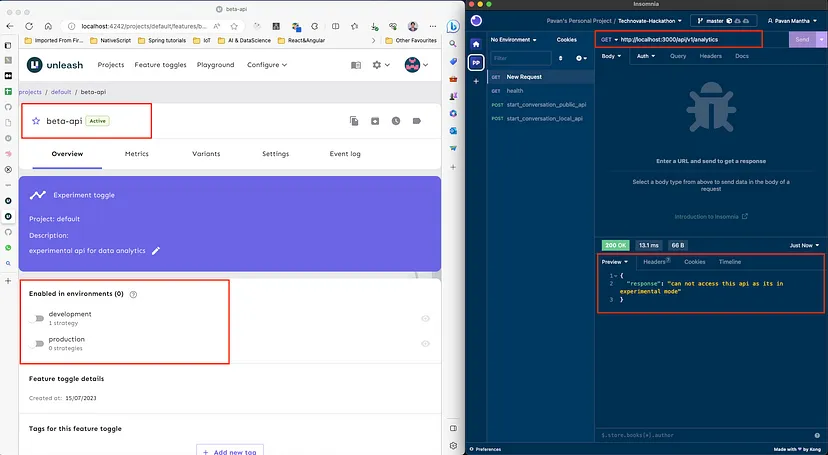
紧接着需要在 unleash 中创建一个功能切换,使用 url 访问 unleash 的 Web 控制台:http://localhost:4242
单击默认项目并创建一个新的切换并向切换添加策略,在例子中,小编选择了 Gradual rollout 策略。创建功能切换后,前往项目设置并创建项目访问令牌(创建服务器端访问令牌)。
Web 控制台显示如下:


运行以下命令,您会看到如下内容:
| PowerShell yarn start:dev |
|---|

选择任何你最喜欢的 API 测试工具,比如 postman on insomnia 或其他任何东西,小编喜欢用insomnia 来测试 API。现在可通过切换开关来测试 API,并查看 Application 的表现。

结论
本文介绍了如何安装NestJS和Unleash服务器以及如何使用Unleash实现功能切换。通过本文的指导,读者能够快速搭建并配置这两个工具,以便在应用中灵活控制功能。
Redis从入门到实践
一节课带你搞懂数据库事务!
Chrome开发者工具使用教程
扩展链接:
在NestJS应用程序中使用 Unleash 实现功能切换的指南的更多相关文章
- Shepherd – 在应用程序中轻松实现引导功能
Shepherd 是一个指导用户使用应用程序的 JavaScript 库.它使用 Tether——另一个开源库,实现所有的步骤.Tether 确保你的步骤不会溢出屏幕或被剪裁.你可以很容易地指导用户使 ...
- WinForm应用程序中实现自动更新功能
WinForm应用程序中实现自动更新功能 编写人:左丘文 2015-4-20 近来在给一客户实施ECM系统,但他们使用功能并不是我们ECM制造版提供的标准功能,他们要求对系统作一些定制功能,为了避免因 ...
- 在java程序中实现发送邮件的功能
最近比较忙,在做一个人事管理系统的项目,在这项目需求中,需要一个发送邮件的功能.这个时候我们可以使用javamail的jar包来实现完美需要的功能,在这里简单的分享一个最基础的发邮件功能. 首先我们需 ...
- 远程控制篇:在DELPHI程序中拨号上网
用MODEM拨号上网,仍是大多数个人网民选择上网的方式.如果能在我们的应用程序中启动拨号连接(如IE浏览器程序中的自动拨号功能),无疑将会方便我们的软件用户(不用再切换应用程序,运行拨号网络),提高我 ...
- WINCE平台下C#应用程序中使用看门狗
看门狗定时器(WDT,Watch Dog Timer)是单片机的一个组成部分,它实际上是一个计数器,一般给看门狗一个大数,程序开始运行后看门狗开始倒计数.如果程序运行正常,过一段时间CPU应发出指令让 ...
- 对于是否在一个python程序中编写函数的启发
那我们到底是应该直接使用这些模块级别的函数呢,还是先编译一个模式对象,再调用模式对象的方法呢?这其实取决于正则表达式的使用频率,如果说我们这个程序只是偶尔使用到正则表达式,那么全局函数是比较方便的:如 ...
- APP开发者如何从应用程序中赚钱?
付费应用程序,这是应用程序最基本的赚钱方式之一,也是拥有巨大潜力的赚钱方式之一.但有一个问题开发者必须扪心自问,您的程序用户是否有一批粉丝级用户的认可,或对您应用程序品牌的认可 蝉大师APP推广工 ...
- 如何在微信小程序中实现音视频通话
微信小程序的音视频通话可以通过微信提供的实时音视频能力实现.这个能力包括了音视频采集.编码.传输和解码等多个环节,开发者只需要使用微信提供的 API 接口就可以轻松地实现音视频通话功能. 在具体实现上 ...
- 微信小程序实现即时通信聊天功能的实例代码
项目背景:小程序中实现实时聊天功能 一.服务器域名配置 配置流程 配置参考URL:https://developers.weixin.qq.com/miniprogram/dev/api/api-ne ...
- h5内嵌微信小程序,调用微信支付功能
在小程序中不能使用之前在浏览器中配置的支付功能,只能调用小程序专属的api进行支付. 因为需要在现在实现的基础上,再添加在小程序中调用微信支付功能,所以我的思路是这样的 1.在点击支付按钮时,判断是不 ...
随机推荐
- 2021-7-11 Vue的自定义指令简单实例
获取焦点简单实例,用Vue.directive(ps:指令)定义,命名不要是关键字,用v-加自定义指令名称调用,而内部用钩子函数inserted来实现 <!DOCTYPE html> &l ...
- [golang]获取本机IP
前言 方便在内网环境中获取服务器本机IP,省了在脚本中过滤ip或ifconfig的结果. 如果内网中有nginx的话,通过nginx获取本机IP也很方便,可参考 借助nginx自动获取本机IP 示例代 ...
- 从源码角度了解Vue生命周期
每个Vue应用都是通过new Vue()创建一个Vue实例开始.Vue()函数可以传入选项Options,常见的有el.template和data选项等. el 只在new创建实例时生效,其值可以是一 ...
- 手写RISC-V处理器(1)
由来 由于去年工作变动,有幸进入了芯片行业,但主要工作内容为基于RISC-V的嵌入式应用软件开发,几乎接触不到芯片设计的相关知识,然而随着工作的深入,越来越想探究一下运行在软件之下的CPU的世界,于是 ...
- 【微信自动化】使用c#实现微信自动化
引言 上个月,在一个群里摸鱼划水空度日,看到了一个老哥分享的一个微信自动化的一个类库,便下载了他的Demo,其本意就是模拟鼠标来操作UI,实现UI自动化:然后自己在瞎琢磨研究,写了一个简单的例子,用来 ...
- 零代码,使用 Dify 和 Laf 两分钟接入企业微信 AI 机器人
Dify 允许创建 AI 应用,并提供二次开发的能力.这里我将演示创建一个法律问答助手的 AI 应用,称作"知法".在本篇教程中,我将指导你为"知法"接入企业微 ...
- Mybatis plus配置MetaObjectHandler无效
项目环境 <dependency> <groupId>com.baomidou</groupId> <artifactId>mybatis-plus-b ...
- springboot项目自动关闭进程重启脚本
话不多说,先上脚本 kill -15 $(netstat -nlp | grep :9095 | awk '{print $7}' | awk -F"/" '{ print $1 ...
- 响应式编程——初识 Flux 和 Mono
by emanjusaka from https://www.emanjusaka.top/archives/4 彼岸花开可奈何 本文欢迎分享与聚合,全文转载请留下原文地址. 前言 Reactor ...
- 创建第一个C语言文件
创建第一个C语言文件 新建=>项目=>空项目 创建.c文件 我们学的是C语言,c++就不写了 调整字体 快捷键:Ctlr + 鼠标滚轮 通过工具调整 工具库与main()函数 打开一个工具 ...