
6R机械臂运动规划及仿真
参考链接
解决Could not find a package configuration file provided by “manipulation_msgs“
moveIt之Unable to identify any set of controllers that can actuate the specified joints问题解决
Unable to identify any set of controllers that can actuate the specified joints: joint1 joint2 ...出错
环境配置
Ubuntu 18.04 melodic
成果图

Part 1: Rviz 机械臂仿真
step1: 下载机械臂模型
下载地址

step2: 创建工作空间
mkdir -p 6R_mechanical_arm/src

cd 6R_mechanical_arm

catkin_make

step3: src文件夹
将之前下载的机械臂模型中 description、gazebo、planning文件夹复制到 src文件夹下

step4: 在 rviz 中显示机械臂模型
在终端中运行 roscore

在工作空间 6R_mechanical_arm 中打开终端

roslaunch marm_description view_arm.launch


step5: 安装 MoveIt
在终端执行以下命令

sudo apt-get install ros-melodic-moveit
step6: 启动 MoveIt
在终端执行以下命令

rosrun moveit_setup_assistant moveit_setup_assistant

step7: 配置 MoveIt
(1)Start


(2)Self-Collisions


(3)Planning Groups(核心)


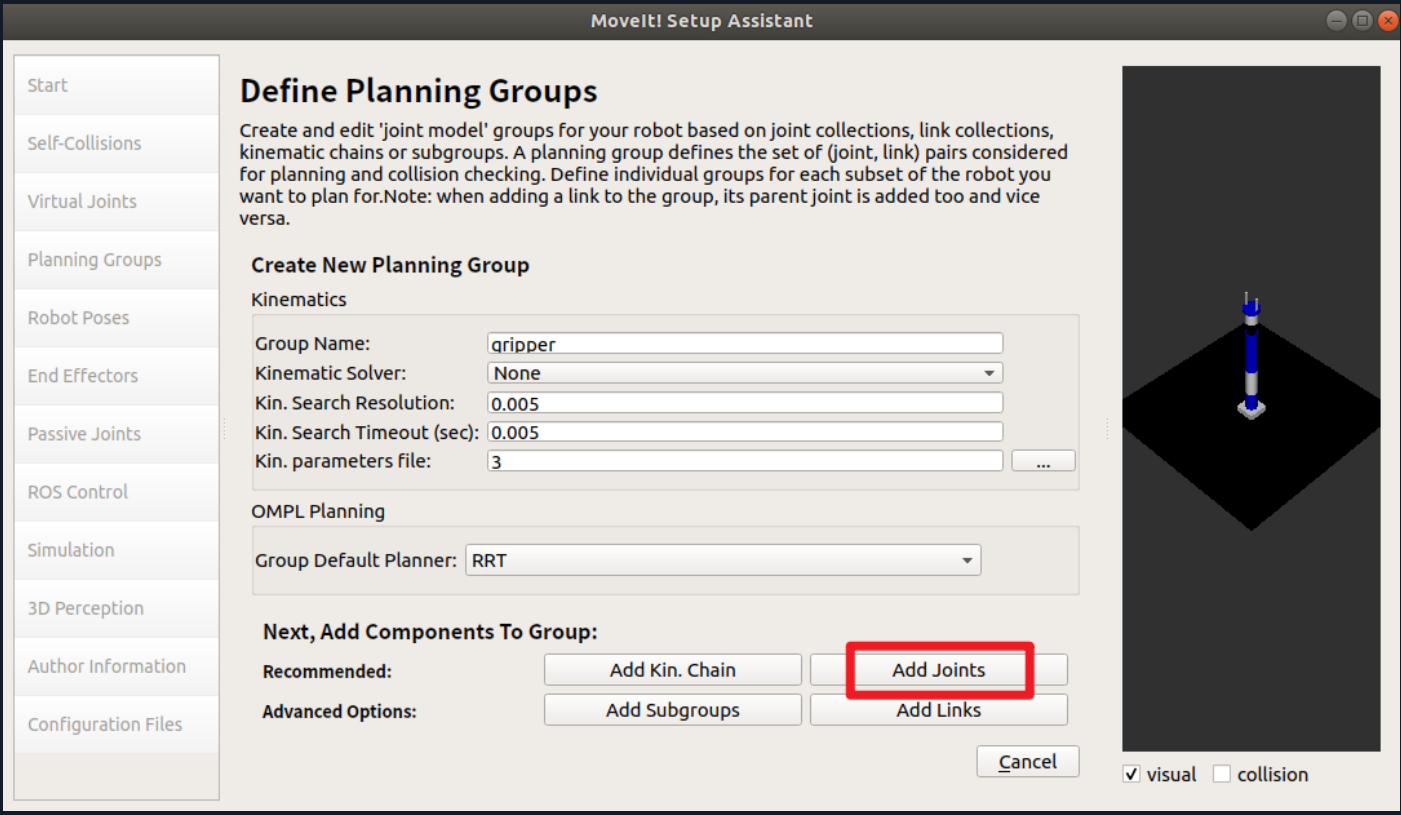


检查是否与下图一致

(4)Robot Poses


(5)End Effectors


(6)Author Information

(7)Configuration Files


step8: 重新编译工作空间


step9: 启动demo文件,测试 rviz 仿真环境


拖动规划
直接鼠标拖动机械臂末端执行器


点击 plan ,进行路径规划


点击 excute ,机械臂运动


设置动画是否循环播放

随机目标点规划


设置初始位姿


添加场景物体


可通过拖动箭头变换位置

Part 2: MoveIt 基础编程
以下代码运行都是在 rviz 打开的前提下执行
关节空间规划
在工作空间中打开终端

source ./devel/setup.bash

rosrun marm_planning moveit_fk_demo.py


工作空间规划
在工作空间中打开终端

source ./devel/setup.bash

rosrun marm_planning moveit_ik_demo.py


笛卡尔路径规划
显示路径


走直线
在工作空间中打开终端

source ./devel/setup.bash

rosrun marm_planning moveit_cartesian_demo.py _cartesian:=True   (走直线)


走曲线
在工作空间中打开终端

source ./devel/setup.bash

rosrun marm_planning moveit_cartesian_demo.py _cartesian:=False  (走曲线)
*


避障规划
在工作空间中打开终端

source ./devel/setup.bash

rosrun marm_planning moveit_obstacles_demo.py


Part 3: Gazebo 机械臂仿真
step1: 依赖文件配置
(1)关节轨迹控制器
trajectory_control.yaml

arm_trajectory_controller.launch

(2)MoveIt 控制器
在 6R_mechanical_arm/src/marm_moveit_config/config 路径下新建 controllers.yaml 文件

6R_mechanical_arm/src/marm_moveit_config/config/controllers.yaml
controller_manager_ns: controller_manager

controller_list:

  - name: arm/arm_joint_controller

    action_ns: follow_joint_trajectory

    type: FollowJointTrajectory

    default: true

    joints:

      - joint1

      - joint2

      - joint3

      - joint4

      - joint5

      - joint6

  - name: arm/gripper_controller

    action_ns: follow_joint_trajectory

    type: FollowJointTrajectory

    default: true

    joints:

      - finger_joint1

      - finger_joint2
6R_mechanical_arm/src/marm_moveit_config/launch/arm_moveit_controller_manager.launch.xml

<launch>

  <!-- Set the param that trajectory_execution_manager needs to find the controller plugin -->

  <arg name="moveit_controller_manager" default="moveit_simple_controller_manager/MoveItSimpleControllerManager" />

  <param name="moveit_controller_manager" value="$(arg moveit_controller_manager)"/>

  <!-- load controller_list -->

  <!-- Gazebo -->

  <rosparam file="$(find marm_moveit_config)/config/controllers.yaml"/>

</launch>
6R_mechanical_arm/src/marm_moveit_config/launch/moveit_planning_execution.launch

<launch>

 # The planning and execution components of MoveIt! configured to

 # publish the current configuration of the robot (simulated or real)

 # and the current state of the world as seen by the planner

 <include file="$(find marm_moveit_config)/launch/move_group.launch">

  <arg name="publish_monitored_planning_scene" value="true" />

 </include>

 # The visualization component of MoveIt!

 <include file="$(find marm_moveit_config)/launch/moveit_rviz.launch"/>

  <!-- We do not have a robot connected, so publish fake joint states -->

  <node name="joint_state_publisher" pkg="joint_state_publisher" type="joint_state_publisher">

    <param name="/use_gui" value="false"/>

    <rosparam param="/source_list">[/arm/joint_states]</rosparam>

  </node>

</launch>
(3)启动环境
arm_world.launch

(4)联结所有 launch 文件
arm_bringup_moveit.launch

step2: 启动 gazebo 和 rviz 仿真环境
在工作空间路径下打开终端,输入以下命令

source ./devel/setup.bash

roslaunch marm_gazebo arm_bringup_moveit.launch


调整 rviz 设置


调整 gazebo 设置
存在模型抖动现象,暂时不调整
step3: 使用 MoveIt
调整机器人目标位置
点击 Plan & Execute


问题汇总
1、Could not find a package configuration file provided by “manipulation_msgs“

解决方法
参考地址:解决Could not find a package configuration file provided by “manipulation_msgs“
下载地址:
2、点击 plan&execute 后,rviz有变化,gazebo无变化

解决方案一:

在终端执行以下代码

sudo apt install ros-melodic-ros-controllers
解决方案二:

修改文件:

工作空间/src/marm_moveit_config/launch/trajectory_execution.launch.xml

将参数 pass_all_args="true" 删掉即可

6R机械臂运动规划及仿真的更多相关文章
- FOC中的Clarke变换和Park变换详解(动图+推导+仿真+附件代码)
文章目录 1 前言 2 自然坐标系ABC 3 αβ\alpha\betaαβ 坐标系 3.1 Clarke变换 3.2 Clarke反变换 4 dqdqdq 坐标系 4.1 Park变换 正转 反转 ...
- 如何用MoveIt快速搭建机器人运动规划平台?
MoveIt = RobotGo,翻译成中文就是“机器人,走你!”所以,MoveIt的主要就是一款致力于让机器人能够自主运动及其相关技术的软件,它的所有模块都是围绕着运动规划的实现而设计的. 两个月前 ...
- ROS是Robot Operating System
ROS是Robot Operating System 机器人操作系统ROS | 简介篇 同样,从个人微信公众号Nao(ID:qRobotics)搬运. 前言 先放一个ROS Industrial一 ...
- 机器人操作系统ROS | 简介篇
同样,从个人微信公众号Nao(ID:qRobotics)搬运. 前言 先放一个ROS Industrial一周年剪辑视频. ROS已经发布八周年了,在国外科研机构中非常受欢迎.目前,以美国西南研究院为 ...
- 嵌入式的我们为什么要学ROS
- 基于 Mathematica 的机器人仿真环境(机械臂篇)[转]
完美的教程,没有之一,收藏学习. 目的 本文手把手教你在 Mathematica 软件中搭建机器人的仿真环境,具体包括以下内容(所使用的版本是 Mathematica 11.1,更早的版本可能缺少某些 ...
- 一步步制作下棋机器人之 coppeliasim进行Scara机械臂仿真与python控制
稚晖君又发布了新的机器人,很是强大. 在编写时看到了稚晖君的招聘信息,好想去试试啊! 小时候都有一个科幻梦,如今的职业也算与梦想有些沾边了.但看到稚晖君这种闪着光芒的作品,还是很是羡慕. 以前就想做一 ...
- V-rep学习笔记:机器人路径规划2
路径规划问题是机器人学研究的一个重要领域,它是指给定操作环境以及起始和目标的位置姿态,要求选择一条从起始点到目标点的路径,使运动物体(移动机器人或机械臂)能安全.无碰撞地通过所有的障碍物而达到目标位置 ...
- 机械臂运动学逆解(Analytical solution)
计算机器人运动学逆解首先要考虑可解性(solvability),即考虑无解.多解等情况.在机器人工作空间外的目标点显然是无解的.对于多解的情况从下面的例子可以看出平面二杆机械臂(两个关节可以360°旋 ...
- ROS机械臂 Movelt 学习笔记1 | 基础准备
环境:Ubuntu18.04 + ROS Melodic 1. 安装ROS 官网下载安装步骤:http://wiki.ros.org/melodic/Installation/Ubuntu 一键安装的 ...
随机推荐
- HTTP通信基础
1. HTTP通信流程: 1)输入www.baidu.com2)解析成IP地址:192.168.0.13)浏览器通过该IP访问web服务器获取web资源4)再返回给客户端5)最后呈现在用户面前 2. ...
- 9. 实现包括前端后台的预约洗狗功能 - 使用Power Automate发送预约邮件 - 使用Power Automate发送带选择按钮(option)的邮件
除了发送普通的电子邮件外,我们还可以选择发送带选项的电子邮件来得到客户的反馈,下面我们就一起来创建带有选择功能的电子邮件吧. 1. 打开我们的Power Portal,在左侧导航栏选择流,点击左上 ...
- 【已解决】appium启动会话时遇到的的几种问题
第一种: 1.启动会话时一直卡在加载界面,报错log信息及截图如下 [ADB] Creating ADB subprocess with args: ["-P",5037,&quo ...
- 基于Kubernetes(k8s)部署Dubbo+Nacos服务
一.说明 本文介绍基于 Kubernetes(k8s) 环境集成阿里云 私有镜像仓库 来部署一套 Dubbo + Nacos 的微服务系统,并使用 Kubernetes DNS 以及 port-for ...
- 使用python爬虫爬取链家潍坊市二手房项目
使用python爬虫爬取链家潍坊市二手房项目 需求分析 需要将潍坊市各县市区页面所展示的二手房信息按要求爬取下来,同时保存到本地. 流程设计 明确目标网站URL( https://wf.lianjia ...
- 一连串div跟随鼠标移动
<!DOCTYPE html> <html lang="en"> <head> <meta charset="UTF-8&quo ...
- 记录关于Chromium系浏览器密码安全问题的一些思考
首先就是在此之前就看到有相关报道讲到Chrome等浏览器密码都在本地明文存储,而且权限要求很低,任何程序都可以随意读取,这方面的安全问题暂且不表. 今天使用Edge时候发现浏览器储存的密码,在我已经设 ...
- 部署kubernetes官网博客
部署kubernetes官网博客 访问 https://kubernetes.io/ 有些时候不问题,部署离线内网使用官网以及博客, 各位尝鲜可以访问 https://doc.oiox.cn/ 安装d ...
- [Java SE]反射之Class
1 获取 指定Class 的类名 package cn.johnnyzen.bd.gatewayservice; import org.junit.Test; @Test public void ge ...
- [Java/Arthas]Arthas The telnet port 3658 is used by process 13988 instead of target process 11208, y[转载]
1 问题描述 Arthas 跟踪 一个已经在tomcat部署的工程quality,第一次使用过的是135091号进程,后来出现问题,换进程连接,报错如上图所示,提示端口占用.原因是上次连接了一个进程, ...