
Seaborn结构化图形绘制(FacetGrid)
结构化图形绘制(FacetGrid)
可实现多行多列个性化绘制图形。
sns.FacetGrid(

    data,

    row=None,

    col=None,

    hue=None,

    col_wrap=None,

    sharex=True,

    sharey=True,

    height=3,

    aspect=1,

    palette=None,

    row_order=None,

    col_order=None,

    hue_order=None,

    hue_kws=None,

    dropna=True,

    legend_out=True,

    despine=True,

    margin_titles=False,

    xlim=None,

    ylim=None,

    subplot_kws=None,

    gridspec_kws=None,

    size=None,

)

Docstring:      Multi-plot grid for plotting conditional relationships.

Init docstring:

Initialize the matplotlib figure and FacetGrid object.

This class maps a dataset onto multiple axes arrayed in a grid of rows

and columns that correspond to *levels* of variables in the dataset.

The plots it produces are often called "lattice", "trellis", or

"small-multiple" graphics.

It can also represent levels of a third varaible with the ``hue``

parameter, which plots different subets of data in different colors.

This uses color to resolve elements on a third dimension, but only

draws subsets on top of each other and will not tailor the ``hue``

parameter for the specific visualization the way that axes-level

functions that accept ``hue`` will.

When using seaborn functions that infer semantic mappings from a

dataset, care must be taken to synchronize those mappings across

facets. In most cases, it will be better to use a figure-level function

(e.g. :func:`relplot` or :func:`catplot`) than to use

:class:`FacetGrid` directly.

The basic workflow is to initialize the :class:`FacetGrid` object with

the dataset and the variables that are used to structure the grid. Then

one or more plotting functions can be applied to each subset by calling

:meth:`FacetGrid.map` or :meth:`FacetGrid.map_dataframe`. Finally, the

plot can be tweaked with other methods to do things like change the

axis labels, use different ticks, or add a legend. See the detailed

code examples below for more information.

See the :ref:`tutorial <grid_tutorial>` for more information.

Parameters

----------

data : DataFrame

    Tidy ("long-form") dataframe where each column is a variable and each

    row is an observation.

row, col, hue : strings

    Variables that define subsets of the data, which will be drawn on

    separate facets in the grid. See the ``*_order`` parameters to

    control the order of levels of this variable.

col_wrap : int, optional

    "Wrap" the column variable at this width, so that the column facets

    span multiple rows. Incompatible with a ``row`` facet.

share{x,y} : bool, 'col', or 'row' optional

    If true, the facets will share y axes across columns and/or x axes

    across rows.

height : scalar, optional

    Height (in inches) of each facet. See also: ``aspect``.

aspect : scalar, optional

    Aspect ratio of each facet, so that ``aspect * height`` gives the width

    of each facet in inches.

palette : palette name, list, or dict, optional

    Colors to use for the different levels of the ``hue`` variable. Should

    be something that can be interpreted by :func:`color_palette`, or a

    dictionary mapping hue levels to matplotlib colors.

{row,col,hue}_order : lists, optional

    Order for the levels of the faceting variables. By default, this

    will be the order that the levels appear in ``data`` or, if the

    variables are pandas categoricals, the category order.

hue_kws : dictionary of param -> list of values mapping

    Other keyword arguments to insert into the plotting call to let

    other plot attributes vary across levels of the hue variable (e.g.

    the markers in a scatterplot).

legend_out : bool, optional

    If ``True``, the figure size will be extended, and the legend will be

    drawn outside the plot on the center right.

despine : boolean, optional

    Remove the top and right spines from the plots.

margin_titles : bool, optional

    If ``True``, the titles for the row variable are drawn to the right of

    the last column. This option is experimental and may not work in all

    cases.

{x, y}lim: tuples, optional

    Limits for each of the axes on each facet (only relevant when

    share{x, y} is True.

subplot_kws : dict, optional

    Dictionary of keyword arguments passed to matplotlib subplot(s)

    methods.

gridspec_kws : dict, optional

    Dictionary of keyword arguments passed to matplotlib's ``gridspec``

    module (via ``plt.subplots``). Requires matplotlib >= 1.4 and is

    ignored if ``col_wrap`` is not ``None``.

See Also

--------

PairGrid : Subplot grid for plotting pairwise relationships.

relplot : Combine a relational plot and a :class:`FacetGrid`.

catplot : Combine a categorical plot and a :class:`FacetGrid`.

lmplot : Combine a regression plot and a :class:`FacetGrid`.
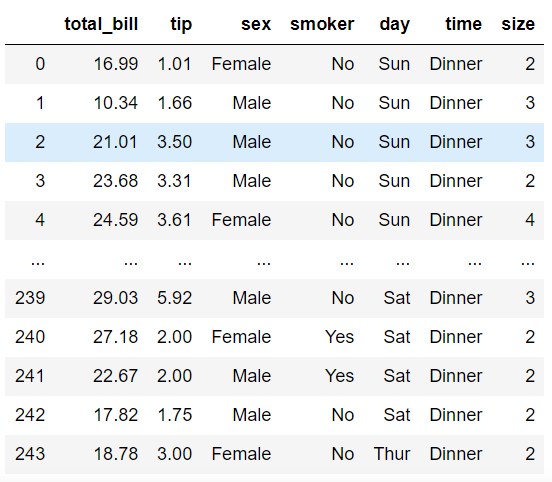
#导入数据

tips = sns.load_dataset('tips', data_home='./seaborn-data')

tips
#设置风格

sns.set_style('white')

#col设置网格的分类列,row设置分类行

ax = sns.FacetGrid(tips, col='time', row='sex')
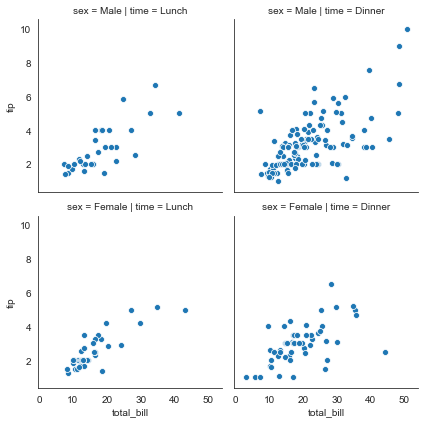
散点图
ax = sns.FacetGrid(tips, col='time', row='sex')

#利用map方法在网格内绘制散点图sns.scatterplot = plt.scatter,sns的散点图更美观

ax = ax.map(sns.scatterplot, 'total_bill', 'tip')
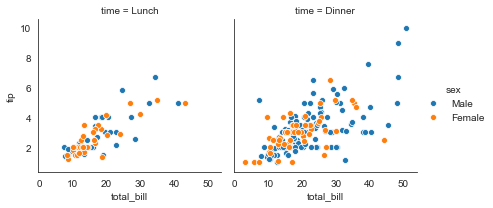
#hue设置分类绘制

ax = sns.FacetGrid(tips, col='time', hue='sex')

ax = ax.map(sns.scatterplot, 'total_bill', 'tip')

#添加图例

ax = ax.add_legend()
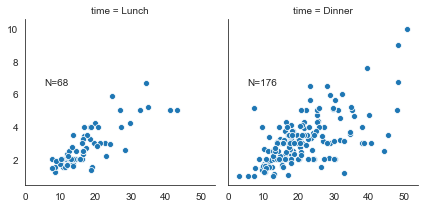
#定义一个文本函数

def annotate(data, **kws):

    n = len(data)

    ax = plt.gca()

    ax.text(.1, .6, f"N={n}", transform=ax.transAxes)

ax = sns.FacetGrid(tips, col='time')

ax = ax.map(sns.scatterplot, 'total_bill', 'tip')

#添加文本标签

ax = ax.map_dataframe(annotate)
#其它参数

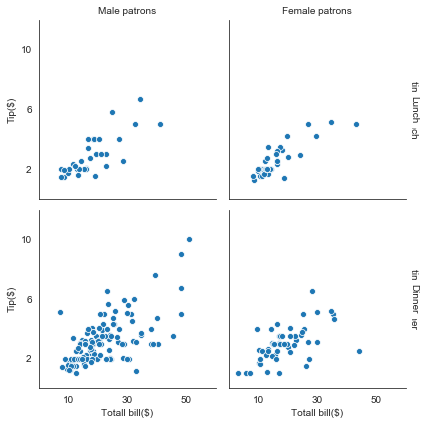
#margin_titles设置边缘标头

ax = sns.FacetGrid(tips, col='sex', row='time', margin_titles=True)

ax.map(sns.scatterplot, 'total_bill', 'tip')

#set_axis_labels设置x轴和y轴标签

ax.set_axis_labels('Totall bill($)', 'Tip($)')

#set_titles设置标头(会出现重叠现象)

ax.set_titles(col_template='{col_name} patrons', row_template='{row_name}')

#坐标上下限和刻度设置

ax.set(xlim=(0,60), ylim=(0, 12), xticks=[10, 30, 50], yticks=[2, 6, 10])

#存储图片

ax.savefig('facet_plot.png')
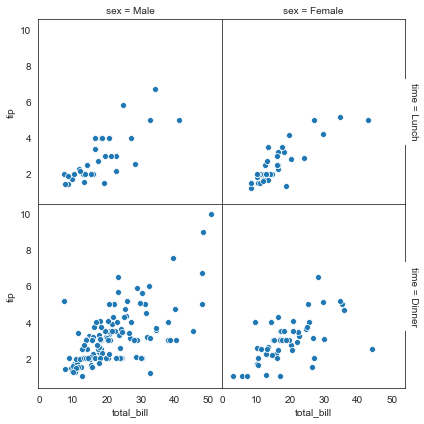
#despine设置是否显示上和右边框线

ax = sns.FacetGrid(tips, col='sex', row='time', margin_titles=True, despine=False)

ax.map(sns.scatterplot, 'total_bill', 'tip')

#设置图形间隔

ax.fig.subplots_adjust(wspace=0, hspace=0)
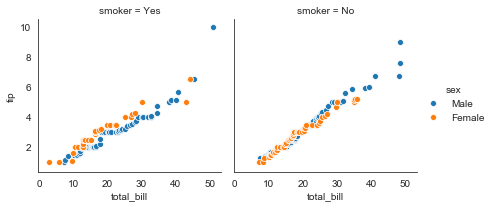
#QQ图:检验样本数据概率分布(例如正态分布)的方法,直观的表示观测值与预测值之间的差异,或两个数之间的差异

from scipy import stats

#定义QQ图函数

def qqplot(x, y, **kwargs):

    _, xr = stats.probplot(x, fit=False)         #拟合概率图

    _, yr = stats.probplot(y, fit=False)

    sns.scatterplot(xr, yr, **kwargs)            #**kwargs表示关键字参数,可以用字典形式传入参数

g = sns.FacetGrid(tips, col='smoker', hue='sex')

g = g.map(qqplot, 'total_bill', 'tip')

g = g.add_legend()
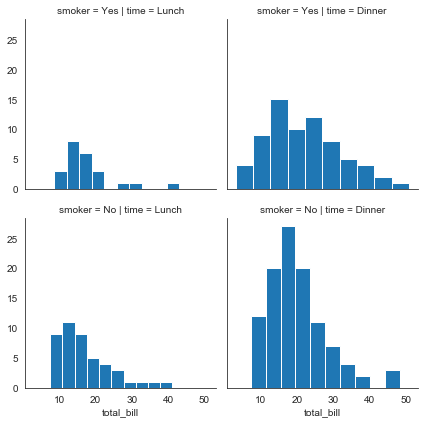
直方图
#直方图

g = sns.FacetGrid(tips, col='time', row='smoker')

g = g.map(plt.hist, 'total_bill')
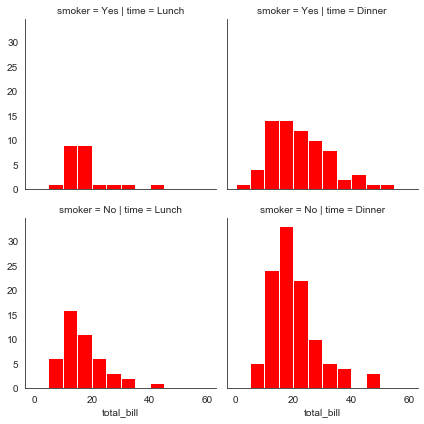
#bins设置直方图个数,color设置颜色

bins = np.arange(0, 65, 5)

g = sns.FacetGrid(tips, col='time', row='smoker')

g = g.map(plt.hist, 'total_bill', bins=bins, color='r')
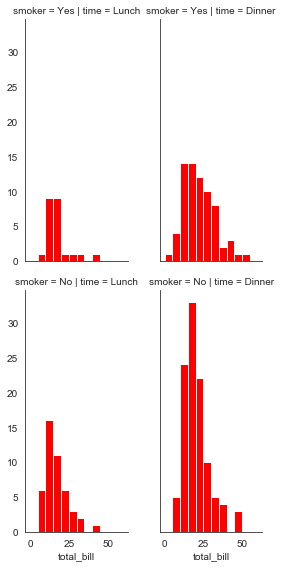
#height设置高度,aspece设宽高比

bins = np.arange(0, 65, 5)

g = sns.FacetGrid(tips, col='time', row='smoker', height=4, aspect=.5)

g = g.map(plt.hist, 'total_bill', bins=bins, color='r')
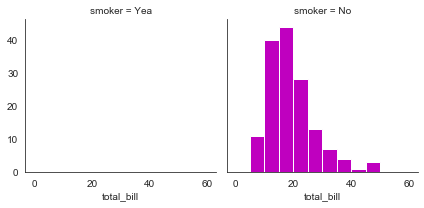
#col_order设置显示顺序

bins = np.arange(0, 65, 5)

g = sns.FacetGrid(tips, col='smoker', col_order=['Yea', 'No'])

g = g.map(plt.hist, 'total_bill', bins=bins, color='m')
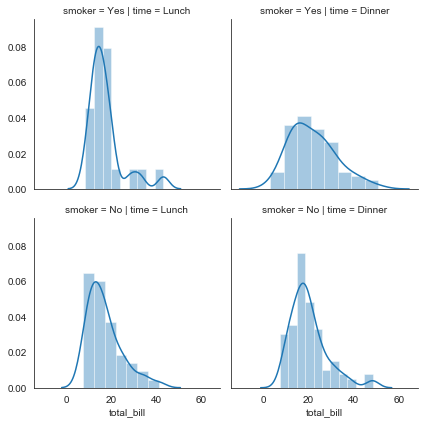
直方密度图
#直方密度图

g = sns.FacetGrid(tips, col='time', row='smoker')

g = g.map(sns.distplot, 'total_bill')
折线图
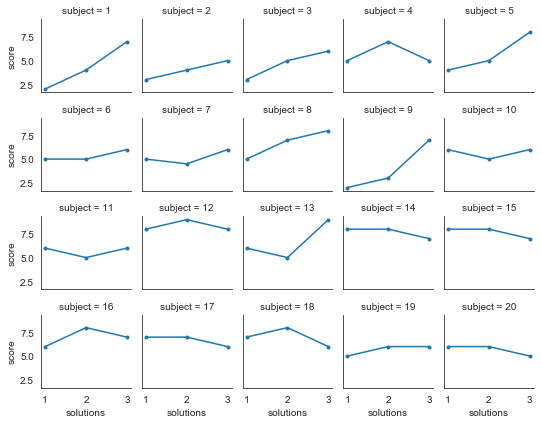
#导入数据

att = sns.load_dataset('attention', data_home='./seaborn-data')

#col_wrap设置列数,height设置高度,marker设置标记点样式

g = sns.FacetGrid(att, col='subject', col_wrap=5, height=1.5)

g = g.map(plt.plot, 'solutions', 'score', marker='.')
Seaborn结构化图形绘制(FacetGrid)的更多相关文章
- d3.js 之SVG:矢量化图形绘制
SVG Scalable Vector Graphics 是一个成熟的W3C标准,被设计用来在web和移动平台 上展示可交互的图形.和HTML类似,SVG也支持CSS和JavaScript.尽管可以使 ...
- seaborn线性关系数据可视化:时间线图|热图|结构化图表可视化
一.线性关系数据可视化lmplot( ) 表示对所统计的数据做散点图,并拟合一个一元线性回归关系. lmplot(x, y, data, hue=None, col=None, row=None, p ...
- CMM模型,结构化开发方法和面向对象开发方法的比较,UML(统一建模语言),jackson开发方法
CMM模型 一.CMM简介 CMM,英文全称为Capability Maturity Model for Software,即:软件成熟度模型. CMM的核心是把软件开发视为一个过程.它是对于软件在定 ...
- 【Windows编程】系列第五篇:GDI图形绘制
上两篇我们学习了文本字符输出以及Unicode编写程序,知道如何用常见Win32输出文本字符串,这一篇我们来学习Windows编程中另一个非常重要的部分GDI图形绘图.Windows的GDI函数包含数 ...
- 图形绘制 Canvas Paint Path 详解
图形绘制简介 Android中使用图形处理引擎,2D部分是android SDK内部自己提供,3D部分是用Open GL ES 1.0.大部分2D使用的api都在android.grap ...
- XHTML 结构化:使用 XHTML 重构网站
http://www.w3school.com.cn/xhtml/xhtml_structural_01.asp 我们曾经为本节撰写的标题是:"XHTML : 简单的规则,容易的方针.&qu ...
- 结构化您的Python工程
我们对于"结构化"的定义是您关注于怎样使您的项目最好地满足它的对象性,我们 需要去考虑如何更好地利用Python的特性来创造简洁.高效的代码.在实践层面, "结构化&qu ...
- (转)GPU图形绘制管线
摘抄“GPU Programming And Cg Language Primer 1rd Edition” 中文名“GPU编程与CG语言之阳春白雪下里巴人”第二章. 图形绘制管线描述GPU渲染流程, ...
- 妙味,结构化模块化 整站开发my100du
********************************************************************* 重要:重新审视的相关知识 /* 妙味官网:www.miaov ...
- Python中的结构化数据分析利器-Pandas简介
Pandas是python的一个数据分析包,最初由AQR Capital Management于2008年4月开发,并于2009年底开源出来,目前由专注于Python数据包开发的PyData开发tea ...
随机推荐
- SpringBoot面试题的零碎整理
面试题1:简述一下Springboot相对SSM做了哪些提升? 首先,SpringBoot是采用"约定大于配置"(Convention over Configuration)的理念 ...
- 用Visual Studio把代码放到GitLab
1.点"Git更改" 2.点"创建Git仓库--": 3.点"现有远程",再输入"远程URL": 4.在出现的警告框里选 ...
- 无所不谈,百无禁忌,Win11本地部署无内容审查中文大语言模型CausalLM-14B
目前流行的开源大语言模型大抵都会有内容审查机制,这并非是新鲜事,因为之前chat-gpt就曾经被"玩"坏过,如果没有内容审查,恶意用户可能通过精心设计的输入(prompt)来操纵L ...
- 求求你别再用OkHttp调用API接口了,快来试试这款HTTP客户端库吧
引言 在日常业务开发中,我们时常需要使用一些其他公司的服务,调用第三方系统的接口,这时就会涉及到网络请求,通常我们可以使用HttpClient,OkHttp等框架去完成网络请求.随着RESTful A ...
- 为什么HashMap的键值可以为null,而ConcurrentHashMap不行?
写在开头 昨天在写<HashMap很美好,但线程不安全怎么办?ConcurrentHashMap告诉你答案!>这篇文章的时候,漏了一个知识点,知道晚上吃饭的时候才凸显想到,关于Concur ...
- [Python] 端口转发代码分享
我的魔法被公司防火墙限制了,所以我只能让我的代理流量从我自己的服务器过一遍,但是服务器上面的客户端只能允许本机使用,不能开放公网访问,所以就想到了端口转发 但是网络上面找到的端口转发工具需要各种配置, ...
- Java 包装类的使用(自动装箱+自动拆箱)+Vector
1 package com.bytezreo.ut; 2 3 import java.util.Scanner; 4 import java.util.Vector; 5 6 /** 7 * 8 * ...
- vue使用cordova的大坑!!
额,前段时间用 cordova 包了个 vue 项目,跑真机,完美.跑公司安卓系统虚拟机,垮. 原因找了很久,最后发现是路由的问题,使用了 createWebHistory ,去掉了 hash ,虽然 ...
- MySQL8.0与5.7版本的下载、安装与配置
•软件下载 下载地址 [官网],点开该网址,点击 DOWNLOAD 来到如下页面: MySQL的版本介绍 MySQL Community Server 社区版本:开源免费,自由下载,但不提供官方技 ...
- “田由甲” - Kafka重复消费线上问题暴雷
Kafka作为一款高性能.分布式的消息队列系统,在大数据领域被广泛应用.然而,在使用Kafka时,重复消费问题是一个常见的挑战,可能会对系统的数据一致性和业务逻辑造成影响.我知道Kafka这个名词时还 ...