
.net core + vue + elementui 删除指定日期段、指定路径下的所有文件
1、呈现效果
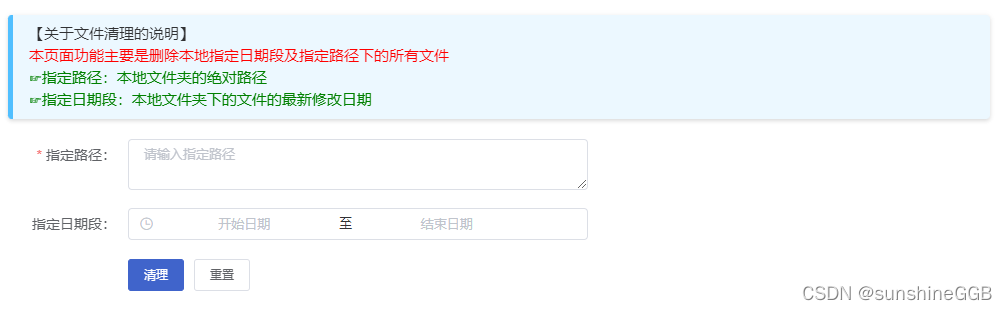
2、后端
1)服务层
/// <summary>

/// 删除指定修改日期段及指定路径下的所有文件

/// </summary>

/// <param name="filepath">指定路径</param>

/// <returns>返回删除结果提示</returns>

public string DeleteSpecifiedPathAllFile(FileInfomationArgs args)

{

    if(args.IsNull()))

    {

        return "参数为空,请重新获取!";

    }

    try

    {

        DirectoryInfo info = new DirectoryInfo(args.FilePath);

        // 去除文件夹的只读属性

        info.Attributes = FileAttributes.Normal & FileAttributes.Directory;

        // 去除文件的只读属性

        File.SetAttributes(args.FilePath, FileAttributes.Normal);

        // 判断文件夹是否存在

        if(Directory.Exists(args.FilePath))

        {

            // 按指定修改时间段删除文件

            if(args.StartTime != null && args.EndTime != null)

            {

                List < FileInfo > fileInfomations = null;

                fileInfomations = info.GetFiles().Where(t => t.LastWriteTime >= args.StartTime && t.LastWriteTime <= args.EndTime).ToList();

                foreach(var fileInfo in fileInfomations)

                {

                    if(File.Exists(fileInfo.FullName))

                    {

                        // 如果有子文件则删除子文件

                        File.Delete(fileInfo.FullName);

                    }

                    else

                    {

                        // 循环递归删除子文件夹的所有文件

                        DeleteSpecifiedPathAllFile(args);

                    }

                }

            }

            else // 删除指定路径的全部文件

            {

                foreach(var file in Directory.GetFileSystemEntries(args.FilePath))

                {

                    if(File.Exists(file))

                    {

                        // 如果有子文件则删除子文件

                        File.Delete(file);

                    }

                    else

                    {

                        // 循环递归删除子文件夹的所有文件

                        DeleteSpecifiedPathAllFile(args);

                    }

                }

            }

            // 删除已空文件夹(此步骤会删除指定目录的最底层文件夹,建议保留文件夹目录,此句注释)

            // Directory.Delete(filepath, true);

        }

        return "当前文件修改日期段的指定路径下的所有文件删除成功!";

    }

    catch(Exception ex)

    {

        return "删除出现异常,异常原因为:" + ex.Message;

    }

}
2)请求参数类
/// <summary>

/// 文件信息参数

/// </summary>

public class FileInfomationArgs

{

    private string _FilePath = "";

    /// <summary>

    /// 指定路径

    /// </summary>

    public string FilePath

    {

        get

        {

            return _FilePath;

        }

        set

        {

            _FilePath = value;

        }

    }

    private DateTime ? _StartTime = null;

    /// <summary>

    /// 指定修改时间开始时间段

    /// </summary>

    public DateTime ? StartTime

    {

        get

        {

            return _StartTime;

        }

        set

        {

            _StartTime = value;

        }

    }

    private DateTime ? _EndTime = null;

    /// <summary>

    /// 指定修改时间结束时间段

    /// </summary>

    public DateTime ? EndTime

    {

        get

        {

            return _EndTime;

        }

        set

        {

            _EndTime = value;

        }

    }

}
3)接口层
/// <summary>

/// 删除指定路径下的所有文件

/// </summary>

/// <param name="filepath">指定路径</param>

/// <returns>返回删除结果提示</returns>

public Result string DeleteSpecifiedPathAllFile(FileInfomationArgs args);
4)控制层
/// <summary>

/// 删除指定路径下的所有文件

/// </summary>

/// <param name="filepath">指定路径</param>

/// <returns>返回删除结果提示</returns>

[HttpPost, HttpOptions]

public IActionResult DeleteSpecifiedPathAllFile(FileInfomationArgs args)

{

    return ToJsonContent(_服务层注入.DeleteSpecifiedPathAllFile(args));

}
3、前端
<html>

 <head></head>

 <body>

  <template>

   <el-form size="small" :model="form" :rules="rules" ref="form" label-width="120px">

    <div class="head_main">

     <el-row :gutter="24">

      <el-col :span="20">

       <div class="key_tip">

         【关于文件清理的说明】

        <p style="color: red;">本页面功能主要是删除本地指定日期段及指定路径下的所有文件</p>

        <p style="color: green;">☞指定路径:本地文件夹的绝对路径</p>

        <p style="color: green;">☞指定日期段:本地文件夹下的文件的最新修改日期</p>

       </div>

      </el-col>

     </el-row>

     <el-row :gutter="24">

      <el-col :span="12">

       <el-form-item label="指定路径:" prop="filePath">

        <el-input class="entity" type="textarea" clearable="" placeholder="请输入指定路径" v-model="form.filePath">

        </el-input>

       </el-form-item>

      </el-col>

     </el-row>

     <el-row :gutter="24">

      <el-col :span="12">

       <el-form-item label="指定日期段:" prop="operationTime">

        <el-date-picker class="entity" v-model="operationTime" type="datetimerange" range-separator="至" start-placeholder="开始日期" end-placeholder="结束日期" clearable="" size="small" style="width:100%">

        </el-date-picker>

       </el-form-item>

      </el-col>

     </el-row>

     <el-row :gutter="15">

      <el-col :span="24">

       <el-form-item>

        <el-button type="primary" des="el" @click="cleanUp">

         清理

        </el-button>

        <el-button des="el" @click="reset">

         重置

        </el-button>

       </el-form-item>

      </el-col>

     </el-row>

    </div>

   </el-form>

  </template>

  <script>

import { 方法名 } from '方法名所在JS文件'

export default {

  data () {

    return {

      form: {

        filePath: '',

        operationTime: '',

      },

      rules: {

        filePath: [

          { required: true, message: '请输入指定路径', trigger: 'blur' },

        ],

      },

    }

  },

  created () {

  },

  methods: {

    // 清理

    cleanUp () {

      this.$refs.form.validate(async (valid) => {

        if (!valid) return

        let startTime, endTime

        if (this.operationTime) {

          startTime = this.operationTime[0]

          endTime = this.operationTime[1]

        }

        try {

          await DeleteSpecifiedPathAllFile({

            FilePath: this.form.filePath,

            StartTime: startTime,

            EndTime: endTime,

          })

          this.$notify({

            type: 'success',

            offset: 50,

            title: '当前文件修改日期段的指定路径下的所有文件删除成功',

          })

          return

        } catch (error) {

          console.log('error:', error)

        }

      })

    },

    // 重置

    reset () {

      this.form.filePath = ''

      this.operationTime = ''

    },

  },

}

</script>

  <style lang="scss">

.head_main {

  .key_tip {

    box-shadow: 0 2px 4px rgba(0, 0, 0, .12), 0 0 6px rgba(0, 0, 0, .04);

    padding: 8px 16px;

    background-color: #ecf8ff;

    border-radius: 4px;

    border-left: 5px solid #50bfff;

    margin: 20px 0;

    line-height: 22px;

  }

}

</style>

 </body>

</html>
代码和呈现效果如上所述。
注:指定路径为本地的绝对路径;指定日期段的判定依据是文件的修改日期
.net core + vue + elementui 删除指定日期段、指定路径下的所有文件的更多相关文章
- unity3d 依据指定的Assets下的目录路径 返回这个路径下的全部文件名称
using UnityEngine; using System.Collections; using System.Collections.Generic; using System.IO; < ...
- python之实现循环查看指定路径下的所有文件---os.walk
循环查看指定路径下的所有文件.文件夹,包含隐藏文件注:“.filename” 以点开头的是隐藏文件 import os for cur_path,cur_dirs,cur_files in os.wa ...
- Python3在指定路径下递归定位文件中出现的字符串
[本文出自天外归云的博客园] 脚本功能:在指定的路径下递归搜索,找出指定字符串在文件中出现的位置(行信息). 用到的python特性: 1. PEP 318 -- Decorators for Fun ...
- Python小代码_15_遍历指定路径下的所有文件和文件夹,并格式化输出文件路径文件名和文件夹名,文件大小,修改时间
遍历指定路径下的所有文件和文件夹,并格式化输出文件路径文件名和文件夹名,文件大小,修改时间 import osimport datetime def print_tree(dir_path): for ...
- Python复制指定目录的各个子目录下的同名文件到指定文件夹并重命名
Python复制指定目录的各个子目录下的同名文件到指定文件夹并重命名 #编码类型 #-*- coding: UTF-8 -*- #导入包 import os import shutil srcpath ...
- mysql 获取指定日期到指定日期 区间段的日期
第一种方法: cross join (就相当于mysql中的循环) CROSS JOIN 把两张表中的数据进行 N * M的组合,即笛卡尔积 这里的两张表利用 union all都有5条数据,所以进行 ...
- python删除执行路径下的空文件夹
def rm_emp_dir(path): """ 删除指定路径下的空文件夹 :param path: 指定路径 :type path: str :return: Non ...
- 算法积累:解决如何获取指定文件夹路径或者文件路径下所有子文件后缀为.h .m .c的文本的行数
1.先解决如何获取一个文件的代码行数 一开始对于这个问题,我的思路就回荡在:1字符串子字符串的判断 2循环直到结束的想法 3将原来是"\n"替换掉之类的想法 一个问题总会有多种解决 ...
- vue@cli3 项目模板怎么使用public目录下的静态文件,找了好久都不对,郁闷!
作为图片最好放在static目录下,但是vue@cli3没有static,网上都说放在public目录下,行,那就放吧,可问题是图片放了怎么使用 第一次尝试 肯定用绝对路径这就不说了,用相对路径,we ...
- js实现指定日期增加指定月份
首先,大致思路为: 1. 先将字符串格式的时间类型转化为Date类型 2. 再将Date类型的时间增加指定月份 3. 最后将Date类型的时间在转化为字符串类型 1. 先将字符串格式的时间类型转化为 ...
随机推荐
- 面试 考察网络请求HTTP相关知识(第六天!)
01.HTTP 常⻅的状态码有哪些? 1xx 服务器收到请求 2xx 请求成功 --- 200 成功状态码 3xx 重定向 --- 301永久重定向,浏览器 ...
- Go语言核心36讲17
在前面的文章中,我们已经提到过很多次"指针"了,你应该已经比较熟悉了.不过,我们那时大多指的是指针类型及其对应的指针值,今天我们讲的则是更为深入的内容. 让我们先来复习一下. ty ...
- 通过docker部署grafana和mysql
阅读本文需要一定的Linux, Docker与MySQL知识, 例如: 会启动容器, 进入容器; 会创建表, 会使用INSERT语句, 会使用SELECT语句... 1. 简介 2. 网络设置 - 2 ...
- Go | 函数注意事项
细节汇总 函数的形参列表可以是多个,返回值列表也可以是多个 形参列表和返回值列表的数据类型,可以是值类型.也可以是引用类型 函数的命名遵循标识符命名规范,首字母不能是数字,首字母大写表示该函数可以被本 ...
- SDK怎么测试?俺不会啊
转载请注明出处️ 作者:测试蔡坨坨 原文链接:caituotuo.top/7bc8d1c8.html 你好,我是测试蔡坨坨. 众所周知,在云产品和SaaS蓬勃发展的当下,企业中有许多系统和环节都是依赖 ...
- 【Shell案例】【打印指定行用sed、for循环、head和tail配合使用】4、输出第5行的内容
描述写一个 bash脚本以输出一个文本文件 nowcoder.txt 中第5行的内容. 示例:假设 nowcoder.txt 内容如下:welcometonowcoderthisisshellcode ...
- mysql基础问题三问(底层逻辑;正在执行;日志观察)
背景:经常面试会遇到且实际工作中也会应用到的三个场景: 目录: 一.mysql查询时的底层原理是什么? 二.如何查看正在执行的mysql语句? 三.如何观察mysql运行过程中的日志信息? - - - ...
- Mybatis-Plus 对 json 的存储使用支持
Mybatis-Plus 对 json 的存储使用支持 场景分析: 随着数据库对字段类型支持的多元化,json 类型的存储已成为多场景高频使用的字段类型.而 MySql.postgrpSql 等都支持 ...
- virtualenv 配置(windows)
1.在线安装 virtualenv pip install virtualenv 2.离线安装 下载virtualenv包,解压并进入setup.py所在文件夹中 python setup.py in ...
- 前后端开发必会的 HTTP 协议“十全大补丸”(万字长文)
本文全面介绍了 HTTP 协议相关知识,包括 HTTP 请求报文.响应报文.持久连接.缓存.Cookie 以及 HTTP 版本升级等! HTTP 协议全称为 HyperText Transfer Pr ...