
CEPH Object Gateway
参考文档:
- CEPH OBJECT GATEWAY:http://docs.ceph.com/docs/master/radosgw/
一.环境准备
1. Ceph Object Gateway框架
Ceph Object Gateway是对象存储接口,构建在librados之上,为应用提供restful类型的网关。其支持两种接口:
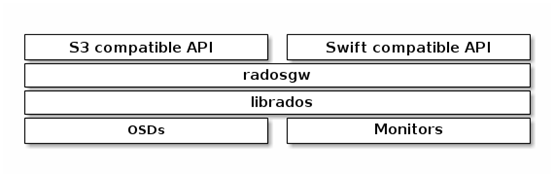
- S3-compatible API:兼容AWS S3 Restful接口;
- Swift-compaible API:兼容Openstack Swift接口。
2. 环境
以《CEPH LIO iSCSI Gateway》中的环境为基础,即:
|
Hostname |
IP |
Service |
Remark |
|
ceph01 |
public:172.30.200.57 cluster:192.30.200.57 |
1. centos7.5 with kernel v4.18.7-1; 2. ceph-13.2.1 mimic (stable),已部署 3. ntp已部署; 4. 禁用selinux; 5. 禁用firewalld或iptables,rgw内嵌civetweb默认采用7480端口。 |
|
|
ceph02 |
public:172.30.200.58 cluster:192.30.200.58 |
||
|
ceph03 |
public:172.30.200.59 cluster:192.30.200.59 |
||
|
ceph-client |
172.30.200.50 |
二.部署Ceph RGW
1. 创建ceph mds
# 通过部署服务器部署,格式:ceph-deploy install --rgw Gateway-NODE1 [Gateway-NODE2 …];

# 如因网络原因导致安装不成功,可在各节点独立安装:ceph-radosgw ceph-common

[root@ceph01 ~]# su - cephde

[cephde@ceph01 ~]$ cd cephcluster/

[cephde@ceph01 cephcluster]$ ceph-deploy install --rgw ceph01 ceph02 ceph03
2. 创建对象网关实例
Ceph 对象存储使用 Ceph 对象网关守护进程( radosgw ,RGW),内嵌了Civetweb服务器与FastCGI 模块。
其中Civetweb服务器默认使用tcp 7480端口。
1)变更默认端口(option)
# 变更Civetweb服务器默认端口,可修改ceph.conf文件,增加[client.rgw.<GATEWAY-NODE>]字段,其中“GATEWAY-NODE”为所在网关节点的短主机名,即:hostname -s;

# 可在部署服务器修改后分发到各网关节点,也可在各网关节点独立修改;

# [client.rgw.<GATEWAY-NODE>]字段与[global]字段在相同层级,且1个网关节点使用1个字段,其中”client”表示客户端配置,“rgw”表示客户端类型,“GATEWAY-NODE”标识实例名;

[cephde@ceph01 cephcluster]$ cat ceph.conf

[client.rgw.ceph01]

rgw_frontends = "civetweb port="

[client.rgw.ceph02]

rgw_frontends = "civetweb port="

[client.rgw.ceph03]

rgw_frontends = "civetweb port="

# 从部署服务器分发ceph.conf

[cephde@ceph01 cephcluster]$ ceph-deploy --overwrite-conf config push ceph01 ceph02 ceph03
2)创建实例
# 在部署服务器创建实例;

# 创建后,在各网关节点对应的守护进程启动;

# 如果ceph.conf配置文件变更,可在对应节点重启服务

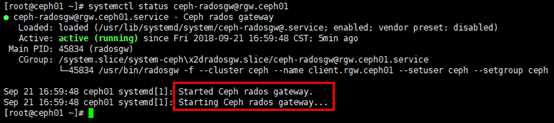
[cephde@ceph01 cephcluster]$ ceph-deploy rgw create ceph01 ceph02 ceph03

# 查看服务

[root@ceph01 ~]# systemctl status ceph-radosgw@rgw.ceph01
# 查看端口

[root@ceph01 ~]# netstat -tunlp | grep radosgw

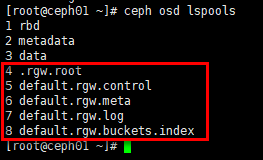
# 创建实例后,同时创建部分默认pool;

# 或:”rados df” 与 “ceph osd pool ls”

[root@ceph01 ~]# ceph osd lspools
3)访问
# 格式:http://RGW-IP:port

[root@ceph01 ~]# curl http://172.30.200.57

# 如果网关实例正常运行,响应如下:

<?xml version="1.0" encoding="UTF-8"?>

<ListAllMyBucketsResult xmlns="http://s3.amazonaws.com/doc/2006-03-01/">

    <Owner>

        <ID>anonymous</ID>

        <DisplayName></DisplayName>

    </Owner>

    <Buckets>

    </Buckets>

</ListAllMyBucketsResult>
三.验证
使用REST接口验证,步骤如下:
- 首先创建适用于s3接口的ceph对象网关用户;
- 基于已创建的用户,创建适用于swift接口的子用户;
- 验证用户是否能访问网关。
1. 创建用户
1)创建用于S3访问的RADOSGW用户
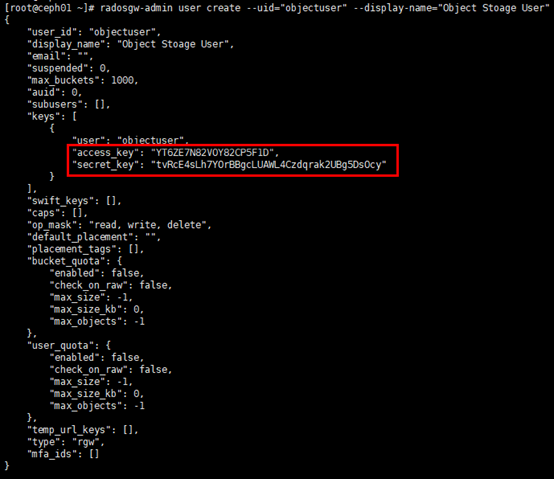
# “--uid”与“--display-name”自定义;

# 返回结果中,keys->access_key 与 keys->secret_key 是访问验证时需要的值

[root@ceph01 ~]# radosgw-admin user create --uid="objectuser" --display-name="Object Stoage User"
2)创建SWITF用户
Swift用户创建分两步:
- 创建子用户;
- 生成秘钥。
# 创建子用户,基于已创建的s3用户;

# 赋予全权限

[root@ceph01 ~]# radosgw-admin subuser create --uid=objectuser --subuser=objectuser:swift --access=full
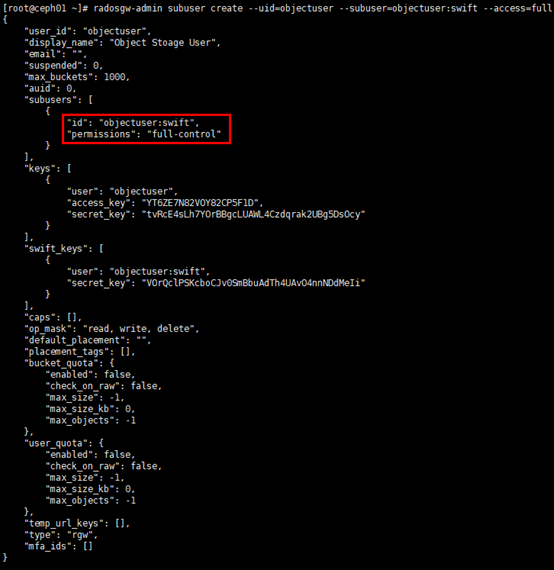
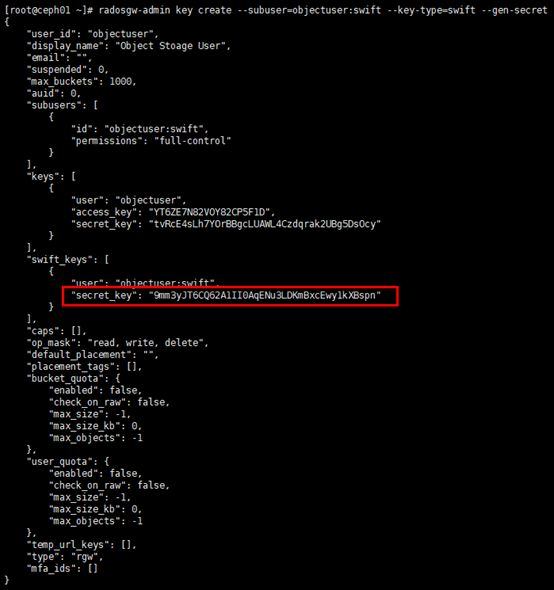
# 生成秘钥;

# 返回结果中,swift_keys ->secret_key 是访问验证时需要的值

[root@ceph01 ~]# radosgw-admin key create --subuser=objectuser:swift --key-type=swift --gen-secret
2. 访问验证
1)测试S3访问
测试采用python脚本完成,脚本流程如下:测试脚本连接radosgw,创建bucket,list bucket。
# 客户端需要安装python-boto

[root@ceph-client ~]# yum install -y python-boto

# 编辑测试脚本;

# 注意”access_key”,”secret_key”,”host”与”port”值修改

[root@ceph-client ~]# vim s3.py

import boto.s3.connection

access_key = 'YT6ZE7N82VOY82CP5F1D'

secret_key = 'tvRcE4sLh7YOrBBgcLUAWL4Czdqrak2UBg5DsOcy'

conn = boto.connect_s3(

        aws_access_key_id=access_key,

        aws_secret_access_key=secret_key,

        host='172.30.200.57', port=,

        is_secure=False, calling_format=boto.s3.connection.OrdinaryCallingFormat(),

       )

bucket = conn.create_bucket('my-new-bucket')

for bucket in conn.get_all_buckets():

    print "{name} {created}".format(

        name=bucket.name,

        created=bucket.creation_date,

)

# 运行脚本,返回结果符合预期

[root@ceph-client ~]# python s3.py

2)测试Swift访问
测试采用swift客户端进行。
# 安装swift客户端

[root@ceph-client ~]# yum install python-setuptools

[root@ceph-client ~]# easy_install pip

[root@ceph-client ~]# pip install --upgrade setuptools

[root@ceph-client ~]# pip install --upgrade python-swiftclient

# 命令格式:swift -A http://{IP ADDRESS}:{port}/auth/1.0 -U USER:swift -K '{swift_secret_key}' list;

# 这里基于s3测试生成的bucket,list bucker,返回结果符合预期

[root@ceph-client ~]# swift -A http://172.30.200.57/auth/1.0 -U objectuser:swift -K '9mm3yJT6CQ62A1II0AqENu3LDKmBxcEwy1kXBspn' list

CEPH Object Gateway的更多相关文章
- Ceph Object Gateway Admin api 获取用户列表问题
按照官方文档使用Admin Ops API 获取用户列表 GET /admin/user时 返回{code: 403, message: Forbidden}这里有两个问题:首先用户列表的请求为 如下 ...
- centos6.4 ceph安装部署之ceph object storage
preface: ceph-deploy does not provide a rapid installation for Ceph Object Storage install Configura ...
- ceph安装Dashboard并开启Object Gateway管理功能
安装配置dashboard Ceph-Dashboard 是用 Python 开发的一个 Ceph 的监控面板,用来监控 Ceph 的运行状态.同时 提供 REST API 来访问状态数据. 低版本的 ...
- golang 操作ceph object storage
ceph的object storage 提供了和amazon s3兼容的接口以供客户访问. 在ceph的官网上,可以看到它提供了多种语言的访问范本,例如python的(http://docs.ceph ...
- 理解 OpenStack + Ceph (5):OpenStack 与 Ceph 之间的集成 [OpenStack Integration with Ceph]
理解 OpenStack + Ceph 系列文章: (1)安装和部署 (2)Ceph RBD 接口和工具 (3)Ceph 物理和逻辑结构 (4)Ceph 的基础数据结构 (5)Ceph 与 OpenS ...
- Ceph部署(二)RGW搭建
背景 Ceph RGW简介 Ceph RGW基于librados,是为应用提供RESTful类型的对象存储接口.RGW提供两种类型的接口: 1) S3:兼容Amazon S3RESTful API: ...
- ceph使用对象网关
1. 介绍 三种验证客户端的方式选一种就行了 2. 安装 2.1 创建对象存储网关系统 步骤1:安装文档安装ceph 步骤2:初始化缓存网关 [root@node1 my-cluster]# ...
- 虚拟机使用ceph-deploy安装ceph
参考: ceph官网介绍 使用ceph-deploy安装Ceph 12.x 安装虚拟机 首先安装虚拟机环境,虚拟机安装这里不做介绍,本实验使用的镜像为CentOS-7-x86_64-Everythin ...
- ceph mimic版本 部署安装
ceph 寻址过程 1. file --- object映射, 把file分割成N个相同的对象 2. object - PG 映射, 利用静态hash得到objectID的伪随机值,在 "位 ...
随机推荐
- 自定义mysql类用于快速执行数据库查询以及将查询结果转为json文件
由于每次连接数据库进行查询比较麻烦,偶尔还需要将查询结果转为json格式的文件, 因此暂时定义一个mysql的类,将这些常用的方法进行封装,便于直接调用(代码如下,个人用,没写什么注释). 注:导入了 ...
- python五十七课——正则表达式(多个字符)
演示匹配多个字符:以下x.y.n都是变量名:分类:1).模糊匹配: x?:表示0个或者1个 取值范围:[0,1]x+:表示1个或者多个 取值范围:[1,无穷大)x*:表示0个或者多个 取值范围:[0, ...
- C/C++每日小练(七)——墓地雕塑
墓地雕塑 题目描写叙述: 在一个周长为10000的圆上等距分布着n个雕塑. 如今又有m个新雕塑增加(位置能够任意放).希望全部n+m个雕塑在圆周上均匀分布.这就须要移动当中一些原有的雕塑.要求n个雕塑 ...
- IDEA多线程调试设置
转至:http://blog.csdn.net/kevindai007/article/details/71412324 使用idea调试多线程的时候发现多线程无法调试,后来经过搜索发现,idea的断 ...
- P1734 最大约数和
题目描述 选取和不超过S的若干个不同的正整数,使得所有数的约数(不含它本身)之和最大. 输入输出格式 输入格式: 输入一个正整数S. 输出格式: 输出最大的约数之和. 输入输出样例 输入样例#1: 复 ...
- 3150luogu洛谷
若说代码 那真的是很水 但是 思想却有点意思 这道题是洛谷博弈论专题的第一道入门题, 然而刚开始我是不会做的, 毕竟是道入门题, 我博弈论还没入门呢. 这道题的做法就是: 如果m为偶数, 那么先手赢( ...
- Ubuntu最新的主要操作系统放弃32位支持?
导读 现在是2018年,2019年即将到来——64位处理器已经成为主流很长一段时间了.如果你仍然使用32位的电脑,那么是时候把它扔进垃圾箱了. 我为所有基于Linux的操作系统维护者感到自豪,他们有勇 ...
- AI 主成分分析(PCA)
主成分分析(principal components analysis,简称PCA),
- MySQL 基础二 创建表格
1.界面创建 2.SQL创建 教程地址:http://blog.csdn.net/brucexia/article/details/53738596 提供学习视频下载 链接:http://pan.ba ...
- jQuery 动画效果
推荐网址:http://www.php100.com/manual/jquery/,用法教学,包括实例. 分类:显示隐藏.淡入淡出.滑动.自定义. <%@ Page Language=" ...