
第六章:声明式服务调用:Spring Cloud Feign
Spring Cloud Feign 是基于 Netflix Feign 实现的,整合了 Spring Cloud Ribbon 和 Spring Cloud Hystrix,除了提供这两者的强大功能之外,还提供了一种声明式的 Web 服务客户端定义方式。
快速入门
- 首先,创建一个 Spring Boot 基础工程,取名为 feign-consumer,并在 pom.xml 中引入 spring-cloud-starter-eureka 和 spring-cloud-starter-feign 依赖。具体内容如下:
<?xml version="1.0" encoding="UTF-8"?>

<project xmlns="http://maven.apache.org/POM/4.0.0" xmlns:xsi="http://www.w3.org/2001/XMLSchema-instance"

    xsi:schemaLocation="http://maven.apache.org/POM/4.0.0 http://maven.apache.org/xsd/maven-4.0.0.xsd">

    <modelVersion>4.0.0</modelVersion>

    <groupId>com.example</groupId>

    <artifactId>feign-consumer</artifactId>

    <version>0.0.1-SNAPSHOT</version>

    <packaging>jar</packaging>

    <name>feign-consumer</name>

    <description>Demo project for Spring Boot</description>

    <parent>

        <groupId>org.springframework.boot</groupId>

        <artifactId>spring-boot-starter-parent</artifactId>

        <version>1.5.6.RELEASE</version>

        <relativePath/> <!-- lookup parent from repository -->

    </parent>

    <properties>

        <project.build.sourceEncoding>UTF-8</project.build.sourceEncoding>

        <project.reporting.outputEncoding>UTF-8</project.reporting.outputEncoding>

        <java.version>1.8</java.version>

        <spring-cloud.version>Dalston.SR2</spring-cloud.version>

    </properties>

    <dependencies>

        <dependency>

            <groupId>org.springframework.boot</groupId>

            <artifactId>spring-boot-starter-web</artifactId>

        </dependency>

        <dependency>

            <groupId>org.springframework.cloud</groupId>

            <artifactId>spring-cloud-starter-eureka</artifactId>

        </dependency>

        <dependency>

            <groupId>org.springframework.cloud</groupId>

            <artifactId>spring-cloud-starter-feign</artifactId>

        </dependency>

        <dependency>

            <groupId>org.springframework.boot</groupId>

            <artifactId>spring-boot-starter-test</artifactId>

            <scope>test</scope>

        </dependency>

    </dependencies>

    <dependencyManagement>

        <dependencies>

            <dependency>

                <groupId>org.springframework.cloud</groupId>

                <artifactId>spring-cloud-dependencies</artifactId>

                <version>${spring-cloud.version}</version>

                <type>pom</type>

                <scope>import</scope>

            </dependency>

        </dependencies>

    </dependencyManagement>

    <build>

        <plugins>

            <plugin>

                <groupId>org.springframework.boot</groupId>

                <artifactId>spring-boot-maven-plugin</artifactId>

            </plugin>

        </plugins>

    </build>

</project>
- 在主类上通过 @EnableFeignClients 注解开启 Spring Cloud Feign 的支持功能。
package com.example.demo;

import org.springframework.boot.SpringApplication;

import org.springframework.boot.autoconfigure.SpringBootApplication;

import org.springframework.cloud.client.discovery.EnableDiscoveryClient;

import org.springframework.cloud.netflix.feign.EnableFeignClients;

@SpringBootApplication

@EnableDiscoveryClient

@EnableFeignClients

public class FeignConsumerApplication {

    public static void main(String[] args) {

        SpringApplication.run(FeignConsumerApplication.class, args);

    }

}
- 定义 HelloService 接口,通过 @FeignClient 注解指定服务名来绑定服务,然后再使用 Spring MVC 的注解来绑定具体该服务提供的 REST 接口。
@FeignClient(value = "hello-service")

public interface HelloService {

    @RequestMapping(value = "/index")

    String hello();

}
注意:此处服务名不区分大小写,hello-service 和 HELLO-SERVICE 都可以使用。
- 接着,创建一个 ConsumerController 来实现对 Feign 客户端的调用。使用 @Autowired 直接注入上面定义的 HelloService 实例,并在 helloConsumer 函数中调用这个绑定了 hello-service 服务接口的客户端来向该服务发起 /index 接口的调用。
package com.example.demo.controller;

import com.example.demo.service.HelloService;

import org.springframework.beans.factory.annotation.Autowired;

import org.springframework.web.bind.annotation.RequestMapping;

import org.springframework.web.bind.annotation.RequestMethod;

import org.springframework.web.bind.annotation.RestController;

/**

 * @author lxx

 * @version V1.0.0

 * @date 2017-8-16

 */

@RestController

public class ConsumerController {

    @Autowired

    HelloService helloService;

    @RequestMapping(value = "feign-consumer", method = RequestMethod.GET)

    public String helloConsumer(){

        return helloService.hello();

    }

}
- 最后,同Ribbon实现的服务消费者一样,需要在 application.properties 中指定注册中心,并定义自身的服务名为 feign-consumer,为了方便本地调试与之前的 Ribbon 消费者的区分,端口使用 9991.
spring.application.name=feign-consumer

server.port=9991

eureka.client.service-url.defaultZone=http://localhost:8082/eureka/
测试验证
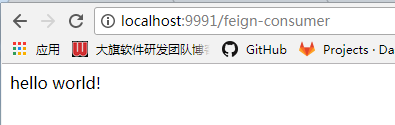
和Ribbon实现时一样,启动 eureka-server 和 两个hello-service,然后启动 feign-consumer,发送请求到 http://localhost:9991/feign-consumer,正确返回。与 Ribbon 不同的是,通过 Feign 我们只需定义服务绑定接口,以声明式的方法,优雅而简单地实现了服务调用。
参数绑定
上面介绍了一个不带参数的 REST 服务绑定。然而实际系统中的各种业务接口要复杂的多,我们会在 HTTP 的各个位置传入不同类型的参数,并且在返回请求响应的时候也可能是一个复杂的对象结构。
在开始介绍 Spring Cloud Feign 的参数绑定之前,先扩展一下服务提供方 hello-service 。增加下面这些接口定义,其中包含带有 Request 参数的请求、带有 Header 信息的请求、带有 RequestBody 的请求以及请求响应体中是一个对象的请求。
package com.example.demo.web;

import org.apache.log4j.Logger;

import org.springframework.beans.factory.annotation.Autowired;

import org.springframework.cloud.client.ServiceInstance;

import org.springframework.cloud.client.discovery.DiscoveryClient;

import org.springframework.web.bind.annotation.*;

import java.util.Random;

/**

 * @author lxx

 * @version V1.0.0

 * @date 2017-8-9

 */

@RestController

public class HelloController {

    private final Logger logger = Logger.getLogger(getClass());

    @Autowired

    private DiscoveryClient client;

    @RequestMapping(value = "/index")

    public String index(){

        ServiceInstance instance = client.getLocalServiceInstance();

        // 让处理线程等待几秒钟

        int sleepTime = new Random().nextInt(3000);

        logger.info("sleepTime:"+sleepTime);

        try {

            Thread.sleep(sleepTime);

        } catch (InterruptedException e) {

            e.printStackTrace();

        }

        logger.info("/hello:host:"+instance.getHost()+" port:"+instance.getPort()

                +" service_id:"+instance.getServiceId());

        return "hello world!";

    }

    @RequestMapping(value = "/hello1", method = RequestMethod.GET)

    public String hello1(@RequestParam String name){

        return "HELLO " + name;

    }

    @RequestMapping(value = "/hello2", method = RequestMethod.GET)

    public User hello2(@RequestHeader String name, @RequestHeader Integer age){

        return new User(name, age);

    }

    @RequestMapping(value = "/hello3", method = RequestMethod.POST)

    public String hello3(@RequestBody User user){

        return "HELLO," + user.getName()+","+user.getAge();

    }

}
User 对象的定义如下,需要注意,这里必须要有User 的默认构造函数。不然,Spring Cloud Feign 根据 JSON 字符串转换 User 对象会抛出异常。
package com.example.demo.web;

/**

 * @author lxx

 * @version V1.0.0

 * @date 2017-8-16

 */

public class User {

    private String name;

    private Integer age;

    public User() {

    }

    public User(String name, Integer age) {

        this.name = name;

        this.age = age;

    }

    public String getName() {

        return name;

    }

    public void setName(String name) {

        this.name = name;

    }

    public Integer getAge() {

        return age;

    }

    public void setAge(Integer age) {

        this.age = age;

    }

    @Override

    public String toString() {

        return "User{" +

                "name='" + name + '\'' +

                ", age=" + age +

                '}';

    }

}
完成对 hello-service 的改造之后,在 feign-consumer 应用中实现这些新增的请求的绑定。
- 首先,在 feign-consumer 中创建与上面一样的 User 类。
- 然后,在 HelloService 接口中增加对上述三个新增接口的绑定声明,修改后,完成的HelloService 接口如下所示:
package com.example.demo.service;

import com.example.demo.entity.User;

import org.springframework.cloud.netflix.feign.FeignClient;

import org.springframework.web.bind.annotation.*;

/**

 * @author lxx

 * @version V1.0.0

 * @date 2017-8-16

 */

@FeignClient(value = "hello-service")

public interface HelloService {

    @RequestMapping(value = "/index")

    String hello();

    @RequestMapping(value = "/hello1", method = RequestMethod.GET)

    String hello1(@RequestParam(value = "name") String name);

    @RequestMapping(value = "/hello2", method = RequestMethod.GET)

    User hello2(@RequestParam(value = "name") String name, @RequestHeader(value = "age") Integer age);

    @RequestMapping(value = "/hello3", method = RequestMethod.POST)

    String hello3(@RequestBody User user);

}
注意:在参数绑定时,@RequestParam、@RequestHeader等可以指定参数名称的注解,他们的 value 不能少。在 Spring MVC 中,这些注解会根据参数名来作为默认值,但是在 Feign 中绑定参数必须通过 value 属性来指明具体的参数名,不然会抛出异常 IllegalStateException ,value 属性不能为空。
- 最后,在 ConsumerController 中新增一个 /feign-consumer2 接口,来对本节新增的声明接口进行调用,修改后的完整代码如下所示:
package com.example.demo.controller;

import com.example.demo.entity.User;

import com.example.demo.service.HelloService;

import org.springframework.beans.factory.annotation.Autowired;

import org.springframework.web.bind.annotation.RequestMapping;

import org.springframework.web.bind.annotation.RequestMethod;

import org.springframework.web.bind.annotation.RestController;

/**

 * @author lxx

 * @version V1.0.0

 * @date 2017-8-16

 */

@RestController

public class ConsumerController {

    @Autowired

    HelloService helloService;

    @RequestMapping(value = "feign-consumer", method = RequestMethod.GET)

    public String helloConsumer(){

        return helloService.hello();

    }

    @RequestMapping(value = "/feign-consumer2", method = RequestMethod.GET)

    public String helloConsumer2(){

        StringBuilder sb = new StringBuilder();

        sb.append(helloService.hello1("didi")).append("\n");

        sb.append(helloService.hello2("didi", 18)).append("\n");

        sb.append(helloService.hello3(new User("didi", 20))).append("\n");

        return sb.toString();

    }

}
测试验证
改造之后,启动服务注册中心、两个hello-service服务以及改造之后的 feign-consumer。通过发送请求到 http://localhost:9991/feign-consumer2 ,触发 HelloService 对新增接口的调用,获取如下输出:

继承特性
通过上述的实践可以发现,当使用 Spring MVC 的注解绑定服务接口时,几乎可以从服务提供方的 Controller 中依靠复制操作,构建出相应的服务客户端绑定接口。既然存在那么多复制操作,自然需要考虑这部分内容是否可以得到进一步的抽象。在 Spring Cloud Feign 中,针对该问题提供了继承特性来帮助我们解决这些复制操作,以进一步减少编码量。下面,详细看看如何通过 Spring Cloud Feign 的继承特性来实现 REST 接口定义的复用。
- 为了能够复用 DTO 与接口定义,我们先创建一个基础的 Maven 工程,命名为 hello-service-api。
- 由于在 hello-service-api 中需要定义可同时复用于服务端与客户端的接口,我们要使用到 Spring MVC 的注解,所以在 pom.xml 中引入 spring-boot-starter-web 依赖,具体内容如下所示:
<?xml version="1.0" encoding="UTF-8"?>

<project xmlns="http://maven.apache.org/POM/4.0.0" xmlns:xsi="http://www.w3.org/2001/XMLSchema-instance"

    xsi:schemaLocation="http://maven.apache.org/POM/4.0.0 http://maven.apache.org/xsd/maven-4.0.0.xsd">

    <modelVersion>4.0.0</modelVersion>

    <groupId>com.example</groupId>

    <artifactId>hello-service-api</artifactId>

    <version>0.0.1-SNAPSHOT</version>

    <packaging>jar</packaging>

    <name>hello-service-api</name>

    <description>Demo project for Spring Boot</description>

    <parent>

        <groupId>org.springframework.boot</groupId>

        <artifactId>spring-boot-starter-parent</artifactId>

        <version>1.5.6.RELEASE</version>

        <relativePath/> <!-- lookup parent from repository -->

    </parent>

    <properties>

        <project.build.sourceEncoding>UTF-8</project.build.sourceEncoding>

        <project.reporting.outputEncoding>UTF-8</project.reporting.outputEncoding>

        <java.version>1.8</java.version>

    </properties>

    <dependencies>

        <dependency>

            <groupId>org.springframework.boot</groupId>

            <artifactId>spring-boot-starter-web</artifactId>

        </dependency>

        <dependency>

            <groupId>org.springframework.boot</groupId>

            <artifactId>spring-boot-starter-test</artifactId>

            <scope>test</scope>

        </dependency>

    </dependencies>

    <build>

        <plugins>

            <plugin>

                <groupId>org.springframework.boot</groupId>

                <artifactId>spring-boot-maven-plugin</artifactId>

            </plugin>

        </plugins>

    </build>

</project>
- 将上一节中实现的 User 对象复制到 hello-service-api 工程中。
- 在 hello-service-api 工程中创建 HelloService 接口,内容如下,该接口中的 User 对象为本项目中添加的 User。
package com.example.demo.service;

import com.example.demo.entity.User;

import org.springframework.web.bind.annotation.*;

/**

 * @author lxx

 * @version V1.0.0

 * @date 2017-8-16

 */

@RequestMapping(value = "/refactor")

public interface HelloService {

    @RequestMapping(value = "/hello4", method = RequestMethod.GET)

    String hello4(@RequestParam(value = "name") String name);

    @RequestMapping(value = "/hello5", method = RequestMethod.GET)

    User hello5(@RequestHeader(value = "name") String name, @RequestHeader(value = "age") Integer age);

    @RequestMapping(value = "/hello6", method = RequestMethod.POST)

    String hello6(@RequestBody User user);

}
因为后续还会通过之前的hello-service 和 feign-consumer 来重构,为了避免接口混淆,在这里定义 HelloService 时,除了头部定义了 /refactor 前缀之外,同时将提供服务的三个接口更名为 hello4、hello5、hello6.
以上操作完成后,执行命令 mvn install 将该模块构建到本地仓库。
- 下面对 hello-service 进行重构,在 pom.xml 的 dependency 节点中,新增对 hello-service-api 的依赖。
<dependency>

    <groupId>com.example</groupId>

    <artifactId>hello-service-api</artifactId>

    <version>0.0.1-SNAPSHOT</version>

</dependency>
- 创建 RefactorHelloController 类实现 hello-service-api 中定义的 HelloService 接口,并参考之前的 HelloController 来实现这三个接口,具体内容如下:
package com.example.demo.web;

import entity.*;

import entity.User;

import org.springframework.web.bind.annotation.RequestBody;

import org.springframework.web.bind.annotation.RequestHeader;

import org.springframework.web.bind.annotation.RequestParam;

import org.springframework.web.bind.annotation.RestController;

import service.HelloService;

/**

 * @author lxx

 * @version V1.0.0

 * @date 2017-8-16

 */

@RestController

public class RefactorHelloController implements HelloService {

    @Override

    public String hello4(@RequestParam(value = "name") String name) {

        return "HELLO " + name;

    }

    @Override

    public User hello5(@RequestHeader(value = "name") String name, @RequestHeader(value = "age") Integer age) {

        return new User(name, age);

    }

    @Override

    public String hello6(@RequestBody User user) {

        return "HELLO," + user.getName()+","+user.getAge();

    }

}
- 完成了服务提供者的重构,接下来在服务消费者 feign-consumer 的 pom.xml 文件中,如在服务提供者一样,新增对 hello-service-api 的依赖。
- 创建 RefactorHelloService 接口,并继承 hello-service-api 包中的 HelloService 接口,然后添加 @FeignClient 注解来绑定服务。(不能正常引用,先跳过)
第六章:声明式服务调用:Spring Cloud Feign的更多相关文章
- 第六章 声明式服务调用: Spring Cloud Feign
我们在使用 Spring Cloud Ribbon 时, 通常都会利用它对 RestTemplate 的请求拦截来实现对依赖服务的接口调用, 而 RestTemplate 已经实现了对 HTTP 请求 ...
- SpringCloud---声明式服务调用---Spring Cloud Feign
1.概述 1.1 Spring Cloud Ribbon.Spring Cloud Hystrix的使用几乎是同时出现的,Spring Cloud提供了一个更高层次的封装这2个工具类框架:Spring ...
- spring cloud 系列第4篇 —— feign 声明式服务调用 (F版本)
源码Gitub地址:https://github.com/heibaiying/spring-samples-for-all 一.feign 简介 在上一个用例中,我们使用ribbon+restTem ...
- Spring Cloud Feign声明式服务调用(转载)+遇到的问题
转载:原文 总结: 1.pom添加依赖 2.application中填写正确的eureka配置 3.启动项中增加注解 @EnableFeignClients 4.填写正确的调用接口 通过原文使用Fei ...
- Spring Cloud 2-Feign 声明式服务调用(三)
Spring Cloud Feign 1. pom.xml 2. application.yml 3. Application.java 4. Client.java 简化RestTemplate调 ...
- Spring Cloud Feign 声明式服务调用
目录 一.Feign是什么? 二.Feign的快速搭建 三.Feign的几种姿态 参数绑定 继承特性 四.其他配置 Ribbon 配置 Hystrix 配置 一.Feign是什么? 通过对前面Sp ...
- Spring Cloud Eureka 分布式开发之服务注册中心、负载均衡、声明式服务调用实现
介绍 本示例主要介绍 Spring Cloud 系列中的 Eureka,使你能快速上手负载均衡.声明式服务.服务注册中心等 Eureka Server Eureka 是 Netflix 的子模块,它是 ...
- 声明式服务调用:Spring Cloud Feign
最近在学习Spring Cloud的知识,现将声明式服务调用:Spring Cloud Feign 的相关知识笔记整理如下.[采用 oneNote格式排版]
- SpringCloud系列-利用Feign实现声明式服务调用
上一篇文章<手把手带你利用Ribbon实现客户端的负载均衡>介绍了消费者通过Ribbon调用服务实现负载均衡的过程,里面所需要的参数需要在请求的URL中进行拼接,但是参数太多会导致拼接字符 ...
- SpringCloud 源码系列(6)—— 声明式服务调用 Feign
SpringCloud 源码系列(1)-- 注册中心 Eureka(上) SpringCloud 源码系列(2)-- 注册中心 Eureka(中) SpringCloud 源码系列(3)-- 注册中心 ...
随机推荐
- German Collegiate Programming Contest 2018 A. Attack on Alpha-Zet
题目链接https://nanti.jisuanke.com/t/28852 题目大意是 h*w 的平面,每两个点有且仅有一条路径,类似于封闭的联通空间,然后在这h*w个点中选取(标记为1~N)N个点 ...
- 247. Strobogrammatic Number II输出所有对称数字
[抄题]: A strobogrammatic number is a number that looks the same when rotated 180 degrees (looked at u ...
- 图片识别文字, OCR
文章引用自: https://www.cnblogs.com/stone_w/archive/2011/10/08/2202397.html 方式一.Asprise-OCR的使用. Asprise-O ...
- dfs | Security Badges
Description You are in charge of the security for a large building, with n rooms and m doors between ...
- ES之五:ElasticSearch聚合
前言 说完了ES的索引与检索,接着再介绍一个ES高级功能API – 聚合(Aggregations),聚合功能为ES注入了统计分析的血统,使用户在面对大数据提取统计指标时变得游刃有余.同样的工作,你在 ...
- 19. pt-query-digest
慢查询参数 slow_query_log=1slow_query_log_file=/mysql3306/log/slow.log 记录的是查询语句,而非管理语句.除非启用 los_slow_admi ...
- C#实现局部峰值查找,功能对应Matlab中的findpeaks.m(转)
相关算法的原理参考Ronny,地址:图像分析:投影曲线的波峰查找,这里感谢下原作者. 参照C++的代码实现,我用C#翻译了下,其实原理也很简单的,下面放相关实现代码: private double[] ...
- windows 性能监视器
转载地址:https://www.cnblogs.com/luo-mao/p/5872374.html
- 第三次spring会议
昨天天所做之事: 我用C#用DelectText对行数进行了定义,刚开始写代码有点无从下手. 遇到的问题:刚开始用datagridView进行了文本的输入,但是它更适合EXCEL之类的数据计算不符合我 ...
- node.js获取参数的常用方法
1.req.body 2.req.query 3.req.params 一.req.body例子 body不是nodejs默认提供的,你需要载入body-parser中间件才可以使用req.body, ...