
Spring Cloud Eureka 分布式开发之服务注册中心、负载均衡、声明式服务调用实现
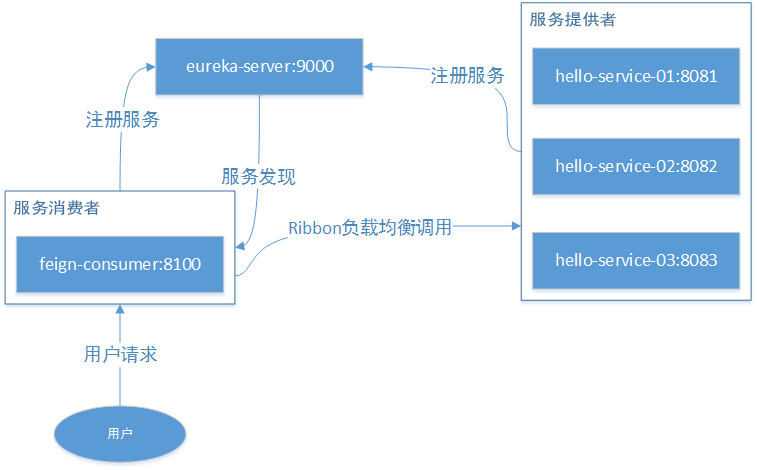
介绍
本示例主要介绍 Spring Cloud 系列中的 Eureka,使你能快速上手负载均衡、声明式服务、服务注册中心等
Eureka Server
Eureka 是 Netflix 的子模块,它是一个基于 REST 的服务,用于定位服务,以实现云端中间层服务发现和故障转移。
服务注册和发现对于微服务架构而言,是非常重要的。有了服务发现和注册,只需要使用服务的标识符就可以访问到服务,而不需要修改服务调用的配置文件。该功能类似于 Dubbo 的注册中心,比如 Zookeeper。
Eureka 采用了 CS 的设计架构。Eureka Server 作为服务注册功能的服务端,它是服务注册中心。而系统中其他微服务则使用 Eureka 的客户端连接到 Eureka Server 并维持心跳连接
Eureka Server 提供服务的注册服务。各个服务节点启动后会在 Eureka Server 中注册服务,Eureka Server 中的服务注册表会存储所有可用的服务节点信息。
Eureka Client 是一个 Java 客户端,用于简化 Eureka Server 的交互,客户端同时也具备一个内置的、使用轮询负载算法的负载均衡器。在应用启动后,向 Eureka Server 发送心跳(默认周期 30 秒)。如果 Eureka Server 在多个心跳周期内没有接收到某个节点的心跳,Eureka Server 会从服务注册表中将该服务节点信息移除。
简单理解:各个微服务将自己的信息注册到server上,需要调用的时候从server中获取到其他微服务信息
Ribbon
Spring Cloud Ribbon 是基于 Netflix Ribbon 实现的一套客户端负载均衡工具,其主要功能是提供客户端的软件负载均衡算法,将 Netflix 的中间层服务连接在一起。
Ribbon 提供多种负载均衡策略:如轮询、随机、响应时间加权等。
Feign
Feign是声明式、模板化的HTTP客户端,可以更加快捷优雅的调用HTTP API。在部分场景下和Ribbon类似,都是进行数据的请求处理,但是在请求参数使用实体类的时候显然更加方便,同时还支持安全性、授权控制等。
Feign是集成了Ribbon的,也就是说如果引入了Feign,那么Ribbon的功能也能使用,比如修改负载均衡策略等
代码实现
1.创建eureka-server服务注册中心
pom.xml pom配置
<?xml version="1.0" encoding="UTF-8"?>

<project xmlns="http://maven.apache.org/POM/4.0.0" xmlns:xsi="http://www.w3.org/2001/XMLSchema-instance"

         xsi:schemaLocation="http://maven.apache.org/POM/4.0.0 http://maven.apache.org/xsd/maven-4.0.0.xsd">

    <modelVersion>4.0.0</modelVersion>

    <groupId>com.easy</groupId>

    <artifactId>eureka-server</artifactId>

    <version>0.0.1-SNAPSHOT</version>

    <packaging>jar</packaging>

    <name>eureka-server</name>

    <description>Demo project for Spring Boot</description>

    <parent>

        <artifactId>cloud-feign</artifactId>

        <groupId>com.easy</groupId>

        <version>1.0.0</version>

    </parent>

    <dependencies>

        <dependency>

            <groupId>org.springframework.cloud</groupId>

            <artifactId>spring-cloud-starter-netflix-eureka-server</artifactId>

        </dependency>

        <dependency>

            <groupId>org.springframework.boot</groupId>

            <artifactId>spring-boot-starter-test</artifactId>

            <scope>test</scope>

        </dependency>

    </dependencies>

    <build>

        <plugins>

            <plugin>

                <groupId>org.springframework.boot</groupId>

                <artifactId>spring-boot-maven-plugin</artifactId>

            </plugin>

        </plugins>

    </build>

</project>
application.yml 配置文件
server:

    port: 9000

spring:

  application:

    name: eureka-server

eureka:

    instance:

        hostname: localhost   # eureka 实例名称

    client:

        register-with-eureka: false # 不向注册中心注册自己

        fetch-registry: false       # 是否检索服务

        service-url:

            defaultZone: http://${eureka.instance.hostname}:${server.port}/eureka/  # 注册中心访问地址
EurekaServerApplication.java 启动类
package com.easy.eurekaServer;

import org.springframework.boot.SpringApplication;

import org.springframework.boot.autoconfigure.SpringBootApplication;

import org.springframework.cloud.netflix.eureka.server.EnableEurekaServer;

@EnableEurekaServer

@SpringBootApplication

public class EurekaServerApplication {

    public static void main(String[] args) {

        SpringApplication.run(EurekaServerApplication.class, args);

    }

}
2.创建hello-service-api接口
Result.java 统一返回实体
package com.easy.helloServiceApi.vo;

import lombok.Getter;

import java.io.Serializable;

@Getter

public class Result implements Serializable {

    private static final long serialVersionUID = -8143412915723961070L;

    private int code;

    private String msg;

    private Object data;

    private Result() {

    }

    private Result(int code, String msg) {

        this.code = code;

        this.msg = msg;

    }

    private Result(int code, String msg, Object data) {

        this.code = code;

        this.msg = msg;

        this.data = data;

    }

    public static Result success() {

        return success(null);

    }

    public static Result success(Object data) {

        return new Result(200, "success", data);

    }

    public static Result fail() {

        return fail(500, "fail");

    }

    public static Result fail(int code, String message) {

        return new Result(code, message);

    }

}
Order.java 订单实体类
package com.easy.helloServiceApi.model;

import lombok.AllArgsConstructor;

import lombok.Data;

import lombok.NoArgsConstructor;

/**

 * 订单类

 */

@Data

@NoArgsConstructor

@AllArgsConstructor

public class Order {

    private String orderId;

    private String goodsId;

    private int num;

}
GoodsServiceClient.java 声明商品服务类
package com.easy.helloServiceApi.client;

import com.easy.helloServiceApi.vo.Result;

import org.springframework.cloud.openfeign.FeignClient;

import org.springframework.web.bind.annotation.PathVariable;

import org.springframework.web.bind.annotation.RequestMapping;

@FeignClient(value = "hello-server")

public interface GoodsServiceClient {

    @RequestMapping("/goods/goodsInfo/{goodsId}")

    Result goodsInfo(@PathVariable("goodsId") String goodsId);

}
Goods.java商品实体类
package com.easy.helloServiceApi.model;

import lombok.AllArgsConstructor;

import lombok.Data;

import lombok.NoArgsConstructor;

import lombok.ToString;

/**

 * 商品类

 */

@Data

@NoArgsConstructor

@AllArgsConstructor

@ToString

public class Goods {

    private String goodsId;

    private String name;

    private String descr;

    // 测试端口

    private int port;

}
3.创建hello-service-01服务提供者(这里创建三个一样的服务提供者做负载均衡用)
GoodsController.java商品服务入口
package com.easy.helloService.controller;

import com.easy.helloService.service.GoodsService;

import com.easy.helloServiceApi.model.Goods;

import com.easy.helloServiceApi.vo.Result;

import org.springframework.beans.factory.annotation.Autowired;

import org.springframework.web.bind.annotation.PathVariable;

import org.springframework.web.bind.annotation.RequestMapping;

import org.springframework.web.bind.annotation.RestController;

@RestController

@RequestMapping("/goods")

public class GoodsController {

    @Autowired

    private GoodsService goodsService;

    @RequestMapping("/goodsInfo/{goodsId}")

    public Result goodsInfo(@PathVariable String goodsId) {

        Goods goods = this.goodsService.findGoodsById(goodsId);

        return Result.success(goods);

    }

}
GoodsService.java接口
package com.easy.helloService.service;

import com.easy.helloServiceApi.model.Goods;

public interface GoodsService {

    Goods findGoodsById(String goodsId);

}
GoodsServiceImpl.java实现接口
package com.easy.helloService.service.impl;

import com.easy.helloService.service.GoodsService;

import com.easy.helloServiceApi.model.Goods;

import org.springframework.stereotype.Service;

import java.util.HashMap;

import java.util.Map;

@Service

public class GoodsServiceImpl implements GoodsService {

    // 模拟数据库

    private static Map<String, Goods> data;

    static {

        data = new HashMap<>();

        data.put("1", new Goods("1", "华为", "华为手机", 8081));  //表示调用8081端口的数据,实际上数据会放在数据库或缓存中

        data.put("2", new Goods("2", "苹果", "苹果", 8081));

    }

    @Override

    public Goods findGoodsById(String goodsId) {

        return data.get(goodsId);

    }

}
HelloServiceApplication.java启动类
package com.easy.helloService;

import org.springframework.boot.SpringApplication;

import org.springframework.boot.autoconfigure.SpringBootApplication;

import org.springframework.cloud.client.discovery.EnableDiscoveryClient;

@EnableDiscoveryClient

@SpringBootApplication

public class HelloServiceApplication {

    public static void main(String[] args) {

        SpringApplication.run(HelloServiceApplication.class, args);

    }

}
application.yml配置文件,8081端口做01服务
server:

    port: 8081

spring:

  application:

    name: hello-server

eureka:

    instance:

        instance-id: goods-api-8081

        prefer-ip-address: true # 访问路径可以显示 IP

    client:

        service-url:

            defaultZone: http://localhost:9000/eureka/  # 注册中心访问地址
4.创建hello-service-02服务提供者(贴出和01服务不一样的地方)
application.yml配置文件,8082做02服务端口
server:

    port: 8082

spring:

  application:

    name: hello-server

eureka:

    instance:

        instance-id: goods-api-8082

        prefer-ip-address: true # 访问路径可以显示 IP

    client:

        service-url:

            defaultZone: http://localhost:9000/eureka/  # 注册中心访问地址
GoodsServiceImpl.java 这里故意设置不同的数据源,用来测试负载均衡有没生效使用
package com.easy.helloService.service.impl;

import com.easy.helloService.service.GoodsService;

import com.easy.helloServiceApi.model.Goods;

import org.springframework.stereotype.Service;

import java.util.HashMap;

import java.util.Map;

@Service

public class GoodsServiceImpl implements GoodsService {

    // 模拟数据库

    private static Map<String, Goods> data;

    static {

        data = new HashMap<>();

        data.put("1", new Goods("1", "华为", "华为手机", 8082));  //表示8082端口的数据,实际上数据会放在数据库或缓存中

        data.put("2", new Goods("2", "苹果", "苹果", 8082));

    }

    @Override

    public Goods findGoodsById(String goodsId) {

        return data.get(goodsId);

    }

}
5.创建hello-service-02服务提供者(贴出和01服务不一样的地方)
application.yml配置文件,8082做02服务端口
server:

    port: 8083

spring:

  application:

    name: hello-server

eureka:

    instance:

        instance-id: goods-api-8083

        prefer-ip-address: true # 访问路径可以显示 IP

    client:

        service-url:

            defaultZone: http://localhost:9000/eureka/  # 注册中心访问地址
GoodsServiceImpl.java 这里故意设置不同的数据源,用来测试负载均衡有没生效使用
package com.easy.helloService.service.impl;

import com.easy.helloService.service.GoodsService;

import com.easy.helloServiceApi.model.Goods;

import org.springframework.stereotype.Service;

import java.util.HashMap;

import java.util.Map;

@Service

public class GoodsServiceImpl implements GoodsService {

    // 模拟数据库

    private static Map<String, Goods> data;

    static {

        data = new HashMap<>();

        data.put("1", new Goods("1", "华为", "华为手机", 8083));  //表示8083端口的数据,实际上数据会放在数据库或缓存中

        data.put("2", new Goods("2", "苹果", "苹果", 8083));

    }

    @Override

    public Goods findGoodsById(String goodsId) {

        return data.get(goodsId);

    }

}
6.创建feign-consumer服务消费者,引入Ribbon实现服务调用负载均衡并实现声明式服务调用
pom.xml配置
<?xml version="1.0" encoding="UTF-8"?>

<project xmlns="http://maven.apache.org/POM/4.0.0" xmlns:xsi="http://www.w3.org/2001/XMLSchema-instance"

         xsi:schemaLocation="http://maven.apache.org/POM/4.0.0 http://maven.apache.org/xsd/maven-4.0.0.xsd">

    <modelVersion>4.0.0</modelVersion>

    <groupId>com.easy</groupId>

    <artifactId>feign-consumer</artifactId>

    <version>0.0.1-SNAPSHOT</version>

    <packaging>war</packaging>

    <name>feign-consumer</name>

    <description>Demo project for Spring Boot</description>

    <parent>

        <artifactId>cloud-feign</artifactId>

        <groupId>com.easy</groupId>

        <version>1.0.0</version>

    </parent>

    <dependencies>

        <!-- springmvc -->

        <dependency>

            <groupId>org.springframework.boot</groupId>

            <artifactId>spring-boot-starter-web</artifactId>

        </dependency>

        <!-- eureka 客户端 -->

        <dependency>

            <groupId>org.springframework.cloud</groupId>

            <artifactId>spring-cloud-starter-netflix-eureka-client</artifactId>

        </dependency>

        <!-- ribbon -->

        <dependency>

            <groupId>org.springframework.cloud</groupId>

            <artifactId>spring-cloud-starter-netflix-ribbon</artifactId>

        </dependency>

        <!-- feign -->

        <dependency>

            <groupId>org.springframework.cloud</groupId>

            <artifactId>spring-cloud-starter-openfeign</artifactId>

        </dependency>

        <dependency>

            <groupId>org.apache.commons</groupId>

            <artifactId>commons-lang3</artifactId>

            <version>3.9</version>

        </dependency>

        <dependency>

            <groupId>org.springframework.boot</groupId>

            <artifactId>spring-boot-starter-test</artifactId>

            <scope>test</scope>

        </dependency>

        <dependency>

            <groupId>com.easy</groupId>

            <artifactId>hello-service-api</artifactId>

            <version>0.0.1</version>

        </dependency>

    </dependencies>

    <build>

        <plugins>

            <plugin>

                <groupId>org.springframework.boot</groupId>

                <artifactId>spring-boot-maven-plugin</artifactId>

            </plugin>

        </plugins>

    </build>

</project>
引入openfeign、ribbon、eureka-client等依赖,openfeign用来实现声明式服务调用,ribbon用来实现负载均衡,eureka-client用来注册、发现服务
RestConfiguration.java 配置
package com.easy.feignConsumer.config;

import com.netflix.loadbalancer.IRule;

import com.netflix.loadbalancer.RandomRule;

import org.springframework.cloud.client.loadbalancer.LoadBalanced;

import org.springframework.context.annotation.Bean;

import org.springframework.context.annotation.Configuration;

import org.springframework.web.client.RestTemplate;

@Configuration

public class RestConfiguration {

    @Bean

    @LoadBalanced

    public RestTemplate getRestTemplate() {

        return new RestTemplate();

    }

    /**

     * 随机选取负载均衡策略

     * @return

     */

    @Bean

    public IRule testRule() {

        return new RandomRule();

    }

}
GoodsService 服务类接口
package com.easy.feignConsumer.service;

import com.easy.helloServiceApi.model.Goods;

import com.easy.helloServiceApi.vo.Result;

public interface GoodsService {

    Result placeGoods(Goods goods);

}
GoodsServiceImpl.java 实现类
package com.easy.feignConsumer.service.impl;

import com.easy.feignConsumer.service.GoodsService;

import com.easy.helloServiceApi.client.GoodsServiceClient;

import com.easy.helloServiceApi.model.Goods;

import com.easy.helloServiceApi.vo.Result;

import lombok.extern.slf4j.Slf4j;

import org.apache.commons.lang3.builder.ToStringBuilder;

import org.springframework.beans.factory.annotation.Autowired;

import org.springframework.stereotype.Service;

@Service

@Slf4j

public class GoodsServiceImpl implements GoodsService {

    @Autowired

    private GoodsServiceClient goodsServiceClient;

    @Override

    public Result placeGoods(Goods order) {

        Result result = this.goodsServiceClient.goodsInfo(order.getGoodsId());

        if (result != null && result.getCode() == 200) {

            log.info("=====获取本地商品====");

            log.info("接口返回数据为==>{}", ToStringBuilder.reflectionToString(result.getData()));

        }

        return result;

    }

}
GoodsController.java 控制器
package com.easy.feignConsumer.controller;

import com.easy.feignConsumer.service.GoodsService;

import com.easy.helloServiceApi.model.Goods;

import com.easy.helloServiceApi.vo.Result;

import org.springframework.beans.factory.annotation.Autowired;

import org.springframework.web.bind.annotation.RequestMapping;

import org.springframework.web.bind.annotation.RestController;

@RestController

@RequestMapping("/goods")

public class GoodsController {

    @Autowired

    private GoodsService orderService;

    @RequestMapping("/place")

    public Result placeGoods(Goods goods) {

        Result result = this.orderService.placeGoods(goods);

        return result;

    }

}
FeignConsumerApplication.java 消息者启动类
package com.easy.feignConsumer;

import org.springframework.boot.SpringApplication;

import org.springframework.boot.autoconfigure.SpringBootApplication;

import org.springframework.cloud.netflix.eureka.EnableEurekaClient;

import org.springframework.cloud.openfeign.EnableFeignClients;

@EnableFeignClients(basePackages = {"com.easy"})

@EnableEurekaClient

@SpringBootApplication

public class FeignConsumerApplication {

    public static void main(String[] args) {

        SpringApplication.run(FeignConsumerApplication.class, args);

    }

}
application.yml 配置文件
server:

  port: 8100

spring:

  application:

    name: feign-consumer

eureka:

  instance:

    instance-id: order-api-8100

    prefer-ip-address: true # 访问路径可以显示 IP

  client:

    service-url:

      defaultZone: http://localhost:9000/eureka/  # 注册中心访问地址
使用示例
运行创建的5个服务
1个服务注册中心,3个服务提供者,1个服务消费者
进入服务注册中心查看服务
地址栏输入:http://localhost:9000/,我们看到5个服务注册成功并且都是运行状态了(UP状态),效果如下:
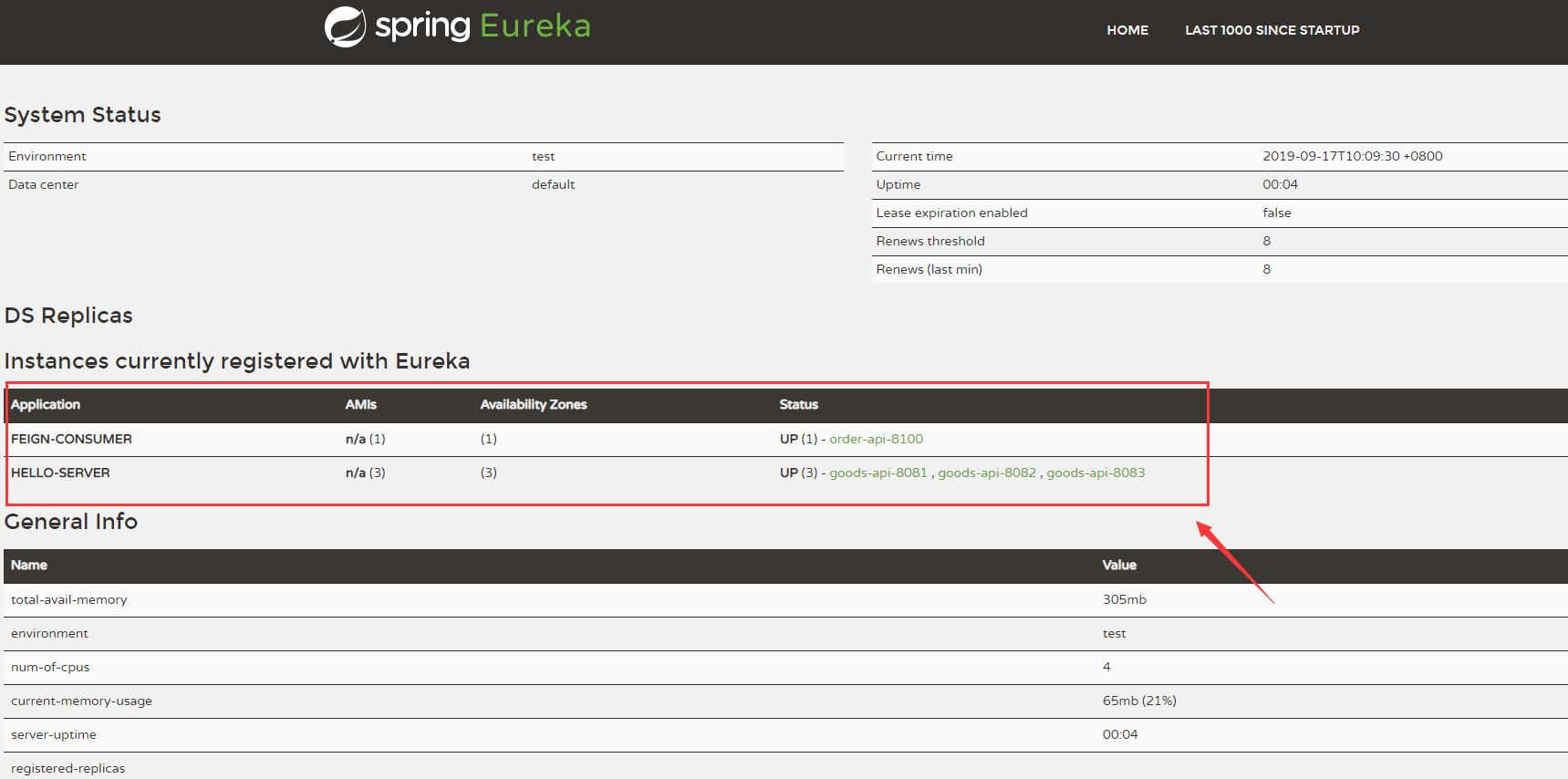
- Application列下有两个服务(FEIGN-CONSUMER、HELLO-SERVER)
- Availability Zones列下表示可用服务分别的数量(这里分别显示1和3)
- Status 列显示服务状态,UP表示服务在运行状态,后面分别跟着服务的内部地址:goods-api-8100(服务消费者),goods-api-8081(服务提供者01), goods-api-8082(服务提供者02), goods-api-8083(服务提供者03)
调用接口测试
地址栏输入:http://localhost:8100/goods/place?goodsId=1,返回数据结果为:
{

code: 200,

msg: "success",

data: {

goodsId: "1",

name: "华为",

descr: "华为手机",

port: 8081

}

}
- 多刷新几次页面,我们发现port会在8081 8082 8083随机变化,表示我们的随机负载均衡器生效了
- 随意关掉2个或1个服务提供者,刷新页面接口功能无影响,能正常返回数据,实现了高可用
声明式服务和非声明式服务对比
非声明式服务调用代码
    @Test

    public void testFeignConsumer() {

        Goods goods = new Goods();

        goods.setGoodsId("1");

        Result result = this.restTemplate.getForObject("http://HELLO-SERVER/goods/goodsInfo/" + goods.getGoodsId(), Result.class);

        log.info("成功调用了服务,返回结果==>{}", ToStringBuilder.reflectionToString(result));

    }
消费端每个请求方法中都需要拼接请求服务的 URL 地址,存在硬编码问题并且这样并不符合面向对象编程的思想
声明式服务调用
@FeignClient(value = "hello-server")

public interface GoodsServiceClient {

    @RequestMapping("/goods/goodsInfo/{goodsId}")

    Result goodsInfo(@PathVariable("goodsId") String goodsId);

}
    @Autowired

    private GoodsServiceClient goodsServiceClient;

    @Override

    public Result placeGoods(Goods order) {

        Result result = this.goodsServiceClient.goodsInfo(order.getGoodsId());

        return result;

    }
通过编写简单的接口和插入注解,就可以定义好HTTP请求的参数、格式、地址等信息,实现远程接口调用,这样将使我们的代码更易扩展和利用,复合面向对象编程实现。
资料
Spring Cloud Eureka 分布式开发之服务注册中心、负载均衡、声明式服务调用实现的更多相关文章
- Spring Cloud Eureka源码分析 --- client 注册流程
Eureka Client 是一个Java 客户端,用于简化与Eureka Server的交互,客户端同时也具备一个内置的.使用轮询负载算法的负载均衡器. 在应用启动后,将会向Eureka Serve ...
- Spring Cloud Eureka 之开发笔记
Eureka客户端 -- 接口 com.netflix.discovery public interface EurekaClient /*常用方法*/ // 获取某个应用 Application g ...
- (9)java Spring Cloud+Spring boot+mybatis企业快速开发架构之SpringCloud-搭建Eureka服务注册中心
首先创建一个 Maven 项目,取名为 eureka-server,在 pom.xml 中配置 Eureka 的依赖信息,代码如下所示. <!-- Spring Boot --> &l ...
- spring cloud深入学习(二)-----服务注册中心spring cloud eureka
服务治理 主要用来实现各个微服务实例的自动化注册与发现,为啥需要这玩意呢?在一开始比如A系统调用B服务,可能通过手工维护B服务的实例,并且还得采用负载均衡等方式,这些全部都得需要手工维护,等后面系统越 ...
- 孰能巧用 Spring Cloud 服务注册中心Eureka
Eureka介绍 在Spring Cloud Netflix 整合技术栈中,Eureka既可以作为服务注册中心也可以用于服务发现对整个微服务架构起着最核心的整合作用. Eureka是基于REST(Re ...
- spring cloud 2.x版本 Eureka Server服务注册中心教程
本文采用Spring cloud本文为2.1.8RELEASE,version=Greenwich.SR3 1.创建服务注册中心 1.1 新建Spring boot工程:eureka-server 1 ...
- Spring Cloud Eureka 注册,发布,调用服务
Spring Cloud为服务治理做了一层抽象接口,所以在Spring Cloud应用中可以支持多种不同的服务治理框架,如Netflix Eureka.Consul和Zookeeper.在Spring ...
- Spring Cloud Eureka 2 (Eureka Server搭建服务注册中心)
工具:IntelliJ IDEA 2017.1.2 x64.maven3.3.9 打开IDE file===>new===>project next next 选择相应的依赖 next ...
- 第三章 服务治理:Spring Cloud Eureka
Spring Cloud Eureka是Spring Cloud Netflix 微服务套件中的一部分,它基于Netflix Eureka做了二次封装,主要负责完成微服务架构中的服务治理功能.Spri ...
随机推荐
- android——卡片式布局
一.CardView <android.support.v7.widget.CardView xmlns:android="http://schemas.android.com/apk ...
- 素数筛法(Eratosthenes筛法)
介绍 Eratosthenes筛法,又名埃氏筛法,对于求1~n区间内的素数,时间复杂度为n log n,对于10^6^ 以内的数比较合适,再超出此范围的就不建议用该方法了. 筛法的思想特别简单: 对于 ...
- MyEclipse下安装FreeMark插件
现在大多人人喜欢用FreeMark模板.但是这个模板在myeclipse或者是eclipse下却是不能只能提示,一大堆只是没有颜色区分的显示在哪里.万能天国总是有办法. 点我去官网下载(比较慢) 我的 ...
- 使用ArrayPool池化大型数组(翻译)
原文链接:https://adamsitnik.com/Array-Pool/ 使用ArrayPool 简介 .NET的垃圾收集器(GC)实现了许多性能优化,其中之一就是,设定年轻的对象很快消亡,然而 ...
- 天天都用消息队列,却不知道为啥要用MQ,这就有点尴尬了
1.为什么要使用消息队列? 分析:一个用消息队列的人,不知道为啥用,有点尴尬.没有复习这点,很容易被问蒙,然后就开始胡扯了. 回答:这个问题,咱只答三个最主要的应用场景(不可否认还有其他的,但是只答三 ...
- (二十)c#Winform自定义控件-有后退的窗体
前提 入行已经7,8年了,一直想做一套漂亮点的自定义控件,于是就有了本系列文章. 开源地址:https://gitee.com/kwwwvagaa/net_winform_custom_control ...
- VU TPS QPS RT 计算公式
1.背景 最近看了阿里巴巴中间件写的一篇文章,讲述了关于并发,RPS,RT之间的关系.感觉收获颇丰.自己使用JMeter工具对公式进行了验证. 2.验证 我们先来看几个基础知识定义: TPS:每秒完成 ...
- 服务注册组件——Eureka高可用集群搭建
服务注册组件--Eureka高可用集群搭建 什么是Eureka? 服务注册组件:将微服务注册到Eureka中. 为什么需要服务注册? 微服务开发重点在一个"微"字,大型应用拆分成微 ...
- 【JVM从小白学成大佬】2.Java虚拟机运行时数据区
目录 1.运行时数据区介绍 2.堆(Heap) 是否可能有两个对象共用一段内存的事故? 3.方法区(Method Area) 4.程序计数器(Program Counter Register) 5.虚 ...
- 建立apk定时自动打包系统第一篇——Ant多渠道打包并指定打包目录和打包日期
团队开发时,每天都需要输出一个apk包给其它部门的同事测试验证.打包几乎是每天必须完成的功课.如果用IDE来输出apk,那速度是非常慢的,如果还需要有不同渠道的apk包,那程序猿都要疯了.当然也有用 ...