
springSecurity初步认识和执行流程
springSecurity是spring官方给我们提供的一个非常强大的一个安全框架。也是现在最受欢迎的安全框架,比shiro更强大
springSecurity主要工作原理是内置了许多过滤器,组成过滤器链,每个过滤器都有自己的明确分工,然后还有异常处理类,还有最后的一个认证授权类。看图
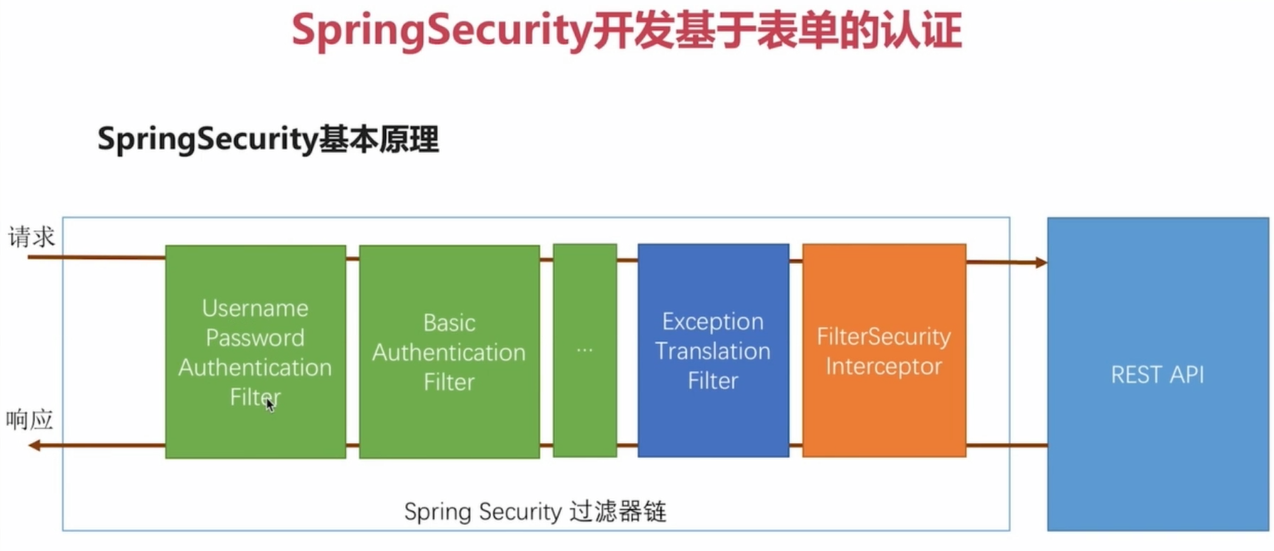
绿色的是代表过滤器链,我们可以自己配置增加和删除,蓝色的是异常处理类,后面黄色的是最后的认证处理类,这两个类的位置是不会变的,所以说,最终我们的请求会到filterSecurityInterceptor这个类中来判断到底能不能访问我们请求的url
比如说:我们直接一个请求(不是登陆请求),他先会到filterSecurityInterceptor这个类,然后验证,没有成功就会抛出异常,让ExceptionTranslationFiter这个类来处理(实际上就是一个转发到登录页面),然后填上账号密码,登陆,会让usernamepasswordAuthenticationFilter这个类拦截,然后最后还是在filterSecurityInterceptor这个类来判断是否要对我们所请求的url做请求
看下面的一个简单demo
BrowserSecurityConfig.java
package com.imooc.security.browser;

import org.springframework.context.annotation.Configuration;

import org.springframework.security.config.annotation.web.builders.HttpSecurity;

import org.springframework.security.config.annotation.web.configuration.WebSecurityConfigurerAdapter;

/**

 * Created by 敲代码的卡卡罗特

 * on 2018/4/15 21:48.

 */

@Configuration

public class BrowserSecurityConfig extends WebSecurityConfigurerAdapter {

    @Override

    protected void configure(HttpSecurity http) throws Exception {

//        http.httpBasic()   //弹出框请求

        http.formLogin()   //表单验证

                .and()

                .authorizeRequests() //开启认证请求

                .anyRequest()        //任何请求

                .authenticated();    //都需要认证

    }

}
声明一个配置文件,配置最基本的功能。
然后我们再访问url就需要登陆了,原始的用户名是user,密码是框架系统生成了验证码,我们需要改变一下。用我们自定义的账号和密码。
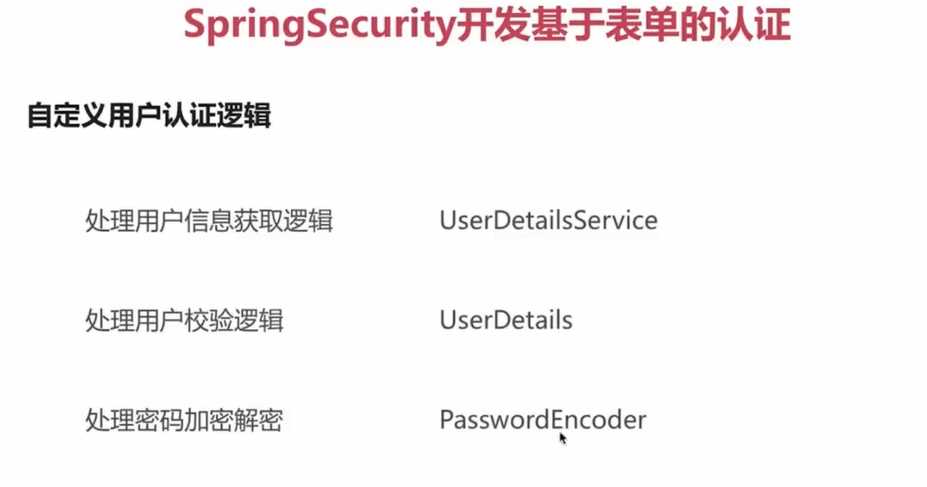
MyUserDetailService.java (最终返回一个User对象) 自定义用户很简单就是@Component 这个类,让spring管理就行
package com.imooc.security.browser;

import org.springframework.security.core.authority.AuthorityUtils;

import org.springframework.security.core.userdetails.User;

import org.springframework.security.core.userdetails.UserDetails;

import org.springframework.security.core.userdetails.UserDetailsService;

import org.springframework.security.core.userdetails.UsernameNotFoundException;

import org.springframework.stereotype.Component;

/**

 * Created by 敲代码的卡卡罗特

 * on 2018/4/15 22:08.

 */

@Component

public class MyUserDetailService implements UserDetailsService {

    @Override

    public UserDetails loadUserByUsername(String s) throws UsernameNotFoundException {

        //、、、、、、省略根据用户名从数据库得到user对象的过程  这个方法就是根据登陆的用户名然后返回一个user对象,这个user对象是框架提供给我们的

        //继承了UserDetails这个类。我们也可以自定义类继承UserDetails

        return new User(s,"123", AuthorityUtils.commaSeparatedStringToAuthorityList("admin"));

    }

}
UserDetails.java 源码解析
public interface UserDetails extends Serializable {

    //权限集合

    Collection<? extends GrantedAuthority> getAuthorities();

    //密码

    String getPassword();

    //账号

    String getUsername();

    //账号是否过期

    boolean isAccountNonExpired();

    //账号是否锁定

    boolean isAccountNonLocked();

    //密码是否过期

    boolean isCredentialsNonExpired();

    //账号是否可用

    boolean isEnabled();

}
密码--》很简单,只需要在配置文件配置一下这个bean就行, BCryptPasswordEncoder这个类是框架给我们提供的。
但是我们在平常用的时候肯定密码存的明文,所以我们需要一个加密算法,我们来配一个加密类。
@Bean

    public PasswordEncoder passwordEncoder(){

        return new BCryptPasswordEncoder();

    }
如果我们还想更加定制化一些呢?
比如说:登陆成功去那个方法,登陆失败去那一个方法。为了方便记录日志嘛。当然。这些可以在配置文件中配置,非常简单。看代码
自定义成功和失败的处理类,只需要new一个类实现框架给的特定的接口就行。然后在配置文件中配置
ImoocAuthenticationSuccessHandler.java //成功处理类
/**

 *

 */

package com.imooc.security.browser.authentication;

import java.io.IOException;

import javax.servlet.ServletException;

import javax.servlet.http.HttpServletRequest;

import javax.servlet.http.HttpServletResponse;

import org.slf4j.Logger;

import org.slf4j.LoggerFactory;

import org.springframework.beans.factory.annotation.Autowired;

import org.springframework.security.core.Authentication;

import org.springframework.security.web.authentication.SavedRequestAwareAuthenticationSuccessHandler;

import org.springframework.stereotype.Component;

import com.fasterxml.jackson.databind.ObjectMapper;

import com.imooc.security.core.properties.LoginResponseType;

import com.imooc.security.core.properties.SecurityProperties;

/**

 * @author zhailiang

 *

 */

@Component("imoocAuthenticationSuccessHandler")

public class ImoocAuthenticationSuccessHandler extends SavedRequestAwareAuthenticationSuccessHandler {

    private Logger logger = LoggerFactory.getLogger(getClass());

    @Autowired

    private ObjectMapper objectMapper;  //springboot默认注入了这个类,处理json的

    @Autowired

    private SecurityProperties securityProperties; //自定义的参数类,不用管。就是配置的url之类的。

    /*

     * (non-Javadoc)

     *

     * @see org.springframework.security.web.authentication.

     * AuthenticationSuccessHandler#onAuthenticationSuccess(javax.servlet.http.

     * HttpServletRequest, javax.servlet.http.HttpServletResponse,

     * org.springframework.security.core.Authentication)

     */

    @Override

    public void onAuthenticationSuccess(HttpServletRequest request, HttpServletResponse response,

            Authentication authentication) throws IOException, ServletException {

        // 注意authentication这个参数可牛了   这里面封装了你当前对象的所有信息

        logger.info("登录成功");

        //这是业务逻辑,不用管,就是说如果设置了json格式,就返回前台json,如果不是就返回页面

        if (LoginResponseType.JSON.equals(securityProperties.getBrowser().getLoginType())) {

            response.setContentType("application/json;charset=UTF-8");

            response.getWriter().write(objectMapper.writeValueAsString(authentication));

        } else {

            //调用父类的方法,其实就是跳转到原来的页面

            super.onAuthenticationSuccess(request, response, authentication);

        }

    }

}
onAuthenticationFailure.java //失败处理类
/**

 *

 */

package com.imooc.security.browser.authentication;

import java.io.IOException;

import javax.servlet.ServletException;

import javax.servlet.http.HttpServletRequest;

import javax.servlet.http.HttpServletResponse;

import org.slf4j.Logger;

import org.slf4j.LoggerFactory;

import org.springframework.beans.factory.annotation.Autowired;

import org.springframework.http.HttpStatus;

import org.springframework.security.core.AuthenticationException;

import org.springframework.security.web.authentication.SimpleUrlAuthenticationFailureHandler;

import org.springframework.stereotype.Component;

import com.fasterxml.jackson.databind.ObjectMapper;

import com.imooc.security.browser.support.SimpleResponse;

import com.imooc.security.core.properties.LoginResponseType;

import com.imooc.security.core.properties.SecurityProperties;

/**

 * @author zhailiang

 *

 */

@Component("imoocAuthenctiationFailureHandler")

public class ImoocAuthenctiationFailureHandler extends SimpleUrlAuthenticationFailureHandler {

    private Logger logger = LoggerFactory.getLogger(getClass());

    @Autowired

    private ObjectMapper objectMapper;

    @Autowired

    private SecurityProperties securityProperties;

    /* (non-Javadoc)

     * @see org.springframework.security.web.authentication.AuthenticationFailureHandler#onAuthenticationFailure(javax.servlet.http.HttpServletRequest, javax.servlet.http.HttpServletResponse, org.springframework.security.core.AuthenticationException)

     */

    @Override

    public void onAuthenticationFailure(HttpServletRequest request, HttpServletResponse response,

            AuthenticationException exception) throws IOException, ServletException {

        logger.info("登录失败");

        if (LoginResponseType.JSON.equals(securityProperties.getBrowser().getLoginType())) {

            response.setStatus(HttpStatus.INTERNAL_SERVER_ERROR.value());

            response.setContentType("application/json;charset=UTF-8");

            response.getWriter().write(objectMapper.writeValueAsString(new SimpleResponse(exception.getMessage())));

        }else{

            super.onAuthenticationFailure(request, response, exception);

        }

    }

}
BrowserSecurityConfig.java //配置文件
package com.imooc.security.browser;

import com.imooc.security.browser.authentication.ImoocAuthenctiationFailureHandler;

import com.imooc.security.browser.authentication.ImoocAuthenticationSuccessHandler;

import org.springframework.beans.factory.annotation.Autowired;

import org.springframework.context.annotation.Bean;

import org.springframework.context.annotation.Configuration;

import org.springframework.security.config.annotation.web.builders.HttpSecurity;

import org.springframework.security.config.annotation.web.configuration.WebSecurityConfigurerAdapter;

import org.springframework.security.crypto.bcrypt.BCryptPasswordEncoder;

import org.springframework.security.crypto.password.PasswordEncoder;

/**

 * Created by 敲代码的卡卡罗特

 * on 2018/4/15 21:48.

 */

@Configuration

public class BrowserSecurityConfig extends WebSecurityConfigurerAdapter {

    @Autowired

    ImoocAuthenticationSuccessHandler imoocAuthenticationSuccessHandler;

    @Autowired

    ImoocAuthenctiationFailureHandler imoocAuthenctiationFailureHandler;

    @Bean

    public PasswordEncoder passwordEncoder(){

        return new BCryptPasswordEncoder();

    }

    @Override

    protected void configure(HttpSecurity http) throws Exception {

//        http.httpBasic()   //弹出框请求

        http.formLogin()   //表单验证

                .loginPage("/authentication/require") //返回登录页,可以是一个action,也可以是一个html页面

                .loginProcessingUrl("/authentication/form") //点击登陆的action,默认是login 我们可以自定义

                .successHandler(imoocAuthenticationSuccessHandler) //配置登陆成功的处理类

                .failureHandler(imoocAuthenctiationFailureHandler)//配置登陆失败的处理类

                .and()

                .authorizeRequests() //开启认证请求

                .antMatchers("/imooc-signIn.html","/authentication/require").permitAll()//忽略认证

                .anyRequest()        //任何请求

                .authenticated();    //都需要认证

        http.csrf().disable();   //关闭csrf

    }

}
自定义未登陆跳转接口 (也就是进一步细化判断,写日志什么的,平常我们在配置文件中配的就是跳转到登陆页面,这是跳转到接口)
package com.imooc.security.browser;

import com.imooc.security.browser.support.SimpleResponse;

import com.imooc.security.core.properties.SecurityConstants;

import com.imooc.security.core.properties.SecurityProperties;

import org.apache.commons.lang.StringUtils;

import org.slf4j.Logger;

import org.slf4j.LoggerFactory;

import org.springframework.beans.factory.annotation.Autowired;

import org.springframework.http.HttpStatus;

import org.springframework.security.web.DefaultRedirectStrategy;

import org.springframework.security.web.RedirectStrategy;

import org.springframework.security.web.savedrequest.HttpSessionRequestCache;

import org.springframework.security.web.savedrequest.RequestCache;

import org.springframework.security.web.savedrequest.SavedRequest;

import org.springframework.web.bind.annotation.RequestMapping;

import org.springframework.web.bind.annotation.ResponseStatus;

import org.springframework.web.bind.annotation.RestController;

import javax.servlet.http.HttpServletRequest;

import javax.servlet.http.HttpServletResponse;

import java.io.IOException;

/**

 * Created by 敲代码的卡卡罗特

 * on 2018/4/16 0:16.

 */

@RestController

public class BrowserSecurityController {

    private Logger logger = LoggerFactory.getLogger(getClass());

    private RequestCache requestCache = new HttpSessionRequestCache();  //提供用缓存中得到url的类

    private RedirectStrategy redirectStrategy = new DefaultRedirectStrategy(); //提供跳转的类

    @Autowired

    private SecurityProperties securityProperties;

    /**

     * 当需要身份认证时,跳转到这里

     *

     * @param request

     * @param response

     * @return

     * @throws IOException

     */

    @RequestMapping(SecurityConstants.DEFAULT_UNAUTHENTICATION_URL)

    @ResponseStatus(code = HttpStatus.UNAUTHORIZED) //返回错误状态码

    public SimpleResponse requireAuthentication(HttpServletRequest request, HttpServletResponse response)

            throws IOException {

        SavedRequest savedRequest = requestCache.getRequest(request, response);

        if (savedRequest != null) {

            String targetUrl = savedRequest.getRedirectUrl();

            logger.info("引发跳转的请求是:" + targetUrl);

            if (StringUtils.endsWithIgnoreCase(targetUrl, ".html")) {

                redirectStrategy.sendRedirect(request, response, securityProperties.getBrowser().getLoginPage());

            }

        }

        return new SimpleResponse("访问的服务需要身份认证,请引导用户到登录页");

    }

}
最后:我们可以在代码的任何地方拿到当前登陆对象的信息(首先是已经登录) 有三种方法
@GetMapping("/user1")

    public Object getUser1() {

        return SecurityContextHolder.getContext().getAuthentication();

    }

    @GetMapping("/user2")

    public Object getUser2(Authentication authentication) {

        return authentication;

    }

    @GetMapping("/user3")

    public Object getUser3(@AuthenticationPrincipal UserDetails user) {

        return user;

    }
实现记住我功能 ,配置很简单,业务逻辑是,你配置好框架会给你在你数据库中创建一个表,包含用户名,token,时间等字段,然后也会在你本地存个cookie,登陆完成在表中插入一条数据,如果下次登陆的话,验证你信息,如果没有携带认证信息,最后会查你的数据库,然后得到你用户名,然后再调那个根据用户名得到用户的方法认证成功。看代码
@Autowired

    private UserDetailsService userDetailsService;

    @Autowired

    private SecurityProperties securityProperties;

    @Bean

    public PersistentTokenRepository persistentTokenRepository() {

        JdbcTokenRepositoryImpl tokenRepository = new JdbcTokenRepositoryImpl(); //new一个这个类

        tokenRepository.setDataSource(dataSource); //指定数据源,因为要存数据库

        tokenRepository.setCreateTableOnStartup(true);//在启动的时候创建表

        return tokenRepository;

    }

 @Override

    protected void configure(HttpSecurity http) throws Exception {

//        http.httpBasic()   //弹出框请求

        http.formLogin()   //表单验证

                .loginPage("/authentication/require") //返回登录页,可以是一个action,也可以是一个html页面

                .loginProcessingUrl("/authentication/form") //点击登陆的action,默认是login 我们可以自定义

                .successHandler(imoocAuthenticationSuccessHandler) //配置登陆成功的处理类

                .failureHandler(imoocAuthenctiationFailureHandler)//配置登陆失败的处理类

                .and()

                .rememberMe() //记住我

                .tokenRepository(persistentTokenRepository())  //指定TokenRepository的bean

                .tokenValiditySeconds(securityProperties.getBrowser().getRememberMeSeconds())//过期时间

                .userDetailsService(userDetailsService)//指定根据名字得到用户的类

                .and()

                .authorizeRequests() //开启认证请求

                .antMatchers("/imooc-signIn.html","/authentication/require").permitAll()//忽略认证

                .anyRequest()        //任何请求

                .authenticated();    //都需要认证

        http.csrf().disable();   //关闭csrf

    }
最后:前台传过来的一定是 name="remember-me" 这个字段
springSecurity初步认识和执行流程的更多相关文章
- Monkey源代码分析之执行流程
在<MonkeyRunner源代码分析之与Android设备通讯方式>中.我们谈及到MonkeyRunner控制目标android设备有多种方法.当中之中的一个就是在目标机器启动一个mon ...
- MySql基础架构以及SQL语句执行流程
01. mysql基础架构 SQL语句是如何执行的 学习一下mysql的基础架构,从一条sql语句是如何执行的来学习. 一般我们写一条查询语句类似下面这样: select user,password ...
- 步步深入:MySQL架构总览->查询执行流程->SQL解析顺序
前言: 一直是想知道一条SQL语句是怎么被执行的,它执行的顺序是怎样的,然后查看总结各方资料,就有了下面这一篇博文了. 本文将从MySQL总体架构--->查询执行流程--->语句执行顺序来 ...
- 第二天 ci执行流程
第二天 ci执行流程 welcome 页面 this this->load 单入口框架index.php 两个文件夹 system application定义 定义常亮路径 载入 codeign ...
- 轻量级前端MVVM框架avalon - 执行流程2
接上一章 执行流程1 在这一大堆扫描绑定方法中应该会哪些实现? 首先我们看avalon能帮你做什么? 数据填充,比如表单的一些初始值,切换卡的各个面板的内容({{xxx}},{{xxx|html}}, ...
- [Java编程思想-学习笔记]第4章 控制执行流程
4.1 return 关键字return有两方面的用途:一方面指定一个方法结束时返回一个值:一方面强行在return位置结束整个方法,如下所示: char test(int score) { if ...
- ThinkPHP2.2框架执行流程图,ThinkPHP控制器的执行流程
ThinkPHP2.2框架执行原理.流程图在线手册 ThinkPHP控制器的执行流程 对用户的第一次URL访问 http://<serverIp>/My/index.php/Index/s ...
- 深入浅出Mybatis系列(十)---SQL执行流程分析(源码篇)
最近太忙了,一直没时间继续更新博客,今天忙里偷闲继续我的Mybatis学习之旅.在前九篇中,介绍了mybatis的配置以及使用, 那么本篇将走进mybatis的源码,分析mybatis 的执行流程, ...
- Servlet执行流程和生命周期【慕课网搬】
Servlet执行流程(GET方式为例) 首先用户客户端浏览器发出Get方式(点击超链接方式)向浏览器发出请求. 服务器接收到客户端点击超链接,接收到GET请求之后,服务器到WEB.xml中<s ...
随机推荐
- The Contest CodeForces - 813A (思维)
Pasha is participating in a contest on one well-known website. This time he wants to win the contest ...
- Max length of title attribute in html
测了一下chrome是1024个utf-8字符. 具体可见: http://stackoverflow.com/questions/8516235/max-length-of-title-attrib ...
- 解决Ubuntu中vi命令的编辑模式下不能正常使用方向键和退格键的问题
在Ubuntu中,进入vi命令的编辑模式,发现按方向键不能移动光标,而是会输出ABCD,以及退格键也不能正常删除字符.这是由于Ubuntu预装的是vim-tiny,而我们需要使用vim-full,解决 ...
- linux ubuntu nethogs安装与介绍
安装nethogs: apt-get -y install ncurses* apt-get -y install libpcap-dev libncurses5-dev wget -c https: ...
- WINFORM 多条件动态查询 通用代码的设计与实现
经常碰到多条件联合查询的问题,以前的习惯认为很简单总会从头开始设计布局代码,往往一个查询面要费上老半天的功夫,而效果也不咋地. 前段时间做了个相对通用的多条件动态查询面,复用起来还是挺方便的, ...
- delphi创建动态菜单
1.动态生成菜单项 varFirstItem: TMenuItem;SecondItem: TMenuItem; begin FirstItem := TMenuItem.Create(Self); ...
- ceph 安装ceph问题汇总
1.在不同节点安装ceph时,出现以下异常: 参考这里 ceph deploy RuntimeError: NoSectionError: No section: 'ceph' 解决方法: 在报错的机 ...
- Codeforces ECR47F Dominant Indices(线段树合并)
一个比较显然的做法:对每棵子树用线段树维护其中的深度,线段树合并即可. 本来想用这个题学一下dsu on tree,结果还是弃疗了. #include<iostream> #include ...
- MT【35】用复数得到的两组恒等式
特别的,当$r\rightarrow1^{-}$时有以下两个恒等式: 第二个恒等式有关的自主招生试题参考博文MT[31]傅里叶级数为背景的三角求和 评:利用两种展开形式得到一些恒等式是复数里经常出现的 ...
- Deep Learning(深度学习)学习笔记整理系列二
声明: 1)该Deep Learning的学习系列是整理自网上很大牛和机器学习专家所无私奉献的资料的.具体引用的资料请看参考文献.具体的版本声明也参考原文献. 2)本文仅供学术交流,非商用.所以每一部 ...