
使用electron为贪吃蛇游戏创建全局快捷键
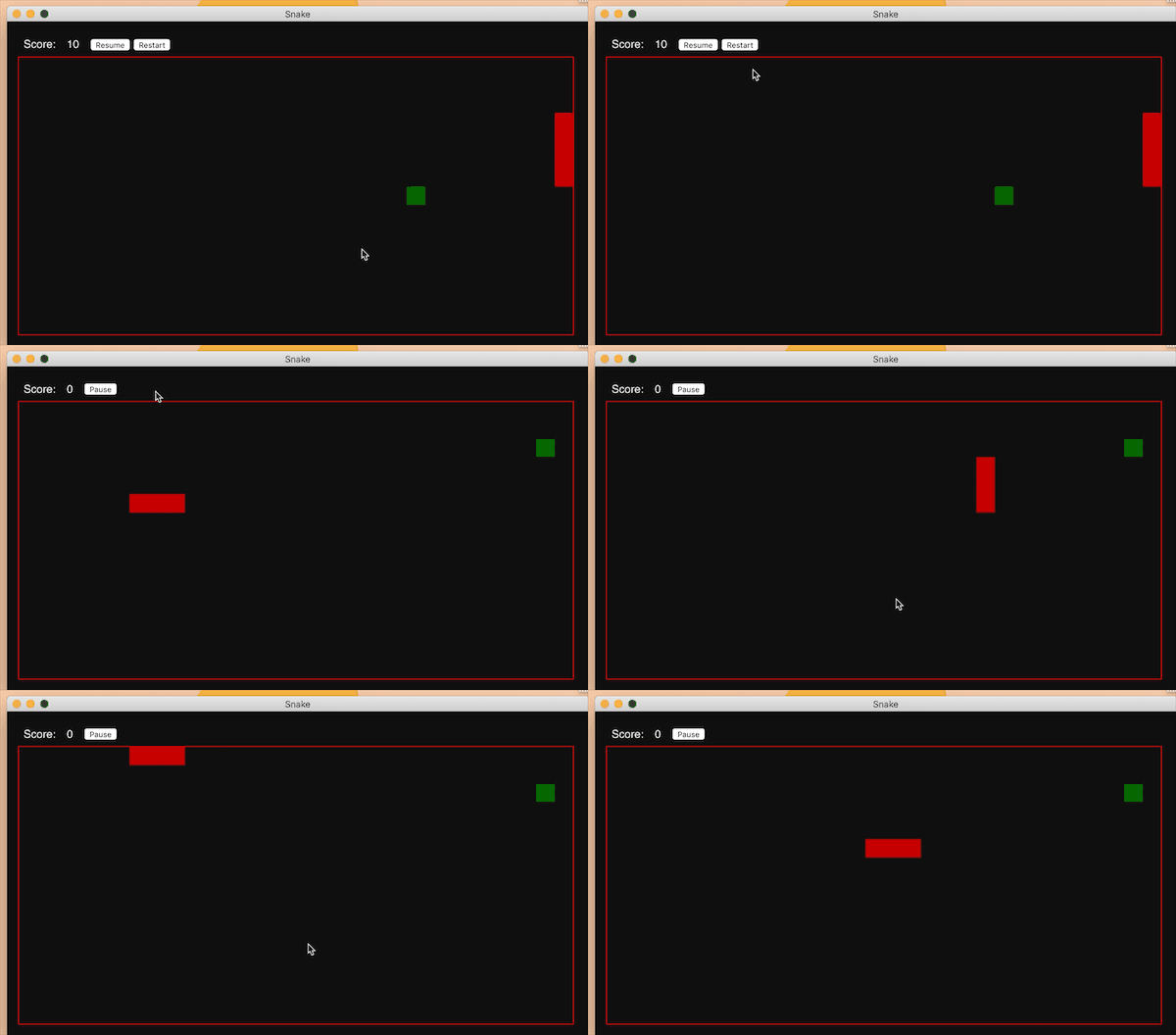
上图就是我们的简体版贪吃蛇游戏,我们可以看到使用键盘上面的上下左右可以对贪吃蛇进行控制。
The picture above is our simplified version of Snake Eating Game. We can see that the top
and bottom of the keyboard can control Snake Eating.
所用到的代码如下
The code used is as follows
//这个是对方向进行的控制

//This is direction control.

window.document.onkeydown = function(event) {

  if (!allowPressKeys){

    return null;

  }

  let keyCode;

  if(!event)

  {

    keyCode = window.event.keyCode;

  }

  else

  {

    keyCode = event.keyCode;

  }

  switch(keyCode)

  {

    case 37:

      if (direction !== 'right') {

        moveLeft();

      }

      break;

    case 38:

      if (direction !== 'down'){

        moveUp();

      }

      break;

    case 39:

      if (direction !== 'left'){

        moveRight();

      }

      break;

    case 40:

      if (direction !== 'up'){

        moveDown();

      }

      break;

    default:

      break;

  }

};
app.css

body {

    margin: 1em;

    padding: 0;

    background: #111;

    color: white;

    font-family: helvetica;

  }

  canvas {

    border: solid 1px red;

    width: 800px;

    height: 400px;

  }

  #scoreboard {

    padding-bottom: 1em;

  }

  #label, #score, #bar {

      float: left;

      padding: 8px;

  }

  #pause_menu, #restart_menu {

    display: none;

  }
app.js

'use strict';

let currentState;

let canvas, ctx, gridSize, currentPosition, snakeBody, snakeLength, direction, score, suggestedPoint, allowPressKeys, interval, choice;

function updateScore () {

  score = (snakeLength - 3) * 10;

  document.getElementById('score').innerText = score;

}

function hasPoint (element) {

  return (element[0] === suggestedPoint[0] && element[1] === suggestedPoint[1]);

}

function makeFoodItem () {

  suggestedPoint = [Math.floor(Math.random()*(canvas.width/gridSize))*gridSize, Math.floor(Math.random()*(canvas.height/gridSize))*gridSize];

  if (snakeBody.some(hasPoint)) {

    makeFoodItem();

  } else {

    ctx.fillStyle = 'rgb(10,100,0)';

    ctx.fillRect(suggestedPoint[0], suggestedPoint[1], gridSize, gridSize);

  }

}

function hasEatenItself (element) {

  return (element[0] === currentPosition.x && element[1] === currentPosition.y);

}

function leftPosition(){

 return currentPosition.x - gridSize;

}

function rightPosition(){

  return currentPosition.x + gridSize;

}

function upPosition(){

  return currentPosition.y - gridSize;

}

function downPosition(){

  return currentPosition.y + gridSize;

}

function whichWayToGo (axisType) {

  if (axisType === 'x') {

    choice = (currentPosition.x > canvas.width / 2) ? moveLeft() : moveRight();

  } else {

    choice = (currentPosition.y > canvas.height / 2) ? moveUp() : moveDown();

  }

}

function moveUp(){

  if (upPosition() >= 0) {

    executeMove('up', 'y', upPosition());

  } else {

    whichWayToGo('x');

  }

}

function moveDown(){

  if (downPosition() < canvas.height) {

    executeMove('down', 'y', downPosition());

  } else {

    whichWayToGo('x');

  }

}

function moveLeft(){

  if (leftPosition() >= 0) {

    executeMove('left', 'x', leftPosition());

	} else {

    whichWayToGo('y');

  }

}

function moveRight(){

  if (rightPosition() < canvas.width) {

    executeMove('right', 'x', rightPosition());

  } else {

    whichWayToGo('y');

  }

}

function executeMove(dirValue, axisType, axisValue) {

  direction = dirValue;

  currentPosition[axisType] = axisValue;

  drawSnake();

}

function moveSnake(){

  switch (direction) {

    case 'up':

      moveUp();

      break;

    case 'down':

      moveDown();

      break;

    case 'left':

      moveLeft();

      break;

    case 'right':

      moveRight();

      break;

  }

}

function restart () {

	document.getElementById('play_menu').style.display='block';

	document.getElementById('pause_menu').style.display='none';

	document.getElementById('restart_menu').style.display='none';

	pause();

	start();

}

function pause(){

	document.getElementById('play_menu').style.display='none';

	document.getElementById('pause_menu').style.display='block';

  clearInterval(interval);

  allowPressKeys = false;

}

function play(){

	document.getElementById('play_menu').style.display='block';

	document.getElementById('pause_menu').style.display='none';

  interval = setInterval(moveSnake,100);

  allowPressKeys = true;

}

function gameOver(){

  pause();

  window.alert('Game Over. Your score was ' + score);

  ctx.clearRect(0,0, canvas.width, canvas.height);

	document.getElementById('play_menu').style.display='none';

  document.getElementById('restart_menu').style.display='block';

}

function drawSnake() {

  if (snakeBody.some(hasEatenItself)) {

    gameOver();

    return false;

  }

  snakeBody.push([currentPosition.x, currentPosition.y]);

  ctx.fillStyle = 'rgb(200,0,0)';

  ctx.fillRect(currentPosition.x, currentPosition.y, gridSize, gridSize);

  if (snakeBody.length > snakeLength) {

    let itemToRemove = snakeBody.shift();

    ctx.clearRect(itemToRemove[0], itemToRemove[1], gridSize, gridSize);

  }

  if (currentPosition.x === suggestedPoint[0] && currentPosition.y === suggestedPoint[1]) {

    makeFoodItem();

    snakeLength += 1;

    updateScore();

  }

}

window.document.onkeydown = function(event) {

  if (!allowPressKeys){

    return null;

  }

  let keyCode;

  if(!event)

  {

    keyCode = window.event.keyCode;

  }

  else

  {

    keyCode = event.keyCode;

  }

  switch(keyCode)

  {

    case 37:

      if (direction !== 'right') {

        moveLeft();

      }

      break;

    case 38:

      if (direction !== 'down'){

        moveUp();

      }

      break;

    case 39:

      if (direction !== 'left'){

        moveRight();

      }

      break;

    case 40:

      if (direction !== 'up'){

        moveDown();

      }

      break;

    default:

      break;

  }

};

function start () {

  ctx.clearRect(0,0, canvas.width, canvas.height);

  currentPosition = {'x':50, 'y':50};

  snakeBody = [];

  snakeLength = 3;

  updateScore();

  makeFoodItem();

  drawSnake();

  direction = 'right';

  play();

}

function initialize () {

  canvas = document.querySelector('canvas');

  ctx = canvas.getContext('2d');

  gridSize = 10;

  start();

}

function togglePauseState () {

  if (currentState) {

    if (currentState === 'play') {

      pause();

   		currentState = 'pause';

    } else {

      play();

   		currentState = 'play';

    }

   } else {

     pause();

     currentState = 'play';

   }

}

const ipcRenderer = require('electron').ipcRenderer;

function togglePauseState () {

  if (currentState) {

    if (currentState === 'play') {

      pause();

      currentState = 'pause';

    } else {

      play();

      currentState = 'play';

    }

  } else {

    pause();

    currentState = 'play';

	}

}

ipcRenderer.on('togglePauseState', togglePauseState);

window.onload = initialize;
<html>

  <head>

    <title>Snake</title>

    <link href="app.css" rel="stylesheet" />

    <script src="app.js"></script>

  </head>

  <body>

    <div id="scoreboard">

      <span id="label">Score:</span>

      <span id="score"></span>

			<div id="bar">

					<div id="play_menu">

				  	<button onclick="pause();">Pause</button>

					</div>

				  <div id="pause_menu">

				    <button onclick="play();">Resume</button>

						<button onclick="restart();">Restart</button>

				  </div>

				  <div id="restart_menu">

				    <button onclick="restart();">Restart</button>

				  </div>

				</div>

			</div>

    </div>

    <canvas></canvas>

  </body>

</html>
main.js

'use strict';

const {app, globalShortcut, BrowserWindow} = require('electron');

let mainWindow = null;

app.on('window-all-closed', () => {

  if (process.platform !== 'darwin') app.quit();

});

app.on('ready', () => {

  mainWindow = new BrowserWindow({

    width: 840,

    height: 470,

    useContentSize: true

  });

  mainWindow.loadURL(`file://${__dirname}/index.html`);

  mainWindow.on('closed', () => { mainWindow = null; });

  const pauseKey = globalShortcut.register('CommandOrControl+P', () => {

    mainWindow.webContents.send('togglePauseState');

  });

  if (!pauseKey) alert('You will not be able to pause the game from the keyboard');

});

app.on('will-quit', () => {

  globalShortcut.unregister('CommandOrControl+P');

});
"name": "snake-electron",
"version": "1.0.0",
"description": "The Snake game, built with Electron for the book 'Cross Platform Desktop Applications'",
"main": "main.js",
"scripts": {
"start": "node_modules/.bin/electron .",
"test": "echo \"Error: no test specified\" && exit 1"
},
"keywords": [
"electron",
"keyboard",
"shortcuts"
],
"author": "Paul Jensen ",
"license": "MIT",
"dependencies": {
"electron-prebuilt": "^1.2.5"
}
}
本文的例子学习自 >这本书
by要学的东西很多,我还差很远
使用electron为贪吃蛇游戏创建全局快捷键的更多相关文章
- 用OpenGL简单编写的一个最简单贪吃蛇游戏
刚学OpenGL的时候,写的一个最简单的贪吃蛇游戏代码 如下: //贪吃蛇游戏 #include<stdio.h> #include<stdlib.h> #include< ...
- 用Java开发贪吃蛇游戏
贪吃蛇游戏的设计步骤: Part 1: 设计游戏图纸 画出900*700的白色窗口 在窗口上添加画布 在画布上添加标题 在画布上添加黑色游戏区 Part 2: 放置静态的蛇:一个头.两个身体 加上开始 ...
- Qt 学习之路 2(34):贪吃蛇游戏(4)
Qt 学习之路 2(34):贪吃蛇游戏(4) 豆子 2012年12月30日 Qt 学习之路 2 73条评论 这将是我们这个稍大一些的示例程序的最后一部分.在本章中,我们将完成GameControlle ...
- Qt 学习之路 2(32):贪吃蛇游戏(2)
Qt 学习之路 2(32):贪吃蛇游戏(2) 豆子 2012年12月27日 Qt 学习之路 2 55条评论 下面我们继续上一章的内容.在上一章中,我们已经完成了地图的设计,当然是相当简单的.在我们的游 ...
- Qt 学习之路 2(31):贪吃蛇游戏(1)
Qt 学习之路 2(31):贪吃蛇游戏(1) 豆子 2012年12月18日 Qt 学习之路 2 41条评论 经过前面一段时间的学习,我们已经了解到有关 Qt 相当多的知识.现在,我们将把前面所讲过的知 ...
- Linux平台下贪吃蛇游戏的运行
1.参考资料说明: 这是一个在Linux系统下实现的简单的贪吃蛇游戏,同学找帮忙,我就直接在Red Hat中调试了一下,参考的是百度文库中"maosuhan"仁兄的文章,结合自己的 ...
- 一个原生JS实现的不太成熟的贪吃蛇游戏
一个初初初初级前端民工 主要是记录一下写过的东西,复习用 大佬们如果看到代码哪里不符合规范,或者有更好写法的,欢迎各位批评指正 十分感谢 实现一个贪吃蛇游戏需要几步? 1.有地图 2.有蛇 3.有食物 ...
- Android快乐贪吃蛇游戏实战项目开发教程-01项目概述与目录
一.项目简介 贪吃蛇是一个很经典的游戏,也很适合用来学习.本教程将和大家一起做一个Android版的贪吃蛇游戏. 我已经将做好的案例上传到了应用宝,无病毒.无广告,大家可以放心下载下来把玩一下.应用宝 ...
- 用C++实现的贪吃蛇游戏
我是一个C++初学者,控制台实现了一个贪吃蛇游戏. 代码如下: //"贪吃蛇游戏"V1.0 //李国良于2016年12月29日编写完成 #include <iostream& ...
随机推荐
- QT 窗口置顶功能
Qt中,保持窗口置顶的设置为: Qt::WindowFlags m_flags = windowFlags(); setWindowFlags(m_flags | Qt::WindowStaysOnT ...
- Redis持久化的两种方式和区别
该文转载自:http://www.cnblogs.com/swyi/p/6093763.html Redis持久化的两种方式和区别 Redis是一种高级key-value数据库.它跟memcached ...
- 【转帖】2018年Windows漏洞年度盘点
2018年Windows漏洞年度盘点丨老漏洞经久不衰,新0day层出不穷 腾讯电脑管家2019-02-12共17875人围观 ,发现 1 个不明物体网络安全资讯 https://www.freebuf ...
- oracle11.2.0.1 deferred_segment_creation 造成exp imp 空表无法导出的问题
oracle11g 新增加了 deferred_segment_creation 的属性在创建的数据库表中,如果表中没有数据,并且这个参数是true的话,并不是直接就在数据文件中的增加相应的segm ...
- [转帖] select、poll、epoll之间的区别总结[整理] + 知乎大神解答 https://blog.csdn.net/qq546770908/article/details/53082870 不过图都裂了.
select.poll.epoll之间的区别总结[整理] + 知乎大神解答 2016年11月08日 15:37:15 阅读数:2569 http://www.cnblogs.com/Anker/p/3 ...
- 关于python requests 包跑ssl的设置 和 charles相关抓包的问题
由于在测试服务器上测试东西都是https,然后最近又在和大神一起开发openapi,api写好当然是要测试的 python上测试接口最好用的莫过于requests模块了.但是 我还从来没有用reque ...
- Test Scenarios for result grid
1 Page loading symbol should be displayed when it is taking more than default time to load the resul ...
- 初学者学习C++的50条忠告
1.把C++当成一门新的语言学习(和C没啥关系!真的.); 2.看<Thinking In C++>,不要看<C++变成死相>; 3.看<The C++ Programm ...
- html 響應式web設計
RWD(響應式web設計)可以根據尺寸大小傳遞網頁,對於平板和移動設備是必須的. <html lang="en-US"> lang表示頁面的主要語言.http://ww ...
- AJAX--总结
AJAX 2018-9-6 14:42:53 AJAX简介 HTTP协议------>HTTP权威指南 请求:客户端去向服务端请求一个文件 响应:服务端把对应的文件内容返回给客户端, ...