
01_Mybaits逆向工程maven版
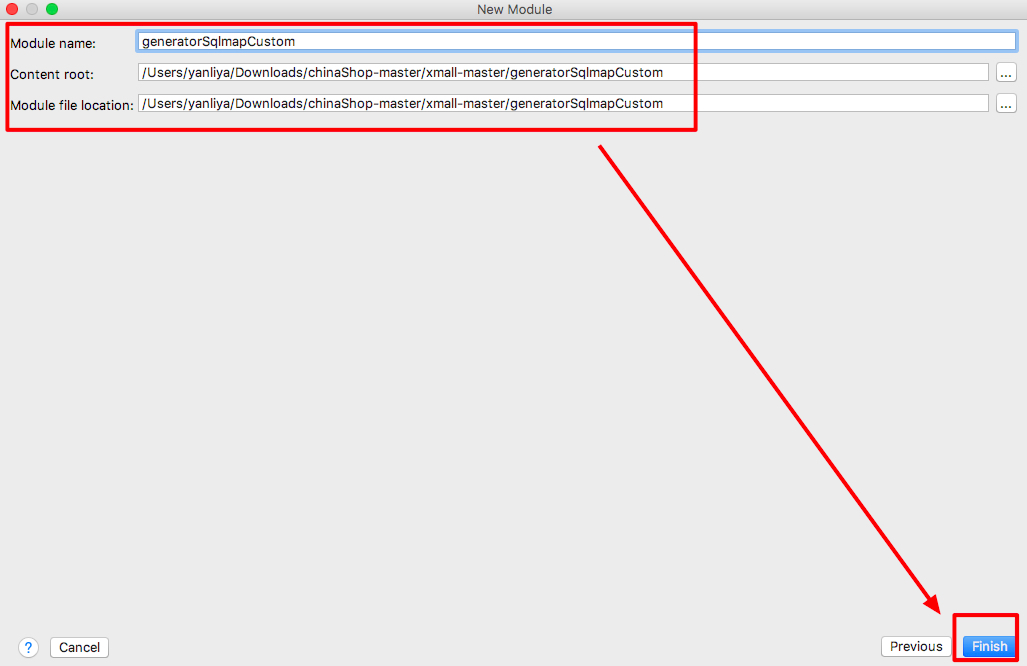
1.创建generatorSqlmapCustom工程
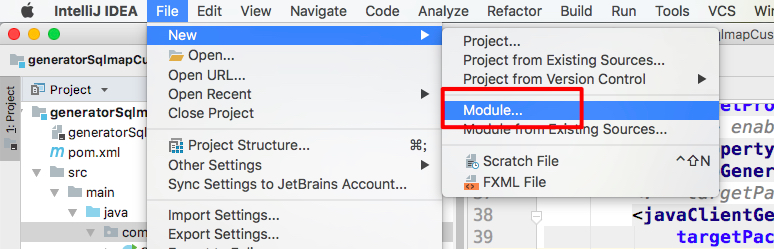
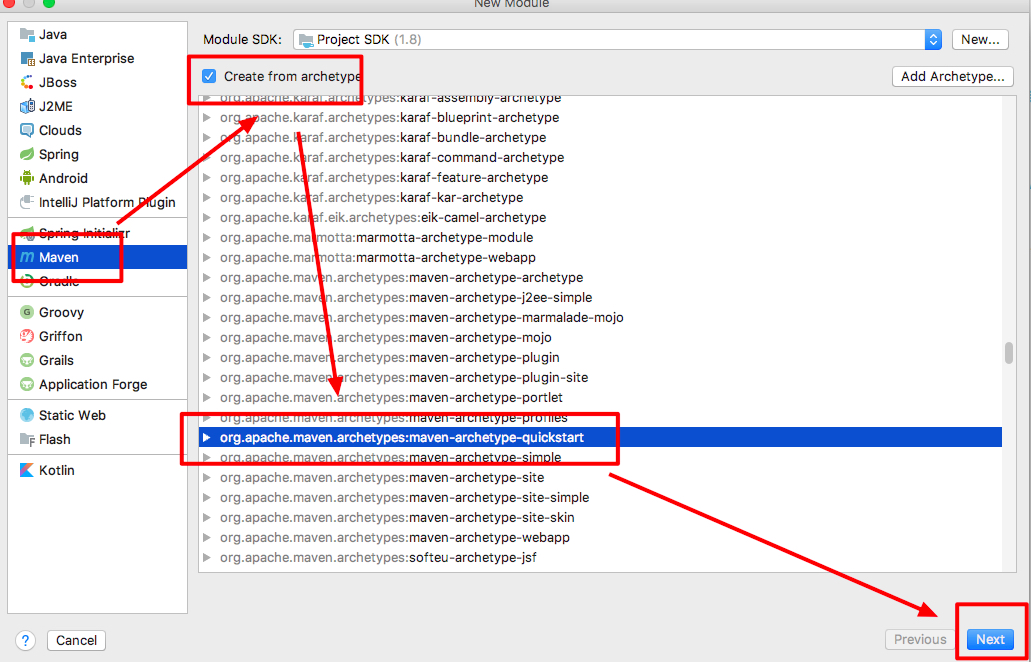
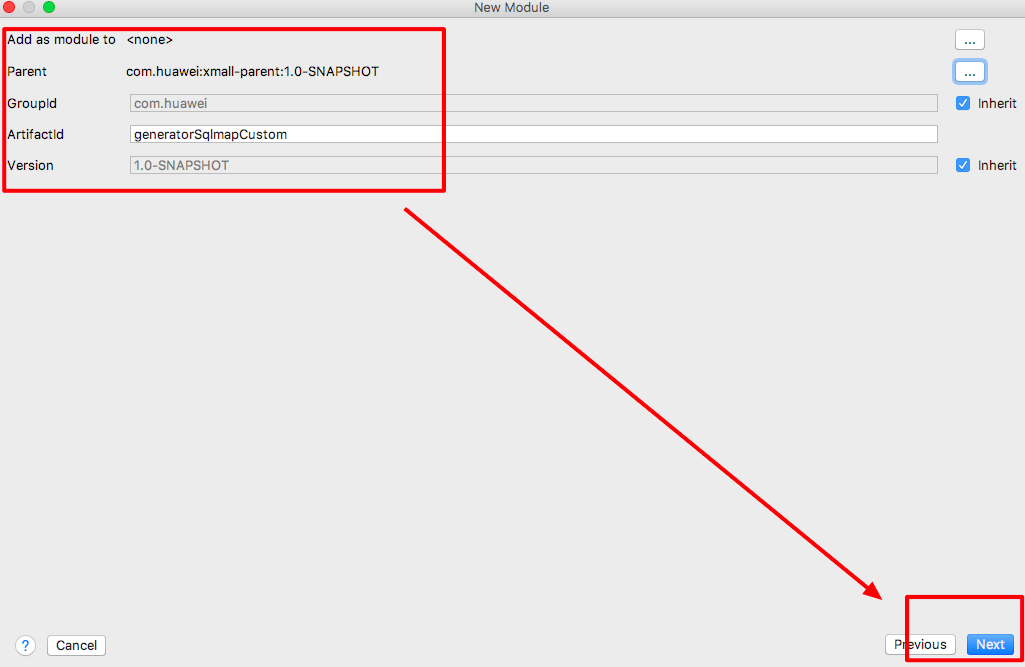
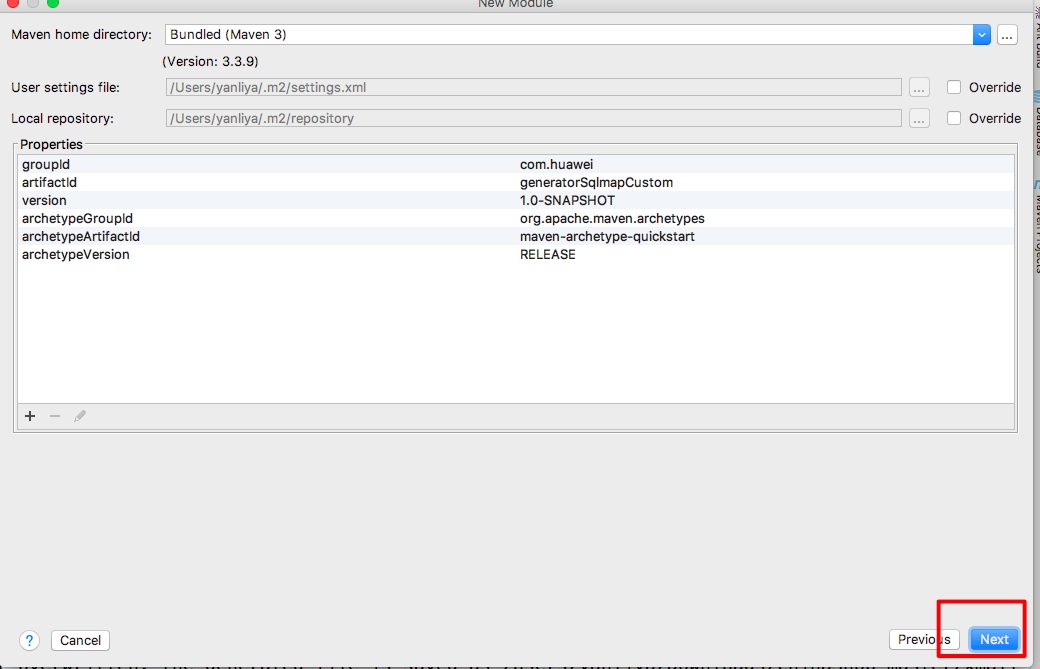
2.修改pom文件
<?xml version="1.0" encoding="UTF-8"?>

<project xmlns="http://maven.apache.org/POM/4.0.0" xmlns:xsi="http://www.w3.org/2001/XMLSchema-instance"

         xsi:schemaLocation="http://maven.apache.org/POM/4.0.0 http://maven.apache.org/xsd/maven-4.0.0.xsd">

    <parent>

        <artifactId>xmall-parent</artifactId>

        <groupId>com.huawei</groupId>

        <version>1.0-SNAPSHOT</version>

        <relativePath>../xmall-parent/pom.xml</relativePath>

    </parent>

    <modelVersion>4.0.0</modelVersion>

    <artifactId>generatorSqlmapCustom</artifactId>

    <name>generatorSqlmapCustom</name>

    <!-- FIXME change it to the project's website -->

    <url>http://www.example.com</url>

    <dependencies>

        <dependency>

            <artifactId>xmall-common</artifactId>

            <groupId>com.huawei</groupId>

            <version>1.0-SNAPSHOT</version>

        </dependency>

        <dependency>

            <groupId>org.mybatis.generator</groupId>

            <artifactId>mybatis-generator-core</artifactId>

            <version>1.3.5</version>

        </dependency>

    </dependencies>

    <build>

        <finalName>mybatis_generator</finalName>

        <plugins>

            <plugin>

                <groupId>org.mybatis.generator</groupId>

                <artifactId>mybatis-generator-maven-plugin</artifactId>

                <version>1.3.5</version>

                <dependencies>

                    <dependency>

                        <groupId>org.mybatis.generator</groupId>

                        <artifactId>mybatis-generator-core</artifactId>

                        <version>1.3.5</version>

                    </dependency>

                    <dependency>

                        <groupId>mysql</groupId>

                        <artifactId>mysql-connector-java</artifactId>

                        <version>5.1.32</version>

                    </dependency>

                </dependencies>

            </plugin>

        </plugins>

    </build>

</project>
3.添加官方提供的逆向工程源码
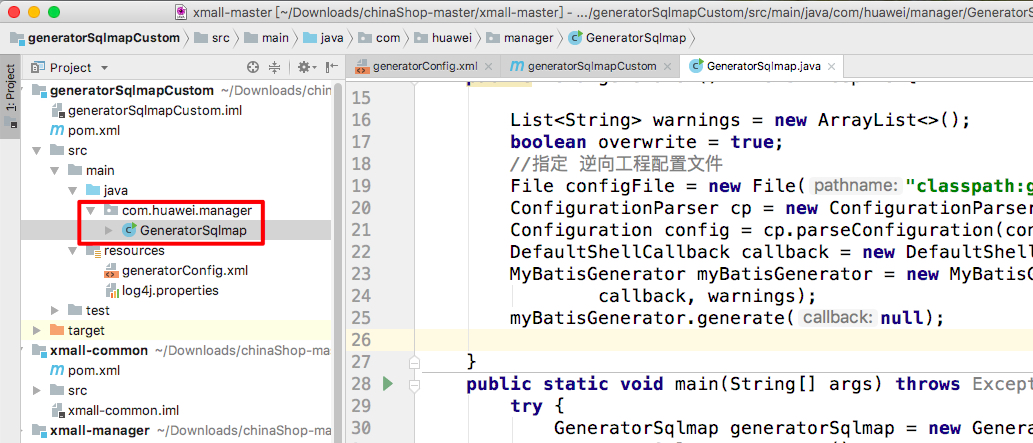
package com.huawei.manager;

import java.io.File;

import java.util.ArrayList;

import java.util.List;

import org.mybatis.generator.api.MyBatisGenerator;

import org.mybatis.generator.config.Configuration;

import org.mybatis.generator.config.xml.ConfigurationParser;

import org.mybatis.generator.internal.DefaultShellCallback;

public class GeneratorSqlmap {

    public void generator() throws Exception{

        List<String> warnings = new ArrayList<>();

        boolean overwrite = true;

        //指定 逆向工程配置文件

        File configFile = new File("classpath:generatorConfig.xml");

        ConfigurationParser cp = new ConfigurationParser(warnings);

        Configuration config = cp.parseConfiguration(configFile);

        DefaultShellCallback callback = new DefaultShellCallback(overwrite);

        MyBatisGenerator myBatisGenerator = new MyBatisGenerator(config,

                callback, warnings);

        myBatisGenerator.generate(null);

    }

    public static void main(String[] args) throws Exception {

        try {

            GeneratorSqlmap generatorSqlmap = new GeneratorSqlmap();

            generatorSqlmap.generator();

        } catch (Exception e) {

            e.printStackTrace();

        }

    }

}
4.添加并修改配置文件
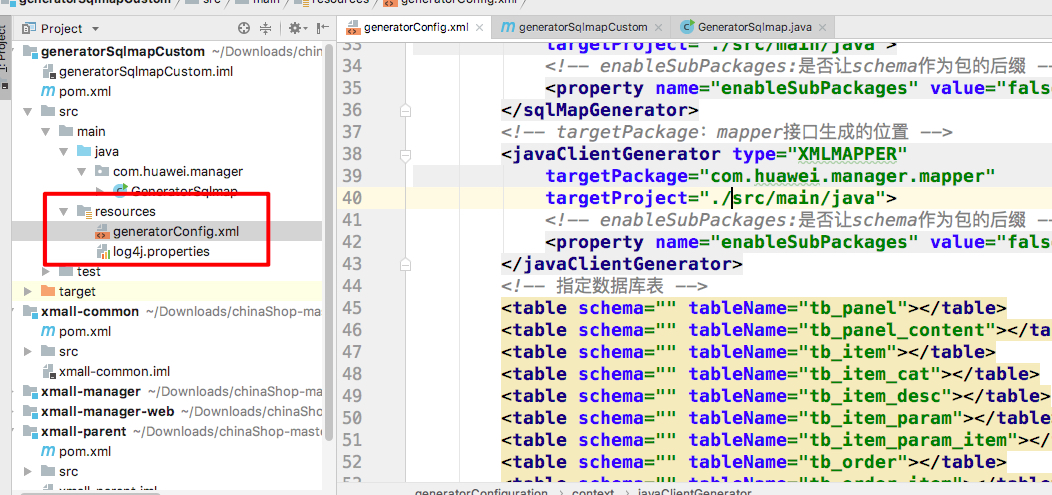
<?xml version="1.0" encoding="UTF-8"?>

<!DOCTYPE generatorConfiguration

  PUBLIC "-//mybatis.org//DTD MyBatis Generator Configuration 1.0//EN"

  "http://mybatis.org/dtd/mybatis-generator-config_1_0.dtd">

<generatorConfiguration>

    <context id="testTables" targetRuntime="MyBatis3">

        <commentGenerator>

            <!-- 是否去除自动生成的注释 true:是 : false:否 -->

            <property name="suppressAllComments" value="true" />

        </commentGenerator>

        <!--数据库连接的信息:驱动类、连接地址、用户名、密码 -->

        <jdbcConnection driverClass="com.mysql.jdbc.Driver"

            connectionURL="jdbc:mysql://192.168.81.130:3306/xmall" userId="root"

            password="root">

        </jdbcConnection>

        <!-- 默认false,把JDBC DECIMAL 和 NUMERIC 类型解析为 Integer,为 true时把JDBC DECIMAL 和

            NUMERIC 类型解析为java.math.BigDecimal -->

        <javaTypeResolver>

            <property name="forceBigDecimals" value="false" />

        </javaTypeResolver>

        <!-- targetProject:生成PO类的位置 -->

        <javaModelGenerator targetPackage="com.huawei.manager.pojo"

            targetProject="./src/main/java">

            <!-- enableSubPackages:是否让schema作为包的后缀 -->

            <property name="enableSubPackages" value="false" />

            <!-- 从数据库返回的值被清理前后的空格 -->

            <property name="trimStrings" value="true" />

        </javaModelGenerator>

        <!-- targetProject:mapper映射文件生成的位置 -->

        <sqlMapGenerator targetPackage="com.huawei.manager.mapper"

            targetProject="./src/main/java">

            <!-- enableSubPackages:是否让schema作为包的后缀 -->

            <property name="enableSubPackages" value="false" />

        </sqlMapGenerator>

        <!-- targetPackage:mapper接口生成的位置 -->

        <javaClientGenerator type="XMLMAPPER"

            targetPackage="com.huawei.manager.mapper"

            targetProject="./src/main/java">

            <!-- enableSubPackages:是否让schema作为包的后缀 -->

            <property name="enableSubPackages" value="false" />

        </javaClientGenerator>

        <!-- 指定数据库表 -->

        <table schema="" tableName="tb_panel"></table>

        <table schema="" tableName="tb_panel_content"></table>

        <table schema="" tableName="tb_item"></table>

        <table schema="" tableName="tb_item_cat"></table>

        <table schema="" tableName="tb_item_desc"></table>

        <table schema="" tableName="tb_item_param"></table>

        <table schema="" tableName="tb_item_param_item"></table>

        <table schema="" tableName="tb_order"></table>

        <table schema="" tableName="tb_order_item"></table>

        <table schema="" tableName="tb_order_shipping"></table>

        <table schema="" tableName="tb_user"></table>

        <table schema="" tableName="tb_member"></table>

        <table schema="" tableName="tb_address"></table>

        <table schema="" tableName="tb_role"></table>

        <table schema="" tableName="tb_permission"></table>

        <table schema="" tableName="tb_role_perm"></table>

        <table schema="" tableName="tb_thanks"></table>

        <table schema="" tableName="tb_shiro_filter"></table>

        <table schema="" tableName="tb_base"></table>

        <table schema="" tableName="tb_log"></table>

        <table schema="" tableName="tb_express"></table>

        <table schema="" tableName="tb_dict"></table>

    </context>

</generatorConfiguration>
log4j的配置文件
log4j.rootLogger=DEBUG, Console

#Console

log4j.appender.Console=org.apache.log4j.ConsoleAppender

log4j.appender.Console.layout=org.apache.log4j.PatternLayout

log4j.appender.Console.layout.ConversionPattern=%d [%t] %-5p [%c] - %m%n

log4j.logger.java.sql.ResultSet=DEBUG

log4j.logger.org.apache=DEBUG

log4j.logger.java.sql.Connection=DEBUG

log4j.logger.java.sql.Statement=DEBUG

log4j.logger.java.sql.PreparedStatement=DEBUG
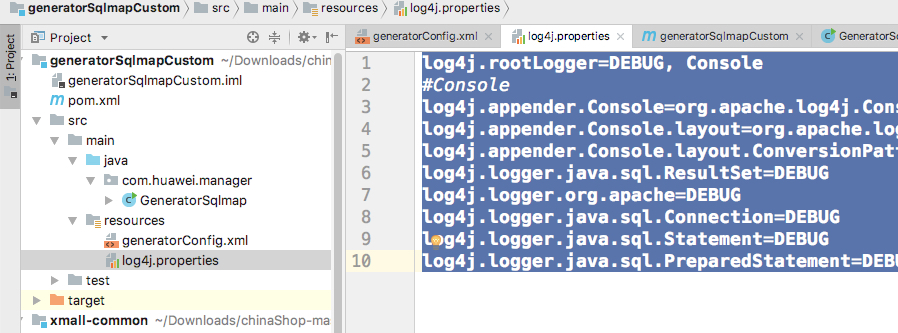
5.添加完成后的目录结构如下:
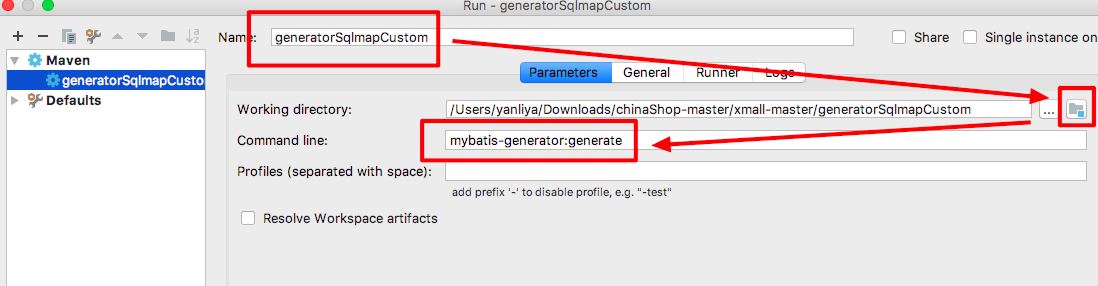
6.运行maven工程,生成代码
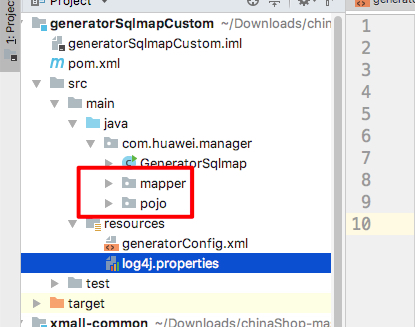
7.生成后的代码结构如下:
01_Mybaits逆向工程maven版的更多相关文章
- Eclipse下创建Spring MVC web程序--非maven版
首先, 安装eclipse和tomcat, 这里我下载的是tomcat9.0版本64位免安装的:地址https://tomcat.apache.org/download-90.cgi 免安装的如何启动 ...
- Jenkins+Sonar质量门禁【实践篇-maven版】
Jenkins+Sonar质量门禁[实践篇-maven版] 配置文档百度挺多的,就不展开来了 首先很遗憾的告诉大家,maven版做不了质量门禁!只能扫描!!! 就我们公司项目里,jenkins ...
- idea创建Maven版的ssm项目
要使用idea创建一个maven项目,首先电脑安装maven,maven下载地址:http://maven.apache.org/download.cgi 1.打开idea,选择创建一个新项目,选择m ...
- Maven 版 JPA 最佳实践(转)
项目结构图 数据库环境 数据库:MySQL 版本:5.x 数据库名:jpa-demo 用户名密码:root/1234 代码清单 1:数据库脚本: ? 1 2 3 4 5 6 7 8 9 10 11 1 ...
- Maven 版 JPA 最佳实践
项目结构图 数据库环境 数据库:MySQL 版本:5.x 数据库名:jpa-demo 用户名密码:root/1234 代码清单 1:数据库脚本: /* Navicat MySQL Data Trans ...
- 使用JBolt新建Maven版工程步骤
一.打开新建对话框 在左侧右键new中可以找到JFinal创建工程的菜单 JBoltHome页面也有快捷按钮用来弹出创建工程对话框. 二.填写Maven和其他信息配置 填写工程name 主包名 下面有 ...
- Eclipse下创建Spring MVC web程序--maven版
1. 创建一个maven工程: File->New->Other... 2. 创建完成后的结构如下: 3. 配置pom.xml文件,添加spring-webmvc依赖项 <pro ...
- 转:Eclipse中创建Maven版的Web工程(详解)
一.搭建步骤 ♦首先创建一个Maven的Project,如下图: ♦点击Next,勾选 Create a simple project ♦点击Next,注意Packing要选择war,因为我们创建的是 ...
- Java-手动搭建SSH(maven版)
创建maven项目 把maven项目变为动态网站,步骤如下: 项目结构图如下: 开始搭建spring+springmvc+Hibernate项目 环境版本就不多说了,直接贴出pom.xml文件 < ...
随机推荐
- 也说性能测试,顺便说python的多进程+多线程、协程
最近需要一个web系统进行接口性能测试,这里顺便说一下性能测试的步骤吧,大概如下 一.分析接口频率 根据系统的复杂程度,接口的数量有多有少,应该优先对那些频率高,数据库操作频繁的接口进行性能测试,所以 ...
- 2018-2019-1 20189206 《Linux内核原理与分析》第九周作业
#linux内核分析学习笔记 --第八章 进程的切换和系统的一般执行过程 学习目标:重点关注进程切换的过程,进程调度的时机,操作系统的基本构成以及一般的执行过程. 进程调度的时机 因为进程的调度只发生 ...
- GuidePage底部导航栏
import 'package:flutter/material.dart'; import 'News.dart'; import 'Video.dart'; import 'Chat.dart'; ...
- 【Git】Git使用记录: 撤回已经commit到本地的提交记录
话不多说直接上步骤: git bash直接干到你的code. 直接敲命令: git reset --soft HEAD~1 搞定 就是这么简单粗暴. 如有顾虑请自行找个案例测试即可. 参考资料 htt ...
- P1908 逆序对
传送门 这题似乎不应该出现在这里.. 日常做法(归并): #include<iostream> #include<cstdio> #include<algorithm&g ...
- 《Blue Flke》团队项目的原型设计与开发
实验目的: 1.掌握软件原型开发技术 2.学习使用软件原型开发工具 实验过程和步骤: 任务1.针对实验六团队项目选题,采用适当的原型开发工具设计团队项目原型. 任务2.在团队博客发布博文,陈述团队项目 ...
- [shell] 脚本使用 【记录】
1.nginx日志切割 vi /var/log/nginx/cut_nginx_log.sh #!/bin/bash date=$(date +%F -d -1day) cd /var/log/ngi ...
- 20175317 《Java程序设计》第二周学习总结
20175317 <Java程序设计>第二周学习总结 教材学习内容总结 第二周我学习了教材三四章的内容,了解了Java与C语言的相似与不同之处. 其中第二章学到了标识符与关键字.基本数据类 ...
- WordCount基本功能
WordCount基本功能 码云地址:https://gitee.com/Joker_zou/WordCount.git 一.项目需求 WordCount的需求可以概括为:对程序设计语言源文件统计字符 ...
- prometheus热重启
prometheus启动命令添加参数 --web.enable-lifecycle 然后热重启:curl -XPOST http://localhost:9090/-/reload