
T4学习- 4、Kalman Studio-T4代码生成器
一、简介
开源代码生成器-Kalman Studio
https://github.com/loamen/Kalman.Studio
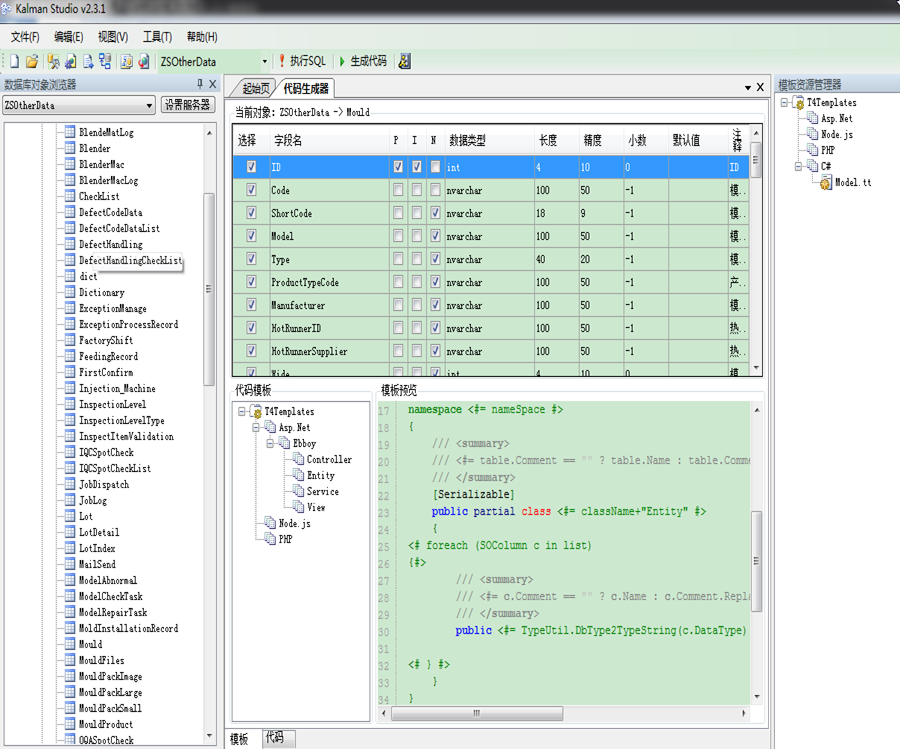
1、软件主要功能如下:
1、基于T4的代码生成工具,根据数据库元数据信息生成代码,支持多数据库,支持批量代码生成;

2、支持根据PowerDesigner物理模型文件来生成代码;

3、内置了一个简单的文本编辑器,支持代码高亮显示;

4、数据库元数据信息浏览工具;

5、数据库文档生成工具,支持输出word及pdf文件格式;

6、IIS日志解析器,小网站可以用用;

7、其他工具,字符串相关操作等。
二、编写T4模板:
1、VS自动根据模板自动生成代码
首先,打开Visual Studio,新建一个文本文件,将扩展名改为"tt"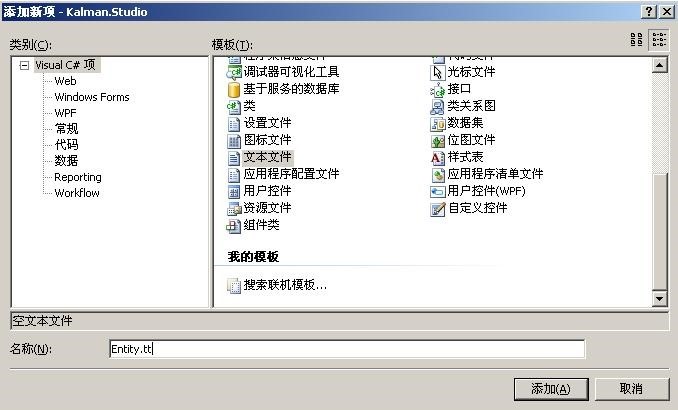
这时Visual Studio会为Entity.tt生成一个对应的类文件Entity.cs。这是因为Visual Studio内置了一个代码生成工具“TextTemplatingFileGenerator”,会自动为每个模板文件生成对应的类文件,如果你在Entity.tt中编辑好模板,然后打开Entity.cs,TextTemplatingFileGenerator会自动解析模板,将代码输出到文件Entity.cs。
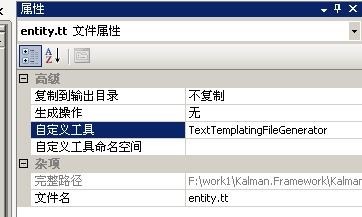
2、编写T4模板
我们这里不需要使用TextTemplatingFileGenerator生成代码,把属性面板,“自定义工具”里面的文字“TextTemplatingFileGenerator”删掉,对应的类文件会自动删除;然后可以开始编写模板了。
我这里先展示一个编写好的实体模板,然后再详细说明。
<#@ template language="C#v3.5" hostSpecific="true" debug="true" #>

<#@ output extension=".cs" #>

<#

    TableHost host = (TableHost)(Host);

    SOTable table = host.Table;

    List<SOColumn> list = host.ColumnList;

    string columnPrefix = host.GetString("ColumnPrefix");

    int prefixLevel = host.GetInt32("PrefixLevel");

    string nameSpace = host.GetString("NameSpace");

    string className = host.GetString("ClassName");

    if(string.IsNullOrEmpty(nameSpace))nameSpace = "Entity";

    if(string.IsNullOrEmpty(className))className = table.Name;

#>

using System;

using System.Collections.Generic;

using System.Text;

using System.Data;

namespace <#= nameSpace #>

{

    /// <summary>

    /// <#= table.Comment == "" ? table.Name : table.Comment #>

    /// </summary>

    [Serializable]

    public partial class <#= className #>

    {

        <# foreach (SOColumn c in list)

        { #>/// <summary>

        /// <#= c.Comment == "" ? c.Name : c.Comment #>

        /// </summary>

        public <#= TypeUtil.DbType2TypeString(c.DataType) #> <#= StringUtil.RemovePrefix(c.Name, columnPrefix, prefixLevel).Replace(" ", "") #> { get; set; }

        <# } #>

    }

}
3、T4模板语法
- <#@ template language="C#v3.5" hostSpecific="true" debug="true" #>:可以指定模板使用的语言,hostSpecific="true"表示是否使用特定的host(Kalman Studio里面使用的是TableHost对象,必须实现接口ITextTemplatingEngineHost)。
- <#@ output extension=".cs" #> : 指定生成文件的扩展名。
- <#@ assembly name="System.Data" #>:添加程序集引用,如果要使用第三方程序集,那么最好在项目中添加引用,或者加入到GAC。
- <#@ import namespace="System.Data" #>:导入要使用的命名空间,注意:这里的命名空间必须要在前面指定的程序集里面找得到的,比如我指定命名空间"System.Data","System.Data.Common",这些在程序集System.Data中都有的。
- <#@ include file="test.tt" #> 导入模板,类似Html的include用法
- <# #>:定义代码块
- <#= #>:定义表达式
- <#+ #>:定义变量
三、Kalman Studio改进
1、自定义架构对象SchemaObject下的类。

2、自定义T4模板的引擎主机类:T4TemplatingEngineHost

3、自定义SqlServerSchema
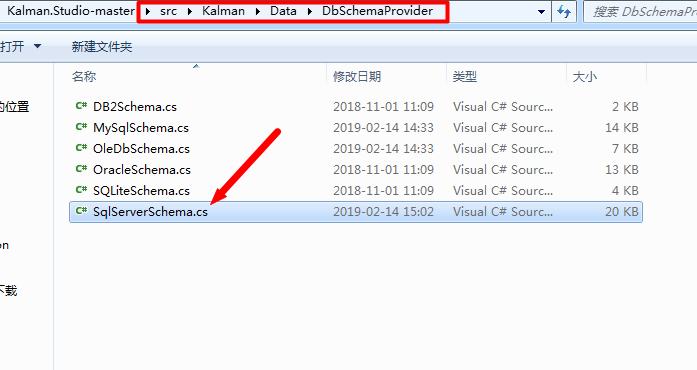
更改Kalman项目的SqlServerSchema文件,增加Computed是否是计算字段的判断。
 public override List<SOColumn> GetTableColumnList(SOTable table)

        {

            string cmdText = string.Format(@"use [{2}];select   colm.name column_name, object_definition(colm.default_object_id) as column_def, systype.name type_name, colm.is_identity, colm.is_nullable ,

                                                        cast(colm.max_length as int) length, cast(colm.precision as int) precision, cast(colm.scale as int) scale, colm.is_computed

                                            from     sys.columns colm

                                                inner join sys.types systype on colm.system_type_id = systype.system_type_id and colm.user_type_id = systype.user_type_id

                                            where    colm.object_id = object_id('{0}')

                                            order by colm.column_id;", table.Name, table.Owner, table.Database.Name);

            List<SOColumn> columnList = new List<SOColumn>();

            List<string> pkList = GetPrimaryKeys(table);

            DataTable dt = this.DbProvider.ExecuteDataSet(System.Data.CommandType.Text, cmdText).Tables[];

            foreach (DataRow row in dt.Rows)

            {

                SOColumn column = new SOColumn

                {

                    Parent = table,

                    Name = row["column_name"].ToString(),

                    DefaultValue = row["column_def"].ToString(),

                    Nullable = row["is_nullable"].ToString()== "True",

                    NativeType = row["type_name"].ToString(),

                    Identify = row["is_identity"].ToString() == "True",

                    Computed = row["is_computed"].ToString() == "True",

                    //ForeignKey

                    Length = ConvertUtil.ToInt32(row["length"], -),

                    Precision = ConvertUtil.ToInt32(row["precision"], -),

                    Scale = ConvertUtil.ToInt32(row["scale"], –),

                };

                column.PrimaryKey = pkList.Contains(column.Name);

                column.DataType = this.GetDbType(column.NativeType);

                column.Comment = GetColumnComment(column);

                columnList.Add(column);

            }

            return columnList;

        }
4、常用的几个自定义的T4模板
1、生成实体:model.tt
<#@ template language="C#v3.5" hostSpecific="true" debug="true" #>

<#@ output extension=".cs" #>

<#

    TableHost host = (TableHost)(Host);

    SOTable table = host.Table;

    List<SOColumn> list = host.ColumnList;

    string nameSpace = host.GetString("NameSpace");

    string className = host.GetString("ClassName");

    if(string.IsNullOrEmpty(nameSpace))nameSpace = "Entity";

    if(string.IsNullOrEmpty(className))className = table.Name;

#>

using System;

using System.Collections.Generic;

using System.Text;

using System.Data;

namespace <#= nameSpace #>

{

    /// <summary>

    /// <#= table.Comment == "" ? table.Name : table.Comment.Replace("\r\n"," ") #>

    /// </summary>

    [Serializable]

    public partial class <#= className+"Entity" #>

    {

<# foreach (SOColumn c in list)

{#>

        /// <summary>

        /// <#= c.Comment == "" ? c.Name : c.Comment.Replace("\r\n"," ") #>

        /// </summary>

        public <#= TypeUtil.DbType2TypeString(c.DataType) #><# if(c.Nullable) {  #><#if(TypeUtil.DbType2Type(c.DataType).IsValueType){ #>?<#

 }#><# }#> <#= c.Name #>{get;set;};

<# } #>

    }

}
2、生成数据访问层:DAL.tt
<#@ template language="C#v3.5" hostSpecific="true" debug="true" #><#@ output extension=".cs" #>

<#

    TableHost host = (TableHost)(Host);

    SOTable table = host.Table;

    List<SOColumn> list = host.ColumnList;

    string nameSpace = host.GetString("NameSpace");

    string className = host.GetString("ClassName");

    if(string.IsNullOrEmpty(nameSpace))nameSpace = "DAL";

    if(string.IsNullOrEmpty(className))className = table.Name;

    List<SOColumn> listPK = new List<SOColumn>();

    List<SOColumn> listOtherCol =new List<SOColumn>();

    List<string> listAdd =new List<string>();

    List<string> listUpdate =new List<string>();

    foreach (SOColumn c in list)

    {

      if(c.PrimaryKey)

      {

          listPK.Add(c);

      }

      if((c.PrimaryKey&&!c.Identify) ||!c.PrimaryKey )

        {

         if( !c.Computed)

         {

             listOtherCol.Add(c);

             listAdd.Add("+ \",\" + SqlNull(entity." + c.Name + ")");

             if(!c.PrimaryKey)

                  listUpdate.Add("+ \","+ c.Name + "=\"+ SqlNull(entity." + c.Name + ")");

        }

    }}

    //colAll

     System.Text.StringBuilder sbcolAllStr = new StringBuilder();

     List<string> list1= list.ConvertAll(p=>p.Name);

    for (int i = ; i < list1.Count; i++)

    {

        sbcolAllStr.Append("t."+list[i] + ",");

        if ((i + ) %  ==  && (i + )!=list1.Count ) sbcolAllStr.Append("\r\n                                         ");

    }

    string colAllStr = sbcolAllStr.ToString().TrimEnd(',');

    //colOtherStr

    System.Text.StringBuilder sbcolOtherStr = new StringBuilder();

    List<string> list2= listOtherCol.ConvertAll(p=>p.Name);

    for (int i = ; i < list2.Count; i++)

    {

       if(list2[i].IndexOf("UpdateUser")>-||list2[i].IndexOf("UpdateTime")>-)

            continue;

        sbcolOtherStr.Append(list2[i] + ",");

        if ((i + ) %  ==   && (i + )!=list2.Count) sbcolOtherStr.Append("\r\n                                         ");

    }

    string colOtherStr =  sbcolOtherStr.ToString().TrimEnd(',');

     //AddStr

    System.Text.StringBuilder sblistAddStr = new StringBuilder();

    for (int i = ; i < listAdd.Count; i++)

    {

           if(listAdd[i].IndexOf("UpdateUser")>-||listAdd[i].IndexOf("UpdateTime")>-)

            continue;

        sblistAddStr.Append(listAdd[i] + "");

        if ((i + ) %  ==   && (i + )!=listAdd.Count) sblistAddStr.Append("\r\n                                         ");

    }

    string listAddStr = System.Text.RegularExpressions.Regex.Replace(sblistAddStr.ToString(), @"^\+\s*"",""\s", "");

    //UpdateStr

    System.Text.StringBuilder sblistUpdateStr = new StringBuilder();

    for (int i = ; i < listUpdate.Count; i++)

    {

           if(listUpdate[i].IndexOf("CreateUser")>-||listUpdate[i].IndexOf("CreateTime")>-)

            continue;

        sblistUpdateStr.Append(listUpdate[i] + "");

        if ((i + ) %  ==   && (i + )!=listUpdate.Count) sblistUpdateStr.Append("\r\n                                         ");

    }

    string listUpdateStr = System.Text.RegularExpressions.Regex.Replace(sblistUpdateStr.ToString(), @"^\+\s*"",", "+ \"");

#>

using System;

using System.Collections.Generic;

using System.Data;

using ZS.Mix.Common;

using <#= className #>.Entity;

namespace <#= nameSpace #>

{

    internal class <#= className+"DAL" #> : BaseDAL

    {

        /// <summary>

        /// 分页获取所有记录

        /// </summary>

        public List<<#= className #>Entity>  GetAll(<#= TypeUtil.DbType2TypeString(listPK[].DataType) #> <#= listPK[].Name #>, int pageindex, int pagesize)

        {

            string sql = string.Format(@"select <#=colAllStr #>

                                         from   <#= table.Database.Name + "." + table.SchemaName + "." + table.Name #> t

                                         where  t.<#= listPK[].Name #>  like '%' + '{0}' + '%'

                                         order by  t.<#= listPK[].Name #> offset ( {} -  ) * {} rows fetch next {} rows only;", <#= listPK[0].Name #>, pageindex, pagesize);

            return Service.SqlTable(sql).ToList<<#= className+"Entity" #>>();

         }

        /// <summary>

        /// 获取记录总数

        /// </summary>

        public  int GetCount(<#= TypeUtil.DbType2TypeString(listPK[].DataType) #> <#= listPK[].Name #>)

        {

            string sql = string.Format(@"select count(1)

                                         from <#= table.Database.Name + "." + table.SchemaName + "." + table.Name #> t

                                         where  <#= listPK[].Name #> like '%' + '{0}' + '%';", <#= listPK[0].Name #>);

            return Convert.ToInt32(Service.SqlValueList(sql));

        }

        /// <summary>

        /// 获取简要记录

        /// </summary>

        public List<<#= className #>Entity> Get<#= className #>List (<#= TypeUtil.DbType2TypeString(listPK[].DataType) #> <#= listPK[].Name #> = "%")

        {

            string sql = string.Format(@"select  <#=colAllStr #>

                                         from  <#= table.Database.Name + "." + table.SchemaName + "." + table.Name #> t

                                         where t.<#= listPK[].Name #> like '%' + '{0}' + '%'

                                         order by t.<#= listPK[].Name #>", <#= listPK[0].Name #>);

            return Service.SqlTable(sql).ToList<<#= className+"Entity" #>>();

        }

        /// <summary>

        /// 获取单个实体

        /// </summary>

        public  <#= className #>Entity Get<#= className #> (<#= TypeUtil.DbType2TypeString(listPK[].DataType) #> <#= listPK[].Name #>)

        {

            string sql = string.Format(@" select <#=colAllStr #>

                                          from <#= table.Database.Name + "." + table.SchemaName + "." + table.Name #> t

                                          where  t.<#= listPK[].Name #> like '%' + '{0}' + '%';", <#= listPK[0].Name #>);

            return Service.SqlTable(sql).ToList<<#= className+"Entity" #>>()[];

        }

        /// <summary>

        /// 是否存在该记录

        /// </summary>

        public bool Exists(<#= TypeUtil.DbType2TypeString(listPK[].DataType) #> <#= listPK[].Name #>)

        {

            string sql = string.Format(@"declare @TempID int;SELECT @TempID = count(1)

                                          from <#= table.Database.Name + "." + table.SchemaName + "." + table.Name #> t

                                         where <#= listPK[].Name #> = '{0}';

                                        if @TempID =

                                            select ;

                                        else

                                            select  ;", <#= listPK[0].Name #>);

            int result = Convert.ToInt32(Service.SqlValueList(sql));

            return result ==  ? true : false;

        }

        /// <summary>

        ///  增加一条数据

        /// </summary>

        public bool Add(<#= className #>Entity entity)

        {

            string sql = @"INSERT INTO <#= table.Database.Name + "." + table.SchemaName + "." + table.Name #>(

                                         <#= colOtherStr #>

                                        )VALUES("

                                           <#= listAddStr #>

                                          + " ) ;";

            int rowsAffected = Service.SqlExecute(sql);

            return rowsAffected ==  ? true : false;

        }

        /// <summary>

        ///  更新一条数据

        /// </summary>

        public bool Update(<#= className #>Entity entity)

        {

            string sql = @"UPDATE <#= table.Database.Name + "." + table.SchemaName + "." + table.Name #> SET "

                                         <#= listUpdateStr #>

                          + " WHERE <#=listPK[0].Name #>= '" + <#= "entity."+listPK[].Name #> +"';";

            int rowsAffected = Service.SqlExecute(sql);

            return rowsAffected ==  ? true : false;

        }

        /// <summary>

        /// 删除一条数据

        /// </summary>

        public bool Delete(<#= TypeUtil.DbType2TypeString(listPK[].DataType) #> <#= listPK[].Name #>)

        {

            string sql = string.Format(@"DELETE <#= table.Database.Name + "." + table.SchemaName + "." + table.Name #>

                                         WHERE <#= listPK[].Name #>='{0}';", <#= listPK[0].Name #>);

            int rowsAffected = Service.SqlExecute(sql);

            return rowsAffected ==  ? true : false;

        }

}
3、注意这个处理null值的函数:
static public object SqlNull(dynamic obj)

{

    if (obj == null)

    {

        return "null";

    }

    string typename = obj.GetType().Name.Equals("Nullable`1") ? obj.GetType().GetGenericArguments()[].ToString() : obj.GetType().ToString();

    if (typename.Equals("System.String") || typename.Equals("System.Boolean"))

    {

        return "'" + obj.ToString() + "'";

    }

    else if (typename.Equals("System.DateTime"))

    {

        return "convert(datetime,'" + obj.ToString() + "') ";

    }

    else

    {

        return obj.ToString();

    }

}
T4学习- 4、Kalman Studio-T4代码生成器的更多相关文章
- [转]发布基于T4模板引擎的代码生成器[Kalman Studio]
本文转自:http://www.cnblogs.com/lingyun_k/archive/2010/05/08/1730771.html 自己空闲时间写的一个代码生成器,基于T4模板引擎的,也不仅是 ...
- T4学习- 2、创建设计时模板
使用设计时 T4 文本模板,您可以在 Visual Studio 项目中生成程序代码和其他文件. 通常,您编写一些模板,以便它们根据来自模型的数据来改变所生成的代码. 模型是包含有关应用程序要求的关键 ...
- T4学习- 1、简介
一.T4简介 T4(Text Template Transformation Toolkit)在 Visual Studio 中,"T4 文本模板"是由一些文本块和控制 ...
- T4学习- 3、创建运行时模板
使用 Visual Studio 预处理过的文本模板,可以在运行时在应用程序中生成文本字符串. 执行应用程序的计算机不必具有 Visual Studio. 预处理过的模板有时称为"运行时文本 ...
- T4学习资料
网址:http://www.olegsych.com/2007/12/text-template-transformation-toolkit/
- openGL学习:Visual Studio配置OpenGL
Visual Studio配置OpenGL 分两步: (一)下载glut,并将其放置到适当的位置 (二) 进行vs2005项目属性配置 ******************************** ...
- Android学习之Android studio TraceView和lint工具的使用具体解释
上次讲述了一下Android studio Terminal的使用配置,今天又学习了一下关于Traceview和lint工具的使用. 首先来讲lint吧: Android lint工具是Android ...
- 学习OpenCV——Kalman滤波
背景: 卡尔曼滤波是一种高效率的递归滤波器(自回归滤波器), 它能够从一系列的不完全及包含噪声的测量中,估计动态系统的状态.卡尔曼滤波的一个典型实例是从一组有限的,包含噪声的,对物体位置的观察序列(可 ...
- [C++学习历程]Visual Studio 2010 的HelloWorld
大学时期曾学过C++的知识,那时候也没有使用VS这样高档的IDE工具,就是C++6.0那样来的.对于重新拾起C++来说,换了个IDE,那么就先从使用IDE学起吧~ 作者:苏生米沿 本文链接:http: ...
随机推荐
- centos下MySQL Workbench连接时崩溃的解决方法
在centos6.5中使用MySQL Workbench 6.3.8链接数据库崩溃,如果是在终端使用命令“mysql-workbench”打开的话会有如下错误提示: /usr/libexec/mysq ...
- 【C#数据结构系列】栈和队列
一:栈 栈和队列也是线性结构,线性表.栈和队列这三种数据结构的数据元素以及数据元素间的逻辑关系完全相同,差别是线性表的操作不受限制,而栈和队列的操作受到限制.栈的操作只能在表的一端进行,队列的插入操作 ...
- 漫画 | Spring AOP
上期,我们看到有小伙伴留言说希望讲讲AOP 然后...... 别激动,来得及 什么是AOP AOP是Spring 框架的一个关键组件,全称为Aspect-OrientedProgramming(面向切 ...
- 如何在idea中设置Tomcat虚拟路径
设置项目的根路径: 设置指定文件的在Tomcat中的虚拟路径: 代码: String fileName = MyFileUtil.getFileName(uploadFileName); File f ...
- Bash:字符串操作
参考:http://blog.csdn.net/finewings/article/details/5718133 字符串提取 去掉指定前缀 1. ${varible#pattern} ...
- windows 格式化D盘
格式化D盘1.右击我的电脑2.高级系统设置3.高级4.性能->设置5.高级->虚拟内存(更改)6.双击D设置->无分页文件7.确定->重启计算机
- webstorm激活
选择 License server http://idea.imsxm.com/ http://idea.iteblog.com/key.php (2016.11.16) http://v2mc.ne ...
- 设计模式(15)--Interpreter(解释器模式)--行为型
作者QQ:1095737364 QQ群:123300273 欢迎加入! 1.模式定义: 解释器模式是类的行为模式.给定一个语言之后,解释器模式可以定义出其文法的一种表示,并同时提供一个解 ...
- Vue知识点(面试常见点)
v-bind和v-model的区别 1.v-bind用来绑定数据和属性以及表达式,缩写为':' 2.v-model使用在表单中,实现双向数据绑定的,在表单元素外使用不起作用 什么是 mvvm? MVV ...
- springboot No Java compiler available for configuration options compilerClassName: [null] and compil
今天使用eclipse创建springboot整合jsp出现一个问题,在idea中并没有遇到这个问题.最后发现是需要在eclipse中添加一个eclipse依赖,依赖如下: <dependenc ...