
ngSanitize和$sce
(angular-ngSanitize模块-$sanitize服务详解)
本篇主要讲解angular中的$sanitize这个服务.此服务依赖于ngSanitize模块.
要学习这个服务,先要了解另一个指令: ng-bing-html.
顾名思义,ng-bind-html和ng-bind的区别就是,ng-bind把值作为字符串,和元素的内容进行绑定,但是ng-bind-html把值作为html,和元素的html进行绑定.相当于jq里面的.text()和.html().
但是,出于安全考虑,如果我们直接使用ng-bind-html是会报错的,ng-bind-html后面的内容必须经过一定的处理.
处理的方式有两种,一种是使用$sce服务,另一种就是使用$sanitize服务.$sce服务怎么用,在以后的文章中会独立讲解,这篇主要讲解$sanitize服务.
$sanitize会根绝一个白名单来净化html标签.这样,不安全的内容就不会被返回. 白名单是根据$compileProvider的aHrefSanitizationWhitelist和imgSrcSanitizationWhitelist函数得到的.
看一个栗子:
html:
<!DOCTYPE html>
<html ng-app="myApp">
<head>
<title></title>
<meta charset="utf-8">
<script src="../angular-1.3.2.js"></script>
<script src="angular-sanitize.min.js"></script>
<script src="script.js"></script>
<link type="text/css" href="../bootstrap.css" rel="stylesheet" />
</head>
<body>
<div class="container">
<table class="table table-bordered" ng-controller="ctrl">
<caption>通过ngSanitize模块的$sanitize服务解析html</caption>
<thead>
<tr>
<th>使用的指令</th>
<th>格式化方法</th>
<th>指令的写法</th>
<th>解析结果</th>
</tr>
</thead>
<tbody>
<tr>
<td>ng-bind-html</td>
<td>使用内置的$sanitize <br/>(不需要出现在js里,只要模型添加了ngSanitize模块, <br/>然后使用ng-bind-html,它的值就自动通过$sanitize编译)</td>
<td><pre><div ng-bind-html="myHtml"><br></div></pre></td>
<td><div ng-bind-html="myHtml"></div></td>
</tr>
<tr>
<td>ng-bind-html</td>
<td>使用$sce的trustAsHtml方法编译<br/>(以后会细讲$sce服务,这里不是重点)</td>
<td><pre><div ng-bind-html="trustHtml"><br></div></pre></td>
<td><div ng-bind-html="trustHtml"></div></td>
</tr>
<tr>
<td>ng-bind</td>
<td>不编译</td>
<td><pre><div ng-bind="myHtml"><br></div></pre></td>
<td><div ng-bind="myHtml"></div></td>
</tr>
</tbody>
</table>
<a class="btn btn-default" href="http://plnkr.co/edit/3FBasliZTRjKs3jwTpoR?p=preview" role="button">plunker</a>
</div>
</body>
</html>
js:
var app =angular.module(‘myApp‘,[‘ngSanitize‘]);

app.controller(‘ctrl‘,function($scope,$sce){

    $scope.myHtml = ‘<p style="color:blue">an html\n‘ +

    ‘<em onclick="this.textContent=\‘code_bunny\‘">click here</em>\n‘ +

    ‘snippet</p>‘;

    $scope.trustHtml = $sce.trustAsHtml($scope.myHtml)

});
结果:
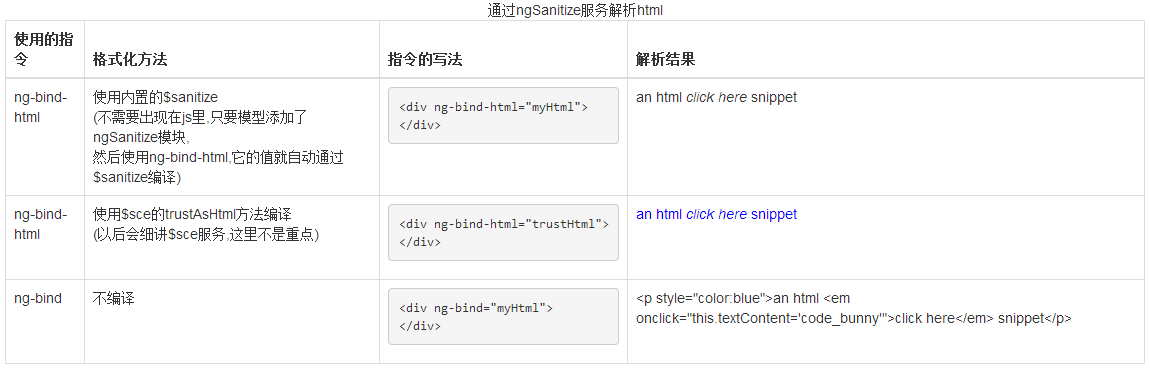
下面来具体说明一下这个栗子:
表格第一行: myHtml是一段字符串,但是它的内容是一段html,使用ng-bind-html可以把它作为元素的.html()绑定给元素.在这里我们给模块添加依赖 ‘ngSanitize‘ ,(需要链入angular-sanitize.min.js).然后使用ng-bind-html,$sanitize会自动对myHtml进行净化.
所以我们看到结果,myHtml是被作为html填充到div里面的,但是不再是原来的myHtml,而是这样的:
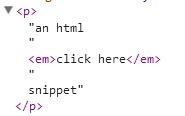
可以看到,$sanitize会把标签的属性都移除,以及绑定在元素上的事件.仅保留了标签和内容.
*记住,$sanitize指令本身不会出现在js代码里.直接使用ng-bind-html就行了.但如果这里不给模块添加依赖ngSanitize,是会报错的.
表格第二行: trustHtml 是myHtml通过$sce.trustAsHtml() 处理以后的返回值.所以它不再经过$sanitize服务的净化.直接作为元素的.html()绑定给元素,所以我们看到myHtml被完整的填充到了div里,保留了所有的属性和事件,classs是有效的,这一行的内容不依赖于ngSanitize模块,$sce服务是内置的.
表格第三行: 不使用ng-bind-html指令.当使用ng-bind指令时,绑定的值就作为字符串填充到元素里,这个没什么好讲的.
ngSanitize和$sce的更多相关文章
- [AngularJS] Html ngSanitize, $sce
Safely render arbitrary HTML snippets by using ngSanitize and $sce. By default angularJS consider us ...
- angular ng-bind-html $sce.trustAsHtml
使用ng-bind-html和$sce.trustAsHtml显示有html符号的内容 angularjs的强大之处之一在于它的双向数据绑定的功能,我们通常会使用data-ng-bind或者dat ...
- angular-ngSanitize模块-$sanitize服务详解
本篇主要讲解angular中的$sanitize这个服务.此服务依赖于ngSanitize模块. 要学习这个服务,先要了解另一个指令: ng-bing-html. 顾名思义,ng-bind-html和 ...
- angularjs 可以加入html标签方法------ng-bind-html的用法总结(2)
angular-ngSanitize模块-$sanitize服务详解 本篇主要讲解angular中的$sanitize这个服务.此服务依赖于ngSanitize模块. 要学习这个服务,先要了解另一个指 ...
- angular源码分析:angular中入境检察官$sce
一.ng-bing-html指令问题 需求:我需要将一个变量$scope.x = '<a href="http://www.cnblogs.com/web2-developer/&qu ...
- 5、AngularJS 直接绑定显示html ($sce、$sanitize服务)
1.直接使用$sce服务(angularjs中:$sce.trustAsHtml($scope.snippet).html:ng-bind-html="snippet") 以下代码 ...
- $sanitize和$sce服务的使用方法
var app =angular.module(‘myApp‘,[‘ngSanitize‘]); app.controller(‘ctrl‘,function($scope,$sce){ $scope ...
- AngularJs $sce 和 $sceDelegate 上下文转义
$sce $sce 服务是AngularJs提供的一种严格上下文转义服务. 严格的上下文转义服务 严格的上下文转义(SCE)是一种需要在一定的语境中导致AngularJS绑定值被标记为安全使用语境的模 ...
- AngularJS 使用$sce控制代码安全检查
由于浏览器都有同源加载策略,不能加载不同域下的文件.也不能使用不合要求的协议比如file进行访问. 在angularJs中为了避免安全漏洞,一些ng-src或者ng-include都会进行安全校验,因 ...
随机推荐
- mysql max_allowed_packet 设置过小导致记录写入失败
mysql根据配置文件会限制server接受的数据包大小. 有时候大的插入和更新会受max_allowed_packet 参数限制,导致写入或者更新失败. 查看目前配置 show VARIABLES ...
- [LeetCode] Consecutive Numbers 连续的数字
Write a SQL query to find all numbers that appear at least three times consecutively. +----+-----+ | ...
- VS2010快捷键设置
1.进入工具----选项 对话框 2.选择 环境---->键盘 3. 在 [显示命令包含] 下面的对话框中输入"对齐"关键字,然后就会在这个编辑框下面一个文本窗口中显示关 ...
- android studio 使用jar包,arr包和怎么使用githup开源项目中的aar包或module
我这里的android studio的版本是2.2.3版本 一.现在大家都用android studio了,就有人问怎么使用jar包 其实使用jar包比较简单 直接吧jar放入工程的app目录下的li ...
- Android性能优化
Android最佳性能实践 Android最佳性能实践(一)——合理管理内存 Android最佳性能实践(二)——分析内存的使用情况 Android最佳性能实践(三)——高性能编码优化 Android ...
- 看完这篇让你对各种前端build工具不再懵逼!
本文原标题为:我终于弄懂了各种前端build工具 译者:@Christian 译文:https://www.sdk.cn/news/5412 原文:https://medium.freecodecam ...
- 日历插件FullCalendar应用:(一)数据展现
在博客园逛了很长时间了,它帮助我获得了很多知识,很感谢大家的分享,而自己呢,由于各种纠结一直没提笔写博客,直到我看到了这篇文章http://www.cnblogs.com/zhaopei/p/why_ ...
- xp 下查看进程指令
xp 下快速查看进程及关联 exe 的指令,刚发现,还没有测试 win7 和 win10 支持不支持. wmic process where creationclassname="win32 ...
- RabbitMQ 集群+负载均衡
负载均衡 集群的配置已经搭建好了,代码也成功跑通,成功做到了高可用,但是我们的程序连接节点并不会管哪个服务器在忙.哪个服务器空闲,完全看心情想连谁就连谁.而且代码中要把每个ip的节点都手动的写出来 , ...
- git文件迁移到新架构
环境: ubuntu16.04 代码托管地址:git.oschina.net 迁移原因: git上某工程是一堆静态页面html,因为在ubuntu下缺乏git图形客户端,想使用eclipse集成的gi ...