
四则运算app总结
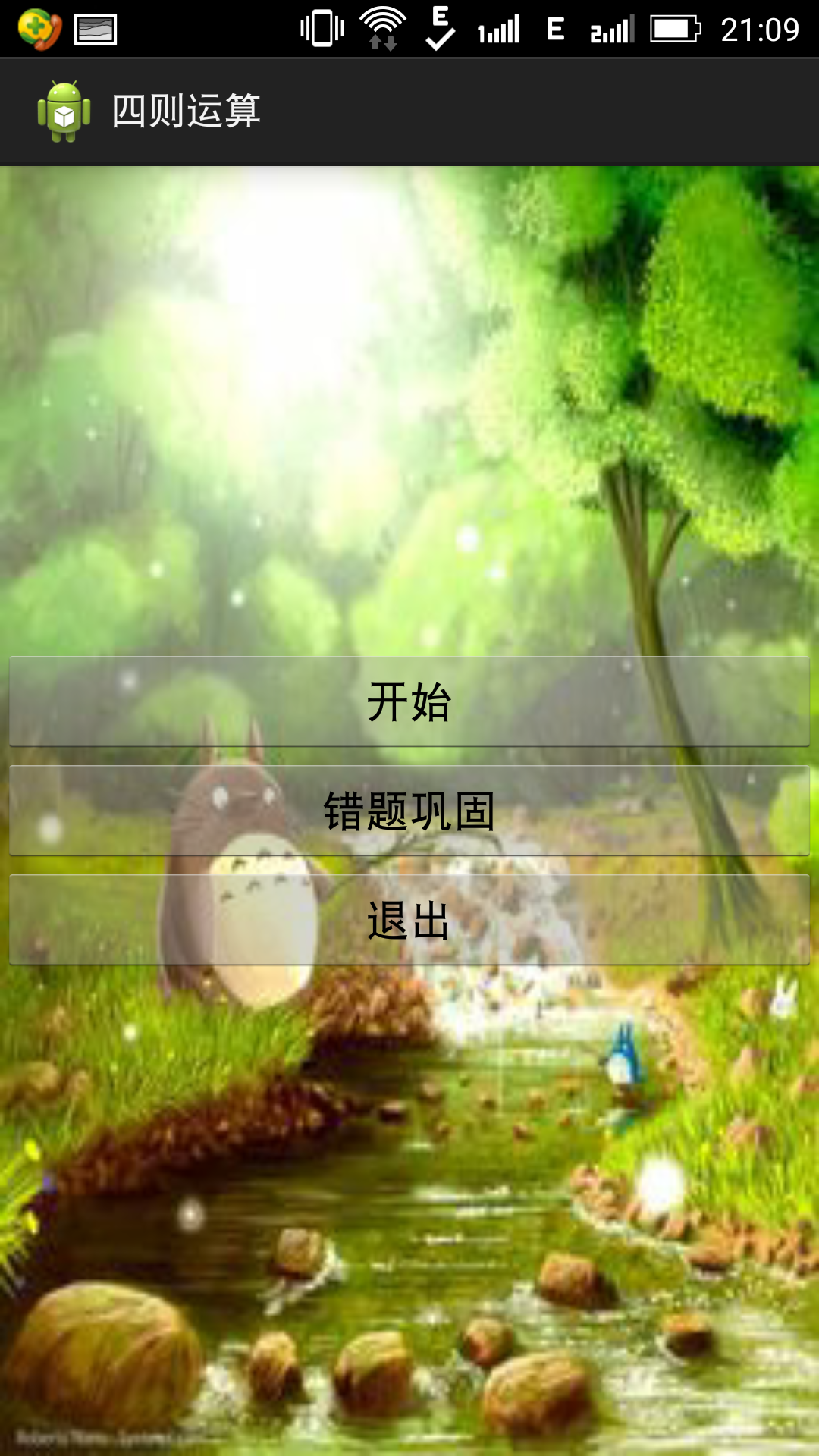
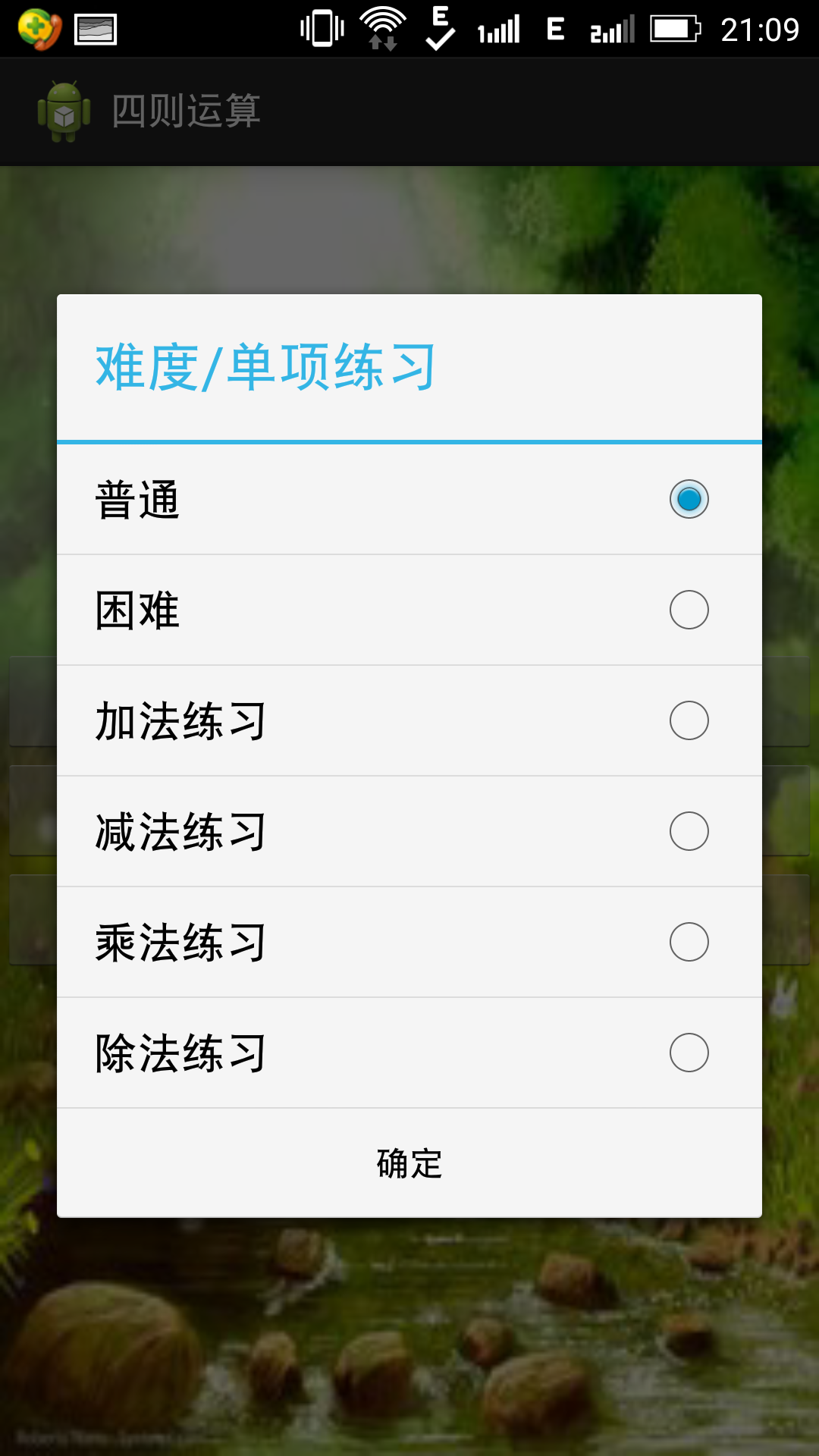
程序有难度和单项练习,但设计了每次只出5到题,如果做错的话会把错题加入到数据库中,然后通多错题巩固选项可以对错题进行训练。
代码:
普通选项代码:
 package com.example.szys;

 import java.math.*;

 import java.util.Random;

 import android.app.Activity;

 import android.app.AlertDialog;

 import android.content.ContentValues;

 import android.content.DialogInterface;

 import android.content.Intent;

 import android.database.Cursor;

 import android.os.Bundle;

 import android.view.View;

 import android.widget.Button;

 import android.widget.EditText;

 import android.widget.TextView;

 public class CalActivity extends Activity {

     int op;

     int a;

     int b;

     int n=0;

     int w=0;

     String r;

     Double answer,respon;

     TextView textview1,textview2;

     EditText editText;

     Button button;

      @Override

      protected void onCreate(Bundle savedInstanceState) {

          super.onCreate(savedInstanceState);

          setContentView(R.layout.cal_main);

          textview1=(TextView)findViewById(R.id.textView1);

          textview2=(TextView)findViewById(R.id.textView2);

          editText=(EditText)findViewById(R.id.EditText1);

              a =new Random().nextInt(100);

             b =new Random().nextInt(100);

             op=new Random().nextInt(4);

             switch(op)

             {

             case 0:

                 textview1.setText(a+"+"+b+"=");

                 answer=(double) (a+b);

                 break;

             case 1:

                 textview1.setText(a+"-"+b+"=");

                 answer=(double) (a-b);

                 break;

             case 2:

                 a =new Random().nextInt(10);

                 b =new Random().nextInt(10);

                 textview1.setText(a+"*"+b+"=");

                 answer=(double) (a*b);

                 break;

             case 3:

                 a =new Random().nextInt(10);

                 b =new Random().nextInt(10);

                 while(b==0){

                     b =new Random().nextInt(10);

                 }

                 textview1.setText(a+"/"+b+"=");

                 BigDecimal   x   =   new   BigDecimal((double)a/b);

                 answer  =   x.setScale(2,   BigDecimal.ROUND_HALF_UP).doubleValue();

                 break;

             }

             button=(Button)findViewById(R.id.button4);

             button.setOnClickListener(new Button.OnClickListener(){

                 @Override

                 public void onClick(View arg0) {

                     // TODO Auto-generated method stub

                     if(!checkInteger(editText.getText().toString()))

                     {

                         AlertDialog.Builder builder = new AlertDialog.Builder(CalActivity.this);

                         builder.setCancelable(false);

                         builder.setTitle("错误");

                         builder.setMessage("你输入的信息有错");

                         builder.setPositiveButton("确定", new DialogInterface.OnClickListener() {

                             public void onClick(DialogInterface dialog, int whichButton) {

                             }

                         });

                         builder.create().show();

                         editText.setText("");

                         return;

                     }

                     respon=Double.parseDouble(editText.getText().toString());

                     r=textview1.getText().toString();

                     ContentValues values = new ContentValues();

                     values.put("problem", r);

                     values.put("answer", answer);

                     editText.setText("");

                     n++;

                     if(respon.equals(answer))

                     {

                         textview2.setText("你答对了!");

                     }

                     else{

                         DBHelper helper = new DBHelper(getApplicationContext());

                         final Cursor c = helper.query();

                         helper.insert(values);

                         w++;

                         textview2.setText("你答错了!\n"+r+answer);

                         helper.close();

                     }

                     if(n<5)

                     {

                         a =new Random().nextInt(100);

                         b =new Random().nextInt(100);

                         op=new Random().nextInt(4);

                         switch(op)

                         {

                         case 0:

                             textview1.setText(a+"+"+b+"=");

                             answer=(double) (a+b);

                             break;

                         case 1:

                             textview1.setText(a+"-"+b+"=");

                             answer=(double) (a-b);

                             break;

                         case 2:

                             a =new Random().nextInt(10);

                             b =new Random().nextInt(10);

                             textview1.setText(a+"*"+b+"=");

                             answer=(double) (a*b);

                             break;

                         case 3:

                             a =new Random().nextInt(10);

                             b =new Random().nextInt(10);

                             while(b==0){

                                 b =new Random().nextInt(10);

                             }

                             textview1.setText(a+"/"+b+"=");

                             BigDecimal   x   =   new   BigDecimal((double)a/b);

                             answer  =   x.setScale(2,   BigDecimal.ROUND_HALF_UP).doubleValue();

                             break;

                         }

                     }

                     else

                     {

                         int right=n-w;

                         double rvate=(double)right/n*100;

                         AlertDialog.Builder builder = new AlertDialog.Builder(CalActivity.this);

                         builder.setCancelable(false);

                         builder.setTitle("结束");

                         builder.setMessage("你答对了"+right+"题"+"\n"+"答错了"+w+"题"+"\n"+"正确率为"+rvate+"%");

                         builder.setPositiveButton("确定", new DialogInterface.OnClickListener() {

                             public void onClick(DialogInterface dialog, int whichButton) {

                                 Intent intent = new Intent(CalActivity.this, MainActivity.class);

                                 intent.setFlags(Intent.FLAG_ACTIVITY_CLEAR_TOP);

                                 startActivity(intent);

                             }

                         });

                         builder.create().show();

                     }

                 }

             });

      }

      public boolean checkInteger(String text) {

          /*      当输入的文本去掉前后空格长度为0时返回false  */

          if(text.trim().length()==0){

                  return false;

          }

          try{

                  Double.parseDouble(text);

          }catch(Exception e){

                  /*      无法转换为整数时返回false   */

                  return false;

          }

          return true;

  }

 }
CalActivity
困难选项代码:
 package com.example.szys;

 import java.math.BigDecimal;

 import java.util.Random;

 import android.app.Activity;

 import android.app.AlertDialog;

 import android.content.ContentValues;

 import android.content.DialogInterface;

 import android.content.Intent;

 import android.database.Cursor;

 import android.os.Bundle;

 import android.view.View;

 import android.widget.Button;

 import android.widget.EditText;

 import android.widget.TextView;

 public class CalActivity1 extends Activity{

     int op;

     int a;

     int b;

     int c;

     int d;

     int n=0;

     int w=0;

     String r;

     Double answer,respon;

     TextView textview1,textview2;

     EditText editText;

     Button button;

      @Override

      protected void onCreate(Bundle savedInstanceState) {

          super.onCreate(savedInstanceState);

          setContentView(R.layout.cal_main);

          textview1=(TextView)findViewById(R.id.textView1);

          textview2=(TextView)findViewById(R.id.textView2);

          editText=(EditText)findViewById(R.id.EditText1);

              a =new Random().nextInt(100);

             b =new Random().nextInt(10);

             c =new Random().nextInt(100);

             d =new Random().nextInt(10);

             op=new Random().nextInt(4);

             switch(op)

             {

             case 0:

                 while(d==0){

                     d =new Random().nextInt(10);

                 }

                 textview1.setText("("+a+"+"+b+")"+"/"+d+"=");

                 BigDecimal   x   =   new   BigDecimal((double) (a+b)/d);

                 answer  =   x.setScale(2,   BigDecimal.ROUND_HALF_UP).doubleValue();

                 break;

             case 1:

                 textview1.setText(d+"*"+a+"-"+b+"=");

                 answer=(double) (d*a-b);

                 break;

             case 2:

                 textview1.setText(a+"*"+b+"+"+c+"=");

                 answer=(double) (a*b+c);

                 break;

             case 3:

                 while(c==0){

                     c =new Random().nextInt(100);

                 }

                 textview1.setText(a+"/"+c+"=");

                 BigDecimal y  =   new   BigDecimal((double)a/c);

                 answer  =   y.setScale(2,   BigDecimal.ROUND_HALF_UP).doubleValue();

                 break;

             }

             button=(Button)findViewById(R.id.button4);

             button.setOnClickListener(new Button.OnClickListener(){

                 @Override

                 public void onClick(View arg0) {

                     // TODO Auto-generated method stub

                     if(!checkInteger(editText.getText().toString()))

                     {

                         AlertDialog.Builder builder = new AlertDialog.Builder(CalActivity1.this);

                         builder.setCancelable(false);

                         builder.setTitle("错误");

                         builder.setMessage("你输入的信息有错");

                         builder.setPositiveButton("确定", new DialogInterface.OnClickListener() {

                             public void onClick(DialogInterface dialog, int whichButton) {

                             }

                         });

                         builder.create().show();

                         editText.setText("");

                         return;

                     }

                     respon=Double.parseDouble(editText.getText().toString());

                     r=textview1.getText().toString();

                     ContentValues values = new ContentValues();

                     values.put("problem", r);

                     values.put("answer", answer);

                     editText.setText("");

                     n++;

                     if(respon.equals(answer))

                     {

                         textview2.setText("你答对了!");

                     }

                     else{

                         DBHelper helper = new DBHelper(getApplicationContext());

                         final Cursor c = helper.query();

                         helper.insert(values);

                         w++;

                         textview2.setText("你答错了!\n"+r+answer);

                         helper.close();

                     }

                     if(n<5)

                     {

                         a =new Random().nextInt(100);

                         b =new Random().nextInt(100);

                         op=new Random().nextInt(4);

                         switch(op)

                         {

                         case 0:

                             while(d==0){

                                 d =new Random().nextInt(10);

                             }

                             textview1.setText("("+a+"+"+b+")"+"/"+d+"=");

                             BigDecimal   x   =   new   BigDecimal((double) (a+b)/d);

                             answer  =   x.setScale(2,   BigDecimal.ROUND_HALF_UP).doubleValue();

                             break;

                         case 1:

                             textview1.setText(d+"*"+a+"-"+b+"=");

                             answer=(double) (d*a-b);

                             break;

                         case 2:

                             textview1.setText(a+"*"+b+"+"+c+"=");

                             answer=(double) (a*b+c);

                             break;

                         case 3:

                             while(c==0){

                                 c =new Random().nextInt(100);

                             }

                             textview1.setText(a+"/"+c+"=");

                             BigDecimal   y   =   new   BigDecimal((double)a/c);

                             answer  =   y.setScale(2,   BigDecimal.ROUND_HALF_UP).doubleValue();

                             break;

                         }

                     }

                     else

                     {

                         int right=n-w;

                         double rvate=(double)right/n*100;

                         AlertDialog.Builder builder = new AlertDialog.Builder(CalActivity1.this);

                         builder.setCancelable(false);

                         builder.setTitle("结束");

                         builder.setMessage("你答对了"+right+"题"+"\n"+"答错了"+w+"题"+"\n"+"正确率为"+rvate+"%");

                         builder.setPositiveButton("确定", new DialogInterface.OnClickListener() {

                             public void onClick(DialogInterface dialog, int whichButton) {

                                 Intent intent = new Intent(CalActivity1.this, MainActivity.class);

                                 intent.setFlags(Intent.FLAG_ACTIVITY_CLEAR_TOP);

                                 startActivity(intent);

                             }

                         });

                         builder.create().show();

                     }

                 }

             });

      }

      public boolean checkInteger(String text) {

          /*      当输入的文本去掉前后空格长度为0时返回false  */

          if(text.trim().length()==0){

                  return false;

          }

          try{

                  Double.parseDouble(text);

          }catch(Exception e){

                  /*      无法转换为整数时返回false   */

                  return false;

          }

          return true;

  }

 }
CalActivity1
加法练习代码:
 package com.example.szys;

 import java.math.*;

 import java.util.Random;

 import android.app.Activity;

 import android.app.AlertDialog;

 import android.content.ContentValues;

 import android.content.DialogInterface;

 import android.content.Intent;

 import android.database.Cursor;

 import android.os.Bundle;

 import android.view.View;

 import android.widget.Button;

 import android.widget.EditText;

 import android.widget.TextView;

 public class CalActivity2 extends Activity {

     int a;

     int b;

     int n=0;

     int w=0;

     String r;

     Double answer,respon;

     TextView textview1,textview2;

     EditText editText;

     Button button;

      @Override

      protected void onCreate(Bundle savedInstanceState) {

          super.onCreate(savedInstanceState);

          setContentView(R.layout.cal_main);

          textview1=(TextView)findViewById(R.id.textView1);

          textview2=(TextView)findViewById(R.id.textView2);

          editText=(EditText)findViewById(R.id.EditText1);

              a =new Random().nextInt(100);

             b =new Random().nextInt(100);

                 textview1.setText(a+"+"+b+"=");

                 answer=(double) (a+b);

             button=(Button)findViewById(R.id.button4);

             button.setOnClickListener(new Button.OnClickListener(){

                 @Override

                 public void onClick(View arg0) {

                     // TODO Auto-generated method stub

                     if(!checkInteger(editText.getText().toString()))

                     {

                         AlertDialog.Builder builder = new AlertDialog.Builder(CalActivity2.this);

                         builder.setCancelable(false);

                         builder.setTitle("错误");

                         builder.setMessage("你输入的信息有错");

                         builder.setPositiveButton("确定", new DialogInterface.OnClickListener() {

                             public void onClick(DialogInterface dialog, int whichButton) {

                             }

                         });

                         builder.create().show();

                         editText.setText("");

                         return;

                     }

                     respon=Double.parseDouble(editText.getText().toString());

                     r=textview1.getText().toString();

                     ContentValues values = new ContentValues();

                     values.put("problem", r);

                     values.put("answer", answer);

                     editText.setText("");

                     n++;

                     if(respon.equals(answer))

                     {

                         textview2.setText("你答对了!");

                     }

                     else{

                         DBHelper helper = new DBHelper(getApplicationContext());

                         final Cursor c = helper.query();

                         helper.insert(values);

                         w++;

                         textview2.setText("你答错了!\n"+r+answer);

                         helper.close();

                     }

                     if(n<5)

                     {

                         a =new Random().nextInt(100);

                         b =new Random().nextInt(100);

                             textview1.setText(a+"+"+b+"=");

                             answer=(double) (a+b);

                     }

                     else

                     {

                         int right=n-w;

                         double rvate=(double)right/n*100;

                         AlertDialog.Builder builder = new AlertDialog.Builder(CalActivity2.this);

                         builder.setCancelable(false);

                         builder.setTitle("结束");

                         builder.setMessage("你答对了"+right+"题"+"\n"+"答错了"+w+"题"+"\n"+"正确率为"+rvate+"%");

                         builder.setPositiveButton("确定", new DialogInterface.OnClickListener() {

                             public void onClick(DialogInterface dialog, int whichButton) {

                                 Intent intent = new Intent(CalActivity2.this, MainActivity.class);

                                 intent.setFlags(Intent.FLAG_ACTIVITY_CLEAR_TOP);

                                 startActivity(intent);

                             }

                         });

                         builder.create().show();

                     }

                 }

             });

      }

      public boolean checkInteger(String text) {

          /*      当输入的文本去掉前后空格长度为0时返回false  */

          if(text.trim().length()==0){

                  return false;

          }

          try{

                  Double.parseDouble(text);

          }catch(Exception e){

                  /*      无法转换为整数时返回false   */

                  return false;

          }

          return true;

  }

 }
CalActivity2
减法练习代码:
 package com.example.szys;

 import java.math.*;

 import java.util.Random;

 import android.app.Activity;

 import android.app.AlertDialog;

 import android.content.ContentValues;

 import android.content.DialogInterface;

 import android.content.Intent;

 import android.database.Cursor;

 import android.os.Bundle;

 import android.view.View;

 import android.widget.Button;

 import android.widget.EditText;

 import android.widget.TextView;

 public class CalActivity3 extends Activity {

     int a;

     int b;

     int n=0;

     int w=0;

     String r;

     Double answer,respon;

     TextView textview1,textview2;

     EditText editText;

     Button button;

      @Override

      protected void onCreate(Bundle savedInstanceState) {

          super.onCreate(savedInstanceState);

          setContentView(R.layout.cal_main);

          textview1=(TextView)findViewById(R.id.textView1);

          textview2=(TextView)findViewById(R.id.textView2);

          editText=(EditText)findViewById(R.id.EditText1);

              a =new Random().nextInt(100);

             b =new Random().nextInt(100);

                 textview1.setText(a+"-"+b+"=");

                 answer=(double) (a-b);

             button=(Button)findViewById(R.id.button4);

             button.setOnClickListener(new Button.OnClickListener(){

                 @Override

                 public void onClick(View arg0) {

                     // TODO Auto-generated method stub

                     if(!checkInteger(editText.getText().toString()))

                     {

                         AlertDialog.Builder builder = new AlertDialog.Builder(CalActivity3.this);

                         builder.setCancelable(false);

                         builder.setTitle("错误");

                         builder.setMessage("你输入的信息有错");

                         builder.setPositiveButton("确定", new DialogInterface.OnClickListener() {

                             public void onClick(DialogInterface dialog, int whichButton) {

                             }

                         });

                         builder.create().show();

                         editText.setText("");

                         return;

                     }

                     respon=Double.parseDouble(editText.getText().toString());

                     r=textview1.getText().toString();

                     ContentValues values = new ContentValues();

                     values.put("problem", r);

                     values.put("answer", answer);

                     editText.setText("");

                     n++;

                     if(respon.equals(answer))

                     {

                         textview2.setText("你答对了!");

                     }

                     else{

                         DBHelper helper = new DBHelper(getApplicationContext());

                         final Cursor c = helper.query();

                         helper.insert(values);

                         w++;

                         textview2.setText("你答错了!\n"+r+answer);

                         helper.close();

                     }

                     if(n<5)

                     {

                         a =new Random().nextInt(100);

                         b =new Random().nextInt(100);

                             textview1.setText(a+"-"+b+"=");

                             answer=(double) (a-b);

                     }

                     else

                     {

                         int right=n-w;

                         double rvate=(double)right/n*100;

                         AlertDialog.Builder builder = new AlertDialog.Builder(CalActivity3.this);

                         builder.setCancelable(false);

                         builder.setTitle("结束");

                         builder.setMessage("你答对了"+right+"题"+"\n"+"答错了"+w+"题"+"\n"+"正确率为"+rvate+"%");

                         builder.setPositiveButton("确定", new DialogInterface.OnClickListener() {

                             public void onClick(DialogInterface dialog, int whichButton) {

                                 Intent intent = new Intent(CalActivity3.this, MainActivity.class);

                                 intent.setFlags(Intent.FLAG_ACTIVITY_CLEAR_TOP);

                                 startActivity(intent);

                             }

                         });

                         builder.create().show();

                     }

                 }

             });

      }

      public boolean checkInteger(String text) {

          /*      当输入的文本去掉前后空格长度为0时返回false  */

          if(text.trim().length()==0){

                  return false;

          }

          try{

                  Double.parseDouble(text);

          }catch(Exception e){

                  /*      无法转换为整数时返回false   */

                  return false;

          }

          return true;

  }

 }
CalActivity3
乘法练习代码:
 package com.example.szys;

 import java.math.*;

 import java.util.Random;

 import android.app.Activity;

 import android.app.AlertDialog;

 import android.content.ContentValues;

 import android.content.DialogInterface;

 import android.content.Intent;

 import android.database.Cursor;

 import android.os.Bundle;

 import android.view.View;

 import android.widget.Button;

 import android.widget.EditText;

 import android.widget.TextView;

 public class CalActivity4 extends Activity {

     int a;

     int b;

     int n=0;

     int w=0;

     String r;

     Double answer,respon;

     TextView textview1,textview2;

     EditText editText;

     Button button;

      @Override

      protected void onCreate(Bundle savedInstanceState) {

          super.onCreate(savedInstanceState);

          setContentView(R.layout.cal_main);

          textview1=(TextView)findViewById(R.id.textView1);

          textview2=(TextView)findViewById(R.id.textView2);

          editText=(EditText)findViewById(R.id.EditText1);

              a =new Random().nextInt(100);

             b =new Random().nextInt(100);

                 textview1.setText(a+"*"+b+"=");

                 answer=(double) (a*b);

             button=(Button)findViewById(R.id.button4);

             button.setOnClickListener(new Button.OnClickListener(){

                 @Override

                 public void onClick(View arg0) {

                     // TODO Auto-generated method stub

                     if(!checkInteger(editText.getText().toString()))

                     {

                         AlertDialog.Builder builder = new AlertDialog.Builder(CalActivity4.this);

                         builder.setCancelable(false);

                         builder.setTitle("错误");

                         builder.setMessage("你输入的信息有错");

                         builder.setPositiveButton("确定", new DialogInterface.OnClickListener() {

                             public void onClick(DialogInterface dialog, int whichButton) {

                             }

                         });

                         builder.create().show();

                         editText.setText("");

                         return;

                     }

                     respon=Double.parseDouble(editText.getText().toString());

                     r=textview1.getText().toString();

                     ContentValues values = new ContentValues();

                     values.put("problem", r);

                     values.put("answer", answer);

                     editText.setText("");

                     n++;

                     if(respon.equals(answer))

                     {

                         textview2.setText("你答对了!");

                     }

                     else{

                         DBHelper helper = new DBHelper(getApplicationContext());

                         final Cursor c = helper.query();

                         helper.insert(values);

                         w++;

                         textview2.setText("你答错了!\n"+r+answer);

                         helper.close();

                     }

                     if(n<5)

                     {

                         a =new Random().nextInt(100);

                         b =new Random().nextInt(100);

                             textview1.setText(a+"*"+b+"=");

                             answer=(double) (a*b);

                     }

                     else

                     {

                         int right=n-w;

                         double rvate=(double)right/n*100;

                         AlertDialog.Builder builder = new AlertDialog.Builder(CalActivity4.this);

                         builder.setCancelable(false);

                         builder.setTitle("结束");

                         builder.setMessage("你答对了"+right+"题"+"\n"+"答错了"+w+"题"+"\n"+"正确率为"+rvate+"%");

                         builder.setPositiveButton("确定", new DialogInterface.OnClickListener() {

                             public void onClick(DialogInterface dialog, int whichButton) {

                                 Intent intent = new Intent(CalActivity4.this, MainActivity.class);

                                 intent.setFlags(Intent.FLAG_ACTIVITY_CLEAR_TOP);

                                 startActivity(intent);

                             }

                         });

                         builder.create().show();

                     }

                 }

             });

      }

      public boolean checkInteger(String text) {

          /*      当输入的文本去掉前后空格长度为0时返回false  */

          if(text.trim().length()==0){

                  return false;

          }

          try{

                  Double.parseDouble(text);

          }catch(Exception e){

                  /*      无法转换为整数时返回false   */

                  return false;

          }

          return true;

  }

 }
CalActivity4
除法练习代码:
 package com.example.szys;

 import java.math.*;

 import java.util.Random;

 import android.app.Activity;

 import android.app.AlertDialog;

 import android.content.ContentValues;

 import android.content.DialogInterface;

 import android.content.Intent;

 import android.database.Cursor;

 import android.os.Bundle;

 import android.view.View;

 import android.widget.Button;

 import android.widget.EditText;

 import android.widget.TextView;

 public class CalActivity5 extends Activity {

     int a;

     int b;

     int n=0;

     int w=0;

     String r;

     Double answer,respon;

     TextView textview1,textview2;

     EditText editText;

     Button button;

      @Override

      protected void onCreate(Bundle savedInstanceState) {

          super.onCreate(savedInstanceState);

          setContentView(R.layout.cal_main);

          textview1=(TextView)findViewById(R.id.textView1);

          textview2=(TextView)findViewById(R.id.textView2);

          editText=(EditText)findViewById(R.id.EditText1);

              a =new Random().nextInt(100);

             b =new Random().nextInt(100);

                 while(b==0){

                     b =new Random().nextInt(100);

                 }

                 textview1.setText(a+"/"+b+"=");

                 BigDecimal   x   =   new   BigDecimal((double)a/b);

                 answer  =   x.setScale(2,   BigDecimal.ROUND_HALF_UP).doubleValue();

             button=(Button)findViewById(R.id.button4);

             button.setOnClickListener(new Button.OnClickListener(){

                 @Override

                 public void onClick(View arg0) {

                     // TODO Auto-generated method stub

                     if(!checkInteger(editText.getText().toString()))

                     {

                         AlertDialog.Builder builder = new AlertDialog.Builder(CalActivity5.this);

                         builder.setCancelable(false);

                         builder.setTitle("错误");

                         builder.setMessage("你输入的信息有错");

                         builder.setPositiveButton("确定", new DialogInterface.OnClickListener() {

                             public void onClick(DialogInterface dialog, int whichButton) {

                             }

                         });

                         builder.create().show();

                         editText.setText("");

                         return;

                     }

                     respon=Double.parseDouble(editText.getText().toString());

                     r=textview1.getText().toString();

                     ContentValues values = new ContentValues();

                     values.put("problem", r);

                     values.put("answer", answer);

                     editText.setText("");

                     n++;

                     if(respon.equals(answer))

                     {

                         textview2.setText("你答对了!");

                     }

                     else{

                         DBHelper helper = new DBHelper(getApplicationContext());

                         final Cursor c = helper.query();

                         helper.insert(values);

                         w++;

                         textview2.setText("你答错了!\n"+r+answer);

                         helper.close();

                     }

                     if(n<5)

                     {

                         a =new Random().nextInt(100);

                         b =new Random().nextInt(100);

                             while(b==0){

                                 b =new Random().nextInt(100);

                             }

                             textview1.setText(a+"/"+b+"=");

                             BigDecimal   x   =   new   BigDecimal((double)a/b);

                             answer  =   x.setScale(2,   BigDecimal.ROUND_HALF_UP).doubleValue();

                     }

                     else

                     {

                         int right=n-w;

                         double rvate=(double)right/n*100;

                         AlertDialog.Builder builder = new AlertDialog.Builder(CalActivity5.this);

                         builder.setCancelable(false);

                         builder.setTitle("结束");

                         builder.setMessage("你答对了"+right+"题"+"\n"+"答错了"+w+"题"+"\n"+"正确率为"+rvate+"%");

                         builder.setPositiveButton("确定", new DialogInterface.OnClickListener() {

                             public void onClick(DialogInterface dialog, int whichButton) {

                                 Intent intent = new Intent(CalActivity5.this, MainActivity.class);

                                 intent.setFlags(Intent.FLAG_ACTIVITY_CLEAR_TOP);

                                 startActivity(intent);

                             }

                         });

                         builder.create().show();

                     }

                 }

             });

      }

      public boolean checkInteger(String text) {

          /*      当输入的文本去掉前后空格长度为0时返回false  */

          if(text.trim().length()==0){

                  return false;

          }

          try{

                  Double.parseDouble(text);

          }catch(Exception e){

                  /*      无法转换为整数时返回false   */

                  return false;

          }

          return true;

  }

 }
CalActivity5
主页面代码:
 package com.example.szys;

 import android.app.Activity;

 import android.app.AlertDialog;

 import android.content.DialogInterface;

 import android.content.Intent;

 import android.database.Cursor;

 import android.os.Bundle;

 import android.view.View;

 import android.widget.Button;

 public class MainActivity extends Activity {

     Button start,end,wa;

     int yourChose=-1;

     private void showSinChosDia()

     {

         final String[] mList={"普通","困难","加法练习","减法练习","乘法练习","除法练习"};

         yourChose=-1;

         AlertDialog.Builder sinChosDia=new AlertDialog.Builder(MainActivity.this);

         sinChosDia.setTitle("难度/单项练习");

         sinChosDia.setSingleChoiceItems(mList, 0, new DialogInterface.OnClickListener() {

             @Override

             public void onClick(DialogInterface dialog, int which) {

                 // TODO Auto-generated method stub

                 yourChose=which;

             }

         });

         sinChosDia.setPositiveButton("确定", new DialogInterface.OnClickListener() {

             @Override

             public void onClick(DialogInterface dialog, int which) {

                 // TODO Auto-generated method stub

                 if(yourChose==0)

                 {

                     Intent intent = new Intent(MainActivity.this, CalActivity.class);

                     startActivity(intent);

                 }

                 if(yourChose==1)

                 {

                     Intent intent = new Intent(MainActivity.this, CalActivity1.class);

                     startActivity(intent);

                 }

                 if(yourChose==2)

                 {

                     Intent intent = new Intent(MainActivity.this, CalActivity2.class);

                     startActivity(intent);

                 }

                 if(yourChose==3)

                 {

                     Intent intent = new Intent(MainActivity.this, CalActivity3.class);

                     startActivity(intent);

                 }

                 if(yourChose==4)

                 {

                     Intent intent = new Intent(MainActivity.this, CalActivity4.class);

                     startActivity(intent);

                 }

                 if(yourChose==5)

                 {

                     Intent intent = new Intent(MainActivity.this, CalActivity5.class);

                     startActivity(intent);

                 }

             }

         });

         sinChosDia.create().show();

     }

     @Override

     protected void onCreate(Bundle savedInstanceState) {

         super.onCreate(savedInstanceState);

         setContentView(R.layout.activity_main);

         final DBHelper helper = new DBHelper(this);

         final Cursor c = helper.query();

         start=(Button) findViewById(R.id.button1);

         start.setOnClickListener(new Button.OnClickListener(){

             @Override

             public void onClick(View v) {

                 // TODO Auto-generated method stub

                 showSinChosDia();

             }

         });

         wa=(Button) findViewById(R.id.button2);

         wa.setOnClickListener(new Button.OnClickListener(){

             @Override

             public void onClick(View v) {

                 // TODO Auto-generated method stub

                 if(!c.moveToNext())

                 {

                     helper.close();

                     AlertDialog.Builder builder = new AlertDialog.Builder(MainActivity.this);

                     builder.setCancelable(false);

                     builder.setTitle("结束");

                     builder.setMessage("无错题");

                     builder.setPositiveButton("确定", new DialogInterface.OnClickListener() {

                         public void onClick(DialogInterface dialog, int whichButton) {

                         }

                     });

                     builder.create().show();

                 }

                 else{

                     Intent intent = new Intent(MainActivity.this, ShowDB.class);

                     startActivity(intent);

                 }

             }

         });

         end=(Button) findViewById(R.id.button3);

         end.setOnClickListener(new Button.OnClickListener(){

             @Override

             public void onClick(View v) {

                 // TODO Auto-generated method stub

                 System.exit(0);

             }

         });

     }

 }
MainActivity
数据库代码:
 package com.example.szys;

 import android.content.ContentValues;

 import android.content.Context;

 import android.database.Cursor;

 import android.database.sqlite.SQLiteDatabase;

 import android.database.sqlite.SQLiteOpenHelper;

 public class DBHelper extends SQLiteOpenHelper {

     private static final String DB_NAME = "coll.db";

     private static final String TBL_NAME = "CollTbl";

     private static final String CREATE_TBL = " create table "

             + " CollTbl(_id integer primary key autoincrement,problem text,answer text) ";

     private SQLiteDatabase db;

     DBHelper(Context c) {

         super(c, DB_NAME, null, 2);

     }

     @Override

     public void onCreate(SQLiteDatabase db) {

         this.db = db;

         db.execSQL(CREATE_TBL);

     }

     public void insert(ContentValues values) {

         SQLiteDatabase db = getWritableDatabase();

         db.insert(TBL_NAME, null, values);

         db.close();

     }

     public Cursor query() {

         SQLiteDatabase db = getWritableDatabase();

         Cursor c = db.query(TBL_NAME, null, null, null, null, null, null);

         return c;

     }

     public void del(int id) {

         if (db == null)

             db = getWritableDatabase();

         db.delete(TBL_NAME, "_id=?", new String[] { String.valueOf(id) });

     }

     public void close() {

         if (db != null)

             db.close();

     }

     @Override

     public void onUpgrade(SQLiteDatabase db, int oldVersion, int newVersion) {

     }

 }
DBHelper
错题巩固代码:
 package com.example.szys;

 import java.math.BigDecimal;

 import java.util.Random;

 import android.app.Activity;

 import android.app.AlertDialog;

 import android.content.ContentValues;

 import android.content.DialogInterface;

 import android.content.Intent;

 import android.database.Cursor;

 import android.database.sqlite.SQLiteDatabase;

 import android.os.Bundle;

 import android.view.View;

 import android.widget.Button;

 import android.widget.EditText;

 import android.widget.TextView;

 public class ShowDB extends Activity {

     int op;

     int a;

     int b;

     int n=0;

     int w=0;

     String r;

     Double respon,answer;

     String problem;

     TextView textview1,textview2;

     EditText editText;

     Button button,button1,button2,button3;

      @Override

      protected void onCreate(Bundle savedInstanceState) {

          super.onCreate(savedInstanceState);

          setContentView(R.layout.show_maiin);

          textview1=(TextView)findViewById(R.id.textView1);

          textview2=(TextView)findViewById(R.id.textView2);

          editText=(EditText)findViewById(R.id.EditText1);

          final DBHelper helper = new DBHelper(this);

          final Cursor c = helper.query();

             c.moveToNext();

             problem = c.getString(c.getColumnIndex("problem"));

             answer = Double.parseDouble(c.getString(c.getColumnIndex("answer")));

             textview1.setText(problem);

             button=(Button)findViewById(R.id.button6);

             button.setOnClickListener(new Button.OnClickListener(){

                 @Override

                 public void onClick(View arg0) {

                     // TODO Auto-generated method stub

                     if(!checkInteger(editText.getText().toString()))

                     {

                         AlertDialog.Builder builder = new AlertDialog.Builder(ShowDB.this);

                         builder.setCancelable(false);

                         builder.setTitle("错误");

                         builder.setMessage("你输入的信息有错");

                         builder.setPositiveButton("确定", new DialogInterface.OnClickListener() {

                             public void onClick(DialogInterface dialog, int whichButton) {

                             }

                         });

                         builder.create().show();

                         editText.setText("");

                         return;

                     }

                     respon=Double.parseDouble(editText.getText().toString());

                     if(respon.equals(answer))

                     {

                         textview2.setText("你答对了!");

                         editText.setText("");

                     }

                     else{

                         w++;

                         textview2.setText("你答错了!\n"+problem+answer);

                         editText.setText("");

                     }

                     if(!c.moveToNext())

                     {

                         AlertDialog.Builder builder = new AlertDialog.Builder(ShowDB.this);

                         builder.setCancelable(false);

                         builder.setTitle("结束");

                         builder.setMessage("");

                         builder.setPositiveButton("确定", new DialogInterface.OnClickListener() {

                             public void onClick(DialogInterface dialog, int whichButton) {

                                 Intent intent = new Intent(ShowDB.this, MainActivity.class);

                                 intent.setFlags(Intent.FLAG_ACTIVITY_CLEAR_TOP);

                                 startActivity(intent);

                             }

                         });

                         builder.create().show();

                     }

                 }

             });

             button1=(Button)findViewById(R.id.button7);

             button1.setOnClickListener(new Button.OnClickListener(){

                 @Override

                 public void onClick(View arg0) {

                     // TODO Auto-generated method stub

                     if(c.moveToNext())

                     {

                         editText.setText("");

                         problem = c.getString(c.getColumnIndex("problem"));

                         answer = Double.parseDouble(c.getString(c.getColumnIndex("answer")));

                         textview1.setText(problem);

                     }

                 }

             });

             button2=(Button)findViewById(R.id.button8);

             button2.setOnClickListener(new Button.OnClickListener(){

                 @Override

                 public void onClick(View arg0) {

                     // TODO Auto-generated method stub

                     helper.del(c.getInt(0));

                     AlertDialog.Builder builder = new AlertDialog.Builder(ShowDB.this);

                     builder.setCancelable(false);

                     builder.setTitle("提示");

                     builder.setMessage("删除成功");

                     builder.setPositiveButton("确定", new DialogInterface.OnClickListener() {

                         public void onClick(DialogInterface dialog, int whichButton) {

                             if(c.moveToNext())

                             {

                                 editText.setText("");

                                 problem = c.getString(c.getColumnIndex("problem"));

                                 answer = Double.parseDouble(c.getString(c.getColumnIndex("answer")));

                                 textview1.setText(problem);

                             }

                             else if(!c.moveToNext())

                             {

                                 textview1.setText("");

                                 AlertDialog.Builder builder = new AlertDialog.Builder(ShowDB.this);

                                 builder.setCancelable(false);

                                 builder.setTitle("结束");

                                 builder.setMessage("已无错题");

                                 builder.setPositiveButton("确定", new DialogInterface.OnClickListener() {

                                     public void onClick(DialogInterface dialog, int whichButton) {

                                         Intent intent = new Intent(ShowDB.this, MainActivity.class);

                                         intent.setFlags(Intent.FLAG_ACTIVITY_CLEAR_TOP);

                                         startActivity(intent);

                                     }

                                 });

                                 builder.create().show();

                             }

                         }

                     });

                     builder.create().show();

                     }

             });

             button3=(Button)findViewById(R.id.button9);

             button3.setOnClickListener(new Button.OnClickListener(){

                 @Override

                 public void onClick(View arg0) {

                     // TODO Auto-generated method stub

                     Intent intent = new Intent(ShowDB.this, MainActivity.class);

                     intent.setFlags(Intent.FLAG_ACTIVITY_CLEAR_TOP);

                     startActivity(intent);

                 }

             });

      }

      public boolean checkInteger(String text) {

          /*      当输入的文本去掉前后空格长度为0时返回false  */

          if(text.trim().length()==0){

                  return false;

          }

          try{

                  Double.parseDouble(text);

          }catch(Exception e){

                  /*      无法转换为整数时返回false   */

                  return false;

          }

          return true;

  }

 }
ShowDB
XML代码
 <FrameLayout xmlns:android="http://schemas.android.com/apk/res/android"

     xmlns:tools="http://schemas.android.com/tools"

     android:id="@+id/container"

     android:layout_width="match_parent"

     android:layout_height="match_parent"

     android:orientation="vertical"

     android:background="@drawable/bg1">

     <LinearLayout

         android:layout_width="fill_parent"

         android:layout_height="wrap_content"

         android:orientation="vertical"

         android:layout_gravity="center">

         <Button

         android:id="@+id/button1"

         android:layout_width="fill_parent"

         android:layout_height="wrap_content"

         android:text="开始" />

             <Button

         android:id="@+id/button2"

         android:layout_width="fill_parent"

         android:layout_height="wrap_content"

         android:text="错题巩固" />

             <Button

         android:id="@+id/button3"

         android:layout_width="fill_parent"

         android:layout_height="wrap_content"

         android:text="退出" />

     </LinearLayout>

 </FrameLayout>
activity_main
 <?xml version="1.0" encoding="utf-8"?>

 <LinearLayout xmlns:android="http://schemas.android.com/apk/res/android"

     android:layout_width="match_parent"

     android:layout_height="match_parent"

     android:orientation="vertical"

     android:background="@drawable/bg1">

     <LinearLayout

        android:layout_width="fill_parent"

         android:layout_height="wrap_content"

         android:orientation="vertical"

         android:layout_gravity="center">

         <LinearLayout

             android:layout_width="match_parent"

             android:layout_height="wrap_content"

             android:layout_gravity="center" >

             <TextView

                 android:id="@+id/textView1"

                 android:layout_width="93dp"

                 android:layout_height="wrap_content"

                 android:editable="true"

                 android:text="" />

             <EditText

                 android:id="@+id/EditText1"

                 android:layout_width="wrap_content"

                 android:layout_height="wrap_content"

                 android:digits="1234567890.-"

                 android:ems="10"

                 android:numeric="decimal"

                 android:text="" >

                 <requestFocus />

             </EditText>

         </LinearLayout>

         <Button

         android:id="@+id/button4"

         android:layout_width="match_parent"

         android:layout_height="wrap_content"

         android:text="确定" />

         <TextView

             android:id="@+id/textView2"

             android:layout_width="match_parent"

             android:layout_height="70dp"

             android:editable="true"

             android:text="" />

     </LinearLayout>

 </LinearLayout>
cal_main
 <?xml version="1.0" encoding="utf-8"?>

 <LinearLayout xmlns:android="http://schemas.android.com/apk/res/android"

     android:layout_width="match_parent"

     android:layout_height="match_parent"

     android:orientation="vertical"

     android:background="@drawable/bg1">

     <LinearLayout

        android:layout_width="fill_parent"

         android:layout_height="wrap_content"

         android:orientation="vertical"

         android:layout_gravity="center">

         <LinearLayout

             android:layout_width="match_parent"

             android:layout_height="wrap_content"

             android:layout_gravity="center" >

             <TextView

                 android:id="@+id/textView1"

                 android:layout_width="93dp"

                 android:layout_height="wrap_content"

                 android:editable="true"

                 android:text="" />

             <EditText

                 android:id="@+id/EditText1"

                 android:layout_width="wrap_content"

                 android:layout_height="wrap_content"

                 android:digits="1234567890.-"

                 android:ems="10"

                 android:numeric="decimal"

                 android:text="" >

                 <requestFocus />

             </EditText>

         </LinearLayout>

         <Button

         android:id="@+id/button6"

         android:layout_width="match_parent"

         android:layout_height="wrap_content"

         android:text="确定" />

         <Button

         android:id="@+id/button7"

         android:layout_width="match_parent"

         android:layout_height="wrap_content"

         android:text="下一题" />

         <Button

         android:id="@+id/button8"

         android:layout_width="match_parent"

         android:layout_height="wrap_content"

         android:text="从错题库删除" />

         <Button

         android:id="@+id/button9"

         android:layout_width="match_parent"

         android:layout_height="wrap_content"

         android:text="返回" />

         <TextView

             android:id="@+id/textView2"

             android:layout_width="match_parent"

             android:layout_height="70dp"

             android:editable="true"

             android:text="" />

     </LinearLayout>

 </LinearLayout>
show_main
可以下载apk:
http://pan.baidu.com/s/1eQjfcSq
四则运算app总结的更多相关文章
- 四则运算app工程的进展
深入分析五个四则运算app: 1.ALM-Addition 缺点:版本是英文版,不利于孩子们弄懂. 用选择题的方法来选择正确的答案,固然有运气答对的成分,不利于统计真实的水平. 优点:有图标统计答题 ...
- 《软件工程》小组团队项目-小学生四则运算APP(First Sprint)
<软件工程>团队项目我们小组选择了小学生四则运算APP,在上学期原有的项目基础上进行更新升级.(自我感觉我们团队上学期的小学生四则运算APP是较为成功且实用的,不过这学期学习到了新的知识, ...
- 小学四则运算APP 最后阶段
团队成员:陈淑筠.杨家安.陈曦 团队选题:小学四则运算APP 这次发布的是我们APP的最终版本!图片背景有根据用户需求改变!还增加了草稿纸运算的画布功能! 运行结果如下: package com.ex ...
- 小学四则运算APP 第三阶段冲刺-第一天
团队成员:陈淑筠.杨家安.陈曦 团队选题:小学四则运算APP 第三次冲刺阶段时间:12.12~12.19 本次发布的是音乐播放功能,可以根据用户需求一边播放音乐一边做题,也拥有暂停播放音乐的功能,增强 ...
- 小学四则运算APP 第二阶段冲刺-第五天
团队成员:陈淑筠.杨家安.陈曦 团队选题:小学四则运算APP 第二次冲刺阶段时间:11.29~12.09 本次发布的是判断题代码,已经实现部分功能,,但是美中不足的是判断错误 panduanset.j ...
- 小学四则运算APP 第二次冲刺 第四天
团队成员:陈淑筠.杨家安.陈曦 团队选题:小学四则运算APP 第二次冲刺阶段时间:11.29~12.09 本次发布的是合并后的选择题功能界面的设置: ChoiceSet.java: package c ...
- 小学四则运算APP 第二阶段冲刺-第三天
团队成员:陈淑筠.杨家安.陈曦 团队选题:小学四则运算APP 第二次冲刺阶段时间:11.29~12.09 本次发布的是判断题的部分代码 panduanset.java import com.examp ...
- 小学四则运算APP 第二次冲刺-第二天
团队成员:陈淑筠.杨家安.陈曦 团队选题:小学四则运算APP 第二次冲刺阶段时间:11.29~12.09 本次发布的判断题功能界面的设置: activity_panduan_set.xml: < ...
- 小学四则运算APP 第二个冲刺 第一天
团队成员:陈淑筠.杨家安.陈曦 团队选题:小学四则运算APP 第二次冲刺阶段时间:11.29~12.09 本次发布的是已完成的功能二(选择题): ChoiceActivity.java: packag ...
- 小学四则运算APP 第一个冲刺 第八天
团队成员:陈淑筠.杨家安.陈曦 团队选题:小学四则运算APP 第一次冲刺阶段时间:11.17~11.27 本次发布的是还未完成的功能二(选择题): ChoiceActivity.java: packa ...
随机推荐
- vue2.0学习笔记之组件
[易错点]: 1. 组件内html代码片段超过一个标签时必须套一个根元素,即template模板子元素只能是一个. 2. 组件名称采用横杠间隔命名时,第一个字母大写会报错. 写法一:全局 ...
- C#创建无窗体的应用程序
示例程序 这是初学C#时困惑了很久才解决的问题,突然想起来拿出来和大家分享. 当初我是这样做的: 1. 在窗体初始化时(构造函数里面),添加一句This.Visible = false; 2 ...
- 基于jmxtrans+influxdb+grafana实现对canal监控
最近在调研canal数据同步系统的监控方案,网上关于jmxtrans+influxdb+grafana监控kafka的文档很多,没有监控canal的.通过几天的摸索,大致明白了来龙去脉.监控流程基本是 ...
- DB2编目配置及管理
打开命令:db2cmd 我一般打开的方式如下: (在db2) ...
- 01-Maven功能特点
1.Maven简介 2.Maven重要性 3.Maven原理
- Docker学习笔记 — 开启Docker远程访问
默认情况下,Docker守护进程会生成一个socket(/var/run/docker.sock)文件来进行本地进程通信,而不会监听任何端口,因此只能在本地使用docker客户端或者使用Docker ...
- Python实现随机读取文本N行数据
工作中需要判断某个文本中的URL是否能正常访问,并且随机获取其中N行能正常访问的URL数据,我的思路是:读取文本每一行数据,用urlopen访问,将返回状态码为200的URL保存到一个列表,获得列表长 ...
- 20155232《网络对抗》Exp2 后门原理与实践
20155232<网络对抗>Exp2 后门原理与实践 问题回答 1.例举你能想到的一个后门进入到你系统中的可能方式? 通过网页上弹出来的软件自动安装 2.例举你知道的后门如何启动起来(wi ...
- CLR回收非托管资源
一.非托管资源 在<垃圾回收算法之引用计数算法>.<垃圾回收算法之引用跟踪算法>和<垃圾回收算法之引用跟踪算法>这3篇文章中,我们介绍了垃圾回收的一些基本概念和原理 ...
- openssh7.9 升级笔记
由于全网安全检查需要,要对项目中1280台Linux系统升级SSH及openssl,其中: OPENSSH 升级为 openssh 7.9p 下载地址: openssl 升级为 1.0.2o 下载地 ...