
QtGui.QCheckBox
A QtGui.QCheckBox is a widget that has two states: on and off. It is a box with a label. Check boxes are typically used to represent features in an application that can be enabled or disabled.
#!/usr/bin/python

# -*- coding: utf-8 -*-

"""

ZetCode PyQt4 tutorial

In this example, a QtGui.QCheckBox widget

is used to toggle the title of a window.

author: Jan Bodnar

website: zetcode.com

last edited: September 2011

"""

import sys

from PyQt4 import QtGui, QtCore

class Example(QtGui.QWidget):

    def __init__(self):

        super(Example, self).__init__()

        self.initUI()

    def initUI(self):

        cb = QtGui.QCheckBox('Show title', self)

        cb.move(20, 20)

        cb.toggle()

        cb.stateChanged.connect(self.changeTitle)

        self.setGeometry(300, 300, 250, 150)

        self.setWindowTitle('QtGui.QCheckBox')

        self.show()

    def changeTitle(self, state):

        if state == QtCore.Qt.Checked:

            self.setWindowTitle('QtGui.QCheckBox')

        else:

            self.setWindowTitle('')

def main():

    app = QtGui.QApplication(sys.argv)

    ex = Example()

    sys.exit(app.exec_())

if __name__ == '__main__':

    main()
In our example, we will create a checkbox that will toggle the window title.
cb = QtGui.QCheckBox('Show title', self)
This is a QtGui.QCheckBox constructor.
cb.toggle()
We have set the window title, so we must also check the checkbox. By default, the window title is not set and the checkbox is unchecked.
cb.stateChanged.connect(self.changeTitle)
We connect the user defined changeTitle() method to the stateChanged signal. The changeTitle()method will toggle the window title.
def changeTitle(self, state):

    if state == QtCore.Qt.Checked:

        self.setWindowTitle('QtGui.QCheckBox')

    else:

        self.setWindowTitle('')
The state of the widget is given to the changeTitle() method in the state variable. If the widget is checked, we set a title of the window. Otherwise, we set an empty string to the titlebar.
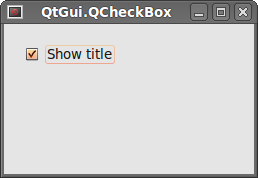 Figure: QtGui.QCheckBox
QtGui.QCheckBox的更多相关文章
- PyQt4单选框QCheckBox
PyQt4中的部件 部件是构建应用程序的基础元素.PyQt4工具包拥有大量的种类繁多的部件.比如:按钮,单选框,滑块,列表框等任何程序员在完成其工作时需要的部件. QCheckBox单选框 单选框具有 ...
- Pyqt 获取打包二进制文件中的资源
记得有一次打开一个单独exe程序,点击btn中的一个帮助说明按钮,在同级目录下就多出一个help.chm 文件并自动打开. 那这个exe肯定是把help.chm 打包到exe中,当我触发“帮助”按钮的 ...
- Pyqt 屏幕截图工具
从Pyqt的examples中看到一段截图代码, (路径:examplas\desktop\screenshot.py) 所以想自己UI下界面,手动练习下 通过UI生成的: Screenshot.py ...
- Pyqt Smtplib实现Qthread多线程发送邮件
一. smtplib 的介绍 smtplib.SMTP([host[, port[, local_hostname[, timeout]]]]) SMTP类构造函数,表示与SMTP服务器之间的连接 ...
- Pyqt QSystemTrayIcon 实现托盘效果
pyqt的托盘效果很好实现,在Pyqt的demo中有个例子 路径:PyQt4\examples\desktop\systray.py 今天我就仿这个Tray效果做效果 一. 创建UI trayicon ...
- pyqt小例子 音乐盒
源代码1: # -*- coding: utf-8 -*- import sys,time,os import ctypes from PyQt4 import QtCore, QtGui,Qt fr ...
- PYQT4 : QSystemTrayIcon练习
照着demo自己做了一遍,练练手 import sys from PyQt4 import QtGui from PyQt4 import QtCore class SysTray(QtGui.QDi ...
- Python&MySQL&PyQt
环境: Python2.7+MySQL5.6+PyQt4 watermark/2/text/aHR0cDovL2Jsb2cuY3Nkbi5uZXQv/font/5a6L5L2T/fontsize/40 ...
- PyQt4 的部件 -- CheckBox 单选框
单选框具有两种状态:被选中或未被选中. 当用户选择或者取消选择时,单选框就会发射一个stateChanged()信号 # QCheckBox 单选框 # 本例创建一个用来改变窗口标题的单选框 impo ...
随机推荐
- Eigen学习笔记1:在VS2015下Eigen(矩阵变换)的配置
一.Eigen简介 Eigen是一个高层次的C ++库,有效支持线性代数,矩阵和矢量运算,数值分析及其相关的算法. Eigen适用范围广,支持包括固定大小.任意大小的所有矩阵操作,甚至是稀疏矩阵:支持 ...
- [BJOI2017]魔法咒语 --- AC自动机 + 矩阵优化
bzoj 4860 LOJ2180 洛谷P3175 [BJOI2017]魔法咒语 题目描述: Chandra 是一个魔法天才. 从一岁时接受火之教会洗礼之后,Chandra 就显示出对火元素无 ...
- 【最小割】【Dinic】HihoCoder - 1252 - The 2015 ACM-ICPC Asia Beijing Regional Contest - D - Kejin Game
题意:有一个技能学习表,是一个DAG,要想正常学习到技能x,要将指向x的技能全部先学到,然后会有一个正常花费cx.然后你还有一种方案,通过氪金dx直接获得技能x.你还可以通过一定的代价,切断一条边.问 ...
- [NC13A]反蝴蝶效应/[SPOJ-NPC2014D]General Joke
[NC13A]反蝴蝶效应/[SPOJ-NPC2014D]General Joke 题目大意: 按顺序访问\(A_{1\sim n}(n\le10^5)\),经过\(A_i\)时身上必须有\(A_i\) ...
- nginx的重试机制以及nginx常用的超时配置说明
nginx的重试机制 现在对外服务的网站,很少只使用一个服务节点,而是部署多台服务器,上层通过一定机制保证容错和负载均衡. nginx就是常用的一种HTTP和反向代理服务器,支持容错和负载均衡. ng ...
- 检测使用内存memory_get_usage,执行时间microtime
最近经常用一些扩展,适当比较所占内存,还有一些扩展执行时间长,检测一下每步的执行时间,可以加以修正调整一下源码 查看运行时间 microtime() #返回当前 Unix 时间戳和微秒数. echo ...
- 2015 百度之星 1001 超级赛亚ACMer 贪心
超级赛亚ACMer Time Limit: 20 Sec Memory Limit: 256 MB 题目连接 http://acdream.info/problem?pid=1750 Descrip ...
- nginx+php-fpm 配置和错误总结
<strong>空白页面:</strong>需要这个参数: fastcgi_param SCRIPT_FILENAME $document_root$fastcgi_scrip ...
- PHP 日期的加减
- Redis-环境搭建、创建服务、搭建主从复制-Windows版本
一.搭建Redis环境 1.链接:http://pan.baidu.com/s/1boKAzzL 密码:sh2r 2.不赘述:执行redis-server.再执行redis-cli即可.redis环境 ...