
ios MBProgressHUD 使用,及二次封装
MBProgressHUD是一个显示HUD窗口的第三方类库,用于在执行一些后台任务时,在程序中显示一个表示进度的loading视图和两个可选的文本提示的HUD窗口。MBProgressHUD 二次封装网上有很多教程,大多数我们在 MVC 模式下发送网络大多都在 UIVIewCOntroller 进行,需要使用弹窗的地方大多也都在controller 中,所有之前给 UIViewCOntroller 写了个分类,方便调用,但是后来觉得在基类中使用不太好,所以今天重新整理一下. demo 地址:https://github.com/SummerHH/YJMBProgressHUD.git
先了解下 MBProgressHUD 使用:
HUD窗口的模式:
// 使用UIActivityIndicatorView来显示进度,这是默认值

MBProgressHUDModeIndeterminate,

// 使用一个圆形饼图来作为进度视图

MBProgressHUDModeDeterminate,

// 使用一个水平进度条

MBProgressHUDModeDeterminateHorizontalBar,

// 使用圆环作为进度条

MBProgressHUDModeAnnularDeterminate,

// 显示一个自定义视图,通过这种方式,可以显示一个正确或错误的提示图

MBProgressHUDModeCustomView,

// 只显示文本

MBProgressHUDModeText
一个MBProgressHUD视图主要由四个部分组成:
1.标题文本
@property (strong, nonatomic, readonly) UILabel *label;
2.详情文本
@property (strong, nonatomic, readonly) UILabel *detailsLabel;
3.loading动画视图
@property (strong, nonatomic, nullable) UIView *customView;
4.HUD背景框
@property (strong, nonatomic, readonly) MBBackgroundView *bezelView;
外观属性:
设置颜色 默认为半半透明的黑色和白色的iOS 7和早iOS版本
@property (strong, nonatomic, nullable) UIColor *contentColor UI_APPEARANCE_SELECTOR;
//设置显示大小
@property (assign, nonatomic) CGSize minSize UI_APPEARANCE_SELECTOR;
//隐藏后从父视图中移除
@property (assign, nonatomic) BOOL removeFromSuperViewOnHide;
//是否显示蒙版,不过1.0.0版本被弃用了
@property (assign) BOOL dimBackground;
- (void)drawRect:(CGRect)rect {

    ...

    if (self.dimBackground) {

        //Gradient colours

        size_t gradLocationsNum = ;

        CGFloat gradLocations[] = {0.0f, 1.0f};

        CGFloat gradColors[] = {0.0f,0.0f,0.0f,0.0f,0.0f,0.0f,0.0f,0.75f};

        CGColorSpaceRef colorSpace = CGColorSpaceCreateDeviceRGB();

        CGGradientRef gradient = CGGradientCreateWithColorComponents(colorSpace, gradColors, gradLocations, gradLocationsNum);

        CGColorSpaceRelease(colorSpace);

        //Gradient center

        CGPoint gradCenter= CGPointMake(self.bounds.size.width/, self.bounds.size.height/);

        //Gradient radius

        float gradRadius = MIN(self.bounds.size.width , self.bounds.size.height) ;

        // 由中心向四周绘制渐变

        CGContextDrawRadialGradient (context, gradient, gradCenter,

                                     , gradCenter, gradRadius,

                                     kCGGradientDrawsAfterEndLocation);

        CGGradientRelease(gradient);

    }

    ...

}
//创建布局
- (id)initWithView:(UIView *)view;
控制布局的属性
// HUD相对于父视图中心点的x轴偏移量和y轴偏移量

@property (assign) float xOffset;

@property (assign) float yOffset;

// HUD各元素与HUD边缘的间距

@property (assign) float margin;

// HUD背景框的最小大小

@property (assign) CGSize minSize;

// HUD的实际大小

@property (atomic, assign, readonly) CGSize size;

// 是否强制HUD背景框宽高相等

@property (assign, getter = isSquare) BOOL square;
//显示和隐藏的方法
- (void)showAnimated:(BOOL)animated;

- (void)hideAnimated:(BOOL)animated;
经常在 UIViewController 中使用,可以给 UIVIewController 写个分类
使用简单方便
#import <UIKit/UIKit.h>

#import "MBProgressHUD.h"

@interface UIViewController (HUD)

-(void)showSuccess:(NSString *)success;

-(void)showError:(NSString *)error;

-(void)showMessage:(NSString *)message;

-(void)showWaiting;

-(void)showLoading;

-(void)showLoadingWithMessage:(NSString *)message;

-(void)showSaving;

-(void)hideHUD;

@end
@implementation UIViewController (HUD)

-(void)showSuccess:(NSString *)success

{

    MBProgressHUD *HUD=[[MBProgressHUD alloc]initWithView:[self getView]];

    HUD.contentColor=[UIColor whiteColor];

    HUD.bezelView.color=[UIColor blackColor];

    HUD.mode=MBProgressHUDModeText;

    HUD.label.text=success;

    HUD.removeFromSuperViewOnHide=YES;

    [[self getView] addSubview:HUD];

    [HUD showAnimated:YES];

    [HUD hideAnimated:YES afterDelay:];

}

-(void)showError:(NSString *)error

{

    MBProgressHUD *HUD=[[MBProgressHUD alloc]initWithView:[self getView]];

    HUD.contentColor=[UIColor whiteColor];

    HUD.bezelView.color=[UIColor blackColor];

    HUD.mode=MBProgressHUDModeText;

    HUD.label.text=error;

    HUD.removeFromSuperViewOnHide=YES;

    [[self getView] addSubview:HUD];

    [HUD showAnimated:YES];

    [HUD hideAnimated:YES afterDelay:];

}

-(void)showMessage:(NSString *)message

{

    MBProgressHUD *HUD=[[MBProgressHUD alloc]initWithView:[self getView]];

    HUD.contentColor=[UIColor whiteColor];

    HUD.bezelView.color=[UIColor blackColor];

    HUD.mode=MBProgressHUDModeText;

    HUD.label.text=message;

    HUD.removeFromSuperViewOnHide=YES;

    [[self getView] addSubview:HUD];

    [HUD showAnimated:YES];

    [HUD hideAnimated:YES afterDelay:];

}

-(void)showWaiting

{

    MBProgressHUD *HUD=[[MBProgressHUD alloc]initWithView:[self getView]];

    HUD.backgroundView.color = [UIColor colorWithWhite:.f alpha:.2f];

    HUD.bezelView.color = [UIColor blackColor];

    HUD.contentColor=[UIColor whiteColor];

    HUD.removeFromSuperViewOnHide=YES;

    [[self getView] addSubview:HUD];

    [HUD showAnimated:YES];

}

-(void)showLoading

{

    MBProgressHUD *HUD=[[MBProgressHUD alloc]initWithView:[self getView]];

    HUD.backgroundView.color = [UIColor colorWithWhite:.f alpha:.2f];

    HUD.bezelView.color = [UIColor blackColor];

    HUD.contentColor=[UIColor whiteColor];

    HUD.label.text=@"正在加载";

    HUD.removeFromSuperViewOnHide=YES;

    [[self getView] addSubview:HUD];

    [HUD showAnimated:YES];

}

-(void)showLoadingWithMessage:(NSString *)message

{

    MBProgressHUD *HUD=[[MBProgressHUD alloc]initWithView:[self getView]];

    HUD.backgroundView.color = [UIColor colorWithWhite:.f alpha:.2f];

    HUD.bezelView.color = [UIColor blackColor];

    HUD.contentColor=[UIColor whiteColor];

    HUD.label.text=message;

    HUD.removeFromSuperViewOnHide=YES;

    [[self getView] addSubview:HUD];

    [HUD showAnimated:YES];

}

-(void)showSaving

{

    MBProgressHUD *HUD=[[MBProgressHUD alloc]initWithView:[self getView]];

    HUD.backgroundView.color = [UIColor colorWithWhite:.f alpha:.2f];

    HUD.bezelView.color = [UIColor blackColor];

    HUD.contentColor=[UIColor whiteColor];

    HUD.label.text=@"正在保存";

    HUD.removeFromSuperViewOnHide=YES;

    [[self getView] addSubview:HUD];

    [HUD showAnimated:YES];

}

-(void)hideHUD

{

    [MBProgressHUD hideHUDForView:[self getView] animated:YES];

}

-(UIView *)getView

{

    UIView *view;

    if (self.navigationController.view) {

        view=self.navigationController.view;

    }else

    {

        view=self.view;

    }

    return view;

}
另一种可以配合网络使用,也可以 用在 Controller中
#import <MBProgressHUD/MBProgressHUD.h>

typedef NS_ENUM(NSInteger, YJProgressHUDStatus) {

    /** 成功 */

    YJProgressHUDStatusSuccess,

    /** 失败 */

    YJProgressHUDStatusError,

    /** 警告*/

    YJProgressHUDStatusWaitting,

    /** 提示 */

    YJProgressHUDStatusInfo,

    /** 等待 */

    YJProgressHUDStatusLoading

};

@interface YJProgressHUD : MBProgressHUD

/**

 *  是否正在显示

 */

@property (nonatomic, assign, getter=isShowNow) BOOL showNow;

/** 返回一个 HUD 的单例 */

+ (instancetype)sharedHUD;

/** 在 window 上添加一个 HUD */

+ (void)showStatus:(YJProgressHUDStatus)status text:(NSString *)text;

#pragma mark - 建议使用的方法

/** 在 window 上添加一个只显示文字的 HUD */

+ (void)showMessage:(NSString *)text;

/** 在 window 上添加一个提示`信息`的 HUD */

+ (void)showWaiting:(NSString *)text;

/** 在 window 上添加一个提示`失败`的 HUD */

+ (void)showError:(NSString *)text;

/** 在 window 上添加一个提示`成功`的 HUD */

+ (void)showSuccess:(NSString *)text;

/** 在 window 上添加一个提示`等待`的 HUD, 需要手动关闭 */

+ (void)showLoading:(NSString *)text;

/** 手动隐藏 HUD */

+ (void)hideHUD;
#import "YJProgressHUD.h"

// 背景视图的宽度/高度

#define BGVIEW_WIDTH 100.0f

// 文字大小

#define TEXT_SIZE    16.0f

@implementation YJProgressHUD

+ (instancetype)sharedHUD {

    static id hud;

    static dispatch_once_t onceToken;

    dispatch_once(&onceToken, ^{

        hud = [[self alloc] initWithView:[UIApplication sharedApplication].keyWindow];

    });

    return hud;

}

+ (void)showStatus:(YJProgressHUDStatus)status text:(NSString *)text {

    YJProgressHUD *HUD = [YJProgressHUD sharedHUD];

    HUD.bezelView.color = [UIColor colorWithHex:0x000000];

    HUD.contentColor=[UIColor whiteColor];

    [HUD showAnimated:YES];

    [HUD setShowNow:YES];

    //蒙版显示 YES , NO 不显示

//        HUD.dimBackground = YES;

    HUD.label.text = text;

    HUD.label.textColor = [UIColor whiteColor];

    [HUD setRemoveFromSuperViewOnHide:YES];

    HUD.label.font = [UIFont boldSystemFontOfSize:TEXT_SIZE];

    [HUD setMinSize:CGSizeMake(BGVIEW_WIDTH, BGVIEW_WIDTH)];

    [[UIApplication sharedApplication].keyWindow addSubview:HUD];

    NSString *bundlePath = [[NSBundle mainBundle] pathForResource:@"YJProgressHUD" ofType:@"bundle"];

    switch (status) {

        case YJProgressHUDStatusSuccess: {

            NSString *sucPath = [bundlePath stringByAppendingPathComponent:@"MBHUD_Success.png"];

            UIImage *sucImage = [UIImage imageWithContentsOfFile:sucPath];

            HUD.mode = MBProgressHUDModeCustomView;

            UIImageView *sucView = [[UIImageView alloc] initWithImage:sucImage];

            HUD.customView = sucView;

            [HUD hideAnimated:YES afterDelay:2.0f];

            dispatch_after(dispatch_time(DISPATCH_TIME_NOW, (int64_t)(2.0f * NSEC_PER_SEC)), dispatch_get_main_queue(), ^{

                [HUD setShowNow:NO];

            });

        }

            break;

        case YJProgressHUDStatusError: {

            NSString *errPath = [bundlePath stringByAppendingPathComponent:@"MBHUD_Error.png"];

            UIImage *errImage = [UIImage imageWithContentsOfFile:errPath];

            HUD.mode = MBProgressHUDModeCustomView;

            UIImageView *errView = [[UIImageView alloc] initWithImage:errImage];

            HUD.customView = errView;

            [HUD hideAnimated:YES afterDelay:2.0f];

            dispatch_after(dispatch_time(DISPATCH_TIME_NOW, (int64_t)(2.0f * NSEC_PER_SEC)), dispatch_get_main_queue(), ^{

                [HUD setShowNow:NO];

            });

        }

            break;

        case YJProgressHUDStatusLoading: {

            HUD.mode = MBProgressHUDModeIndeterminate;

        }

            break;

        case YJProgressHUDStatusWaitting: {

            NSString *infoPath = [bundlePath stringByAppendingPathComponent:@"MBHUD_Warn.png"];

            UIImage *infoImage = [UIImage imageWithContentsOfFile:infoPath];

            HUD.mode = MBProgressHUDModeCustomView;

            UIImageView *infoView = [[UIImageView alloc] initWithImage:infoImage];

            HUD.customView = infoView;

            [HUD hideAnimated:YES afterDelay:2.0f];

            dispatch_after(dispatch_time(DISPATCH_TIME_NOW, (int64_t)(2.0f * NSEC_PER_SEC)), dispatch_get_main_queue(), ^{

                [HUD setShowNow:NO];

            });

        }

            break;

        case YJProgressHUDStatusInfo: {

            NSString *infoPath = [bundlePath stringByAppendingPathComponent:@"MBHUD_Info.png"];

            UIImage *infoImage = [UIImage imageWithContentsOfFile:infoPath];

            HUD.mode = MBProgressHUDModeCustomView;

            UIImageView *infoView = [[UIImageView alloc] initWithImage:infoImage];

            HUD.customView = infoView;

            [HUD hideAnimated:YES afterDelay:2.0f];

            dispatch_after(dispatch_time(DISPATCH_TIME_NOW, (int64_t)(2.0f * NSEC_PER_SEC)), dispatch_get_main_queue(), ^{

                [HUD setShowNow:NO];

            });

        }

            break;

        default:

            break;

    }

}

+ (void)showMessage:(NSString *)text {

    YJProgressHUD *HUD = [YJProgressHUD sharedHUD];

    HUD.bezelView.color = [UIColor colorWithHex:0x000000];

    [HUD showAnimated:YES];

    [HUD setShowNow:YES];

    HUD.label.text = text;

    HUD.contentColor=[UIColor whiteColor];

    [HUD setMinSize:CGSizeZero];

    [HUD setMode:MBProgressHUDModeText];

    //    HUD.dimBackground = YES;

    [HUD setRemoveFromSuperViewOnHide:YES];

    HUD.label.font = [UIFont boldSystemFontOfSize:TEXT_SIZE];

    [[UIApplication sharedApplication].keyWindow addSubview:HUD];

    dispatch_after(dispatch_time(DISPATCH_TIME_NOW, (int64_t)(2.0f * NSEC_PER_SEC)), dispatch_get_main_queue(), ^{

        [[YJProgressHUD sharedHUD] setShowNow:NO];

        [[YJProgressHUD sharedHUD] hideAnimated:YES];

    });

}

+ (void)showWaiting:(NSString *)text {

    [self showStatus:YJProgressHUDStatusWaitting text:text];

}

+ (void)showError:(NSString *)text {

    [self showStatus:YJProgressHUDStatusError text:text];

}

+ (void)showSuccess:(NSString *)text {

    [self showStatus:YJProgressHUDStatusSuccess text:text];

}

+ (void)showLoading:(NSString *)text {

    [self showStatus:YJProgressHUDStatusLoading text:text];

}

+ (void)hideHUD {

    [[YJProgressHUD sharedHUD] setShowNow:NO];

    [[YJProgressHUD sharedHUD] hideAnimated:YES];

}
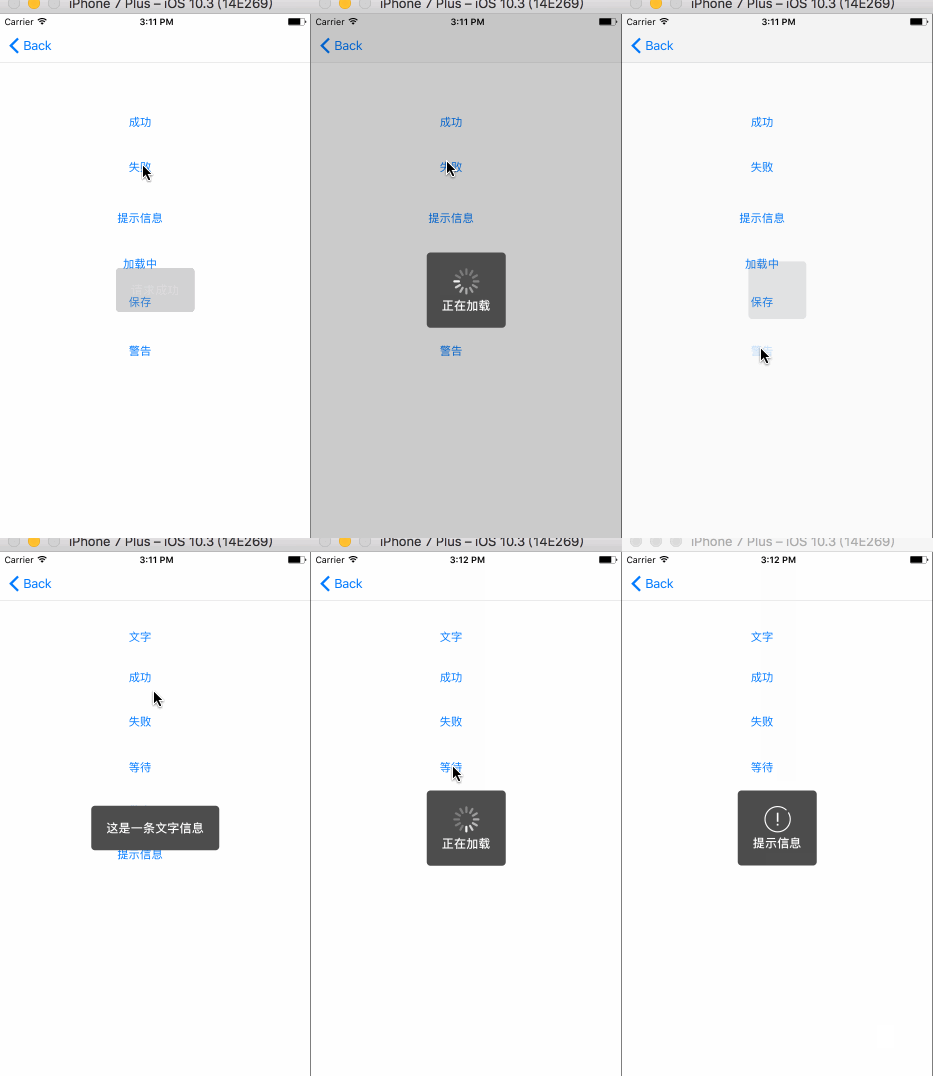
效果图:
ios MBProgressHUD 使用,及二次封装的更多相关文章
- 对MBProgressHUD进行二次封装并精简使用
对MBProgressHUD进行二次封装并精简使用 https://github.com/jdg/MBProgressHUD 几个效果图: 以下源码是MBProgressHUD支持最新的iOS8的版本 ...
- AFNetworking3.0+MBProgressHUD二次封装,一句话搞定网络提示
对AFNetworking3.0+MBProgressHUD的二次封装,使用更方便,适用性非常强: 一句话搞定网络提示: 再也不用担心网络库更新后,工程要修改很多地方了!网络库更新了只需要更新这个封装 ...
- iOS项目相关@AFN&SDWeb的二次封装
一,AFNetworking跟SDWebImge是功能强大且常用的第三方,然而在实际应用中需要封装用来复用今天就跟大家分享一下AFN&SDWeb的二次封装 1. HttpClient.h及.m ...
- iOS菜鸟之AFN的二次封装
我用一个单例类将一些常用的网络请求进行了二次封装,主要包括post请求 get请求 图片文件上传下载 视频的断点续传等功能. 首先大家先去github上下载AFN,将文件夹内的AFNetworki ...
- 对百度WebUploader开源上传控件的二次封装,精简前端代码(两句代码搞定上传)
前言 首先声明一下,我这个是对WebUploader开源上传控件的二次封装,底层还是WebUploader实现的,只是为了更简洁的使用他而已. 下面先介绍一下WebUploader 简介: WebUp ...
- AFNetworking二次封装的那些事
AFNetworking可是iOS网络开发的神器,大大简便了操作.不过网络可是重中之重,不能只会用AFNetworking.我觉得网络开发首先要懂基本的理论,例如tcp/ip,http协议,之后要了解 ...
- 本地缓存下载文件,download的二次封装
来源:http://ask.dcloud.net.cn/article/524 源码下载链接 说明: (1)由于平时项目中大量用到了附件下载等功能,所以就花了一个时间,把plus的downlaod进行 ...
- .Net Framework下对Dapper二次封装迁移到.Net Core2.0遇到的问题以及对Dapper的封装介绍
今天成功把.Net Framework下使用Dapper进行封装的ORM成功迁移到.Net Core 2.0上,在迁移的过程中也遇到一些很有意思的问题,值得和大家分享一下.下面我会还原迁移的每一个过程 ...
- 代码二次封装-xUtils(android)
通常我们会引用很多lib 而且会出现lib 与我们的功能仅仅差一点点 这种情况我们最好不要去改动源代码 而是进行二次封装 举例我使用 xUtils的二次封装 此处说明我是搞ios的 这个是androi ...
随机推荐
- CSS如何计算优先级?如何计算权重?
(1) 优先级就近原则,同权重以最近者为准 载入样式以最后载入的样式为准: 同权重下:内联样式表(标签内部) > 嵌入样式表(当前文件) > 外部样式表(外部文件) !import > ...
- TCP的三次握手和四次挥手,为什么?
首先,我们要知道TCP是全双工的,即客户端在给服务器端发送信息的同时,服务器端也可以给客户端发送信息.而半双工的意思是A可以给B发,B也可以给A发,但是A在给B发的时候,B不能给A发,即不同时,为半双 ...
- kafka之c接口常用API------librdkafka
1 安装方法以及相关库文件 https://github.com/edenhill/librdkafka 2 High-level producer High-level consumer Simpl ...
- TMF SID性能相关实体介绍
TMF SID性能相关实体介绍 Copyright © TeleManagement Forum 2013. All Rights Reserved. This document and transl ...
- 递归实现从n个数中选r个数的组合数
#include <stdio.h> #include <stdlib.h> ], count; void comb(int m, int k) { int i, j; for ...
- 网络请求返回HTTP状态码(404,400,500)
HTTP状态码(HTTP Status Code) 一些常见的状态码为: - 服务器成功返回网页 - 请求的网页不存在 - 服务不可用 所有状态解释: 1xx(临时响应) 表示临时响应并需要请求者继续 ...
- PAT L2-006【二叉树中序后序构造树】
#include<bits/stdc++.h> using namespace std; typedef long long LL; struct BT{ int w; BT *L; BT ...
- css 实现三栏布局的四种方式
三栏布局就是左中右,左右两边固定,中间自适应. 1. 绝对定位 <div class="left">左边</div> <div class=" ...
- php文件上传(视频图片或者其他)
html页面 <html> <head> <meta charset="utf-8"> <title></title> ...
- MySQL主从配置实战笔记
其实网上已经有关于MySQL主从复制的很丰富全面的资料了,这里写点东西主要是为了给自己加深印象. 复制原理 MySQL主从复制是内建的非常强大的功能,主要应用于数据备份,负载均衡等方面.因为配置相对比 ...