
Python+selenium之测试报告(3)
较测试报告(2),该文章将测试报告和测试截图存放在随机变动的文件夹下面,去除了要存放在指定文件夹下面的限制。
注:遇到问题有:
1.创建由时间自动拼接的多级文件夹
2.
 import os

 import time

 current_time = time.strftime("%Y-%m-%d-%H_%M", time.localtime(time.time()))

 current_time1 = time.strftime("%H_%M_%S", time.localtime(time.time()))

 pic_path1 = '.\\' + current_time + "\\result\\"

 pic_path = pic_path1 + "image"+"\\" + current_time1 + '.png'

 os.makedirs(pic_path)

 print(pic_path)
拼接好的路径要使用os.makedirs()创建对应的文件夹目录
path = pic_path1 + current_time1 + '.png'
创建好的文件夹无法再使用该路径继续创建下级路径,只能存放对应的内容
3.测试报告必须得放在测图文件的外层目录下,否者在测试报告中查找图片会报如下的错误
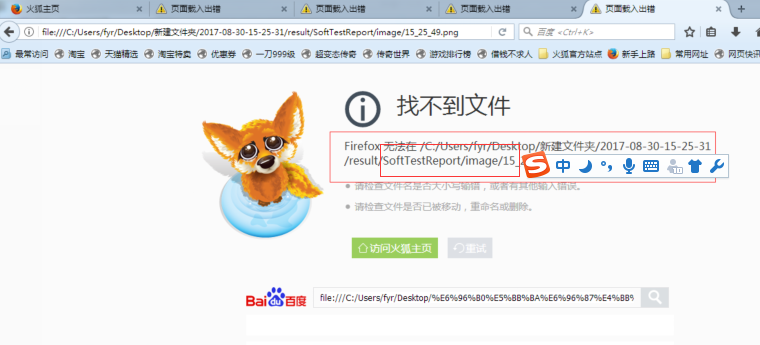
整个代码如下:
 # -*- coding: utf-8 -*-

 import HTMLTestReport

 import HTMLTestRunner

 import os

 import sys

 import time

 import unittest

 from selenium import webdriver

 current_time = time.strftime("%Y-%m-%d-%H-%M-%S", time.localtime(time.time()))

 pic_path = '.\\' + current_time + "\\result\\"

 pic_path1 = '.\\' + current_time + "\\result\\image\\"

 os.makedirs(pic_path)

 os.makedirs(pic_path1)

 class Baidu(unittest.TestCase):

     def setUp(self):

         self.driver = webdriver.Firefox()

         self.driver.implicitly_wait(30)

         self.driver.maximize_window()

         self.driver.get("https://www.baidu.com")

         time.sleep(5)

     def test_case1(self):

         """设计测试case"""  # *****效果是在测试报告中显示显示出测试名称*****

         print("========【case_0001】打开百度搜索 =============")

         # "."表示创建的路径为当.py文件所处的地址,\\是用\将“\”转义

         current_time1 = time.strftime("%H_%M_%S", time.localtime(time.time()))

         path = pic_path1 + current_time1 + '.png'

         print(path)  # 打印图片的地址

         time.sleep(5)

         self.driver.save_screenshot(path)  # 截图,获取测试结果

         time.sleep(2)

         self.assertEqual('百度一下,你就知道', self.driver.title)  # 断言判断测试是否成功,判断标题是否为百度(设计失败的case)

     def test_case2(self):

         """设计测试过程中报错的case"""

         global pic_path

         print("========【case_0002】搜索selenium =============")

         self.driver.find_element_by_id("kw").clear()

         self.driver.find_element_by_id("kw").send_keys(u"selenium")

         self.driver.find_element_by_id('su').click()

         time.sleep(2)

         # "."表示创建的路径为当.py文件所处的地址,\\是用\将“\”转义

         current_time1 = time.strftime("%H_%M_%S", time.localtime(time.time()))

         path = pic_path1 + current_time1 + '.png'

         print(path)  # 打印图片的地址

         time.sleep(5)

         self.driver.save_screenshot(path)  # 截图,获取测试结果

         time.sleep(2)

         self.assertIn('selenium', self.driver.title)  # 断言书写错误,导致case出错

     def test_case3(self):

         """设计测试成功的case"""

         print("========【case_0003】 搜索梦雨情殇博客=============")

         self.driver.find_element_by_id("kw").clear()

         self.driver.find_element_by_id("kw").send_keys(u"明道")

         self.driver.find_element_by_id('su').click()

         # "."表示创建的路径为当.py文件所处的地址,\\是用\将“\”转义

         current_time1 = time.strftime("%H_%M_%S", time.localtime(time.time()))

         path = pic_path1 + current_time1 + '.png'

         print(path)  # 打印图片的地址

         time.sleep(5)

         self.driver.save_screenshot(path)  # 截图,获取测试结果

         time.sleep(3)

         print(self.driver.title)

         self.assertIn('明道', self.driver.title)

     def tearDown(self):

         self.driver.quit()

 if __name__ == "__main__":

     '''生成测试报告'''

     current_time1 = time.strftime("%H_%M_%S", time.localtime(time.time()))

     testunit = unittest.TestSuite()

     testunit.addTest(Baidu("test_case1"))

     testunit.addTest(Baidu("test_case2"))

     testunit.addTest(Baidu("test_case3"))

     report_path = pic_path + "SoftTestReport_" + current_time1 + '.html'  # 生成测试报告的路径

     fp = open(report_path, "wb")

     runner = HTMLTestReport.HTMLTestRunner(stream=fp, title=u"自动化测试报告", description='自动化测试演示报告', tester='fyr')

     # runner = HTMLTestRunner.HTMLTestRunner(stream=fp, title=u"自动化测试报告", description='自动化测试演示报告')

     runner.run(testunit)

     fp.close()
Python+selenium之测试报告(3)的更多相关文章
- Python+selenium之测试报告(1)
一.下载HTMLTestRunner.py HTMLTestRunner 是 Python 标准库的 unittest 模块的一个扩展.它生成易于使用的 HTML 测试报告.HTMLTestRunne ...
- Python+selenium之测试报告(2)
# -*- coding: utf-8 -*- import HTMLTestReport import HTMLTestRunner import os import sys import time ...
- python+selenium生成测试报告后自动发送邮件
标签(空格分隔): 自动化测试 运行自动化脚本后,会产生测试报告,而将测试报告自动发送给相关人员,能够让对方及时的了解测试情况,查看测试结果. 整个脚本包括三个部分: 生成测试报告 获取最新的测试报告 ...
- python selenium自动化测试报告
先记录一下,后续继续更新. 首先:HTMLTestRunner的下载地址:http://tungwaiyip.info/software/HTMLTestRunner.html 选中后单击右键,在弹出 ...
- 【转】【Python + selenium】linux和mac环境,驱动器chromedriver和测试报告HTMLTestRunner放置的位置
感谢: 作者:gz_tester,文章:<linux和mac环境,chromedriver和HTMLTestRunner放置的位置> 使用场景 配置python selenium 环境 使 ...
- python+selenium +unittest生成HTML测试报告
python+selenium+HTMLTestRunner+unittest生成HTML测试报告 首先要准备HTMLTestRunner文件,官网的HTMLTestRunner是python2语法写 ...
- 使用python selenium进行自动化functional test
Why Automation Testing 现在似乎大家都一致认同一个项目应该有足够多的测试来保证功能的正常运作,而且这些此处的‘测试’特指自动化测试:并且大多数人会认为如果还有哪个项目依然采用人工 ...
- Python Selenium设计模式-POM
前言 本文就python selenium自动化测试实践中所需要的POM设计模式进行分享,以便大家在实践中对POM的特点.应用场景和核心思想有一定的理解和掌握. 为什么要用POM 基于python s ...
- Jenkins持续集成项目搭建与实践——基于Python Selenium自动化测试(自由风格)
Jenkins简介 Jenkins是Java编写的非常流行的持续集成(CI)服务,起源于Hudson项目.所以Jenkins和Hudson功能相似. Jenkins支持各种版本的控制工具,如CVS.S ...
随机推荐
- ie8兼容rgba的方法
现在做个网页还得考虑ie8,只想说:尼玛! 但是没办法,屈于淫威也得弄. 首先说下rgba的含义吧,rgba,r代表red,g代表green,b代表blue,a代表透明度. filter:progid ...
- [51nod1035]最长的循环节
题意:输出<=n的数中倒数循环节长度最长的那个数 解题关键:http://w3.math.sinica.edu.tw/math_media/d253/25311.pdf https://wenk ...
- sublime取消自动升级提示
1.进入Preferences -> Settings-User ,添加 "update_check": false, 2.重启Sublime.
- HDU - 2689 Sort it与2016蓝桥杯B 交换瓶子 排序(相邻交换与任意交换)
Sort it You want to processe a sequence of n distinct integers by swapping two adjacent sequence ele ...
- Newtonsoft.Json序列化字符串-格式化和时间格式问题
最近C#中需要将实体进行json序列化,使用了Newtonsoft.Json public static void TestJson() { DataTable d ...
- linux mysql 简单记录
mysql 1.linux下启动mysql的命令:mysqladmin start/ect/init.d/mysql start (前面为mysql的安装路径) 2.linux下重启mysql的命令: ...
- [Xcode 实际操作]六、媒体与动画-(10)UIView视图翻转动的画制作
目录:[Swift]Xcode实际操作 本文将演示翻转动画的制作. 在项目导航区,打开视图控制器的代码文件[ViewController.swift] import UIKit class ViewC ...
- 剑指Offer的学习笔记(C#篇)-- 二进制中1的个数
题目描述 输入一个整数,输出该数二进制表示中1的个数.其中负数用补码表示. 一 . 解题思路 新颖的解法,使得该题目运用到了二进制的位运算符.先了解一下位运算符! 此题便很好的发挥了位运算符& ...
- MyBaties源码解析
觉得查看源代码确实是一个学习的一种方法 因为很多时候别人把最核心的代码给我们都封装好了 我们直接可以来拿使用 很多时候自己也会问 为什么通过这个方法就可以得到我觉得就是一颗好奇心吧 我算了算 就这三个 ...
- eclipse svn 忽略target .project .classpath等目录文件
这个build失败的解决方案就是不要把你项目的 target目录放在src repository 里面,还有 .project 和 .classpath 最好也别放到src repository 里. ...