
Python+selenium之测试报告(2)
 # -*- coding: utf-8 -*-

 import HTMLTestReport

 import HTMLTestRunner

 import os

 import sys

 import time

 import unittest

 from selenium import webdriver

 class Baidu(unittest.TestCase):

     def setUp(self):

         self.driver = webdriver.Firefox()

         self.driver.implicitly_wait(30)

         self.driver.maximize_window()

         # self.base_url = "https://www.baidu.com"

         # self.driver.get(self.base_url)

         self.driver.get("https://www.baidu.com")

     def test_case1(self):

         """设计测试失败case"""  # *****效果是在测试报告中显示显示出测试名称*****

         print("========【case_0001】打开百度搜索 =============")

         # current_time = time.strftime("%Y-%M-%D-%H-%M-%S", time.localtime(time.time()))

         # "."表示创建的路径为当.py文件所处的地址,\\是用\将“\”转义

         # pic_path = '.\\result\\image\\' + current_time + '.png'

         current_time = time.strftime("%Y-%m-%d-%H_%M_%S", time.localtime(time.time()))

         pic_path = '.\\result\\image\\' + '2017-07-17\\' + current_time + '.png'

         print(pic_path)  # 打印图片的地址

         time.sleep(2)

         self.driver.save_screenshot(pic_path)  # 截图,获取测试结果

         self.assertEqual('百度一下,你就知道', self.driver.title)  # 断言判断测试是否成功,判断标题是否为百度(设计失败的case)

     def test_case2(self):

         """设计测试过程中报错的case"""

         print("========【case_0002】搜索selenium =============")

         self.driver.find_element_by_id("kw").clear()

         self.driver.find_element_by_id("kw").send_keys(u"selenium")

         self.driver.find_element_by_id('su').click()

         time.sleep(2)

         # current_time = time.strftime("%Y-%M-%D-%H-%M-%S", time.localtime(time.time()))

         current_time = time.strftime("%Y-%m-%d-%H_%M_%S", time.localtime(time.time()))

         # "."表示创建的路径为当.py文件所处的地址,\\是用\将“\”转义

         pic_path = '.\\result\\image\\'+'2017-07-17\\' + current_time + '.png'

         print(pic_path)  # 打印图片的地址

         time.sleep(2)

         self.driver.save_screenshot(pic_path)  # 截图,获取测试结果

         self.assertIn('selenium', self.driver.title)  # 断言书写错误,导致case出错

     def test_case3(self):

         """设计测试成功的case"""

         print("========【case_0003】 搜索梦雨情殇博客=============")

         self.driver.find_element_by_id("kw").clear()

         self.driver.find_element_by_id("kw").send_keys(u"梦雨情殇")

         self.driver.find_element_by_id('su').click()

         # current_time = time.strftime("%Y-%M-%D-%H-%M-%S", time.localtime(time.time()))

         current_time = time.strftime("%Y-%m-%d-%H_%M_%S", time.localtime(time.time()))

         # "."表示创建的路径为当.py文件所处的地址,\\是用\将“\”转义

         pic_path = '.\\result\\image\\2017-07-17\\' + current_time + '.png'

         print(pic_path)  # 打印图片的地址

         time.sleep(2)

         self.driver.save_screenshot(pic_path)  # 截图,获取测试结果

         self.assertIn('梦雨情殇', self.driver.title)

     def tearDown(self):

         self.driver.quit()

 if __name__ == "__main__":

     '''生成测试报告'''

     current_time = time.strftime("%Y-%m-%d-%H_%M_%S", time.localtime(time.time()))

     testunit = unittest.TestSuite() # 定义一个单元测试容器

     testunit.addTest(Baidu("test_case1")) #将测试用例加入到测试容器内

     testunit.addTest(Baidu("test_case2"))

     testunit.addTest(Baidu("test_case3"))

     report_path = ".\\result\\SoftTestReport_" + current_time + '.html'  # 生成测试报告的路径

     fp = open(report_path, "wb")

     runner = HTMLTestReport.HTMLTestRunner(stream=fp, title=u"自动化测试报告", description='自动化测试演示报告', tester='fyr')

     # runner = HTMLTestRunner.HTMLTestRunner(stream=fp, title=u"自动化测试报告", description='自动化测试演示报告')

     runner.run(testunit)

     fp.close()
注意事项:
1.获取当前时间的格式为:
%Y-%m-%d-%H_%M_%S 而不是 %Y-%M-%D-%H-%M-%S
2.填写的截图存放地址“\”,要用转义字符“\”进行转义,变为“\\”
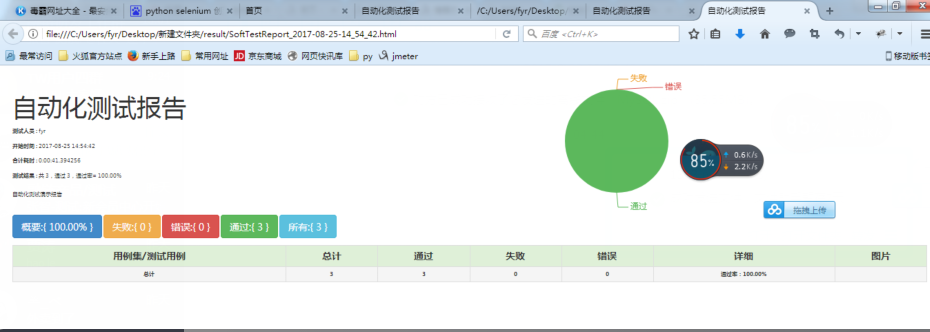
3.runner = HTMLTestReport.HTMLTestRunner(stream=fp, title=u"自动化测试报告", description='自动化测试演示报告', tester='fyr')的测试报告如图所示:
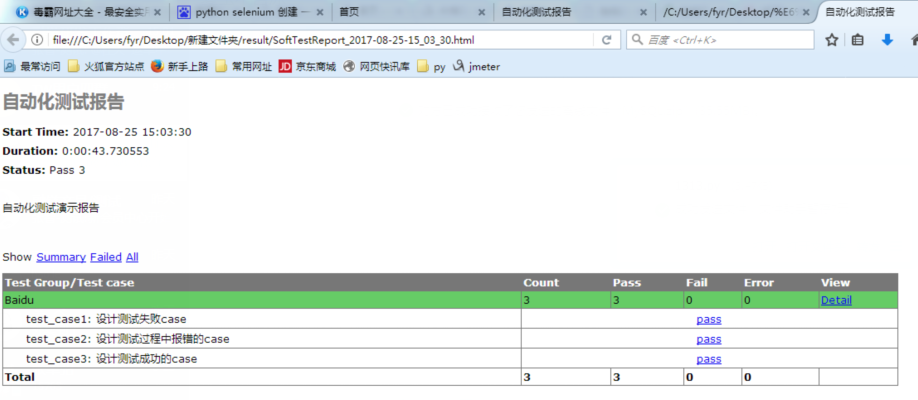
4.runner = HTMLTestRunner.HTMLTestRunner(stream=fp, title=u"自动化测试报告", description='自动化测试演示报告') 的效果图如图所示:
Python+selenium之测试报告(2)的更多相关文章
- Python+selenium之测试报告(1)
一.下载HTMLTestRunner.py HTMLTestRunner 是 Python 标准库的 unittest 模块的一个扩展.它生成易于使用的 HTML 测试报告.HTMLTestRunne ...
- Python+selenium之测试报告(3)
较测试报告(2),该文章将测试报告和测试截图存放在随机变动的文件夹下面,去除了要存放在指定文件夹下面的限制. 注:遇到问题有: 1.创建由时间自动拼接的多级文件夹 2. import os impor ...
- python+selenium生成测试报告后自动发送邮件
标签(空格分隔): 自动化测试 运行自动化脚本后,会产生测试报告,而将测试报告自动发送给相关人员,能够让对方及时的了解测试情况,查看测试结果. 整个脚本包括三个部分: 生成测试报告 获取最新的测试报告 ...
- python selenium自动化测试报告
先记录一下,后续继续更新. 首先:HTMLTestRunner的下载地址:http://tungwaiyip.info/software/HTMLTestRunner.html 选中后单击右键,在弹出 ...
- 【转】【Python + selenium】linux和mac环境,驱动器chromedriver和测试报告HTMLTestRunner放置的位置
感谢: 作者:gz_tester,文章:<linux和mac环境,chromedriver和HTMLTestRunner放置的位置> 使用场景 配置python selenium 环境 使 ...
- python+selenium +unittest生成HTML测试报告
python+selenium+HTMLTestRunner+unittest生成HTML测试报告 首先要准备HTMLTestRunner文件,官网的HTMLTestRunner是python2语法写 ...
- 使用python selenium进行自动化functional test
Why Automation Testing 现在似乎大家都一致认同一个项目应该有足够多的测试来保证功能的正常运作,而且这些此处的‘测试’特指自动化测试:并且大多数人会认为如果还有哪个项目依然采用人工 ...
- Python Selenium设计模式-POM
前言 本文就python selenium自动化测试实践中所需要的POM设计模式进行分享,以便大家在实践中对POM的特点.应用场景和核心思想有一定的理解和掌握. 为什么要用POM 基于python s ...
- Jenkins持续集成项目搭建与实践——基于Python Selenium自动化测试(自由风格)
Jenkins简介 Jenkins是Java编写的非常流行的持续集成(CI)服务,起源于Hudson项目.所以Jenkins和Hudson功能相似. Jenkins支持各种版本的控制工具,如CVS.S ...
随机推荐
- SQLServer中连接个数及超时问题
超时时间已到.超时时间已到,但是尚未从池中获取连接.出现这种情况可能是因为所有池连接均在使用,并且达到了最大池大小. 解决办法1.在代码里面,把未关闭的连接关闭2.扩大共享池,方法如下:解决方法可以是 ...
- nodejs链接mysql
使用mysql连接池:1.安装mysql支持npm install mysql 2.安装node.js的mysqlpool模块npm install -g node-mysql //-g表全局 3.直 ...
- AngularJs(Part 4)--Modules depending on other Modules
Angular does an excellent job of managing object dependencies. it can even take care of module depen ...
- 5. 通过PHP反序列化进行远程代码执行
php序列化与反序列化 最近准备复现一下ecshop2.x,3.x的注入漏洞,其中涉及到了php反序列化的问题,由于之前太小白 ,导致粗心大意,所以此对php反序列化漏洞进行更详细的分析. 提起php ...
- 牛客多校2 D-money(dp记录/贪心)
D-money 链接:https://www.nowcoder.com/acm/contest/140/D来源:牛客网 时间限制:C/C++ 1秒,其他语言2秒 空间限制:C/C++ 131072K, ...
- .net 扩展方法,lamada表达式 委托
扩展方法 (1)扩展方法是一种特殊的静态方法,它定义在一个静态类中,但可以在其他类的对象上向调用实例方法那样进行调用.因此,通过扩展方法,我们就可以在不修改一个类型的前提下对一个类型进行功能上的扩充, ...
- ApplicationContext的三个常用实现类:
ClassPathXmlApplicationContext 它可以加载类路径下的配置文件,要求配置文件必须在类路径下,不在的话加载不了 (java中获取类路径下资源的方式) FileSystemXm ...
- 2017-9-2 NOIP模拟赛
“与” (and.pas/.c/.cpp) 时间限制:1s:空间限制64MB 题目描述: 给你一个长度为n的序列A,请你求出一对Ai,Aj(1<=i<j<=n)使Ai“与”Aj最大. ...
- 洛谷P2652 同花顺
P2652 同花顺 题目背景 所谓同花顺,就是指一些扑克牌,它们花色相同,并且数字连续. 题目描述 现在我手里有n张扑克牌,但它们可能并不能凑成同花顺.我现在想知道,最少更换其中的多少张牌,我能让这 ...
- jmter介绍及安装
一. Apache JMeter介绍 1. Apache JMeter是什么 Apache JMeter 是Apache组织的开放源代码项目,是一个100%纯Java桌面应用,用于压力 ...