
Silhouette-Outlined Diffuse
http://wiki.unity3d.com/index.php/Silhouette-Outlined_Diffuse
A variant of Outlined Diffuse 3 showing outlines only at the exteriors of the object. Useful for showing
which character is selected in a strategy game, for example.
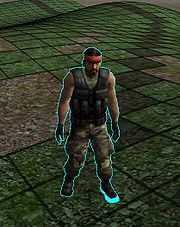

Notice the left foot is far too down the ground.
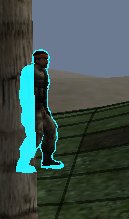
The outline is merely the object in question but scaled upwards, rendered in a single color, and it always shows on top of everything (like the tree here), except the object it is outlining. You can remove the "showing on top" effect by removing all occurrences
of "ZTest Always"
Shader "Outlined/Silhouetted Diffuse" {

	Properties {

		_Color ("Main Color", Color) = (.5,.5,.5,1)

		_OutlineColor ("Outline Color", Color) = (0,0,0,1)

		_Outline ("Outline width", Range (0.0, 0.03)) = .005

		_MainTex ("Base (RGB)", 2D) = "white" { }

	}


CGINCLUDE

#include "UnityCG.cginc"


struct appdata {

	float4 vertex : POSITION;

	float3 normal : NORMAL;

};


struct v2f {

	float4 pos : POSITION;

	float4 color : COLOR;

};


uniform float _Outline;

uniform float4 _OutlineColor;


v2f vert(appdata v) {

	// just make a copy of incoming vertex data but scaled according to normal direction

	v2f o;

	o.pos = mul(UNITY_MATRIX_MVP, v.vertex);


	float3 norm   = mul ((float3x3)UNITY_MATRIX_IT_MV, v.normal);

	float2 offset = TransformViewToProjection(norm.xy);


	o.pos.xy += offset * o.pos.z * _Outline;

	o.color = _OutlineColor;

	return o;

}

ENDCG


	SubShader {

		Tags { "Queue" = "Transparent" }


		// note that a vertex shader is specified here but its using the one above

		Pass {

			Name "OUTLINE"

			Tags { "LightMode" = "Always" }

			Cull Off

			ZWrite Off

			ZTest Always

			ColorMask RGB // alpha not used


			// you can choose what kind of blending mode you want for the outline

			Blend SrcAlpha OneMinusSrcAlpha // Normal

			//Blend One One // Additive

			//Blend One OneMinusDstColor // Soft Additive

			//Blend DstColor Zero // Multiplicative

			//Blend DstColor SrcColor // 2x Multiplicative


CGPROGRAM

#pragma vertex vert

#pragma fragment frag


half4 frag(v2f i) :COLOR {

	return i.color;

}

ENDCG

		}


		Pass {

			Name "BASE"

			ZWrite On

			ZTest LEqual

			Blend SrcAlpha OneMinusSrcAlpha

			Material {

				Diffuse [_Color]

				Ambient [_Color]

			}

			Lighting On

			SetTexture [_MainTex] {

				ConstantColor [_Color]

				Combine texture * constant

			}

			SetTexture [_MainTex] {

				Combine previous * primary DOUBLE

			}

		}

	}


	SubShader {

		Tags { "Queue" = "Transparent" }


		Pass {

			Name "OUTLINE"

			Tags { "LightMode" = "Always" }

			Cull Front

			ZWrite Off

			ZTest Always

			ColorMask RGB


			// you can choose what kind of blending mode you want for the outline

			Blend SrcAlpha OneMinusSrcAlpha // Normal

			//Blend One One // Additive

			//Blend One OneMinusDstColor // Soft Additive

			//Blend DstColor Zero // Multiplicative

			//Blend DstColor SrcColor // 2x Multiplicative


			CGPROGRAM

			#pragma vertex vert

			#pragma exclude_renderers gles xbox360 ps3

			ENDCG

			SetTexture [_MainTex] { combine primary }

		}


		Pass {

			Name "BASE"

			ZWrite On

			ZTest LEqual

			Blend SrcAlpha OneMinusSrcAlpha

			Material {

				Diffuse [_Color]

				Ambient [_Color]

			}

			Lighting On

			SetTexture [_MainTex] {

				ConstantColor [_Color]

				Combine texture * constant

			}

			SetTexture [_MainTex] {

				Combine previous * primary DOUBLE

			}

		}

	}


	Fallback "Diffuse"

}
Bumped version:
Shader "Outlined/Silhouetted Bumped Diffuse" {

	Properties {

		_Color ("Main Color", Color) = (.5,.5,.5,1)

		_OutlineColor ("Outline Color", Color) = (0,0,0,1)

		_Outline ("Outline width", Range (0.0, 0.03)) = .005

		_MainTex ("Base (RGB)", 2D) = "white" { }

		_BumpMap ("Bumpmap", 2D) = "bump" {}

	}


CGINCLUDE

#include "UnityCG.cginc"


struct appdata {

	float4 vertex : POSITION;

	float3 normal : NORMAL;

};


struct v2f {

	float4 pos : POSITION;

	float4 color : COLOR;

};


uniform float _Outline;

uniform float4 _OutlineColor;


v2f vert(appdata v) {

	// just make a copy of incoming vertex data but scaled according to normal direction

	v2f o;

	o.pos = mul(UNITY_MATRIX_MVP, v.vertex);


	float3 norm   = mul ((float3x3)UNITY_MATRIX_IT_MV, v.normal);

	float2 offset = TransformViewToProjection(norm.xy);


	o.pos.xy += offset * o.pos.z * _Outline;

	o.color = _OutlineColor;

	return o;

}

ENDCG


	SubShader {

		Tags { "Queue" = "Transparent" }


		// note that a vertex shader is specified here but its using the one above

		Pass {

			Name "OUTLINE"

			Tags { "LightMode" = "Always" }

			Cull Off

			ZWrite Off

			ZTest Always


			// you can choose what kind of blending mode you want for the outline

			Blend SrcAlpha OneMinusSrcAlpha // Normal

			//Blend One One // Additive

			//Blend One OneMinusDstColor // Soft Additive

			//Blend DstColor Zero // Multiplicative

			//Blend DstColor SrcColor // 2x Multiplicative


CGPROGRAM

#pragma vertex vert

#pragma fragment frag


half4 frag(v2f i) : COLOR {

	return i.color;

}

ENDCG

		}


CGPROGRAM

#pragma surface surf Lambert

struct Input {

	float2 uv_MainTex;

	float2 uv_BumpMap;

};

sampler2D _MainTex;

sampler2D _BumpMap;

uniform float3 _Color;

void surf(Input IN, inout SurfaceOutput o) {

	o.Albedo = tex2D(_MainTex, IN.uv_MainTex).rgb * _Color;

	o.Normal = UnpackNormal(tex2D(_BumpMap, IN.uv_BumpMap));

}

ENDCG


	}


	SubShader {

		Tags { "Queue" = "Transparent" }


		Pass {

			Name "OUTLINE"

			Tags { "LightMode" = "Always" }

			Cull Front

			ZWrite Off

			ZTest Always

			Offset 15,15


			// you can choose what kind of blending mode you want for the outline

			Blend SrcAlpha OneMinusSrcAlpha // Normal

			//Blend One One // Additive

			//Blend One OneMinusDstColor // Soft Additive

			//Blend DstColor Zero // Multiplicative

			//Blend DstColor SrcColor // 2x Multiplicative


			CGPROGRAM

			#pragma vertex vert

			#pragma exclude_renderers gles xbox360 ps3

			ENDCG

			SetTexture [_MainTex] { combine primary }

		}


CGPROGRAM

#pragma surface surf Lambert

struct Input {

	float2 uv_MainTex;

	float2 uv_BumpMap;

};

sampler2D _MainTex;

sampler2D _BumpMap;

uniform float3 _Color;

void surf(Input IN, inout SurfaceOutput o) {

	o.Albedo = tex2D(_MainTex, IN.uv_MainTex).rgb * _Color;

	o.Normal = UnpackNormal(tex2D(_BumpMap, IN.uv_BumpMap));

}

ENDCG


	}


	Fallback "Outlined/Silhouetted Diffuse"

}
Outline Only Variant
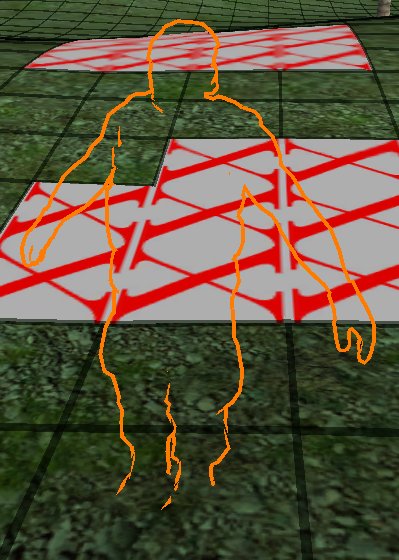
The thing that does the trick here is "Blend Zero One" which is to completely forego rendering our object and use only the destination color (i.e. whatever is behind the object). In effect, the object itself is invisible, but we still let the outline render
itself. So that's what we're left with: only the outline.
Shader "Outlined/Silhouette Only" {

	Properties {

		_OutlineColor ("Outline Color", Color) = (0,0,0,1)

		_Outline ("Outline width", Range (0.0, 0.03)) = .005

	}


CGINCLUDE

#include "UnityCG.cginc"


struct appdata {

	float4 vertex : POSITION;

	float3 normal : NORMAL;

};


struct v2f {

	float4 pos : POSITION;

	float4 color : COLOR;

};


uniform float _Outline;

uniform float4 _OutlineColor;


v2f vert(appdata v) {

	// just make a copy of incoming vertex data but scaled according to normal direction

	v2f o;

	o.pos = mul(UNITY_MATRIX_MVP, v.vertex);


	float3 norm   = mul ((float3x3)UNITY_MATRIX_IT_MV, v.normal);

	float2 offset = TransformViewToProjection(norm.xy);


	o.pos.xy += offset * o.pos.z * _Outline;

	o.color = _OutlineColor;

	return o;

}

ENDCG


	SubShader {

		Tags { "Queue" = "Transparent" }


		Pass {

			Name "BASE"

			Cull Back

			Blend Zero One


			// uncomment this to hide inner details:

			//Offset -8, -8


			SetTexture [_OutlineColor] {

				ConstantColor (0,0,0,0)

				Combine constant

			}

		}


		// note that a vertex shader is specified here but its using the one above

		Pass {

			Name "OUTLINE"

			Tags { "LightMode" = "Always" }

			Cull Front


			// you can choose what kind of blending mode you want for the outline

			//Blend SrcAlpha OneMinusSrcAlpha // Normal

			//Blend One One // Additive

			Blend One OneMinusDstColor // Soft Additive

			//Blend DstColor Zero // Multiplicative

			//Blend DstColor SrcColor // 2x Multiplicative


CGPROGRAM

#pragma vertex vert

#pragma fragment frag


half4 frag(v2f i) :COLOR {

	return i.color;

}

ENDCG

		}


	}


	Fallback "Diffuse"

}
Silhouette-Outlined Diffuse的更多相关文章
- CSharpGL(13)用GLSL实现点光源(point light)和平行光源(directional light)的漫反射(diffuse reflection)
CSharpGL(13)用GLSL实现点光源(point light)和平行光源(directional light)的漫反射(diffuse reflection) 2016-08-13 由于CSh ...
- 【译】Unity3D Shader 新手教程(5/6) —— Bumped Diffuse Shader
本文为翻译,附上原文链接. 转载请注明出处--polobymulberry-博客园. 动机 如果你满足以下条件,我建议你阅读这篇教程: 你想学习片段着色器(Fragment Shader). 你想实现 ...
- [Unity3D] Normal map、Diffuse map 和 Speculer map
Normal map : Normal map (法线贴图) 它的作用是模拟出高模上的一些细节纹理,特别是将高模上的圆滑和粗糙度投射到低模上,让低模也有高模的效果. 因为高模的面数非常多,导入引擎后电 ...
- Unity3D 开发之shader教程(浅谈光照之漫反射diffuse)
在游戏开发过程中,光照应该是必不可少部分,当然,这是指大多数的稍微大型一些的3D游戏会需要,给模型或者山山水水加上光照,会看上去更加的真实,获得更好的体验.一个本身不发光物体显示什么颜色,在于本身反射 ...
- u3d_Shader_effects笔记3 half diffuse 和 ramp texture
1.前面的心情 每次写博客,先写心情也好,就当是小日记了吧.现在已经懒到不想动笔和纸来写日记了.近两天公司的活较少,晚上直接回来了,没有留公司.在公司看代码,不做工,就困... 哎,小辉哥家的老房子后 ...
- Tranparent/cutout/diffuse
Shader "Tranparent/cutout/diffuse" { Properties { // _Color ("Main Color", Co ...
- 开源文件比较工具:WinMerge、KDiff3、diffuse
为了寻找免费的BeyondCompare的替代品,最后经过实用,找到如下一些: 1.diffuse 感受:如果仅仅是比较两个文本类的文件,这个软件也就够用了. 安装好后,对着文件点击右键,会出现“Op ...
- <Learning How to Learn>Week One: Focused versus Diffuse Thinking
1-1 Introduction to the focused and diffuse modes (4:40) 两种思考的模式:focused mode以及diffuse mode focused ...
- 开源的文件比较工具:WinMerge,KDiff3,diffuse
为了寻找免费的BeyondCompare的替代品,最后经过实用,找到如下一些: 1.diffuse 感受:如果仅仅是比较两个文本类的文件,这个软件也就够用了. 安装好后,对着文件点击右键,会出现&qu ...
随机推荐
- Flask:基本结构
python有两个比较出名的网络框架,一个是django,一个是flask. 之前的django文章里面介绍了django的各种用法,这个系列开始介绍flask的用法.相比与django,flask更 ...
- .htaccess技巧: URL重写(Rewrite)与重定向(Redirect) (转)
目录 Table of Contents 一.准备开始:mod_rewrite 二.利用.htaccess实现URL重写(rewrite)与URL重定向(redirect) 将.htm页面映射到.ph ...
- cron表达式(转)
原文地址:http://www.cnblogs.com/linjiqin/archive/2013/07/08/3178452.html Cron表达式是一个字符串,字符串以5或6个空格隔开,分为6或 ...
- 关于LCD的duty与bias
关于LCD的duty与bias 关于LCD的duty与bias duty: 占空比将所有公共电极(COM)各施加一次扫描电压的时间叫一帧,单位时间内扫描多少帧的频率叫帧频,将扫描公共电极(COM)选通 ...
- 20145239杜文超 《Java程序设计》第10周学习总结
20145239 <Java程序设计>第10周学习总结 教材学习内容总结 Java的网络编程 网络编程 网络编程就是在两个或两个以上的设备(例如计算机)之间传输数据. 网络概述 1.计算机 ...
- 《C prime plus (第五版)》 ---第11章 字符串和字符串函数---2
11-3:字符串 输出 三个标准的函数:puts() fputs() printf() 1.puts()函数: #include<stdio.h> #define DEF "I ...
- POJ1625 Censored! —— AC自动机 + DP + 大数
题目链接:https://vjudge.net/problem/POJ-1625 Censored! Time Limit: 5000MS Memory Limit: 10000K Total S ...
- laravel基础课程---16、数据迁移(数据库迁移是什么)
laravel基础课程---16.数据迁移(数据库迁移是什么) 一.总结 一句话总结: 是什么:数据库迁移就像是[数据库的版本控制],可以让你的团队轻松修改并共享应用程序的数据库结构. 使用场景:解决 ...
- Android Studio 字体大小和背景色的设置
豆绿色的RGB值:#C7EDCC 1.打开Android Studio——>Ctrl+Alt+s 或者 File——>Settings 2.在弹窗中选中“Colors&Fonts” ...
- 岭回归与Lasso回归
线性回归的一般形式 过拟合问题及其解决方法 问题:以下面一张图片展示过拟合问题 解决方法:(1):丢弃一些对我们最终预测结果影响不大的特征,具体哪些特征需要丢弃可以通过PCA算法来实现:(2):使用正 ...