
MVVM框架下 WPF隐藏DataGrid一列
最近的一个项目,需要在部分用户登录的时候,隐藏DataGrid中的一列,但是常规的绑定不好使,在下面举个例子。
XAML部分代码
<Window x:Class="DataGridColumn.MainWindow"

        xmlns="http://schemas.microsoft.com/winfx/2006/xaml/presentation"

        xmlns:x="http://schemas.microsoft.com/winfx/2006/xaml"

        xmlns:local="clr-namespace:DataGridColumn"

        Title="MainWindow" Height="350" Width="525">

    <Grid>

        <Grid.RowDefinitions>

            <RowDefinition Height="50"/>

            <RowDefinition Height="*"/>

        </Grid.RowDefinitions>

        <StackPanel Grid.Row="0">

            <Button Content="显示" Command="{Binding Button1Command}"/>

            <Button Content="隐藏" Command="{Binding Button2Command}"/>

        </StackPanel>

        <DataGrid Grid.Row="1" AutoGenerateColumns="False">

            <DataGrid.Columns>

                <DataGridTextColumn Header="列一"/>

                <DataGridTextColumn Header="列二"/>

                <DataGridTextColumn Header="列三" Visibility="{Binding DataContext.IsVisibility,RelativeSource={RelativeSource AncestorType={x:Type DataGrid}}}"/>

            </DataGrid.Columns>

        </DataGrid>

    </Grid>

</Window>
XAML
ViewModel部分代码
using GalaSoft.MvvmLight.Command;

using System;

using System.Collections.Generic;

using System.ComponentModel;

using System.Linq;

using System.Text;

using System.Threading.Tasks;

using System.Windows;

namespace DataGridColumn

{

    public class MainWindowVM : INotifyPropertyChanged

    {

        public MainWindowVM()

        {

            IsVisibility = Visibility.Hidden;

        }

        public event PropertyChangedEventHandler PropertyChanged;

        private void INotifyPropertyChanged(string name)

        {

            if (PropertyChanged != null)

            {

                PropertyChanged(this, new PropertyChangedEventArgs(name));

            }

        }

        private Visibility isVisibility;

        public Visibility IsVisibility

        {

            get { return isVisibility; }

            set

            {

                isVisibility = value;

                INotifyPropertyChanged("IsVisibility");

            }

        }

        private RelayCommand button1Command;

        public RelayCommand Button1Command

        {

            get

            {

                return button1Command = new RelayCommand(

                    () =>

                    {

                        IsVisibility = Visibility.Visible;

                    });

            }

        }

        private RelayCommand button2Command;

        public RelayCommand Button2Command

        {

            get

            {

                return button2Command = new RelayCommand(

                    () =>

                    {

                        IsVisibility = Visibility.Hidden;

                    });

            }

        }

    }

}
ViewModel
显示效果如下
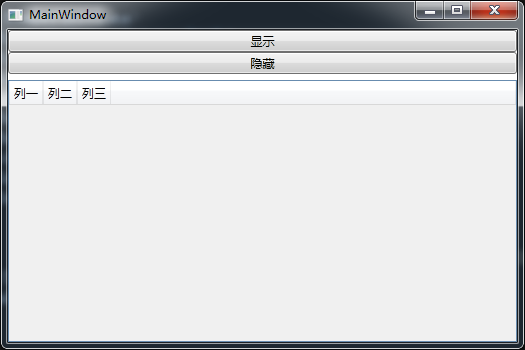
本该隐藏的第三列,没有隐藏,比较困惑,然后百度了一下,在两个网站上得到了答案,网站一,网站二
出现问题的原因是,DataGridTextColumn不属于Visual Tree
解决方案有两种:
一、采用代理(网站一)
1、添加一个FrameworkElement的代理
<Window.Resources>

        <FrameworkElement x:Key="ProxyElement" DataContext="{Binding}"/>
 </Window.Resources>
2、用一个不可见的ContentControl绑定上一步的FrameworkElement代理
<ContentControl Visibility="Collapsed" Content="{StaticResource ProxyElement}"/>
3、用代理做为Visibility的数据源
<DataGridTextColumn Header="列二" Visibility="{Binding DataContext.IsVisibility,Source={StaticResource ProxyElement}}"/>
二、使用Freezable(网站二)
根据MSDN里Freezable的相关文档,在Remarks下有这样的一句话
Detailed change notification: Unlike other DependencyObject objects, a Freezable object provides change notifications when sub-property values change.
大意就是和其他的DependencyObject相比,在子属性值更改时, Freezable 对象提供更改通知。个人认为应该是由于Freezable有这个特点,所以才能被用在这里。
代码如下
BindingProxy类
public class BindingProxy:Freezable

    {

        protected override Freezable CreateInstanceCore()

        {

            return new BindingProxy();

            //throw new NotImplementedException();

        }

        public static readonly DependencyProperty DataProperty = DependencyProperty.Register("Data", typeof(object), typeof(BindingProxy), new UIPropertyMetadata(null));

        public object Data

        {

            get { return (object)GetValue(DataProperty); }

            set { SetValue(DataProperty, value); }

        }

    }
BindingProxy
XAML引用BindingProxy
<local:BindingProxy x:Key="proxy" Data="{Binding}"/>
Visibility绑定
<DataGridTextColumn Header="列三" Visibility="{Binding Data.IsVisibility,Source={StaticResource proxy}}"/>
效果如下,列二用的是方法一,列三用的是方法二

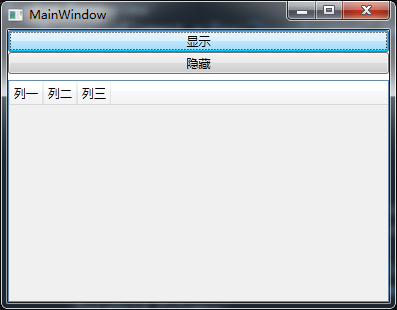
作为新手,只能理解如此,希望有大神可以给好好的讲解一下,谢谢。
MVVM框架下 WPF隐藏DataGrid一列的更多相关文章
- MVVM框架从WPF移植到UWP遇到的问题和解决方法
MVVM框架从WPF移植到UWP遇到的问题和解决方法 0x00 起因 这几天开始学习UWP了,之前有WPF经验,所以总体感觉还可以,看了一些基础概念和主题,写了几个测试程序,突然想起来了前一段时间在W ...
- MVVM模式下WPF动态绑定展示图片
MVVM模式下WPF动态展示图片,界面选择图标,复制到项目中固定目录下面,保存到数据库的是相对路径,再次读取的时候是根据数据库的相对路径去获取项目中绝对路径的图片展示. 首先在ViewModel中 / ...
- MVVM框架下,WPF实现Datagrid里的全选和选择
最近的一个项目是用MVVM实现,在实现功能的时候,就会有一些东西,和以前有很大的区别,项目中就用到了常用的序号,就是在Datagrid里的一个字段,用checkbox来实现. 既然是MVVM,就要用到 ...
- 关于使用MVVM模式在WPF的DataGrid控件中实现ComboBox编辑列
最近在做一个组态软件的项目,有一个需求需要在建立IO设备变量的时候选择变量的类型等. 建立IO变量的界面是一个DataGrid实现的,可以一行一行的新建变量,如下如所示: 这里需要使用带有ComboB ...
- WPF MVVM框架下,VM界面写控件
MVVM正常就是在View页面写样式,ViewModel页面写逻辑,但是有的时候纯在View页面写样式并不能满足需求.我最近的这个项目就遇到了,因此只能在VM页面去写样式控件,然后绑定到View页面. ...
- mybatis框架下解决数据库中表的列的字段名和实体类属性不相同的问题
导包.... 实体类中的属性,getter,setter,tostring,构造等方法就不写了 private int id; private String orderNo; private floa ...
- mvvm框架下页面与ViewModel的各种参数传递方式
传单个参数的话在xaml用 Command={Binding ViewModel的事件处理名称} CommandParameter={Binding 要传递的控件名称} ViewMode ...
- wpf 获取datagrid 模板列中的控件
目前采用的 方法 (网上提供的一款) public static DataGridRow GetRow(DataGrid datagrid, int columnIndex) { ...
- C# wpf中DataGrid 支持汇总行
最近有一个需求,需要汇总金额,份额等字段.我们使用的是原生的WPF控件,自己开发了一套Template.而没有使用比较成熟的第三方控件.所以这个功能得自己开发.并且要做成控件层次的功能. 当然也可以这 ...
随机推荐
- python基础01 Hello World!
摘要:简单的Hello Word! python 命令行 如已经安装python,那么在linux命令行中输入 $python 将进入python.乱吼在命令行提示符>>>后面输入 ...
- Logical query-processing phases
Logical query-processing phases in brief (1) FROM This phase identifies the query’s source tables an ...
- 【SRM】649 t2
题意 一个数列\(A\),数的范围均在\([0, 2^N-1]\)内,求一个\(B\),使得新生成的数列\(C\)中逆序对最多(\(C_i = A_i xor B\)),输出最多的逆序对.(\(|A| ...
- 【异常】No ManagedConnections available within configured blocking timeout
Caused by: org.jboss.util.NestedSQLException: No ManagedConnections available within configured bloc ...
- js二进制与十进制互转
十进制转换为二进制: var num = 100; console.log(num.toString(2)); toString()方法可把一个 Number 对象转换为一个字符串,并返回结果. 语法 ...
- 移动前端不得不了解的html5 head 头标签
本文主要内容来自一丝的常用的 HTML 头部标签和百度FEX的HTML head 头标签. 移动端的工作已经越来越成为前端工作的重要内容,除了平常的项目开发,HTML 头部标签功能,特别是meta标签 ...
- php 中的 基本区别点
this.self.parent https://my.oschina.net/jackguo/blog/189020
- tab+tab
<!DOCTYPE html PUBLIC "-//W3C//DTD XHTML 1.0 Transitional//EN" "http://www.w3.org/ ...
- webserver几个例子
刚刚学习了web服务,实现了发布和调用电话号码归属地查询,下面我简单的说一下 第一个方法利用网页实现号码查询: 首先进入http://www.webxml.com.cn/网站 然后点这个 输入手机号码 ...
- [转]Android通过NDK调用JNI,使用opencv做本地c++代码开发配置方法
原文地址:http://blog.csdn.net/watkinsong/article/details/9849973 有一种方式不需要自己配置所有的Sun JDK, Android SDK以及ND ...