
ASP.NET Core MVC 打造一个简单的图书馆管理系统 (修正版)(二)数据库初始化、基本登录页面以及授权逻辑的建立
前言:
本系列文章主要为我之前所学知识的一次微小的实践,以我学校图书馆管理系统为雏形所作。
本系列文章主要参考资料:
微软文档:https://docs.microsoft.com/zh-cn/aspnet/core/getting-started/?view=aspnetcore-2.1&tabs=windows
《Pro ASP.NET MVC 5》、《锋利的 jQuery》
此系列皆使用 VS2017+C# 作为开发环境。如果有什么问题或者意见欢迎在留言区进行留言。
项目 github 地址:https://github.com/NanaseRuri/LibraryDemo
本章内容:Identity 框架的配置、对账户进行授权的配置、数据库的初始化方法、自定义 TagHelper
一到四为对 Student 即 Identity框架的使用,第五节为对 Admin 用户的配置
一、自定义账号和密码的限制
在 Startup.cs 的 ConfigureServices 方法中可以对 Identity 的账号和密码进行限制:
             services.AddIdentity<Student, IdentityRole>(opts =>

             {

                 opts.User.RequireUniqueEmail = true;

                 opts.User.AllowedUserNameCharacters = "qwertyuiopasdfghjklzxcvbnmQWERTYUIOPASDFGHJKLZXCVBNM0123456789";

                 opts.Password.RequiredLength = ;

                 opts.Password.RequireNonAlphanumeric = false;

                 opts.Password.RequireLowercase = false;

                 opts.Password.RequireUppercase = false;

                 opts.Password.RequireDigit = false;

             }).AddEntityFrameworkStores<StudentIdentityDbContext>()

                 .AddDefaultTokenProviders();
RequireUniqueEmail 限制每个邮箱只能用于一个账号。
此处 AllowedUserNameCharacters 方法限制用户名能够使用的字符,需要单独输入每个字符。
剩下的设置分别为限制密码必须有符号 / 包含小写字母 / 包含大写字母 / 包含数字。
二、对数据库进行初始化
在此创建一个 StudentInitiator 以及一个 BookInitiator用以对数据库进行初始化:
     public class StudentInitiator

     {

         public static async Task Initial(IServiceProvider serviceProvider)

         {

             UserManager<Student> userManager = serviceProvider.GetRequiredService<UserManager<Student>>();

             if (userManager.Users.Any())

             {

                 return;

             }

             IEnumerable<Student> initialStudents = new[]

             {

                 new Student()

                 {

                     UserName = "U201600001",

                     Name = "Nanase",

                     Email = "Nanase@cnblog.com",

                     PhoneNumber = "",

                     Degree = Degrees.CollegeStudent,

                     MaxBooksNumber = ,

                 },

                 new Student()

                 {

                     UserName = "U201600002",

                     Name = "Ruri",

                     Email = "NanaseRuri@cnblog.com",

                     PhoneNumber = "",

                     Degree = Degrees.DoctorateDegree,

                     MaxBooksNumber =

                 },

             };

             foreach (var student in initialStudents)

             {

                 await userManager.CreateAsync(student, student.UserName.Substring(student.UserName.Length - ,));

             }

         }

        }
新建 BookInitiator 用于初始化该数据库,不知道为什么在这里会报一个 Book 重复主键的错误,但是数据确实全都插进去了:
public class BookInitiator
{
public static async Task BookInitial(IServiceProvider serviceProvider)
{
LendingInfoDbContext context = serviceProvider.GetRequiredService<LendingInfoDbContext>();
if (!context.Books.Any() || !context.Bookshelves.Any())
{
Bookshelf[] bookshelfs = new[]
{
new Bookshelf()
{
BookshelfId = ,
Location = "主校区",
Sort = "计算机"
},
new Bookshelf()
{
BookshelfId = ,
Location = "主校区",
Sort = "文学"
},
new Bookshelf()
{
BookshelfId = ,
Location = "东校区",
Sort = "计算机"
},
new Bookshelf()
{
BookshelfId = ,
Location = "阅览室",
Sort = "文学"
},
new Bookshelf()
{
BookshelfId = ,
Location = "阅览室",
Sort = "计算机"
},
}; Book[] books = new[]
{
new Book()
{
Name = "精通ASP.NET MVC 5",
BarCode = "",
ISBN = "978-7-115-41023-8",
State = BookState.Normal,
FetchBookNumber = "TP393.092 19",
Location = "主校区",
Sort = "计算机"
},
new Book()
{
Name = "精通ASP.NET MVC 5",
BarCode = "",
ISBN = "978-7-115-41023-8",
State = BookState.Normal,
FetchBookNumber = "TP393.092 19",
Location = "主校区",
Sort = "计算机"
},
new Book()
{
Name = "精通ASP.NET MVC 5",
BarCode = "",
ISBN = "978-7-115-41023-8",
State = BookState.Normal,
FetchBookNumber = "TP393.092 19",
Location = "东校区",
Sort = "计算机"
},
new Book()
{
Name = "精通ASP.NET MVC 5",
BarCode = "",
ISBN = "978-7-115-41023-8",
State = BookState.Readonly,
FetchBookNumber = "TP393.092 19",
Location = "阅览室",
Sort = "计算机"
},
new Book()
{
Name = "Entity Framework实用精要",
BarCode = "",
ISBN = "978-7-302-48593-3",
State = BookState.Normal,
FetchBookNumber = "TP393.09 447",
Location = "主校区",
Sort = "计算机"
},
new Book()
{
Name = "Entity Framework实用精要",
BarCode = "",
ISBN = "978-7-302-48593-3",
State = BookState.Normal,
FetchBookNumber = "TP393.09 447",
Location = "主校区",
Sort = "计算机"
},
new Book()
{
Name = "Entity Framework实用精要",
BarCode = "",
ISBN = "978-7-302-48593-3",
State = BookState.Normal,
FetchBookNumber = "TP393.09 447",
Location = "东校区",
Sort = "计算机"
},
new Book()
{
Name = "Entity Framework实用精要",
BarCode = "",
ISBN = "978-7-302-48593-3",
State = BookState.Normal,
FetchBookNumber = "TP393.09 447",
Location = "东校区",
Sort = "计算机"
},
new Book()
{
Name = "Entity Framework实用精要",
BarCode = "",
ISBN = "978-7-302-48593-3",
State = BookState.Normal,
FetchBookNumber = "TP393.09 447",
Location = "阅览室",
Sort = "计算机"
},
new Book()
{
Name = "Rails 5敏捷开发",
BarCode = "",
ISBN = "978-7-5680-3659-7",
State = BookState.Normal,
FetchBookNumber = "TP393.09 448",
Location = "主校区",
Sort = "计算机"
},
new Book()
{
Name = "Rails 5敏捷开发",
BarCode = "",
ISBN = "978-7-5680-3659-7",
State = BookState.Normal,
FetchBookNumber = "TP393.09 448",
Location = "主校区",
Sort = "计算机"
},
new Book()
{
Name = "Rails 5敏捷开发",
BarCode = "",
ISBN = "978-7-5680-3659-7",
State = BookState.Readonly,
FetchBookNumber = "TP393.09 448",
Location = "主校区",
Sort = "计算机"
},
new Book()
{
Name = "你必须掌握的Entity Framework 6.x与Core 2.0",
BarCode = "",
ISBN = "978-7-5680-3659-7",
State = BookState.Normal,
FetchBookNumber = "TP393.09 452",
Location = "主校区",
Sort = "计算机"
},
new Book()
{
Name = "你必须掌握的Entity Framework 6.x与Core 2.0",
BarCode = "",
ISBN = "978-7-5680-3659-7",
State = BookState.Readonly,
FetchBookNumber = "TP393.09 452",
Location = "主校区",
Sort = "计算机"
},
new Book()
{
Name = "毛选. 第一卷",
BarCode = "",
ISBN = "7-01-000922-8",
State = BookState.Normal,
FetchBookNumber = "A41 1:1",
Location = "主校区",
Sort = "文学"
},
new Book()
{
Name = "毛选. 第一卷",
BarCode = "",
ISBN = "7-01-000922-8",
State = BookState.Normal,
FetchBookNumber = "A41 1:1",
Location = "主校区",
Sort = "文学"
},
new Book()
{
Name = "毛选. 第一卷",
BarCode = "",
ISBN = "7-01-000922-8",
State = BookState.Readonly,
FetchBookNumber = "A41 1:1",
Location = "阅览室",
Sort = "文学"
},
new Book()
{
Name = "毛选. 第二卷",
BarCode = "",
ISBN = "7-01-000915-5",
State = BookState.Normal,
FetchBookNumber = "A41 1:2",
Location = "主校区",
Sort = "文学"
},
new Book()
{
Name = "毛选. 第二卷",
BarCode = "",
ISBN = "7-01-000915-5",
State = BookState.Readonly,
FetchBookNumber = "A41 1:2",
Location = "阅览室",
Sort = "文学"
},
new Book()
{
Name = "毛选. 第三卷",
BarCode = "",
ISBN = "7-01-000916-3",
State = BookState.Normal,
FetchBookNumber = "A41 1:3",
Location = "主校区",
Sort = "文学"
},
new Book()
{
Name = "毛选. 第三卷",
BarCode = "",
ISBN = "7-01-000916-3",
State = BookState.Readonly,
FetchBookNumber = "A41 1:3",
Location = "阅览室",
Sort = "文学"
},
new Book()
{
Name = "毛选. 第四卷",
BarCode = "",
ISBN = "7-01-000925-2",
State = BookState.Normal,
FetchBookNumber = "A41 1:4",
Location = "主校区",
Sort = "文学"
},
new Book()
{
Name = "毛选. 第四卷",
BarCode = "",
ISBN = "7-01-000925-2",
State = BookState.Readonly,
FetchBookNumber = "A41 1:4",
Location = "阅览室",
Sort = "文学"
}
}; BookDetails[] bookDetails = new[]
{
new BookDetails()
{
Author = "Admam Freeman",
Name = "精通ASP.NET MVC 5",
ISBN = "978-7-115-41023-8",
Press = "人民邮电出版社",
PublishDateTime = new DateTime(,,),
SoundCassettes = "13, 642页 : 图 ; 24cm",
Version = ,
FetchBookNumber = "TP393.092 19",
Description = "ASP.NET MVC 5框架是微软ASP.NET Web平台的新进展。它提供了高生产率的编程模型,结合ASP.NET的全部优势,促成更整洁的代码架构、测试驱动开发和强大的可扩展性。本书涵盖ASP.NET MVC 5的所有开发优势技术,包括用C#属性定义路由技术及重写过滤器技术等。且构建MVC应用程序的用户体验也有本质上的改进。其中书里也专一讲解了用新Visual Studio 2013创建MVC应用程序时的技术和技巧。本书包括完整的开发工具介绍以及对代码进行辅助编译和调试的技术。本书还涉及流行的Bootstrap JavaScript库,该库现已被纳入到MVC 5之中,为开发人员提供更广泛的多平台CSS和HTML5选项,而不必像以前那样去加载大量的第三方库。"
},
new BookDetails()
{
Author = "吕高旭",
Name = "Entity Framework实用精要",
ISBN = "978-7-302-48593-3",
Press = "清华大学出版社",
PublishDateTime = new DateTime(,,),
SoundCassettes = "346页 ; 26cm",
Version = ,
FetchBookNumber = "TP393.09 447",
Description = "本书通过介绍Entity Framework与 LINQ 开发实战的案例,以 Entity Framework 技术内容的讨论为主线,结合关键的 LINQ技巧说明,提供读者系统性学习 Entity Framework 所需的内容。本书旨在帮助读者进入 Entity Framework的世界,建立必要的技术能力,同时希望读者在完成本书的教学课程之后,能够更进一步地将其运用在实际的项目开发中。"
},
new BookDetails()
{
Author = "鲁比",
Name = "Rails 5敏捷开发",
ISBN = "978-7-5680-3659-7",
Press = "华中科技大学出版社",
PublishDateTime = new DateTime(,,),
SoundCassettes = "xxi, 451页 : 图 ; 23cm",
Version = ,
FetchBookNumber = "TP393.09 448",
Description = "本书以讲解“购书网站”案例为主线, 逐步介绍Rails的内置功能。全书分为3部分, 第一部分介绍Rails的安装、应用程序验证、Rails框架的体系结构, 以及Ruby语言知识; 第二部分用迭代方式构建应用程序, 然后依据敏捷开发模式开展测试, 最后用Capistrano完成部署; 第三部分补充日常实用的开发知识。本书既有直观的示例, 又有深入的分析, 同时涵盖了Web开发各方面的知识, 堪称一部内容全面而又深入浅出的佳作。第5版增加了关于Rails 5和Ruby 2.2新特性和最佳实践的内容。"
},
new BookDetails()
{
Author = "汪鹏",
Name = "你必须掌握的Entity Framework 6.x与Core 2.0",
ISBN = "978-7-302-50017-9",
Press = "清华大学出版社",
PublishDateTime = new DateTime(,,),
SoundCassettes = "X, 487页 : 图 ; 26cm",
Version = ,
FetchBookNumber = "TP393.09 452",
Description = "本书分为四篇,第一篇讲解Entity Framework 6.x的基础,包括数据库表的创建,数据的操作和数据加载方式。第二篇讲解Entity Framework 6.x进阶,包括基本原理和性能优化。第三篇讲解跨平台Entity Framework Core 2.x的基础知识和开发技巧。第四篇讲解在Entity Framework Core 2.x中解决并发问题,并给出实战开发案例。"
},
new BookDetails()
{
Author = "毛",
Name = "毛选. 第一卷",
ISBN = "7-01-000914-7",
Press = "人民出版社",
PublishDateTime = new DateTime(,,),
SoundCassettes = "340页 : 肖像 ; 19厘米",
FetchBookNumber = "A41 1:1",
Version = ,
Description = "《毛选》是对20世纪中国影响最大的书籍之一。"
},
new BookDetails()
{
Author = "毛",
Name = "毛选. 第二卷",
ISBN = "7-01-000915-5",
Press = "人民出版社",
PublishDateTime = new DateTime(,,),
SoundCassettes = "343-786页 : 肖像 ; 19厘米",
Version = ,
FetchBookNumber = "A41 1:2",
Description = "《毛选》是对20世纪中国影响最大的书籍之一。"
},
new BookDetails()
{
Author = "毛",
Name = "毛选. 第三卷",
ISBN = "7-01-000916-3",
Press = "人民出版社",
PublishDateTime = new DateTime(,,),
SoundCassettes = "789Ł±1120页 ; 20厘米",
FetchBookNumber = "A41 1:3",
Version = ,
Description = "《毛选》是对20世纪中国影响最大的书籍之一。"
},
new BookDetails()
{
Author = "毛",
Name = "毛选. 第四卷",
ISBN = "7-01-000925-2",
Press = "人民出版社",
PublishDateTime = new DateTime(,,),
SoundCassettes = "1123Ł±1517页 ; 20厘米",
FetchBookNumber = "A41 1:4",
Version = ,
Description = "《毛选》是对20世纪中国影响最大的书籍之一。"
},
}; var temp = from book in books
from bookshelf in bookshelfs
where book.Location == bookshelf.Location && book.Sort == bookshelf.Sort
select new { BarCode = book.BarCode, BookshelfId = bookshelf.BookshelfId }; foreach (var bookshelf in bookshelfs)
{
bookshelf.Books=new List<Book>();
} foreach (var tem in temp)
{
Bookshelf targetShelf = bookshelfs.Single(bookshelf => bookshelf.BookshelfId == tem.BookshelfId);
Book targetBook = books.Single(book => book.BarCode == tem.BarCode);
targetShelf.Books.Add(targetBook);
} foreach (var bookshelf in bookshelfs)
{
bookshelf.MaxFetchNumber=bookshelf.Books.Max(b => b.FetchBookNumber);
bookshelf.MinFetchNumber=bookshelf.Books.Min(b => b.FetchBookNumber);
} foreach (var bookshelf in bookshelfs)
{
await context.Bookshelves.AddAsync(bookshelf);
await context.SaveChangesAsync();
} foreach (var bookDetail in bookDetails)
{
await context.BooksDetail.AddAsync(bookDetail);
await context.SaveChangesAsync();
} foreach (var book in books)
{
await context.Books.AddAsync(book);
await context.SaveChangesAsync();
}
}
}
}
为确保能够进行初始化,在 Startup.cs 的 Configure 方法中调用该静态方法:
              DatabaseInitiator.Initial(app.ApplicationServices).Wait();

              BookInitiator.BookInitial(app.ApplicationServices).Wait();
Initial 方法中 serviceProvider 参数将在传入 ConfigureServices 方法调用后的 ServiceProvider,此时在 Initial 方法中初始化的数据也会使用 ConfigureServices 中对账号和密码的限制。
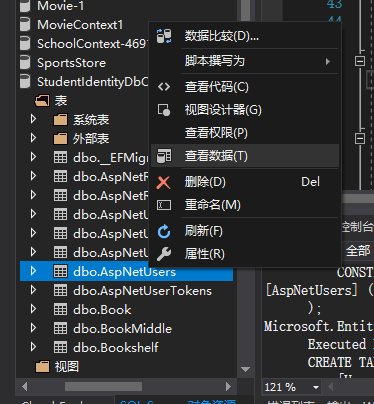
此处我们使用账号的后六位作为密码。启动网页后查看数据库的数据:


三、建立验证所用的控制器以及视图
首先创建一个视图模型用于存储账号的信息,为了方便实现多种登录方式,此处创建一个 LoginType 枚举:
[UIHint] 特性构造函数传入一个字符串用来告知对应属性在使用 Html.EditorFor() 时用什么模板来展示数据。
     public enum LoginType

     {

         UserName,

         Email,

         Phone

     }

     public class LoginModel

     {

         [Required(ErrorMessage = "请输入您的学号 / 邮箱 / 手机号码")]

         [Display(Name = "学号 / 邮箱 / 手机号码")]

         public string Account { get; set; }

         [Required(ErrorMessage = "请输入您的密码")]

         [UIHint("password")]

         [Display(Name = "密码")]

         public string Password { get; set; }

         [Required]

         public LoginType LoginType { get; set; }

     }
使用支架特性创建一个 StudentAccountController

StudentAccount 控制器:
第 5 行判断是否授权以避免多余的授权:
      public class StudentAccountController : Controller

      {

         public IActionResult Login(string returnUrl)

         {

             if (HttpContext.User.Identity.IsAuthenticated)

             {

                 return RedirectToAction("AccountInfo");

             }

             LoginModel loginInfo = new LoginModel();

             ViewBag.returnUrl = returnUrl;

             return View(loginInfo);

         }

     }
在在 Login 视图中添加多种登录方式,并使视图更加清晰,创建了一个 LoginTypeTagHelper ,TagHelper 可制定自定义 HTML 标记并在最终生成视图时转换成标准的 HTML 标记。
     [HtmlTargetElement("LoginType")]

     public class LoginTypeTagHelper:TagHelper

     {

         public string[] LoginType { get; set; }

         public override Task ProcessAsync(TagHelperContext context, TagHelperOutput output)

         {

             foreach (var loginType in LoginType)

             {

                 switch (loginType)

                 {

                     case "UserName": output.Content.AppendHtml($"<option selected=\"selected/\" value=\"{loginType}\">学号</option>");

                         break;

                     case "Email": output.Content.AppendHtml(GetOption(loginType, "邮箱"));

                         break;

                     case "Phone": output.Content.AppendHtml(GetOption(loginType, "手机号码"));

                         break;

                     default: break;

                 }

             }

             return Task.CompletedTask;

         }

         private static string GetOption(string loginType,string innerText)

         {

             return $"<option value=\"{loginType}\">{innerText}</option>";

         }

     }
Login 视图:
25 行中使用了刚建立的 LoginTypeTagHelper:
 @model LoginModel

 @{

     ViewData["Title"] = "Login";

 }

 <h2>Login</h2>

 <br/>

 <div class="text-danger" asp-validation-summary="All"></div>

 <br/>

 <form asp-action="Login" method="post">

     <input type="hidden" name="returnUrl" value="@ViewBag.returnUrl"/>

     <div class="form-group">

         <label asp-for="Account"></label>

         <input asp-for="Account" class="form-control" placeholder="请输入你的学号 / 邮箱 / 手机号"/>

     </div>

     <div class="form-group">

         <label asp-for="Password"></label>

         <input asp-for="Password" class="form-control" placeholder="请输入你的密码"/>

     </div>

     <div class="form-group">

         <label>登录方式</label>

         <select asp-for="LoginType">

             <option disabled value="">登录方式</option>

             <LoginType login-type="@Enum.GetNames(typeof(LoginType))"></LoginType>

         </select>

     </div>

     <input type="submit" class="btn btn-primary"/>

 </form>
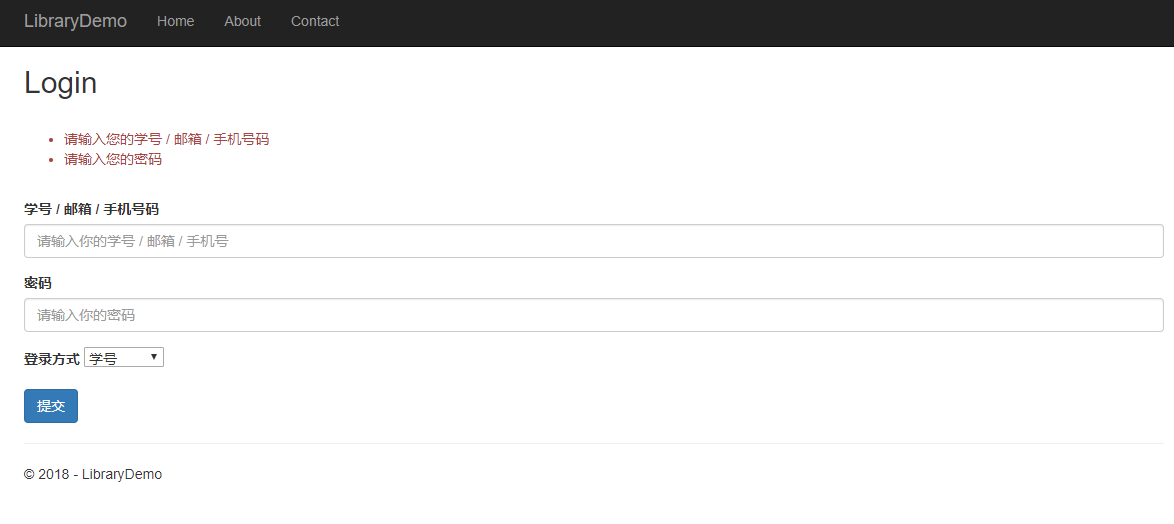
然后创建一个用于对信息进行验证的动作方法。
为了获取数据库的数据以及对数据进行验证授权,需要通过 DI(依赖注入) 获取对应的 UserManager 和 SignInManager 对象,在此针对 StudentAccountController 的构造函数进行更新。
StudentAccountController 整体:
     [Authorize]

     public class StudentAccountController : Controller

     {

         private UserManager<Student> _userManager;

         private SignInManager<Student> _signInManager;

         public StudentAccountController(UserManager<Student> studentManager, SignInManager<Student> signInManager)

         {

             _userManager = studentManager;

             _signInManager = signInManager;

         }

         [AllowAnonymous]

         public IActionResult Login(string returnUrl)

         {

             if (HttpContext.User.Identity.IsAuthenticated)

             {

                 return RedirectToAction("AccountInfo");

             }

             LoginModel loginInfo = new LoginModel();

             ViewBag.returnUrl = returnUrl;

             return View(loginInfo);

         }

         [HttpPost]

         [ValidateAntiForgeryToken]

         [AllowAnonymous]

         public async Task<IActionResult> Login(LoginModel loginInfo, string returnUrl)

         {

             if (ModelState.IsValid)

             {

                 Student student =await GetStudentByLoginModel(loginInfo);

                 if (student == null)

                 {

                     return View(loginInfo);

                 }

                 SignInResult signInResult = await _signInManager.PasswordSignInAsync(student, loginInfo.Password, false, false);

                 if (signInResult.Succeeded)

                 {

                     return Redirect(returnUrl ?? "/StudentAccount/"+nameof(AccountInfo));

                 }

                 ModelState.AddModelError("", "账号或密码错误");

             }

             return View(loginInfo);

         }

         public IActionResult AccountInfo()

         {

             return View(CurrentAccountData());

         }

         Dictionary<string, object> CurrentAccountData()

         {

             var userName = HttpContext.User.Identity.Name;

             var user = _userManager.FindByNameAsync(userName).Result;

             return new Dictionary<string, object>()

             {

                 ["学号"]=userName,

                 ["姓名"]=user.Name,

                 ["邮箱"]=user.Email,

                 ["手机号"]=user.PhoneNumber,

             };

         }

     }
_userManager 以及 _signInManager 将通过 DI 获得实例;[ValidateAntiForgeryToken] 特性用于防止 XSRF 攻击;returnUrl 参数用于接收或返回之前正在访问的页面,在此处若 returnUrl 为空则返回 AccountInfo 页面;[Authorize] 特性用于确保只有已授权的用户才能访问对应动作方法;CurrentAccountData 方法用于获取当前用户的信息以在 AccountInfo 视图中呈现。
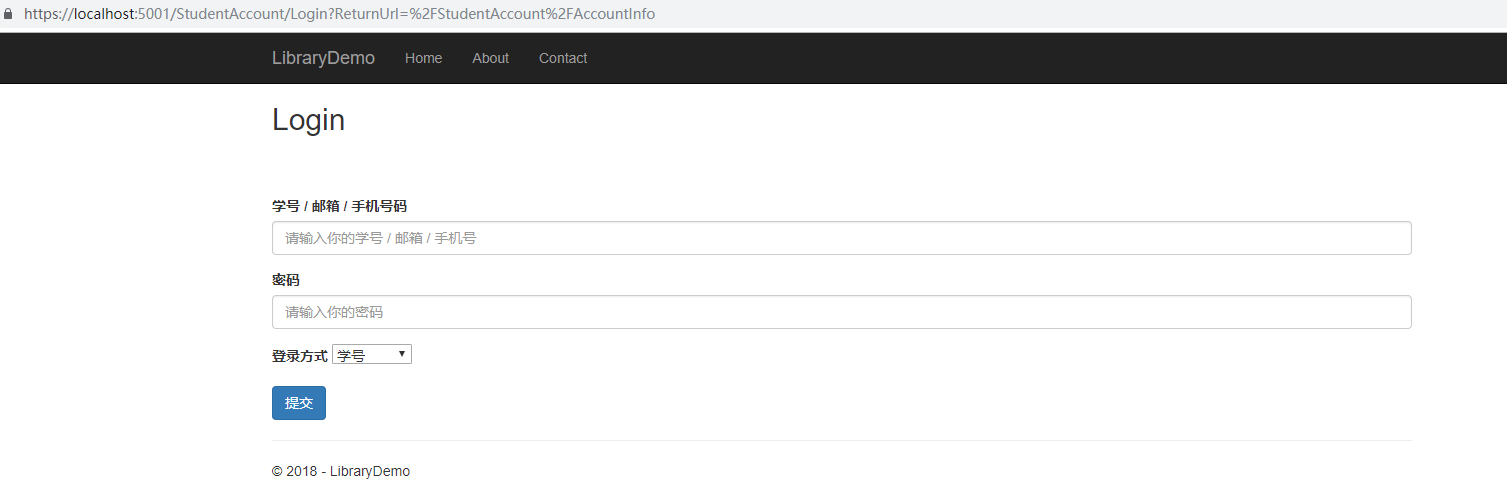
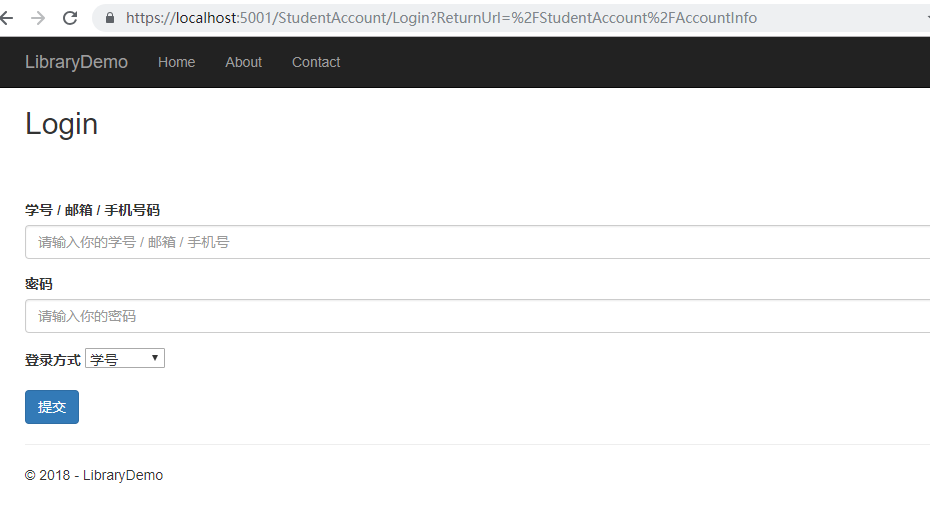
由于未进行授权,在此直接访问 AccountInfo 方法默认会返回 /Account/Login 页面请求验证,可通过在 Startup.cs 的 ConfigureServices 方法进行配置以覆盖这一行为,让页面默认返回 /StudentAccount/Login :
             services.ConfigureApplicationCookie(opts =>

             {

                 opts.LoginPath = "/StudentAccount/Login";

             }
为了使 [Authorize] 特性能够正常工作,需要在 Configure 方法中使用 Authentication 中间件,如果没有调用 app.UseAuthentication(),则访问带有 [Authorize] 的方法会再度要求进行验证。中间件的顺序很重要:
             app.UseAuthentication();

             app.UseHttpsRedirection();

             app.UseStaticFiles();

             app.UseCookiePolicy();
直接访问 AccountInfo 页面:
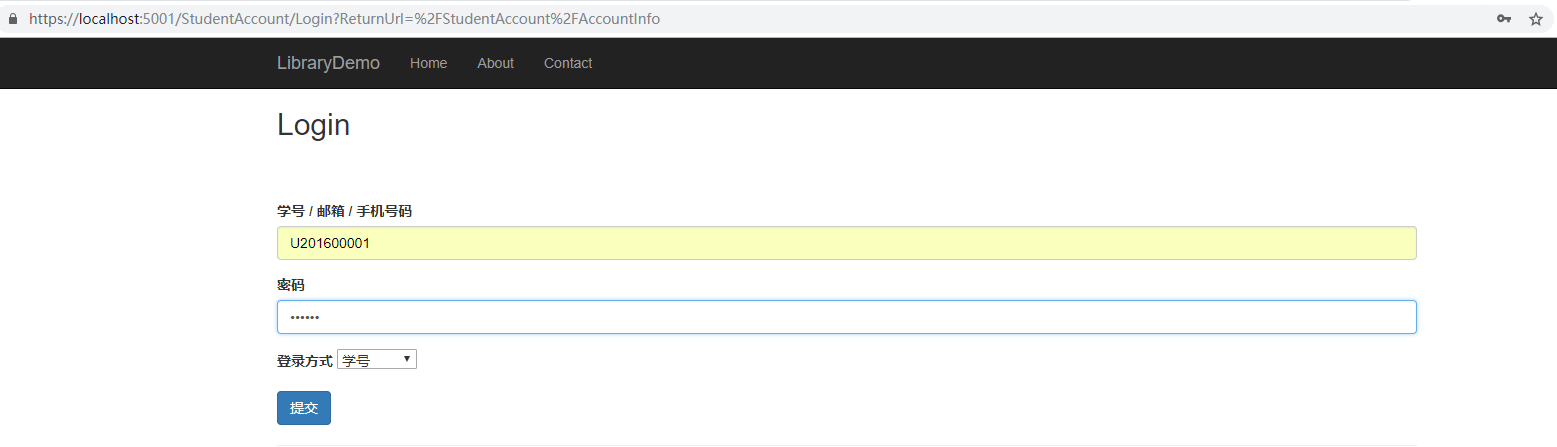
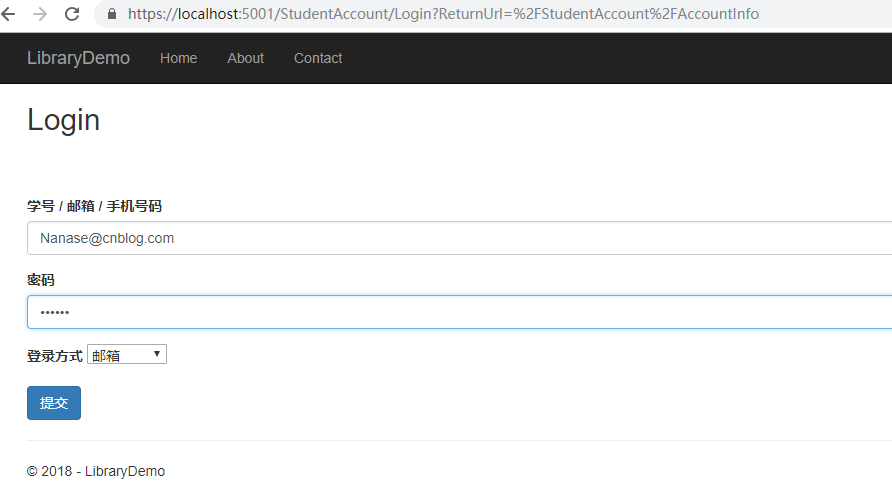
输入账号密码进行验证:
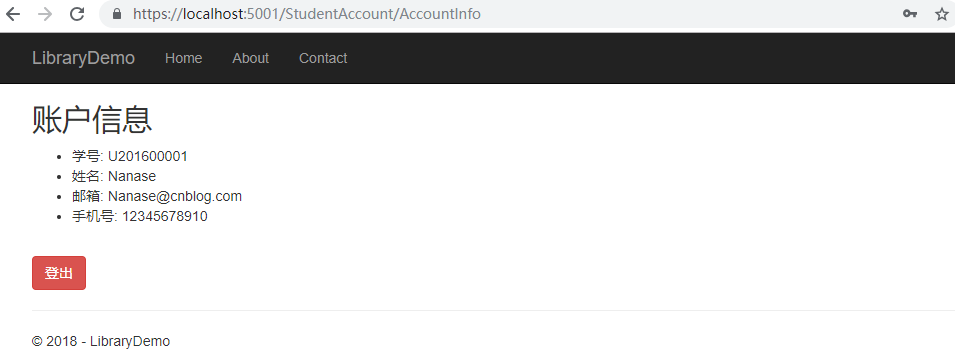
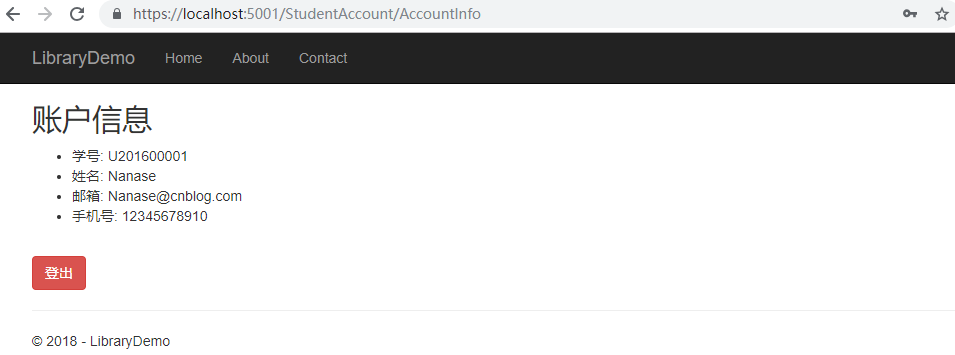
验证之后返回 /StudentAccount/AccountInfo 页面:

四、创建登出网页
简单地调用 SignOutAsync 用以清除当前 Cookie 中的授权信息。
         public async Task<IActionResult> Logout(string returnUrl)

         {

             await _signInManager.SignOutAsync();

             if (returnUrl == null)

             {

                 return View("Login");

             }

             return Redirect(returnUrl);

         }
同时在 AccountInfo 添加登出按钮:
     @model Dictionary<string, object>

     @{

         ViewData["Title"] = "AccountInfo";

     }

     <h2>账户信息</h2>

     <ul>

         @foreach (var info in Model)

         {

             <li>@info.Key: @Model[info.Key]</li>

         }

     </ul>

     <br />

     <a class="btn btn-danger" asp-action="Logout">登出</a>

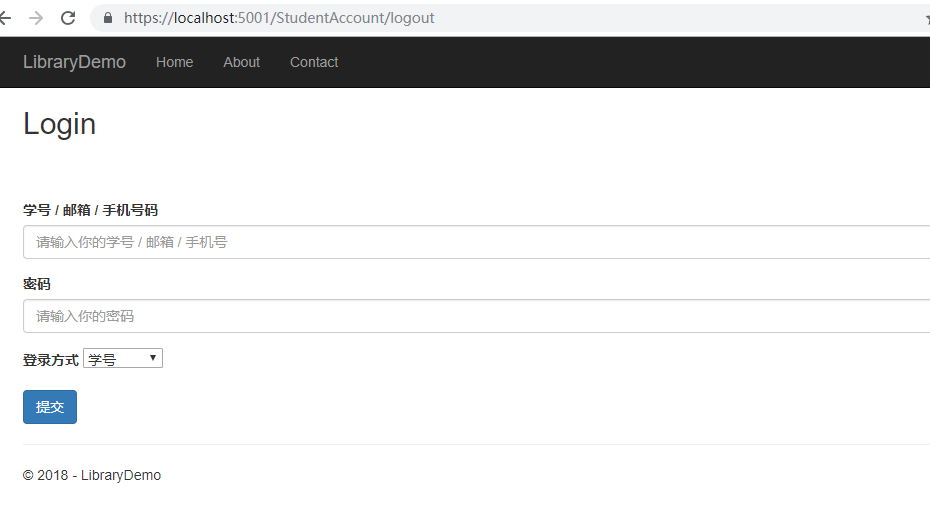
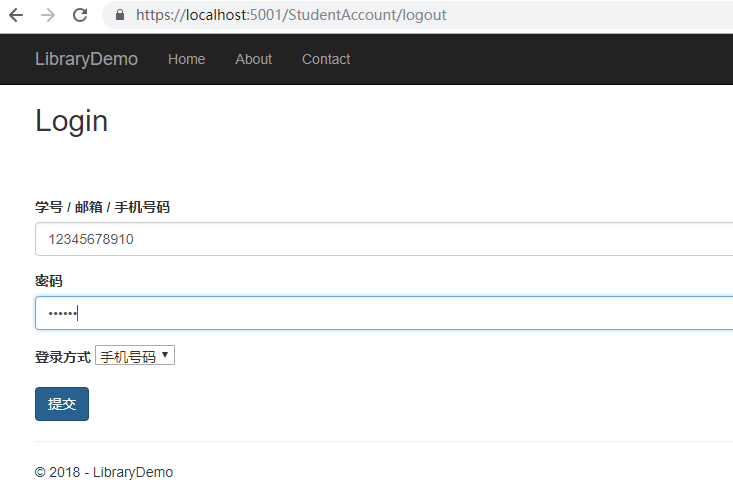
登出后返回 Login 页面,同时 AccountInfo 页面需要重新进行验证。
附加使用邮箱以及手机号验证的测试:
五、基于 Role 的 Identity 授权
修改 StudentInitial 类,添加名为 admin 的学生数组并使用 AddToRoleAsync 为用户添加身份。在添加 Role 之前需要在 RoleManager 对象中使用 Create 方法为 Role 数据库添加特定的 Role 字段:
     public class StudentInitiator

     {

         public static async Task InitialStudents(IServiceProvider serviceProvider)

         {

             UserManager<Student> userManager = serviceProvider.GetRequiredService<UserManager<Student>>();

             RoleManager<IdentityRole> roleManager = serviceProvider.GetRequiredService<RoleManager<IdentityRole>>();

             if (userManager.Users.Any())

             {

                 return;

             }

             if (await roleManager.FindByNameAsync("Admin")==null)

             {

                 await roleManager.CreateAsync(new IdentityRole("Admin"));

             }

             if (await roleManager.FindByNameAsync("Student")==null)

             {

                 await roleManager.CreateAsync(new IdentityRole("Student"));

             }

             IEnumerable<Student> initialStudents = new[]

             {

                 new Student()

                 {

                     UserName = "U201600001",

                     Name = "Nanase",

                     Email = "Nanase@cnblog.com",

                     PhoneNumber = "",

                     Degree = Degrees.CollegeStudent,

                     MaxBooksNumber = ,

                 },

                 new Student()

                 {

                     UserName = "U201600002",

                     Name = "Ruri",

                     Email = "NanaseRuri@cnblog.com",

                     PhoneNumber = "",

                     Degree = Degrees.DoctorateDegree,

                     MaxBooksNumber =

                 }

             };

             IEnumerable<Student> initialAdmins = new[]

             {

                 new Student()

                 {

                     UserName = "A000000000",

                     Name="Admin0000",

                     Email = "Admin@cnblog.com",

                     PhoneNumber = "",

                     Degree = Degrees.CollegeStudent,

                     MaxBooksNumber =

                 },

                 new Student()

                 {

                     UserName = "A000000001",

                     Name = "Admin0001",

                     Email = "123456789@qq.com",

                     PhoneNumber = "",

                     Degree = Degrees.CollegeStudent,

                     MaxBooksNumber =

                 },

             };

             foreach (var student in initialStudents)

             {

                 await userManager.CreateAsync(student, student.UserName.Substring(student.UserName.Length - , ));

             }

             foreach (var admin in initialAdmins)

             {

                 await userManager.CreateAsync(admin, "zxcZXC!123");

                 await userManager.AddToRoleAsync(admin, "Admin");

             }

         }

     }
对 ConfigureServices 作进一步配置,添加 Cookie 的过期时间和不满足 Authorize 条件时返回的 Url:
1             services.ConfigureApplicationCookie(opts =>

2             {

3                 opts.Cookie.HttpOnly = true;

4                 opts.LoginPath = "/StudentAccount/Login";

5                 opts.AccessDeniedPath = "/StudentAccount/Login";

6                 opts.ExpireTimeSpan=TimeSpan.FromMinutes(5);

7             });
则当 Role 不为 Admin 时将返回 /StudentAccount/Login 而非默认的 /Account/AccessDeny。
然后新建一个用以管理学生信息的 AdminAccount 控制器,设置 [Authorize] 特性并指定 Role 属性,使带有特定 Role 的身份才可以访问该控制器。
     [Authorize(Roles = "Admin")]

     public class AdminAccountController : Controller

     {

         private UserManager<Student> _userManager;

         public AdminAccountController(UserManager<Student> userManager)

         {

             _userManager = userManager;

         }

         public IActionResult Index()

         {

             ICollection<Student> students = _userManager.Users.ToList();

             return View(students);

         }

     }
Index 视图:
 @using LibraryDemo.Models.DomainModels

 @model IEnumerable<LibraryDemo.Models.DomainModels.Student>

 @{

     ViewData["Title"] = "AccountInfo";

     Student stu = new Student();

 }

 <link rel="stylesheet" href="~/css/BookInfo.css" />

 <script>

     function confirmDelete() {

         var userNames = document.getElementsByName("userNames");

         var message = "确认删除";

         var values = [];

         for (i in userNames) {

             if (userNames[i].checked) {

                 message = message + userNames[i].value+",";

                 values.push(userNames[i].value);

             }

         }

         message = message + "?";

         if (confirm(message)) {

             $.ajax({

                 url: "@Url.Action("RemoveStudent")",

                 contentType: "application/json",

                 method: "POST",

                 data: JSON.stringify(values),

                 success: function(students) {

                     updateTable(students);

                 }

             });

         }

     }

     function updateTable(data) {

         var body = $("#studentList");

         body.empty();

         for (var i = ; i < data.length; i++) {

             var person = data[i];

             body.append(`<tr><td><input type="checkbox" name="userNames" value="${person.userName}" /></td>

             <td>${person.userName}</td><td>${person.name}</td><td>${person.degree}</td>

             <td>${person.phoneNumber}</td><td>${person.email}</td><td>${person.maxBooksNumber}</td></tr>`);

         }

     };

     function addStudent() {

         var studentList = $("#studentList");

         if (!document.getElementById("studentInfo")) {

             studentList.append('<tr id="studentInfo">' +

                 '<td></td>' +

                 '<td><input type="text" name="UserName" id="UserName" /></td>' +

                 '<td><input type="text" name="Name" id="Name" /></td>' +

                 '<td><input type="text" name="Degree" id="Degree" /></td>' +

                 '<td><input type="text" name="PhoneNumber" id="PhoneNumber" /></td>' +

                 '<td><input type="text" name="Email" id="Email" /></td>' +

                 '<td><input type="text" name="MaxBooksNumber" id="MaxBooksNumber" /></td>' +

                 '<td><button type="submit" onclick="return postAddStudent()">添加</button></td>' +

                 '</tr>');

         }

     }

     function postAddStudent() {

         $.ajax({

             url: "@Url.Action("AddStudent")",

             contentType: "application/json",

             method: "POST",

             data: JSON.stringify({

                 UserName: $("#UserName").val(),

                 Name: $("#Name").val(),

                 Degree:$("#Degree").val(),

                 PhoneNumber: $("#PhoneNumber").val(),

                 Email: $("#Email").val(),

                 MaxBooksNumber: $("#MaxBooksNumber").val()

             }),

             success: function (student) {

                 addStudentToTable(student);

             }

         });

     }

     function addStudentToTable(student) {

         var studentList = document.getElementById("studentList");

         var studentInfo = document.getElementById("studentInfo");

         studentList.removeChild(studentInfo);

         $("#studentList").append(`<tr>` +

             `<td><input type="checkbox" name="userNames" value="${student.userName}" /></td>` +

             `<td>${student.userName}</td>` +

             `<td>${student.name}</td>`+

             `<td>${student.degree}</td>` +

             `<td>${student.phoneNumber}</td>` +

             `<td>${student.email}</td>` +

             `<td>${student.maxBooksNumber}</td >` +

             `</tr>`);

     }

 </script>

 <h2>学生信息</h2>

 <div id="buttonGroup">

     <button class="btn btn-primary" onclick="return addStudent()">添加学生</button>

     <button class="btn btn-danger" onclick="return confirmDelete()">删除学生</button>

 </div>

 <br />

 <table>

     <thead>

         <tr>

             <th></th>

             <th>@Html.LabelFor(m => stu.UserName)</th>

             <th>@Html.LabelFor(m => stu.Name)</th>

             <th>@Html.LabelFor(m => stu.Degree)</th>

             <th>@Html.LabelFor(m => stu.PhoneNumber)</th>

             <th>@Html.LabelFor(m => stu.Email)</th>

             <th>@Html.LabelFor(m => stu.MaxBooksNumber)</th>

         </tr>

     </thead>

     <tbody id="studentList">

         @if (!@Model.Any())

         {

             <tr><td colspan="">未有学生信息</td></tr>

         }

         else

         {

             foreach (var student in Model)

             {

                 <tr>

                     <td><input type="checkbox" name="userNames" value="@student.UserName" /></td>

                     <td>@student.UserName</td>

                     <td>@student.Name</td>

                     <td>@Html.DisplayFor(m => student.Degree)</td>

                     <td>@student.PhoneNumber</td>

                     <td>@student.Email</td>

                     <td>@student.MaxBooksNumber</td>

                 </tr>

             }

         }

     </tbody>

 </table>
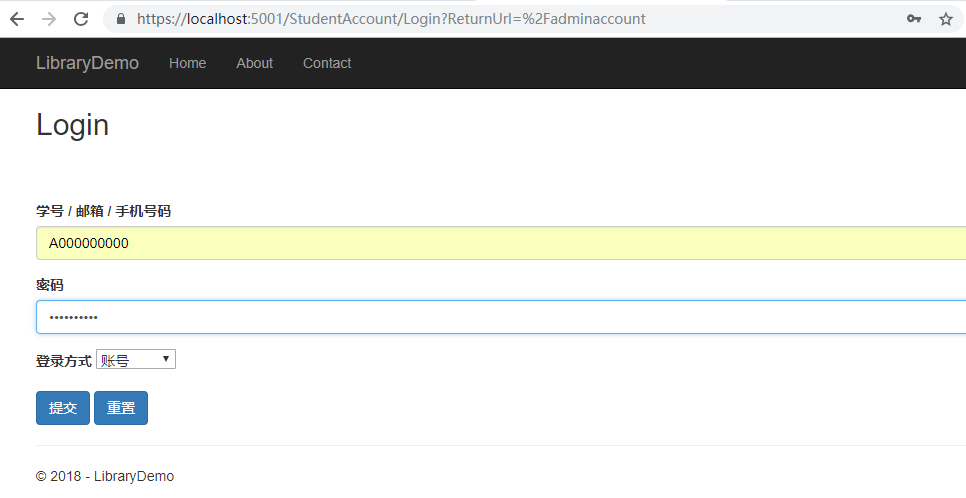
使用 Role 不是 Admin 的账户登录:


使用 Role 为 Admin 的账户登录:

ASP.NET Core MVC 打造一个简单的图书馆管理系统 (修正版)(二)数据库初始化、基本登录页面以及授权逻辑的建立的更多相关文章
- ASP.NET Core MVC 打造一个简单的图书馆管理系统 (修正版)(七) 学生信息增删
前言: 本系列文章主要为我之前所学知识的一次微小的实践,以我学校图书馆管理系统为雏形所作. 本系列文章主要参考资料: 微软文档:https://docs.microsoft.com/zh-cn/asp ...
- ASP.NET Core MVC 打造一个简单的图书馆管理系统 (修正版)(六)学生借阅/预约/查询书籍事务
前言: 本系列文章主要为我之前所学知识的一次微小的实践,以我学校图书馆管理系统为雏形所作. 本系列文章主要参考资料: 微软文档:https://docs.microsoft.com/zh-cn/asp ...
- ASP.NET Core MVC 打造一个简单的图书馆管理系统 (修正版)(五)外借/阅览图书信息的增删改查
前言: 本系列文章主要为我之前所学知识的一次微小的实践,以我学校图书馆管理系统为雏形所作. 本系列文章主要参考资料: 微软文档:https://docs.microsoft.com/zh-cn/asp ...
- ASP.NET Core MVC 打造一个简单的图书馆管理系统 (修正版)(四)图书信息的增删改查
前言: 本系列文章主要为我之前所学知识的一次微小的实践,以我学校图书馆管理系统为雏形所作. 本系列文章主要参考资料: 微软文档:https://docs.microsoft.com/zh-cn/asp ...
- ASP.NET Core MVC 打造一个简单的图书馆管理系统 (修正版)(三)密码修改以及密码重置
前言: 本系列文章主要为我之前所学知识的一次微小的实践,以我学校图书馆管理系统为雏形所作. 本系列文章主要参考资料: 微软文档:https://docs.microsoft.com/zh-cn/as ...
- ASP.NET Core MVC 打造一个简单的图书馆管理系统 (修正版)(一) 基本模型以及数据库的建立
前言: 本系列文章主要为我之前所学知识的一次微小的实践,以我学校图书馆管理系统为雏形所作. 本系列文章主要参考资料: 微软文档:https://docs.microsoft.com/zh-cn/asp ...
- 002.Create a web API with ASP.NET Core MVC and Visual Studio for Windows -- 【在windows上用vs与asp.net core mvc 创建一个 web api 程序】
Create a web API with ASP.NET Core MVC and Visual Studio for Windows 在windows上用vs与asp.net core mvc 创 ...
- 在ASP.NET Core MVC中构建简单 Web Api
Getting Started 在 ASP.NET Core MVC 框架中,ASP.NET 团队为我们提供了一整套的用于构建一个 Web 中的各种部分所需的套件,那么有些时候我们只需要做一个简单的 ...
- Pro ASP.NET Core MVC 第6版 第二章(前半章)
目录 第二章 第一个MVC 应用程序 学习一个软件开发框架的最好方法是跳进他的内部并使用它.在本章,你将用ASP.NET Core MVC创建一个简单的数据登录应用.我将它一步一步地展示,以便你能看清 ...
随机推荐
- BZOJ1583: [Usaco2009 Mar]Moon Mooing 哞哞叫
给n<=4000000,c,a1,b1,c1,a2,b2,c2,以c为初始得到的数,每次可以把得到的某个数x进行操作f1(x)=a1*x/c1+b1,f2(x)=a2*x/c2+b2,求最后能得 ...
- Thinkphp 3.2使用Redis
(1)直接调用框架自带的Redis类: 路径:\ThinkPHP\Library\Think\Cache\Driver\Redis.class.php. public function test(){ ...
- [Bzoj4182]Shopping(点分治)(树上背包)(单调队列优化多重背包)
4182: Shopping Time Limit: 30 Sec Memory Limit: 128 MBSubmit: 374 Solved: 130[Submit][Status][Disc ...
- MySQL查询count(*)、count(1)、count(field)的区别收集
经过查询研究得出这个和MySQL中用什么引擎有关,比如InnoDB和MyISAM在处理这count(*).count(1).count(field)都有不同的方式,还有就是和版本都有关系,不同的版本会 ...
- 火狐firefox、谷歌chrome等浏览器扩展、插件介绍
火狐旧的插件扩展已经不可用,需要更新,这是本人安装的最新的插件 chrome插件 https://www.zhihu.com/question/68338297
- .NET作品集:基于svn 的.net 持续集成工具
作品背景 这个.net 持续集成作品还是在2014年的时候从事.net 软件项目开发的时候做的,当时部门还用着vs2008用vb.net做项目(现在也是),项目代码极混乱,版本工具用的vss,而且用的 ...
- Angular2.x-服务
heroes之旅HeroesComponent目前正在获取并显示虚假数据. 在本教程重构之后,HeroesComponent将会精益求精并专注于支持视图.用模拟服务进行单元测试也会更容易. 为什么服务 ...
- js 计算两个日期之间 相差几年几月几日
1.计算日期差 Mine.vue <!-- 我的 --> <template> <div> <!-- 标题栏 --> <x-header :lef ...
- HiWorkV1.3版震撼公布,今日起正式公开測试!
今天HiWork迎来了公开測试和V1.3大版本号更迭,HiWork集成的机器人达到20种,未读消息提醒亦可从不同维度进行设置,不断变好真是件振奋人心的事儿呢. 在这个看重颜值(kan lian)的互联 ...
- maven导入dom4j以及jaxen.jar报java.lang.UnsupportedOperationException:错误
<dependency> <groupId>jaxen</groupId> <artifactId>jaxen</artifactId> & ...