
Spring Boot整合Thymeleaf视图层
Spring Boot整合Thymeleaf
Spring Boot整合Thymeleaf(Spring Boot官方推荐的视图层技术)
Thymeleaf特点:thymeleaf通过特定的语法对html的标记进行渲染。
Spring Boot整合Thymeleaf 的项目步骤
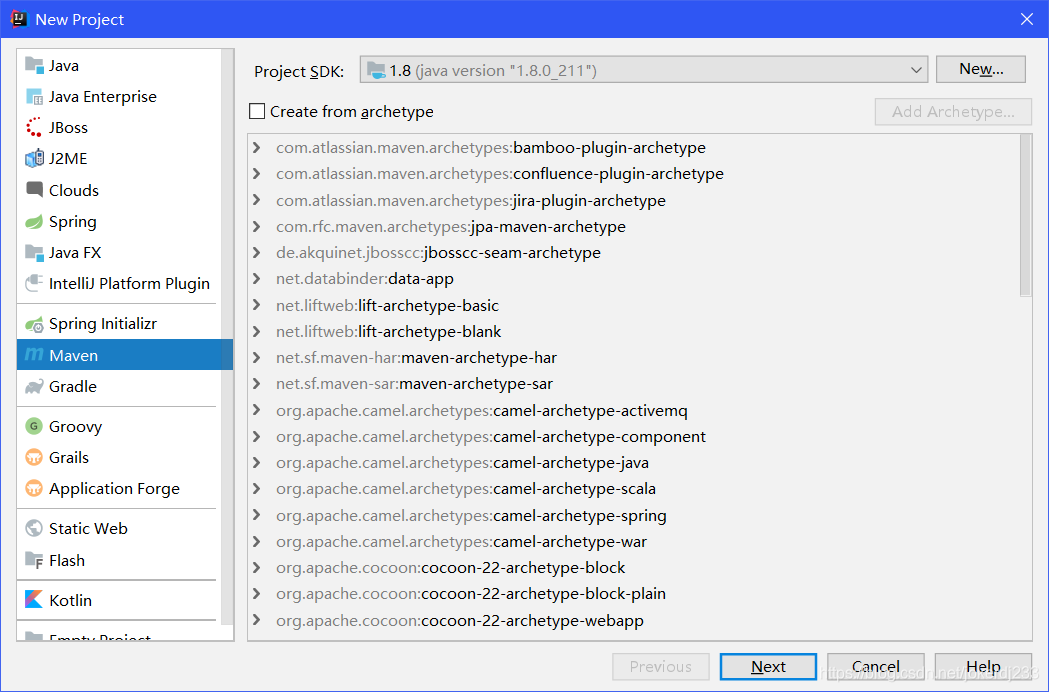
- 创建Thymeleaf的项目(maven project的jar类型的spring boot项目)
- 打开pom.xml文件,添加启动器坐标
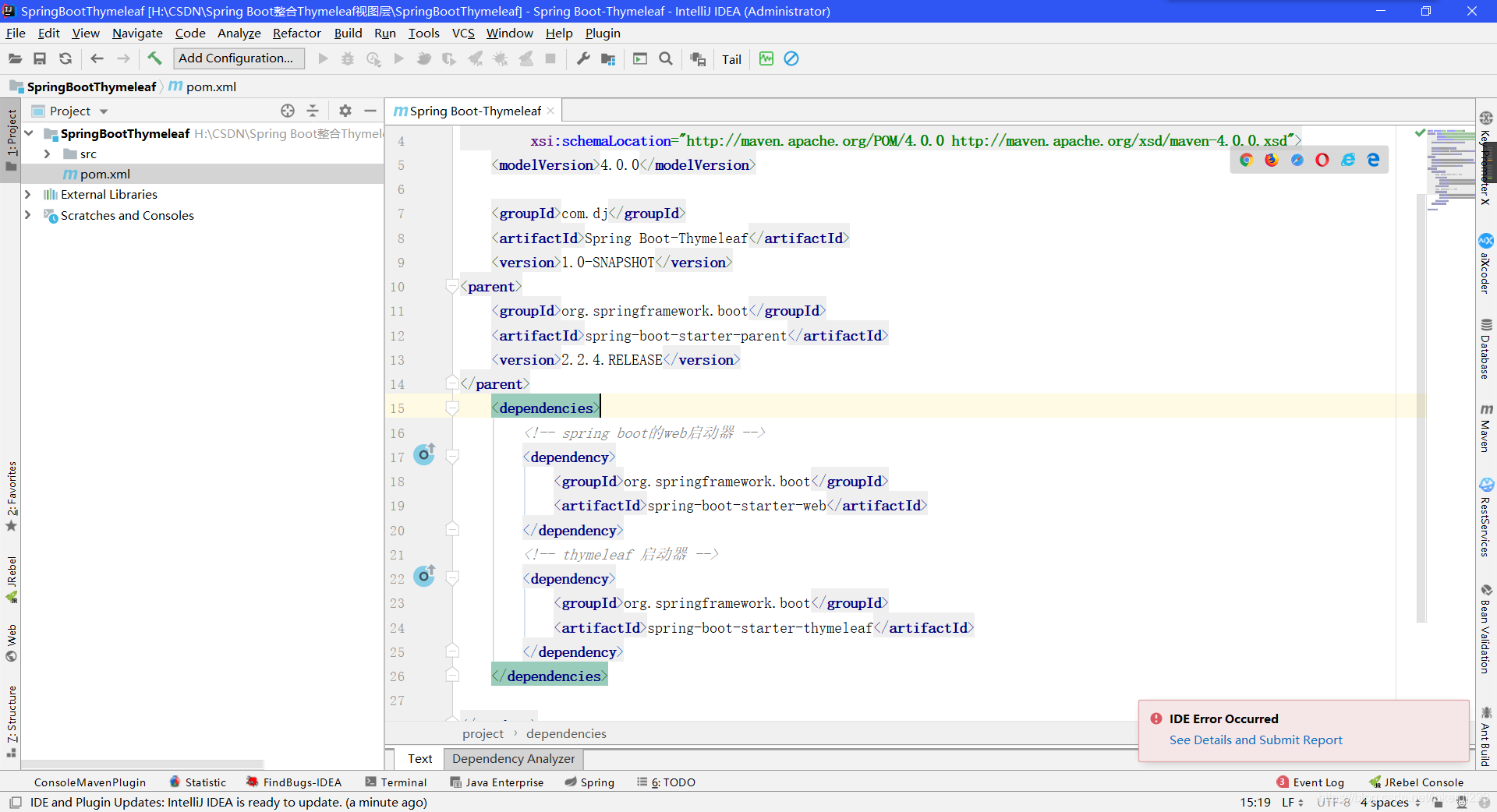
代码:
<parent>

    <groupId>org.springframework.boot</groupId>

    <artifactId>spring-boot-starter-parent</artifactId>

    <version>2.2.4.RELEASE</version>

</parent>

    <dependencies>

        <!-- spring boot的web启动器 -->

        <dependency>

            <groupId>org.springframework.boot</groupId>

            <artifactId>spring-boot-starter-web</artifactId>

        </dependency>

        <!-- thymeleaf 启动器 -->

        <dependency>

            <groupId>org.springframework.boot</groupId>

            <artifactId>spring-boot-starter-thymeleaf</artifactId>

        </dependency>

    </dependencies>
- 编写Controller控制器
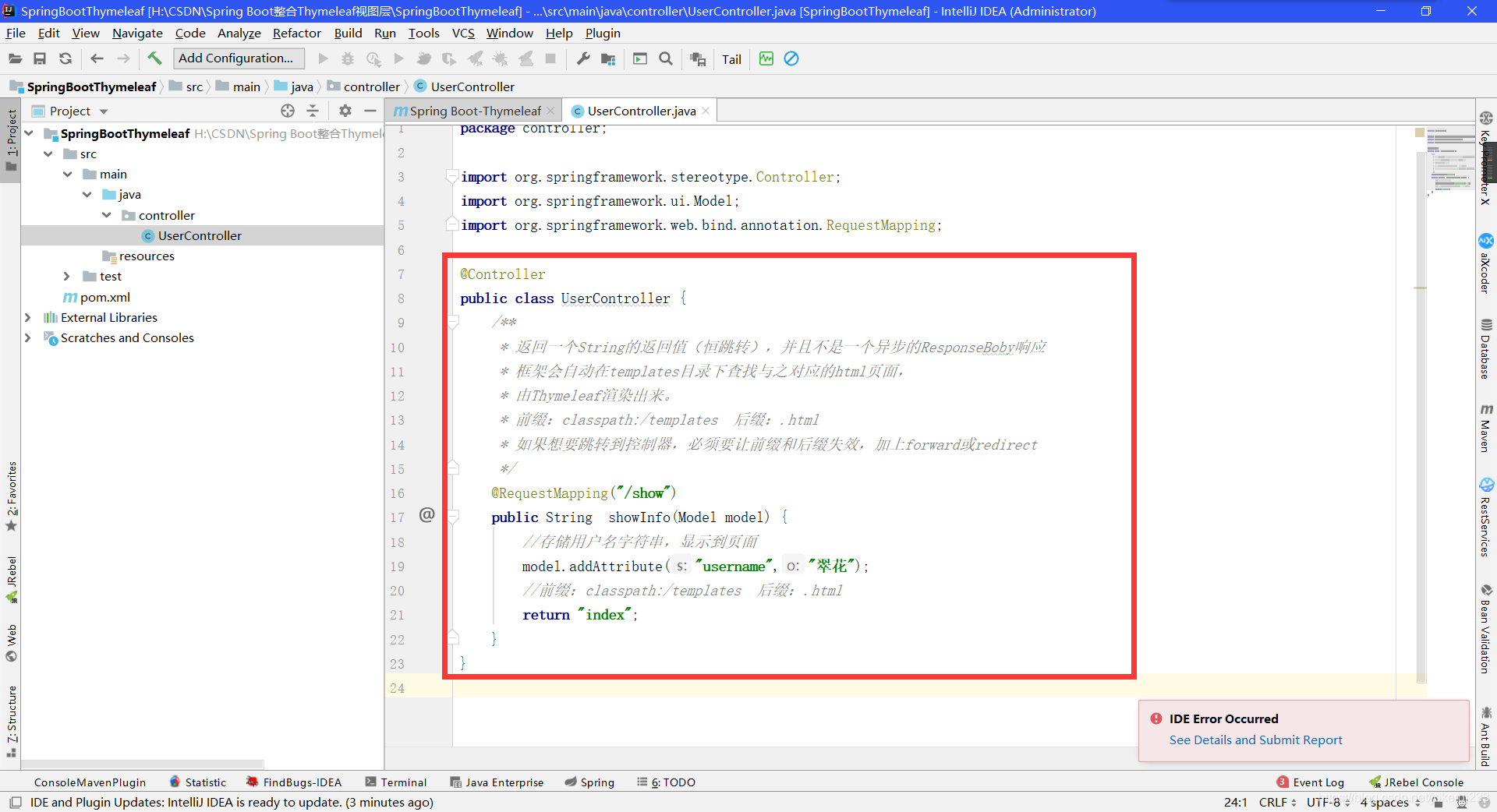
代码:
@Controller

public class UserController {

	/**

	 * 返回一个String的返回值(恒跳转),并且不是一个异步的ResponseBoby响应

	 * 框架会自动在templates目录下查找与之对应的html页面,

	 * 由Thymeleaf渲染出来。

	 * 前缀:classpath:/templates  后缀:.html

	 * 如果想要跳转到控制器,必须要让前缀和后缀失效,加上forward或redirect

	 */

	@RequestMapping("/show")

	public String  showInfo(Model model) {

		//存储用户名字符串,显示到页面

		model.addAttribute("username","翠花");

		//前缀:classpath:/templates  后缀:.html

		return "index";

	}

}
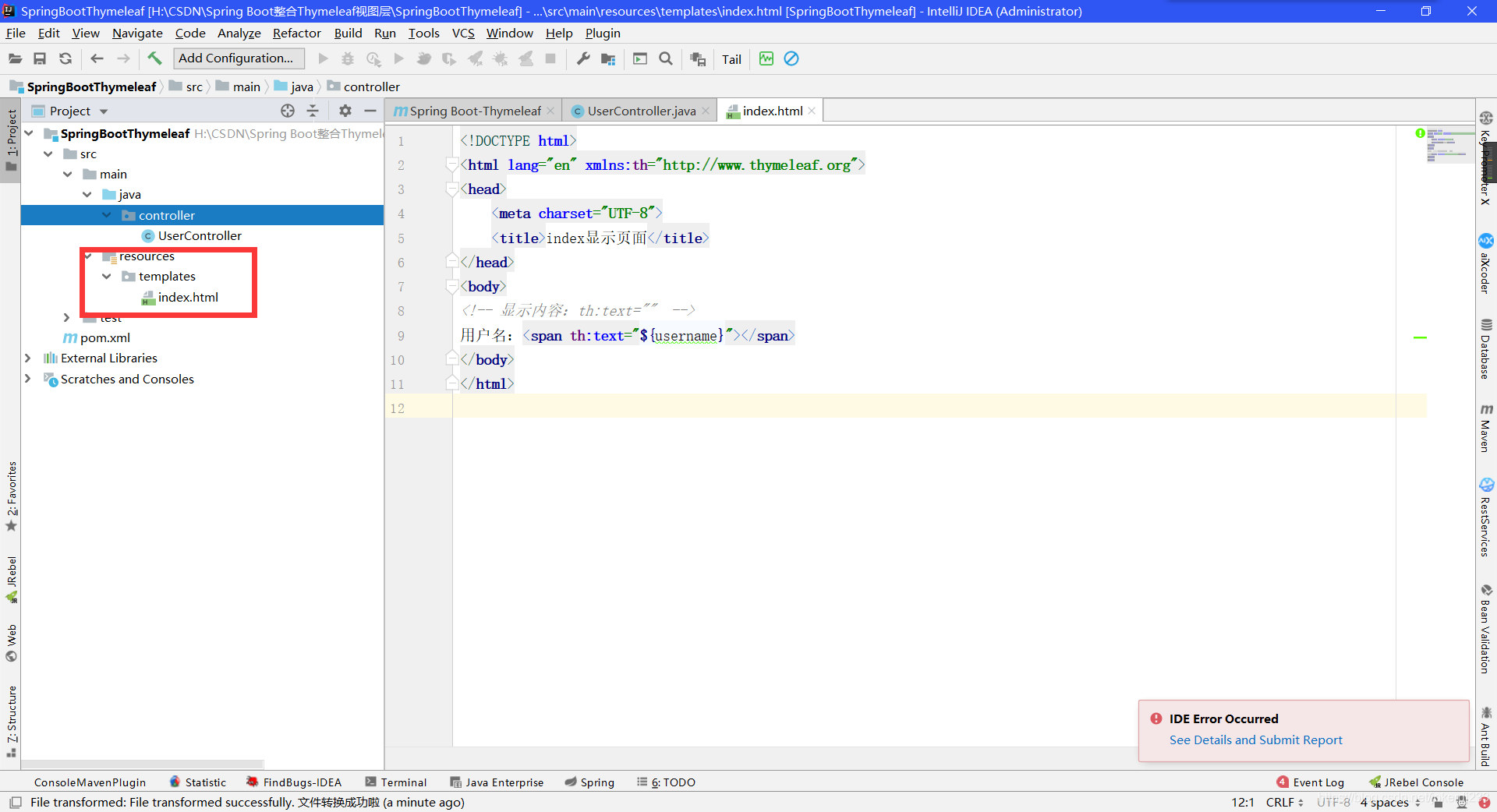
- 编写Thymeleaf视图层页面 (负责数据的展示)
Thymeleaf页面必须要放在src/main/resources/templates下
templates:该目录是安全.意味着目录下的内容不允许外界直接访问。
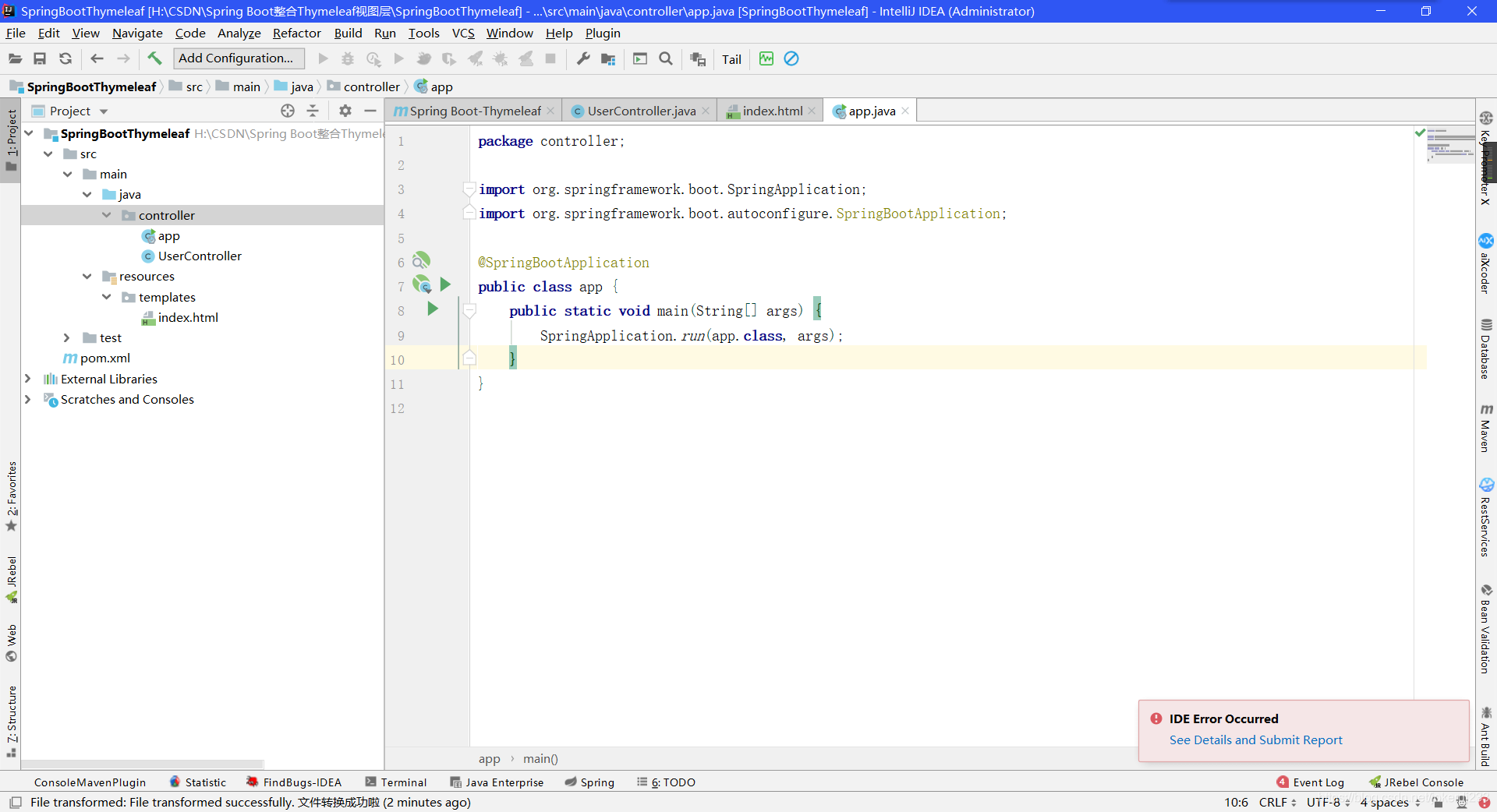
- 启动类
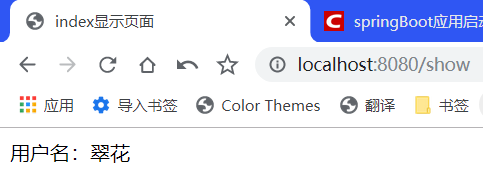
- 浏览器输入: localhost:8080/show
Thymeleaf 语法详解
- 变量输出
th:text :在页面中输出值
th:value : 将值放入input标签的value属性中
用户名:<span th:text="${username}"></span>

<hr/>

用户名: <input th:value="${username}"/>
- Thymeleaf内置对象 (内置对象一定用#)
1:字符串操作 strings
strings.isEmpty() : 判断字符串是否为空。True,false
strings.startsWith() : 判断字符串是否已什么开头。True,false
strings.endsWith() : 判断字符串是否已什么结尾。True,false
strings.length() : 返回字符串的长度
strings.indexOf() : 查找子字符串出现的位置
strings.toUpperCase():转大写
strings.tolowerCase():转小写
Strings.substring() :截取子字符串
用户名的长度:<span th:text="${#strings.length(username)}"></span>

  <hr/>

  获取用户名的姓:<span th:text="${#strings.substring(username,0,1)}"></span>
- 日期格式化处理 dates
dates.format():默认以浏览器作为格式化标签
dates.format(time,’yyyy-MM-dd hh:mm:ss ’): 按照自定义的格式进行转换
dates.year():获取年
dates.month():获取月
dates.day():获取日
当前时间:<span th:text="${time}"></span>

 <hr/>

 格式化日期:<span th:text="${#dates.format(time,'yyyy-MM-dd HH:mm:ss')}"></span>
- 条件判断
1:th: if
controller:
model.addAttribute("sex", "男");
html:
您可能喜欢:<span th:if="${sex}=='男'">篮球,动漫</span>
th:switch
th:case循环迭代遍历
th:each
	1:迭代遍历list

		<table border="1" width="50%">

     <tr>

        <td>序号</td>

        <td>编号</td>

        <td>姓名</td>

        <td>年龄</td>

     </tr>

     <!--var:状态变量  index ,count,first last size  even odd-->

     <tr th:each="user,var:${list}">

        <td th:text="${var.count}"></td>

        <td th:text="${user.id}"></td>

        <td th:text="${user.name}"></td>

        <td th:text="${user.age}"></td>

     </tr>

 </table>
2:迭代遍历map
...
- 作用域的对象数据的获取操作
	//作用域  request,session  application

request.setAttribute("req", "HttpServletRequest");

request.getSession().setAttribute("sess", "HttpSession");

request.getSession().getServletContext().setAttribute("app", "ServletContext");

<!--页面部分-->

Request数据:<span th:text="${#httpServletRequest.getAttribute('req')}"></span><br/>

Session数据:<span th:text="${session.sess}"></span><br/>

Application数据:<span th:text="${application.app}"></span><br/>
- Url表达式
th:href
th:src
th:action
1:表达式语法 @{}
2: 路径类型绝对路径
相对路径
1:相对于当前项目的根目录  /

      <a th:href=”@{/index}”></a>

2: 相对于服务器路径的根目录 ~

      <a th:href=”@{~/项目名/资源}”></a>

<!-- 连接 url表达式 -->

 <a href="http://www.baidu.com">百度一下</a>

 <a th:href="@{http://www.baidu.com}">百度一下</a>

 <a th:href="@{/show}">show</a>

 <hr/>

 <img src="images/3.jpg" />

 <img th:src="@{${img}}"  />
Spring Boot整合Thymeleaf视图层的更多相关文章
- Spring Boot2 系列教程(九)Spring Boot 整合 Thymeleaf
虽然现在慢慢在流行前后端分离开发,但是据松哥所了解到的,还是有一些公司在做前后端不分的开发,而在前后端不分的开发中,我们就会需要后端页面模板(实际上,即使前后端分离,也会在一些场景下需要使用页面模板, ...
- 极简 Spring Boot 整合 Thymeleaf 页面模板
虽然现在慢慢在流行前后端分离开发,但是据松哥所了解到的,还是有一些公司在做前后端不分的开发,而在前后端不分的开发中,我们就会需要后端页面模板(实际上,即使前后端分离,也会在一些场景下需要使用页面模板, ...
- 从零开始的Spring Boot(5、Spring Boot整合Thymeleaf)
Spring Boot整合Thymeleaf 写在前面 从零开始的Spring Boot(4.Spring Boot整合JSP和Freemarker) https://www.cnblogs.com/ ...
- Spring Boot整合 Thymeleaf 模板引擎
什么是Thymeleaf Thymeleaf是一款用于渲染XML.XHTML.HTML5内容的模板引擎.类似Velocity,FreeMaker模板引擎,它也可以轻易的与Spring MVC等Web框 ...
- Spring Boot整合Thymeleaf模板引擎
什么是Thymeleaf Thymeleaf是一款用于渲染XML.XHTML.HTML5内容的模板引擎.类似Velocity,FreeMaker模板引擎,它也可以轻易的与Spring MVC等Web框 ...
- Spring Boot 整合 Thymeleaf 完整 Web 案例
Thymeleaf 是一种模板语言.那模板语言或模板引擎是什么?常见的模板语言都包含以下几个概念:数据(Data).模板(Template).模板引擎(Template Engine)和结果文档(Re ...
- spring boot整合Thymeleaf的那些坑(spring boot 学习笔记之四)
这里简单记录一下Thymeleaf配置和使用的步骤 1.修改pom文件,添加依赖 <dependency> <groupId>org.springframework.boot& ...
- spring boot整合Thymeleaf
1.引入thymeleaf: <dependency> <groupId>org.springframework.boot</groupId> <artifa ...
- spring boot 整合Thymeleaf模板
SpringBoot 是为了简化 Spring 应用的创建.运行.调试.部署等一系列问题而诞生的产物,自动装配的特性让我们可以更好的关注业务本身而不是外部的XML配置,我们只需遵循规范,引入相关的依赖 ...
随机推荐
- [LeetCode] 994. Rotting Oranges 腐烂的橘子
题目: 思路: 每个腐烂的橘子都能将自己上下左右的新鲜橘子传染,像极了现在的肺炎... 如果格子中只有一个腐烂的橘子,那么这便是一个典型的层次遍历,第一个传染多个,称为第二层,第二层传染第三层 但这里 ...
- Ubuntu 系统下如何安装pip3工具
一.[导读]Ubuntu 系统内置了 Python2 和 Python3 两个版本的开发环境,却没有内置相应的 pip3 管理工具,本文将介绍如何在Ubuntu下如何快速安装 pip3 工具,并升级到 ...
- SQLi-Labs之1~6关 - 常规注入与盲注
年初五 财神入 第一关 联合注入 1.准备 2.加'截断 3.order by 判断查询列数 4.同上 5.联合查询判断字段位置 6.查数据库名 7.1 查表名 7.2 查列名 8.查数据 第二关 不 ...
- 19.10.11学习日记随笔 mysql事务隔离性
一天的感悟 学习事务的处理方式,其中反想自己学过的flask 默认是开启事务的,flask_sqlalchemy每次在提交时都是需要commit,或者失败是需要rollback回滚操作的,其实pyth ...
- 学习RF遇到的问题
1.Windows安装pip命令安装RF报错: File "<stdin>", line 1 pip install robotframework 原因:pip命令不在 ...
- Ansible-免密登录与主机清单Inventory
Ansible的指定用户与密码登录.免密登录.指定ssh端口以及主机清单Inventory配置 在实际使用中并不需要对ansible配置进行修改,或者说只有需要的时候才修改ansible配置. 添加用 ...
- Scikit-Learn 源码研读 (第二期)基类的实现细节
目录 BaseEstimator `get_params` `set_params` ClassifierMixin RegressorMixin 检查传入的对象 检查样本数和权重系数 实现$R^2$ ...
- pycharm+keras+yolo3的使用和自选模型的训练中遇到的坑
1.TensorFlow版本的问题 报错:RuntimeError: `get_session` is not available when using TensorFlow 2.0. 解决办法:这个 ...
- RestFul API 统一格式返回 + 全局异常处理
一.背景 在分布式.微服务盛行的今天,绝大部分项目都采用的微服务框架,前后端分离方式.前端和后端进行交互,前端按照约定请求URL路径,并传入相关参数,后端服务器接收请求,进行业务处理,返回数据给前端. ...
- go:内置函数 | 闭包 | 数组 | 切片 | 排序 | map | 锁
内置函数 1.close: 主要是用来关闭channel 2.len:用来求长度,比如string.array.slice.map.channel 3.new与make都是用来分配内存 new用来分配 ...