
PhoenixFD插件流体模拟——UI布局【Interaction】详解
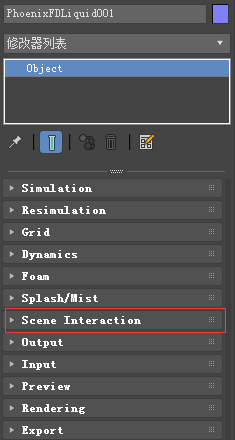
流体交互
主要内容
- Overview 综述
- Parameters 参数
综述
!It is strongly recommended to avoid geometry that has cavities inside.强烈建议避免内部有空洞的几何形状。
These may cause jets and other undesired phenomena.这些可能会导致喷流和其他不受欢迎的现象。
This dialog is used to enable/disable the interaction with objects in the scene.此对话框用于启用/禁用场景中与对象的交互。
There are several different types of objects that may affect the simulation: Sources, Solid objects, Forces, etc.有几种不同类型的对象可能会影响仿真:源、实体对象、力等。
By default, all these scene elements will interact with the simulator unless otherwise specified by the Include/Exclude list.默认情况下,所有这些场景元素都将与模拟器交互,除非Include/Exclude列表另有规定。
If you want to disable the interaction you have to put the objects in the Exclude list.如果要禁用交互,必须将对象放入排除列表中。
If there are more objects that don't need to interact with the simulator, you may alternatively switch to the Include list mode.如果有更多的对象不需要与模拟器交互,您可以切换到Include列表模式。
In this mode you have to add to the list all the objects that you want to interact with the simulator.在此模式下,您必须将想要与模拟器交互的所有对象添加到列表中。
Since all forces affect the simulation by default, adding a force in your scene to be used by e.g. PFlow will automatically affect your simulation and this might not be desired.由于默认情况下所有的力都会影响仿真,所以在场景中添加一个力,例如PFlow将会自动影响仿真,这可能是不需要的。
In the Active Forces list you can check which 3ds Max forces interact with the simulator and you may exclude them if you wish so.在动力列表中,您可以检查哪些3ds Max力与模拟器交互,如果您愿意,您可以排除它们。
UI Path: ||Select Liquid Simulator | LiquidSim object|| > Modify panel > Interaction rollout
参数

Include/Exclude list | ielist, iemode – Determines which objects will be ignored or processed by the simulation.确定仿真将忽略或处理哪些对象。
Use the radio buttons to switch between Include list and Exclude list. When Exclude list is active (the default), all objects in the scene will interact with the simulator unless they are added to the exclusion list. In Include list mode, no objects will interact with the simulator unless they are added to the list.
Exclude hidden objects | exclhidden – When enabled, the hidden objects will be excluded regardless of the list content.
Exclude Fire/Smoke Sims | exclfiresm – When enabled, FireSmokeSim objects will not interact with the liquid simulator.当启用时,FireSmokeSim对象将不会与液体模拟器交互。
PhoenixFD插件流体模拟——UI布局【Interaction】详解的更多相关文章
- PhoenixFD插件流体模拟——UI布局【Simulation】详解
前言 之前使用RealFlow做流体模拟,但是总得和3ds导来导去,略显麻烦,特意学习PhoenixFD插件,直接在3ds中进行流体模拟.若读者有更好的流体模拟方法,欢迎在评论区交流. 原文地址:ht ...
- PhoenixFD插件流体模拟——UI布局【Output】详解
Liquid Output 流体输出 本文主要讲解Output折叠栏中的内容.原文地址:https://docs.chaosgroup.com/display/PHX3MAX/Liquid+Outp ...
- PhoenixFD插件流体模拟——UI布局【Splash | Mist】详解
液体飞溅 | 水雾 本文主要讲解Splash | Mist折叠栏中的内容.原文地址:https://docs.chaosgroup.com/display/PHX3MAX/Liquid+Splash+ ...
- PhoenixFD插件流体模拟——UI布局【Foam】详解
流体泡沫 本文主要讲解Foam折叠栏中的内容.原文地址:https://docs.chaosgroup.com/display/PHX3MAX/Liquid+Foam 主要内容 Overview 综述 ...
- PhoenixFD插件流体模拟——UI布局【Rendering】详解
Liquid Rendering 流体渲染 本文主要讲解Rendering折叠栏中的内容.原文地址:https://docs.chaosgroup.com/display/PHX3MAX/Liqui ...
- PhoenixFD插件流体模拟——UI布局【Export】详解
Liquid Export 流体导出 本文主要讲解Export折叠栏中的内容.原文地址:https://docs.chaosgroup.com/display/PHX3MAX/Liquid+Expor ...
- PhoenixFD插件流体模拟——UI布局【Preview】详解
Liquid Preview 流体预览 本文主要讲解Preview折叠栏中的内容.原文地址:https://docs.chaosgroup.com/display/PHX3MAX/Liquid+Pr ...
- PhoenixFD插件流体模拟——UI布局【Input】详解
Liquid Input 流体输入 本文主要讲解Input折叠栏中的内容.原文地址:https://docs.chaosgroup.com/display/PHX3MAX/Liquid+Input 主 ...
- PhoenixFD插件流体模拟——UI布局【Dynamics】详解
流体动力学 本文主要讲解Dynamics折叠栏中的内容.原文地址:https://docs.chaosgroup.com/display/PHX3MAX/Liquid+Dynamics 主要内容 Ov ...
随机推荐
- configEnvironment()源码探究
该方法目的是对上面刚创建的环境对象进行相关配置,包含两步:配置属性源和配置活跃profiles. 其中配置属性源如下: 1.首先获取属性源 2.然后将默认属性源添加到属性源中 3.然后将命令行属性源添 ...
- WinHTTrack Website Copier使用说明
WinHTTrack Website Copier使用说明 WinHTTrack Website Copier可以抓取整个网站或者某个网页.某个论坛帖子.以抓取论坛某个主题帖子为例: 1.打开WinH ...
- LeetCode——17. Letter Combinations of a Phone Number
一.题目链接: https://leetcode.com/problems/letter-combinations-of-a-phone-number/ 二.题目大意: 给定一段数字字符串,其中每个数 ...
- maven向本地仓库导入jar包
如果maven工程的依赖jar包在网上找不到,那么只能自己打包,然后传到本地仓库,可以使用如下命令 mvn install:install-file -DgroupId=com.redis.redis ...
- 20175236 《Java程序设计》实验一(Java开发环境的熟悉)实验报告
一.实验报告封面 课程:Java程序设计 班级:1752班 姓名:温丰帆 学号:20175236 指导教师:娄嘉鹏 实验日期:2019年4月2日 实验时间:13:45 - 15:25 实验序号:实验一 ...
- 使用pgrouting进行最短路径搜索
PgRouting是基于开源空间数据库PostGIS用于网络分析的扩展模块,最初它被称作pgDijkstra,因为它只是利用Dijkstra算法实现最短路径搜索,之后慢慢添加了其他的路径分析算法 ...
- 没讲明白的水题orz
有一道解释程序的水题没给非计算机专业的同学讲明白orz,在这里再练一下.. 源代码完全没有缩进真是难以忍受.. p.s.懂递归就不用看了#include <stdio.h> int n = ...
- 极速认识RSS!
在解释RSS是什么之前,让我先来举个栗子. 大家都能在街道看到许多海报栏.在那里,会贴出各种各样最新的消息,比如哪个系要开讲座了.星期二晚上的电影放什么.二手货转让等 等.只要看一下海报栏,就会对学校 ...
- localStorage sessionStorage 用法
sessionStorage.getItem('key') // 获取 sessionStorage.setItem('key','value') //设置 sessionStorage.remove ...
- Winform 弹出窗体等待
显示效果: FrmWaiting.cs: public FrmWaitingBox(EventHandler<EventArgs> Method,string msg) { Initial ...