
a dive in react lifecycle
背景:我在react文档里找生命周期的图,居然没有,不敢相信我是在推特上找到的。。。
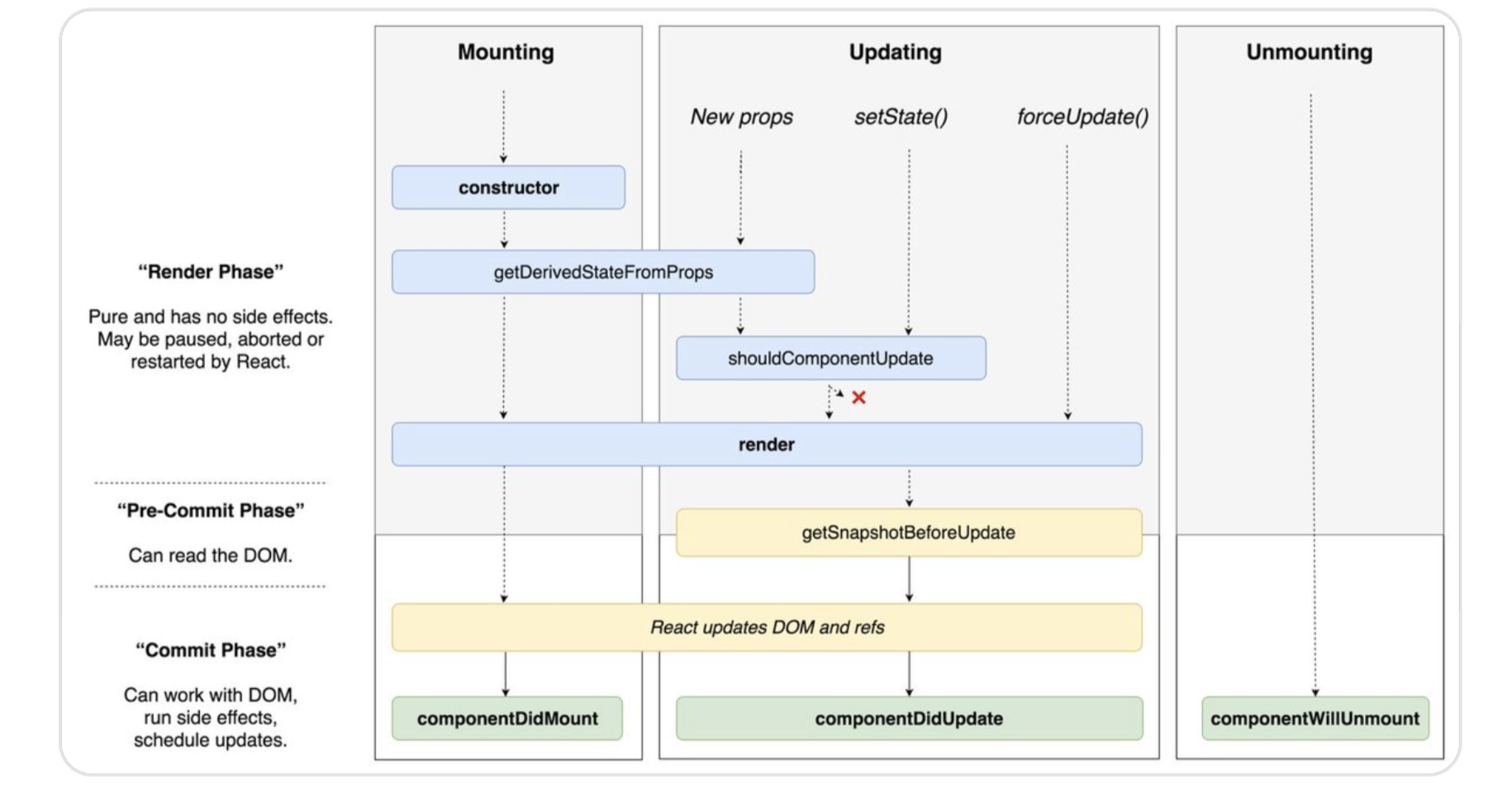
正文
react v16.3 新生命周期:
- static getDerivedStateFromProps
- getSnapshotBeforeUpdata
1: getDerivedStateFromProps, 在render之前,返回一个obj更新state,或者null不更新state, 这个生命周期的使用场景是:state根据props变化。
 static getDerivedStateFromProps(nextProps: SearchProps, prevState: SearchState) {

    const { location } = nextProps

    const state = location.state

    if (state && (state.keyword !== prevState.keyword)) {

      const { keyword } = statereturn {

        pageState: 0,

        employee: {

          hit: 0,

          count: 0,

          data: [],

          currentOffset: 0

        },

        document: {

          hit: 0,

          count: 0,

          data: [],

          currentOffset: 0

        },

        keyword,

        needExact: false

      }

    }

    return null

  }
2: getSnapshotBeforeUpdata 触发时间:在实际dom挂载之前,虚拟dom构建之后。返回的任何数据或者null,都将作为componentDidUpdate()的参数。
 getSnapshotBeforeUpdate(prevProps, prevState) {

    // Are we adding new items to the list?

    // Capture the scroll position so we can adjust scroll later.

    if (prevProps.list.length < this.props.list.length) {

      const list = this.listRef.current;

      return list.scrollHeight - list.scrollTop;

    }

    return null;

  }

  componentDidUpdate(prevProps, prevState, snapshot) {

    // If we have a snapshot value, we've just added new items.

    // Adjust scroll so these new items don't push the old ones out of view.

    // (snapshot here is the value returned from getSnapshotBeforeUpdate)

    if (snapshot !== null) {

      const list = this.listRef.current;

      list.scrollTop = list.scrollHeight - snapshot;

    }

  }
建议用法总结请移步:https://juejin.im/post/5aca20c96fb9a028d700e1ce
这里拷贝一个我用到的一种情况:props更新时重新请求
// old

  componentWillReceiveProps(nextProps) {

    if (nextProps.id !== this.props.id) {

        this.setState({externalData: null});

      this._loadAsyncData(nextProps.id);

    }

  }

// new

  static getDerivedStateFromProps(nextProps, prevState) {

    // Store prevId in state so we can compare when props change.

    if (nextProps.id !== prevState.prevId) {

      return {

        externalData: null,

        prevId: nextProps.id,

      };

    }

    // No state update necessary

    return null;

  }

  componentDidUpdate(prevProps, prevState) {

    if (this.state.externalData === null) {

      this._loadAsyncData(this.props.id);

    }

  }
我的使用:
  componentDidUpdate(prevProps: SearchProps, prevState: SearchState) {

    const { keyword, needExact } = this.state

    if (keyword && (keyword !== prevState.keyword)) {  // 上一次的state和这一次的对比,如果需要,就进行fetch数据,并setstate。其中this.state就是getDerivedStateFromProps返回的 更新后的state

      if (needExact) {

        this._fetchExactData(this.state.keyword)

        this.setState({

          needExact: false

        })

      } else {

        Promise.all([this._fetchInitData('document'), this._fetchInitData('employee')])

          .then(values => {

            let pageState = 0

            const { state } = this.props.location

            if (state && state.type) {

              pageState = state.type

            } else if (!values[1] && values[0]) {

              pageState = 1

            }

            this.setState({

              pageState,

            })

          })

      }

    }

  }
最后,记录一个小知识点:
由于state变化,需要出发请求数据的,在componentDidUpdate中进行。
a dive in react lifecycle的更多相关文章
- React Lifecycle
React Lifecycle 分为三种: 初始化阶段 状态的更新 销毁 实例化: ReactDom.render 用于将模板转换成HTML语言,并插入DOM节点. 1.getDefaultProps ...
- React LifeCycle API
React LifeCycle API old API & new API 不可以混用 demo https://codesandbox.io/s/react-parent-child-lif ...
- React LifeCycle Methods & re-learning 2019
React LifeCycle Methods & re-learning 2019 v16.9.0 https://reactjs.org/docs/react-component.html ...
- 一图解析 React组件生命周期 (React Component Lifecycle)
React LifeCycle v1 参考官方文档作成 可放大 参考:https://reactjs.org/docs/react-component.html 数字补丁数字补丁数字补丁数字补丁数 ...
- React (Native) Rendering Lifecycle
How Does React Native Work? The idea of writing mobile applications in JavaScript feels a little odd ...
- react与jQuery对比,有空的时候再翻译一下
参考资料:http://reactfordesigners.com/labs/reactjs-introduction-for-people-who-know-just-enough-jquery-t ...
- 如何用 React Native 创建一个iOS APP?(三)
前两部分,<如何用 React Native 创建一个iOS APP?>,<如何用 React Native 创建一个iOS APP (二)?>中,我们分别讲了用 React ...
- 从性能角度看react组件拆分的重要性
React是一个UI层面的库,它采用虚拟DOM技术减少Javascript与真正DOM的交互,提升了前端性能:采用单向数据流机制,父组件通过props将数据传递给子组件,这样让数据流向一目了然.一旦组 ...
- 携程React Native实践
React Native(下文简称 RN)开源已经一年多时间,国内各大互联网公司都在使用,携程也在今年 5 月份投入资源开始引入,并推广给多个业务团队使用,本文将会分享我们遇到的一些问题以及我们的优化 ...
随机推荐
- 通过URL触发Jenkins构建
用Jenkins做持续集成时,一般会使用webhooks触发构建,或者定时构建,这里记录用URL的方式触发Jenkins构建. Note: This assumes you're using Jenk ...
- package-lock.json,我们应该了解
原谅我占2017年12月31日一个坑,后续补上
- PDF 报表 Java 组件 iText5 中的单位注意事项
这里面涉及到这几个单位: 点(磅)(pt).像素(px).英寸(inch).毫米(mm) 分辨率单位有: dpi(点每英寸):出现于打印或印刷领域. lpi (线每英寸):描述光学分辨率的尺度. pp ...
- Kali学习笔记30:身份认证与命令执行漏洞
文章的格式也许不是很好看,也没有什么合理的顺序 完全是想到什么写一些什么,但各个方面都涵盖到了 能耐下心看的朋友欢迎一起学习,大牛和杠精们请绕道 实验环境: Kali机器:192.168.163.13 ...
- MySql事务的隔离级别及作用
逻辑工作单元遵循一系列(ACID)规则则称为事务. 原子性:保证事务是一系列的运作,如果中间过程有一个不成功则全部回滚,全部成功则成功.保证了事务的原则性. 一致性:一致性指的是比如A向B转100块钱 ...
- java 常见面试题总结(一)
1.Redis应用场景 答:分布式会话,分布式锁,计数器,缓存,消息队列,排行榜,最新列表. 2.如何访问一个类的私有方法? 答:使用反射进行访问,代码如下: package cn.entity; p ...
- Docker安装配置MongoDB并使用Robo 3T在局域网连接
主要参考了这位老兄的文章(传送门),写的还是比较详细的. 不废话直接来正经的. 1.docker pull mongo 从docker hub拉取最新的mongo镜像文件,300多M大小. 2.doc ...
- [原创]K8mysqlCmd数据库免驱连接工具
无需机器安装MYSQL驱动,可用于内网渗透(如远控cmd下连接目标内网不可上网机器数据库) 当然目标机可代理出来的话,没必要使用该工具了 因为很多功能SQL语句需要自己打,很多人可能不懂 如果更新2. ...
- Android--UI之ImageView
前言 这篇博客聊一聊在Android下ImageView的使用,在此篇博客中,会讲解到ImageView的一些属性的使用,以及ImageView展示图片的放大.缩小.旋转等操作.最后再讲解一下Andr ...
- karma测试实践
karma是Google团队开发的一套前端测试运行框架,它不同于测试框架(jasmine,mocha等),它运行在这些测试框架之上,主要完成的工作有: 1.karma启动一个web服务器,生成包含js ...