
使用C# (.NET Core) 实现迭代器设计模式 (Iterator Pattern)
本文的概念来自深入浅出设计模式一书
项目需求
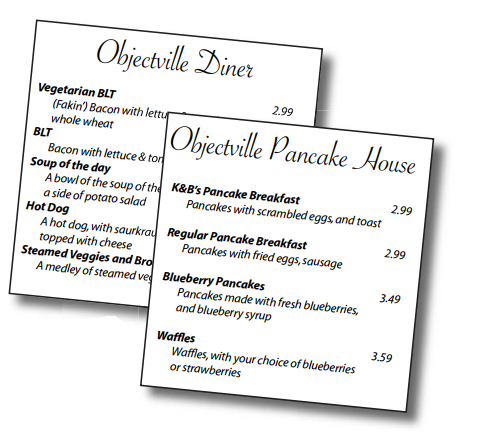
有两个饭店合并了, 它们各自有自己的菜单. 饭店合并之后要保留这两份菜单.
这两个菜单是这样的:
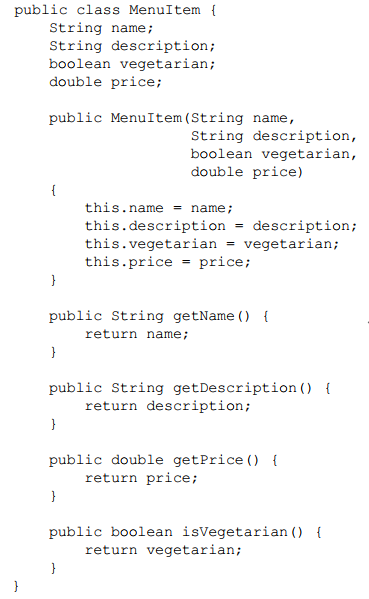
菜单项MenuItem的代码是这样的:
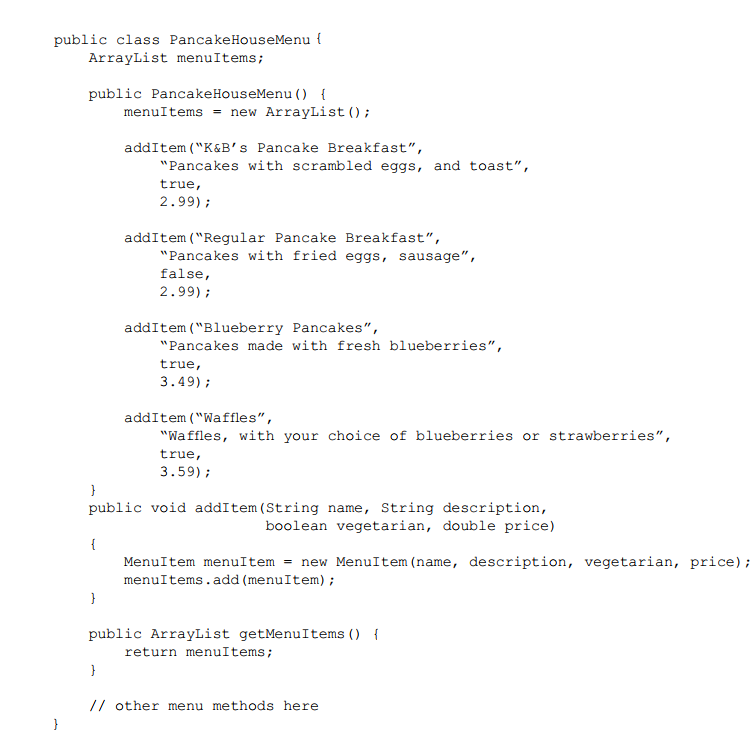
最初我们是这样设计的, 这是第一份菜单:
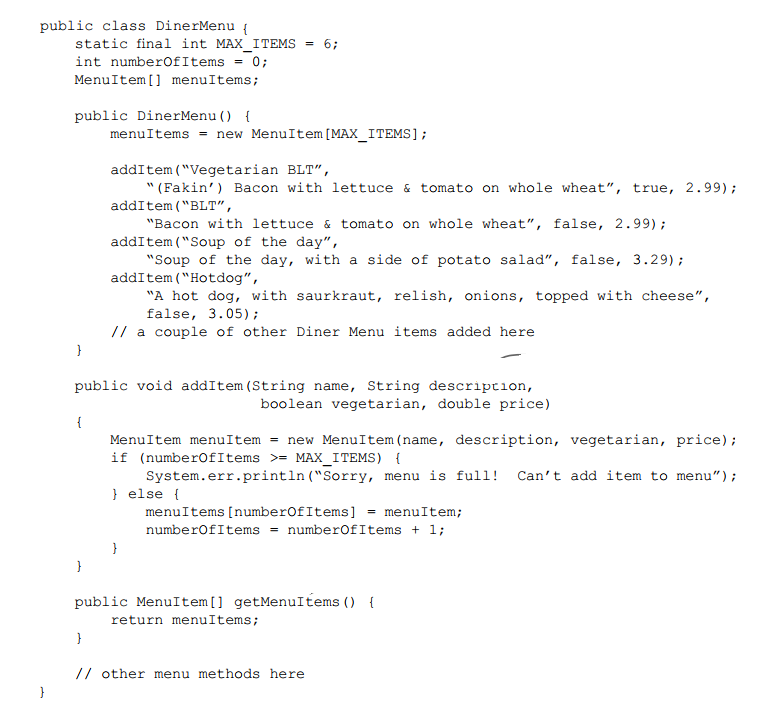
这是第2份菜单:
同时有两个菜单存在的问题
问题就是多个菜单把事情变复杂了. 例如: 如果一个服务员需要使用两份菜单的话, 那么她就无法很快的告诉客户有哪些菜是适合素食主义者的了.
服务员还有可能有这些需求:
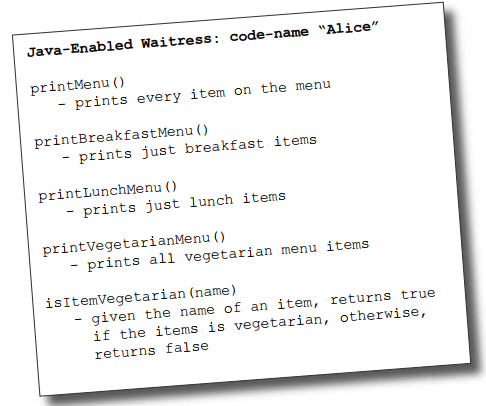
打印菜单, 打印早餐菜单, 打印午餐菜单, 打印素食菜单, 判断某个菜是否是素食的.
首先我们尝试一下如何实现打印菜单:
1. 调用两个菜单上面的getMenuItem()方法来获取各自的菜单项, 由于它们的菜单不同, 所以需要写两段代码:

2. 打印两个菜单的菜单项, 同样也是两套代码:
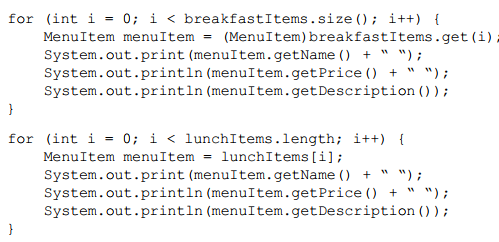
3. 如果还有一份菜单, 那么就需要写三套代码....
现在就很麻烦了.
怎么解决这个问题
如果能找到一种方式让这两个菜单同时实现一个接口就好了. 我们已经知道, 要把变化的部分封装起来.
什么是变化的部分? 由于不同对象集合引起的遍历操作.
那我们试试;
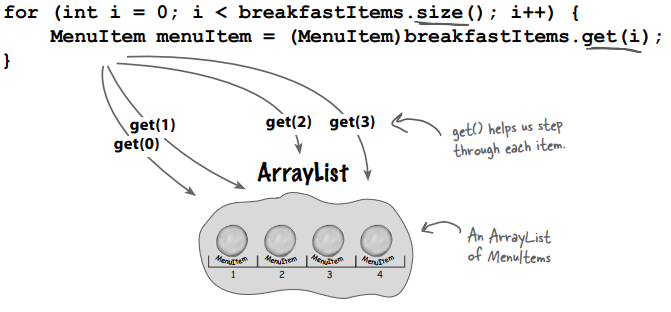
1. 想要遍历早餐项, 我们使用ArrayList的size()和get()方法:
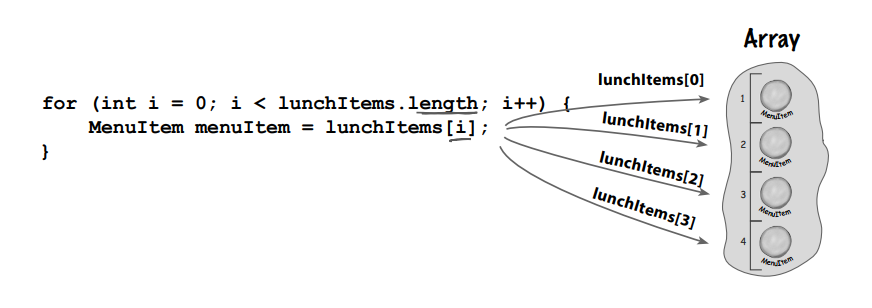
2. 想要遍历午餐项, 我们需要使用Array的length成员变量以及通过索引访问数组:
3. 如果我们创建一个对象, 把它叫做迭代器, 让它来封装我们遍历集合的方式怎么样?
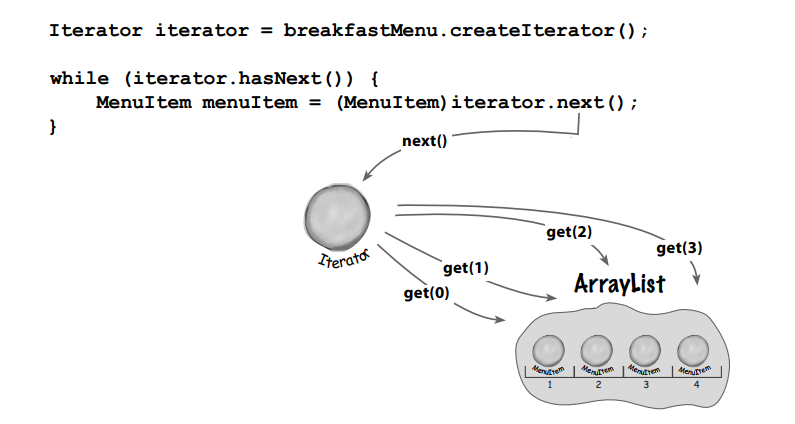
这里, 我们需要早餐菜单创建一个迭代器, 如果还有剩余的菜单项没有遍历完, 就获取下一个菜单项.
4. 让我们在Array上试试:
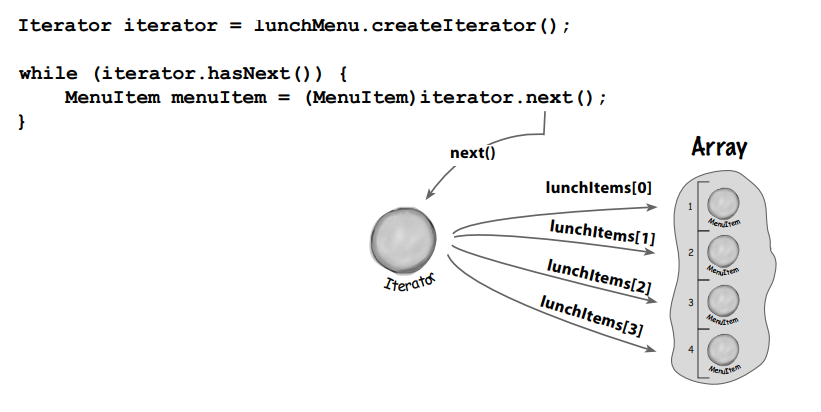
初识迭代器模式
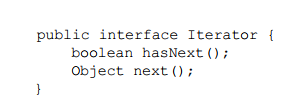
首先你需要知道这种模式依赖于一个迭代器接口. 例如这个:
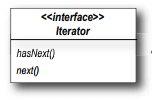
hasNext()方法告诉我们集合中是否还有剩余的条目没有遍历到.
next()方法返回下一个条目.
有了这个接口, 我们可以在任何一种集合上实现该接口.:
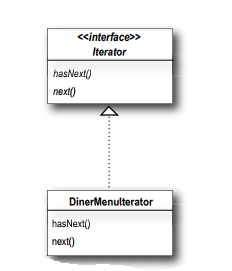
修改代码
定义迭代器接口:
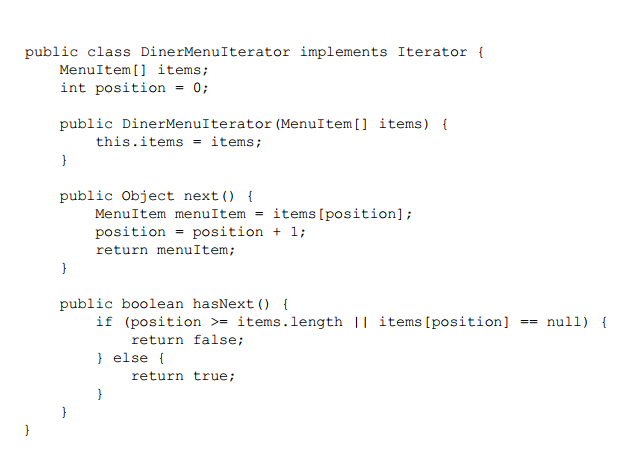
然后再DinerMenu上实现迭代器接口:
然后使用迭代器来修改DinerMenu菜单:
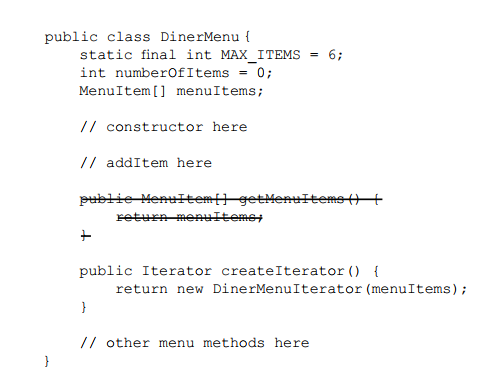
注意: 不要直接返回集合, 因为这样会暴露内部实现.
createIterator()方法返回的是迭代器的接口, 客户并不需要知道DinerMenu是如何维护菜单项的, 也不需要DinerMenu的迭代器是如何实现的. 它只是用迭代器来遍历菜单里面的条目.
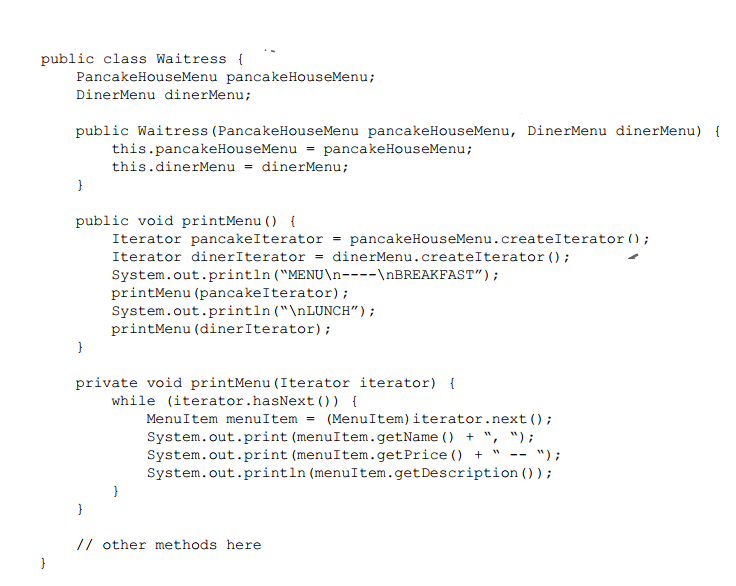
最后服务员的代码如下:
测试代码:
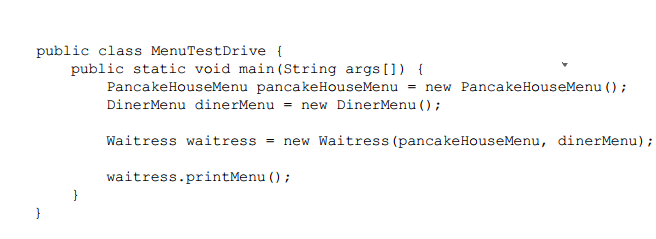
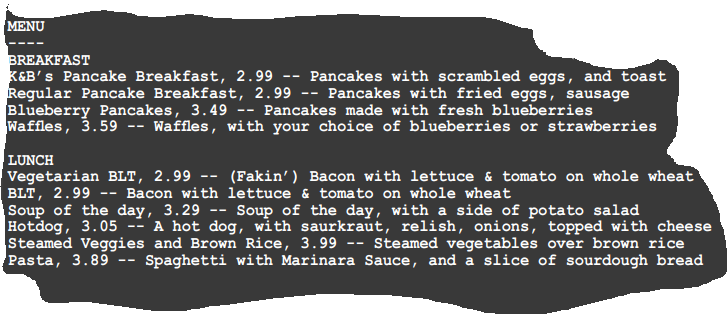
我们做了哪些修改?
我们只是为菜单添加了createIterator()方法.
而现在, 菜单的实现被封装了, 服务员不知道菜单是如何保存菜单项的.
我们所需要的只是一个循环, 它可以多态的处理实现了迭代器接口的集合.
而服务员使用的是迭代器接口.
现在呢, 菜单还没有共同的接口, 这意味着服务员仍然被绑定在两个具体的菜单类上, 一会我们再说这个.
当前的设计图
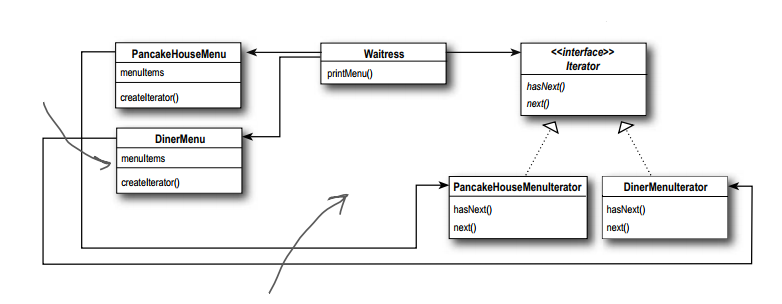
目前就是两个菜单实现了同一套方法, 但是还没有实现同一个接口.
使用C#, .NET Core控制台项目进行实现
菜单项 MenuItem:
namespace IteratorPattern.Menus

{

    public class MenuItem

    {

        public string Name { get; }

        public string Description { get; }

        public bool Vegetarian { get; }

        public double Price { get; }

        public MenuItem(string name, string description, bool vegetarian, double price)

        {

            Name = name;

            Description = description;

            Vegetarian = vegetarian;

            Price = price;

        }

    }

}
迭代器接口 IMyIterator:
namespace IteratorPattern.Abstractions

{

    public interface IMyIterator

    {

        bool HasNext();

        object Next();

    }

}
两个菜单迭代器:
using IteratorPattern.Abstractions;

using IteratorPattern.Menus;

namespace IteratorPattern.MenuIterators

{

    public class MyDinerMenuIterator: IMyIterator

    {

        private readonly MenuItem[] _menuItems;

        private int _position;

        public MyDinerMenuIterator(MenuItem[] menuItems)

        {

            _menuItems = menuItems;

        }

        public bool HasNext()

        {

            if (_position >= _menuItems.Length || _menuItems[_position] == null)

            {

                return false;

            }

            return true;

        }

        public object Next()

        {

            var menuItem = _menuItems[_position];

            _position++;

            return menuItem;

        }

    }

}

using System.Collections;

using IteratorPattern.Abstractions;

namespace IteratorPattern.MenuIterators

{

    public class MyPancakeHouseMenuIterator:IMyIterator

    {

        private readonly ArrayList _menuItems;

        private int _position;

        public MyPancakeHouseMenuIterator(ArrayList menuItems)

        {

            _menuItems = menuItems;

        }

        public bool HasNext()

        {

            if (_position >= _menuItems.Count || _menuItems[_position] == null)

            {

                return false;

            }

            _position++;

            return true;

        }

        public object Next()

        {

            var menuItem = _menuItems[_position];

            _position++;

            return menuItem;

        }

    }

}
两个菜单:
using System;

using System.Collections.Generic;

using System.Text;

using IteratorPattern.Abstractions;

using IteratorPattern.MenuIterators;

namespace IteratorPattern.Menus

{

    public class MyDinerMenu

    {

        private const int MaxItems = ;

        private int _numberOfItems = ;

        private MenuItem[] MenuItems { get; }

        public MyDinerMenu()

        {

            MenuItems = new MenuItem[MaxItems];

            AddItem("Vegetarian BLT", "(Fakin’) Bacon with lettuce & tomato on whole wheat", true, 2.99);

            AddItem("BLT", "Bacon with lettuce & tomato on whole wheat", false, 2.99);

            AddItem("Soup of the day", "Soup of the day, with a side of potato salad", false, 3.29);

            AddItem("Hotdog", "A hot dog, with saurkraut, relish, onions, topped with cheese", false, 3.05);

        }

        public void AddItem(string name, string description, bool vegetarian, double price)

        {

            var menuItem = new MenuItem(name, description, vegetarian, price);

            if (_numberOfItems >= MaxItems)

            {

                Console.WriteLine("Sorry, menu is full! Can't add item to menu");

            }

            else

            {

                MenuItems[_numberOfItems] = menuItem;

                _numberOfItems++;

            }

        }

        public IMyIterator CreateIterator()

        {

            return new MyDinerMenuIterator(MenuItems);

        }

    }

}

using System.Collections;

using IteratorPattern.Abstractions;

using IteratorPattern.MenuIterators;

namespace IteratorPattern.Menus

{

    public class MyPancakeHouseMenu

    {

        public ArrayList MenuItems { get; }

        public MyPancakeHouseMenu()

        {

            MenuItems = new ArrayList();

            AddItem("K&B’s Pancake Breakfast", "Pancakes with scrambled eggs, and toast", true, 2.99);

            AddItem("Regular Pancake Breakfast", "Pancakes with fried eggs, sausage", false, 2.99);

            AddItem("Blueberry Pancakes", "Pancakes made with fresh blueberries", true, 3.49);

            AddItem("Waffles", "Waffles, with your choice of blueberries or strawberries", true, 3.59);

        }

        public void AddItem(string name, string description, bool vegetarian, double price)

        {

            var menuItem = new MenuItem(name, description, vegetarian, price);

            MenuItems.Add(menuItem);

        }

        public IMyIterator CreateIterator()

        {

            return new MyPancakeHouseMenuIterator(MenuItems);

        }

    }

}
服务员 Waitress:
using System;

using IteratorPattern.Abstractions;

using IteratorPattern.Menus;

namespace IteratorPattern.Waitresses

{

    public class MyWaitress

    {

        private readonly MyPancakeHouseMenu _pancakeHouseMenu;

        private readonly MyDinerMenu _dinerMenu;

        public MyWaitress(MyPancakeHouseMenu pancakeHouseMenu, MyDinerMenu dinerMenu)

        {

            _pancakeHouseMenu = pancakeHouseMenu;

            _dinerMenu = dinerMenu;

        }

        public void PrintMenu()

        {

            var pancakeIterator = _pancakeHouseMenu.CreateIterator();

            var dinerIterator = _dinerMenu.CreateIterator();

            Console.WriteLine("MENU\n--------------\nBREAKFIRST");

            PrintMenu(pancakeIterator);

            Console.WriteLine("\nLUNCH");

            PrintMenu(dinerIterator);

        }

        private void PrintMenu(IMyIterator iterator)

        {

            while (iterator.HasNext())

            {

                var menuItem = iterator.Next() as MenuItem;

                Console.Write($"{menuItem?.Name}, ");

                Console.Write($"{menuItem?.Price} -- ");

                Console.WriteLine($"{menuItem?.Description}");

            }

        }

    }

}
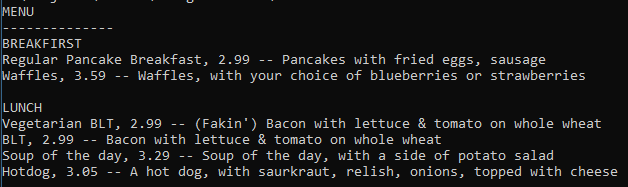
测试:
        static void MenuTestDriveUsingMyIterator()

        {

            var pancakeHouseMenu = new MyPancakeHouseMenu();

            var dinerMenu = new MyDinerMenu();

            var waitress = new MyWaitress(pancakeHouseMenu, dinerMenu);

            waitress.PrintMenu();

        }
做一些改进
Java里面内置了Iterator接口, 我们刚才是手写了一个Iterator迭代器接口. Java内置的定义如下:
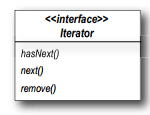
注意里面这个remove()方法, 我们可能不需要它.
remove()方法是可选实现的, 如果你不想让集合有此功能的话, 就应该抛出NotSupportedException(C#的).
使用java内置的Iterator来实现
由于PancakeHouseMenu使用的是ArrayList, 而ArrayList已经实现了该接口, 那么:这样简单改一下就可以:
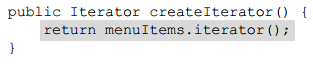
针对DinerMe菜单, 还是需要手动实现的:
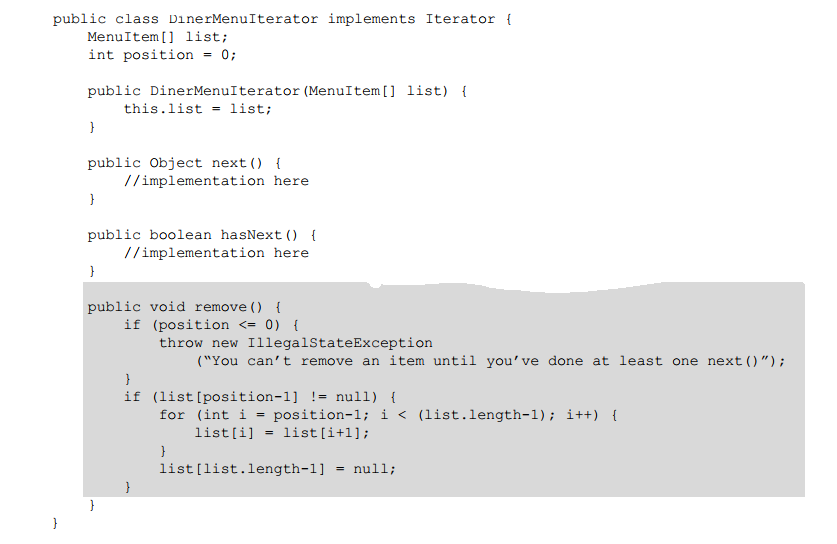
最后别忘了给菜单规定一个统一的接口:

服务员Waitress类里面也使用Menu来代替具体的菜单, 这样也减少了服务员对具体类的依赖(针对接口编程, 而不是具体的实现):

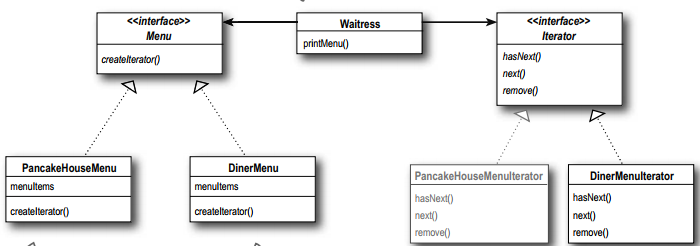
最后看下改进后的设计类图:
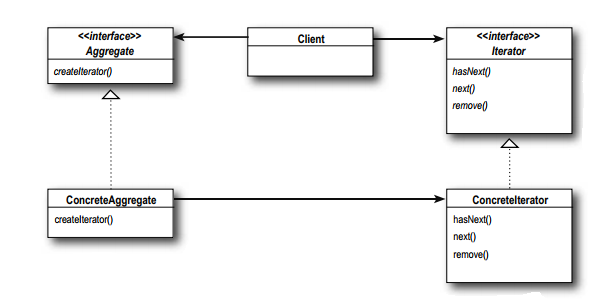
迭代器模式定义
迭代器模式提供了一种访问聚合对象(例如集合)元素的方式, 而且又不暴露该对象的内部表示.
迭代器模式负责遍历该对象的元素, 该项工作由迭代器负责而不是由聚合对象(集合)负责.
类图:
其它问题
- 迭代器分内部迭代器和外部迭代器, 我们上面实现的是外部迭代器. 也就是说客户控制着迭代, 它通过调用next()方法来获取下个元素. 而内部迭代器由迭代器本身自己控制迭代, 这种情况下, 你需要告诉迭代器遍历的时候需要做哪些动作, 所以你得找到一种方式把操作传递进去. 内部迭代器还是不如外部的灵活, 但是也许使用起来会简单一些?
- 迭代器意味着无序. 它所遍历的集合的顺序是根据集合来定的, 也有可能会遍历出来的元素值会重复.
单一职责设计原则
一个类应该只有一个变化发生的原因.
写代码的时候这个原则很容易被忽略掉, 只能通过多检查设计来避免违反原则.
所谓的高内聚, 就是只这个类是围绕一套关连的函数而设计的.
而低内聚就是只这个类是围绕一些不相关的函数而设计的.
遵循该原则的类通常是高内聚的, 并且可维护性要比那些多重职责或低内聚的类好.
需求变更
还需要添加另一份菜单:
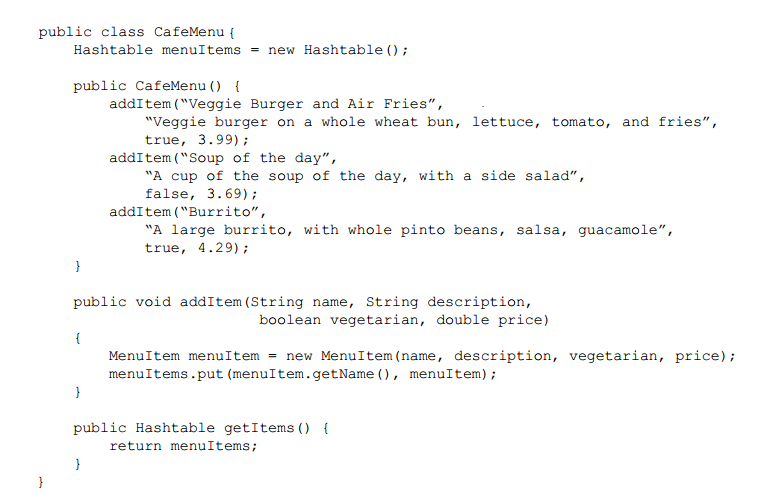
这个菜单使用的是HashTable.
首先修改该菜单, 让它实现Menu接口:
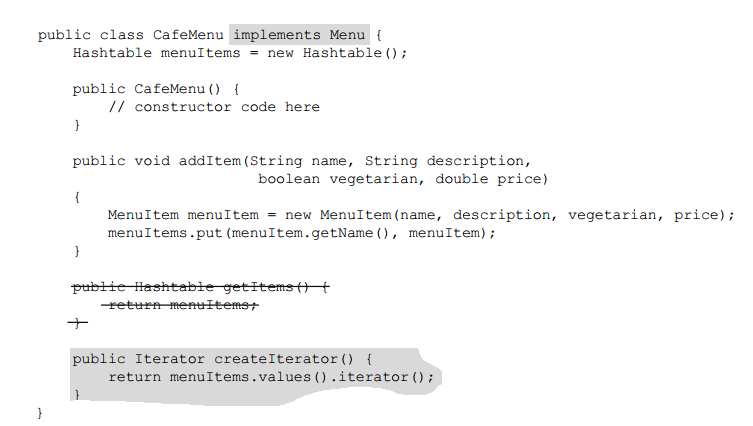
注意看HashTable的不同之处:
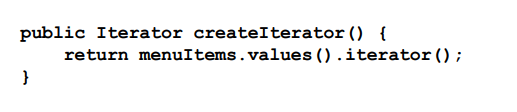
首先通过values()方法获取HashTable的集合对象, 这个对象正好实现了Iterator接口, 直接调用iterator()方法即可.
最后修改服务员类:
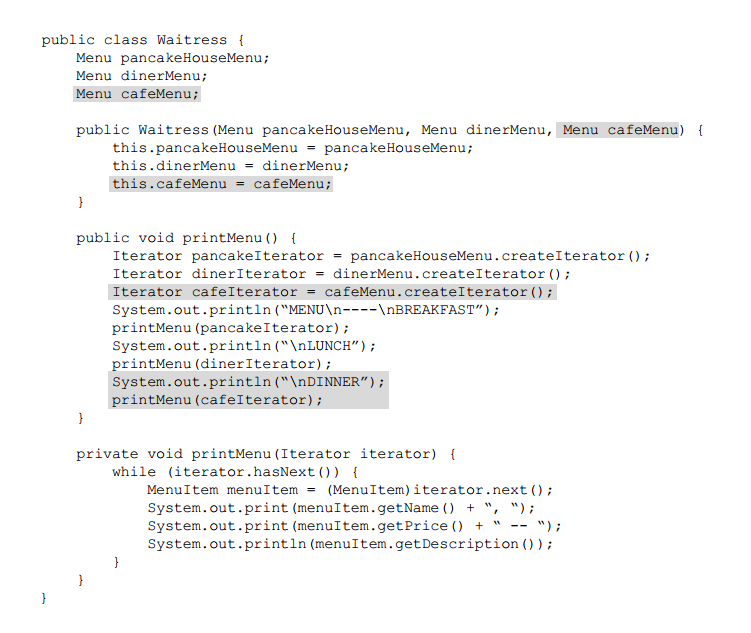
测试:
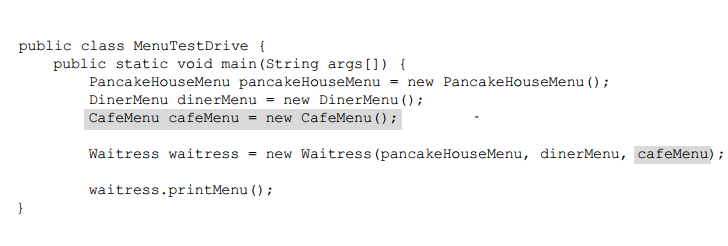
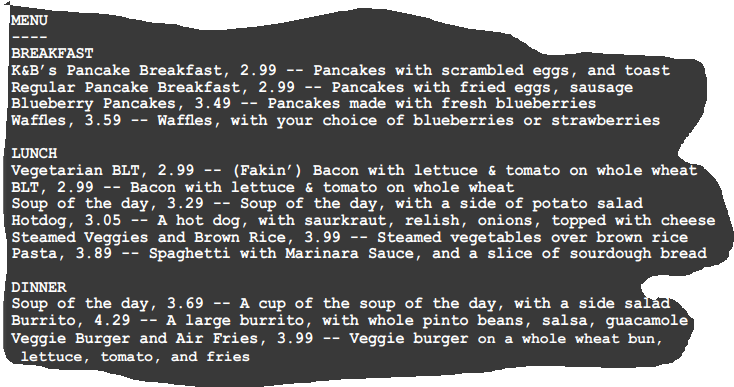
到目前我们做了什么
我们给了服务员一种简单的方式来遍历菜单项, 不同的菜单实现了同一个迭代器接口, 服务员不需要知道菜单项的实现方法.
我们把服务员和菜单的实现解耦了
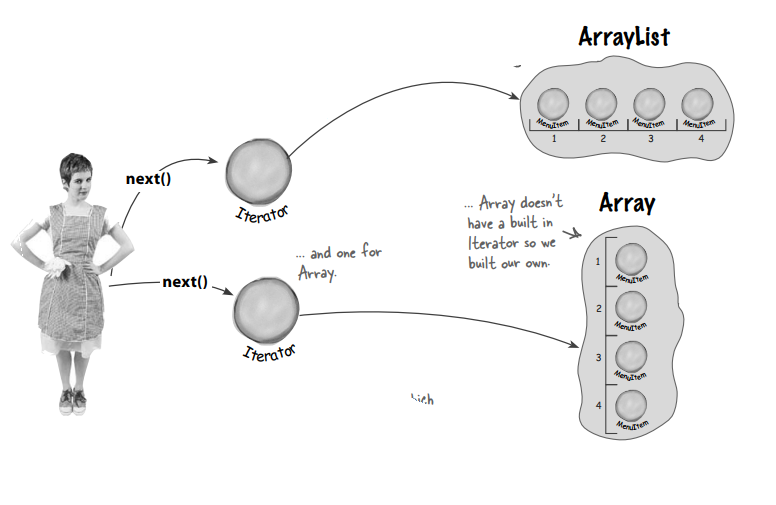
而且使服务员可以扩展:
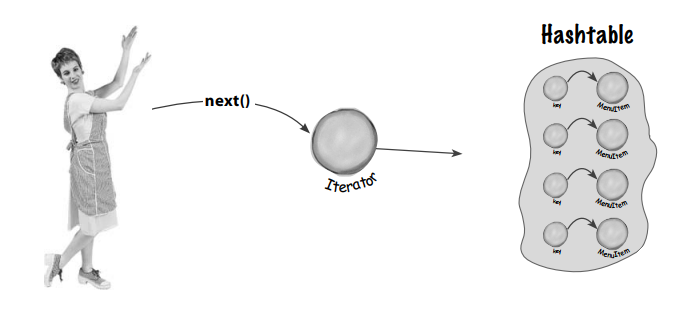

还有个问题
现在有三个菜单, 每次再添加一个菜单的时候, 你都得相应的添加一套代码, 这违反了"对修改关闭, 对扩展开放原则".
那我们把这些菜单放到可迭代的集合即可:
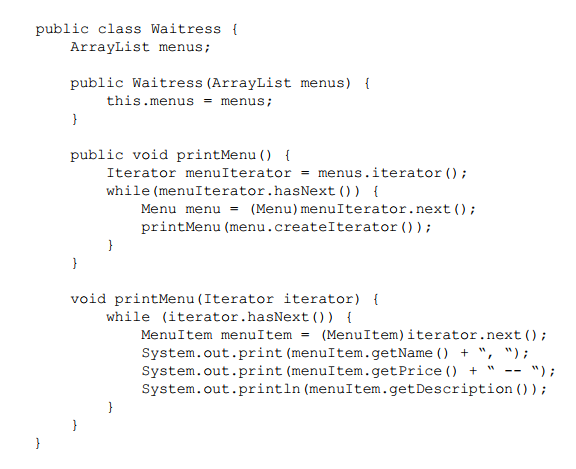
C#, .NET Core控制带项目实现
菜单接口:
using System.Collections;

namespace IteratorPattern.Abstractions

{

    public interface IMenu

    {

        IEnumerator CreateIEnumerator();

    }

}
三个菜单:
using System;

using System.Collections;

using IteratorPattern.Abstractions;

using IteratorPattern.MenuIterators;

namespace IteratorPattern.Menus

{

    public class DinerMenu: IMenu

    {

        private const int MaxItems = ;

        private int _numberOfItems = ;

        private MenuItem[] MenuItems { get; }

        public DinerMenu()

        {

            MenuItems = new MenuItem[MaxItems];

            AddItem("Vegetarian BLT", "(Fakin’) Bacon with lettuce & tomato on whole wheat", true, 2.99);

            AddItem("BLT", "Bacon with lettuce & tomato on whole wheat", false, 2.99);

            AddItem("Soup of the day", "Soup of the day, with a side of potato salad", false, 3.29);

            AddItem("Hotdog", "A hot dog, with saurkraut, relish, onions, topped with cheese", false, 3.05);

        }

        public void AddItem(string name, string description, bool vegetarian, double price)

        {

            var menuItem = new MenuItem(name, description, vegetarian, price);

            if (_numberOfItems >= MaxItems)

            {

                Console.WriteLine("Sorry, menu is full! Can't add item to menu");

            }

            else

            {

                MenuItems[_numberOfItems] = menuItem;

                _numberOfItems++;

            }

        }

        public IEnumerator CreateIEnumerator()

        {

            return new DinerMenuIterator(MenuItems);

        }

    }

}

using System.Collections;

using IteratorPattern.Abstractions;

using IteratorPattern.MenuIterators;

namespace IteratorPattern.Menus

{

    public class PancakeHouseMenu: IMenu

    {

        public ArrayList MenuItems { get; }

        public PancakeHouseMenu()

        {

            MenuItems = new ArrayList();

            AddItem("K&B’s Pancake Breakfast", "Pancakes with scrambled eggs, and toast", true, 2.99);

            AddItem("Regular Pancake Breakfast", "Pancakes with fried eggs, sausage", false, 2.99);

            AddItem("Blueberry Pancakes", "Pancakes made with fresh blueberries", true, 3.49);

            AddItem("Waffles", "Waffles, with your choice of blueberries or strawberries", true, 3.59);

        }

        public void AddItem(string name, string description, bool vegetarian, double price)

        {

            var menuItem = new MenuItem(name, description, vegetarian, price);

            MenuItems.Add(menuItem);

        }

        public IEnumerator CreateIEnumerator()

        {

            return new PancakeHouseMenuIterator(MenuItems);

        }

    }

}

using System.Collections;

using IteratorPattern.Abstractions;

namespace IteratorPattern.Menus

{

    public class CafeMenu : IMenu

    {

        public Hashtable MenuItems { get; } = new Hashtable();

        public CafeMenu()

        {

            AddItem("Veggie Burger and Air Fries", "Veggie burger on a whole wheat bun, lettuce, tomato, and fries", true, 3.99);

            AddItem("Soup of the day", "A cup of the soup of the day, with a side salad", false, 3.69);

            AddItem("Burrito", "A large burrito, with whole pinto beans, salsa, guacamole", true, 4.29);

        }

        public IEnumerator CreateIEnumerator()

        {

            return MenuItems.GetEnumerator();

        }

        public void AddItem(string name, string description, bool vegetarian, double price)

        {

            var menuItem = new MenuItem(name, description, vegetarian, price);

            MenuItems.Add(menuItem.Name, menuItem);

        }

    }

}
菜单的迭代器:
using System;

using System.Collections;

using IteratorPattern.Menus;

namespace IteratorPattern.MenuIterators

{

    public class DinerMenuIterator: IEnumerator

    {

        private readonly MenuItem[] _menuItems;

        private int _position = -;

        public DinerMenuIterator(MenuItem[] menuItems)

        {

            _menuItems = menuItems;

        }

        public bool MoveNext()

        {

            _position++;

            if (_position >= _menuItems.Length || _menuItems[_position] == null)

            {

                return false;

            }

            return true;

        }

        public void Reset()

        {

            _position = -;

        }

        public object Current => _menuItems[_position];

    }

}
using System.Collections;

using System.Collections.Generic;

namespace IteratorPattern.MenuIterators

{

    public class PancakeHouseMenuIterator : IEnumerator

    {

        private readonly ArrayList _menuItems;

        private int _position = -;

        public PancakeHouseMenuIterator(ArrayList menuItems)

        {

            _menuItems = menuItems;

        }

        public bool MoveNext()

        {

            _position++;

            if (_position >= _menuItems.Count || _menuItems[_position] == null)

            {

                return false;

            }

            return true;

        }

        public void Reset()

        {

            _position = -;

        }

        public object Current => _menuItems[_position];

    }

}
服务员:
using System;

using System.Collections;

using IteratorPattern.Abstractions;

using IteratorPattern.Menus;

namespace IteratorPattern.Waitresses

{

    public class Waitress

    {

        private readonly ArrayList _menus;

        public Waitress(ArrayList menus)

        {

            _menus = menus;

        }

        public void PrintMenu()

        {

            var menuIterator = _menus.GetEnumerator();

            while (menuIterator.MoveNext())

            {

                var menu = menuIterator.Current as IMenu;

                PrintMenu(menu?.CreateIEnumerator());

            }

        }

        private void PrintMenu(IEnumerator iterator)

        {

            while (iterator.MoveNext())

            {

                if (iterator.Current != null)

                {

                    MenuItem menuItem;

                    if (iterator.Current is MenuItem item)

                    {

                        menuItem = item;

                    }

                    else

                    {

                        menuItem = ((DictionaryEntry)iterator.Current).Value as MenuItem;

                    }

                    Console.Write($"{menuItem?.Name}, ");

                    Console.Write($"{menuItem?.Price} -- ");

                    Console.WriteLine($"{menuItem?.Description}");

                }

            }

            Console.WriteLine();

        }

    }

}
测试:
        static void MenuTestDriveUsingIEnumerator()

        {

            var pancakeHouseMenu = new PancakeHouseMenu();

            var dinerMenu = new DinerMenu();

            var cafeMenu = new CafeMenu();

            var waitress = new Waitress(new ArrayList()

            {

                pancakeHouseMenu, dinerMenu, cafeMenu

            });

            waitress.PrintMenu();

        }

深入浅出设计模式的C#实现的代码: https://github.com/solenovex/Head-First-Design-Patterns-in-CSharp
这篇先到这, 本章涉及到组合模式, 下篇文章再写.
使用C# (.NET Core) 实现迭代器设计模式 (Iterator Pattern)的更多相关文章
- 设计模式(十):从电影院中认识"迭代器模式"(Iterator Pattern)
上篇博客我们从醋溜土豆丝与清炒苦瓜中认识了“模板方法模式”,那么在今天这篇博客中我们要从电影院中来认识"迭代器模式"(Iterator Pattern).“迭代器模式”顾名思义就是 ...
- 乐在其中设计模式(C#) - 迭代器模式(Iterator Pattern)
原文:乐在其中设计模式(C#) - 迭代器模式(Iterator Pattern) [索引页][源码下载] 乐在其中设计模式(C#) - 迭代器模式(Iterator Pattern) 作者:weba ...
- 设计模式学习--迭代器模式(Iterator Pattern)和组合模式(Composite Pattern)
设计模式学习--迭代器模式(Iterator Pattern) 概述 ——————————————————————————————————————————————————— 迭代器模式提供一种方法顺序 ...
- 设计模式系列之迭代器模式(Iterator Pattern)——遍历聚合对象中的元素
模式概述 模式定义 模式结构图 模式伪代码 模式改进 模式应用 模式在JDK中的应用 模式在开源项目中的应用 模式总结 说明:设计模式系列文章是读刘伟所著<设计模式的艺术之道(软件开发人员内功修 ...
- 二十四种设计模式:迭代器模式(Iterator Pattern)
迭代器模式(Iterator Pattern) 介绍提供一种方法顺序访问一个聚合对象中各个元素,而又不需暴露该对象的内部表示. 示例有一个Message实体类,某聚合对象内的各个元素均为该实体对象,现 ...
- 设计模式 - 迭代器模式(iterator pattern) 具体解释
迭代器模式(iterator pattern) 详细解释 本文地址: http://blog.csdn.net/caroline_wendy 迭代器模式(iterator pattern) : 提供一 ...
- 使用C# (.NET Core) 实现组合设计模式 (Composite Pattern)
本文的概念性内容来自深入浅出设计模式一书. 本文需结合上一篇文章(使用C# (.NET Core) 实现迭代器设计模式)一起看. 上一篇文章我们研究了多个菜单一起使用的问题. 需求变更 就当我们感觉我 ...
- 迭代器模式(Iterator Pattern)
迭代器模式定义:Iterator Pattern提供一种方法顺序访问一个聚合元素中的各个元素,而又不暴漏内部方法 酒吧提供beer和wine: public class Bar { private L ...
- php迭代器模式(iterator pattern)
... <?php /* The iterator pattern is used to traverse a container and access its elements. In oth ...
随机推荐
- DTO的问题
首先使用写好的excle将表中的列进行复制,然后生成代码. 实现一个类继承FormCommonDTO.注意父类有的属性子类一定不能写,否则转换时会报错. 字段名字不一样,意义一样的,不能删除
- Python 的经典设计格言,格言来源于 Python 但不限于 Python
The Zen of Python, by Tim Peters Beautiful is better than ugly. Explicit is better than implicit. Si ...
- sql语句性能优化
需要的准备知识 1最左前缀匹配 mysql会一直向右匹配直到遇到范围查询(>.<.between.like)就停止匹配, 对于where条件 a = 1 and b> 2 and c ...
- java GUI的效果图
import java.awt.*;import javax.swing.*; public class GridBagDemo extends JFrame { public static v ...
- oracle 关于房贷计算过程
create or replace procedure fd(p_bj in number, --贷款本金 p_nll in number, --年利率 p_ns in number, --贷款年数 ...
- #error "OpenCV 4.x+ requires enabled C++11 support"解决方法
报错的本质是需要c++11的支持,顾名思义,当前的编译环境是c++11以下的版本.我用的cmake编译,因此再cmakelists文件内添加设置c++标准为14就可以编译通过. )
- 【微信小程序】模仿58同城页面制作以及动态数据加载
完成动态数据的加载,如下 使用上班的空余时间慢慢的学习,相信总有一天我会很熟悉的掌握这门技术. 本次学习小总结: 微信小程序使用的代码基本与HTML.CSS.JS等前段有关知识一样. 微信小程序js使 ...
- HTTP Status 404 – Not Found
一般都是配置中的问题,这次发现扫描controller时,自己的包是com.aaa.conlller,而springmvc.xml中扫描的是com.aaa.controller,,多写了一个l
- python3 django1.11 安装xadmin 的方法,亲测可用
首先需要Pip安装如下的包ip install django-crispy-forms pip install django-import-export pip install django-reve ...
- 20155205 郝博雅 Exp3 免杀原理与实践
20155205 郝博雅 Exp3 免杀原理与实践 一.基础问题回答 (1)杀软是如何检测出恶意代码的? 答:++基于特征码的检测++<简单来说一段特征码就是一段或多段数据.如果一个可执行文件( ...