
通过python统计nginx日志定位php网站响应慢的问题
# 公司网站反映很慢,可能是一些页面的访问方法或者页面引起,通过程序统计nginx访问日志的页面和具体的action方法访问次数以及平均响应时间可以为程序开发的同事提供参考定位具体的代码

# 默认的nginx日志
log_format main '$remote_addr - $remote_user [$time_local] "$request" '
'$status $body_bytes_sent "$http_referer" '
'"$http_user_agent" "$http_x_forwarded_for"';
现在加上响应时间,方便统计
log_format access '$remote_addr - $remote_user [$time_local] "$request" '
'$status $body_bytes_sent "$http_referer" '
'"$http_user_agent" "$http_x_forwarded_for" "$http_host" "$upstream_response_time" "$request_time"' ;
发现统计出来的响应时间$upstream_response_time无法参与计算,于是去掉引号,变为如下,方便计算:
log_format  main  '$remote_addr - $remote_user [$time_local] "$request" '

             '$status $body_bytes_sent "$http_referer" '

             '"$http_user_agent" "$http_x_forwarded_for" "$http_host" $upstream_response_time $request_time';
不需要去掉双引号也可以,用python处理一下去掉两边的双引号即可,如下:
_time = _time.lstrip('"').rstrip('"')
具体的python代码
#encoding=utf-8 from decimal import Decimal
# 找到日志中的top n,日志格式如下
# 192.168.5.46 - - [01/Dec/2017:09:47:21 +0800] "GET /api_moblie_idol.php?action=get_user_guangying_comment&app_platform=android&channelId=S007&starid=6730&version=164&unique_id=A73308A15313C8E34B518CA515288A13&messageid=5a20ae347a11737a288b4738>ui_cid=03908d9fa39c8de124aa01688109b26c&page=7&type=latest HTTP/1.0" 200 70 "-" "-" "223.89.74.82" "data.android.idol001.com" 0.050 0.052
# 统计访问网站php页面和方法的次数,并且生成响应时间
def log_analysis(log_file, dpath, topn = 10):
path=log_file
shandle = open(path, 'r')
count = 1 log_dict = {}
log_dict2 = {}
total_time = 0.0 while True:
# 最好加上strip()碰到换行就无法识别了
line = shandle.readline().strip()
# 如果到了文件末尾就终止
if line == '':
break
nodes = line.split() # 192.168.9.187 - - [30/Nov/2017:18:28:35 +0800] "GET /api_moblie_idol.phpnique_id=5ACE6943 HTTP/1.0" 200 13950 "-" "idol/5900 (iPhone; iOS 10.3.2; Scale/3.00)" "171.221.169.54" "data.idol001.com" "0.144" "0.144" _url, _time = nodes[6], nodes[-2] # 使用?分割页面,获取url,通过action和&分割出action动作
_tmp = _url.split('action')
if len(_tmp) != 2:
continue
_url = _url.split('?')[0] _method = _tmp[1].split('&')[0] # print 'url:%s, method:%s, time:%s' % (_url,_method,_time) # 如果不是数字就跳出本次循环
if _time == '-':
continue try:
# {(url,method):count}当做字典的key
# 统计url,method的次数
if (_url, _method) not in log_dict:
log_dict[(_url, _method)] = 1
else:
log_dict[(_url, _method)] = log_dict[(_url, _method)] + 1 # 统计url,method的累计时间 if (_url, _method) not in log_dict2:
log_dict2[(_url, _method)] = Decimal(_time)
else:
log_dict2[(_url, _method)] = Decimal(_time) + Decimal(log_dict2[(_url, _method)])
except Exception,e:
continue # print log_dict
# print log_dict2
# 关闭文件句柄
shandle.close()
# 对字典进行排序
# ('/index', 'post'): 2
rst_list = log_dict.items()
# print rst_list for j in range(topn):
# 冒泡法根据rst_list中的count排序,找出访问量最大的10个IP
for i in range(0,len(rst_list) - 1):
if rst_list[i][1] > rst_list[i+1][1]:
temp = rst_list[i]
rst_list[i] = rst_list[i+1]
rst_list[i+1] = temp # 获取 topn 个数
need_list = rst_list[-1:-topn - 1:-1] rt_list = []
for _line, _num in need_list:
_tmp_dict = {}
_avg_time = Decimal(log_dict2[_line])/Decimal(_num)
# print '_avg= %s' % _avg_time
_tmp_dict['_num'] = _num
_tmp_dict['_avg'] = _avg_time
rt_list.append((_line,_tmp_dict)) # print rt_list
# 打印出top 10访问日志,并写入网页中
title = 'nginx访问日志'
tbody = ''
for k,v in rt_list:
print v['_num'],k[1],k[0],v['_avg']
tbody += '<tr>\n<td>%s</td><td>%s</td><td>%s</td><td>%s</td>\n<tr>\n' % (v['_num'],k[1],k[0],v['_avg']) html_tpl = '''
<!DOCTYPE html>
<html>
<head>
<meta charset="utf-8">
<title>{title}</title>
</head>
<body>
<table border="1" cellspacing="0" cellpadding="0" color='pink'>
<thead>
<tr cellspacing="0" cellpadding="0">
<th>访问次数</th>
<th>method</th>
<th>url</th>
<th>平均响应时间</th>
</tr>
</thead>
{tbody}
</table>
</body>
</html>
'''
html_handle = open(dpath,'w')
html_handle.write(html_tpl.format(title = title, tbody = tbody))
html_handle.close() # 函数入口
if __name__ == '__main__':
# nginx日志文件
log_file = 'access_android_idol001_com.log'
dpath = 'top1000.html'
# topn 表示去top多少个
# 不传,默认10个
topn = 1000
log_analysis(log_file,dpath,topn)
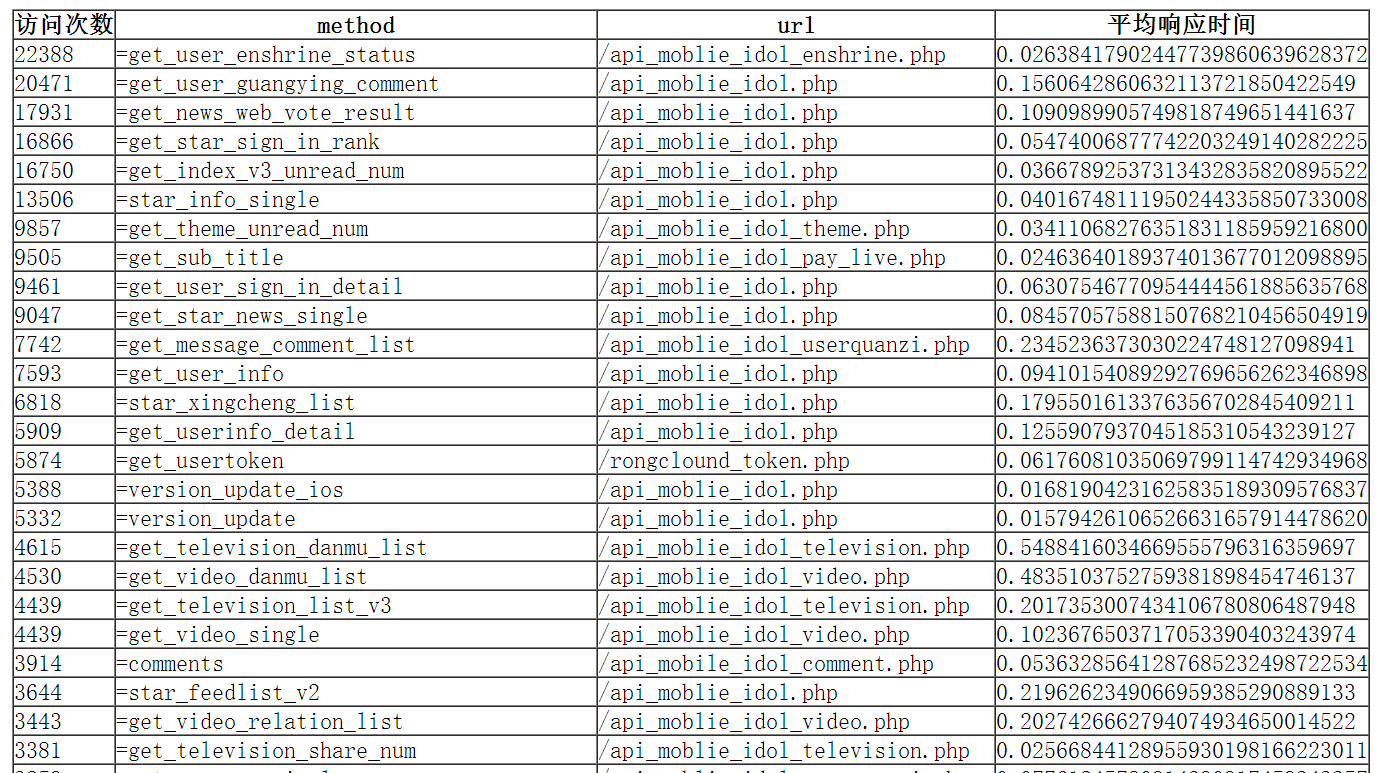
最终的效果:
通过python统计nginx日志定位php网站响应慢的问题的更多相关文章
- 使用Python 统计nginx日志前十ip访问量并以柱状图显示
脚本内容: import matplotlib.pyplot as plt # nginx_file = '10.6.11.91_access.log-2018-12-27' ip = {} #筛选n ...
- 统计nginx日志里流量
用awk可以,比如,我想统计nginx日志里,今天下午3点0分,这一分钟内,访问的流量(文件的大小) grep "07/Nov/2013:15:00:" *.log|awk '{ ...
- Python切割nginx日志_小组_ThinkSAAS
Python切割nginx日志_小组_ThinkSAAS Python切割nginx日志
- 统计nginx日志
.根据访问IP统计UV awk '{print $1}' access.log|sort | uniq -c |wc -l .统计访问URL统计PV awk '{print $7}' access.l ...
- linux统计nginx日志中请求访问量命令
Nginx 三种分配策略:轮询.权重.ip_hash(比如你登录了一个网站,登录信息已经保存到 a 机器,但当你做后续操作时的请求会到 b 机器,那么就获取不到你原来登录的信息,此时你就需要重新登录了 ...
- 利用python分析nginx日志
最近在学习python,写了个脚本分析nginx日志,练练手.写得比较粗糙,但基本功能可以实现. 脚本功能:查找出当天访问次数前十位的IP,并获取该IP来源,并将分析结果发送邮件到指定邮箱. 实现前两 ...
- 统计nginx日志单IP访问请求数排名
下面是我截取一段nginx日志 /Jan/::: +] "-" "Mozilla/5.0 (X11; Ubuntu; Linux x86_64; rv:31.0) Gec ...
- Grafana和influxdb监控nginx日志中的请求响应时间图形化监控
监控效果如图: 监控方法: 通过logstash过滤nginx日志,然后解析出nginx日志中的request time字段 然后output到influxdb时序数据库中 通过grafana展示数据 ...
- python统计nginx脚本信息
#!/usr/bin/env python # -*- coding: utf-8 -*- import urllib2 import json import subprocess import th ...
随机推荐
- fastJson--json与java格式的转换
fastJson--json与java格式的转换: /* * alibaba提供的fastJson:用法: */ @Test public void testJson() { User user = ...
- js监听键盘事件
用JS监听键盘按下事件(keydown event) 1.监听全局键盘按下事件,例如监听全局回车事件 1 $(document).keydown(function(event){ 2 if(eve ...
- vue-router导航钩子
Vue路由中的导航钩子,可以用来拦截导航,让它完成跳转. 全局导航钩子 当一个导航触发时,全局的 before 钩子按照创建顺序调用.钩子是异步解析执行,此时导航在所有钩子 resolve 完之前一直 ...
- 【由浅入深理解java集合】(一)——集合框架 Collction、Map
本篇文章主要对java集合的框架进行介绍,使大家对java集合的整体框架有个了解.具体介绍了Collection接口,Map接口以及Collection接口的三个子接口Set,List,Queue. ...
- Android资源重命名
Android资源比如图片重命名后,Resource里看到的还是之前的名字,可以关掉AndroidStudio,从新打开就正常了
- ASP.NET Web API 2 使用 AuthorizationFilter(授权过滤器)实现 Basic 认证
Ø 前言 在 Web 项目中授权认证方式有很多种,本文主要讲述基于 Basic 的认证方式.这是一种比较简单.常见的认证方式,主要是将请求的用户名和密码进行加密后返回给调用方,比较适合采用用户名.密 ...
- js强制将页面放到最大
<!DOCTYPE html> <html> <head> <title></title> <script language=&quo ...
- seleniums私房菜系列一 ---- selenium简介
一.Selenium是什么? Selenium是ThroughtWorks公司一个强大的开源Web功能测试工具系列,本系列现在主要包括以下4款: 1.Selenium Core:支持DHTML的测试案 ...
- Codeforces Round #536 (Div. 2)
前言 如您所见这又是一篇咕了的文章,直接咕了10天 好久没打CF了 所以还是个蓝名菜鸡 机房所有人都紫名及以上了,wtcl 这次前4题这么水虽然不知道为什么花了1h,结果不知道为什么搞到一半出锅了,后 ...
- 2017CCPC秦皇岛 M题Safest Buildings&&ZOJ3993【复杂模拟】
题意: 给出两个半径R,r,R表示第一次的大圈半径,r表示第二次的小圈半径.第一次大圈的圆心位于(0,0),第二次小圈的圆心未知,但在大圈内,给你一个n,然后给出n个屋子的位置,问这些屋子中,第二次在 ...