
cocos2dx 2.x实现闪电效果(贴画版)
cocos2dx 2.x实现闪电效果(非画线版)
在网上搜索到一个直接用opengl画线实现的版本,但放在游戏中效果不太搭,要求用贴图的。我这个版本用的也是画线版的算法。
闪动的时候效果还可以,每段衔接的地方还是不太完美,各位有其他的建议的请联系我 blue-1986@hotmail.com
转载请注明出处 http://www.cnblogs.com/mrblue/p/4315091.html
效果图
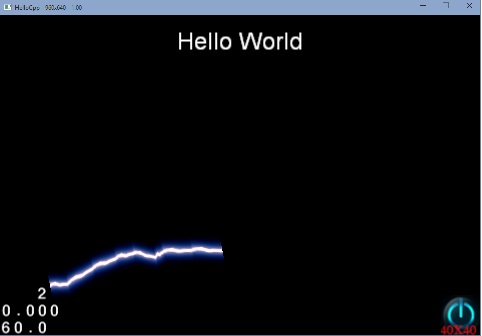
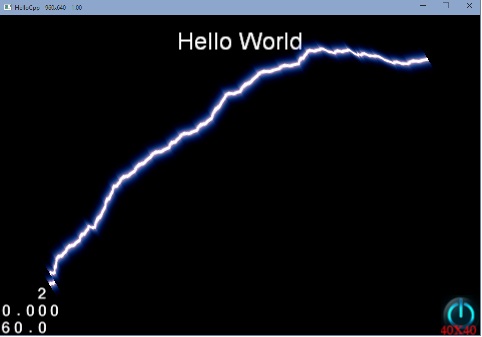
//头文件
#ifndef __LIGINTNING_H__

#define __LIGINTNING_H__

#include "cocos2d.h"

#include <vector>

class Lightning : public cocos2d::CCNode

{

public:

	Lightning();

	~Lightning();

public:

    static Lightning* create(const std::string& strTextureFile, float fLength);

	virtual bool init(const std::string& strTextureFile, float fLength);

protected:

	virtual void draw()/*override*/;

	virtual void update(float fDelta)/*override*/;

public:

	void setTexture(cocos2d::CCTexture2D *texture);

	void setLength(float fLength){ m_fLength = fLength; }

protected:

	void calculateVertex();

	void addLightningSegment(float x1, float y1, float x2, float y2, float displace);

protected:

	std::vector<cocos2d::CCPoint>	m_vecLightningTrackPoint;

	std::vector<float>				m_vecVertics;

	std::vector<float>				m_vecCoordinates;

	cocos2d::CCTexture2D*			m_pTexture;

	float							m_fLength;

};

#endif // __HELLOWORLD_SCENE_H__
//cpp
#include "Lightning.h"

USING_NS_CC;

using namespace std;

Lightning::Lightning()

    :m_pTexture(NULL)

{

    m_vecLightningTrackPoint.reserve();

    m_vecVertics.reserve();

    m_vecCoordinates.reserve();

}

Lightning::~Lightning()

{

    CC_SAFE_RELEASE(m_pTexture);

}

Lightning* Lightning::create( const std::string& strTextureFile, float fLength )

{

    Lightning * pRet = new Lightning();

    if (pRet && pRet->init(strTextureFile,fLength))

    {

        pRet->autorelease();

    }

    else

    {

        CC_SAFE_DELETE(pRet);

    }

    return pRet;

}

bool Lightning::init(const string& strFile, float fLength)

{

    CCNode::init();

    setShaderProgram(CCShaderCache::sharedShaderCache()->programForKey(kCCShader_PositionTexture));

    setLength(fLength);

    setTexture(CCTextureCache::sharedTextureCache()->addImage(strFile.c_str()));

    scheduleUpdate();

    return true;

}

void Lightning::draw()

{

    if(m_vecVertics.empty()||m_vecCoordinates.empty()) return;

    CC_NODE_DRAW_SETUP();

    ccGLEnableVertexAttribs( kCCVertexAttribFlag_Position | kCCVertexAttribFlag_TexCoords );

    ccGLBlendFunc( CC_BLEND_SRC,CC_BLEND_DST );

    ccGLBindTexture2D( m_pTexture->getName() );

    glVertexAttribPointer(kCCVertexAttrib_Position, , GL_FLOAT, GL_FALSE, , (GLvoid*)(&m_vecVertics[]));

    glVertexAttribPointer(kCCVertexAttrib_TexCoords, , GL_FLOAT, GL_FALSE, , (GLvoid*)(&m_vecCoordinates[]));

    glDrawArrays(GL_TRIANGLE_STRIP, , m_vecVertics.size()/);

}

void Lightning::addLightningSegment( float x1, float y1, float x2, float y2, float displace )

{

    if (displace <=m_pTexture->getPixelsWide()/ )

    {

        m_vecLightningTrackPoint.push_back(ccp(x2,y2));

    }

    else

    {

        float mid_x = (x2+x1)/;

        float mid_y = (y2+y1)/;

        mid_x += (CCRANDOM_0_1() - 0.5) * displace;

        mid_y += (CCRANDOM_0_1() - 0.5) * displace;

        addLightningSegment(x1, y1, mid_x, mid_y, displace/);

        addLightningSegment(mid_x, mid_y,x2, y2, displace/);

    }

}

void Lightning::update(float delta)

{

    calculateVertex();

}

void Lightning::calculateVertex()

{

    m_vecLightningTrackPoint.clear();

    m_vecLightningTrackPoint.push_back(CCPointZero);

    addLightningSegment(,,m_fLength,,m_fLength/);

    m_vecVertics.clear();

    m_vecCoordinates.clear();

    for (size_t i=; i<m_vecLightningTrackPoint.size(); i++)

    {

        const auto& pt = m_vecLightningTrackPoint[i];

        m_vecVertics.push_back(pt.x);

        m_vecVertics.push_back(pt.y-m_pTexture->getPixelsHigh()/);

        m_vecVertics.push_back(pt.x);

        m_vecVertics.push_back(pt.y+m_pTexture->getPixelsHigh()/);

        m_vecCoordinates.push_back(i);

        m_vecCoordinates.push_back();

        m_vecCoordinates.push_back(i);

        m_vecCoordinates.push_back();

    }

}

void Lightning::setTexture( cocos2d::CCTexture2D *texture )

{

    CC_SAFE_RETAIN(texture);

    CC_SAFE_RELEASE(m_pTexture);

    m_pTexture = texture;
ccTexParams params = {GL_LINEAR,GL_LINEAR,GL_REPEAT,GL_REPEAT};
m_pTexture->setTexParameters(¶ms);
}
cocos2dx 2.x实现闪电效果(贴画版)的更多相关文章
- 仿360手机卫士界面效果android版源码
仿360手机卫士界面效果android版,这个今天一大早在源码天堂的那个网站上看到了一个那个网站最新更新的一个源码,所以就分享给大学习一下吧,布局还挺不错的,而且也很简单的,我就不把我修改的那个分享出 ...
- cocos2d-x 2.0 拖尾效果分析
转自:http://game.dapps.net/gamedev/game-engine/7281.html 在Cocos2d-x中,拖尾效果有一个专门的类CCMotionStreak来实现.下面我们 ...
- 【转】Cocos2d-x 2.0 拖尾效果深入分析
Cocos2d-x 2.0 拖尾效果深入分析 另:本章所用Cocos2d-x版本为: cocos2d-2.0-x-2.0.2@ Aug 30 2012 http://cn.cocos2d-x.org/ ...
- 微博发布效果jq版
大家都看过新浪微博的发状态功能,我模拟了一下类似的效果,包括发布时间,删除效果等.代码如下: <!DOCTYPE HTML> <html> <head> <m ...
- Cocos2d-x 水果忍者划痕效果
网上找的一个关于水果忍者划痕的,效果还算凑合.其原理就是基于OpenGL绘制直线,因为版本号过老,此处笔者改动了一些方法,粘贴后可直接使用 适用于Cocos2d-x 2.2.1 .h文件里须要添�的代 ...
- cocos2dx实例开发之flappybird(入门版)
cocos2dx社区里有个系列博客完整地复制原版flappybird的全部特性.只是那个代码写得比較复杂,新手学习起来有点捉摸不透,这里我写了个简单的版本号.演演示样例如以下: watermark/2 ...
- Cocos2d-x实现简单的翻牌效果
触发器互联网影响找了很多.有自己的点重写一个复杂的sprite类来实现.简单的操作来对引擎的使用CCOrbitCamera实现,但是,也存在一些问题,后变反了. 我在用的仅仅是一个简单的翻牌效果,点击 ...
- [Unity3D]Unity3D游戏开发3D选择场景中的对象,并显示轮廓效果强化版
大家好,我是秦培,欢迎关注我的博客,我的博客地址blog.csdn.net/qinyuanpei. 在上一篇文章中,我们通过自己定义着色器实现了一个简单的在3D游戏中选取.显示物体轮廓的实例. 在文章 ...
- Cocos2d-x移植android增加震动效果
cpp部分通过jni调用java静态函数 头文件: #include <jni.h> #include "cocos2d.h" #include "platf ...
随机推荐
- rabbitmq的web管理界面无法使用guest用户登录
安装最新版本的rabbitmq(3.3.1),并启用management plugin后,使用默认的账号guest登陆管理控制台,却提示登陆失败. 翻看官方的release文档后,得知由于账号gues ...
- WinForm中新开一个线程操作 窗体上的控件(跨线程操作控件)
最近在做一个winform的小软件(抢票的...).登录窗体要从远程web页面获取一些数据,为了不阻塞登录窗体的显示,开了一个线程去加载数据远程的数据,会报一个错误"线程间操作无效: 从不是 ...
- json的中括号和大括号的使用?
参考这篇文章: http://www.cnblogs.com/sgdkg/archive/2012/12/03/2799723.html json 变量有两种可能, 可能是一个对象, (类似 类的实例 ...
- poj2391 Ombrophobic Bovines 题解
http://poj.org/problem?id=2391 floyd+网络流+二分 题意:有一个有向图,里面每个点有ai头牛,快下雨了牛要躲进雨棚里,每个点有bi个雨棚,每个雨棚只能躲1头牛.牛可 ...
- protobuf
1.下载地址:https://code.google.com/p/protobuf/downloads/list 安装 ./configure && make && m ...
- Mastering Web Application Development with AngularJS 读书笔记(三)
第一章笔记 (三) 一.Factories factory 方法是创建对象的另一种方式,与service相比更灵活,因为可以注册可任何任意对象创造功能.例如: myMod.factory('notif ...
- 基于zepto判断mobile的横竖屏状态
借用jquery mobile中的代码,删除了一些多余的部分,简单的基于zepto的模块 var CheckOrientation = (function(){ var win = $( window ...
- js反序列化时间
var time = "/Date(1279270720000+0800)/"; var tme1 = ChangeDateFormat(time); alert(tme1); J ...
- 关于R中的mode()和class()的区别
本文原创,转载请注明出处,本人Q1273314690(交流学习) 说明:本文曾经在15年11月在CSDN发过,但是由于CSDN不支持为知笔记的发布为博客的API功能,所以,自今天起,转移到博客园(幸好 ...
- 【PHP面向对象(OOP)编程入门教程】12.重载新的方法(parent::)
在学习PHP 这种语言中你会发现, PHP中的方法是不能重载的, 所谓的方法重载就是定义相同的方法名,通过“参数的个数“不同或“参数的类型“不 同,来访问我们的相同方法名的不同方法.但是因为PHP是弱 ...