
Android 开发添加控件事件的三种方式
- import android.app.Activity;
- import android.os.Bundle;
- import android.view.View;
- import android.view.View.OnClickListener;
- import android.widget.Button;
- import android.widget.Toast;
- public class HelloActivity extends Activity {
- /** Called when the activity is first created. */
- @Override
- public void onCreate(Bundle savedInstanceState) {
- super.onCreate(savedInstanceState);
- setContentView(R.layout.main);
- Button btnMethod01;
- Button btnMethod02;
- Button btnMethod03;
- btnMethod01 = (Button)findViewById(R.id.button1);
- btnMethod02 = (Button)findViewById(R.id.button2);
- btnMethod03 = (Button)findViewById(R.id.button3);
- //第一种方法:匿名类
- btnMethod01.setOnClickListener(new Button.OnClickListener(){
- public void onClick(View v){
- Toast.makeText(HelloActivity.this,R.string.method01
- ,Toast.LENGTH_SHORT).show();
- }
- });
- //添加监听事件
- btnMethod02.setOnClickListener(new button1OnClickListener());
- }
- //第二种方法:内部类实现 有两部 1.写内部类 2.添加监听事件
- private class button1OnClickListener implements OnClickListener{
- public void onClick(View v){
- Toast.makeText(HelloActivity.this,R.string.method02,
- Toast.LENGTH_SHORT).show();
- }
- }
- //第三种方法:用xml方法配置,该名称要与 main.xml 中button03的
- //android:onClick="OnClickButton03"的名字一样
- public void OnClickButton03(View v){
- Toast.makeText(HelloActivity.this,R.string.method03
- ,Toast.LENGTH_SHORT).show();
- }
- }
import android.app.Activity;

import android.os.Bundle;

import android.view.View;

import android.view.View.OnClickListener;

import android.widget.Button;

import android.widget.Toast;

public class HelloActivity extends Activity {

    /** Called when the activity is first created. */

    @Override

    public void onCreate(Bundle savedInstanceState) {

        super.onCreate(savedInstanceState);

        setContentView(R.layout.main);

        Button btnMethod01;

        Button btnMethod02;

        Button btnMethod03;

        btnMethod01 = (Button)findViewById(R.id.button1);

        btnMethod02 = (Button)findViewById(R.id.button2);

        btnMethod03 = (Button)findViewById(R.id.button3);

        //第一种方法:匿名类

        btnMethod01.setOnClickListener(new Button.OnClickListener(){

            public void onClick(View v){

                Toast.makeText(HelloActivity.this,R.string.method01

                        ,Toast.LENGTH_SHORT).show();

            }

        });

        //添加监听事件

        btnMethod02.setOnClickListener(new button1OnClickListener());

    }

    //第二种方法:内部类实现  有两部 1.写内部类 2.添加监听事件

    private class button1OnClickListener implements OnClickListener{

        public void onClick(View v){

            Toast.makeText(HelloActivity.this,R.string.method02,

                    Toast.LENGTH_SHORT).show();

        }

    }

    //第三种方法:用xml方法配置,该名称要与  main.xml 中button03的

    //android:onClick="OnClickButton03"的名字一样

    public void OnClickButton03(View v){

        Toast.makeText(HelloActivity.this,R.string.method03

                ,Toast.LENGTH_SHORT).show();

    }

}
- <?xml version="1.0" encoding="utf-8"?>
- <LinearLayout xmlns:android="http://schemas.android.com/apk/res/android"
- android:layout_width="fill_parent"
- android:layout_height="fill_parent"
- android:orientation="vertical">
- <Button
- android:id="@+id/button1"
- android:layout_width="match_parent"
- android:layout_height="wrap_content"
- android:text="@string/method01"/>
- <Button
- android:id="@+id/button2"
- android:layout_width="match_parent"
- android:layout_height="wrap_content"
- android:text="@string/method02"/>
- <Button
- android:onClick="OnClickButton03"
- android:id="@+id/button3"
- android:layout_width="match_parent"
- android:layout_height="wrap_content"
- android:text="@string/method03"/>
- </LinearLayout>
<?xml version="1.0" encoding="utf-8"?>

<LinearLayout xmlns:android="http://schemas.android.com/apk/res/android"

    android:layout_width="fill_parent"

    android:layout_height="fill_parent"

    android:orientation="vertical">

    <Button

        android:id="@+id/button1"

        android:layout_width="match_parent"

        android:layout_height="wrap_content"

        android:text="@string/method01"/>

    <Button

        android:id="@+id/button2"

        android:layout_width="match_parent"

        android:layout_height="wrap_content"

        android:text="@string/method02"/>

    <Button

        android:onClick="OnClickButton03"

        android:id="@+id/button3"

        android:layout_width="match_parent"

        android:layout_height="wrap_content"

        android:text="@string/method03"/>

</LinearLayout>
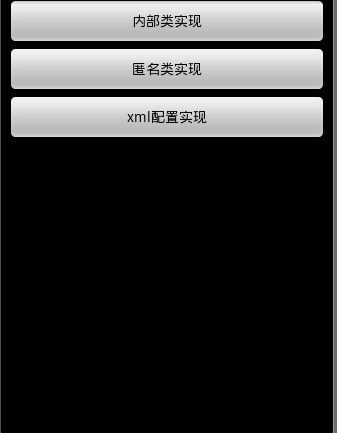
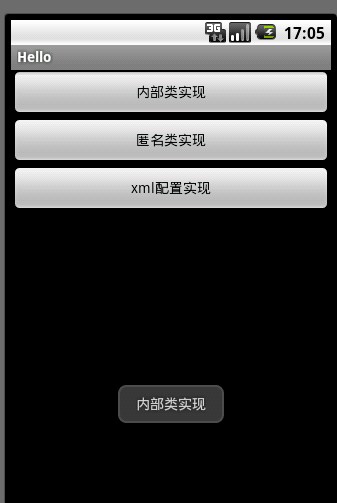
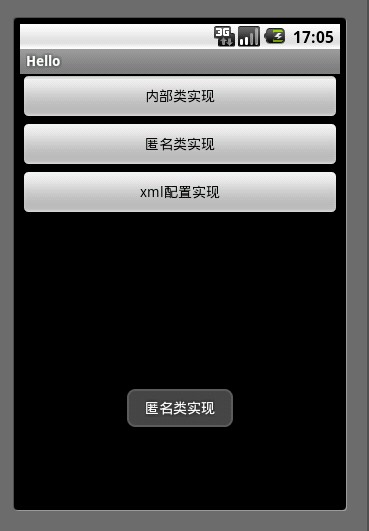

Android 开发添加控件事件的三种方式的更多相关文章
- CAD控件,CAD插件使用教程:Android开发使用控件--开发环境的搭建
Android开发使用控件入门--环境搭建 2014-12-24 09:57 14人阅读 评论(0) 收藏 编辑 删除 CAD控件.CAD三维控件,手机 ...
- Android开发使用控件入门--环境搭建
Android开发使用控件入门--环境搭建 软件名称(,梦,,想.CAD ,控件) 1. 环境搭建: 3 1.1. 安装Eclipse 3 1.2. 下载JDK 3 1.3. 下载Android S ...
- 【VS开发】在VS2010中开发ActiveX控件设置测试容器的方式
在VS2010中开发ActiveX控件设置测试容器的方式 借鉴文章http://blog.csdn.net/waxgourd0/article/details/7374669 在VS2010中开发MF ...
- 怎样在Android开发中FPS游戏实现的两种方式比较
怎样在Android开发中FPS游戏实现的两种方式比较 如何用Android平台开发FPS游戏,其实现过程有哪些方法,这些方法又有哪些不同的地方呢?首先让我们先了解下什么是FPS 英文名:FPS (F ...
- Android Material Design控件学习(三)——使用TextInputLayout实现酷市场登录效果
前言 前两次,我们学习了 Android Material Design控件学习(一)--TabLayout的用法 Android Material Design控件学习(二)--Navigation ...
- Android 触发Button按钮事件的三种方式
1.新创建一个类 2.使用内部类 3.当多个button按钮时,为简化代码而创建的实例listener 贴代码: MainActivity.Java 文件: package com.android. ...
- 界面跳转+Android Studio Button事件的三种方式
今天学习界面跳转 java类总是不能新建成功 看了网上教程 (20条消息) 关于android studio无法创建类或者接口问题的解决方法_qq_39916160的博客-CSDN博客 可以新建了 但 ...
- Android - 页面返回上一页面的三种方式
今年刚刚跳槽到了新公司,也开始转型做Android,由此开始Android的学习历程. 最近在解很多UI的bug,在解bug过程中,总结了在UI的实现过程中,页面返回上一页面的几种实现方式. 一. 自 ...
- NGUI注册事件的三种方式
1.第一种方式 当一个元素要执行某个方法,而这个方法在此元素赋予的脚本上有,那么直接会调用此方法,但此方法的名称必须是内置的固定名称,例如OnClick,OnMouseOver,OnMouseOut等 ...
随机推荐
- 阿里云ECS 利用快照创建磁盘实现无损扩容数据盘
在扩容数据盘时,若遇到磁盘原因导致无法无损的扩容时,可以临时购买一块独立云磁盘来存放数据,然后将数据盘彻底格式化来解决,以下是操作步骤: 1. 首先基于当前数据盘创建一个快照,备份数据,同时可以利用 ...
- hibernate注解note
@Id标识主键属性 1.hibernate5.2 mysql5.7 不需要实现 serializable也可以? 2.主键255的长度我生成了? @GeneratedValue主键生成策略 1.主键设 ...
- 【RS】BPR:Bayesian Personalized Ranking from Implicit Feedback - BPR:利用隐反馈的贝叶斯个性化排序
[论文标题]BPR:Bayesian Personalized Ranking from Implicit Feedback (2012,Published by ACM Press) [论文作者]S ...
- jQuery 自定义网页滚动条样式插件 mCustomScrollbar 的介绍和使用方法(转)
系统默认的滚动条样式,真的已经看的够恶心了.试想一下,如果在一个很有特色和创意的网页中,出现了一根系统中默认的滚动条样式,会有多么的别扭. 为了自己定义网页中的滚动条的方法,我真的已经找了很久了,就目 ...
- 【IL】IL指令详解
名称 说明 Add 将两个值相加并将结果推送到计算堆栈上. Add.Ovf 将两个整数相加,执行溢出检查,并且将结果推送到计算堆栈上. Add.Ovf.Un 将两个无符号整数值相加,执行溢出检查,并且 ...
- 【Oracle】Oracle中复合数据类型
1,常见的操作数据库的技术有那些 jdbc 使用java 访问数据库的技术 PLSQL (procedure 过程化sql) 在数据库内部操作数据的技术 proc/c++ ...
- Redis 启动警告错误解决[转]
Redis 启动警告错误解决 启动错误 1.WARNING overcommit_memory is set to 0! Background save may fail under low memo ...
- UIAlertView 点击按钮后控制其是否消失
新建NotDismissAlertView类,继承UIAlertView. 设置控制是否消失的标示符 重写 在-(void)dismissWithClickedButtonIndex:(NSInte ...
- Win 7 IE11不能下载文件,右键另存为也不行
在IE11中不能下载文件,右键另存为也无效. 发现 在IE11中点击“INTERNET选项”后,IE临时文件夹的地址没有显示,大小为0,修改只能让设置在8-8MB,注销再登录后,一切设置无效. 问题就 ...
- Ios开发中UILocalNotification实现本地通知实现提醒功能
这两天在做一个日程提醒功能,用到了本地通知的功能,记录相关知识如下: 1.本地通知的定义和使用: 本地通知是UILocalNotification的实例,主要有三类属性: scheduled time ...