
Oracle RAC集群删除节点
一,节点环境
[root@node1 ~]# cat /etc/hosts

127.0.0.1   localhost localhost.localdomain localhost4 localhost4.localdomain4

::         localhost localhost.localdomain localhost6 localhost6.localdomain6

192.168.0.194 node2

192.168.0.193 node1

192.168.0.183 node1vip

192.168.0.182 node2vip

172.168.0.194 node2prv

172.168.0.193 node1prv

192.168.0.176 dbscan

192.168.0.16 standby
二,操作实例
01,dbca 删除节点host02
登入oracle 用户运行dbca-->进行删除数据库-->delete databases 下一步
!!!----------------------------注意--------------------------!!!
选择数据库请认真核对.确定数据安全性!!,删除前再三思考!!选项是英文,请看懂英文再选择!!
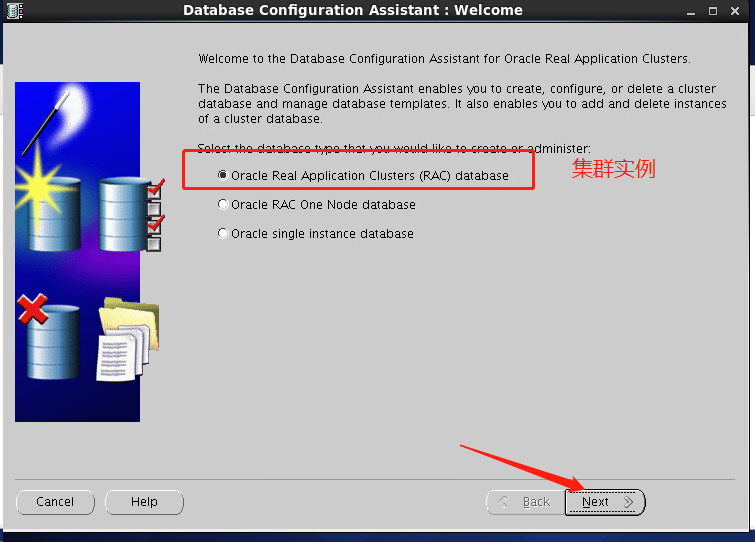
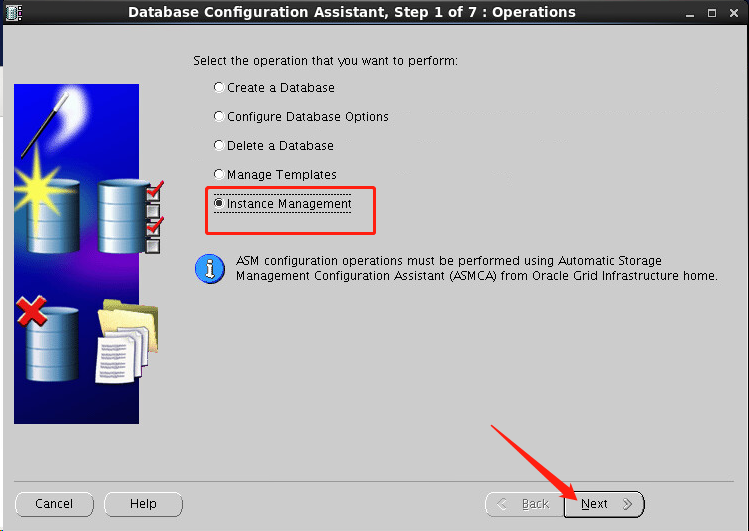
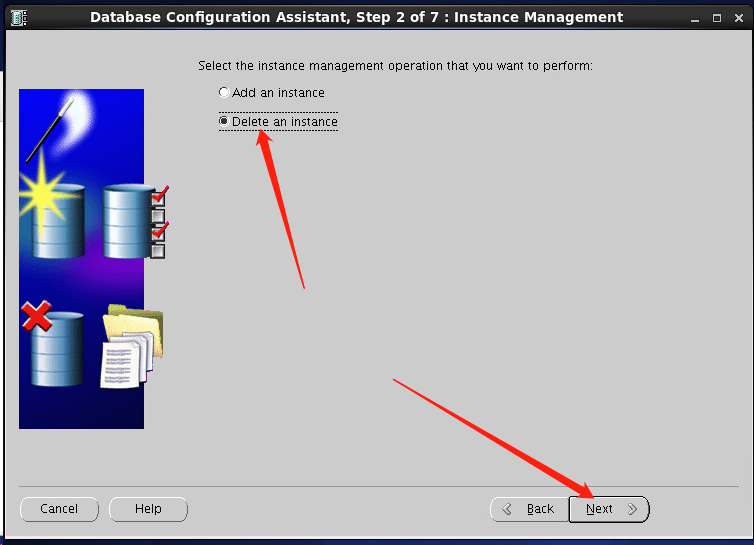
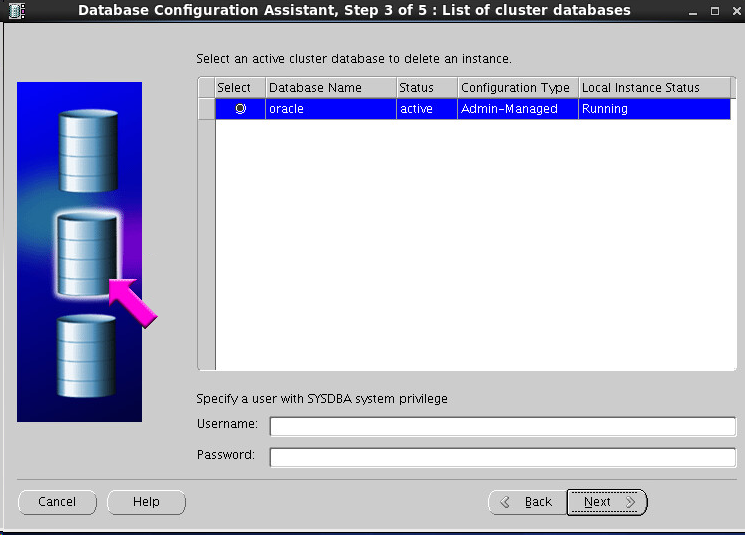
输入用户sys,密码123456,具体根据自己的来填写
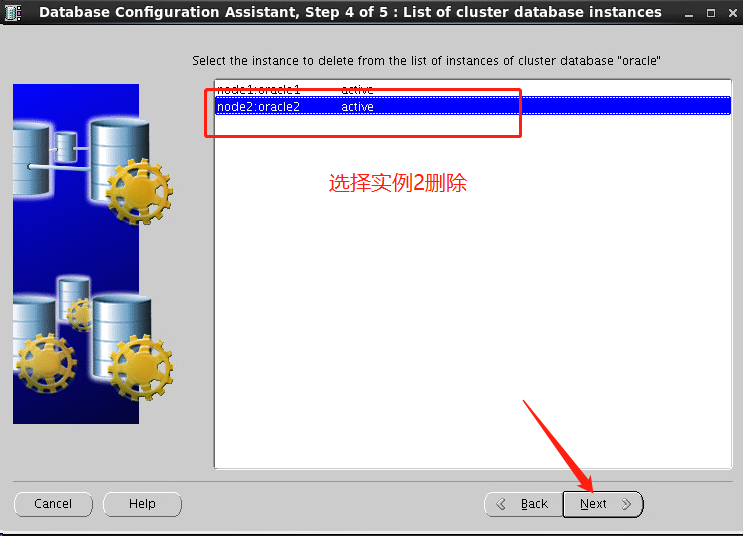
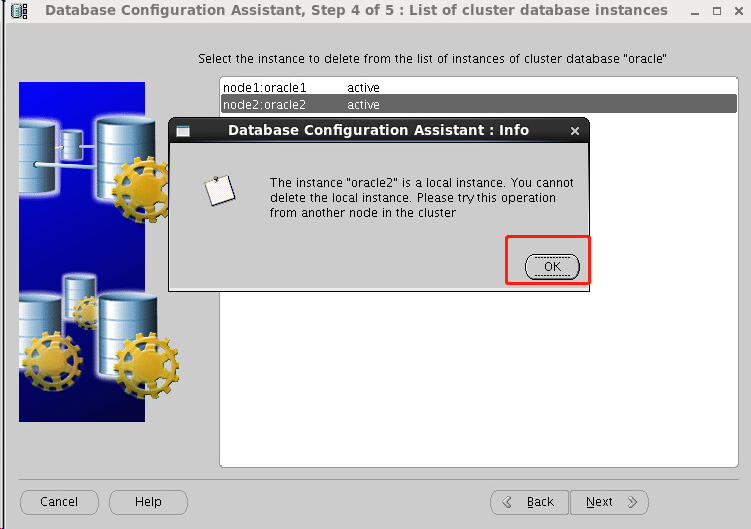
为啥到这一步出问题了呢,因为我在node2节点删除node2节点,自己删自己当然不允许啦,现在我换个节点node1操作把
到了node1删除的时候会发现自动选择node2节点
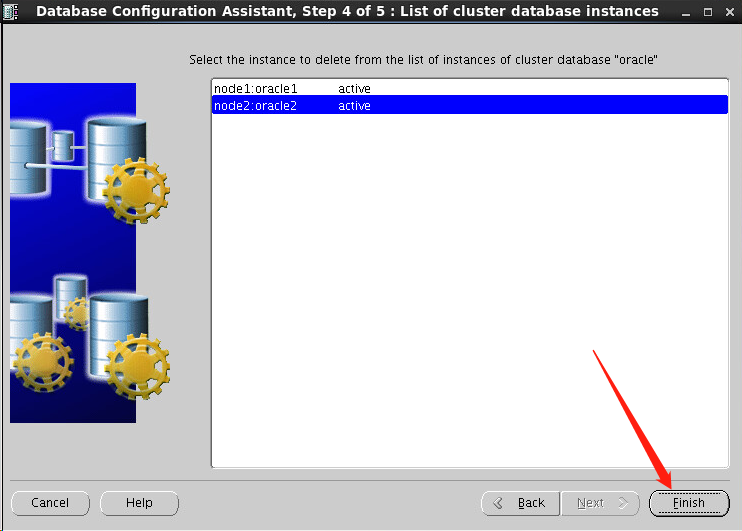
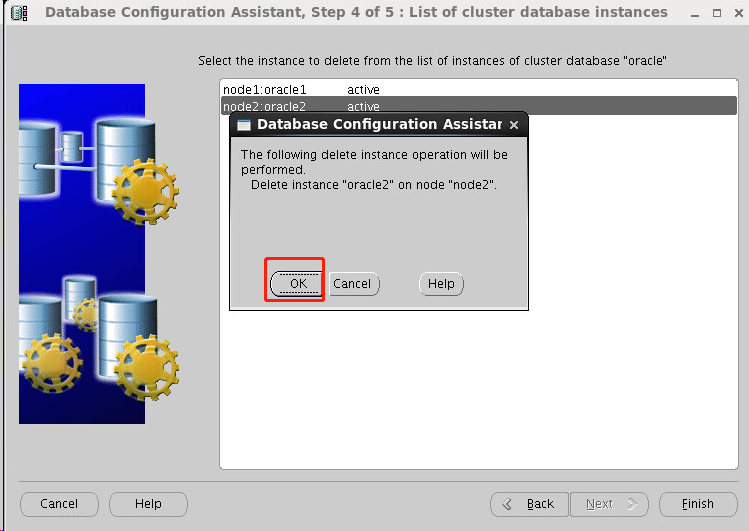
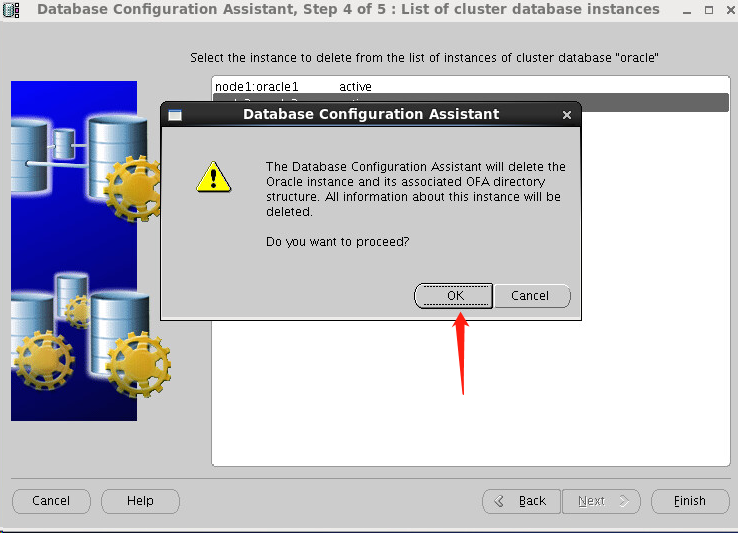
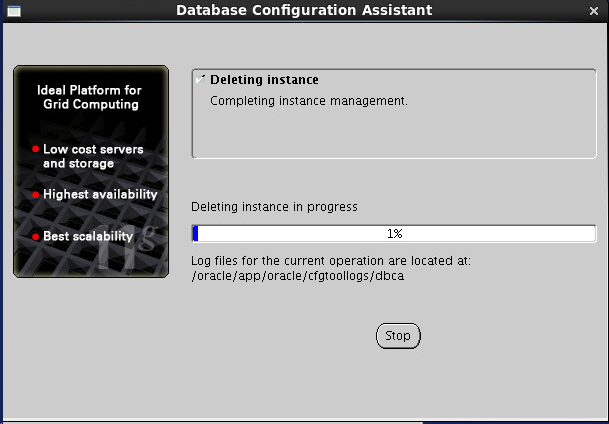
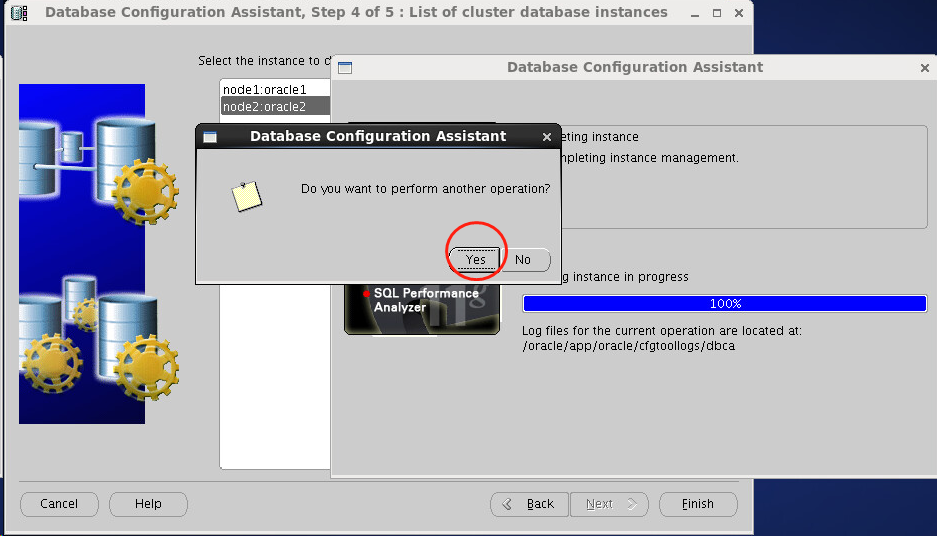
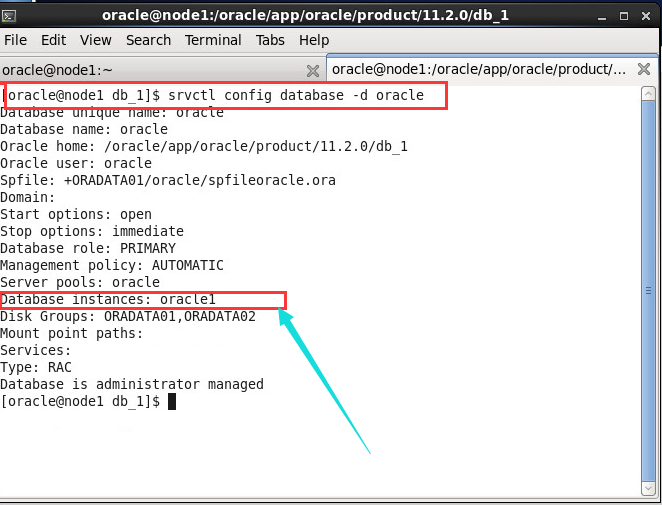
node1 上查看节点是否存在
----------------------------------------------------
三,清理
01,发现节点还在,资源也还在

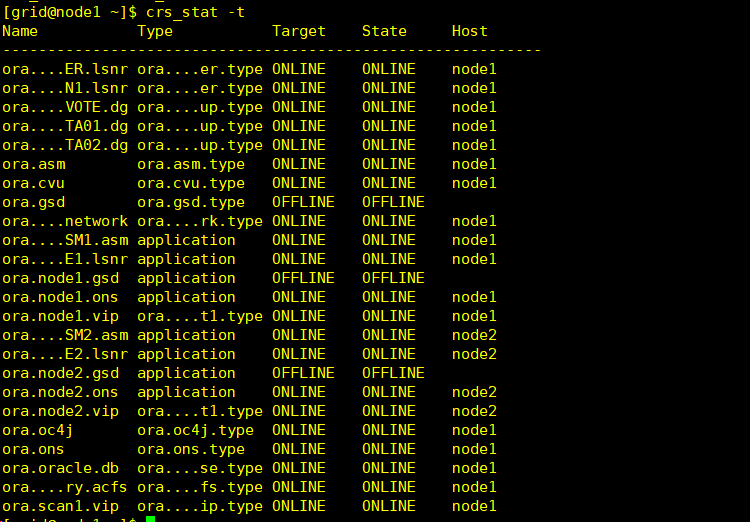
 [grid@node1 ~]$ crsctl status resource -t

 --------------------------------------------------------------------------------

 NAME           TARGET  STATE        SERVER                   STATE_DETAILS

 --------------------------------------------------------------------------------

 Local Resources

 --------------------------------------------------------------------------------

 ora.LISTENER.lsnr

                ONLINE  ONLINE       node1

                ONLINE  ONLINE       node2

 ora.OCR_VOTE.dg

                ONLINE  ONLINE       node1

                ONLINE  ONLINE       node2

 ora.ORADATA01.dg

                ONLINE  ONLINE       node1

                ONLINE  ONLINE       node2

 ora.ORADATA02.dg

                ONLINE  ONLINE       node1

                ONLINE  ONLINE       node2

 ora.asm

                ONLINE  ONLINE       node1                    Started

                ONLINE  ONLINE       node2                    Started

 ora.gsd

                OFFLINE OFFLINE      node1

                OFFLINE OFFLINE      node2

 ora.net1.network

                ONLINE  ONLINE       node1

                ONLINE  ONLINE       node2

 ora.ons

                ONLINE  ONLINE       node1

                ONLINE  ONLINE       node2

 ora.registry.acfs

                ONLINE  ONLINE       node1

                ONLINE  ONLINE       node2

 --------------------------------------------------------------------------------

 Cluster Resources

 --------------------------------------------------------------------------------

 ora.LISTENER_SCAN1.lsnr

               ONLINE  ONLINE       node1

 ora.cvu

               ONLINE  ONLINE       node1

 ora.node1.vip

               ONLINE  ONLINE       node1

 ora.node2.vip

               ONLINE  ONLINE       node2

 ora.oc4j

               ONLINE  ONLINE       node1

 ora.oracle.db

               ONLINE  ONLINE       node1                    Open

 ora.scan1.vip

               ONLINE  ONLINE       node1

 [grid@node1 ~]$
02,停掉监听
格式:

srvctl disable listener -l listener_name -n name_of_node_to_delete

srvctl stop listener -l listener_name -n name_of_node_to_delete

 操作:

srvctl disable listener -l listener -n node2

srvctl stop listener -l listener -n node2

查看:

[grid@node1 ~]$ crsctl status resource -t

--------------------------------------------------------------------------------

NAME           TARGET  STATE        SERVER                   STATE_DETAILS

--------------------------------------------------------------------------------

Local Resources

--------------------------------------------------------------------------------

ora.LISTENER.lsnr

               ONLINE  ONLINE       node1

               OFFLINE OFFLINE      node2 -----停了

ora.OCR_VOTE.dg

               ONLINE  ONLINE       node1

               ONLINE  ONLINE       node2

ora.ORADATA01.dg

               ONLINE  ONLINE       node1

               ONLINE  ONLINE       node2

ora.ORADATA02.dg

               ONLINE  ONLINE       node1

               ONLINE  ONLINE       node2

ora.asm

               ONLINE  ONLINE       node1                    Started

               ONLINE  ONLINE       node2                    Started

ora.gsd

               OFFLINE OFFLINE      node1

               OFFLINE OFFLINE      node2

ora.net1.network

               ONLINE  ONLINE       node1

               ONLINE  ONLINE       node2

ora.ons

               ONLINE  ONLINE       node1

               ONLINE  ONLINE       node2

ora.registry.acfs

               ONLINE  ONLINE       node1

               ONLINE  ONLINE       node2

--------------------------------------------------------------------------------

Cluster Resources

--------------------------------------------------------------------------------

ora.LISTENER_SCAN1.lsnr

              ONLINE  ONLINE       node1

ora.cvu

              ONLINE  ONLINE       node1

ora.node1.vip

              ONLINE  ONLINE       node1

ora.node2.vip

              ONLINE  ONLINE       node2

ora.oc4j

              ONLINE  ONLINE       node1

ora.oracle.db

              ONLINE  ONLINE       node1                    Open

ora.scan1.vip

              ONLINE  ONLINE       node1
03,删除Oracle software
操作如下:
 [oracle@node2 bin]$ cd $ORACLE_HOME/deinstall/

 [oracle@node2 deinstall]$ ls

 bootstrap.pl  deinstall.pl   jlib        response

 deinstall     deinstall.xml  readme.txt  sshUserSetup.sh

 [oracle@node2 deinstall]$ ./deinstall -local

 Checking for required files and bootstrapping ...

 Please wait ...

 Location of logs /oracle/app/oraInventory/logs/

 ############ ORACLE DEINSTALL & DECONFIG TOOL START ############

 ######################### CHECK OPERATION START #########################

 ## [START] Install check configuration ##

 Checking for existence of the Oracle home location /oracle/app/oracle/product/11.2./db_1

 Oracle Home type selected for deinstall is: Oracle Real Application Cluster Database

 Oracle Base selected for deinstall is: /oracle/app/oracle

 Checking for existence of central inventory location /oracle/app/oraInventory

 Checking for existence of the Oracle Grid Infrastructure home /oracle/11.2./grid/crs

 The following nodes are part of this cluster: node1,node2

 Checking for sufficient temp space availability on node(s) : 'node1,node2'

 ## [END] Install check configuration ##

 Network Configuration check config START

 Network de-configuration trace file location: /oracle/app/oraInventory/logs/netdc_check2019--14_04---PM.log

 Network Configuration check config END

 Database Check Configuration START

 Database de-configuration trace file location: /oracle/app/oraInventory/logs/databasedc_check2019--14_04---PM.log

 Database Check Configuration END

 Enterprise Manager Configuration Assistant START

 EMCA de-configuration trace file location: /oracle/app/oraInventory/logs/emcadc_check2019--14_04---PM.log

 Enterprise Manager Configuration Assistant END

 Oracle Configuration Manager check START

 OCM check log file location : /oracle/app/oraInventory/logs//ocm_check4254.log

 Oracle Configuration Manager check END

 ######################### CHECK OPERATION END #########################

 ####################### CHECK OPERATION SUMMARY #######################

 Oracle Grid Infrastructure Home is: /oracle/11.2./grid/crs

 The cluster node(s) on which the Oracle home deinstallation will be performed are:node1,node2

 Since -local option has been specified, the Oracle home will be deinstalled only on thelocal node, 'node2', and the global configuration will be removed.

 Oracle Home selected for deinstall is: /oracle/app/oracle/product/11.2./db_1

 Inventory Location where the Oracle home registered is: /oracle/app/oraInventory

 The option -local will not modify any database configuration for this Oracle home.

 No Enterprise Manager configuration to be updated for any database(s)

 No Enterprise Manager ASM targets to update

 No Enterprise Manager listener targets to migrate

 Checking the config status for CCR

 node1 : Oracle Home exists with CCR directory, but CCR is not configured

 node2 : Oracle Home exists with CCR directory, but CCR is not configured

 CCR check is finished

 Do you want to continue (y - yes, n - no)? [n]: y

 A log of this session will be written to: '/oracle/app/oraInventory/logs/deinstall_deconfig2019-03-14_04-04-17-PM.out'

 Any error messages from this session will be written to: '/oracle/app/oraInventory/logs/deinstall_deconfig2019-03-14_04-04-17-PM.err'

 ######################## CLEAN OPERATION START ########################

 Enterprise Manager Configuration Assistant START

 EMCA de-configuration trace file location: /oracle/app/oraInventory/logs/emcadc_clean2019--14_04---PM.log

 Updating Enterprise Manager ASM targets (if any)

 Updating Enterprise Manager listener targets (if any)

 Enterprise Manager Configuration Assistant END

 Database de-configuration trace file location: /oracle/app/oraInventory/logs/databasedc_clean2019--14_04---PM.log

 Network Configuration clean config START

 Network de-configuration trace file location: /oracle/app/oraInventory/logs/netdc_clean2019--14_04---PM.log

 De-configuring Local Net Service Names configuration file...

 Local Net Service Names configuration file de-configured successfully.

 De-configuring backup files...

 Backup files de-configured successfully.

 The network configuration has been cleaned up successfully.

 Network Configuration clean config END

 Oracle Configuration Manager clean START

 OCM clean log file location : /oracle/app/oraInventory/logs//ocm_clean4254.log

 Oracle Configuration Manager clean END

 Setting the force flag to false

 Setting the force flag to cleanup the Oracle Base

 Oracle Universal Installer clean START

 Detach Oracle home '/oracle/app/oracle/product/11.2.0/db_1' from the central inventory on the local node : Done

 Failed to delete the directory '/oracle/app/oracle/product/11.2.0/db_1'. The directory is in use.

 Delete directory '/oracle/app/oracle/product/11.2.0/db_1' on the local node : Failed <<<<

 Failed to delete the directory '/oracle/app/oracle/product/11.2.0/db_1'. The directory is in use.

 Failed to delete the directory '/oracle/app/oracle/product/11.2.0/db_1'. The directory is in use.

 Failed to delete the directory '/oracle/app/oracle/product/11.2.0'. The directory is not empty.

 Failed to delete the directory '/oracle/app/oracle/product'. The directory is not empty.

 Failed to delete the directory '/oracle/app/oracle'. The directory is not empty.

 Delete directory '/oracle/app/oracle' on the local node : Failed <<<<

 Oracle Universal Installer cleanup completed with errors.

 Oracle Universal Installer clean END

 ## [START] Oracle install clean ##

 Clean install operation removing temporary directory '/tmp/deinstall2019-03-14_04-04-11PM' on node 'node2'

 ## [END] Oracle install clean ##

 ######################### CLEAN OPERATION END #########################

 ####################### CLEAN OPERATION SUMMARY #######################

 Cleaning the config for CCR

 As CCR is not configured, so skipping the cleaning of CCR configuration

 CCR clean is finished

 Successfully detached Oracle home '/oracle/app/oracle/product/11.2.0/db_1' from the central inventory on the local node.

 Failed to delete directory '/oracle/app/oracle/product/11.2.0/db_1' on the local node.

 Failed to delete directory '/oracle/app/oracle' on the local node.

 Oracle Universal Installer cleanup completed with errors.

 Oracle deinstall tool successfully cleaned up temporary directories.

 #######################################################################

 ############# ORACLE DEINSTALL & DECONFIG TOOL END #############
04,删除Grid soft
 [grid@node2 ~]$ cd $ORACLE_HOME/deinstall

 [grid@node2 deinstall]$ ls

 bootstrap.pl  deinstall.pl   jlib        response

 deinstall     deinstall.xml  readme.txt  sshUserSetup.sh

 [grid@node2 deinstall]$ ./deinstall -local

 Checking for required files and bootstrapping ...

 Please wait ...

 Location of logs /tmp/deinstall2019--14_04--22PM/logs/

 ############ ORACLE DEINSTALL & DECONFIG TOOL START ############

 ######################### CHECK OPERATION START #########################

 ## [START] Install check configuration ##

 Checking for existence of the Oracle home location /oracle/11.2./grid/crs

 Oracle Home type selected for deinstall is: Oracle Grid Infrastructure for a Cluster

 Oracle Base selected for deinstall is: /oracle/11.2./11.2.

 Checking for existence of central inventory location /oracle/app/oraInventory

 Checking for existence of the Oracle Grid Infrastructure home /oracle/11.2./grid/crs

 The following nodes are part of this cluster: node1,node2

 Checking for sufficient temp space availability on node(s) : 'node1,node2'

 ## [END] Install check configuration ##

 Traces log file: /tmp/deinstall2019--14_04--22PM/logs//crsdc.log

 Network Configuration check config START

 Network de-configuration trace file location: /tmp/deinstall2019--14_04--22PM/logs/netdc_check2019--14_04---PM.log

 Specify all RAC listeners (do not include SCAN listener) that are to be de-configured [LISTENER]:^C[grid@node2 deinstall]$ ./deinstall -local

 Checking for required files and bootstrapping ...

 Please wait ...

 Location of logs /tmp/deinstall2019--14_04--58PM/logs/

 ############ ORACLE DEINSTALL & DECONFIG TOOL START ############

 ######################### CHECK OPERATION START #########################

 ## [START] Install check configuration ##

 Checking for existence of the Oracle home location /oracle/11.2./grid/crs

 Oracle Home type selected for deinstall is: Oracle Grid Infrastructure for a Cluster

 Oracle Base selected for deinstall is: /oracle/11.2./11.2.

 Checking for existence of central inventory location /oracle/app/oraInventory

 Checking for existence of the Oracle Grid Infrastructure home /oracle/11.2./grid/crs

 The following nodes are part of this cluster: node1,node2

 Checking for sufficient temp space availability on node(s) : 'node1,node2'

 ## [END] Install check configuration ##

 Traces log file: /tmp/deinstall2019--14_04--58PM/logs//crsdc.log

 Network Configuration check config START

 Network de-configuration trace file location: /tmp/deinstall2019--14_04--58PM/logs/netdc_check2019--14_04---PM.log

 Specify all RAC listeners (do not include SCAN listener) that are to be de-configured [LISTENER]:

 Network Configuration check config END

 Asm Check Configuration START

 ASM de-configuration trace file location: /tmp/deinstall2019--14_04--58PM/logs/asmcadc_check2019--14_04---PM.log

 ######################### CHECK OPERATION END #########################

 ####################### CHECK OPERATION SUMMARY #######################

 Oracle Grid Infrastructure Home is: /oracle/11.2./grid/crs

 The cluster node(s) on which the Oracle home deinstallation will be performed are:node1,node2

 Since -local option has been specified, the Oracle home will be deinstalled only on thelocal node, 'node2', and the global configuration will be removed.

 Oracle Home selected for deinstall is: /oracle/11.2./grid/crs

 Inventory Location where the Oracle home registered is: /oracle/app/oraInventory

 Following RAC listener(s) will be de-configured: LISTENER

 Option -local will not modify any ASM configuration.

 Do you want to continue (y - yes, n - no)? [n]: y

 A log of this session will be written to: '/tmp/deinstall2019-03-14_04-14-58PM/logs/deinstall_deconfig2019-03-14_04-15-03-PM.out'

 Any error messages from this session will be written to: '/tmp/deinstall2019-03-14_04-14-58PM/logs/deinstall_deconfig2019-03-14_04-15-03-PM.err'

 ######################## CLEAN OPERATION START ########################

 ASM de-configuration trace file location: /tmp/deinstall2019--14_04--58PM/logs/asmcadc_clean2019--14_04---PM.log

 ASM Clean Configuration END

 Network Configuration clean config START

 Network de-configuration trace file location: /tmp/deinstall2019--14_04--58PM/logs/netdc_clean2019--14_04---PM.log

 De-configuring RAC listener(s): LISTENER

 De-configuring listener: LISTENER

     Stopping listener on node "node2": LISTENER

     Warning: Failed to stop listener. Listener may not be running.

 Listener de-configured successfully.

 De-configuring Naming Methods configuration file...

 Naming Methods configuration file de-configured successfully.

 De-configuring backup files...

 Backup files de-configured successfully.

 The network configuration has been cleaned up successfully.

 Network Configuration clean config END

 ---------------------------------------->

 The deconfig command below can be executed in parallel on all the remote nodes. Executethe command on  the local node after the execution completes on all the remote nodes.

 Run the following command as the root user or the administrator on node "node1".

 /tmp/deinstall2019--14_04--58PM/perl/bin/perl -I/tmp/deinstall2019--14_04--58PM/perl/lib -I/tmp/deinstall2019--14_04--58PM/crs/install /tmp/deinstall2019--14_04--58PM/crs/install/rootcrs.pl -force  -deconfig -paramfile "/tmp/deinstall2019-03-14_04-14-58PM/response/deinstall_Ora11g_gridinfrahome1.rsp"

 Run the following command as the root user or the administrator on node "node2".

 /tmp/deinstall2019--14_04--58PM/perl/bin/perl -I/tmp/deinstall2019--14_04--58PM/perl/lib -I/tmp/deinstall2019--14_04--58PM/crs/install /tmp/deinstall2019--14_04--58PM/crs/install/rootcrs.pl -force  -deconfig -paramfile "/tmp/deinstall2019-03-14_04-14-58PM/response/deinstall_Ora11g_gridinfrahome1.rsp"

 Press Enter after you finish running the above commands

 <----------------------------------------提示运行脚本,删除哪个运行哪个不要搞错了
[root@node2 ~]# /tmp/deinstall2019-03-14_04-14-58PM/perl/bin/perl -I/tmp/deinstall2019-03-14_04-14-58PM/perl/lib -I/tmp/deinstall2019-03-14_04-14-58PM/crs/install /tmp/deinstall2019-03-14_04-14-58PM/crs/install/rootcrs.pl -force  -deconfig -paramfile "/tmp/deinstall2019-03-14_04-14-58PM/response/deinstall_Ora11g_gridinfrahome1.rsp"

Using configuration parameter file: /tmp/deinstall2019--14_04--58PM/response/deinstall_Ora11g_gridinfrahome1.rsp

Network exists: /192.168.0.0/255.255.255.0/eth0, type static

VIP exists: /node1vip/192.168.0.183/192.168.0.0/255.255.255.0/eth0, hosting node node1

VIP exists: /node2vip/192.168.0.182/192.168.0.0/255.255.255.0/eth0, hosting node node2

GSD exists

ONS exists: Local port , remote port , EM port

CRS-: Attempting to stop 'ora.registry.acfs' on 'node2'

CRS-: Stop of 'ora.registry.acfs' on 'node2' succeeded

CRS-: Starting shutdown of Oracle High Availability Services-managed resources on 'node2'

CRS-: Attempting to stop 'ora.crsd' on 'node2'

CRS-: Starting shutdown of Cluster Ready Services-managed resources on 'node2'

CRS-: Attempting to stop 'ora.OCR_VOTE.dg' on 'node2'

CRS-: Attempting to stop 'ora.ORADATA01.dg' on 'node2'

CRS-: Attempting to stop 'ora.ORADATA02.dg' on 'node2'

CRS-: Stop of 'ora.ORADATA02.dg' on 'node2' succeeded

CRS-: Stop of 'ora.ORADATA01.dg' on 'node2' succeeded

CRS-: Stop of 'ora.OCR_VOTE.dg' on 'node2' succeeded

CRS-: Attempting to stop 'ora.asm' on 'node2'

CRS-: Stop of 'ora.asm' on 'node2' succeeded

CRS-: Shutdown of Cluster Ready Services-managed resources on 'node2' has completed

CRS-: Stop of 'ora.crsd' on 'node2' succeeded

CRS-: Attempting to stop 'ora.ctssd' on 'node2'

CRS-: Attempting to stop 'ora.evmd' on 'node2'

CRS-: Attempting to stop 'ora.asm' on 'node2'

CRS-: Attempting to stop 'ora.drivers.acfs' on 'node2'

CRS-: Attempting to stop 'ora.mdnsd' on 'node2'

CRS-: Stop of 'ora.evmd' on 'node2' succeeded

CRS-: Stop of 'ora.mdnsd' on 'node2' succeeded

CRS-: Stop of 'ora.ctssd' on 'node2' succeeded

CRS-: Stop of 'ora.asm' on 'node2' succeeded

CRS-: Attempting to stop 'ora.cluster_interconnect.haip' on 'node2'

CRS-: Stop of 'ora.cluster_interconnect.haip' on 'node2' succeeded

CRS-: Attempting to stop 'ora.cssd' on 'node2'

CRS-: Stop of 'ora.cssd' on 'node2' succeeded

CRS-: Attempting to stop 'ora.crf' on 'node2'

CRS-: Stop of 'ora.drivers.acfs' on 'node2' succeeded

CRS-: Stop of 'ora.crf' on 'node2' succeeded

CRS-: Attempting to stop 'ora.gipcd' on 'node2'

CRS-: Stop of 'ora.gipcd' on 'node2' succeeded

CRS-: Attempting to stop 'ora.gpnpd' on 'node2'

CRS-: Stop of 'ora.gpnpd' on 'node2' succeeded

CRS-: Shutdown of Oracle High Availability Services-managed resources on 'node2' has completed

CRS-: Oracle High Availability Services has been stopped.
05,删除相关信息
[root@node2 db_1]# rm -rf /etc/oraInst.loc

[root@node2 db_1]# rm -rf /opt/ORCLfmap

[root@node2 db_1]# rm -rf /etc/oratab
06,更新dbms inventory
[oracle@node1 ~]$ $ORACLE_HOME/oui/bin/runInstaller -updateNodeList  ORACLE_HOME=$ORACLE_HOME CLUSTER_NODES=node1

Starting Oracle Universal Installer...

Checking swap space: must be greater than  MB.   Actual  MB    Passed

The inventory pointer is located at /etc/oraInst.loc

The inventory is located at /oracle/app/oraInventory

'UpdateNodeList' was successful.
更新
[oracle@node1 ~]$ $ORACLE_HOME/oui/bin/runInstaller -updateNodeList -local   ORACLE_HOME=$ORACLE_HOME CLUSTER_NODES=node1

Starting Oracle Universal Installer...

Checking swap space: must be greater than  MB.   Actual  MB    Passed

The inventory pointer is located at /etc/oraInst.loc

The inventory is located at /oracle/app/oraInventory

'UpdateNodeList' was successful.
Oracle RAC集群删除节点的更多相关文章
- Oracle RAC集群添加节点
一,节点环境 所有节点分发/etc/hosts,这里我添加两个节点,一个是上次删除的节点,另一个是什么都没有的节点,尝试添加 服务器介绍什么的都在这hosts文件了,大家自己琢磨下 [grid@nod ...
- Oracle rac集群环境中的特殊问题
备注:本文摘抄于张晓明<大话Oracle RAC:集群 高可用性 备份与恢复> 因为集群环境需要多个计算机协同工作,要达到理想状态,必须要考虑在集群环境下面临的新挑战. 1.并发控制 在集 ...
- bay——Oracle RAC集群体系结构.docx
Oracle RAC集群体系结构 ————bayaim 2018年10月22日13:33 https://blog.51cto.com/ixdba/862207 一. Oracle集群体系结构 O ...
- 【Oracle 集群】Linux下Oracle RAC集群搭建之Oracle DataBase安装(八)
Oracle 11G RAC数据库安装(八) 概述:写下本文档的初衷和动力,来源于上篇的<oracle基本操作手册>.oracle基本操作手册是作者研一假期对oracle基础知识学习的汇总 ...
- ORACLE RAC集群的体系结构
RAC是一个完整的集群应用环境,它不仅实现了集群的功能,而且提供了运行在集群之上的应用程序,即Oracle数据库.无论与普通的集群相比,还是与普通的Oracle数据库相比,RAC都有一些独特之处. R ...
- 【转】【Oracle 集群】Linux下Oracle RAC集群搭建之Oracle DataBase安装(八)
原文地址:http://www.cnblogs.com/baiboy/p/orc8.html 阅读目录 目录 数据库安装 参考文献 相关文章 Oracle 11G RAC数据库安装(八) 概述:写 ...
- was配置oracle RAC集群的数据源
在WebSphere中配置配置Oracle RAC集群的数据源,假设Oracle RAC双击分别为 HOST1 与 HOST2 , 端口为1521 ,服务名为 orcldbservice,则配置的UR ...
- Oracle RAC集群资料收集
RAC优势和劣势 http://tech.it168.com/a2012/0814/1384/000001384756_all.shtml 双机热备与RAC并行模式对比 WAS数据源设置 http:/ ...
- Oracle RAC 集群环境下日志文件结构
Oracle RAC 集群环境下日志文件结构 在Oracle RAC环境中,对集群中的日志的定期检查是必不可少的.通过查看集群日志,可以早期定位集群环境中出现的问题,以便将问题消灭在萌芽状态.简单介绍 ...
随机推荐
- 测试中常用到的linux命令
1. man 格式化以及列出命令的(在线)操作手册. 使用方法 man [ -options ] name man man ...
- 学习React中遇到的问题
1.执行eject后,再次启动项目报错 情景:使用create-react-app搭建了项目,启动没有问题,然后执行 $ yarn eject 暴露出webpack配置文件等,再次 $ yarn st ...
- IDEA下载与安装
IntelliJ IDEA号称当前Java开发效率最高的IDE工具. IntelliJ IDEA有两个版本:社区版(Community)和旗舰版(Ultimate). 社区版 是免费的.开源的,但功能 ...
- 转:Linux下同时启动两个Tomcat进行设置
转: Linux下同时启动两个Tomcat进行设置 解压tar.gz:tar -zxvf apache-tomcat-6.0.41.tar.gz 至相应的路径下,可解压至两个不同的路径或者相同的路径下 ...
- Linux 运维工程师经典面试题合集(不断更新中 ...)
写在前面的话 做运维以来,关注了很多关于互联网技术,培训等乱七八糟的公众号,时不时的就会推一些各种公司的面试题过来. 大致看了一下,发现自己很多知识要么遗忘了,要么很难说出个所以然,所以这里对那些个人 ...
- Weekly Contest 117
965. Univalued Binary Tree A binary tree is univalued if every node in the tree has the same value. ...
- oracle查询分区表中的数据
select * from TABLE_NAME partition(分区名) T WHERE T.COL_NAME= 'XX';
- 【转】WinForm时间选择控件(DateTimePicker)如何选择(显示)时分秒
源地址:https://www.cnblogs.com/EvanFan/p/7826160.html 注意:年月日时分秒的大小写格式,如果错了数据就错了,如果能显示当前时间说明设置正确
- Shell等,不等......
-eq //等于 -ne //不等于 -gt //大于 (greater ) -lt //小于 (less) -g ...
- Mysql的用户基本操作
创建用户: mysql> create user 'cai'@'localhost' identified by '123456'; Query OK, 0 rows affected (0.0 ...