
使用testng.xml组织测试用例
测试用例类TeseNG.java:

import org.openqa.selenium.By;
import org.openqa.selenium.WebDriver;
import org.openqa.selenium.WebElement;
import org.openqa.selenium.firefox.FirefoxDriver;
import org.testng.Assert;
import org.testng.Reporter;
import org.testng.annotations.*;

public class TestNG {
    private WebDriver driver;

    @BeforeClass
    public void beforeClass() throws InterruptedException {
        System.setProperty("webdriver.firefox.marionette",
                "src/main/resourcec/geckodriver.exe");
        String baiduHomePage;
        baiduHomePage = "https://www.baidu.com/";

        driver = new FirefoxDriver();
        driver.manage().window().maximize();
        driver.get(baiduHomePage);
        Thread.sleep(2000);
        Assert.assertEquals(driver.getTitle(), "百度一下,你就知道");
    }

    @Test(dataProvider = "word")
    public void testNG(String keyword, String case_1, String searchTitle)
            throws InterruptedException {
        WebElement webElement = driver.findElement(By.xpath(".//*[@id='kw']"));
        webElement.clear();
        webElement.sendKeys(keyword);

        driver.findElement(By.xpath(".//*[@id='su']")).click();
        Thread.sleep(3000);

        Reporter.log(case_1);
        Assert.assertEquals(driver.getTitle(), searchTitle);
        driver.navigate().refresh();
    }

    @AfterClass
    public void afterClass(){
        driver.close();
        driver.quit();
    }

    @DataProvider(name = "word")
    public static Object[][] data(){
        return new Object[][]{{"Selenium", "搜索Selenium的测试用例", "Selenium_百度搜索"},
                {"JMeter", "搜索JMeter的测试用例", "JMeter_百度搜索"},
                {"Appium", "搜索Appium的测试用例", "Appium_百度搜索"}
    };
    }
}

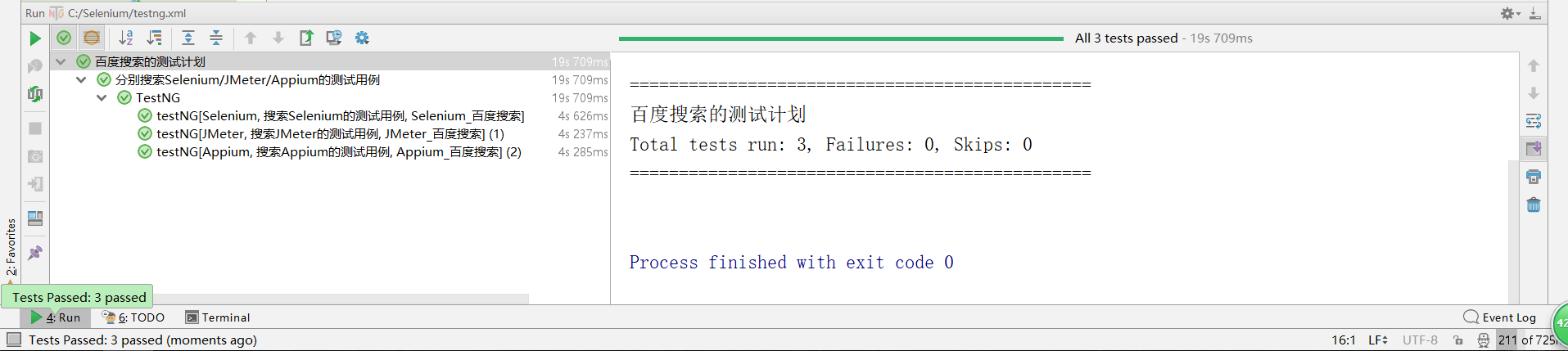
testng.xml文件:
<?xml version="1.0" encoding="UTF-8"?>
<!DOCTYPE suite SYSTEM "http://testng.org/testng-1.0.dtd">
<suite name="百度搜索的测试计划" verbose="2" preserve-order="true">

    <test  name="分别搜索Selenium/JMeter/Appium的测试用例">
        <classes>
            <class name="TestNG" />
        </classes>
    </test>

    <listeners>
        <listener class-name="org.uncommons.reportng.HTMLReporter" />
        <listener class-name="org.uncommons.reportng.JUnitXMLReporter" />
    </listeners>
</suite>
使用testng.xml组织测试用例的更多相关文章
- testng.xml 执行多个测试用例
1.在工程名字上点击右键,点击[New]-->[File] 2.在弹出的[New File]对话框中的[File name]输入[testng.xml],点击[Finish]即创建了一个test ...
- testng.xml文件的配置
------Web自动化测试之Webdriver+TestNG--从零到熟练(系列) TestNG用来管理测试用例的是testng.xml配置文件,我们可以通过配置这个文件来达到组织测试用例,输出测试 ...
- testng教程之testng.xml的配置和使用,以及参数传递
昨天学习了一下testng基础教程,http://www.cnblogs.com/tobecrazy/p/4579414.html 昨天主要学习的是testng 的annotation基本用法和生命周 ...
- IDEA 单元测试testng入门及testng.xml
直接进入正题: 1.TestNG的运行方式如下: With a testng.xml file 直接run as test suite With ant 使用ant From the command ...
- 接口自动化框架(java)--5.通过testng.xml生成extentreport测试报告
这套框架的报告是自己封装的 由于之前已经通过Extentreport插件实现了Testng的IReport接口,所以在testng.xml中使用listener标签并指向实现IReport接口的那个类 ...
- testng.xml 配置大全
1.TestNG的运行方式如下: 1 With a testng.xml file 直接run as test suite 2 With ant 使用ant 3 From the command li ...
- TestNG 入门指导——理解testng.xml执行/不执行某个包,某个类,某个方法
这一篇我们主要学习如下几个知识点: ⑴关于testng.xml ⑵创建一个测试套件 ⑶执行testng.xml ⑷在测试套件中创建多个测试用例 ⑸在用例中增加class,packages, metho ...
- 【TestNG测试】TestNG、Maven、testng.xml构建测试工程
创建一个maven工程 使用Idea创建maven工程 建立类似如上的工程结构,src/main/java,src/test/java,pom.xml,testng.xml,这里由于我们使用工程是 ...
- TestNG的testng.xml配置概述
TestNG提供的annotaions用来辅助定义测试类. TestNG的testng.xml配置文件用来辅助定义执行什么样的测试,即testng.xml更像是一个测试规划. testng.xml配置 ...
随机推荐
- 2018.10.6 Hibernate配置文件详解-------ORM元数据配置 &&& hibernate主配置文件
ORM既然是实体与关系数据库的映射,那就需要建立实体和关系数据库之间的基础数据,也可以称为元数据.简单的说就是表示类与表.列与属性(get.set方法)等等之间对应关系的数据. Customer.hb ...
- 【luogu P2194 HXY烧情侣】 题解
题目链接:https://www.luogu.org/problemnew/show/P2194 第一问:缩点并且统计其强连通分量里的最小耗费.把所有强连通分量的最小耗费加起来. 第二问:统计在每个强 ...
- SyncUI跨设备同步
SynUI控制代码 <script type="text/javascript"> /* SyncUI script (Learn more at http://syn ...
- webpack4——打包html报错解决
①先引入html-webpack-plugin插件,然后在终端下载 npm install --save-dev html-webpack-plugin ②我的文件结构 ③修改webpack.dev. ...
- python的格式化输出(format,%)
皇城PK Python中格式化字符串目前有两种阵营:%和format,我们应该选择哪种呢? 自从Python2.6引入了format这个格式化字符串的方法之后,我认为%还是format这根本就不算个问 ...
- PL/SQL 数组的使用
一.固定数组 1.在模式(schema)级创建VARRAY类型 语法: CREATE OR REPLACE TYPE varray_type_name IS VARRAY(n) OF <elem ...
- Vue--- vue-Router 路由
文档 https://router.vuejs.org/zh-cn npm install vue-router --save 调用 import Vue from 'vue' import Vue ...
- CF605A Sorting Railway Cars(递推)
题目描述 An infinitely long railway has a train consisting of n cars, numbered from 1 to n (the numbers ...
- 【TOJ 1449】Area of Circles II(求不同位置的两圆面积之和)
描述 There are two circles on the plane. Now you must to calculate the area which they cover the plane ...
- spring cloud 学习之路由网关(zuul)
学习自方志朋的博客 http://blog.csdn.net/forezp/article/details/69939114 在微服务架构中,需要几个基础的服务治理组件,包括服务注册与发现.服务消费. ...