
IntelliJ IDEA使用hibernate
环境:
数据库:mariadb 10.2.16 https://downloads.mariadb.org/
配置好maven:见收藏的博文链接 https://www.cnblogs.com/ICE_Inspire/p/9250194.html
官方文档:http://docs.jboss.org/hibernate/orm/5.3/userguide/html_single/Hibernate_User_Guide.html#domain-model
具体过程:
1.新建一个maven project,如图

2.编辑pom.xml ,增加如下内容
 <dependency>

 <groupId>org.hibernate</groupId>

 <artifactId>hibernate-core</artifactId>

 <version>5.3.2.Final</version>

 </dependency>

 <dependency>

 <groupId>mysql</groupId>

 <artifactId>mysql-connector-java</artifactId>

 <version>5.1.4</version>

 </dependency>

 <dependency>

 <groupId>org.hibernate</groupId>

 <artifactId>hibernate-c3p0</artifactId>

 <version>5.3.2.Final</version>

 </dependency>
hibernate-c3p0是为了解决:
WARN: HHH10001002: Using Hibernate built-in connection pool (not for production use!)
之后,重新Reimport all maven project,如图
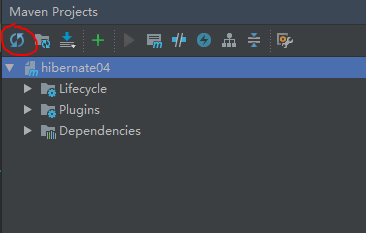
3.建立表 sql如下:
CREATE TABLE IF NOT EXISTS `customer` (

`id` int(11) NOT NULL AUTO_INCREMENT,

`name` varchar(20) DEFAULT NULL,

PRIMARY KEY (`id`)

) ENGINE=InnoDB AUTO_INCREMENT=10 DEFAULT CHARSET=utf8;
项目里增加对应类:
public class Customer {

private Integer id; //主键id

private String name; //客户姓名

/**

* @return the id

*/

public Integer getId() {

return id;

}

/**

* @param id the id to set

*/

public void setId(Integer id) {

this.id = id;

}

/**

* @return the name

*/

public String getName() {

return name;

}

/**

* @param name the name to set

*/

public void setName(String name) {

this.name = name;

}

//重写toString()方法

@Override

public String toString() {

return "Customer [id=" + id + ", name=" + name + "]";

}

}
4.在src\main下建立文件夹resources,添加Customer.hbm.xml文件,内容如下:
<?xml version="1.0" encoding="UTF-8"?>

<!DOCTYPE hibernate-mapping PUBLIC

"-//Hibernate/Hibernate Mapping DTD 3.0//EN"

"http://www.hibernate.org/dtd/hibernate-mapping-3.0.dtd">

<hibernate-mapping>

<!-- name代表的是实体类名(根据具体情况更改),table代表的是表名 -->

<class name="hibernate03.model.Customer" table="customer">

<!-- name=id代表的是customer类中属性 column=id代表的是table表中的字段 -->

<id name="id" column="id">

<!-- 主键生成策略 -->

<generator class="native"/>

</id>

<!-- 其他属性使用property标签来映射 -->

<property name="name" column="name" type="string"/>

</class>

</hibernate-mapping>
添加hibernate.cfg.xml文件,内容如下
<?xml version="1.0" encoding="utf-8"?>

<!DOCTYPE hibernate-configuration PUBLIC

"-//Hibernate/Hibernate Configuration DTD 3.0//EN"

" http://www.hibernate.org/dtd/hibernate-configuration-3.0.dtd">

<hibernate-configuration>

<session-factory>

<!-- <property name="hibernate.connection.driver_class">org.mariadb.jdbc.Driver</property> -->

<property name="hibernate.connection.driver_class">com.mysql.jdbc.Driver</property>

<property name="hibernate.connection.url">jdbc:mysql://localhost:3306/test</property>

<property name="hibernate.connection.username">root</property>

<property name="hibernate.connection.password">123456</property>

<property name="hibernate.dialect">org.hibernate.dialect.MySQLDialect</property>

<property name="hibernate.c3p0.min_size">5</property> <!--在连接池中可用数据库连接的最小数目-->

<property name="hibernate.c3p0.max_size">30</property> <!--在连接池中所有数据库连接的最大数目-->

<property name="hibernate.c3p0.time_out">1800</property> <!--设定数据库连接的超时时间-->

<property name="hibernate.c3p0.max_statement">50</property> <!--可以被缓存的PreparedStatement的最大数目-->

<mapping resource="Customer.hbm.xml"></mapping>

</session-factory>

</hibernate-configuration>
如果红色字体,请重新Reimport all maven project.
5.增加HibernateUtil工具类
import org.hibernate.HibernateException;

import org.hibernate.Session;

import org.hibernate.SessionFactory;

import org.hibernate.cfg.Configuration;

public class HibernateUtil extends Object{

private static SessionFactory sessionFactory;

static

{

try{

Configuration configuration=new Configuration().configure();

sessionFactory = configuration.buildSessionFactory();

}catch (Throwable ex){

throw new ExceptionInInitializerError(ex);

}

}

private static final ThreadLocal<Session> threadLocal = new ThreadLocal<Session>();

public static SessionFactory getSessionFactory() {

return sessionFactory;

}

public static Session getSession() throws HibernateException

{

Session session = threadLocal.get();

if (session == null){

session = sessionFactory.openSession();

threadLocal.set(session);

}

return session;

}

public static void closeSession() throws HibernateException {

Session session = threadLocal.get();

if (session != null)

session.close();

threadLocal.set(null);

}

public static void shutdown(){

getSessionFactory().close();

}

}
6.测试
public static void main( String[] args )

{

Session session = HibernateUtil.getSession();

Transaction tx = session.beginTransaction();

try{

Customer customer=new Customer();

customer.setId(3);

customer.setName("ICE_Inspire");

session.save(customer);

tx.commit();

System.out.println("保存成功!");

}catch(Exception e){

e.printStackTrace();

tx.rollback();

System.out.println("保存失败!");

}finally{

HibernateUtil.closeSession();

}

}
7.显示结果
七月 08, 2018 1:31:11 下午 org.hibernate.Version logVersion
INFO: HHH000412: Hibernate Core {5.3.2.Final}
七月 08, 2018 1:31:11 下午 org.hibernate.cfg.Environment <clinit>
INFO: HHH000206: hibernate.properties not found
七月 08, 2018 1:31:13 下午 org.hibernate.annotations.common.reflection.java.JavaReflectionManager <clinit>
INFO: HCANN000001: Hibernate Commons Annotations {5.0.4.Final}
七月 08, 2018 1:31:13 下午 org.hibernate.c3p0.internal.C3P0ConnectionProvider configure
INFO: HHH010002: C3P0 using driver: com.mysql.jdbc.Driver at URL: jdbc:mysql://localhost:3306/test
七月 08, 2018 1:31:13 下午 org.hibernate.c3p0.internal.C3P0ConnectionProvider configure
INFO: HHH10001001: Connection properties: {user=root, password=****}
七月 08, 2018 1:31:13 下午 org.hibernate.c3p0.internal.C3P0ConnectionProvider configure
INFO: HHH10001003: Autocommit mode: false
七月 08, 2018 1:31:13 下午 com.mchange.v2.log.MLog
信息: MLog clients using java 1.4+ standard logging.
七月 08, 2018 1:31:13 下午 com.mchange.v2.c3p0.C3P0Registry
信息: Initializing c3p0-0.9.5.2 [built 08-December-2015 22:06:04 -0800; debug? true; trace: 10]
七月 08, 2018 1:31:13 下午 org.hibernate.c3p0.internal.C3P0ConnectionProvider configure
INFO: HHH10001007: JDBC isolation level: <unknown>
七月 08, 2018 1:31:13 下午 com.mchange.v2.c3p0.impl.AbstractPoolBackedDataSource
信息: Initializing c3p0 pool... com.mchange.v2.c3p0.PoolBackedDataSource@39db5c50 [ connectionPoolDataSource -> com.mchange.v2.c3p0.WrapperConnectionPoolDataSource@c4d328da [ acquireIncrement -> 3, acquireRetryAttempts -> 30, acquireRetryDelay -> 1000, autoCommitOnClose -> false, automaticTestTable -> null, breakAfterAcquireFailure -> false, checkoutTimeout -> 0, connectionCustomizerClassName -> null, connectionTesterClassName -> com.mchange.v2.c3p0.impl.DefaultConnectionTester, contextClassLoaderSource -> caller, debugUnreturnedConnectionStackTraces -> false, factoryClassLocation -> null, forceIgnoreUnresolvedTransactions -> false, forceSynchronousCheckins -> false, identityToken -> 1hge13a9wxed8vobdm3gs|42530531, idleConnectionTestPeriod -> 0, initialPoolSize -> 5, maxAdministrativeTaskTime -> 0, maxConnectionAge -> 0, maxIdleTime -> 0, maxIdleTimeExcessConnections -> 0, maxPoolSize -> 30, maxStatements -> 0, maxStatementsPerConnection -> 0, minPoolSize -> 5, nestedDataSource -> com.mchange.v2.c3p0.DriverManagerDataSource@1dcb54fb [ description -> null, driverClass -> null, factoryClassLocation -> null, forceUseNamedDriverClass -> false, identityToken -> 1hge13a9wxed8vobdm3gs|6676f6a0, jdbcUrl -> jdbc:mysql://localhost:3306/test, properties -> {user=******, password=******} ], preferredTestQuery -> null, privilegeSpawnedThreads -> false, propertyCycle -> 0, statementCacheNumDeferredCloseThreads -> 0, testConnectionOnCheckin -> false, testConnectionOnCheckout -> false, unreturnedConnectionTimeout -> 0, usesTraditionalReflectiveProxies -> false; userOverrides: {} ], dataSourceName -> null, extensions -> {}, factoryClassLocation -> null, identityToken -> 1hge13a9wxed8vobdm3gs|7d446ed1, numHelperThreads -> 3 ]
七月 08, 2018 1:31:14 下午 org.hibernate.dialect.Dialect <init>
INFO: HHH000400: Using dialect: org.hibernate.dialect.MySQLDialect
七月 08, 2018 1:31:14 下午 org.hibernate.engine.jdbc.env.internal.LobCreatorBuilderImpl useContextualLobCreation
INFO: HHH000423: Disabling contextual LOB creation as JDBC driver reported JDBC version [3] less than 4
保存成功!
Process finished with exit code 0
备注:
如果提示*.hbm.xml not found,检查下target/classes/目录下是否有和main/resources/目录下一样的xml文件.
<build>

<resources>

<resource>

<directory>src/main/resources</directory>

<includes>

<include>**/*.xml</include>

<include>**/*.properties</include>

</includes>

</resource>

</resources>

</build>
IntelliJ IDEA使用hibernate的更多相关文章
- Intellij IDEA的Hibernate简单应用
1.创建数据库及其表 create database demo; use demo; CREATE TABLE `user` ( `id` int(10) unsigned NOT NULL ...
- *IntelliJ IDEA配置Hibernate
为IntelliJ IDEA安装Hibernate插件
- 【笔记】IntelliJ IDEA配置Hibernate
参考:imooc:http://www.imooc.com/video/7706 1.创建Hibernate的配置文件. 将依赖包导入项目.http://blog.csdn.net/a15337525 ...
- 【转载】Intellij IDEA的Hibernate简单应用
转载自: https://www.cnblogs.com/yangyquin/p/5438248.html 1.创建数据库及其表 create database demo; use demo ...
- *IntelliJ IDEA使用Hibernate连接数据库
在IntelliJ IDEA中配置MySQL Database.
- intellij 编译 springmvc+hibernate+spring+maven 找不到hbm.xml映射文件
1. 错误信息 Invocation of init method failed; nested exception is org.hibernate.MappingNotFoundException ...
- Intellij idea生成Hibernate实体类
反向生成基于注解的Hibernate实体类 1. 为项目添加Hibernate支持 2. 在IDE右边找到database,然后按照步骤添加数据. 3. 保存后.在主面板左侧有persistence, ...
- 【转】IntelliJ IDEA下自动生成Hibernate映射文件以及实体类
1.构建项目并添加项目结构配置以及配置初始参数 1.1.如图将基本的架子搭建好 1.2.点击File,弹出的菜单中点击Project Structure: 1.3.点击左侧的Modul ...
- spring入门(五) spring mvc+hibernate
核心是让SessionFactory由Spring管理 1.引入依赖 <!-- https://mvnrepository.com/artifact/org.springframework/sp ...
随机推荐
- asp ajax
//[AjaxPro.AjaxMethod()] //public DataTable loadChecked() //{ // return BDAContext.GetObject<ICNP ...
- 修改Linux时区的2种办法
由于Azure 上所有的服务时间都采用了 UTC 时间.UTC 时间比中国时间晚 8 个小时,该如何按照自己的需要来进行修改呢,下面提供2种办法以供参考: 1.修改 /etc/localtime 文件 ...
- sp_addlinkedserver创建远程服务器查询
远程服务器查询可以分两步完成: 1.建立连接服务器 exec sp_addlinkedserver @server='Test_Server', --被访问的服务器别名 @srvproduct='', ...
- C# 获得word中某一段落所在页的页码
方式一:通过openxml 从xml结构里获得不可行.原因如下A footer is not on a page and a page number in a footer is a field th ...
- oracle学习篇八:约束
----约束------- --1.主键约束--唯一标识,不能为空,通常用于ID--1>创建主键create table person(id varchar2(20) primary key,n ...
- android startActivityForResult()
举例说我想要做的一个事情是,在一个主界面(主Activity)上能连接往许多不同子功能模块(子Activity上去),当子模块的事情做完之后就回到主界面,或许还同时返回一些子模块完成的数据交给主Act ...
- Android学习——AsyncTask的使用
AsyncTask是安卓自带的异步操作类,把异步操作简化并封装好,从而可以让开发者在子线程中更方便地更新UI. AsyncTask为一个抽象类,在继承AsyncTask时需要指定如下三个泛型参数:&l ...
- mongodb 3.4 学习 (四)分片
https://www.linode.com/docs/databases/mongodb/build-database-clusters-with-mongodb 由三部分组成 shard: 每个s ...
- #学习笔记#e2e学习使用(一)
本文仅限于记录本人学习的过程,以及怎么踩的坑,是如何解决的.逻辑肯定是混乱的,有用之处会抽出共通另行发帖. 最终目标:要运用于Vue项目中,进行功能测试甚至自动化测试. 一.e2e概念 理解:end ...
- 记录一次 sql在数据库可以查到 mybatis代码查不到的问题
原始代码: 查不到 SELECT b.ID, b.PRICE_ITEM_CODE, b.PRICE_NAME, b.DES_SITE_CODE, b.SRC_SITE_CODE, b.CALC_TYP ...