
IntelliJ IDEA使用hibernate
环境:
数据库:mariadb 10.2.16 https://downloads.mariadb.org/
配置好maven:见收藏的博文链接 https://www.cnblogs.com/ICE_Inspire/p/9250194.html
官方文档:http://docs.jboss.org/hibernate/orm/5.3/userguide/html_single/Hibernate_User_Guide.html#domain-model
具体过程:
1.新建一个maven project,如图

2.编辑pom.xml ,增加如下内容
 <dependency>

 <groupId>org.hibernate</groupId>

 <artifactId>hibernate-core</artifactId>

 <version>5.3.2.Final</version>

 </dependency>

 <dependency>

 <groupId>mysql</groupId>

 <artifactId>mysql-connector-java</artifactId>

 <version>5.1.4</version>

 </dependency>

 <dependency>

 <groupId>org.hibernate</groupId>

 <artifactId>hibernate-c3p0</artifactId>

 <version>5.3.2.Final</version>

 </dependency>
hibernate-c3p0是为了解决:
WARN: HHH10001002: Using Hibernate built-in connection pool (not for production use!)
之后,重新Reimport all maven project,如图
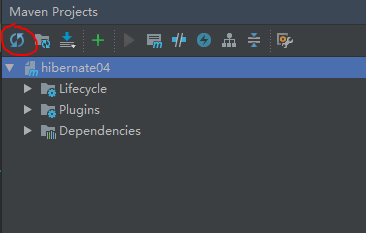
3.建立表 sql如下:
CREATE TABLE IF NOT EXISTS `customer` (

`id` int(11) NOT NULL AUTO_INCREMENT,

`name` varchar(20) DEFAULT NULL,

PRIMARY KEY (`id`)

) ENGINE=InnoDB AUTO_INCREMENT=10 DEFAULT CHARSET=utf8;
项目里增加对应类:
public class Customer {

private Integer id; //主键id

private String name; //客户姓名

/**

* @return the id

*/

public Integer getId() {

return id;

}

/**

* @param id the id to set

*/

public void setId(Integer id) {

this.id = id;

}

/**

* @return the name

*/

public String getName() {

return name;

}

/**

* @param name the name to set

*/

public void setName(String name) {

this.name = name;

}

//重写toString()方法

@Override

public String toString() {

return "Customer [id=" + id + ", name=" + name + "]";

}

}
4.在src\main下建立文件夹resources,添加Customer.hbm.xml文件,内容如下:
<?xml version="1.0" encoding="UTF-8"?>

<!DOCTYPE hibernate-mapping PUBLIC

"-//Hibernate/Hibernate Mapping DTD 3.0//EN"

"http://www.hibernate.org/dtd/hibernate-mapping-3.0.dtd">

<hibernate-mapping>

<!-- name代表的是实体类名(根据具体情况更改),table代表的是表名 -->

<class name="hibernate03.model.Customer" table="customer">

<!-- name=id代表的是customer类中属性 column=id代表的是table表中的字段 -->

<id name="id" column="id">

<!-- 主键生成策略 -->

<generator class="native"/>

</id>

<!-- 其他属性使用property标签来映射 -->

<property name="name" column="name" type="string"/>

</class>

</hibernate-mapping>
添加hibernate.cfg.xml文件,内容如下
<?xml version="1.0" encoding="utf-8"?>

<!DOCTYPE hibernate-configuration PUBLIC

"-//Hibernate/Hibernate Configuration DTD 3.0//EN"

" http://www.hibernate.org/dtd/hibernate-configuration-3.0.dtd">

<hibernate-configuration>

<session-factory>

<!-- <property name="hibernate.connection.driver_class">org.mariadb.jdbc.Driver</property> -->

<property name="hibernate.connection.driver_class">com.mysql.jdbc.Driver</property>

<property name="hibernate.connection.url">jdbc:mysql://localhost:3306/test</property>

<property name="hibernate.connection.username">root</property>

<property name="hibernate.connection.password">123456</property>

<property name="hibernate.dialect">org.hibernate.dialect.MySQLDialect</property>

<property name="hibernate.c3p0.min_size">5</property> <!--在连接池中可用数据库连接的最小数目-->

<property name="hibernate.c3p0.max_size">30</property> <!--在连接池中所有数据库连接的最大数目-->

<property name="hibernate.c3p0.time_out">1800</property> <!--设定数据库连接的超时时间-->

<property name="hibernate.c3p0.max_statement">50</property> <!--可以被缓存的PreparedStatement的最大数目-->

<mapping resource="Customer.hbm.xml"></mapping>

</session-factory>

</hibernate-configuration>
如果红色字体,请重新Reimport all maven project.
5.增加HibernateUtil工具类
import org.hibernate.HibernateException;

import org.hibernate.Session;

import org.hibernate.SessionFactory;

import org.hibernate.cfg.Configuration;

public class HibernateUtil extends Object{

private static SessionFactory sessionFactory;

static

{

try{

Configuration configuration=new Configuration().configure();

sessionFactory = configuration.buildSessionFactory();

}catch (Throwable ex){

throw new ExceptionInInitializerError(ex);

}

}

private static final ThreadLocal<Session> threadLocal = new ThreadLocal<Session>();

public static SessionFactory getSessionFactory() {

return sessionFactory;

}

public static Session getSession() throws HibernateException

{

Session session = threadLocal.get();

if (session == null){

session = sessionFactory.openSession();

threadLocal.set(session);

}

return session;

}

public static void closeSession() throws HibernateException {

Session session = threadLocal.get();

if (session != null)

session.close();

threadLocal.set(null);

}

public static void shutdown(){

getSessionFactory().close();

}

}
6.测试
public static void main( String[] args )

{

Session session = HibernateUtil.getSession();

Transaction tx = session.beginTransaction();

try{

Customer customer=new Customer();

customer.setId(3);

customer.setName("ICE_Inspire");

session.save(customer);

tx.commit();

System.out.println("保存成功!");

}catch(Exception e){

e.printStackTrace();

tx.rollback();

System.out.println("保存失败!");

}finally{

HibernateUtil.closeSession();

}

}
7.显示结果
七月 08, 2018 1:31:11 下午 org.hibernate.Version logVersion
INFO: HHH000412: Hibernate Core {5.3.2.Final}
七月 08, 2018 1:31:11 下午 org.hibernate.cfg.Environment <clinit>
INFO: HHH000206: hibernate.properties not found
七月 08, 2018 1:31:13 下午 org.hibernate.annotations.common.reflection.java.JavaReflectionManager <clinit>
INFO: HCANN000001: Hibernate Commons Annotations {5.0.4.Final}
七月 08, 2018 1:31:13 下午 org.hibernate.c3p0.internal.C3P0ConnectionProvider configure
INFO: HHH010002: C3P0 using driver: com.mysql.jdbc.Driver at URL: jdbc:mysql://localhost:3306/test
七月 08, 2018 1:31:13 下午 org.hibernate.c3p0.internal.C3P0ConnectionProvider configure
INFO: HHH10001001: Connection properties: {user=root, password=****}
七月 08, 2018 1:31:13 下午 org.hibernate.c3p0.internal.C3P0ConnectionProvider configure
INFO: HHH10001003: Autocommit mode: false
七月 08, 2018 1:31:13 下午 com.mchange.v2.log.MLog
信息: MLog clients using java 1.4+ standard logging.
七月 08, 2018 1:31:13 下午 com.mchange.v2.c3p0.C3P0Registry
信息: Initializing c3p0-0.9.5.2 [built 08-December-2015 22:06:04 -0800; debug? true; trace: 10]
七月 08, 2018 1:31:13 下午 org.hibernate.c3p0.internal.C3P0ConnectionProvider configure
INFO: HHH10001007: JDBC isolation level: <unknown>
七月 08, 2018 1:31:13 下午 com.mchange.v2.c3p0.impl.AbstractPoolBackedDataSource
信息: Initializing c3p0 pool... com.mchange.v2.c3p0.PoolBackedDataSource@39db5c50 [ connectionPoolDataSource -> com.mchange.v2.c3p0.WrapperConnectionPoolDataSource@c4d328da [ acquireIncrement -> 3, acquireRetryAttempts -> 30, acquireRetryDelay -> 1000, autoCommitOnClose -> false, automaticTestTable -> null, breakAfterAcquireFailure -> false, checkoutTimeout -> 0, connectionCustomizerClassName -> null, connectionTesterClassName -> com.mchange.v2.c3p0.impl.DefaultConnectionTester, contextClassLoaderSource -> caller, debugUnreturnedConnectionStackTraces -> false, factoryClassLocation -> null, forceIgnoreUnresolvedTransactions -> false, forceSynchronousCheckins -> false, identityToken -> 1hge13a9wxed8vobdm3gs|42530531, idleConnectionTestPeriod -> 0, initialPoolSize -> 5, maxAdministrativeTaskTime -> 0, maxConnectionAge -> 0, maxIdleTime -> 0, maxIdleTimeExcessConnections -> 0, maxPoolSize -> 30, maxStatements -> 0, maxStatementsPerConnection -> 0, minPoolSize -> 5, nestedDataSource -> com.mchange.v2.c3p0.DriverManagerDataSource@1dcb54fb [ description -> null, driverClass -> null, factoryClassLocation -> null, forceUseNamedDriverClass -> false, identityToken -> 1hge13a9wxed8vobdm3gs|6676f6a0, jdbcUrl -> jdbc:mysql://localhost:3306/test, properties -> {user=******, password=******} ], preferredTestQuery -> null, privilegeSpawnedThreads -> false, propertyCycle -> 0, statementCacheNumDeferredCloseThreads -> 0, testConnectionOnCheckin -> false, testConnectionOnCheckout -> false, unreturnedConnectionTimeout -> 0, usesTraditionalReflectiveProxies -> false; userOverrides: {} ], dataSourceName -> null, extensions -> {}, factoryClassLocation -> null, identityToken -> 1hge13a9wxed8vobdm3gs|7d446ed1, numHelperThreads -> 3 ]
七月 08, 2018 1:31:14 下午 org.hibernate.dialect.Dialect <init>
INFO: HHH000400: Using dialect: org.hibernate.dialect.MySQLDialect
七月 08, 2018 1:31:14 下午 org.hibernate.engine.jdbc.env.internal.LobCreatorBuilderImpl useContextualLobCreation
INFO: HHH000423: Disabling contextual LOB creation as JDBC driver reported JDBC version [3] less than 4
保存成功!
Process finished with exit code 0
备注:
如果提示*.hbm.xml not found,检查下target/classes/目录下是否有和main/resources/目录下一样的xml文件.
<build>

<resources>

<resource>

<directory>src/main/resources</directory>

<includes>

<include>**/*.xml</include>

<include>**/*.properties</include>

</includes>

</resource>

</resources>

</build>
IntelliJ IDEA使用hibernate的更多相关文章
- Intellij IDEA的Hibernate简单应用
1.创建数据库及其表 create database demo; use demo; CREATE TABLE `user` ( `id` int(10) unsigned NOT NULL ...
- *IntelliJ IDEA配置Hibernate
为IntelliJ IDEA安装Hibernate插件
- 【笔记】IntelliJ IDEA配置Hibernate
参考:imooc:http://www.imooc.com/video/7706 1.创建Hibernate的配置文件. 将依赖包导入项目.http://blog.csdn.net/a15337525 ...
- 【转载】Intellij IDEA的Hibernate简单应用
转载自: https://www.cnblogs.com/yangyquin/p/5438248.html 1.创建数据库及其表 create database demo; use demo ...
- *IntelliJ IDEA使用Hibernate连接数据库
在IntelliJ IDEA中配置MySQL Database.
- intellij 编译 springmvc+hibernate+spring+maven 找不到hbm.xml映射文件
1. 错误信息 Invocation of init method failed; nested exception is org.hibernate.MappingNotFoundException ...
- Intellij idea生成Hibernate实体类
反向生成基于注解的Hibernate实体类 1. 为项目添加Hibernate支持 2. 在IDE右边找到database,然后按照步骤添加数据. 3. 保存后.在主面板左侧有persistence, ...
- 【转】IntelliJ IDEA下自动生成Hibernate映射文件以及实体类
1.构建项目并添加项目结构配置以及配置初始参数 1.1.如图将基本的架子搭建好 1.2.点击File,弹出的菜单中点击Project Structure: 1.3.点击左侧的Modul ...
- spring入门(五) spring mvc+hibernate
核心是让SessionFactory由Spring管理 1.引入依赖 <!-- https://mvnrepository.com/artifact/org.springframework/sp ...
随机推荐
- asp.net MVC3之AJAX实现(json)
asp.net MVC3之AJAX实现(json) 分类: Asp.net MVC 2011-08-10 13:55 2272 ...
- Please, configure Web Facet first!idea报这错的解决办法!!
Please, configure Web Facet first!idea报这错的解决办法!! 今天在idea导入用eclipse的项目,然后运行项目的时候报这个错, 看下图 网上找了好多都没解决, ...
- 从零开始的全栈工程师——html篇1
全栈工程师也可以叫web 前端 H5主要是网站 app 小程序 公众号这一块 HTML篇 html(超文本标记语言,标记通用标记语言下的一个应用.) “超文本”就是指页面内可以包含图片.链接,甚至音乐 ...
- 生成对抗式网络 GAN的理解
转自:https://zhuanlan.zhihu.com/p/24767059,感谢分享 生成式对抗网络(GAN)是近年来大热的深度学习模型.最近正好有空看了这方面的一些论文,跑了一个GAN的代码, ...
- 多线程(五)~ wait/notify机制(等待/通知)
首先我们来看一张图,这张图描述了线程操作的几个步骤. 图已经描述的很清楚了,这里除了wait()之外,其他的前面都已经接触过了. 这一章我们主要来说一下和wait()相关的操作,其实和wait()相关 ...
- piranha配置
典型的高可用负载均衡 1)lvs + ldirectord + heartbeat lvs(ipvsadmin) 调度器,将用户请求分发到后端真实服务器,不负责健康检查 ldirectord 服务监控 ...
- 【Leetcode】【Medium】Single Number II
Given an array of integers, every element appears three times except for one. Find that single one. ...
- c++链表实现学生成绩管理系统(简易版)
#include<iostream> using namespace std; typedef struct student{ int id;//学号 string sex; string ...
- 深度剖析hdfs原理
大数据底层技术的三大基石起源于Google在2006年之前的三篇论文GFS.Map-Reduce. Bigtable,其中GFS.Map-Reduce技术直接支持了Apache Hadoop项目的诞生 ...
- 2017软件测试_HW1_最近遇到的编程问题
最近遇到的错误:我对着网页源代码编写了一段爬虫语句,运行没有提示有错误,而且 可以抓取到全部的数据,但是不能按照要求将这些数据分到制定的位置. 发现问题原因:我把抓取到的字段对着网页源码看了一下,发 ...