
scrapy shell命令的【选项】简介
在使用scrapy shell测试某网站时,其返回400 Bad Request,那么,更改User-Agent请求头信息再试。
DEBUG: Crawled () <GET https://www.某网站.com> (referer: None)
可是,怎么更改呢?
使用scrapy shell --help命令查看其用法:
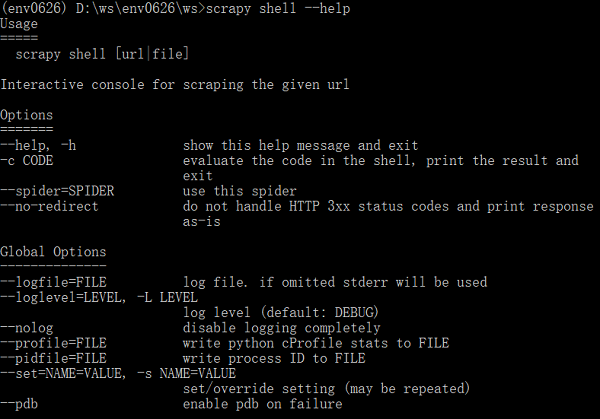
Options中没有找到相应的选项;
Global Options呢?里面的--set/-s命令可以设置/重写配置。
使用-s选项更改了User-Agent配置,再测试某网站,成功返回页面(状态200):
...>scrapy shell -s USER_AGENT="Mozilla/5.0 (Windows NT 6.1) AppleWebKit/537.36 (KHTML, like Gecko) Chrome/59.0.3071.86 Safari/537.36" https://www.某网站.com
2018-07-15 12:11:00 [scrapy.core.engine] DEBUG: Crawled () <GET https://www.某网站.com> (referer: None)
--------翻篇--------
说明,其实,这个-s的用法并非自己通过上面步骤知道的(之前一直关注Options下面的选项,忽略了Global Options,觉得没用吗?),而是通过网页搜索,然后见到下面的文章:
scrapy shell 用法(慢慢更新...) 原文作者:木木&侃侃(一位园友,原文链接)

更进一步:在Scrapy的源码中会对相关配置项有更详细的信息。
打开C:\Python36\Lib\site-packages\scrapy\commands目录,可以在里面看到各种内置的Scrapy命令的Python文件,其中,shell.py正是scrapy shell命令的源文件。

从源码可以看到,里面定义了Command类——继承了scrapy.commands.ScrapyCommand,在Command的add_options函数中,添加了三个选项:
-c:evaluate the code in the shell, print the result and exit(执行一段解析代码?)
--spider:use this spider
--no-redirect:do not handle HTTP 3xx status codes and print response as-is
没有发现-s选项,那么,-s选项来自哪儿呢?看看scrapy.commands.ScrapyCommand的源码(__init__.py文件中)。可以发现,其下的add_options函数中添加了-s选项:
 def add_options(self, parser):

     """

     Populate option parse with options available for this command

     """

     group = OptionGroup(parser, "Global Options")

     group.add_option("--logfile", metavar="FILE",

         help="log file. if omitted stderr will be used")

     group.add_option("-L", "--loglevel", metavar="LEVEL", default=None,

         help="log level (default: %s)" % self.settings['LOG_LEVEL'])

     group.add_option("--nolog", action="store_true",

         help="disable logging completely")

     group.add_option("--profile", metavar="FILE", default=None,

         help="write python cProfile stats to FILE")

     group.add_option("--pidfile", metavar="FILE",

         help="write process ID to FILE")

     group.add_option("-s", "--set", action="append", default=[], metavar="NAME=VALUE",

         help="set/override setting (may be repeated)")

     group.add_option("--pdb", action="store_true", help="enable pdb on failure")

     parser.add_option_group(group)
好了,源头找到了。
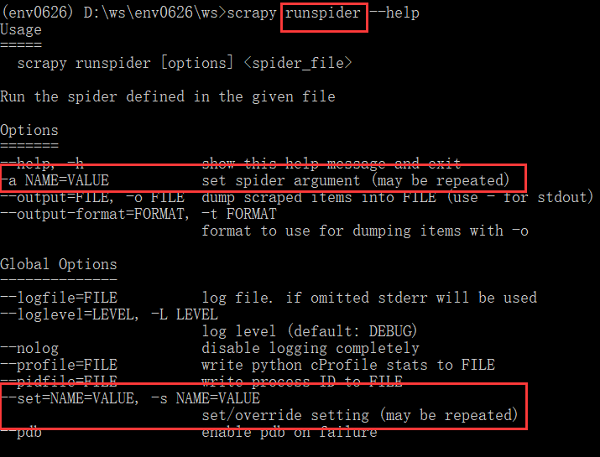
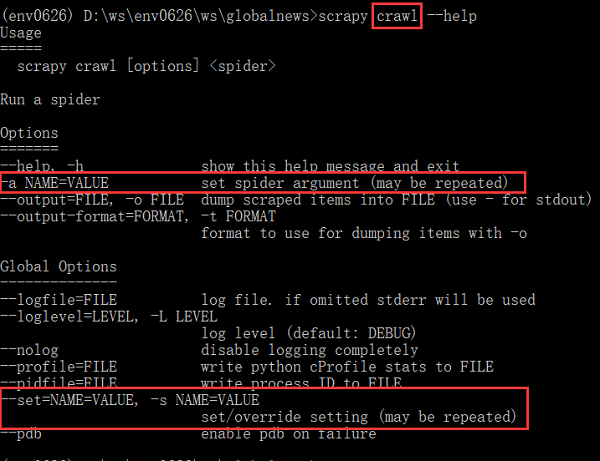
可是,之前在寻找方法时发现,scrapy crawl、runspider提供了-a选项来设置/重写配置,可是,已经有了-s选项了,为何还要增加-a选项呢?两者有什么区别?
从其解释来看,-a选项仅仅修改spider的参数,而-s可以设置的范围更广泛,包括官文Settings中所有配置吧!(未测试)
parser.add_option("-a", dest="spargs", action="append", default=[], metavar="NAME=VALUE",
help="set spider argument (may be repeated)")
--------翻篇--------
实践1:scrapy shell的-c选项
(env0626) D:\ws\env0626\ws>scrapy shell -c "response.xpath('//title/text()')" https://www.baidu.com
输出:
2018-07-15 13:07:23 [scrapy.core.engine] DEBUG: Crawled (200) <GET https://www.baidu.com> (referer: None)
[<Selector xpath='//title/text()' data='百度一下,你就知道'>]
实践2:scrapy runspider -a选项和-s选项修改User-Agent请求头
 # -*- coding: utf-8 -*-

 import scrapy

 class MousiteSpider(scrapy.Spider):

     name = 'mousite'

     allowed_domains = ['www.zhihu.com']

     start_urls = ['https://www.zhihu.com/']

     def parse(self, response):

         yield response.xpath('//title/text()')
测试结果:-a选项无法获取数据,返回400;-s选项可以,返回200;
-a选项:
(env0626) D:\ws\env0626\ws>scrapy runspider -a USER_AGENT="Mozilla/5.0 (Windows NT 6.1) AppleWebKit/537.36 (KHTML, like Gecko) Chrome/59.0.3071.86 Safari/537.36" mousite.py
DEBUG: Crawled (400) <GET https://www.zhihu.com/> (referer: None)
INFO: Ignoring response <400 https://www.zhihu.com/>: HTTP status code is not handled or not allowed
-s选项:
(env0626) D:\ws\env0626\ws>scrapy runspider -s USER_AGENT="Mozilla/5.0 (Windows NT 6.1) AppleWebKit/537.36 (KHTML, like Gecko) Chrome/59.0.3071.86 Safari/537.36" mousite.py
DEBUG: Crawled (200) <GET https://www.zhihu.com/> (referer: None)
{'title': [<Selector xpath='//title/text()' data='知乎 - 发现更大的世界'>]}
看来,两者还是有差别的。
注意,上面的试验都是在Scrapy项目外执行()。
scrapy shell命令的【选项】简介的更多相关文章
- 在Scrapy项目【内外】使用scrapy shell命令抓取 某网站首页的初步情况
Windows 10家庭中文版,Python 3.6.3,Scrapy 1.5.0, 时隔一月,再次玩Scrapy项目,希望这次可以玩的更进一步. 本文展示使用在 Scrapy项目内.项目外scrap ...
- Linux下shell命令执行过程简介
Linux是如何寻找命令路径的:http://c.biancheng.net/view/5969.html Linux上命令运行的基本过程:https://blog.csdn.net/hjx5200/ ...
- 安装ipython,使用scrapy shell来验证xpath选择的结果 | How to install iPython and how does it work with Scrapy Shell
1. scrapy shell 是scrapy包的一个很好的交互性工具,目前我使用它主要用于验证xpath选择的结果.安装好了scrapy之后,就能够直接在cmd上操作scrapy shell了. 具 ...
- scrapy shell 用法(慢慢更新...)
scrapy shell 命令 1.scrapy shell url #url指你所需要爬的网址 2.有些网址数据的爬取需要user-agent,scrapy shell中可以直接添加头文件, 第①种 ...
- Scrapy的shell命令(转)
scrapy python MrZONT 2015年08月29日发布 ...
- Scrapy命令行工具简介
Windows 10家庭中文版,Python 3.6.4,virtualenv 16.0.0,Scrapy 1.5.0, 在最初使用Scrapy时,使用编辑器或IDE手动编写模块来创建爬虫(Spide ...
- 4-3 调试代码命令 scrapy shell http://blog.jobbole.com/114496/(入口url)
调试代码命令 scrapy shell http://blog.jobbole.com/114496/(入口url)
- linux + shell 命令等
Linux命令[注意:建议用UltraEdit打开] 一.文件处理命令 1.命令格式与目录处理命令 ls –a[查看隐藏文件] ls –l[查看文件信息长格式显示] ls –d[查看指定目录的详细信息 ...
- VxWorks操作系统shell命令与调试方法总结
VxWorks下的调试手段 主要介绍在Tornado集成开发环境下的调试方法,和利用支撑定位问题的步骤.思路. 1 Tornado的调试工具 嵌入式实时操作系统VxWorks和集成开发 ...
随机推荐
- 51nod 1293 球与切换器 | DP
51nod 1293 球与切换器 | DP 题面 有N行M列的正方形盒子.每个盒子有三种状态0, -1, +1.球从盒子上边或左边进入盒子,从下边或右边离开盒子.规则: 如果盒子的模式是-1,则进入它 ...
- 【转】rt-thread的位图调度算法分析
序言 期待读者 本文期待读者有C语言编程基础,后文中要分析代码,对其中的一些C语言中的简单语句不会介绍,但是并不要求读者有过多的C基础,比如指针和链表等不会要求太多,后面在分析代码时,会附带地介绍相关 ...
- bzoj 1823: [JSOI2010]满汉全席 && bzoj 2199 : [Usaco2011 Jan]奶牛议会 2-sat
noip之前学的内容了,看到题竟然忘了怎么建图了,复习一下. 2-sat 大概是对于每个元素,它有0和1两种选择,必须选一个但不能同时选.这之间又有一些二元关系,比如x&y=1等等... 先把 ...
- bzoj 3190 赛车 半平面交
直接写的裸的半平面交,已经有点背不过模板了... 这题卡精度,要用long double ,esp设1e-20... #include<iostream> #include<cstd ...
- 【题解】Arpa's letter-marked tree and Mehrdad's Dokhtar-kosh paths Codeforces 741D DSU on Tree
Prelude 很好的模板题. 传送到Codeforces:(* ̄3 ̄)╭ Solution 首先要会DSU on Tree,不会的看这里:(❤ ω ❤). 众所周知DSU on Tree是可以用来处 ...
- sql server查询数据库的大小和各数据表的大小
查询出来的结果中各字段的详细说明参考MSDN资料:https://msdn.microsoft.com/zh-cn/library/ms188776.aspx 如果只是查询数据库的大小的话,直接使用以 ...
- 51nod1019 逆序数
1019 逆序数 基准时间限制:1 秒 空间限制:131072 KB 分值: 0 难度:基础题 收藏 关注 在一个排列中,如果一对数的前后位置与大小顺序相反,即前面的数大于后面的数,那么它们就称为 ...
- Windows下配置Nginx+php7
第一部分:准备工作 第二部分:安装nginx 第三部分:安装php(这里主要讲nginx配置启动php,以cgi运行php)nginx配置文件是conf文件夹里的nginx.conf 在这里,我简单说 ...
- 八卦Minsky打压神经网络始末
八卦Minsky打压神经网络始末 谈下Minsky造成的神经网络冰河事件:57年一个叫弗兰克的大概只有二流水平的学者搞出了感知机,理论和实践证明了对线性可分问题的有效性,引起一阵轰动,特别是非科学圈类 ...
- pandas 实现rfm模型
import pandas as pd import numpy as np df = pd.read_csv('./zue_164466.csv') df['ptdate'] = pd.to_dat ...