
.NET:CLR via C# Compute-Bound Asynchronous Operations
线程槽
使用线程池了以后就不要使用线程槽了,当线程池执行完调度任务后,线程槽的数据还在。
测试代码
 using System;

 using System.Collections.Generic;

 using System.Linq;

 using System.Text;

 using System.Threading;

 using System.Threading.Tasks;

 using System.Runtime.Remoting;

 namespace ExecutionContextStudy

 {

     class Program

     {

         static void Main(string[] args)

         {

             for (var i = ; i < ; i++)

             {

                 Thread.Sleep();

                 Task.Run(() =>

                 {

                     var slot = Thread.GetNamedDataSlot("test");

                     if (slot == null)

                     {

                         Thread.AllocateNamedDataSlot("test");

                     }

                     if (Thread.GetData(slot) == null)

                     {

                         Thread.SetData(slot, DateTime.Now.Millisecond);

                     }

                     Console.WriteLine(Thread.CurrentThread.ManagedThreadId + ":" + Thread.GetData(slot));

                 });

             }

             Console.ReadLine();

         }

     }

 }
输出结果

CallContext
CallContext 可以避免线程槽的问题。
测试代码
 using System;

 using System.Collections.Generic;

 using System.Linq;

 using System.Text;

 using System.Threading;

 using System.Threading.Tasks;

 using System.Runtime.Remoting.Messaging;

 namespace ExecutionContextStudy

 {

     class CallContextTest

     {

         public static void Test()

         {

             Console.WriteLine("测试:CallContext.SetData");

             for (var i = ; i < ; i++)

             {

                 Thread.Sleep();

                 Task.Run(() =>

                 {

                     if (CallContext.GetData("test") == null)

                     {

                         CallContext.SetData("test", DateTime.Now.Millisecond);

                     }

                     Console.WriteLine(Thread.CurrentThread.ManagedThreadId + ":" + CallContext.GetData("test"));

                 });

             }

             Console.WriteLine("测试:CallContext.LogicalSetData");

             for (var i = ; i < ; i++)

             {

                 Thread.Sleep();

                 Task.Run(() =>

                 {

                     if (CallContext.LogicalGetData("test") == null)

                     {

                         CallContext.LogicalSetData("test", DateTime.Now.Millisecond);

                     }

                     Console.WriteLine(Thread.CurrentThread.ManagedThreadId + ":" + CallContext.LogicalGetData("test"));

                 });

             }

             Console.ReadLine();

         }

     }

 }
输出结果
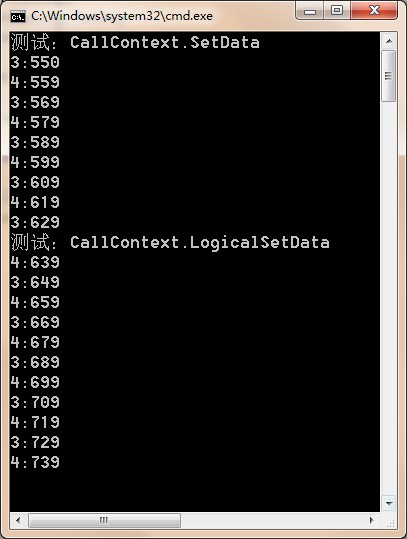
Execution Contexts
Every thread has an execution context data structure associated with it. The execution context includes things such as security settings (compressed stack, Thread’s Principal property, and Windows identity), host settings (see System.Threading.HostExecutionContextManager), and logical call context data (see System.Runtime.Remoting.Messaging.CallContext’s LogicalSetData and LogicalGetData methods). When a thread executes code, some operations are affected by the values of the thread’s execution context settings. This is certainly true for the security settings. Ideally, whenever a thread uses another (helper) thread to perform tasks, the issuing thread’s execution context should flow (be copied) to the helper thread. This ensures that any operations performed by helper thread(s) are executing with the same security settings and host settings. It also CHAPTER 27 Compute-Bound Asynchronous Operations 695 ensures that any data stored in the initiating thread’s logical call context is available to the helper thread.
By default, the CLR automatically causes the initiating thread’s execution context to flow to any helper threads. This transfers context information to the helper thread, but it comes at a performance cost, because there is a lot of information in an execution context, and accumulating all of this information and then copying it for the helper thread takes a fair amount of time. If the helper thread then employs additional helper threads, then more execution context data structures have to be created and initialized as well.
In the System.Threading namespace, there is an ExecutionContext class that allows you to control how a thread’s execution context flows from one thread to another.
测试代码
 using System;

 using System.Collections.Generic;

 using System.Linq;

 using System.Text;

 using System.Threading;

 using System.Threading.Tasks;

 using System.Runtime.Remoting.Messaging;

 namespace ExecutionContextStudy

 {

     class ExecutionContextTest

     {

         public static void Test()

         {

             Console.WriteLine("测试:CallContext.SetData");

             Task.Run(() =>

             {

                 CallContext.SetData("test", "段光伟");

                 Console.WriteLine(Thread.CurrentThread.ManagedThreadId + ":" + CallContext.GetData("test"));

                 Task.Run(() =>

                 {

                     Console.WriteLine(Thread.CurrentThread.ManagedThreadId + ":" + CallContext.GetData("test"));

                 });

             });

             Thread.Sleep();

             Console.WriteLine("测试:CallContext.LogicalSetData");

             Task.Run(() =>

             {

                 CallContext.LogicalSetData("test", "段光伟");

                 Console.WriteLine(Thread.CurrentThread.ManagedThreadId + ":" + CallContext.LogicalGetData("test"));

                 Task.Run(() =>

                 {

                     Console.WriteLine(Thread.CurrentThread.ManagedThreadId + ":" + CallContext.LogicalGetData("test"));

                 });

                 ExecutionContext.SuppressFlow();

                 Task.Run(() =>

                 {

                     Console.WriteLine("SuppressFlow 之后:" + CallContext.LogicalGetData("test"));

                 });

                 ExecutionContext.RestoreFlow();

                 Task.Run(() =>

                 {

                     Console.WriteLine("RestoreFlow 之后:" + CallContext.LogicalGetData("test"));

                 });

             });

             Console.ReadLine();

         }

     }

 }
输出结果
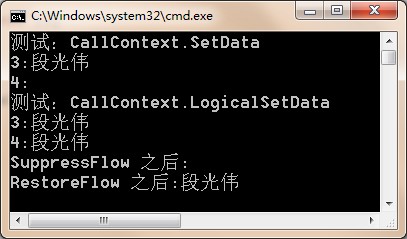
Cooperative Cancellation and Timeout
To cancel an operation, you must first create a System.Threading.CancellationTokenSource object. This object contains all the states having to do with managing cancellation. After constructing a CancellationTokenSource (a reference type), one or more CancellationToken (a value type) instances can be obtained by querying its Token property and passed around to your operations that CHAPTER 27 Compute-Bound Asynchronous Operations 697 allow themselves to be canceled. Here are the most useful members of the CancellationToken value type.
测试代码
 using System;

 using System.Collections.Generic;

 using System.Linq;

 using System.Text;

 using System.Threading.Tasks;

 using System.Threading;

 namespace ExecutionContextStudy

 {

     class CancellationTest

     {

         public static void Test()

         {

             CancellationTokenSource cts = new CancellationTokenSource();

             ThreadPool.QueueUserWorkItem(o => Count(cts.Token, ));

             Console.WriteLine("Press <Enter> to cancel the operation.");

             Console.ReadLine();

             cts.Cancel();

             Console.ReadLine();

         }

         private static void Count(CancellationToken token, Int32 countTo)

         {

             for (Int32 count = ; count < countTo; count++)

             {

                 if (token.IsCancellationRequested)

                 {

                     Console.WriteLine("Count is cancelled");

                     break;

                 }

                 Console.WriteLine(count);

                 Thread.Sleep();

             }

             Console.WriteLine("Count is done");

         }

     }

 }
输出结果
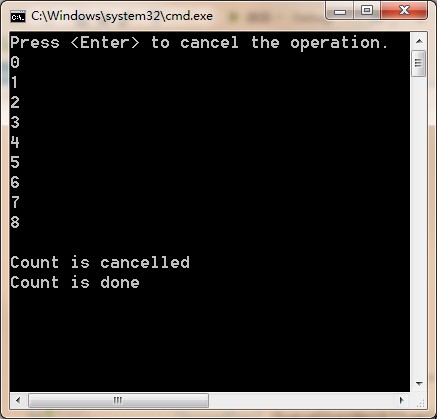
If you’d like, you can call CancellationTokenSource’s Register method to register one or more methods to be invoked when a CancellationTokenSource is canceled. To this method, you pass an Action<Object> delegate, a state value that will be passed to the callback via the delegate, and a Boolean indicating whether or not to invoke the delegate by using the calling thread’s SynchronizationContext. If you pass false for the useSynchronizationContext parameter, then the thread that calls Cancel will invoke all the registered methods sequentially. If you pass true for the useSynchronizationContext parameter, then the callbacks are sent (as opposed to posted) to the captured SynchronizationContext object that governs which thread invokes the callback.
测试代码
 using System;

 using System.Collections.Generic;

 using System.Linq;

 using System.Text;

 using System.Threading.Tasks;

 using System.Threading;

 namespace ExecutionContextStudy

 {

     class CancellationTest

     {

         public static void Test()

         {

             CancellationTokenSource cts = new CancellationTokenSource();

             cts.Token.Register(() =>

             {

                 Console.WriteLine("Cancel callback 1,In Thread:" + Thread.CurrentThread.ManagedThreadId);

             });

             cts.Token.Register(() =>

             {

                 Console.WriteLine("Cancel callback 2,In Thread:" + Thread.CurrentThread.ManagedThreadId);

             }, true);

             ThreadPool.QueueUserWorkItem(o => Count(cts.Token, ));

             Console.WriteLine("Press <Enter> to cancel the operation.");

             Console.ReadLine();

             cts.Cancel();

             cts.Token.Register(() =>

             {

                 Console.WriteLine("Cancel callback 3,In Thread:" + Thread.CurrentThread.ManagedThreadId);

             });

             cts.Token.Register(() =>

             {

                 Console.WriteLine("Cancel callback 4,In Thread:" + Thread.CurrentThread.ManagedThreadId);

             }, true);

             Console.ReadLine();

         }

         private static void Count(CancellationToken token, Int32 countTo)

         {

             for (Int32 count = ; count < countTo; count++)

             {

                 if (token.IsCancellationRequested)

                 {

                     Console.WriteLine("Count is cancelled,In Thread:" + Thread.CurrentThread.ManagedThreadId);

                     break;

                 }

                 Console.WriteLine(count);

                 Thread.Sleep();

             }

             Console.WriteLine("Count is done,In Thread:" + Thread.CurrentThread.ManagedThreadId);

         }

     }

 }
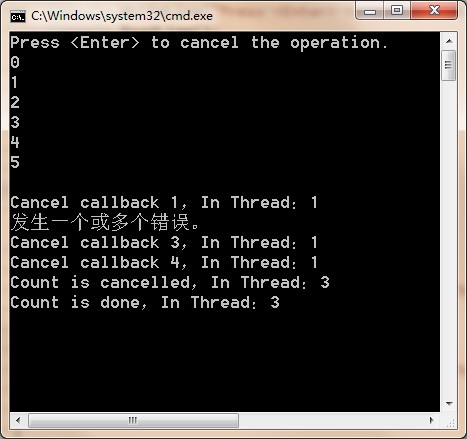
输出结果
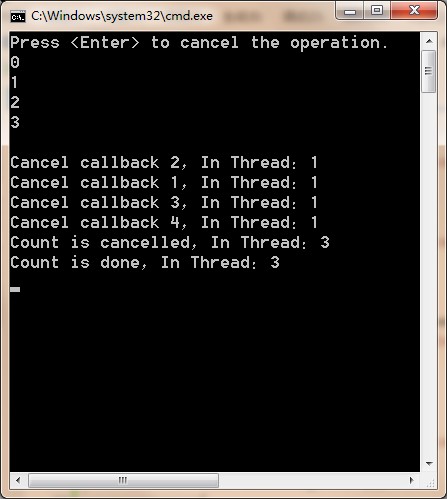
If Register is called multiple times, then multiple callback methods will be invoked. These callback methods could throw an unhandled exception. If you call CancellationTokenSource’s Cancel, passing it true, then the first callback method that throws an unhandled exception stops the other callback methods from executing, and the exception thrown will be thrown from Cancel as well. If you call Cancel passing it false, then all registered callback methods are invoked. Any unhandled exceptions that occur are added to a collection. After all callback methods have executed, if any of them threw an unhandled exception, then Cancel throws an AggregateException with its InnerExceptions property set to the collection of exception objects that were thrown. If no registered callback methods threw an unhandled exception, then Cancel simply returns without throwing any exception at all.
测试代码
 using System;

 using System.Collections.Generic;

 using System.Linq;

 using System.Text;

 using System.Threading.Tasks;

 using System.Threading;

 namespace ExecutionContextStudy

 {

     class CancellationTest

     {

         public static void Test()

         {

             CancellationTokenSource cts = new CancellationTokenSource();

             cts.Token.Register(() =>

             {

                 Console.WriteLine("Cancel callback 1,In Thread:" + Thread.CurrentThread.ManagedThreadId);

             });

             cts.Token.Register(() =>

             {

                 throw new Exception("抛出异常");

                 Console.WriteLine("Cancel callback 2,In Thread:" + Thread.CurrentThread.ManagedThreadId);

             }, true);

             ThreadPool.QueueUserWorkItem(o => Count(cts.Token, ));

             Console.WriteLine("Press <Enter> to cancel the operation.");

             Console.ReadLine();

             try

             {

                 cts.Cancel();

             }

             catch (Exception ex)

             {

                 Console.WriteLine(ex.Message);

             }

             cts.Token.Register(() =>

             {

                 Console.WriteLine("Cancel callback 3,In Thread:" + Thread.CurrentThread.ManagedThreadId);

             });

             cts.Token.Register(() =>

             {

                 Console.WriteLine("Cancel callback 4,In Thread:" + Thread.CurrentThread.ManagedThreadId);

             }, true);

             Console.ReadLine();

         }

         private static void Count(CancellationToken token, Int32 countTo)

         {

             for (Int32 count = ; count < countTo; count++)

             {

                 if (token.IsCancellationRequested)

                 {

                     Console.WriteLine("Count is cancelled,In Thread:" + Thread.CurrentThread.ManagedThreadId);

                     break;

                 }

                 Console.WriteLine(count);

                 Thread.Sleep();

             }

             Console.WriteLine("Count is done,In Thread:" + Thread.CurrentThread.ManagedThreadId);

         }

     }

 }
输出结果
you can create a new CancellationTokenSource object by linking a bunch of other CancellationTokenSource objects. This new CancellationTokenSource object will be canceled when any of the linked CancellationTokenSource objects are canceled.
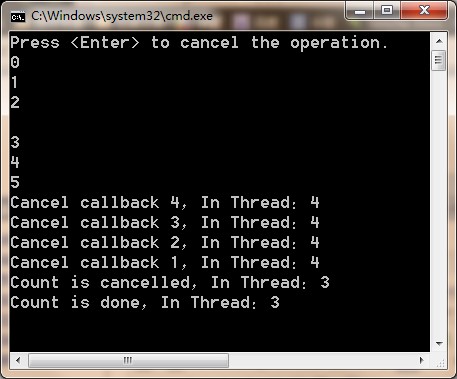
It is often valuable to cancel an operation after a period of time has elapsed. For example, imagine a server application that starts computing some work based on a client request. But the server application needs to respond to the client within two seconds, no matter what. In some scenarios, it is better to respond in a short period of time with an error or with partially computed results as opposed to waiting a long time for a complete result. Fortunately, CancellationTokenSource gives you a way to have it self-cancel itself after a period of time. To take advantage of this, you can either construct a CancellationTokenSource object by using one of the constructors that accepts a delay, or you can call CancellationTokenSource’s CancelAfter method.
测试代码
 using System;

 using System.Collections.Generic;

 using System.Linq;

 using System.Text;

 using System.Threading.Tasks;

 using System.Threading;

 namespace ExecutionContextStudy

 {

     class CancellationTest

     {

         public static void Test()

         {

             CancellationTokenSource cts = new CancellationTokenSource();

             cts.Token.Register(() =>

             {

                 Console.WriteLine("Cancel callback 1,In Thread:" + Thread.CurrentThread.ManagedThreadId);

             });

             cts.Token.Register(() =>

             {

                 Console.WriteLine("Cancel callback 2,In Thread:" + Thread.CurrentThread.ManagedThreadId);

             }, true);

             ThreadPool.QueueUserWorkItem(o => Count(cts.Token, ));

             Console.WriteLine("Press <Enter> to cancel the operation.");

             Console.ReadLine();

             cts.CancelAfter();

             cts.Token.Register(() =>

             {

                 Console.WriteLine("Cancel callback 3,In Thread:" + Thread.CurrentThread.ManagedThreadId);

             });

             cts.Token.Register(() =>

             {

                 Console.WriteLine("Cancel callback 4,In Thread:" + Thread.CurrentThread.ManagedThreadId);

             }, true);

             Console.ReadLine();

         }

         private static void Count(CancellationToken token, Int32 countTo)

         {

             for (Int32 count = ; count < countTo; count++)

             {

                 if (token.IsCancellationRequested)

                 {

                     Console.WriteLine("Count is cancelled,In Thread:" + Thread.CurrentThread.ManagedThreadId);

                     break;

                 }

                 Console.WriteLine(count);

                 Thread.Sleep();

             }

             Console.WriteLine("Count is done,In Thread:" + Thread.CurrentThread.ManagedThreadId);

         }

     }

 }
输出结果
Task
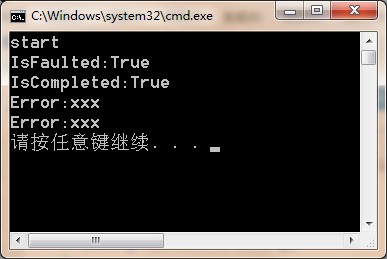
If the compute-bound task throws an unhandled exception, the exception will be swallowed, stored in a collection, and the thread pool thread is allowed to return to the thread pool. When the Wait method or the Result property is invoked, these members will throw a System.AggregateException object.
测试代码
 using System;

 using System.Collections.Generic;

 using System.Linq;

 using System.Text;

 using System.Threading.Tasks;

 using System.Threading;

 namespace TaskProgramming

 {

     class _003_Exception

     {

         public static void Test()

         {

             var task = Task.Factory.StartNew(() =>

             {

                 Console.WriteLine("start");

                 throw new Exception("xxx");

             });

             Thread.Sleep();

             Console.WriteLine("IsFaulted:" + task.IsFaulted);

             Console.WriteLine("IsCompleted:" + task.IsCompleted);

             Console.WriteLine("Error:" + task.Exception.InnerExceptions.First().Message);

             try

             {

                 task.Wait();

             }

             catch (AggregateException ex)

             {

                 Console.WriteLine("Error:" + ex.InnerExceptions.First().Message);

             }

         }

     }

 }
输出结果
The AggregateException type is used to encapsulate a collection of exception objects (which can happen if a parent task spawns multiple child tasks that throw exceptions).
Canceling a Task
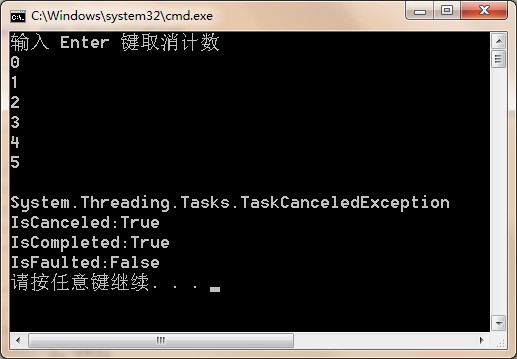
When creating a Task, you can associate a CancellationToken with it by passing it to Task’s constructor (as shown in the preceding code). If the CancellationToken gets canceled before the Task is scheduled, the Task gets canceled and never executes at all.2 But if the Task has already been scheduled (by calling the Start method), then the Task’s code must explicitly support cancellation if it allows its operation to be canceled while executing. Unfortunately, while a Task object has a CancellationToken associated with it, there is no way to access it, so you must somehow get the same CancellationToken that was used to create the Task object into the Task’s code itself. The easiest way to write this code is to use a lambda expression and “pass” the CancellationToken as a closure variable (as I’ve done in the previous code example).
测试代码
 using System;

 using System.Collections.Generic;

 using System.Linq;

 using System.Text;

 using System.Threading.Tasks;

 using System.Threading;

 namespace TaskProgramming

 {

     class _004_Cancellation

     {

         public static void Test()

         {

             CancellationTokenSource cts = new CancellationTokenSource();

             var ct = cts.Token;

             var task = Task.Factory.StartNew(() =>

             {

                 for (var i = ; i < ; i++)

                 {

                     Thread.Sleep();

                     ct.ThrowIfCancellationRequested();

                     Console.WriteLine(i);

                 }

             }, ct);

             Console.WriteLine("输入 Enter 键取消计数");

             Console.ReadLine();

             cts.Cancel();

             Thread.Sleep();

             try

             {

                 task.Wait();

             }

             catch(AggregateException ex)

             {

                 Console.WriteLine(ex.InnerException.GetType());

                 Console.WriteLine("IsCanceled:" + task.IsCanceled);

                 Console.WriteLine("IsCompleted:" + task.IsCompleted);

                 Console.WriteLine("IsFaulted:" + task.IsFaulted);

             }

         }

     }

 }
运行结果
Starting a New Task Automatically When Another Task Completes
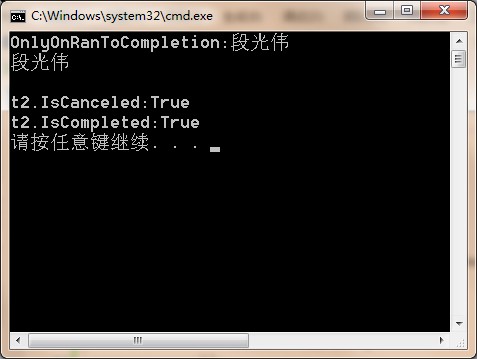
When you call ContinueWith, you can indicate that you want the new task to execute only if the first task is canceled by specifying the TaskContinuationOptions.OnlyOnCanceled flag. Similarly, you have the new task execute only if the first task throws an unhandled exception using the TaskContinuationOptions. OnlyOnFaulted flag. And, of course, you can use the TaskContinuationOptions. OnlyOnRanToCompletion flag to have the new task execute only if the first task runs all the way to completion without being canceled or throwing an unhandled exception. By default, if you do not specify any of these flags, then the new task will run regardless of how the first task completes. When a Task completes, any of its continue-with tasks that do not run are automatically canceled.
测试代码
 using System;

 using System.Collections.Generic;

 using System.Linq;

 using System.Text;

 using System.Threading.Tasks;

 using System.Threading;

 namespace TaskProgramming

 {

     class _005_Continuation

     {

         public static void Test()

         {

             var task = Task.Factory.StartNew(() =>

             {

                 Thread.Sleep();

                 return "段光伟";

             });

             var t1 = task.ContinueWith(x =>

             {

                 Console.WriteLine(x.Result);

             });

             var t2 = task.ContinueWith(x =>

             {

                 Console.WriteLine("OnlyOnCanceled:" + x.Result);

             }, TaskContinuationOptions.OnlyOnCanceled);

             var t3 = task.ContinueWith(x =>

             {

                 Console.WriteLine("OnlyOnFaulted:" + x.Result);

             }, TaskContinuationOptions.OnlyOnFaulted);

             var t4 = task.ContinueWith(x =>

             {

                 Console.WriteLine("OnlyOnRanToCompletion:" + x.Result);

             }, TaskContinuationOptions.OnlyOnRanToCompletion);

             Console.ReadLine();

             Console.WriteLine("t2.IsCanceled:" + t2.IsCanceled);

             Console.WriteLine("t2.IsCompleted:" + t2.IsCompleted);

         }

     }

 }
输出结果
A Task May Start Child Tasks
By default, Task objects created by another task are top-level tasks that have no relationship to the task that creates them. However, the TaskCreationOptions.AttachedToParent flag associates a Task with the Task that creates it so that the creating task is not considered finished until all its children (and grandchildren) have finished running. When creating a Task by calling the ContinueWith method, you can make the continuewith task be a child by specifying the TaskContinuationOptions.AttachedToParent flag.
测试代码
 using System;

 using System.Collections.Generic;

 using System.Linq;

 using System.Text;

 using System.Threading.Tasks;

 using System.Threading;

 namespace TaskProgramming

 {

     class _006_Child

     {

         public static void Test()

         {

             var parent = new Task(() =>

             {

                 Console.WriteLine("Parent");

                 new Task(() =>

                 {

                     Thread.Sleep();

                     Console.WriteLine("Child #1");

                 }, TaskCreationOptions.AttachedToParent).Start();

                 new Task(() =>

                 {

                     Thread.Sleep();

                     Console.WriteLine("Child #2");

                 }, TaskCreationOptions.AttachedToParent).Start();

             });

             parent.ContinueWith((x) =>

             {

                 Console.WriteLine("Child #3");

             });

             parent.Start();

             Console.ReadLine();

         }

     }

 }
输出结果

Inside a Task
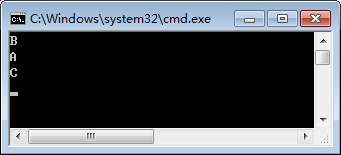
When you first construct a Task object, its status is Created. Later, when the task is started, its status changes to WaitingToRun. When the Task is actually running on a thread, its status changes CHAPTER 27 Compute-Bound Asynchronous Operations 709 to Running. When the task stops running and is waiting for any child tasks, the status changes to WaitingForChildrenToComplete. When a task is completely finished, it enters one of three final states: RanToCompletion, Canceled, or Faulted. When a Task<TResult> runs to completion, you can query the task’s result via Task<TResult>’s Result property. When a Task or Task<TResult> faults, you can obtain the unhandled exception that the task threw by querying Task’s Exception property; which always returns an AggregateException object whose collection contains the set of unhandled exceptions.
A Task object is in the WaitingForActivation state if that Task is created by calling one of these functions: ContinueWith, ContinueWhenAll, ContinueWhenAny, or FromAsync. A Task created by constructing a TaskCompletionSource< TResult> object is also created in the WaitingForActivation state. This state means that the Task’s scheduling is controlled by the task infrastructure. For example, you cannot explicitly start a Task object that was created by calling ContinueWith. This Task will start automatically when its antecedent task has finished executing.
测试代码
 using System;

 using System.Collections.Generic;

 using System.Linq;

 using System.Text;

 using System.Threading.Tasks;

 using System.Threading;

 namespace TaskProgramming

 {

     class _006_ContinuteWhen

     {

         public static void Test()

         {

             var t1 = Task.Run(() =>

             {

                 Thread.Sleep();

                 Console.WriteLine("A");

             });

             var t2 = Task.Run(() =>

             {

                 Thread.Sleep();

                 Console.WriteLine("B");

             });

             Task.Factory.ContinueWhenAll(new Task[] { t1, t2 }, (ts) =>

             {

                 Thread.Sleep();

                 Console.WriteLine("C");

             });

             Console.ReadLine();

         }

     }

 }
输出结果
.NET:CLR via C# Compute-Bound Asynchronous Operations的更多相关文章
- A filter or servlet of the current chain does not support asynchronous operations. 错误解决记录
做视频文件上传一直报这个错误: java.lang.IllegalStateException: A filter or servlet of the current chain does not s ...
- [AngularJS NG-redux] Handle Asynchronous Operations with Middleware
Invariably the question that comes up when talking about Redux is how does one handle asynchronous o ...
- 转载:Maven项目mybatis Invalid bound statement (not found)解决方法
在mapper代理的开发中,程序员需要遵守一些规范,mybatis才能实现mapper接口的代理对象. 它的规范如下: mapper.xml的namespace要写所映射接口的全称类名. mapper ...
- 第一节:CLR寄宿
本系列文章来自 CLR VIA C# .NET FrameWork在Microsoft Windows平台的顶部运行.这意味着.NET必须用Windows可以理解的技术来构建.首先,所有的托管模块和 ...
- 解决“ 故障模块名称: clr.dll ”
错误内容: 微软的错误说明:http://support.microsoft.com/kb/2640103/zh-cn 类似下面的错误: 错误应用程序名称:xxx.exe,版本: 1.0.0.0,时间 ...
- CLR via C#读书笔记一:CLR的执行模型
CLR(Common Language Runtime)公共语言进行时是一个可由多种编程语言使用的“进行时”. 将源代码编译成托管模块 可用支持CLR的任何语言创建源代码文件,然后用对应的编译器检查语 ...
- .NET:CLR via C# Exceptions and State Management
重点学习的个概念 unhandled exceptions constrained execution regions code contracts runtime wrapped exception ...
- .NET:CLR via C# Shared Assemblies and Strongly Named Assemblies
Two Kinds of Assemblies, Two Kinds of Deployment A strongly named assembly consists of four attribut ...
- .NET:CLR via C# The CLR’s Execution Model
The CLR’s Execution Model The core features of the CLR memory management. assembly loading. security ...
随机推荐
- 使用Oracle数据库,对某个表频繁更新
使用Oracle数据库,对某个表频繁更新,查询时要联合这张表,查询速度非常慢,有什么解决办法? 一般的pc机oracle更新的效率均可达到500+/s, 可能的问题,你更新这个不会是每次都新建jdbc ...
- 基于 Struts2 的单文件和多文件上传
文件的上传下载是 Web 开发中老生常谈的功能,基于 Struts2 框架对于实现这一功能,更是能够给我们带来很多的便利.Struts2 已经有默认的 upload 拦截器.我们只需要写参数,它就会自 ...
- HDU - 4465 期望 + 取log优化
思路:这个求期望的公式很容易得到,但是在算的时候我们会遇到一个问题,就是组合数太大了根本存不下, 这时候就可以在计算的时候都取log,最后复原... 以前没遇到过.. #include<bit ...
- wampserver的安装和使用
首先想说一下通常搭建WAMP平台的时候主要分为散装包搭建和集成包搭建过程. 散装包搭建就是把PHP,Apache,MySQL等下载下来,一个个的安装,其过程灰常的复杂,而且需要配置的系统变量和修改的文 ...
- 《Android源码设计模式》--原型模式
No1: 原型模式使用场景: 1)类初始化需要消耗非常多的资源,这个资源包括数据.硬件资源等,通过原型复制避免这些消耗 2)通过new产生一个对象需要非常繁琐的数据准备货访问权限,这是可以使用原型模式 ...
- Java_正则表达式&时间日期
正则表达式 1.概念 正则表达式(英语:Regular Expression,在代码中常简写为regex). 正则表达式是一个字符串,使用单个字符串来描述.用来定义匹配规则,匹配一系列符合某个句法规则 ...
- 美团 R 语言数据运营实战
一.引言 近年来,随着分布式数据处理技术的不断革新,Hive.Spark.Kylin.Impala.Presto 等工具不断推陈出新,对大数据集合的计算和存储成为现实,数据仓库/商业分析部门日益成为各 ...
- DP Training(Updating)
感觉前面做了那么多$dp$全是自己想的还是太少啊…… 好像在LZT的博客上看到了不错的资源?赶紧开坑,以一句话题解为主 Codeforces 419B 第一题就开始盗图 由于只有一个交点,手玩一下发现 ...
- 利用meterpreter下的Venom免杀后门
转载请注明作者:admin-神风 下载地址:https://github.com/r00t-3xp10it/venom .从Github上下载框架: tar.gz OR zip OR git clon ...
- [POI2015]Łasuchy
[POI2015]Łasuchy 题目大意: 圆桌上摆放着\(n(n\le10^6)\)份食物,围成一圈,第\(i\)份食物所含热量为\(c_i\). 相邻两份食物之间坐着一个人,共有\(n\)个人. ...