
uploadify的java应用
API:http://www.uploadify.com/documentation/
下载地址:http://www.uploadify.com/
这几天查看插件,发现uploadify插件做不错,查了一些资料,总结笔记一下。
项目文件截图:
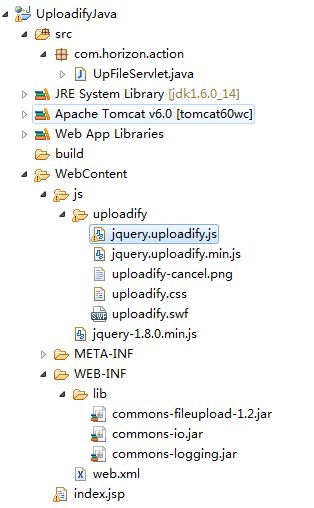
lib如图;
web.xml代码:
<?xml version="1.0" encoding="UTF-8"?>

<web-app xmlns:xsi="http://www.w3.org/2001/XMLSchema-instance" xmlns="http://java.sun.com/xml/ns/javaee" xmlns:web="http://java.sun.com/xml/ns/javaee/web-app_2_5.xsd" xsi:schemaLocation="http://java.sun.com/xml/ns/javaee http://java.sun.com/xml/ns/javaee/web-app_2_5.xsd" id="WebApp_ID" version="2.5">

  <display-name>UploadifyJava</display-name>

  <welcome-file-list>

    <welcome-file>index.jsp</welcome-file>

  </welcome-file-list>

  <servlet>

    <description></description>

    <display-name>UpFileServlet</display-name>

    <servlet-name>UpFileServlet</servlet-name>

    <servlet-class>com.horizon.action.UpFileServlet</servlet-class>

  </servlet>

  <servlet-mapping>

    <servlet-name>UpFileServlet</servlet-name>

    <url-pattern>/UpFileServlet</url-pattern>

  </servlet-mapping>

</web-app>
UpFileServlet.java代码:
package com.horizon.action;

import java.io.File;

import java.io.IOException;

import java.util.Iterator;

import java.util.List;

import java.util.UUID;

import javax.servlet.ServletException;

import javax.servlet.http.HttpServlet;

import javax.servlet.http.HttpServletRequest;

import javax.servlet.http.HttpServletResponse;

import org.apache.commons.fileupload.FileItem;

import org.apache.commons.fileupload.FileUploadException;

import org.apache.commons.fileupload.disk.DiskFileItemFactory;

import org.apache.commons.fileupload.servlet.ServletFileUpload;

/**

 * Servlet implementation class UpFileServlet

 */

public class UpFileServlet extends HttpServlet {

    private static final long serialVersionUID = 1L;

    /**

     * @see HttpServlet#HttpServlet()

     */

    public UpFileServlet() {

        super();

        // TODO Auto-generated constructor stub

    }

    /**

     * @see HttpServlet#doGet(HttpServletRequest request, HttpServletResponse

     *      response)

     */

    @SuppressWarnings({ "unchecked", "rawtypes" })

    protected void doGet(HttpServletRequest request,

            HttpServletResponse response) throws ServletException, IOException {

        // 获得参数

        String timestamp = request.getParameter("timestamp");

        String token = request.getParameter("token");

        System.out.println(timestamp);

        System.out.println(token);

        // 获得文件

        String savePath = this.getServletConfig().getServletContext()

                .getRealPath("");

        savePath = savePath + "/uploads/";

        File f1 = new File(savePath);

        System.out.println(savePath);

        if (!f1.exists()) {

            f1.mkdirs();

        }

        DiskFileItemFactory fac = new DiskFileItemFactory();

        ServletFileUpload upload = new ServletFileUpload(fac);

        upload.setHeaderEncoding("utf-8");

        List fileList = null;

        try {

            fileList = upload.parseRequest(request);

        } catch (FileUploadException ex) {

            System.out.println(ex.getMessage());

            return;

        }

        Iterator<FileItem> it = fileList.iterator();

        String name = "";

        String extName = "";

        while (it.hasNext()) {

            FileItem item = it.next();

            if (!item.isFormField()) {

                name = item.getName();

                long size = item.getSize();

                String type = item.getContentType();

                System.out.println(size + " " + type);

                if (name == null || name.trim().equals("")) {

                    continue;

                }

                // 扩展名格式:

                if (name.lastIndexOf(".") >= ) {

                    extName = name.substring(name.lastIndexOf("."));

                }

                File file = null;

                do {

                    // 生成文件名:

                    name = UUID.randomUUID().toString();

                    file = new File(savePath + name + extName);

                } while (file.exists());

                File saveFile = new File(savePath + name + extName);

                try {

                    item.write(saveFile);

                } catch (Exception e) {

                    e.printStackTrace();

                }

            }

        }

        response.getWriter().print(name + extName);

    }

    /**

     * @see HttpServlet#doPost(HttpServletRequest request, HttpServletResponse

     *      response)

     */

    protected void doPost(HttpServletRequest request,

            HttpServletResponse response) throws ServletException, IOException {

        doGet(request, response);

    }

}
index.jsp代码:
<%@ page language="java" contentType="text/html; charset=UTF-8"
pageEncoding="UTF-8"%>
<!DOCTYPE HTML>
<html>
<head>
<meta http-equiv="Content-Type" content="text/html; charset=UTF-8">
<title>UploadiFive Test</title>
<script src="js/jquery-1.8.0.min.js" type="text/javascript"></script>
<script src="js/uploadify/jquery.uploadify.min.js"
type="text/javascript"></script>
<link rel="stylesheet" type="text/css" href="js/uploadify/uploadify.css">
<style type="text/css">
body {
font: 13px Arial, Helvetica, Sans-serif;
}
</style>
</head>
<body>
<h1>Uploadify Demo for java</h1>
<form>
<div id="queue"></div>
<input id="file_upload" name="file_upload" type="file" multiple="true" />
<a href="javascript:$('#file_upload').uploadify('upload')">开始上传</a>
<a href="javascript:$('#file_upload').uploadify('cancel')">取消所有上传</a>
</p>
</form>
<script type="text/javascript">
$(function() {
var timestamp = new Date().getTime();
$('#file_upload').uploadify({
'formData' : {
'timestamp' : timestamp,
'token' : 'unique_salt' + timestamp
},// 设置想后台传递的参数 如果设置该参数,那么method应该设置为get,才能得到参数
'swf' : 'js/uploadify/uploadify.swf',// 指定swf文件
'uploader' : 'UpFileServlet',// 后台处理的页面
'cancelImg' : 'js/uploadify/uploadify-cancel.png',// 取消按钮图片路径
"queueID" : 'queue',// 上传文件页面中,你想要用来作为文件队列的元素的id, 默认为false 自动生成, 不带#
'method' : 'get',// 设置上传格式
'auto' : false,// 当选中文件后是否自动提交
'multi' : true,// 是否支持多个文件上传
'simUploadLimit' : ,
'buttonText' : '选择文件',// 按钮显示的文字
'onUploadSuccess': function (file, data, response) {// 上传成功后执行
$('#' + file.id).find('.data').html(' 上传完毕');
}
});
});
</script>
</body>
</html>
期间在上传参数时,发现无法传送,经过查CSDN的资料,可以设置method参数为get,来解决问题。
针对,上传是complete转为中文,jquery.uploadify.js源码下图:

得出结论。
参考网址:http://www.cnblogs.com/babycool/archive/2012/08/04/2623137.html
另外还有html5版本,需要的话可以查看官网
uploadify的java应用的更多相关文章
- Struts2+Uploadify文件上传使用详解
Uploadify是JQuery的一个上传插件,实现的效果非常不错,带进度显示.不过官方提供的实例是php版本的,本文将详细介绍Uploadify在java中的使用,您也可以点击下面的链接进行演示或下 ...
- Struts2 + uploadify 多文件上传完整的例子!
首先,我这里使用的是 Jquery Uploadify3.2版本号 导入相关的CSS JS <link rel="stylesheet" type=" ...
- Spark案例分析
一.需求:计算网页访问量前三名 import org.apache.spark.rdd.RDD import org.apache.spark.{SparkConf, SparkContext} /* ...
- uploadify前台上传文件,java后台处理的例子
1.先创建一个简单的web项目upload (如图1-1) 2.插件的准备 (1).去uploadify的官网下载一个uploadify插件,然后解压新建个js文件夹放进去(这个不强求,只要路径对了就 ...
- uploadify+批量上传文件+java
<%@ page language="java" contentType="text/html; charset=UTF-8" pageEncoding= ...
- java应用uploadify 3.2丢失session
java应用uploadify 3.2丢失session http://c-bai.iteye.com/blog/1829269 uploadify上传用的是一个flash插件. flash中有个bu ...
- java版-JQuery上传插件Uploadify使用实例
摘自:http://itindex.net/detail/47160-java-jquery-%E4%B8%8A%E4%BC%A0 运行效果: 包结构图: 后台JAVA逻辑: package com. ...
- java 上传2(使用java组件fileupload和uploadify)
项目关键包和插件
- uploadify 3.2 java应用丢失session
flash中有个bug就是自身创建一个session,这样就导致与web本身的session不一致 权限验证失败的问题. 原因: 因为uploadify是不会自动传送session值的,所以当ses ...
随机推荐
- [BZOJ3309]DZY Loves Math(莫比乌斯反演+线性筛)
$\sum\limits_{T=1}^{n}\lfloor\frac{n}{T}\rfloor\lfloor\frac{m}{T}\rfloor\sum\limits_{d|T}f(d)\mu(\fr ...
- Problem H: 深入浅出学算法009-韩信点兵
Description 秦朝末年,楚汉相争.有一次,韩信将1500名将士与楚王大将李锋交战.苦战一场,楚军不敌,败退回营,汉军也死伤四五百人,于是,韩信整顿兵马也返回大本营.当行至一山坡,忽有后军来报 ...
- 【10.5校内测试】【DP】【概率】
转移都很明显的一道DP题.按照不优化的思路,定义状态$dp[i][j][0/1]$表示吃到第$i$天,当前胃容量为$j$,前一天吃(1)或不吃(0)时能够得到的最大价值. 因为有一个两天不吃可以复原容 ...
- python开发_logging_日志处理
在很多编程语言中,都会出现日志处理操作,python也不例外... 接下来我们来看看python中的logging模块 ''' python中,logging模块主要是处理日志的. 所谓日志,可理解为 ...
- Codeforces Round #357 (Div. 2) C. Heap Operations 模拟
C. Heap Operations 题目连接: http://www.codeforces.com/contest/681/problem/C Description Petya has recen ...
- android 从零单排 第一期 按键显示helloworld
啦啦啦- 我是qscqesze 今天开始android的从零单排啦啦啦- 首先从最简单的开始 要求: 程序运行后,单击屏幕上的按键后可以显示一句话,如“Hello World!” 这是一个最基础最基础 ...
- CGI 、PHP-CGI、FASTCGI、PHP-FPM
CGI是干嘛的? CGI是为了保证web server传递过来的数据是标准格式的,方便CGI程序的编写者.web server(比如说nginx)只是内容的分发者.比如,如果请求的是/index/ht ...
- 连接本地websocket服务延迟的问题
今天用C#编写了一个Chrome Remote Debugger的客户端程序,发现使用rest和websocket程序时第一次连接的时候特别慢,大概每次都要消耗一秒左右,而用chrome直接连接却没有 ...
- .Net高级技术——程序集
程序集(Assembly),可以看做是一堆相关类打一个包,相当于java中的jar包(*).打包的目的:程序中只引用必须的程序集,减小程序的尺寸:一些程序集内部的类不想让其他程序集调用. 我们调用的类 ...
- mysql 连接出错 'mysqladmin flush-hosts'
本文章 转载于: http://blog.itechol.com/space-33-do-blog-id-5670.html 求助QQ:499628121 环境说明: 内网测试服务器19 ...