
NPOI操作Excel文件
首先,通过NuGet添加NPOI.
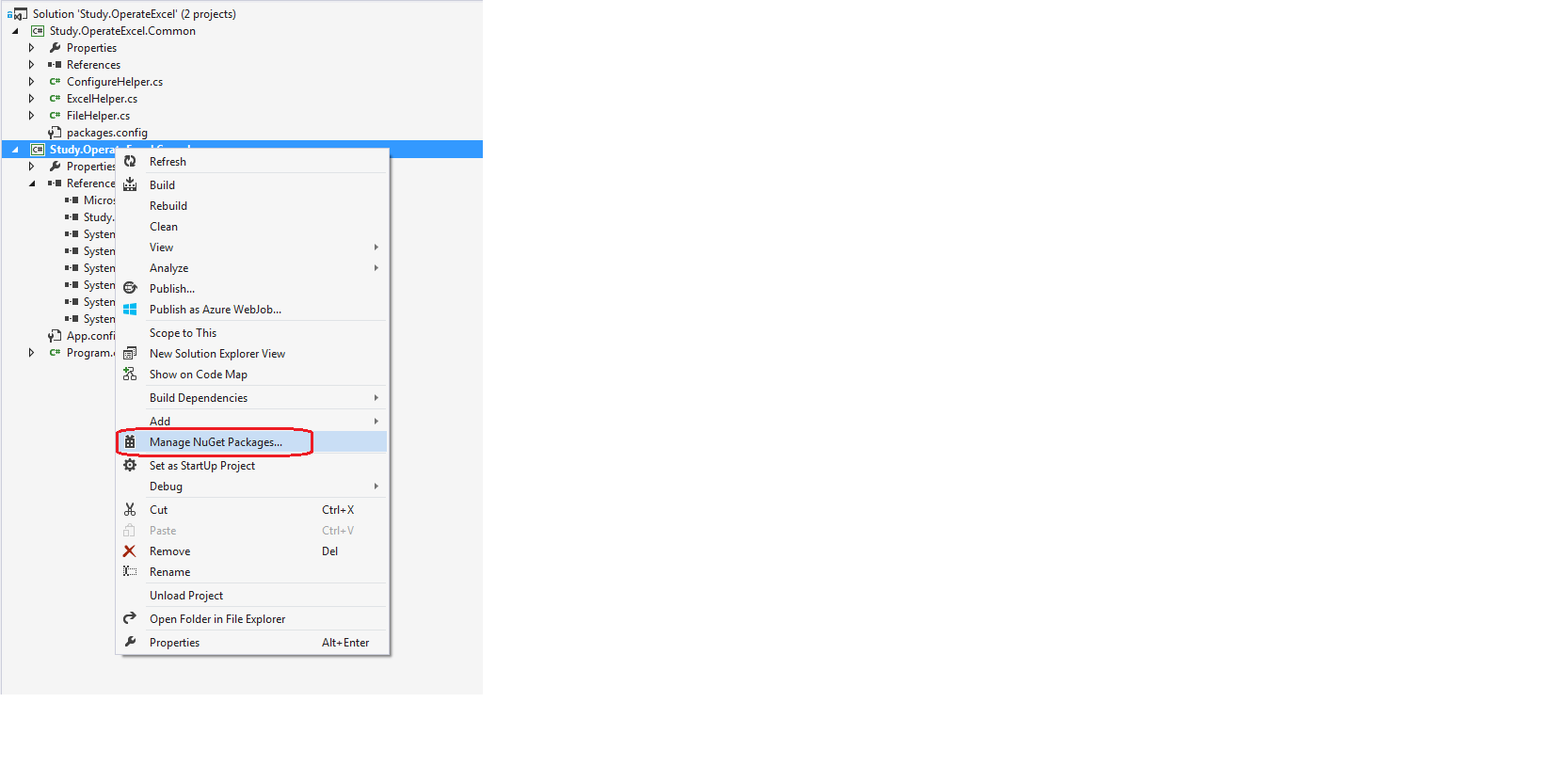
NPOI依赖SharpZipLib,通过NuGet添加SharpZipLib.
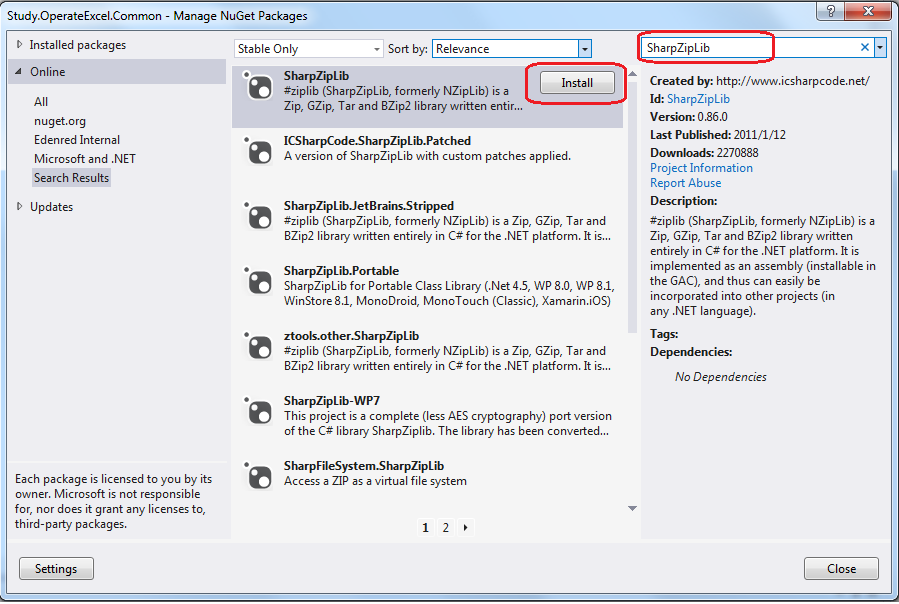
然后添加NPOI.
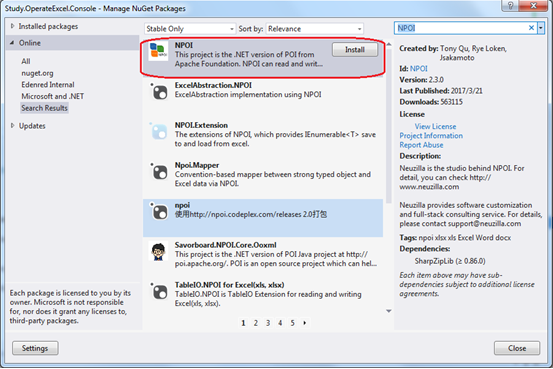
添加后项目的引用列表如下:

把DataTable转换成Excel文件。
代码如下:
        public static MemoryStream RenderDataTableToExcel(DataTable table)

        {

            MemoryStream ms = new MemoryStream();

            IWorkbook workbook = new HSSFWorkbook();

            ISheet sheet = workbook.CreateSheet(table.TableName);

            for (int rowIndex = ; rowIndex < table.Rows.Count; rowIndex++)

            {

                IRow dataRow = sheet.CreateRow(rowIndex);

                foreach (DataColumn column in table.Columns)

                {

                    dataRow.CreateCell(column.Ordinal).SetCellValue(table.Rows[rowIndex][column].ToString());

                }

            }

            workbook.Write(ms);

            ms.Close();

            return ms;

        }
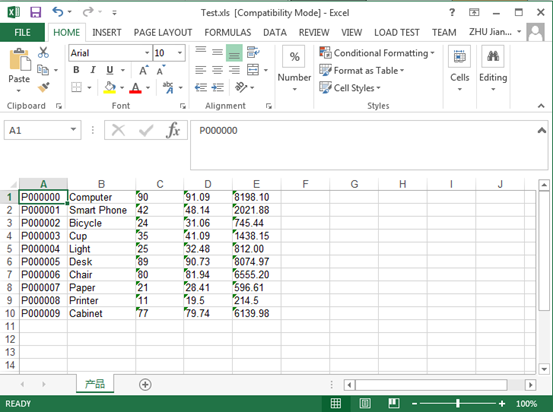
转换Excel文件内容如下:
Excel文件添加表头
代码:
        public static MemoryStream RenderDataTableToExcelWithHeader(DataTable table)

        {

            MemoryStream ms = new MemoryStream();

            IWorkbook workbook = new HSSFWorkbook();

            ISheet sheet = workbook.CreateSheet(table.TableName);

            IRow headerRow = sheet.CreateRow();

            foreach (DataColumn column in table.Columns)

            {

                headerRow.CreateCell(column.Ordinal).SetCellValue(string.Format("    {0}    ", column.Caption));

            }

            for (int rowIndex = ; rowIndex < table.Rows.Count; rowIndex++)

            {

                IRow dataRow = sheet.CreateRow(rowIndex+);

                foreach (DataColumn column in table.Columns)

                {

                    dataRow.CreateCell(column.Ordinal).SetCellValue(table.Rows[rowIndex][column].ToString());

                }

            }

            workbook.Write(ms);

            ms.Close();

            return ms;

        }
转换Excel文件内容如下:
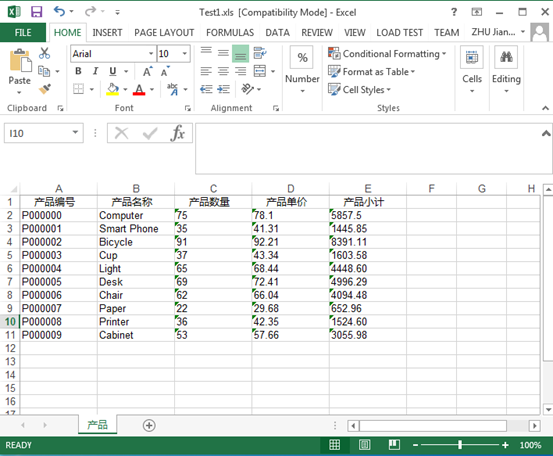
添加Excel文件添加表头样式
代码:
public static MemoryStream RenderDataTableToExcelWithHeaderRowStyle(DataTable table)

        {

            MemoryStream ms = new MemoryStream();

            IWorkbook workbook = new HSSFWorkbook();

            ISheet sheet = workbook.CreateSheet(table.TableName);

            IRow headerRow = sheet.CreateRow();

            ICellStyle headStyle = workbook.CreateCellStyle();

            headStyle.Alignment = HorizontalAlignment.Center;

            headStyle.FillForegroundColor = HSSFColor.Grey25Percent.Index;

            headStyle.FillPattern = FillPattern.SolidForeground;

            IFont font = workbook.CreateFont();

            font.FontName = "Microsoft Yahei";

            font.FontHeightInPoints = ;

            font.IsBold = true;

            font.Color = HSSFColor.White.Index;

            headStyle.SetFont(font);

            headStyle.BorderBottom = BorderStyle.Thin;

            headStyle.BorderRight = BorderStyle.Thin;

            headStyle.BorderLeft = BorderStyle.Thin;

            foreach (DataColumn column in table.Columns)

            {

                ICell cell = headerRow.CreateCell(column.Ordinal);

                cell.SetCellValue(string.Format("    {0}    ", column.Caption));

                cell.CellStyle = headStyle;

            }

            for (int rowIndex = ; rowIndex < table.Rows.Count; rowIndex++)

            {

                IRow dataRow = sheet.CreateRow(rowIndex + );

                foreach (DataColumn column in table.Columns)

                {

                    dataRow.CreateCell(column.Ordinal).SetCellValue(table.Rows[rowIndex][column].ToString());

                }

            }

            workbook.Write(ms);

            ms.Close();

            return ms;

        }
转换Excel文件内容如下:
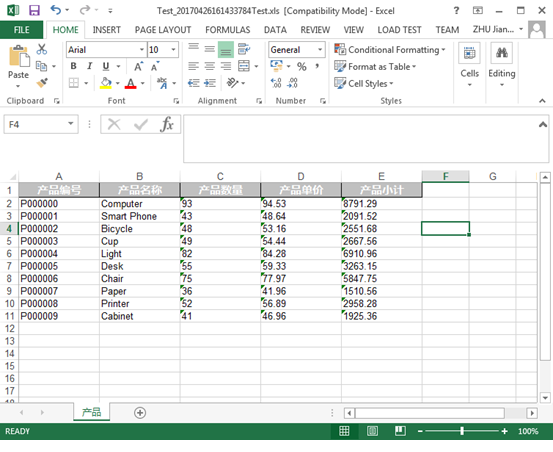
添加Excel文件添加数据行样式
代码:
public static MemoryStream RenderDataTableToExcelWithDataRowStyle(DataTable table)

        {

            MemoryStream ms = new MemoryStream();

            IWorkbook workbook = new HSSFWorkbook();

            ISheet sheet = workbook.CreateSheet(table.TableName);

            IRow headerRow = sheet.CreateRow();

            ICellStyle headStyle = workbook.CreateCellStyle();

            headStyle.Alignment = HorizontalAlignment.Center;

            headStyle.FillForegroundColor = HSSFColor.Grey25Percent.Index;

            headStyle.FillPattern = FillPattern.SolidForeground;

            IFont font = workbook.CreateFont();

            font.FontName = "Microsoft Yahei";

            font.FontHeightInPoints = ;

            font.IsBold = true;

            font.Color = HSSFColor.White.Index;

            headStyle.SetFont(font);

            headStyle.BorderBottom = BorderStyle.Thin;

            headStyle.BorderRight = BorderStyle.Thin;

            headStyle.BorderLeft = BorderStyle.Thin;

            ICellStyle dataRowEvenStyle = workbook.CreateCellStyle();

            dataRowEvenStyle.Alignment = HorizontalAlignment.Center;

            dataRowEvenStyle.FillForegroundColor = HSSFColor.LightOrange.Index;

            dataRowEvenStyle.FillPattern = FillPattern.SolidForeground;

            IFont dataRowEvenFont = workbook.CreateFont();

            dataRowEvenFont.FontName = "Microsoft Yahei";

            dataRowEvenFont.FontHeightInPoints = ;

            dataRowEvenFont.Color = HSSFColor.Blue.Index;

            dataRowEvenStyle.SetFont(dataRowEvenFont);

            dataRowEvenStyle.BorderBottom = BorderStyle.Thin;

            dataRowEvenStyle.BorderRight = BorderStyle.Thin;

            dataRowEvenStyle.BorderLeft = BorderStyle.Thin;

            ICellStyle dataRowOddStyle = workbook.CreateCellStyle();

            dataRowOddStyle.Alignment = HorizontalAlignment.Center;

            dataRowOddStyle.FillForegroundColor = HSSFColor.LightGreen.Index;

            dataRowOddStyle.FillPattern = FillPattern.SolidForeground;

            IFont dataRowOddFont = workbook.CreateFont();

            dataRowOddFont.FontName = "Microsoft Yahei";

            dataRowOddFont.FontHeightInPoints = ;

            dataRowOddFont.Color = HSSFColor.Black.Index;

            dataRowOddStyle.SetFont(dataRowOddFont);

            dataRowOddStyle.BorderBottom = BorderStyle.Thin;

            dataRowOddStyle.BorderRight = BorderStyle.Thin;

            dataRowOddStyle.BorderLeft = BorderStyle.Thin;

            foreach (DataColumn column in table.Columns)

            {

                ICell cell = headerRow.CreateCell(column.Ordinal);

                cell.SetCellValue(string.Format("    {0}    ", column.Caption));

                cell.CellStyle = headStyle;

            }

            for (int rowIndex = ; rowIndex < table.Rows.Count; rowIndex++)

            {

                IRow dataRow = sheet.CreateRow(rowIndex + );

                foreach (DataColumn column in table.Columns)

                {

                    ICell cell = dataRow.CreateCell(column.Ordinal);

                    cell.SetCellValue(table.Rows[rowIndex][column].ToString());

                    if (rowIndex %  == )

                    {

                        cell.CellStyle = dataRowEvenStyle;

                    }

                    else

                    {

                        cell.CellStyle = dataRowOddStyle;

                    }

                }

            }

            workbook.Write(ms);

            ms.Close();

            return ms;

        }
转换Excel文件内容如下:

Excel文件合并单元格
代码:
public static MemoryStream RenderDataTableToExcelMergedRegion(DataTable table)

        {

            MemoryStream ms = new MemoryStream();

            IWorkbook workbook = new HSSFWorkbook();

            ISheet sheet = workbook.CreateSheet(table.TableName);

            IRow headerRow = sheet.CreateRow();

            ICellStyle headStyle = workbook.CreateCellStyle();

            headStyle.Alignment = HorizontalAlignment.Center;

            headStyle.FillForegroundColor = HSSFColor.Grey25Percent.Index;

            headStyle.FillPattern = FillPattern.SolidForeground;

            IFont font = workbook.CreateFont();

            font.FontName = "Microsoft Yahei";

            font.FontHeightInPoints = ;

            font.IsBold = true;

            font.Color = HSSFColor.White.Index;

            headStyle.SetFont(font);

            headStyle.BorderBottom = BorderStyle.Thin;

            headStyle.BorderRight = BorderStyle.Thin;

            headStyle.BorderLeft = BorderStyle.Thin;

            ICellStyle dataRowEvenStyle = workbook.CreateCellStyle();

            dataRowEvenStyle.Alignment = HorizontalAlignment.Center;

            dataRowEvenStyle.FillForegroundColor = HSSFColor.LightOrange.Index;

            dataRowEvenStyle.FillPattern = FillPattern.SolidForeground;

            IFont dataRowEvenFont = workbook.CreateFont();

            dataRowEvenFont.FontName = "Microsoft Yahei";

            dataRowEvenFont.FontHeightInPoints = ;

            dataRowEvenFont.Color = HSSFColor.Blue.Index;

            dataRowEvenStyle.SetFont(dataRowEvenFont);

            dataRowEvenStyle.BorderBottom = BorderStyle.Thin;

            dataRowEvenStyle.BorderRight = BorderStyle.Thin;

            dataRowEvenStyle.BorderLeft = BorderStyle.Thin;

            ICellStyle dataRowOddStyle = workbook.CreateCellStyle();

            dataRowOddStyle.Alignment = HorizontalAlignment.Center;

            dataRowOddStyle.FillForegroundColor = HSSFColor.LightGreen.Index;

            dataRowOddStyle.FillPattern = FillPattern.SolidForeground;

            IFont dataRowOddFont = workbook.CreateFont();

            dataRowOddFont.FontName = "Microsoft Yahei";

            dataRowOddFont.FontHeightInPoints = ;

            dataRowOddFont.Color = HSSFColor.Black.Index;

            dataRowOddStyle.SetFont(dataRowOddFont);

            dataRowOddStyle.BorderBottom = BorderStyle.Thin;

            dataRowOddStyle.BorderRight = BorderStyle.Thin;

            dataRowOddStyle.BorderLeft = BorderStyle.Thin;

            foreach (DataColumn column in table.Columns)

            {

                ICell cell = headerRow.CreateCell(column.Ordinal);

                cell.SetCellValue(string.Format("    {0}    ", column.Caption));

                cell.CellStyle = headStyle;

            }

            for (int rowIndex = ; rowIndex < table.Rows.Count; rowIndex++)

            {

                IRow dataRow = sheet.CreateRow(rowIndex + );

                foreach (DataColumn column in table.Columns)

                {

                    ICell cell = dataRow.CreateCell(column.Ordinal);

                    cell.SetCellValue(table.Rows[rowIndex][column].ToString());

                    if (rowIndex %  == )

                    {

                        cell.CellStyle = dataRowEvenStyle;

                    }

                    else

                    {

                        cell.CellStyle = dataRowOddStyle;

                    }

                }

            }

            sheet.AddMergedRegion(new CellRangeAddress(, , , ));

            sheet.AddMergedRegion(new CellRangeAddress(, , , ));

            sheet.AddMergedRegion(new CellRangeAddress(, , , ));

            sheet.AddMergedRegion(new CellRangeAddress(, , , ));

            sheet.AddMergedRegion(new CellRangeAddress(, , , ));

            workbook.Write(ms);

            ms.Close();

            return ms;

        }
转换Excel文件内容如下:
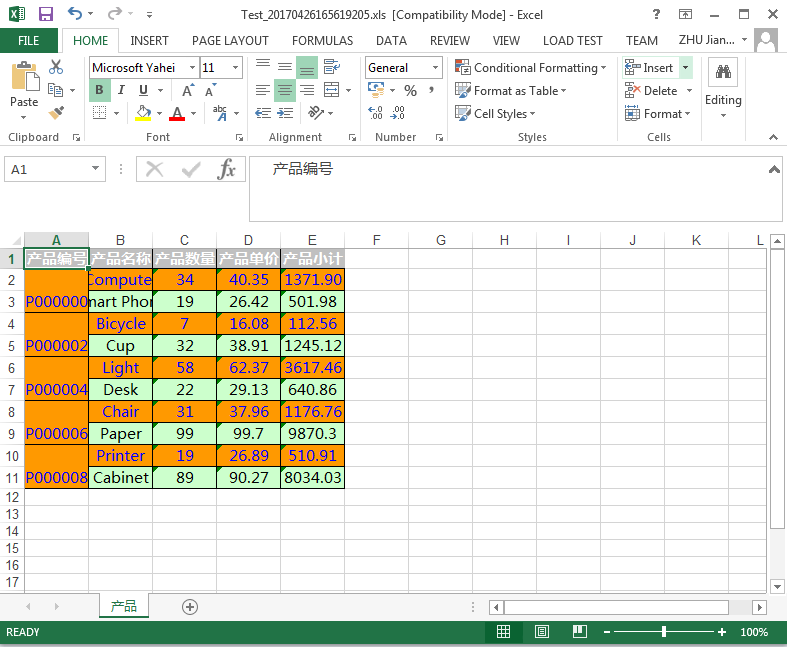
NPOI操作Excel文件的更多相关文章
- C#利用NPOI操作Excel文件
NPOI作为开源免费的组件,功能强大,可用来读写Excel(兼容xls和xlsx两种版本).Word.PPT文件.可是要让我们记住所有的操作,这便有点困难了,至此,总结一些在开发中常用的针对Excel ...
- 使用NPOI操作Excel文件及其日期处理
工作中经常遇到需要读取或导出Excel文件的情况,而NPOI是目前最宜用.效率最高的操作的Office(不只是Excel哟)文件的组件,使用方便,不详细说明了. Excel工作表约定:整个Excel表 ...
- C#项目中操作Excel文件——使用NPOI库
转载自:http://blog.csdn.net/dcrmg/article/details/52356236# 感谢-牧野- 实际C#项目中经常会涉及到需要对本地Excel文件进行操作,特别是一些包 ...
- NPOI操作Excel辅助类
/// <summary> /// NPOI操作excel辅助类 /// </summary> public static class NPOIHelper { #region ...
- NPOI操作excel之写入数据到excel表
在上一篇<NPOI操作excel之读取excel数据>我们把excel数据写入了datatable中,本篇就讲如何把datatable数据写入excel中. using System; u ...
- C#开发中使用Npoi操作excel实例代码
C#开发中使用Npoi操作excel实例代码 出处:西西整理 作者:西西 日期:2012/11/16 9:35:50 [大 中 小] 评论: 0 | 我要发表看法 Npoi 是什么? 1.整个Exce ...
- C#使用oledb操作excel文件的方法
本文实例讲述了C#使用oledb操作excel文件的方法.分享给大家供大家参考.具体分析如下: 不管什么编程语言都会提供操作Excel文件的方式,C#操作Excel主要有以下几种方式: 1.Excel ...
- C# 如何使用NPOI操作Excel以及读取合并单元格等
C#操作Excel方法有很多,以前用的需要电脑安装office才能用,但因为版权问题公司不允许安装office.所以改用NPOI进行Excel操作,基本上一些简单的Excel操作都没有问题,读写合并单 ...
- C# 操作 Excel 文件(.xls 或 .xlsx)
在.net中,常用的操作excel文件的方式,有三种: OLE DB的形式, 第三方框架NPOI, Office组件. 总结: 通过对比,在读取大数据量的excel文件,建议用OLE DB的形式,把e ...
随机推荐
- -webkit-css
WebKit CSS: 1.“盒模型”的具体描述性质的包围盒块内容,包括边界,填充等等. .test{ -webkit-border-bottom-left-radius: radius; -webk ...
- git提示error setting certificate verify locations解决办法
先打开git bash窗口 执行命令: git config --system http.sslcainfo "C:\Program Files (x86)\git\bin\curl-ca- ...
- Mycat从入门到放弃
https://blog.csdn.net/u013235478/article/details/53178657
- CSS命名方法(笔记)
划分CSS的一些方法(不同的划分方法都有利与弊,要记住,最合适项目的才是最好的): ①按功能划分:将字体的CSS存放在font.css.将控制颜色的CSS存放在color.css.将控制布局的CSS存 ...
- 边框画的三角形给shadow
本文地址:http://www.cnblogs.com/veinyin/p/8690882.html 要写一个对话气泡样式,我们首先想到的当然给是一个盒子,然后用边框画一个三角形定位过去. 如果不需 ...
- 如何编写 Typescript 声明文件
使用TypeScript已经有了一段时间,这的确是一个好东西,虽说在使用的过程中也发现了一些bug,不过都是些小问题,所以整体体验还是很不错的. TypeScript之所以叫Type,和它的强类型是分 ...
- 差分约束系统+输出路径(I - Advertisement POJ - 1752 )
题目链接:https://cn.vjudge.net/contest/276233#problem/I 题目大意:输入k和n,然后输入n行,每一次输入两个数,代表开端和结尾,如果这个区间内点的个数大于 ...
- 信息安全学习笔记--XSS
一.XSS简介 XSS (Cross Site Scripting)是一种经常出现在web应用中的计算机安全漏洞,它允许恶意web用户将代码植入到提供给其它用户使用的页面中.比如这些代码包括HTML代 ...
- jQuery.Validate 验证,以及 remote验证, 多参数传递
jQuery.Validate 验证: http://www.runoob.com/jquery/jquery-plugin-validate.html 教程网址,很简单, 今天主要在这里记录一下re ...
- Sublime Text 3 注册码失效(被移除)解决方法
最近Sublime Text 3 增加了注册码验证功能,如果你使用共享版本的注册码,可能会提示注册码失效,但是却可以正常激活. 只需要把下面的字段加入到你的hosts文件即可: 127.0.0.1 l ...