
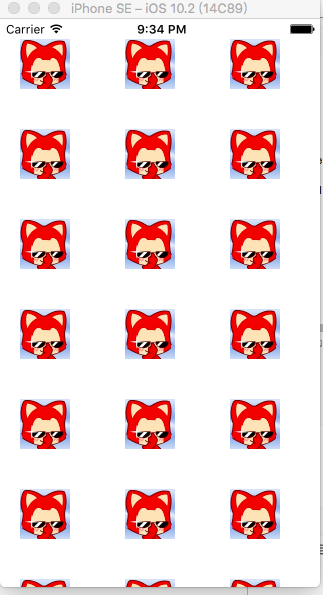
UICollectionViewCell 网格显示数据
using System;

using System.Collections.Generic;

using Foundation;

using UIKit;

namespace ddd

{

    public partial class ViewController : UIViewController

    {

        private List<UIImage> collectionData;

        private UICollectionView collectionView;

        private UICollectionViewFlowLayout collectionViewLayout;

        protected ViewController(IntPtr handle) : base(handle)

        {

            // Note: this .ctor should not contain any initialization logic.

        }

        public override void ViewDidLoad()

        {

            base.ViewDidLoad();

            uiConfig();

        }

        private void uiConfig()

        {

            //设置假的数据源数组

            collectionData = new List<UIImage>();

            for (int i = ; i < ; i++)

            {

                collectionData.Add(UIImage.FromFile("1.jpg"));

            }

            //初始化UICollectionView

            collectionViewLayout = new UICollectionViewFlowLayout();

            collectionViewLayout.MinimumLineSpacing = 20f;//设置行距

            collectionViewLayout.MinimumInteritemSpacing = 10f;//设置列距

            collectionViewLayout.SectionInset = new UIEdgeInsets(, , , );//设置边界

            collectionViewLayout.ItemSize = new CoreGraphics.CGSize(70f, 70f);//设置网格大小

            collectionView = new UICollectionView(this.View.Bounds, collectionViewLayout);

            collectionView.BackgroundColor = UIColor.LightTextColor;

            collectionView.RegisterNibForCell(ImageCell.Nib, "ImageCell");

            collectionView.Source = new collectionSource(this);

            this.View.AddSubview(collectionView);

        }

        public override void DidReceiveMemoryWarning()

        {

            base.DidReceiveMemoryWarning();

            // Release any cached data, images, etc that aren't in use.

        }

        private class collectionSource : UICollectionViewSource

        {

            ViewController owner;

            public collectionSource(ViewController owner)

            {

                this.owner = owner;

            }

            //设置网格个数

            public override nint GetItemsCount(UICollectionView collectionView, nint section)

            {

                return owner.collectionData.Count;

            }

            //设置网格中的内容

            public override UICollectionViewCell GetCell(UICollectionView collectionView, NSIndexPath indexPath)

            {

                ImageCell cell = (ImageCell)collectionView.DequeueReusableCell((NSString)ImageCell.Key, indexPath);

                cell.ImageView.Image = owner.collectionData[indexPath.Row];

                return cell;

            }

            //选中某一个网格

            public override void ItemSelected(UICollectionView collectionView, NSIndexPath indexPath)

            {

                UIAlertView alert = new UIAlertView();

                alert.Title = string.Format("你选择了第{0}个网格", indexPath.Row);

                alert.AddButton("确定");

                alert.Show();

            }

        }

    }

    public partial class ImageCell : UICollectionViewCell

    {

        public static readonly NSString Key = new NSString("ImageCell");

        public static readonly UINib Nib;

        static ImageCell()

        {

            Nib = UINib.FromName("ImageCell", NSBundle.MainBundle);

        }

        protected ImageCell(IntPtr handle) : base(handle)

        {

            // Note: this .ctor should not contain any initialization logic.

            this.Initialize();              //调用初始化方法

        }

        //设置属性

        public UIImageView ImageView

        {

            get;

            private set;

        }

        //初始化

        private void Initialize()

        {

            this.ImageView = new UIImageView(this.ContentView.Bounds);          //实例化对象

            this.ImageView.ContentMode = UIViewContentMode.ScaleAspectFit;      //设置显示模式

            this.ContentView.AddSubview(this.ImageView);                        //添加

        }

    }

}
UICollectionViewCell 网格显示数据的更多相关文章
- echarts使用记录(三):x/y轴数据和刻度显示及坐标中网格显示、格式化x/y轴数据
1.去掉坐标轴刻度线,刻度数据,坐标轴网格,以Y轴为例,同理X轴 xAxis: [{ type: 'category', axisTick: {//决定是否显示坐标刻度 alignWithLabel: ...
- mysql数据库导出模型到powerdesigner,PDM图形窗口中显示数据列的中文注释
1,mysql数据库导出模型到powerdesigner 2,CRL+Shift+X 3,复制以下内容,执行 '******************************************** ...
- 怎样操作WebAPI接口(显示数据)
就在去年Insus.NET已经写好的一个WebAPI项目,并且发布在IIS中.参考<创建与使用Web API>http://www.cnblogs.com/insus/p/5019088. ...
- miniui前台无法显示数据
坑爹,刚开始使用miniui重写对账单的功能,显示数据的时候明明已经获取到json数据了,但前台还是显示不出来,找了一上午的原因,终于找到是因为前台显示字段的field值要改成和json中(数据库字段 ...
- EasyUI datagrid 格式化显示数据
http://blog.163.com/ppy2790@126/blog/static/103242241201512502532379/ 设置formatter属性,是一个函数,格式化函数有3个参数 ...
- Flexigrid在IE下不显示数据的处理
文章总结自我的论坛提问: http://bbs.csdn.net/topics/390498434?page=1#post-394918028 解决方法: 网上的答案经我验证都是不靠谱的,以后大家就知 ...
- iPhone Tableview分批显示数据
//非原创 iPhone Tableview分批显示数据是本文要介绍的内容,主要讲解的是数据的显示.iPhone屏幕尺寸是有限的,如果需要显示的数据很多,可以先数据放到一个table中,先显示10 ...
- php 连接mysql数据库并显示数据 实例 转载
<!DOCTYPE HTML PUBLIC "-//W3C//DTD HTML 4.01 Transitional//EN" "http://www.w3.org/ ...
- Extjs中Chart利用series的tips属性设置鼠标划过时显示数据
效果如下: 从官网找到的例子,大家参考下吧.源码: Ext.require('Ext.chart.*'); Ext.require('Ext.layout.container.Fit'); Ext.o ...
随机推荐
- node-sass报错解决方法
在Vue.js中,每一个vue文件都是一个组件,在.vue文件中可以将模板,脚本,样式写在一起,便于组织整个组件.在使用template,script时,编写css样式时,都进行的特别顺利,唯独当我想 ...
- iOS从零开始学习直播之音频1.播放本地音频文件
现在直播越来越火,俨然已经成为了下一个红海.作为一个资深码农(我只喜欢这样称呼自己,不喜欢别人这样称呼我),我必须赶上时代的潮流,开始研究视频直播.发现视屏直播类的文章上来就讲拉流.推流.采集.美 ...
- android MVP设计模式!
实现原理: MainActivity 用来更新UI,和显示业务逻辑的结果! LoginPresenterCompl 用来处理 业务逻辑 ILoginPresenter 业务处理类抽象出来的接口 ILo ...
- 基于JQuery实现的文本框自动填充功能
1. 实现的方法 /* * js实现的文本框的自动完成功能 */ function doAutoComplete(textid,dataid,url){ $("#" + texti ...
- js的replace函数入参为function时的疑问
近期在写js导出excel文件时运用到replace方法,此处详细的记录下它各个参数所代表的的意义. 定义和用法 replace() 方法用于在字符串中用一些字符替换另一些字符,或替换一个与正则表达式 ...
- 容易忘记的git命令
pwd命令:显示当前的目录 git init:把当前目录变成git可以管理的仓库 git diff 文件名:查看修改了什么内容 git log:查看commit历史,包括时间.作者.版本号.commi ...
- EA方法论
1 EA的定义 Enterprise Architecture,企业架构,简称EA.根据开放群组的业务领导层IT架构指引:“有效的企业架构(Enterprise Architecture,EA)对企业 ...
- iOS系列 基础篇 02 StoryBoard 故事板文件
iOS基础 02 StoryBoard 故事板文件 目录: 1. 故事板的导航特点 2. 故事板中的Scene和Segue 3. 本文最后 在上篇HelloWorld工程中有一个Main.storyb ...
- PHP对象Object的概念
类提供了一个基础,可以在此基础上创建实体(即这个类所建模的实体)的特定实例,这些特定实例称为对象(object) 例如,员工管理应用程序可能包括一个EmPloyee 类.然后可以用这个类来创建和维护特 ...
- 织梦Dedecms使用Nginx的安全设置
首先需要说明的是,任何程序都是有漏洞的,我们需要做好一些必要的防范,来减少由于程序漏洞造成的损失.织梦的漏洞多,这个是很多人的想法.不过大家如果做好了织梦系统的文件夹权限什么的设置,很多漏洞也是用不上 ...