
git 提交报错 : The file will have its original line endings in your working directory.
报错现象
git add . 的时候发现此报错
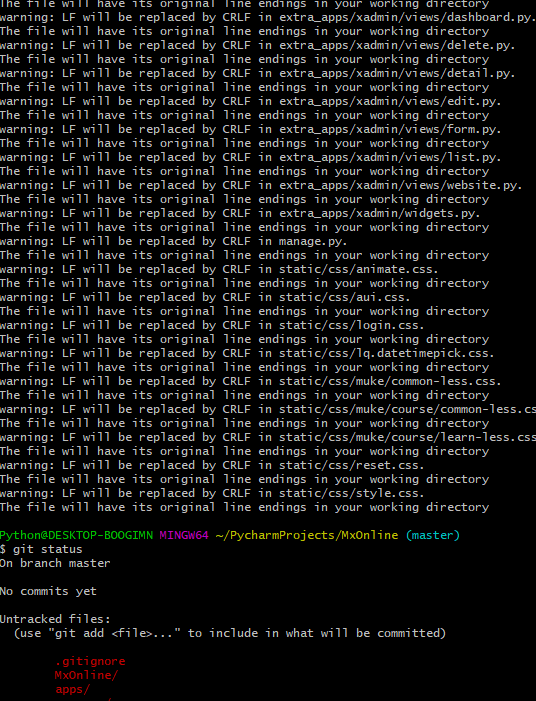
报错分析
看情况应该是不同系统对换行的识别不到位导致的
就常识来说文件是在windows下生成的所以换行和 linux 确实不同可能是因为这个导致的
报错解决
git config --global core.autocrlf false
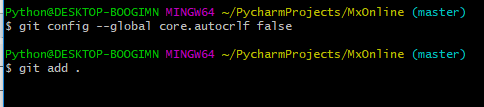
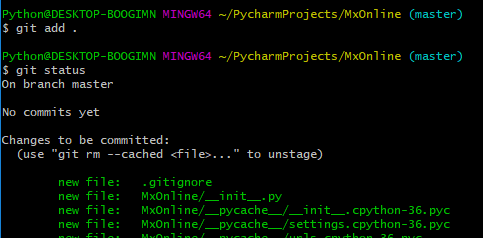
同理在 pycharm 中也要做相关操作
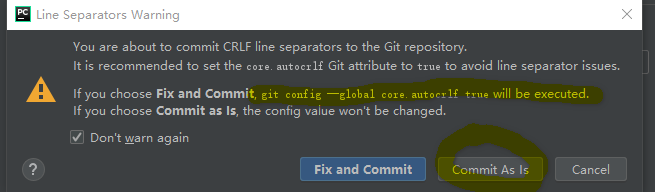
在pycharm 中进行操作的时候也会提示这个问题. 如果选择 fix and commit 就会设置为 True 会被转换
所以我们要选择 commit as ls 不做处理
额外补充
Git下处理“换行”(line ending)
core.autocrlf是git中负责处理line ending的变量,可以设置3个值:true,false,inout。
(1)设置为true【config --global core.autocrlf true】
当设置成true时,这意味着你在任何时候添加(add)文件到git仓库时,git都会视为它是一个文本文件(text file)。
它将把crlf变成LF。
(2)设置为false【config --global core.autocrlf false】
当设置成false时,line endings将不做转换操作。文本文件保持原来的样子。
(3)设置为input时,添加文件git仓库时,git把crlf编程lf。当有人Check代码时还是lf方式。因此在window操作系统下,不要使用这个设置。
git 提交报错 : The file will have its original line endings in your working directory.的更多相关文章
- Git提交时提示‘The file will have its original line endings in your working directory’
Git提交时提示'The file will have its original line endings in your working directory' Git出现错误 git add -A ...
- 解决git报错“The file will have its original line endings in your working directory”的方法
在执行命令 git commit --all -m '说明' 时报错“The file will have its original line endings in your working dir ...
- windows10下git报错warning: LF will be replaced by CRLF in readme.txt. The file will have its original line endings in your working directory.
window10下使用git时 报错如下: $ git add readme.txtwarning: LF will be replaced by CRLF in readme.txt.The fil ...
- [Git add . ] 遇到The file will have its original line endings in your working directory 解决办法
1.在新项目中使用[ git add . ]时出现: warning: LF will be replaced by CRLF in ...... The file will have its ori ...
- git出现“The file will have its original line endings in your working directory”错误
一.现象: git add *时出现如下现象: The file will have its original line endings in your working directory 解决: G ...
- The file will have its original line endings in your working directory.
在空仓库的情况下,add,出现一下问题 The file will have its original line endings in your working directory. 当报这个警告时是 ...
- 解决使用git出现 The file will have its original line endings in your working directory
执行以下命令即可解决 git rm -r --cached . git config core.autocrlf false git add . . 代表当前目录
- warning: LF will be replaced by CRLF in ***. The file will have its original line endings in your working directory.
git config --global core.autocrlf false
- 解决 The file will have its original line endings in your working directory
首先出现这个问题主要原因是:我们从别人github地址上通过git clone下载下来,而又想git push到我们自己的github上,那么就会出现上面提示的错误信息 此时需要执行如下代码: git ...
随机推荐
- Leetcode 2. Add Two Numbers(medium)
You are given two non-empty linked lists representing two non-negative integers. The digits are stor ...
- 对Vuejs框架原理名词解读
渐进式()+虚拟Dom: vue-cli 遍历Dom:先序遍历DOM树的5种方法! 三层架构+m v c +mvp+m v vm()+MVC,MVP 和 MVVM 的图示 剖析vue MVVM实现原理 ...
- pycharm异常问题之Unable to save settings: Failed to save settings. Please restart PyCharm
pycharm异常之Unable to save settings: Failed to save settings. Please restart PyCharm 今天一不小心将电脑关了,但是关机之 ...
- 使用log4j记录日志
目录 log4j的优点 导入log4j的jar包 log4j的错误级别 log4j日志的输出目的地 log4j的配置示例 log4j的全局配置讲解 控制台日志的配置讲解 日志输出文件的配置讲解 使用l ...
- Linux之常用软件-服务
在使用Linux系统的时候,经常要使用一些功能,但是并不是系统自带的一些功能,这个时候就需要我们进行扩展安装一些软件. 1)telnet 检测telnet-server的rpm包是否安装 [root ...
- IdentityServer4【Introduction】之包和项目构建
包和项目构建 IdentityServer包含了以下的nuget包: IdentityServer4 nuget | github 这个包包含了IdentityServer核心的组成部分,有对象模型, ...
- IdentityServer4【Introduction】之概括
The Big Picture 大多数现代应用看起来都像下面的样子: 大多数的交互是下面这样: 浏览器与web应用之间的通信 web应用和web APIs之间的通信(这两者有时是独立的,有时是有用户参 ...
- 项目中常用的MySQL 优化
本文我们来谈谈项目中常用的MySQL优化方法,共19条,具体如下: 一.EXPLAIN 做MySQL优化,我们要善用EXPLAIN查看SQL执行计划. 下面来个简单的示例,标注(1.2.3.4.5)我 ...
- mybatis源码分析(四)---------------代理对象的生成
在mybatis两种开发方式这边文章中,我们提到了Mapper动态代理开发这种方式,现在抛出一个问题:通过sqlSession.getMapper(XXXMapper.class)来获取代理对象的过程 ...
- spark-shell简单使用介绍(scala)
>>提君博客原创 http://www.cnblogs.com/tijun/ << 提君博客原创 1.进入命令窗口 ./bin/spark-shell 附上帮助指令,查看一 ...