
How To Add User To Sudoers On Debian 10 Buster
In today’s tutorial, we are going to see how you can add a user to sudoers on Debian distributions.
The sudo command allows authorized users to perform commands as another user, which is by default the root user.
There are two ways to add a user to sudoers : you can add this user to the sudo group or you can add this user to the sudoers file located at etc.
Here are the details of the two methods.
Table of Contents
I – Adding an existing user to the sudo group
As a prerequisites, make sure that the sudo command is available by default. If it’s not the case, you can install it by running (with an account with admin rights)
$ apt-get update

$ apt-get install sudo
The first method is to add the user to the sudo group.
To do that, you are going to use the “usermod” command with the capital G flag (for groups)
$ sudo usermod -a -G sudo userYou can also use the gpasswd command to grand sudo rights.
$ sudo gpasswd -a bob sudo

Adding user to the group sudo
Make sure that the user belongs to the sudo group with the groups command.
$ su - user

(password for user)

$ groups

user sudo
You should now be able to perform a sudo request on Debian 10.
Depending on the configuration you chose during your Debian 10 installation process, you may or may not have access to a root account. If you chose a password for your root account, you will be able to connect to it. Otherwise, the default admin account is the one you created during the installation process.
II – Adding an existing user to the sudoers file
The sudoers file is located at /etc/sudoers.
This file contains a set of rules that are applied to determine who has sudo rights on a system, which commands they can execute with sudo privileges, and if they should be prompted a password or not.
However, you should never modify the sudoers file with a text editor.
Saving a bad sudoers may leave you with the impossibility of getting sudo rights ever again.
Instead, you are going to use visudo, a tool designed to make sure you don’t do any mistakes.
$ sudo visudoThis is what you should see.
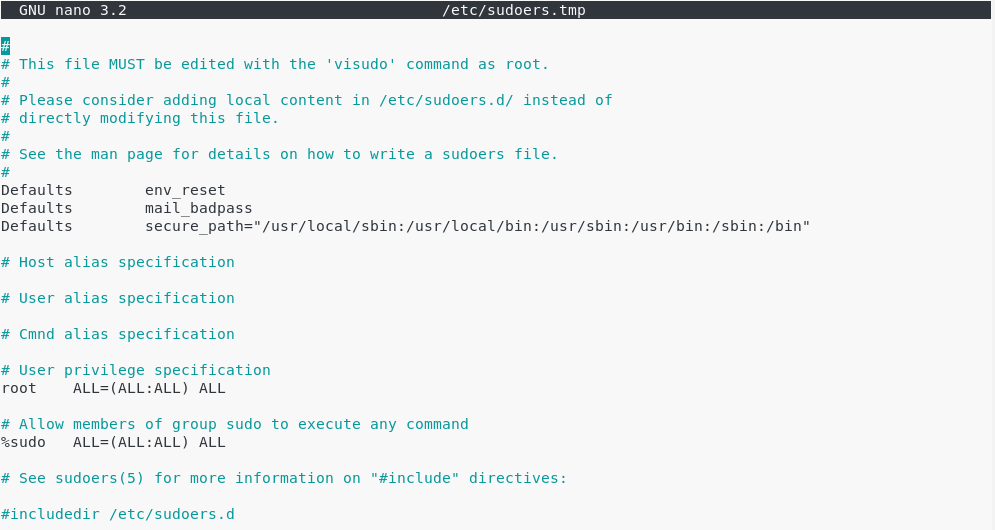
At the end of the file, add a new line for the user.
$ john ALL=(ALL:ALL) ALL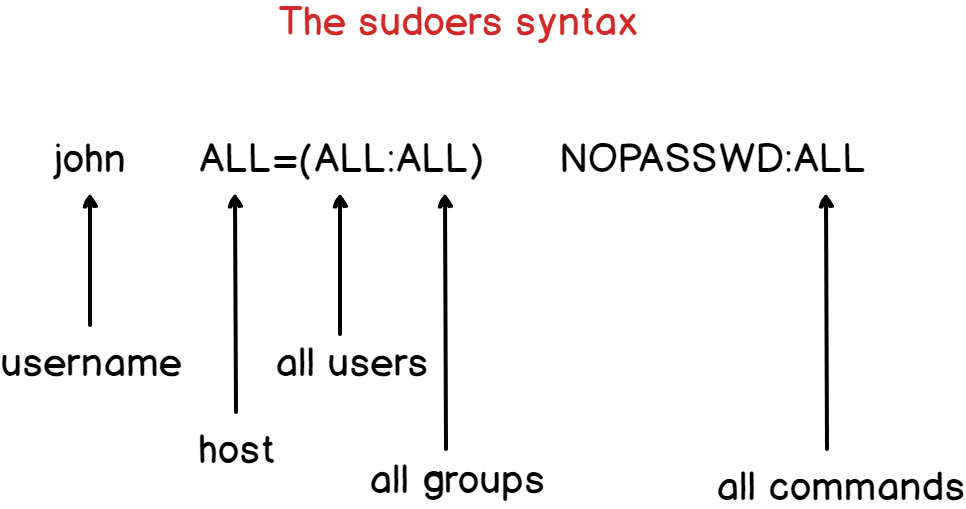
By default, the account password will be asked every five minutes to perform sudo operations.
However, if you want to remove this password verification, you can set the NOPASSWD option.
$ john ALL=(ALL:ALL) NOPASSWD:ALLIf you want the password verification to be skipped for longer periods of time, you can overwrite the timestamp_timeout (in minutes) parameter in your sudoers file.
# /etc/sudoers

#

# This file MUST be edited with the 'visudo' command as root.

#

# See the man page for details on how to write a sudoers file.

#

Defaults        env_reset

Defaults        mail_badpass

Defaults        secure_path = /sbin:/bin:/usr/sbin:/usr/bin

Defaults        timestamp_timeout=30
III – Adding a group to the sudoers file
Via the visudo, you can add an entire group to the sudoers.
This might be handy if you have a group for system administrators for example. In this case, you simply have to add a user to the system administrators group for him/her to be granted sudo privileges.
To add a group to the sudoers file, simply add a percent symbol at the beginning of the file.
$ %sysadmins ALL=(ALL:ALL) NOPASSWD:ALLMake sure that your user is part of the designed group with the groups command.
$ su - user

$ groups

user sysadmins
You can test your new sudo rights by changing your password for example
$ sudo passwdIV – Most Common Errors
- user is not in the sudoers file. This incident will be reported.
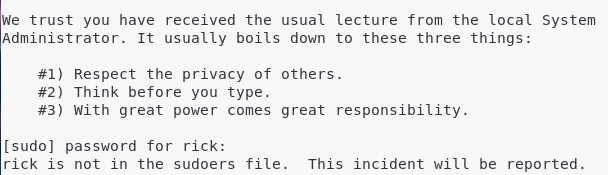
This is the standard error message you get when a user does not belong to the sudo group on Debian 10.
By adding this user to the sudoers file on Debian, this error message should not be raised anymore.
How To Add User To Sudoers On Debian 10 Buster的更多相关文章
- How to Set Up a NFS Server on Debian 10 Buster
How to Set Up a NFS Server on Debian 10 Buster Nick Congleton Debian 24 May 2019 Contents 1. Softw ...
- 【转贴】Debian 10 "buster" 正式发布
Debian 10 "buster" 正式发布 https://news.cnblogs.com/n/627909/ 我看到龙芯的 就是 mips64el 的指令集.. Linux ...
- debian 10 "Buster"正式发布了
Debian Buster将从内核4.9.0.3升级到4.19.0-4.
- 用开源软件TrinityCore在Debian 10上搭建魔兽世界8.3.0.34220的服务器
用开源软件TrinityCore在Debian 10上搭建魔兽世界8.3.0.34220的服务器 TrinityCore是魔兽世界(World of Warcraft)的开源的服务端.目前支持魔兽的3 ...
- Debian 9 / Debian 10 / Ubuntu 18.04 / Ubuntu 18.10快速开启BBR加速 或 关闭BBR加速
如果使用的是Debian 9.Debian 10.Ubuntu 18.04.Ubuntu 18.10等内核高于4.9版本的系统,均可以使用此方法开启BBR加速,若你使用了Ubuntu 19.04的系统 ...
- debian 10安装英伟达独显驱动
我的显卡是GTX1050TI,刚安装好Debian 10的时候启动会黑屏,无法进入系统,解决办法是在grub界面,按e修改启动参数,在启动参数那一行(一般会包含quiet)后面加上 nouveau.m ...
- Debian 10 xfce 错误提示 ACCESS DENIED
闲来无事重新安装自己的服务器发现很多关于Debian的初始安装问题都已经陌生了在此重新整理下自己安装所遇到的问题: ACCESS DENIED 释: 登录成功拒绝Root密码访问 解决方法: loc ...
- debian 10 安装fcitx 后设置
设置好代理后 apt-get install fcitx 后 仍然看不到 语言栏 可能是 在设置fcitx时 的字体太小了 输入法配置 ->外观->字体 加大 即可
- Debian 10 或Ubuntu 安装后启动黑屏解决办法
对于双显卡设备,很有可能是开源显卡驱动异常导致无法启动,在启动参数那一行加上 nouveau.modeset=0 禁用nouveau驱动即可进入系统
随机推荐
- nginx 二级目录高级写法
nginx二级目录高级配置: location ~ .*\.(html)$ { expires 1m; error_page 404 = /test/index.html; access_log /d ...
- Django基础之django分页
一.Django的内置分页器(paginator) view from django.shortcuts import render,HttpResponse # Create your views ...
- unittest之makeSuite\testload\discover及测试报告teseReport
转载:http://www.cnblogs.com/sunny0/p/7771089.html 测试套件suite除了使用addTest以外,还有使用操作起来更更简便的makeSuite\testlo ...
- Code First 下自动更新数据库结构(Automatic Migrations)
示例 Web.config <?xml version="1.0" encoding="utf-8"?> <configuration> ...
- 【转载】使用Class.getResource和ClassLoader.getResource方法获取文件路径
自从转投Java阵营后,一直发下Java程序的路径读取异常麻烦,因此查阅了比较多的版本内容,整合了一份自己的学习笔记.主要使用Class及通过ClassLoader来动态获取文件路径. 查阅链接如下: ...
- 骨骼蒙皮动画(SkinnedMesh)
骨骼蒙皮动画也就是SkinnedMesh,应该是目前用的最多的3D模型动画了.因为他可以解决关节动画的裂缝问题,而且原理简单,效果出色,所以今天详细的谈一下骨骼蒙皮动画的相关知识. 关节动画中使用的是 ...
- java SE,EE,ME区别
Java SE(Java Platform,Standard Edition):java平台标准版: Java EE(Java Platform.Enterprise Edition):java平台企 ...
- 【转载】C#指定文件夹下面的所有内容复制到目标文件夹下面
在涉及到文件夹操作的过程中,有时候需要将文件夹下的所有内容复制拷贝到另一个文件夹,在C#的开发中有时候会遇到这个功能需求将指定文件夹下所有的内容复制到另一个文件夹,这个过程需要遍历所有的文件和目录.此 ...
- Vue路由的使用和route-link router-view样式和动画的设置
什么是路由 后端路由:**对于普通的网站,所有的超链接都是URL地址,所有的URL地址都对应服务器上对应的资源: 前端路由:**对于单页面应用程序来说,主要通过URL中的hash(#号)来实现不同页面 ...
- 七年开发经验详解JVM的GC 算法
概述 GC 是 JVM 自带的功能,它能够自动回收对象,清理内存,这是 Java 语言的一大优势,但是GC绝不仅伴随着Java,相反,GC历史比Java更悠久.关于GC,我认为有四个问题需要解决: 为 ...