
java中的io流总结(一)
知识点:基于抽象基类字节流(InputStream和OutputStream)、字符流(Reader和Writer)的特性,处理纯文本文件,优先考虑使用字符流BufferedReader/BufferedWriter,其他的考虑使用字节流(BufferedInputStream/BufferedOutputStream),之所以使用缓冲流读写很快
(一)io结构图
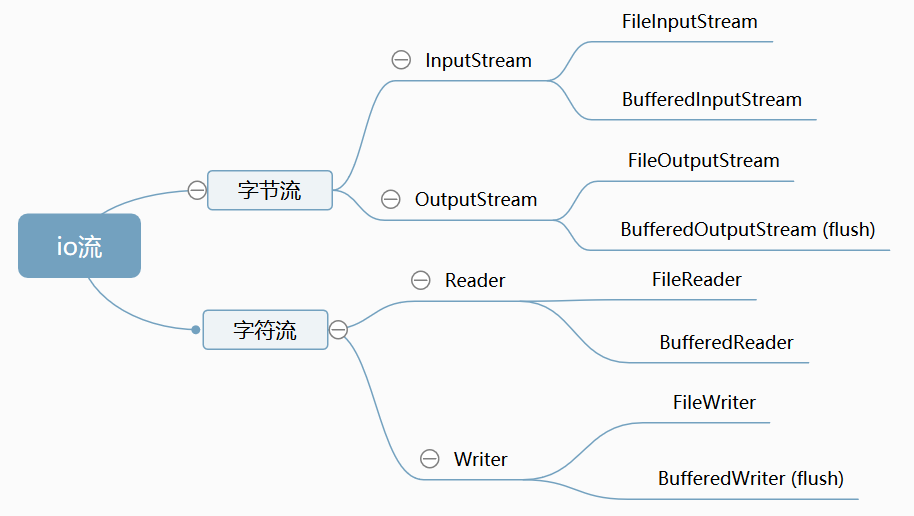
字节流和字符流的区别:
1.字节流处理所有的类型数据,如:图片,视频等等,而字符流只能处理字符数据,如果处理纯文本文件,优先考虑使用字符流,其他的考虑使用字节流;
2.字节流读到一个字节就返回一个字节,字符流使用字节流读到一个或者多个字节,去查编码表,将查到的字符返回(中文对应的字节数为两个)。
(二)示例代码
(1) 节点流 FileInputStream/FileOutStream(字节流)读写文件实现文件的复制
import java.io.*;
/*
IO体系
抽象基类            节点流(文件流)       缓冲流(处理流的一种)
InputStream        FileInputStream       BufferedInputStream
OutputStream       FileOutputStream      BufferedOutputStream (flush)
Reader             FileReader            BufferedReader (readline)
Writer             FileWriter            BufferedWriter (flush)
*/
public class IOTestInputOutputStream {
//复制文件
@Test
public void TestFileInputOutputStream(){
    //TestCopyFile("E:\\test\\io\\test2.txt","E:\\test\\io\\test8.txt"); //复制文本文件
    //TestCopyFile("E:\\test\\io\\1.png","E:\\test\\io\\2.png");//图片
    long start=System.currentTimeMillis();
    TestCopyFile("E:/test/io/1.flv","E:/test/io/2.flv");
    long end=System.currentTimeMillis();
    System.out.println("时间:"+(end-start));//复制视频48.3M需要6151毫秒
}
public void TestCopyFile(String src,String dest){
        File file1=new File(src);
        File file2=new File(dest);

        FileInputStream fis=null;
        FileOutputStream fos=null;
            try {
                int len;
                byte[] b=new byte[50];
               fis=new FileInputStream(file1);
               fos=new FileOutputStream(file2);

                while (((len=fis.read(b))!=-1)) {
                    fos.write(b,0,len);
                }
            } catch (IOException e) {
                e.printStackTrace();
            }finally {
                try {
                    fis.close();
                } catch (IOException e) {
                    e.printStackTrace();
                }
                try {
                    fos.close();
                } catch (IOException e) {
                    e.printStackTrace();
                }
            }
    }
}
(2) 节点流 FileReader/FileWriter(缓冲流)读写文件实现文件的复制
import java.io.*;
/*
FileReader、FileWriter 可以实现文本文件复制
对于非文本文件(视频文件、音频文件、图片),只能使用字节流
*/
public class FileReaderFileWriter {
    //复制文本文件
    @Test
    public void FileReaderAndFileWriter(){
      CopyFileRederAndWriter("E:/test/io/3.txt","E:/test/io/4.txt");
      //CopyFileRederAndWriter("E:/test/io/1.png","E:/test/io/3.png"); //文件复制出错
    }
    public void CopyFileRederAndWriter(String src,String desc){
        FileReader fr=null;
        FileWriter fw=null;

        try {
            File file1=new File(src);
            File file2=new File(desc);
            fr=new FileReader(file1);
            fw=new FileWriter(file2);
            char[] c=new char[20];
            int len;
            while ((len=fr.read(c))!=-1){
                String str=new String(c);
                fw.write(str,0,len);
            }
        } catch (IOException e) {
            e.printStackTrace();
        }finally {
            if (fr!=null){
                try {
                    fr.close();
                } catch (IOException e) {
                    e.printStackTrace();
                }
            }
            if (fw!=null){
                try {
                    fw.close();
                } catch (IOException e) {
                    e.printStackTrace();
                }
            }
        }
    }
}
(3) 缓冲流 BufferedInputStream/BufferedInputStream 读写文件实现文件的复制
使用缓冲流较文件读写熟读更快,如下例子中读写48.4M的视频文件,文件需要6151毫秒,而缓冲只需要170毫秒,实际应用中使用缓冲流,将文件作为参数传入缓冲中
@Test
public  void testBufferedInputOutputStream(){
    long start=System.currentTimeMillis();
    CopyBufferedInputOutputStream("E:/test/io/1.flv","E:/test/io/2.flv");
    long end=System.currentTimeMillis();
    System.out.println("时间:"+(end-start));//复制视频48.3M需要170毫秒,较节点流速度快
}

public void CopyBufferedInputOutputStream(String src,String desc){
    BufferedInputStream bis=null;
    BufferedOutputStream bos=null;

    try {
        File file1=new File(src);
        File file2=new File(desc);

        FileInputStream fis=new FileInputStream(file1);
        FileOutputStream fos=new FileOutputStream(file2);

        bis=new BufferedInputStream(fis);
        bos=new BufferedOutputStream(fos);
        byte[] b=new byte[50];
        int len;
        while ((len=bis.read(b))!=-1){
            bos.write(b,0,len);
        }
    } catch (IOException e) {
        e.printStackTrace();
    }finally {
        //先关闭输出流,后关闭输入流
        if (bos!=null){
            try {
                bos.flush();//清空缓冲区内的数据,最后一次
                bos.close();
            } catch (IOException e) {
                e.printStackTrace();
            }
        }
        if (bis!=null){
            try {
                bis.close();
            } catch (IOException e) {
                e.printStackTrace();
            }
        }
    }
}
(4) 缓冲流 BufferedReader/BufferedWriter读写文件实现文件的复制
@Test
public void testBufferedReaderAndWriter(){
    BufferedReader br=null;
    BufferedWriter bw=null;

    try {
        File file1=new File("E:/test/io/3.txt");
        File file2=new File("E:/test/io/5.txt");
        FileReader fr=new FileReader(file1);
        FileWriter fw=new FileWriter(file2);
        br=new BufferedReader(fr);
        bw=new BufferedWriter(fw);

       String str;
       while ((str=br.readLine())!=null){//按行读
          // System.out.println(str+"\n");
           bw.write(str+"\n");//换行写
          // bw.newLine();//换行写
       }
    } catch (IOException e) {
        e.printStackTrace();
    }finally {
         if (bw!=null){
            try {
                bw.flush();//清空缓冲区内的数据,最后一次
                bw.close();
            } catch (IOException e) {
                e.printStackTrace();
            }
        }
        if (br!=null){
            try {
                br.close();
            } catch (IOException e) {
                e.printStackTrace();
            }
        }

    }
}
java中的io流总结(一)的更多相关文章
- java中的IO流
Java中的IO流 在之前的时候我已经接触过C#中的IO流,也就是说集中数据固化的方式之一,那么我们今天来说一下java中的IO流. 首先,我们学习IO流就是要对文件或目录进行一系列的操作,那么怎样操 ...
- Java中的IO流总结
Java中的IO流总结 1. 流的继承关系,以及字节流和字符流. 2. 节点流FileOutputStream和FileInputStream和处理流BufferedInputStream和Buffe ...
- Java中的IO流大体介绍
由于Java中的IO流是在是知识点繁多,所以我大约花了1周的时间将其整理起来.但是整理起来后并不是将完事了,我还是要分字节流和字符流来讲述.然后字节流和字符流中还有是否带有缓冲流. 讲述完IO流后我将 ...
- Java中的IO流,Input和Output的用法,字节流和字符流的区别
Java中的IO流:就是内存与设备之间的输入和输出操作就成为IO操作,也就是IO流.内存中的数据持久化到设备上-------->输出(Output).把 硬盘上的数据读取到内存中,这种操作 成为 ...
- Java中的IO流(五)
上一篇<Java中的IO流(四)>记录了一下Properties类,此类不属于IO流,它属于集合框架.接下来说一下IO流中的其它流 一,打印流PrintStream PrintStream ...
- Java中的IO流(六)
上一篇<Java中的IO流(五)>把流中的打印流PrintStream,PrintWriter,序列流SequenceInputStream以及结合之前所记录的知识点完成了文件的切割与文件 ...
- JAVA 中的IO流
Java中的IO流是用来处理设备与设备之前的数据传输,在java中以流的形式传输.流分为两类:字节流和字符流. 字节流:InputStream,OutPutSteam.(计算机内的数据都是以字节存储的 ...
- Java中的IO流(四)
上一篇<Java中的IO流(三)>把IO流中的文件及目录操作的对象File类记录了一下,本篇把本不属性IO流但又和IO流有关系的一个对象作一下记录,此对象本属于集合框架里的一个子集,即Pr ...
- Java中的IO流(三)
上一篇<Java中的IO流(二)>把学习Java的字符流以及转换流作了一下记录,从本篇开始将把IO流中对文件或文件夹操作的对象File类的学习进行一下记录. 一,File类的构造函数及字段 ...
- Java中的IO流(二)
上一篇<Java中的IO流(一)>把学习IO流的字符流作了一下记录,本篇把字节流记录一下. 一,Java中的字节流 Java中的字节流的操作方式与字符流的操作方式大致相同,连方法名都是类似 ...
随机推荐
- 學校 iPad 使用學校google帳號登入Google Drive 提示"裝置政策提醒"的解決方法
因爲學校iPad 是給學生和老師使用,大多數是不需要設置鎖屏密碼的,然後 Gsuite 默認是開啓 “行動管理服務” 的策略為基本,就是需要設備設置鎖屏密碼以保障資料安全,不那麽容易被竊取. 然後就出 ...
- Linear regression with one variable - Cost function
摘要: 本文是吴恩达 (Andrew Ng)老师<机器学习>课程,第二章<单变量线性回归>中第7课时<代价函数>的视频原文字幕.为本人在视频学习过程中逐字逐句记录下 ...
- leetcode1140 Stone Game II
思路: dp,用记忆化搜索比较好实现. 实现: class Solution { public: int dfs(vector<int>& sum, int cur, int M, ...
- redis key 空闲(一)
语法: redis 127.0.0.1:6379> COMMAND KEY_NAME 实例: redis 127.0.0.1:6379[1]> select 2 OK redis 127. ...
- go基础系列 第二章 go指针
一. 指针 先来看一段代码 var pa *int pa = &a *pa = fmt.Println(a) 这里定义了一个int类型的变量a, 有定义了一个指针类型的变量pa, 让pa指向了 ...
- [转帖]分享Oracle的四道经典面试题,值得收藏
分享Oracle的四道经典面试题,值得收藏 原创 波波说运维 2019-07-20 00:02:00 https://www.toutiao.com/i6713901660919300621/ 概述 ...
- [DEBUG] ubuntu pip安装成功却无法import
我的pip经常出问题,我也不知道为啥..今天搞啥啥坏=.= 问题: pip自动安装显示成功,在交互环境下却无法import ==========================踩坑========== ...
- BFC的作用及其应用
简单介绍BFC BFC 就是块级格式化上下文,是页面盒模型布局中的一种 CSS 渲染模式,相当于一个独立的容器,里面的元素和外部的元素相互不影响. 创建 BFC 的方式有: 1.html的根元素 2. ...
- Python 基础教程 | 菜鸟教程
https://www.runoob.com/python/python-install.html
- GB2312、GBK、GB18030 这几种字符集的主要区别
1 GB2312-80 GB 2312 或 GB 2312-80 是中国国家标准简体中文字符集,全称<信息交换用汉字编码字符集·基本集>,又称 GB 0,由中国国家标准总局发布,1981 ...