
[游戏开发]imgui介绍
创建窗口
    ImGui::Begin("Hello, world!");

    ImGui::End();
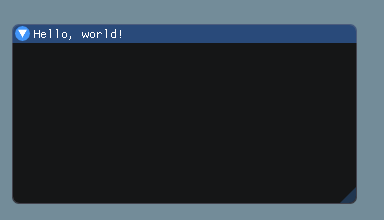
其中, ImGui::Begin("Hello, world!");函数的原型是 IMGUI_API bool Begin(const char* name, bool* p_open = NULL, ImGuiWindowFlags flags = 0);
p_open决定了他是否是打开状态,flags决定了他的样式。
flags是一个整数,表示你需要的样式的和,以下是所有的flag
    ImGuiWindowFlags_None                   = 0,

    ImGuiWindowFlags_NoTitleBar             = 1 << 0,   // Disable title-bar

    ImGuiWindowFlags_NoResize               = 1 << 1,   // Disable user resizing with the lower-right grip

    ImGuiWindowFlags_NoMove                 = 1 << 2,   // Disable user moving the window

    ImGuiWindowFlags_NoScrollbar            = 1 << 3,   // Disable scrollbars (window can still scroll with mouse or programmatically)

    ImGuiWindowFlags_NoScrollWithMouse      = 1 << 4,   // Disable user vertically scrolling with mouse wheel. On child window, mouse wheel will be forwarded to the parent unless NoScrollbar is also set.

    ImGuiWindowFlags_NoCollapse             = 1 << 5,   // Disable user collapsing window by double-clicking on it

    ImGuiWindowFlags_AlwaysAutoResize       = 1 << 6,   // Resize every window to its content every frame

    ImGuiWindowFlags_NoBackground           = 1 << 7,   // Disable drawing background color (WindowBg, etc.) and outside border. Similar as using SetNextWindowBgAlpha(0.0f).

    ImGuiWindowFlags_NoSavedSettings        = 1 << 8,   // Never load/save settings in .ini file

    ImGuiWindowFlags_NoMouseInputs          = 1 << 9,   // Disable catching mouse, hovering test with pass through.

    ImGuiWindowFlags_MenuBar                = 1 << 10,  // Has a menu-bar

    ImGuiWindowFlags_HorizontalScrollbar    = 1 << 11,  // Allow horizontal scrollbar to appear (off by default). You may use SetNextWindowContentSize(ImVec2(width,0.0f)); prior to calling Begin() to specify width. Read code in imgui_demo in the "Horizontal Scrolling" section.

    ImGuiWindowFlags_NoFocusOnAppearing     = 1 << 12,  // Disable taking focus when transitioning from hidden to visible state

    ImGuiWindowFlags_NoBringToFrontOnFocus  = 1 << 13,  // Disable bringing window to front when taking focus (e.g. clicking on it or programmatically giving it focus)

    ImGuiWindowFlags_AlwaysVerticalScrollbar= 1 << 14,  // Always show vertical scrollbar (even if ContentSize.y < Size.y)

    ImGuiWindowFlags_AlwaysHorizontalScrollbar=1<< 15,  // Always show horizontal scrollbar (even if ContentSize.x < Size.x)

    ImGuiWindowFlags_AlwaysUseWindowPadding = 1 << 16,  // Ensure child windows without border uses style.WindowPadding (ignored by default for non-bordered child windows, because more convenient)

    ImGuiWindowFlags_NoNavInputs            = 1 << 18,  // No gamepad/keyboard navigation within the window

    ImGuiWindowFlags_NoNavFocus             = 1 << 19,  // No focusing toward this window with gamepad/keyboard navigation (e.g. skipped by CTRL+TAB)

    ImGuiWindowFlags_UnsavedDocument        = 1 << 20,  // Append '*' to title without affecting the ID, as a convenience to avoid using the ### operator. When used in a tab/docking context, tab is selected on closure and closure is deferred by one frame to allow code to cancel the closure (with a confirmation popup, etc.) without flicker.

    ImGuiWindowFlags_NoNav                  = ImGuiWindowFlags_NoNavInputs | ImGuiWindowFlags_NoNavFocus,

    ImGuiWindowFlags_NoDecoration           = ImGuiWindowFlags_NoTitleBar | ImGuiWindowFlags_NoResize | ImGuiWindowFlags_NoScrollbar | ImGuiWindowFlags_NoCollapse,

    ImGuiWindowFlags_NoInputs               = ImGuiWindowFlags_NoMouseInputs | ImGuiWindowFlags_NoNavInputs | ImGuiWindowFlags_NoNavFocus,

    // [Internal]

    ImGuiWindowFlags_NavFlattened           = 1 << 23,  // [BETA] Allow gamepad/keyboard navigation to cross over parent border to this child (only use on child that have no scrolling!)

    ImGuiWindowFlags_ChildWindow            = 1 << 24,  // Don't use! For internal use by BeginChild()

    ImGuiWindowFlags_Tooltip                = 1 << 25,  // Don't use! For internal use by BeginTooltip()

    ImGuiWindowFlags_Popup                  = 1 << 26,  // Don't use! For internal use by BeginPopup()

    ImGuiWindowFlags_Modal                  = 1 << 27,  // Don't use! For internal use by BeginPopupModal()

    ImGuiWindowFlags_ChildMenu              = 1 << 28   // Don't use! For internal use by BeginMenu()
以上内容在imgui.h的枚举ImGuiWindowFlags_里也有。
创建文字
    ImGui::Begin("Hello, world!");

    ImGui::Text("%s","Hello");

    ImGui::Text("world");

    ImGui::End();
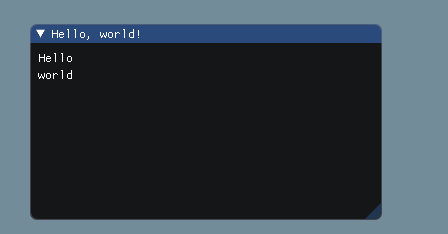
其中文字是可以使用格式化的。
创建图片
ImGuiIO& io = ImGui::GetIO();

    ImTextureID tex_id = io.Fonts->TexID;

    ImGui::Begin("Hello, world!");

    ImGui::Image(tex_id,ImVec2(64,64));

    ImGui::End();
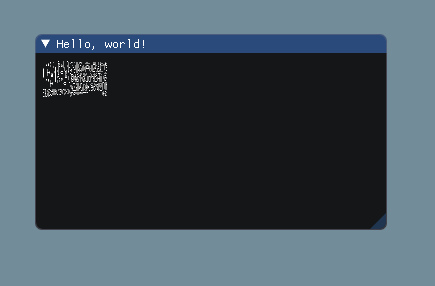
由于Imgui的图片加载和自己选择的图形渲染库有关,所以这里我们拿字体图片做例子。
猜测,由于字体图片的比例和我们设置的长宽比不一致,所以渲染出来的图形也不是正方形。
ImGui::Image的函数原型是 IMGUI_API void Image(ImTextureID user_texture_id, const ImVec2& size, const ImVec2& uv0 = ImVec2(0,0), const ImVec2& uv1 = ImVec2(1,1), const ImVec4& tint_col = ImVec4(1,1,1,1), const ImVec4& border_col = ImVec4(0,0,0,0));
其中size是渲染出来的大小,uv0和uv1都是一个0-1的小数,表示要渲染的图片在材质的位置,tint_col和border_col是两个颜色由一个32位整数表示,RGBA。
[游戏开发]imgui介绍的更多相关文章
- 5、Cocos2dx 3.0小游戏开发的例子寻找测试三个简单的介绍和总结
繁重的劳动开发商,当转载请注明出处:http://blog.csdn.net/haomengzhu/article/details/27186557 測试例子简单介绍 Cocos2d-x 为我们提供了 ...
- 5、Cocos2dx 3.0游戏开发找小三之測试例子简单介绍及小结
重开发人员的劳动成果.转载的时候请务必注明出处:http://blog.csdn.net/haomengzhu/article/details/27186557 測试例子简单介绍 Cocos2d-x ...
- 【COCOS2DX-LUA 脚本开发之一】在Cocos2dX游戏中使用Lua脚本进行游戏开发(基础篇)并介绍脚本在游戏中详细用途!
[COCOS2DX-LUA 脚本开发之一]在Cocos2dX游戏中使用Lua脚本进行游戏开发(基础篇)并介绍脚本在游戏中详细用途! 分类: [Cocos2dx Lua 脚本开发 ] 2012-04-1 ...
- 2、Cocos2dx 3.0游戏开发找小三之引擎简单介绍
尊重开发人员的劳动成果,转载的时候请务必注明出处:http://blog.csdn.net/haomengzhu/article/details/27094663 引擎简单介绍 Cocos2d-x 的 ...
- 二、Cocos2dx概念介绍(游戏开发中不同的坐标系,cocos2dx锚点)
注:ccp是cocos2dx中的一个宏定义,#define ccp(__X__,__Y__)CCPointMake((float)__X__, (float)__Y__),在此文章中表示坐标信息 1. ...
- Unity3D游戏开发初探—1.跨平台的游戏引擎让.NET程序员新生
一.Unity3D平台简介 Unity是由Unity Technologies开发的一个让轻松创建诸如三维视频游戏.建筑可视化.实时三维动画等类型互动内容的多平台的综合型游戏开发工具,是一个全面整合的 ...
- Unity3D游戏开发初探—2.初步了解3D模型基础
一.什么是3D模型? 1.1 3D模型概述 简而言之,3D模型就是三维的.立体的模型,D是英文Dimensions的缩写. 3D模型也可以说是用3Ds MAX建造的立体模型,包括各种建筑.人物.植被. ...
- Unity3D游戏开发初探—3.初步了解U3D物理引擎
一.什么是物理引擎? 四个世纪前,物理学家牛顿发现了万有引力,并延伸出三大牛顿定理,为之后的物理学界的发展奠定了强大的理论基础.牛顿有句话是这么说的:“如果说我看得比较远的话,那是因为我站在巨人的肩膀 ...
- Egret白鹭H5小游戏开发入门(二)
前言: 昨天的文章中简单的介绍了Egret白鹭引擎从安装到基本的使用配置等问题,今天着重介绍H5小游戏开发的起步阶段,如Wing面板的使用,素材的处理,类的说明,开始布局等等. 整体概况: 根据上一篇 ...
随机推荐
- element table中使用el-select
效果: 然后看代码: 注意事项: el-select的v-model要和option的value值对应,注意是string还是number类型哦- 此文转载别人
- 【前端开发】】js中var写和不写的区别
js中var用与不用的区别 Javascript声明变量的时候,虽然用var关键字声明和不用关键字声明,很多时候运行并没有问题,但是这两种方式还是有区别的.可以正常运行的代码并不代表是合适的代码. v ...
- rabbitmq笔记(一)rabbitmq简介及基础
一.消息组件 如果从消息组件来讲主要划分位两类: 1.JMS组件:ActiveMQ(慢): 2.AMQP组件(协议):性能是最高的, 而AMQP有两个主要的开源: 1)RabbitMQ:使用最广泛,速 ...
- python高并发的详解
一.什么是高并发 高并发(High Concurrency)是互联网分布式系统架构设计中必须考虑的因素之一,它通常是指,通过设计保证系统能够同时并行处理很多请求. 高并发相关常用的一些指标有响应时间( ...
- 列表推导式中的各个元素的id并不一样
列表推导式中的各个元素在不同的内存中,id不一样 # 列表推导式的不同id值 ----------------------------------------------------- T = [] ...
- ES6 解构赋值详解
解构赋值是对赋值运算符的扩展,可以将属性/值从对象/数组中取出,赋值给其他变量. 一.数组的解构赋值 1.基本用法 只要等号两边的模式相同,左边的变量就会被赋予对应的值. let [a, [[b], ...
- jquery基础知识3
1.jquery的位置信息 <!DOCTYPE html> <html lang="en"> <head> <meta charset=& ...
- [转]对于BIO/NIO/AIO,你还只停留在烧开水的水平吗
原文:https://www.javazhiyin.com/40106.html https://coding.imooc.com/class/381.html ------------------- ...
- python打造批量关键词排名查询工具
自己做站点的时候,都看看收录和关键词排名什么的,所以打造的这个批量关键词查询工具. #encoding:utf-8 import urllib,re,random,time,sys,StringIO, ...
- 命令检测站点是否使用CDN加速
在CMD 输入 nslookup 域名 例如:nslookup www.baidu.com有CDN的示例Server: cache3-gzAddress: 211.98.4.1Non ...