
LVS实现健康性检查功能
LVS高可用性
Director不可用,整个系统将不可用;SPoF Single Point of Failure
解决方案:高可用
keepalived heartbeat/corosync
某RS不可用时,Director依然会调度请求至此RS
解决方案: 由Director对各RS健康状态进行检查,失败时禁用,成功时启用
keepalived heartbeat/corosync ldirectord
检测方式:
(a) 网络层检测,icmp

(b) 传输层检测,端口探测

(c) 应用层检测,请求某关键资源
RS全不用时:backup server, sorry server
ldirectord
ldirectord:监控和控制LVS守护进程,可管理LVS规则
包名:ldirectord-3.9.6-0rc1.1.1.x86_64.rpm
下载:http://download.opensuse.org/repositories/network:/ha-clustering:/Stable/CentOS_CentOS-7/x86_64/
文件:
/etc/ha.d/ldirectord.cf 主配置文件

/usr/share/doc/ldirectord-3.9.6/ldirectord.cf 配置模版

/usr/lib/systemd/system/ldirectord.service 服务

/usr/sbin/ldirectord 主程序,Perl实现

/var/log/ldirectord.log 日志

/var/run/ldirectord.ldirectord.pid pid文件
ldirectord实战演练:
1、在LVS服务器上下载ldirectord包,并安装此包
[root@lvsdata]#wget http://download.opensuse.org/repositories/network:/ha-clustering:/Stable/CentOS_CentOS-7/x86_64/ldirectord-3.9.6-0rc1.1.2.x86_64.rpm

[root@lvsdata]#yum install ldirectord-3.9.6-0rc1.1.2.x86_64.rpm -y
2、查看安装后的包
[root@lvsdata]#rpm -ql ldirectord-3.9.6-0rc1.1.2

/etc/ha.d

/etc/ha.d/resource.d

/etc/ha.d/resource.d/ldirectord

/etc/logrotate.d/ldirectord

/usr/lib/ocf/resource.d/heartbeat/ldirectord

/usr/lib/systemd/system/ldirectord.service

/usr/sbin/ldirectord

/usr/share/doc/ldirectord-3.9.6

/usr/share/doc/ldirectord-3.9.6/COPYING

/usr/share/doc/ldirectord-3.9.6/ldirectord.cf

/usr/share/man/man8/ldirectord.8.gz
3、在LVS服务器上,将配置文件复制到/etc/ha.d目录下
[root@lvsdata]#cp /usr/share/doc/ldirectord-3.9.6/ldirectord.cf /etc/ha.d/
4、在LVS服务器上安装httpd服务,并启动
[root@lvsha.d]#yum install httpd -y

[root@lvsha.d]#echo Sorry Server > /var/www/html/index.html

[root@lvsha.d]#systemctl start httpd
5、在原有搭建好的LVS负载均衡调度基础上,修改此配置文件
virtual=10.0.0.100:80  添加VIP地址

        real=192.168.37.19:80 gate  添加RS1IP地址

        real=192.168.37.20:80 gate  添加RS2IP地址

        fallback=127.0.0.1:80 gate

        service=http

        scheduler=rr

        #persistent=600

        #netmask=255.255.255.255

        protocol=tcp

        checktype=negotiate

        checkport=80

        request="index.html"

        #receive="Test Page"   注释掉

        #virtualhost=www.x.y.z 注释掉
6、删除原有绑定在lo网卡上的IP地址以及ipvsadm规则,并手动添加新的IP地址,绑定在回环网卡上。
[root@lvs~]#bash lvs_dr_vs.sh  stop

[root@lvs~]#ifconfig lo:1 10.0.0.100/24
7、启动ldirectord,此时就会自动添加ipvsad规则。
[root@lvsdata]#systemctl start ldirectord

[root@lvsdata]#ipvsadm -Ln

IP Virtual Server version 1.2.1 (size=4096)

Prot LocalAddress:Port Scheduler Flags

  -> RemoteAddress:Port           Forward Weight ActiveConn InActConn

TCP  10.0.0.100:80 rr

  -> 192.168.37.19:80             Route   1      0          0

  -> 192.168.37.20:80             Route   1      0          0
8、此时停止RS1服务器的httpd服务
[root@rs1~]#systemctl stop httpd
9、在LVS服务器上查看掉线之后被踢掉的ipvsadm调度规则
[root@lvsdata]#ipvsadm -Ln

IP Virtual Server version 1.2.1 (size=4096)

Prot LocalAddress:Port Scheduler Flags

  -> RemoteAddress:Port           Forward Weight ActiveConn InActConn

TCP  10.0.0.100:80 rr

  -> 192.168.37.20:80             Route   1      0          35
10、此时在客户端查看访问页面是RS2的页面
[root@centos6 network-scripts]# while : ;do curl 10.0.0.100;sleep 0.5;done

192.168.37.20 RS2

192.168.37.20 RS2

192.168.37.20 RS2

192.168.37.20 RS2
11、此时再恢复RS1服务器的httpd服务
[root@rs1~]#systemctl start httpd
12、ldirectord软件会自动启动RS1的ipvsadm规则。
[root@lvsdata]#ipvsadm -Ln

IP Virtual Server version 1.2.1 (size=4096)

Prot LocalAddress:Port Scheduler Flags

  -> RemoteAddress:Port           Forward Weight ActiveConn InActConn

TCP  10.0.0.100:80 rr

  -> 192.168.37.19:80             Route   1      0          71

  -> 192.168.37.20:80             Route   1      0          97
13、在客户端访问的httpd服务页面,此时就会恢复两个RS服务器的信息。
[root@centos6 network-scripts]# while : ;do curl 10.0.0.100;sleep 0.5;done

192.168.37.19 RS1

192.168.37.20 RS2

192.168.37.19 RS1
14、此时RS1和RS2的httpd服务都停掉
[root@rs2~]#systemctl stop httpd

[root@rs1~]#systemctl stop httpd
15、此时的ipvsadm规则的回环网卡就会显示。
[root@lvsdata]#ipvsadm -Ln

IP Virtual Server version 1.2.1 (size=4096)

Prot LocalAddress:Port Scheduler Flags

  -> RemoteAddress:Port           Forward Weight ActiveConn InActConn

TCP  10.0.0.100:80 rr

  -> 127.0.0.1:80                 Route   1      0          0
16、此时客户端就会显示LVS调度器httpd服务里边的index.html信息。
[root@centos6 network-scripts]# while : ;do curl 10.0.0.100;sleep 0.5;done

Sorry Server

Sorry Server

Sorry Server

Sorry Server
17、修改LVS服务器的ldirectord配置文件,重启服务,就会将开启httpd服务的作为优先级高的在客户端进行访问。
[root@lvsdata]#vim /etc/ha.d/ldirectord.cf

quiescent=yes

[root@lvsdata]#systemctl restart ldirectord.service
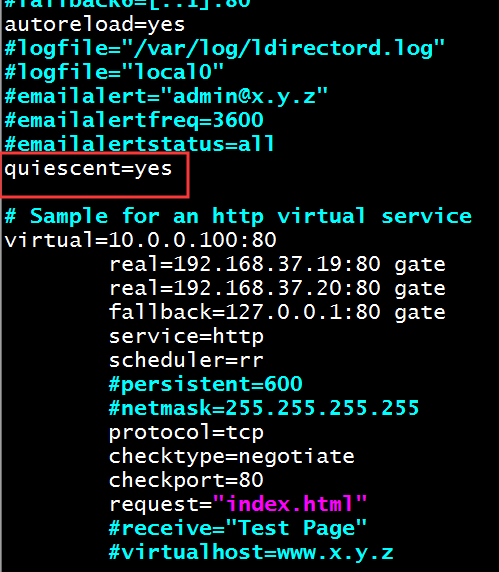
18、此时查看ipvsadm规则优先级情况,此时RS2的服务是开启的,就会只访问RS2服务器。

19、在客户端访问LVS调度器,此时调度访问的是RS2服务器。
[root@centos6 network-scripts]# while : ;do curl 10.0.0.100;sleep 0.5;done

192.168.37.20 RS2

192.168.37.20 RS2

192.168.37.20 RS2
20、而如果此时RS1的httpd服务开启之后,此时LVS服务器的ipvsadm规则中RS服务器两者的优先级就会一样,两个权重一致,就会都去访问。
[root@rs1~]#systemctl start httpd

21、在客户端访问LVS调度器的IP地址。
[root@centos6 network-scripts]# while : ;do curl 10.0.0.100;sleep 0.5;done

192.168.37.20 RS2

192.168.37.19 RS1

192.168.37.20 RS2

192.168.37.19 RS1
LVS实现健康性检查功能的更多相关文章
- LVS之3---健康检查
LVS实现健康性检查功能 LVS高可用性 解决方案: 由Director对各RS健康状态进行检查,失败时禁用,成功时启用 keepalived heartbeat/corosync ldirector ...
- LVS节点健康检查及管理脚本
在LVS负载均衡主节点上,模拟keepalived健康检查功能管理LVS节点,当节点挂掉从服务器池中剔除,好了再加到服务器池中来. 工具:yum install -y ipvsadm web03:10 ...
- nginx的健康检查功能将挂掉的Tomcat舍弃
1.Ngninx自带健康检查功能,能将挂掉的服务器舍弃,不在访问路径里 2.Nginx还有URL重写功能,能将接收到的请求,进行改写,再将新的URL分发到后端服务器上
- Tengine笔记3:Nginx的反向代理和健康状态检查
通常代理服务器只用于处理内部网络对Intenet的请求,客户端必须通过代理服务器把本来要发送到Web服务器上的请求通过代理服务器分发给Web服务器,Web服务器响应时再通过代理服务器把响应发给客户端: ...
- nginx_upstream_check_module-master对nginx的后端机器进行健康状态检查报403错误【转】
在nginx.conf配置文件中 在server添加 location /nstatus { check_status; access_log off; #allow 192.168.2.11; #d ...
- nginx健康节点检查nginx_upstream_check_module 淘宝的upstream_check进行nginx后端检查 tengine
Nginx实战系列之功能篇----后端节点健康检查 2015-01-18 22:35 5007人阅读 评论(0) 收藏 举报 分类: Nginx(28) 目录(?)[+] 公司前一段对业务 ...
- C++中重载决议与可访问性检查的顺序
http://blog.csdn.net/starlee/article/details/1406781 对于如下的类: class ClxECS{public: double Test(dou ...
- solr入门之solr的拼写检查功能的应用级别尝试
今天主要是收集了些拼写检查方面的资料和 尝试使用一下拼写检查的功能--=遇到了不少问题 拼写检查的四种配置眼下我仅仅算是成功了半个吧 --------------------------------- ...
- pod管理调度约束、与健康状态检查
pod的管理 [root@k8s-master ~]# vim pod.yaml apiVersion: v1 kind: Pod metadata: name: nginx-pod labels: ...
随机推荐
- SharpGL学习笔记(一) 平台构建与Opengl的hello World (转)
(一)平台构建与Opengl的hello World OpenGL就是3d绘图的API,微软针和它竞争推出D3D,也就是玩游戏时最常见的DirectorX组件中的3d功能. 所以不要指望windows ...
- Silence Removal and End Point Detection JAVA Code(音频删除静音与结束判断)
转载自:http://ganeshtiwaridotcomdotnp.blogspot.com/2011/08/silence-removal-and-end-point-detection_29.h ...
- python解析本地HTML文件
Python使用爬虫技术时,每运行一次,本地都会访问一次主机.为避免完成程序前调试时多次访问主机增加主机负荷,我们可以在编写程序前将网页源代码存在本地,调试时访问本地文件即可.现在我来分享一下爬取资料 ...
- Beginning Linux Programming 学习--chapter 11 Processes and Signals
What's process--什么是进程? The UNIX standards, specifically IEEE Std 1003.1, 2004 Edition, defines a pr ...
- DateTimeFormatter 的操作与使用 -- 通俗易懂
在上一章我们讲解了LocalDate.LocalTime.LocalDateTime.Instant的操作与使用,下面讲解它们之间是如何进行格式化 DateTimeFormatter这个类它只提供了时 ...
- redis 主从 哨兵
数据库为什么要读写分离 写代码好多年了,大家先抛弃在代码框架里面各种花哨的设计之外,写的代码到最后无非就是为了增删查改数据库.一般项目数据库刚开始只是但一个库,随着数据量的增大,就开始优化数据库(抛开 ...
- C 语言函数手册:涵盖字符测试、字符串操作、内存管理、时间换算、数学计算、文件操作、进程管理、文件权限控制、信号处理、接口处理、环境变量、终端控制
1. 字符测试函数 函数 说明 isascii() 判断字符是否为ASCII码字符 2. 字符串操作 函数 说明 gcvt() 将浮点型数转换为字符串(四舍五入) index() 查找字符串并返回首次 ...
- django 相关配置(pycharm)
第二步
- 『Python基础』第7节:基本运算符
一. 基本运算符 运算按种类可以分为: 算数运算.比较运算.逻辑运算.赋值运算.成员运算.身份运算.位运算. 今天我们只学习算数运算.比较运算.逻辑运算.赋值运算.成员运算 1.1 算数运算 以下假设 ...
- Git Gui、Ssh key的使用和ideaui配置使用Git解决冲突(下)
目的: 1.Git Gui的使用 2.Ssh key 介绍及使用 2.1小结:https 和 SSH 的区别 3.Idea配置使用并使用git 4.ideaui使用Git冲突问题解决 Git Gui的 ...