
Azure Powershell获取指定订阅下的虚拟机信息(ARM)
为方便Azure用户导出已创建虚拟机的相关信息,特编写如下脚本:
详情脚本:
# 登陆Azure Account

Add-AzureRmAccount -EnvironmentName AzureChinaCloud

# 设置订阅ID

$sub = "******"

Select-AzureRmSubscription -Subscription $sub

# 设置Excel格式

$excel = New-Object -ComObject Excel.Application

$workbook = $excel.Workbooks.add()

$sheet = $workbook.worksheets.Item(1)

$sheet.cells.item(1,1) = "Test"

$excel.Visible = $true

for($b = 1 ; $b -le 14 ; $b++)

{

 $sheet.cells.item(1,$b).font.bold = $true

 #$sheet.cells.item(1,$b).borders.LineStyle = $lineStyle::xlDashDot

 $sheet.cells.item(1,$b).borders.ColorIndex = $colorIndex::xlColorIndexAutomatic

 $sheet.cells.item(1,$b).borders.weight = $borderWeight::xlMedium

}

$x = 2

$lineStyle = "microsoft.office.interop.excel.xlLineStyle" -as [type]

$colorIndex = "microsoft.office.interop.excel.xlColorIndex" -as [type]

$borderWeight = "microsoft.office.interop.excel.xlBorderWeight" -as [type]

$chartType = "microsoft.office.interop.excel.xlChartType" -as [type]

$sheet.cells.item(1,1) = "名称"

$sheet.cells.item(1,2) = "类型"

$sheet.cells.item(1,3) = "状态"

$sheet.cells.item(1,4) = "资源组"

$sheet.cells.item(1,5) = "位置"

$sheet.cells.item(1,6) = "订阅ID"

$sheet.cells.item(1,7) = "内网IP"

$sheet.cells.item(1,8) = "内网IP保留状态"

$sheet.cells.item(1,9) = "配置信息"

$sheet.cells.item(1,10) = "系统"

$sheet.cells.item(1,11) = "DNS域名"

$sheet.cells.item(1,12) = "公网IP"

$sheet.cells.item(1,13) = "公网IP保留状态"

$sheet.cells.item(1,14) = "目标端口"

# 定义变量

$vms = Get-AzureRmVM -Status

$vmCount = $vms.Count

$nics = Get-AzureRmNetworkInterface

$pips = Get-AzureRmPublicIpAddress

$nsgs = Get-AzureRmNetworkSecurityGroup

Write-Host "done"

$currentSub = (Get-AzureRmContext).Subscription.Name

# 定义方法

Function GetResourceNameFromResourceId($resourceId)

{

    return $resourceId.Substring($resourceId.LastIndexOf('/') + 1);

}

# 提取变量Value

for($i=0; $i -lt $vmCount; $i++)

 {

    $vm = $vms[$i];

    $nicResourceId = $vm.NetworkProfile.NetworkInterfaces[0].Id

    $nicInterfaces = GetResourceNameFromResourceId($nicResourceId)

    #$nic = Get-AzureRmNetworkInterface -Name $nicInterfaces -ResourceGroupName $vm.ResourceGroupName

    $nic = $nics | where {$_.Name -eq  $nicInterfaces -and $_.ResourceGroupName -eq $vm.ResourceGroupName}

    $ipResourceId = $nic.IpConfigurations[0].PublicIpAddress.Id

    $ipAddress = GetResourceNameFromResourceId($ipResourceId)

    $pip = $pips | where {$_.Name -eq $ipAddress -and $_.ResourceGroupName -eq $vm.ResourceGroupName}

    $sheet.cells.item($x,1) = $vm.name

    $sheet.cells.item($x,2) = "虚拟机(ARM)"

    $sheet.cells.item($x,3) = $vm.PowerState

    $sheet.cells.item($x,4) = $vm.ResourceGroupName

    $sheet.cells.item($x,5) = $vm.Location

    $sheet.cells.item($x,6) = $currentSub

    $sheet.cells.item($x,7) = $nic.IpConfigurations[0].PrivateIpAddress

    $sheet.cells.item($x,8) = $nic.IpConfigurations[0].PrivateIpAllocationMethod

    $sheet.cells.item($x,9) = $vm.HardwareProfile.VmSize

    $sheet.cells.item($x,10) = $vm.StorageProfile.OsDisk.OsType.ToString()

    $sheet.cells.item($x,11) = $pip.DnsSettings.Fqdn

    $sheet.cells.item($x,12) = $pip.IpAddress

    $sheet.cells.item($x,13) = $pip.PublicIpAllocationMethod

    $nsgResourceId = $nic.NetworkSecurityGroup[0].Id

    $nsgName = GetResourceNameFromResourceId($nsgResourceId)

    #$nsg = Get-AzureRmNetworkSecurityGroup -Name $nsgName -ResourceGroupName $vm.ResourceGroupName

    $nsg = $nsgs | where {$_.Name -eq  $nsgName -and $_.ResourceGroupName -eq $vm.ResourceGroupName}

    $ports = $nsg.SecurityRules.DestinationPortRange

    $portCount = $ports.Count

    for($j=0; $j -lt $portCount; $j++)

      {

        $port = $ports[$j];

        $sheet.cells.item($x,14) = $port

        $x++

      }

 }

$range = $sheet.usedRange

$range.EntireColumn.AutoFit() | out-null

$uri=$vm.VM.OSVirtualHardDisk.MediaLink.AbsoluteUri

$location=Get-AzureDisk | Where-Object {$_.MediaLink -eq $uri}| Select-Object Location
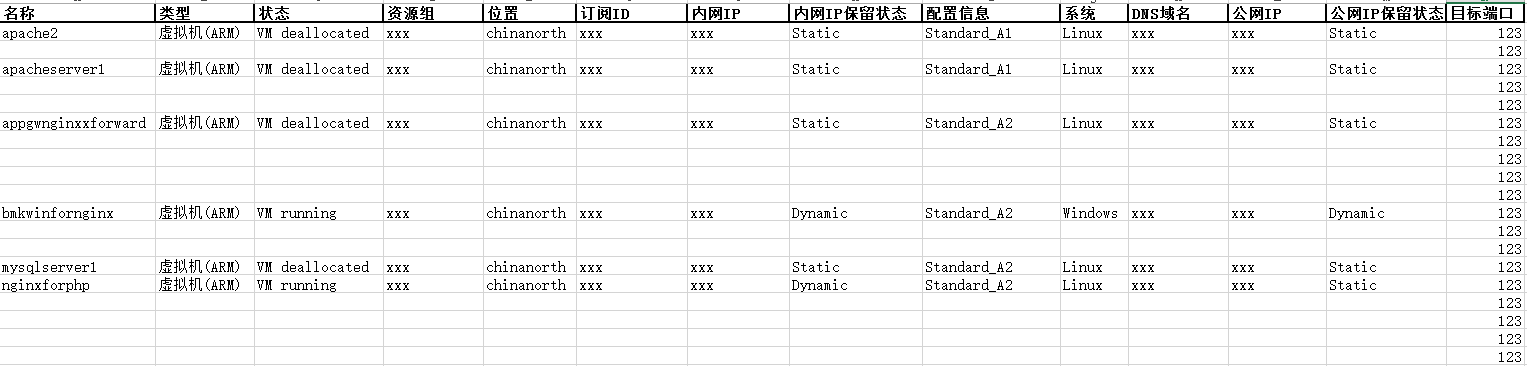
输出项及格式见下:
备注:
1.运行脚本期间可能会出现如下报错,忽略即可,不影响最终的结果统计。

2.该脚本运行前,需要事先定义好订阅
3.该脚本输出的为一个Excel表格,输出期间不要关闭正在运行的Excel
4.如果需要对指定Azure账号下的所有订阅进行统计,可参考如下脚本的遍历订阅方法,参考链接:
param(

    [string]$tenantId="",

    [string]$file="Azure-ARM-VMs.csv"

)

Add-AzureRmAccount -EnvironmentName AzureChinaCloud

Get-AzureRmSubscription

$vmobjs = @()

foreach ($sub in $subs)

{

    Write-Host Processing subscription $sub.SubscriptionName

    try

    {

        Select-AzureRmSubscription -SubscriptionId $sub.SubscriptionId -ErrorAction Continue

        $vms = Get-AzureRmVm

        foreach ($vm in $vms)

        {

            $vmInfo = [pscustomobject]@{

                'Subscription'=$sub.SubscriptionName

                'Mode'='ARM'

                'Name'=$vm.Name

                'ResourceGroupName' = $vm.ResourceGroupName

                'Location' = $vm.Location

                'VMSize' = $vm.HardwareProfile.VMSize

                'Status' = $null

                'AvailabilitySet' = $vm.AvailabilitySetReference.Id }

            $vmStatus = $vm | Get-AzureRmVM -Status

            $vmInfo.Status = $vmStatus.Statuses[1].DisplayStatus

            $vmobjs += $vmInfo

        }

    }

    catch

    {

        Write-Host $error[0]

    }

}

$vmobjs | Export-Csv -NoTypeInformation -Path $file

Write-Host "VM list written to $file"
Azure Powershell获取指定订阅下的虚拟机信息(ARM)的更多相关文章
- Azure Powershell获取指定订阅下的虚拟机信息(ASM)
为方便Azure用户导出已创建虚拟机的相关信息,特编写如下脚本: 详情脚本: # 登陆Azure Account Add-AzureAccount -Environment AzureChinaClo ...
- [转]C# 获取指定目录下所有文件信息、移动目录、拷贝目录
原文:http://blog.csdn.net/vchao13/article/details/6200255 1.获取指定目录下所有文件信息 /// <summary> /// 返回指定 ...
- C# 获取指定目录下所有文件信息
/// <summary> /// 返回指定目录下所有文件信息 /// </summary> /// <param name="strDirectory&quo ...
- 获取指定订阅下所有Azure ARM虚拟机配置(CPU核数,内存大小,磁盘信息)的使用情况
脚本内容: <# .SYNOPSIS This script grab all ARM VM VHD file in the subscription and caculate VHD size ...
- C# 获取指定目录下所有文件信息、移动目录、拷贝目录
/// <summary> /// 返回指定目录下的所有文件信息 /// </summary> /// <param name="strDirectory&qu ...
- c# 获取指定目录下的所有文件并显示在网页上
参考文献: FileInfo 的使用 https://msdn.microsoft.com/zh-cn/library/system.io.fileinfo_methods(v=vs.110).as ...
- 一个获取指定目录下一定格式的文件名称和文件修改时间并保存为文件的python脚本
摘自:http://blog.csdn.net/forandever/article/details/5711319 一个获取指定目录下一定格式的文件名称和文件修改时间并保存为文件的python脚本 ...
- PHP 获取指定目录下所有文件(包含子目录)
PHP 获取指定目录下所有文件(包含子目录) //glob — 寻找与模式匹配的文件路径 $filter_dir = array('CVS', 'templates_c', 'log', 'img', ...
- TDirectory.GetFileSystemEntries获取指定目录下的目录和文件
使用函数: System.IOUtils.TDirectory.GetFileSystemEntries 所有重载: class function GetFileSystemEntries(const ...
随机推荐
- ES6 Generators并发
ES6 Generators系列: ES6 Generators基本概念 深入研究ES6 Generators ES6 Generators的异步应用 ES6 Generators并发 如果你已经读过 ...
- K:Union-Find(并查集)算法
相关介绍: 并查集的相关算法,是我见过的,最为之有趣的算法之一.并查集是一种树型的数据结构,用于处理一些不相交集合(Disjoint Sets)的合并及查询问题.其相关的实现代码较为简短,实现思想也 ...
- 使用Tomcat的Reload提高开发速度(翻译)
欢迎转载http://www.cnblogs.com/coodream2009,有翻译的不太准确的地方请大家指出,我继续修改完善. 按照Java Servlet规范第四部分推荐的,Tomcat系统的实 ...
- c# socket 粘包 其实。。。
文章内容有错,请直接关闭~~~不要看了.丢人. private static Dictionary<string, Packet> cache = new Dictionary<st ...
- Spring+SpringMVC+MyBatis+easyUI整合基础篇
基础篇 Spring+SpringMVC+MyBatis+easyUI整合基础篇(一)项目简介 Spring+SpringMVC+MyBatis+easyUI整合基础篇(二)牛刀小试 Spring+S ...
- windbg关于.NET分析的扩展命令
收到一个dump文件,运行环境的.net framework的详细版本是多少呢? dump信息与性能计数器结合分析时,想知道该dump运行的进程号是多少? dump定位到有效的堆栈信息,而对应的源码是 ...
- Java面向对象抽象类案例分析
/** 雇员示例: 需求:公司中程序员有姓名,工号,薪水,工作内容 项目经理除了有姓名,工号,薪水还有奖金,工作内容 对给出需求进行数据建模 分析: 在这个问题领域中,先找出涉及的对象 通过名词提炼法 ...
- UVA 1030 - Image Is Everything【模拟+思维+迭代更新】
题目链接:uva 1030 - Image Is Everything 题目大意:有一个最大为n*n*n的立方体的一个不规整立体,由若干个1*1*1的小正方体构成(每一个小正方体被涂成不同的颜色),给 ...
- Uva - 12050 Palindrome Numbers【数论】
题目链接:uva 12050 - Palindrome Numbers 题意:求第n个回文串 思路:首先可以知道的是长度为k的回文串个数有9*10^(k-1),那么依次计算,得出n是长度为多少的串,然 ...
- sass 安装
最近在安装sass的过程中遇到 了一下问题,总结一下安装过程. windows下sass的安装是依赖于ruby的,所以要先安装rubyinstaller,下载地址:https://rubyinstal ...