
zxing .net 多种条码格式的生成
下载地址:http://zxingnet.codeplex.com/
zxing.net是.net平台下编解条形码和二维码的工具,使用非常方便。
本文主要说明一下多种类型条码的生成。
适用的场景,标签可视化设计时,自定义条码类型,预览。
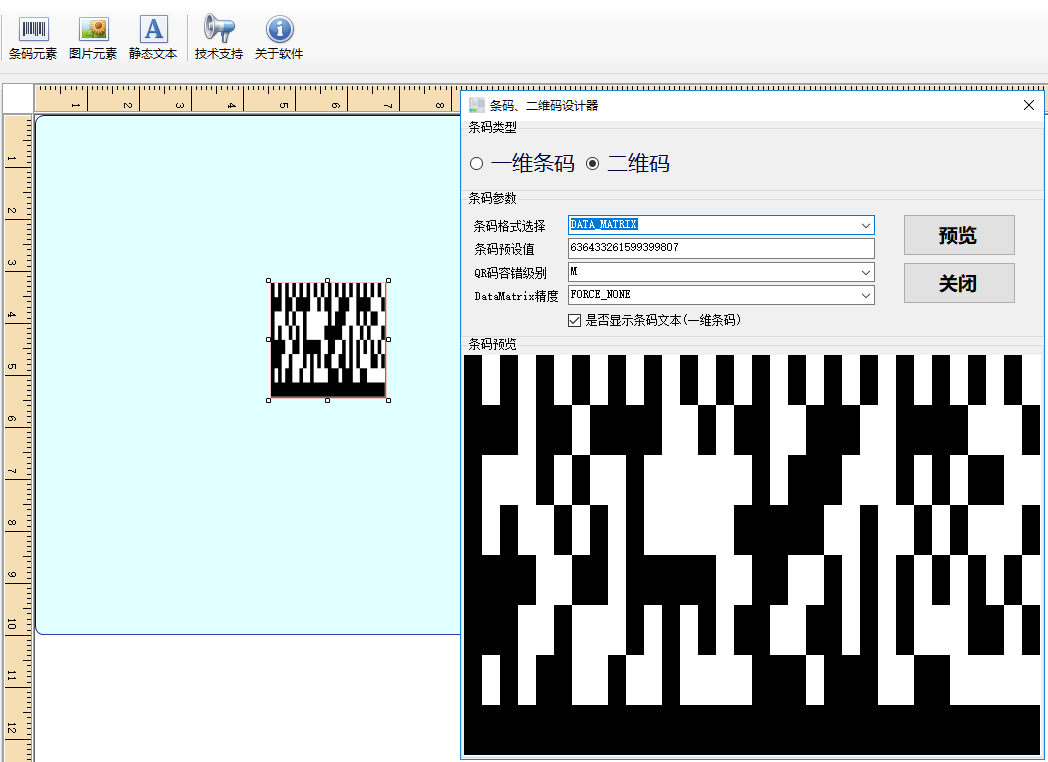
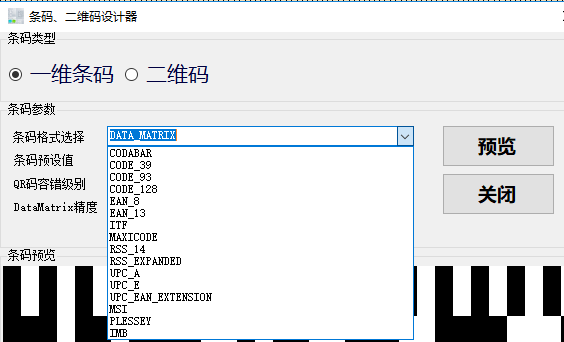
遍历zxing支持的全部条码类型
if (rb == rb1wm)

            {

                foreach (BarcodeFormat format in Enum.GetValues(typeof(BarcodeFormat)))

                {

                    if (format != BarcodeFormat.All_1D)

                        cbxBarcodeFormat.Items.Add(format.ToString());

                }

                cbxBarcodeFormat.Items.Remove(BarcodeFormat.QR_CODE.ToString());

                cbxBarcodeFormat.Items.Remove(BarcodeFormat.AZTEC.ToString());

                cbxBarcodeFormat.Items.Remove(BarcodeFormat.DATA_MATRIX.ToString());

                cbxBarcodeFormat.Items.Remove(BarcodeFormat.PDF_417.ToString());

            }

            if (rb == rb2wm)

            {

                cbxBarcodeFormat.Items.Add(BarcodeFormat.QR_CODE.ToString());

                cbxBarcodeFormat.Items.Add(BarcodeFormat.AZTEC.ToString());

                cbxBarcodeFormat.Items.Add(BarcodeFormat.DATA_MATRIX.ToString());

                cbxBarcodeFormat.Items.Add(BarcodeFormat.PDF_417.ToString());

            }
根据选择的类型生成条码
Bitmap bitmap = new Bitmap(pbxBarcode.Width, pbxBarcode.Height);
Graphics g = Graphics.FromImage(bitmap);
g.Clear(Color.White);
Format = (BarcodeFormat)Enum.Parse(typeof(BarcodeFormat), cbxBarcodeFormat.SelectedItem.ToString());
try
{
var options = new ZXing.Common.EncodingOptions
{
PureBarcode = !chxDisplayBarcode.Checked
};
#region 根据条码类型Write Image
switch (Format)
{
case BarcodeFormat.QR_CODE:
#region QRCode
if (cbxErrorLevel.SelectedItem.ToString().Equals("L"))
ErrorCorrectionLevel = QR_ErrorCorrectionLevel.L;
if (cbxErrorLevel.SelectedItem.ToString().Equals("H"))
ErrorCorrectionLevel = QR_ErrorCorrectionLevel.H;
if (cbxErrorLevel.SelectedItem.ToString().Equals("M"))
ErrorCorrectionLevel = QR_ErrorCorrectionLevel.M;
if (cbxErrorLevel.SelectedItem.ToString().Equals("Q"))
ErrorCorrectionLevel = QR_ErrorCorrectionLevel.Q;
ErrorCorrectionLevel level = null;
switch (ErrorCorrectionLevel)
{
case QR_ErrorCorrectionLevel.H:
level = ZXing.QrCode.Internal.ErrorCorrectionLevel.H;
break;
case QR_ErrorCorrectionLevel.M:
level = ZXing.QrCode.Internal.ErrorCorrectionLevel.M;
break;
case QR_ErrorCorrectionLevel.L:
level = ZXing.QrCode.Internal.ErrorCorrectionLevel.L;
break;
case QR_ErrorCorrectionLevel.Q:
level = ZXing.QrCode.Internal.ErrorCorrectionLevel.Q;
break;
}
QrCodeEncodingOptions qr_options = new QrCodeEncodingOptions
{
Margin = 0,
DisableECI = true,
CharacterSet = "UTF-8",
ErrorCorrection = level,
PureBarcode = !chxDisplayBarcode.Checked,
Width = pbxBarcode.Width,
Height = pbxBarcode.Height
};
var qrWriter = new ZXing.BarcodeWriter();
qrWriter.Format = BarcodeFormat.QR_CODE;
qrWriter.Options = qr_options;
#endregion
bitmap = qrWriter.Write(tbxBarcodeValue.Text.Trim());
BarCodeOptionsChanged?.Invoke(qrWriter.Options, Format, bitmap);
break;
case BarcodeFormat.PDF_417:
#region PDF417
PDF417EncodingOptions pdf_options = new PDF417EncodingOptions
{
Margin = 0,
DisableECI = true,
CharacterSet = "UTF-8",
Width = pbxBarcode.Width,
Height = pbxBarcode.Height,
PureBarcode = !chxDisplayBarcode.Checked
};
var pdf417Writer = new ZXing.BarcodeWriter();
pdf417Writer.Format = BarcodeFormat.PDF_417;
pdf417Writer.Options = pdf_options;
#endregion
bitmap = pdf417Writer.Write(tbxBarcodeValue.Text.Trim());
BarCodeOptionsChanged?.Invoke(pdf417Writer.Options, Format, bitmap);
break;
case BarcodeFormat.DATA_MATRIX:
#region DataMatrix
DatamatrixEncodingOptions dataMatrix_options = new DatamatrixEncodingOptions
{
Margin = 0,
SymbolShape = (ZXing.Datamatrix.Encoder.SymbolShapeHint)(Enum.Parse(typeof(ZXing.Datamatrix.Encoder.SymbolShapeHint), cbxDataMatrixOption.SelectedItem.ToString())),
Width = pbxBarcode.Width,
Height = pbxBarcode.Height,
PureBarcode = !chxDisplayBarcode.Checked,
};
var dataMatrixWriter = new ZXing.BarcodeWriter();
dataMatrixWriter.Format = BarcodeFormat.DATA_MATRIX;
dataMatrixWriter.Options = dataMatrix_options;
#endregion
bitmap = dataMatrixWriter.Write(tbxBarcodeValue.Text.Trim());
BarCodeOptionsChanged?.Invoke(dataMatrixWriter.Options, Format, bitmap);
break;
case BarcodeFormat.AZTEC:
#region Aztec
ZXing.Aztec.AztecEncodingOptions aztecEncodingOptions = new ZXing.Aztec.AztecEncodingOptions
{
Margin = 0,
ErrorCorrection = 2,
PureBarcode = !chxDisplayBarcode.Checked,
Layers = 16
};
var aztecWriter = new ZXing.BarcodeWriter();
aztecWriter.Format = BarcodeFormat.AZTEC;
aztecWriter.Options = aztecEncodingOptions;
#endregion
bitmap = aztecWriter.Write(tbxBarcodeValue.Text.Trim());
BarCodeOptionsChanged?.Invoke(aztecWriter.Options, Format, bitmap);
break;
case BarcodeFormat.CODE_128:
#region Code128
ZXing.OneD.Code128EncodingOptions code128_options = new ZXing.OneD.Code128EncodingOptions
{
Margin = 0,
PureBarcode = !chxDisplayBarcode.Checked,
Width = pbxBarcode.Width,
Height = pbxBarcode.Height,
ForceCodesetB = true
};
var code128_Writer = new ZXing.BarcodeWriter();
code128_Writer.Format = BarcodeFormat.CODE_128;
code128_Writer.Options = code128_options;
#endregion
bitmap = code128_Writer.Write(tbxBarcodeValue.Text.Trim());
BarCodeOptionsChanged?.Invoke(code128_Writer.Options, Format, bitmap);
break;
case BarcodeFormat.CODABAR:
var codeBar_Writer = new ZXing.BarcodeWriter();
codeBar_Writer.Format = BarcodeFormat.CODABAR;
codeBar_Writer.Options = options;
bitmap = codeBar_Writer.Write(tbxBarcodeValue.Text.Trim());
BarCodeOptionsChanged?.Invoke(options, Format, bitmap);
break;
case BarcodeFormat.EAN_13:
var ean13_Writer = new ZXing.BarcodeWriter();
ean13_Writer.Format = BarcodeFormat.EAN_13;
ean13_Writer.Options = options;
bitmap = ean13_Writer.Write(tbxBarcodeValue.Text.Trim());
BarCodeOptionsChanged?.Invoke(options, Format, bitmap);
break;
case BarcodeFormat.EAN_8:
var ean8_Writer = new ZXing.BarcodeWriter();
ean8_Writer.Format = BarcodeFormat.EAN_8;
ean8_Writer.Options = options;
bitmap = ean8_Writer.Write(tbxBarcodeValue.Text.Trim());
BarCodeOptionsChanged?.Invoke(options, Format, bitmap);
break;
case BarcodeFormat.CODE_39:
var code39_Writer = new ZXing.BarcodeWriter();
code39_Writer.Format = BarcodeFormat.CODE_39;
code39_Writer.Options = options;
bitmap = code39_Writer.Write(tbxBarcodeValue.Text.Trim());
BarCodeOptionsChanged?.Invoke(options, Format, bitmap);
break;
case BarcodeFormat.UPC_A:
var upca_Writer = new ZXing.BarcodeWriter();
upca_Writer.Format = BarcodeFormat.UPC_A;
upca_Writer.Options = options;
bitmap = upca_Writer.Write(tbxBarcodeValue.Text.Trim());
BarCodeOptionsChanged?.Invoke(options, Format, bitmap);
break;
case BarcodeFormat.UPC_E:
var upce_Writer = new ZXing.BarcodeWriter();
upce_Writer.Format = BarcodeFormat.UPC_E;
upce_Writer.Options = options;
bitmap = upce_Writer.Write(tbxBarcodeValue.Text.Trim());
BarCodeOptionsChanged?.Invoke(options, Format, bitmap);
break;
case BarcodeFormat.MSI:
var msi_Writer = new ZXing.BarcodeWriter();
msi_Writer.Format = BarcodeFormat.MSI;
msi_Writer.Options = options;
bitmap = msi_Writer.Write(tbxBarcodeValue.Text.Trim());
BarCodeOptionsChanged?.Invoke(options, Format, bitmap);
break;
case BarcodeFormat.ITF:
var itf_Writer = new ZXing.BarcodeWriter();
itf_Writer.Format = BarcodeFormat.ITF;
itf_Writer.Options = options;
bitmap = itf_Writer.Write(tbxBarcodeValue.Text.Trim());
BarCodeOptionsChanged?.Invoke(options, Format, bitmap);
break;
case BarcodeFormat.PLESSEY:
var plessey_Writer = new ZXing.BarcodeWriter();
plessey_Writer.Format = BarcodeFormat.PLESSEY;
plessey_Writer.Options = options;
bitmap = plessey_Writer.Write(tbxBarcodeValue.Text.Trim());
BarCodeOptionsChanged?.Invoke(options, Format, bitmap);
break;
case BarcodeFormat.MAXICODE:
var code_Writer = new ZXing.BarcodeWriter();
code_Writer.Format = BarcodeFormat.MAXICODE;
code_Writer.Options = options;
bitmap = code_Writer.Write(tbxBarcodeValue.Text.Trim());
BarCodeOptionsChanged?.Invoke(options, Format, bitmap);
break;
default:
throw new Exception("条码格式暂不支持!");
}
#endregion
}
catch (Exception ex)
{
MessageBox.Show("编码生成错误:" + ex.Message, "系统提示", MessageBoxButtons.OK, MessageBoxIcon.Error);
}
finally
{
pbxBarcode.Image = bitmap;
}
zxing .net 多种条码格式的生成的更多相关文章
- C# - VS2019调用ZXing.NET实现条码、二维码和带有Logo的二维码生成
前言 C# WinFrm程序调用ZXing.NET实现条码.二维码和带有Logo的二维码生成. ZXing.NET导入 GitHub开源库 ZXing.NET开源库githib下载地址:https:/ ...
- java二维码生成-谷歌(Google.zxing)开源二维码生成学习及实例
java二维码生成-谷歌(Google.zxing)开源二维码生成的实例及介绍 我们使用比特矩阵(位矩阵)的QR码编码在缓冲图片上画出二维码 实例有以下一个传入参数 OutputStream ou ...
- ini格式数据生成与解析具体解释
ini格式数据生成与解析具体解释 1.ini格式数据长啥样? watermark/2/text/aHR0cDovL2Jsb2cuY3Nkbi5uZXQv/font/5a6L5L2T/fontsize/ ...
- python 将png图片格式转换生成gif动画
先看知乎上面的一个连接 用Python写过哪些[脑洞大开]的小工具? https://www.zhihu.com/question/33646570/answer/157806339 这个哥们通过爬气 ...
- C# - VS2019 WinFrm程序调用ZXing.NET实现条码、二维码和带有Logo的二维码的识别
前言 C# WinFrm程序调用ZXing.NET实现条码.二维码和带有Logo的二维码的识别. ZXing.NET导入 GitHub开源库 ZXing.NET开源库githib下载地址:https: ...
- 2018-8-10-VisualStudio-2017-项目格式-自动生成版本号
title author date CreateTime categories VisualStudio 2017 项目格式 自动生成版本号 lindexi 2018-08-10 19:16:52 + ...
- Android zxing 解析二维码,生成二维码极简demo
zxing 官方的代码很多,看起来很费劲,此demo只抽取了有用的部分,实现了相机预览解码,解析本地二维码,生成二维码三个功能. 简化后的结构如下: 废话少说直接上代码: BaseDecodeHand ...
- 将DataSet(DataTable)转换成JSON格式(生成JS文件存储)
public static string CreateJsonParameters(DataTable dt) { /**/ /**/ /**/ /* /*********************** ...
- JAVA中通过时间格式来生成唯一的文件名
有时候我们需要截图,在要截图时,有人用到了时间格式,但是时间格式中的:在文件名称中是不被允许的字符,所以就会报错,如何生成唯一的时间文件名: package com.demo; import java ...
随机推荐
- Linux下实现视频读取(三)---Buffer的准备和数据读取
前面主要介绍的是:V4L2 的一些设置接口,如亮度,饱和度.曝光时间,帧数,增益.白平衡等.今天看看V4L2 得到数据的几个关键ioctl,Buffer的申请和数据的抓取. 1. 初始化 Memory ...
- Android ListView Adapter的getItemViewType和getViewTypeCount多种布局
<Android ListView Adapter的getItemViewType和getViewTypeCount多种布局> 在Android的ListView中.假设在一个Lis ...
- iOS_正則表達式
iOS 正則表達式 正則表達式,又称正规表示法.常规表示法(英语:Regular Expression,在代码中常简写为regex.regexp或RE).计算机科学的一个概念. 正則表達式使用单个字符 ...
- 从0开始做垂直O2O个性化推荐-以58到家美甲为例
从0开始做垂直O2O个性化推荐 上次以58转转为例,介绍了如何从0开始如何做互联网推荐产品(回复"推荐"阅读),58转转的宝贝为闲置物品,品类多种多样,要做统一的宝贝画像比较难,而 ...
- jstl常用语句
1.select框中if选中,下面的语句实现从后台给过来一个category实体,如果category的categoryType为指定的值,则选中. <select class="fo ...
- python中的subprocess.Popen()使用
python中的subprocess.Popen()使用 从python2.4版本开始,可以用subprocess这个模块来产生子进程,并连接到子进程的标准输入/输出/错误中去,还可以得到子进程的返回 ...
- scrapy里的selector,不能有正则提取
参考:http://blog.csdn.net/dawnranger/article/details/50037703 Selector 有一个 .re() 方法,用来通过正则表达式来提取数据. 不同 ...
- SpringBoot ( 七 ) :springboot + mybatis 多数据源最简解决方案
说起多数据源,一般都来解决那些问题呢,主从模式或者业务比较复杂需要连接不同的分库来支持业务.我们项目是后者的模式,网上找了很多,大都是根据jpa来做多数据源解决方案,要不就是老的spring多数据源解 ...
- c#值类型与引用类型区别
值类型对象的两种表示方式:未装箱和已装箱,引用类型总是处于已装箱 值类型从System.ValueType派生.该类型提供了与System.Object相同方法,但System.ValueType重写 ...
- Java中参数传递问题
Java中参数传递可以分为值传递和引用传递,话不多说直接撸代码 1.传原始类型(int,String等)数据是值传递 package test_1; public class Test { publi ...