
Ruby小白入门笔记之 <Gemfile 文件>
因为初学Ruby,四处查资料无果,才来的贴出亲自试过的操作,覆盖整个个人入门笔记博客中,故所有的操作,都以最明了的方式阐述,当你创建完一个新的Rails应用后,你发现JAVA中我们可以编写maven聚合项目来控制其子项目的JDK,TOMCAT等等的版本,那么Ruby是怎样来管理的呢,答案就是在Gemfile中加依赖,而这个文件不是你手动编写的,而是使用Bundler来安装和引入该应用所需的gem。执行rails new命令时会自动运行Bundler(bundle install命令),而bundle就是根据Gemfile文件中的来依赖你所定义的源,就像JAVA中的依赖jar包一样。下面先看看默认生成的Gemfile中有什么?
 source 'https://rubygems.org'

 git_source(:github) { |repo| "https://github.com/#{repo}.git" }

 ruby '2.3.1'

 # Bundle edge Rails instead: gem 'rails', github: 'rails/rails'

 gem 'rails', '~> 5.2.0'

 # Use sqlite3 as the database for Active Record

 gem 'sqlite3'

 # Use Puma as the app server

 gem 'puma', '~> 3.11'

 # Use SCSS for stylesheets

 gem 'sass-rails', '~> 5.0'

 # Use Uglifier as compressor for JavaScript assets

 gem 'uglifier', '>= 1.3.0'

 # See https://github.com/rails/execjs#readme for more supported runtimes

 # gem 'mini_racer', platforms: :ruby

 # Use CoffeeScript for .coffee assets and views

 gem 'coffee-rails', '~> 4.2'

 # Turbolinks makes navigating your web application faster. Read more: https://github.com/turbolinks/turbolinks

 gem 'turbolinks', '~> 5'

 # Build JSON APIs with ease. Read more: https://github.com/rails/jbuilder

 gem 'jbuilder', '~> 2.5'

 # Use Redis adapter to run Action Cable in production

 # gem 'redis', '~> 4.0'

 # Use ActiveModel has_secure_password

 # gem 'bcrypt', '~> 3.1.7'

 # Use ActiveStorage variant

 # gem 'mini_magick', '~> 4.8'

 # Use Capistrano for deployment

 # gem 'capistrano-rails', group: :development

 # Reduces boot times through caching; required in config/boot.rb

 gem 'bootsnap', '>= 1.1.0', require: false

 group :development, :test do

   # Call 'byebug' anywhere in the code to stop execution and get a debugger console

   gem 'byebug', platforms: [:mri, :mingw, :x64_mingw]

 end

 group :development do

   # Access an interactive console on exception pages or by calling 'console' anywhere in the code.

   gem 'web-console', '>= 3.3.0'

   gem 'listen', '>= 3.0.5', '< 3.2'

   # Spring speeds up development by keeping your application running in the background. Read more: https://github.com/rails/spring

   gem 'spring'

   gem 'spring-watcher-listen', '~> 2.0.0'

 end

 group :test do

   # Adds support for Capybara system testing and selenium driver

   gem 'capybara', '>= 2.15', '< 4.0'

   gem 'selenium-webdriver'

   # Easy installation and use of chromedriver to run system tests with Chrome

   gem 'chromedriver-helper'

 end

 # Windows does not include zoneinfo files, so bundle the tzinfo-data gem

 gem 'tzinfo-data', platforms: [:mingw, :mswin, :x64_mingw, :jruby]
可以看到很多的代码都被#注释掉了,这些代码之所以注释而又放在这,是为了告诉你一些常用的gem,也是为了展示Bundler的句法,在gem指令中,如果你没有指定版本,那么Bundler就会默认安装最新版。
题外话:
gem 'uglifier', '>= 1.3.0'

这行代码的意思是,安装版本号大于或等于1.3.0的uglifier(作用是压缩 Asset Pipeline中的文件),就算是7.2版也会安装。

gem 'coffee-rails','~> 4.0.0'

这行代码的意思是,安装版本号大于4.0.0,但小于4.1的coffee-rails。也就是说,>=表示法意思是始终安装最新版;~> 4.0.0表示法的意思是只安装最后一个数字变化的版本
但是往往开发中我们会修改Gemfile,换用更为精准的版本号,并且引用国内淘宝的,就不用翻墙,提高速度,那么下面就来看看修改过后的文件。
注意将source 'https://rubygems.org' 改为 source 'https://ruby.taobao.org'
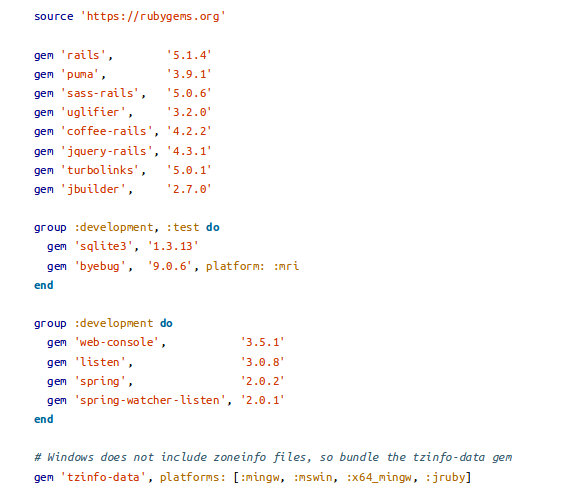
修改完后执行Bundle install命令,来安装这些gem,注意别像我一样蠢,一开始居然没在项目内运行命令,应该在你带有Gemfile的目录下执行Bbundle install.然后出现类似下面提示,就是更新依赖成功
Using rake 12.3.1

Using concurrent-ruby 1.0.5

Using i18n 1.0.1

Using minitest 5.11.3

Using thread_safe 0.3.6

Using tzinfo 1.2.5

Using activesupport 5.2.0

Using builder 3.2.3

Using erubi 1.7.1

Using mini_portile2 2.3.0

Using nokogiri 1.8.2

Using rails-dom-testing 2.0.3

Using crass 1.0.4

Using loofah 2.2.2

Using rails-html-sanitizer 1.0.4

Using actionview 5.2.0

Using rack 2.0.5

Using rack-test 1.0.0

Using actionpack 5.2.0

Using nio4r 2.3.1

Using websocket-extensions 0.1.3

Using websocket-driver 0.7.0

Using actioncable 5.2.0

Using globalid 0.4.1

Using activejob 5.2.0

Using mini_mime 1.0.0

Using mail 2.7.0

Using actionmailer 5.2.0

Using activemodel 5.2.0

Using arel 9.0.0

Using activerecord 5.2.0

Using mimemagic 0.3.2

Using marcel 0.3.2

Using activestorage 5.2.0

Using public_suffix 3.0.2

Using addressable 2.5.2

Using io-like 0.3.0

Using archive-zip 0.11.0

Using bindex 0.5.0

Using msgpack 1.2.4

Using bootsnap 1.3.0

Using bundler 1.16.2

Using byebug 10.0.2

Using xpath 3.1.0

Using capybara 3.2.1

Using ffi 1.9.25

Using childprocess 0.9.0

Using chromedriver-helper 1.2.0

Using coffee-script-source 1.12.2

Using execjs 2.7.0

Using coffee-script 2.4.1

Using method_source 0.9.0

Using thor 0.20.0

Using railties 5.2.0

Using coffee-rails 4.2.2

Using multi_json 1.13.1

Using jbuilder 2.7.0

Using rb-fsevent 0.10.3

Using rb-inotify 0.9.10

Using ruby_dep 1.5.0

Using listen 3.1.5

Using puma 3.11.4

Using sprockets 3.7.1

Using sprockets-rails 3.2.1

Using rails 5.2.0

Using rubyzip 1.2.1

Using sass-listen 4.0.0

Using sass 3.5.6

Using tilt 2.0.8

Using sass-rails 5.0.7

Using selenium-webdriver 3.12.0

Using spring 2.0.2

Using spring-watcher-listen 2.0.1

Using sqlite3 1.3.13

Using turbolinks-source 5.1.0

Using turbolinks 5.1.1

Using uglifier 4.1.11

Using web-console 3.6.2

Bundle complete! 18 Gemfile dependencies, 78 gems now installed.

Use `bundle info [gemname]` to see where a bundled gem is installed.
好了,到此为止Gemfile文件就入门完了,嘻嘻。
如果你还想深入了解Gemfile文件,那个可以参考下 http://tosbourn.com/what-is-the-gemfile/
Ruby小白入门笔记之 <Gemfile 文件>的更多相关文章
- Ruby小白入门笔记之<个人记录档>
书写缘由 快两年的JAVA开发,因为来到一家新公司,产品需要用Ruby开发,故此才有了这从头开始,一入编程深似海啊...... 因为入门时是JAVA,所以理念跟规范早已形成,故此感觉突然采用Ruby编 ...
- Ruby小白入门笔记之<Rails项目目录结构>
一 .流程分析 二.目录分析 DemoRails app (核心) assets (web前端所需文件) images (图片) javascripts (JS代码) styleshe ...
- Ruby小白入门笔记之<Rubymine工具的快捷键>
智能快捷 Ctrl+Alt+G:弹出Generate Ctrl+Alt+L:格式化代码 Alt+F1:切换视图(Project, Structure, etc.). Alt+F2:弹出预览窗口,可选择 ...
- Python爬虫 小白[3天]入门笔记
笔记来源 Day-0 1.如果你还不了解Python的基础语法,可以移步|>>>Python 基础 小白 [7天] 入门笔记<<<|或自行学习. 简介 1.什么是爬 ...
- 《Ruby语言入门教程v1.0》学习笔记-01
<Ruby语言入门教程v1.0> 编著:张开川 邮箱:kaichuan_zhang@126.com 想要学习ruby是因为公司的自动化测试使用到了ruby语言,但是公司关于ruby只给了一 ...
- Ruby入门笔记
Ruby入门笔记 一切皆为对象 “Hello”.length 方法 定义:def开头 end结尾 命名一般采用下划线分隔单词
- Python基础 小白[7天]入门笔记
笔记来源 Day-1 基础知识(注释.输入.输出.循环.数据类型.随机数) #-*- codeing = utf-8 -*- #@Time : 2020/7/11 11:38 #@Author : H ...
- React.js入门笔记
# React.js入门笔记 核心提示 这是本人学习react.js的第一篇入门笔记,估计也会是该系列涵盖内容最多的笔记,主要内容来自英文官方文档的快速上手部分和阮一峰博客教程.当然,还有我自己尝试的 ...
- Web前端小白入门指迷
前注:这篇文章首发于我自己创办的服务于校园的技术分享 [西邮 Upper -- 004]Web前端小白入门指迷,写得很用心也就发在这里. 大前端之旅 大前端有很多种,Shell 前端,客户端前端,Ap ...
随机推荐
- kubesphere集群节点扩容
原有的节点是 : master[123] , node[1234] 新加的节点node5 一.修改配置文件hosts.ini [root@master0 ~]# /conf/hosts.ini [al ...
- Nginx实用整理
1. nginx 简述 1.1Nginx是轻量级高并发HTTP服务器和反向代理服务器:同时也是一个IMAP.POP3.SMTP代理服务器:Nginx可以作为一个HTTP服务器进行网站的发布处理,另外N ...
- sed命令替换文件内容
reference: https://www.cnblogs.com/starof/p/4181985.html 抓取目录名并修改 ls | grep "XXX" > 1.t ...
- shell知识点(一)
Shell1.概述Shell是一个命令行解释器,它接收应用程序/用户命令,然后调用操作系统内核还是一个功能相当强大的编程语言,易编写.易调试.灵活性强2.shell解析器查看linux提供的shell ...
- SQL server 获取异常
一.try...... catch 获取异常信息 /*======================================== 相关错误消 息如下: ERROR_NUMBER() 返回错误号. ...
- count(列) count(*)
总结:但是真的结论是这样的么.其实不然.其实在数据库中count(*)和count(列)根本就是不等价的,count(*)是针对于全表的,而count(列)是针对于某一列的,如果此列值为空的话,cou ...
- JS 跳转后保持当前参数
跳转 var data = str+"&jc=0"+ "&data=" + $("form").serialize().re ...
- 什么是DOM(文档对象模型)?
㈠什么是DOM? 文档对象模型(Document Object Model,简称DOM),是W3C组织推荐的处理可扩展标志语言的标准编程接口. DOM 定义了访问 HTML 和 XML 文档的标准: ...
- malloc,calloc,realloc
与堆操作相关的两个函数 malloc #include<stdio.h> #include<stdlib.h> #include<string.h> int mai ...
- python3基础: 元组tuple、 列表list、 字典dict、集合set。 迭代器、生成器
一.元组: tuple Python 的元组与列表类似,不同之处在于元组的元素不能修改. 元组中的元素值是不允许删除的,但我们可以使用del语句来删除整个元组 tup2 = (111, 22, 33, ...