
java文件断点上传
1,项目调研
因为需要研究下断点上传的问题。找了很久终于找到一个比较好的项目。
在GoogleCode上面,代码弄下来超级不方便,还是配置hosts才好,把代码重新上传到了github上面。
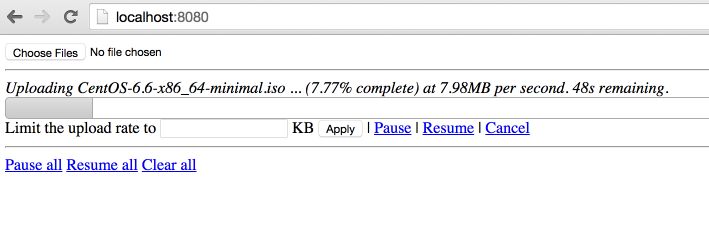
效果:
上传中,显示进度,时间,百分比。
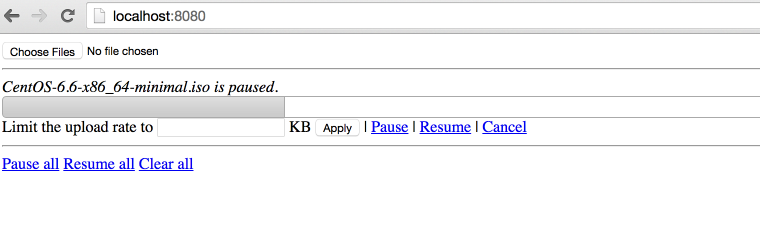
点击【Pause】暂停,点击【Resume】继续。
2,代码分析
原始项目:
项目进行了封装使用最简单的方法实现了http的断点上传。
因为html5 里面有读取文件分割文件的类库,所以才可以支持断点上传,所以这个只能在html5 支持的浏览器上面展示。
同时,在js 和 java 同时使用 cr32 进行文件块的校验,保证数据上传正确。
代码在使用了最新的servlet 3.0 的api,使用了异步执行,监听等方法。
上传类UploadServlet
@Component("javaLargeFileUploaderServlet")
@WebServlet(name = "javaLargeFileUploaderServlet", urlPatterns = { "/javaLargeFileUploaderServlet" })
public class UploadServlet extends HttpRequestHandlerServlet
implements HttpRequestHandler {
private static final Logger log = LoggerFactory.getLogger(UploadServlet.class);
@Autowired
UploadProcessor uploadProcessor;
@Autowired
FileUploaderHelper fileUploaderHelper;
@Autowired
ExceptionCodeMappingHelper exceptionCodeMappingHelper;
@Autowired
Authorizer authorizer;
@Autowired
StaticStateIdentifierManager staticStateIdentifierManager;
@Override
public void handleRequest(HttpServletRequest request, HttpServletResponse response)
throws IOException {
log.trace("Handling request");
Serializable jsonObject = null;
try {
// extract the action from the request
UploadServletAction actionByParameterName =
UploadServletAction.valueOf(fileUploaderHelper.getParameterValue(request, UploadServletParameter.action));
// check authorization
checkAuthorization(request, actionByParameterName);
// then process the asked action
jsonObject = processAction(actionByParameterName, request);
// if something has to be written to the response
if (jsonObject != null) {
fileUploaderHelper.writeToResponse(jsonObject, response);
}
}
// If exception, write it
catch (Exception e) {
exceptionCodeMappingHelper.processException(e, response);
}
}
private void checkAuthorization(HttpServletRequest request, UploadServletAction actionByParameterName)
throws MissingParameterException, AuthorizationException {
// check authorization
// if its not get progress (because we do not really care about authorization for get
// progress and it uses an array of file ids)
if (!actionByParameterName.equals(UploadServletAction.getProgress)) {
// extract uuid
final String fileIdFieldValue = fileUploaderHelper.getParameterValue(request, UploadServletParameter.fileId, false);
// if this is init, the identifier is the one in parameter
UUID clientOrJobId;
String parameter = fileUploaderHelper.getParameterValue(request, UploadServletParameter.clientId, false);
if (actionByParameterName.equals(UploadServletAction.getConfig) && parameter != null) {
clientOrJobId = UUID.fromString(parameter);
}
// if not, get it from manager
else {
clientOrJobId = staticStateIdentifierManager.getIdentifier();
}
// call authorizer
authorizer.getAuthorization(
request,
actionByParameterName,
clientOrJobId,
fileIdFieldValue != null ? getFileIdsFromString(fileIdFieldValue).toArray(new UUID[] {}) : null);
}
}
private Serializable processAction(UploadServletAction actionByParameterName, HttpServletRequest request)
throws Exception {
log.debug("Processing action " + actionByParameterName.name());
Serializable returnObject = null;
switch (actionByParameterName) {
case getConfig:
String parameterValue = fileUploaderHelper.getParameterValue(request, UploadServletParameter.clientId, false);
returnObject =
uploadProcessor.getConfig(
parameterValue != null ? UUID.fromString(parameterValue) : null);
break;
case verifyCrcOfUncheckedPart:
returnObject = verifyCrcOfUncheckedPart(request);
break;
case prepareUpload:
returnObject = prepareUpload(request);
break;
case clearFile:
uploadProcessor.clearFile(UUID.fromString(fileUploaderHelper.getParameterValue(request, UploadServletParameter.fileId)));
break;
case clearAll:
uploadProcessor.clearAll();
break;
case pauseFile:
List<UUID> uuids = getFileIdsFromString(fileUploaderHelper.getParameterValue(request, UploadServletParameter.fileId));
uploadProcessor.pauseFile(uuids);
break;
case resumeFile:
returnObject =
uploadProcessor.resumeFile(UUID.fromString(fileUploaderHelper.getParameterValue(request, UploadServletParameter.fileId)));
break;
case setRate:
uploadProcessor.setUploadRate(UUID.fromString(fileUploaderHelper.getParameterValue(request, UploadServletParameter.fileId)),
Long.valueOf(fileUploaderHelper.getParameterValue(request, UploadServletParameter.rate)));
break;
case getProgress:
returnObject = getProgress(request);
break;
}
return returnObject;
}
List<UUID> getFileIdsFromString(String fileIds) {
String[] splittedFileIds = fileIds.split(",");
List<UUID> uuids = Lists.newArrayList();
for (int i = 0; i < splittedFileIds.length; i++) {
uuids.add(UUID.fromString(splittedFileIds[i]));
}
return uuids;
}
private Serializable getProgress(HttpServletRequest request)
throws MissingParameterException {
Serializable returnObject;
String[] ids =
new Gson()
.fromJson(fileUploaderHelper.getParameterValue(request, UploadServletParameter.fileId), String[].class);
Collection<UUID> uuids = Collections2.transform(Arrays.asList(ids), new Function<String, UUID>() {
@Override
public UUID apply(String input) {
return UUID.fromString(input);
}
});
returnObject = Maps.newHashMap();
for (UUID fileId : uuids) {
try {
ProgressJson progress = uploadProcessor.getProgress(fileId);
((HashMap<String, ProgressJson>) returnObject).put(fileId.toString(), progress);
}
catch (FileNotFoundException e) {
log.debug("No progress will be retrieved for " + fileId + " because " + e.getMessage());
}
}
return returnObject;
}
private Serializable prepareUpload(HttpServletRequest request)
throws MissingParameterException, IOException {
// extract file information
PrepareUploadJson[] fromJson =
new Gson()
.fromJson(fileUploaderHelper.getParameterValue(request, UploadServletParameter.newFiles), PrepareUploadJson[].class);
// prepare them
final HashMap<String, UUID> prepareUpload = uploadProcessor.prepareUpload(fromJson);
// return them
return Maps.newHashMap(Maps.transformValues(prepareUpload, new Function<UUID, String>() {
public String apply(UUID input) {
return input.toString();
};
}));
}
private Boolean verifyCrcOfUncheckedPart(HttpServletRequest request)
throws IOException, MissingParameterException, FileCorruptedException, FileStillProcessingException {
UUID fileId = UUID.fromString(fileUploaderHelper.getParameterValue(request, UploadServletParameter.fileId));
try {
uploadProcessor.verifyCrcOfUncheckedPart(fileId,
fileUploaderHelper.getParameterValue(request, UploadServletParameter.crc));
}
catch (InvalidCrcException e) {
// no need to log this exception, a fallback behaviour is defined in the
// throwing method.
// but we need to return something!
return Boolean.FALSE;
}
return Boolean.TRUE;
}
}
异步上传UploadServletAsync
@Component("javaLargeFileUploaderAsyncServlet")
@WebServlet(name = "javaLargeFileUploaderAsyncServlet", urlPatterns = { "/javaLargeFileUploaderAsyncServlet" }, asyncSupported = true)
public class UploadServletAsync extends HttpRequestHandlerServlet
implements HttpRequestHandler {
private static final Logger log = LoggerFactory.getLogger(UploadServletAsync.class);
@Autowired
ExceptionCodeMappingHelper exceptionCodeMappingHelper;
@Autowired
UploadServletAsyncProcessor uploadServletAsyncProcessor;
@Autowired
StaticStateIdentifierManager staticStateIdentifierManager;
@Autowired
StaticStateManager<StaticStatePersistedOnFileSystemEntity> staticStateManager;
@Autowired
FileUploaderHelper fileUploaderHelper;
@Autowired
Authorizer authorizer;
/**
* Maximum time that a streaming request can take.<br>
*/
private long taskTimeOut = DateUtils.MILLIS_PER_HOUR;
@Override
public void handleRequest(final HttpServletRequest request, final HttpServletResponse response)
throws ServletException, IOException {
// process the request
try {
//check if uploads are allowed
if (!uploadServletAsyncProcessor.isEnabled()) {
throw new UploadIsCurrentlyDisabled();
}
// extract stuff from request
final FileUploadConfiguration process = fileUploaderHelper.extractFileUploadConfiguration(request);
log.debug("received upload request with config: "+process);
// verify authorization
final UUID clientId = staticStateIdentifierManager.getIdentifier();
authorizer.getAuthorization(request, UploadServletAction.upload, clientId, process.getFileId());
//check if that file is not paused
if (uploadServletAsyncProcessor.isFilePaused(process.getFileId())) {
log.debug("file "+process.getFileId()+" is paused, ignoring async request.");
return;
}
// get the model
StaticFileState fileState = staticStateManager.getEntityIfPresent().getFileStates().get(process.getFileId());
if (fileState == null) {
throw new FileNotFoundException("File with id " + process.getFileId() + " not found");
}
// process the request asynchronously
final AsyncContext asyncContext = request.startAsync();
asyncContext.setTimeout(taskTimeOut);
// add a listener to clear bucket and close inputstream when process is complete or
// with
// error
asyncContext.addListener(new UploadServletAsyncListenerAdapter(process.getFileId()) {
@Override
void clean() {
log.debug("request " + request + " completed.");
// we do not need to clear the inputstream here.
// and tell processor to clean its shit!
uploadServletAsyncProcessor.clean(clientId, process.getFileId());
}
});
// then process
uploadServletAsyncProcessor.process(fileState, process.getFileId(), process.getCrc(), process.getInputStream(),
new WriteChunkCompletionListener() {
@Override
public void success() {
asyncContext.complete();
}
@Override
public void error(Exception exception) {
// handles a stream ended unexpectedly , it just means the user has
// stopped the
// stream
if (exception.getMessage() != null) {
if (exception.getMessage().equals("Stream ended unexpectedly")) {
log.warn("User has stopped streaming for file " + process.getFileId());
}
else if (exception.getMessage().equals("User cancellation")) {
log.warn("User has cancelled streaming for file id " + process.getFileId());
// do nothing
}
else {
exceptionCodeMappingHelper.processException(exception, response);
}
}
else {
exceptionCodeMappingHelper.processException(exception, response);
}
asyncContext.complete();
}
});
}
catch (Exception e) {
exceptionCodeMappingHelper.processException(e, response);
}
}
}
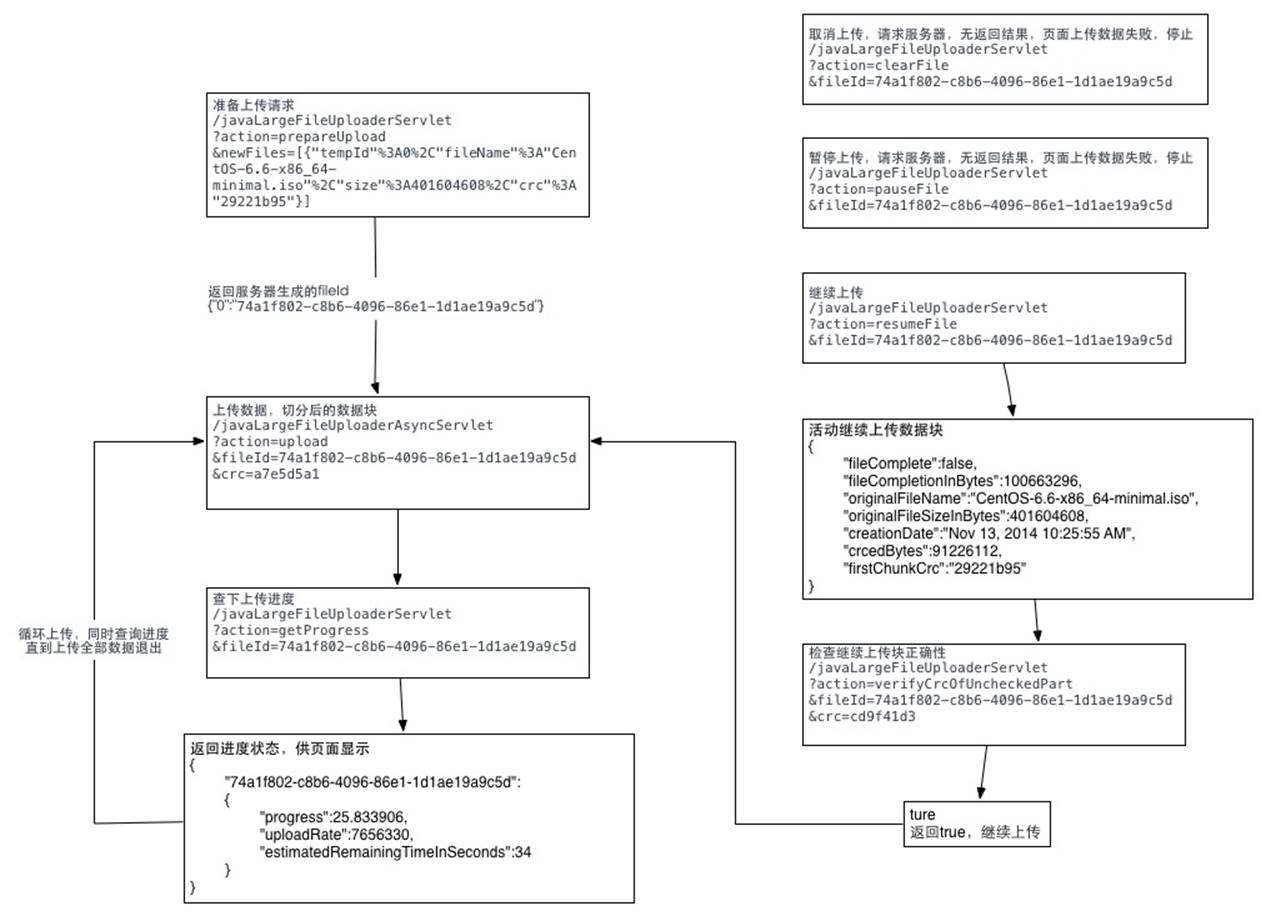
3,请求流程图:
主要思路就是将文件切分,然后分块上传。
详细代码可以参照我写的这篇文章:http://blog.ncmem.com/wordpress/2019/08/12/%e5%a4%a7%e6%96%87%e4%bb%b6%e6%96%ad%e7%82%b9%e7%bb%ad%e4%bc%a0-2/
java文件断点上传的更多相关文章
- 后端springmvc,前端html5的FormData实现文件断点上传
前言 最近项目中有使用到文件断点上传,得空便总结总结,顺便记录一下,毕竟“好记性不如烂笔头”. 后端代码: package com.test.controller; import java.io.Bu ...
- 文件断点上传,html5实现前端,java实现服务器
断点上传能够防止意外情况导致上传一半的文件下次上传时还要从头下载,网上有很多关于断点的实现,这篇文章只是从前到后完整的记录下一个可用的实例,由于生产环境要求不高,而且就是提供给一两个人用,所以我简化了 ...
- java HTTP文件断点上传
之前仿造uploadify写了一个HTML5版的文件上传插件,没看过的朋友可以点此先看一下~得到了不少朋友的好评,我自己也用在了项目中,不论是用户头像上传,还是各种媒体文件的上传,以及各种个性的业务需 ...
- Android中Socket大文件断点上传
原文:http://blog.csdn.net/shimiso/article/details/8529633 什么是Socket? 所谓Socket通常也称作“套接字”,用于描述IP地址和端口,是一 ...
- Android应用开发之使用Socket进行大文件断点上传续传
http://www.linuxidc.com/Linux/2012-03/55567.htm http://blog.csdn.net/shimiso/article/details/8529633 ...
- java 文件的上传和下载
主要介绍使用 smartupload.jar 包中的方法对文件的上传和下载.上传时文件是存放在服务器中,我用的是tamcat. 首先建立一个servlet 类,对文件的操作 package com.d ...
- java文件夹上传下载控件分享
用过浏览器的开发人员都对大文件上传与下载比较困扰,之前遇到了一个需要在JAVA.MyEclipse环境下大文件上传的问题,无奈之下自己开发了一套文件上传控件,在这里分享一下.希望能对你有所帮助. 以下 ...
- java文件分片上传,断点续传
百度的webUploader的前端开源插件实现的大文件分片上传功能 前端部分 前端页面代码如下,只需要修改自己的文件上传地址接口地址: <!DOCTYPE html> <html l ...
- java文件断点续传上传下载解决方案
这里只写后端的代码,基本的思想就是,前端将文件分片,然后每次访问上传接口的时候,向后端传入参数:当前为第几块文件,和分片总数 下面直接贴代码吧,一些难懂的我大部分都加上注释了: 上传文件实体类: 看得 ...
随机推荐
- python-笔记(一)python简介和入门
一.什么是python? python是一种面向对象.解释型的计算机语言,它的特点是语法简洁.优雅.简单易学.在1989诞生,Guido(龟叔)开发.这里的python并不是蟒蛇的意思,而是龟叔非常喜 ...
- 读Dubbo源码,学习SPI
核心类 ExtensionLoader 使用方法 定义接口,使用@SPI标记 @SPI("impl1") public interface SimpleExt { // @Adap ...
- drop_duplicates()函数
1dataframe删除某一列的重复元素,默认只留下第一次出现的 inplace参数设置为true时直接在原数据上修改,为False时,生成副本. 注意所有函数中inplace一旦设置为True,此时 ...
- hbase的API
import org.apache.hadoop.conf.Configuration; import org.apache.hadoop.hbase.*; import org.apache.had ...
- win10编写8086汇编程序(dosbox)
有部分同学反馈.在使用edit命令来编写汇编程序时遇到问题,由于模拟器没有edit程序,所以要换一种方式编写源程序.下面是完整的演示. 视频链接:http://www.bilibili.com/vid ...
- VUe.js 父组件向子组件中传值及方法
父组件向子组件中传值 1. Vue实例可以看做是大的组件,那么在其内部定义的私有组件与这个实例之间就出现了父子组件的对应关系. 2. 父子组件在默认的情况下,子组件是无妨访问到父组件中的数据的,所以 ...
- 001--PowerDesigner连接MySQL
PowerDesigner连接MySQL(一) 博客地址:https://blog.csdn.net/codemonkey_king/article/details/53263597 https:// ...
- python基础-7模块,第三方模块安装方法,使用方法。sys.path os sys time datetime hashlib pickle json requests xml
模块,用一砣代码实现了某个功能的代码集合. 类似于函数式编程和面向过程编程,函数式编程则完成一个功能,其他代码用来调用即可,提供了代码的重用性和代码间的耦合.而对于一个复杂的功能来,可能需要多个函数才 ...
- [Python3] 005 列表的基本使用
目录 1. 列表概述 2. 创建列表 3. 列表常用操作 (1) 访问列表 (2) 分片操作 1) 正向操作 2) 反向操作 3) 内置函数 id() 加入队伍 1. 列表概述 一组有顺序的数据的组合 ...
- js如何获取到select的option值???
1.获得选项option的值 var obj = document.getElementByIdx_x(”testSelect”); //定位id var index = obj.selectedIn ...