
flume(2)
接续上一篇:https://www.cnblogs.com/metianzing/p/9511852.html
这里也是主要记录配置文件。
以上一篇案例五为基础,考虑到日志服务器和采集日志的服务器往往不是一台,本篇采用多agent的形式。
agent1: source:TAILDIR
sink:avro
agent2: source:avro
sink:kafka
1>agent1配置文件
cd /usr/local/flume/conf

vim agent1_abtd.conf
编写 agent1_abtd.conf,内容如下:
# Name the components on this agent

agent1.sources = s1

agent1.sinks = k1

agent1.channels = ch1

# Describe/configure the source

agent1.sources.s1.type = TAILDIR

agent1.sources.s1.positionFile = /opt/classiclaw/nginx/logs/abtd_magent/taildir_position.json

agent1.sources.s1.filegroups = f1

agent1.sources.s1.filegroups.f1 = /opt/classiclaw/nginx/logs/access.log.*

agent1.sources.s1.headers.f1.headerKey1 = value1

agent1.sources.s1.fileHeader = true

# Describe the sink

agent1.sinks.k1.type = avro

agent1.sinks.k1.hostname = ubuntu

agent1.sinks.k1.port = 44444

# Set channel

agent1.channels.ch1.type = file

agent1.channels.ch1.checkpointDir = /opt/classiclaw/nginx/logs/flume_data/checkpoint

agent1.channels.ch1.dataDirs = /opt/classiclaw/nginx/logs/flume_data/data

# bind

agent1.sources.s1.channels = ch1

agent1.sinks.k1.channel = ch1
2> agent2配置文件
cd /usr/local/flume/conf

vim agent2_abtd.conf
编写agent2_abtd.conf ,内容如下:
# Name the components on this agent

agent2.sources = s2

agent2.sinks = k2

agent2.channels = ch2

# Describe/configure the source

agent2.sources.s2.type = avro

agent2.sources.s2.bind = 0.0.0.0

agent2.sources.s2.port = 44444

# Describe the sink

agent2.sinks.k2.type = org.apache.flume.sink.kafka.KafkaSink

agent2.sinks.k2.brokerList = ubuntu:9092

agent2.sinks.k2.topic = abtd_magent

agent2.sinks.k2.kafka.flumeBatchSize = 20

agent2.sinks.k2.kafka.producer.acks = 1

agent2.sinks.k2.kafka.producer.linger.ms = 1

agent2.sinks.k2.kafka.producer.compression.type = snappy

# set channel

agent2.channels.ch2.type = memory

agent2.channels.ch2.capacity = 1000000

agent2.channels.ch2.transactionCapacity = 1000000

# Bind the source and sink to the channel

agent2.sources.s2.channels = ch2

agent2.sinks.k2.channel = ch2
3>创建 topic:abtd_magent
前提是已经启动zookeeper和Kafka。
cd /usr/local/kafka

./bin/kafka-topics.sh --zookeeper ubuntu:2181 --create --topic abtd_magent --replication-factor 1 --partitions 3
4>启动agent2
cd /usr/local/flume

./bin/flume-ng agent --name agent2 --conf conf/ --conf-file conf/agent2_abtd.conf -Dflume.root.logger=INFO,console

5>启动agent1
cd /usr/local/flume

./bin/flume-ng agent --name agent1 --conf conf/ --conf-file conf/agent1_abtd.conf -Dflume.root.logger=INFO,console
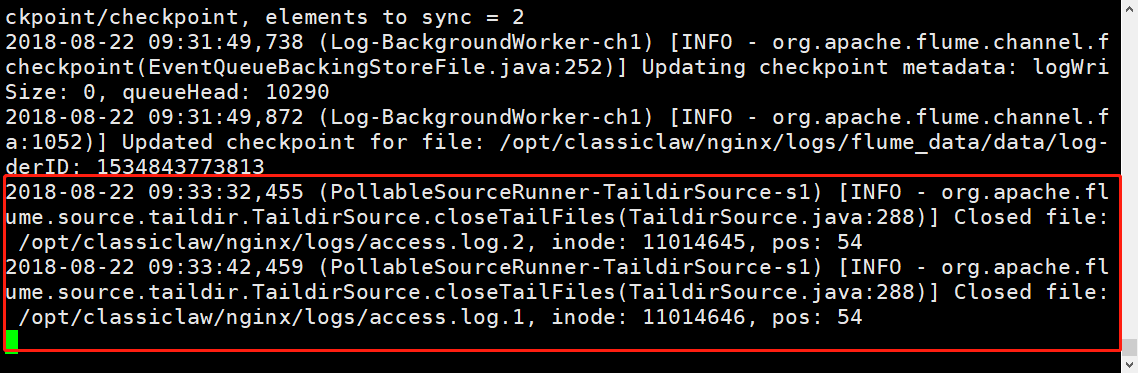
6>agent1 :添加文件到flume source目录
cd /opt/classiclaw/nginx/logs

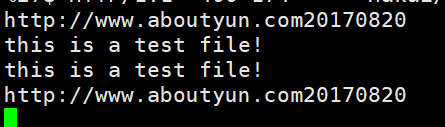
echo -e "this is a test file! \nhttp://www.aboutyun.com20170820">access.log.1
7>查看kafka consumer
agent1:
flume(2)的更多相关文章
- Flume1 初识Flume和虚拟机搭建Flume环境
前言: 工作中需要同步日志到hdfs,以前是找运维用rsync做同步,现在一般是用flume同步数据到hdfs.以前为了工作简单看个flume的一些东西,今天下午有时间自己利用虚拟机搭建了 ...
- Flume(4)实用环境搭建:source(spooldir)+channel(file)+sink(hdfs)方式
一.概述: 在实际的生产环境中,一般都会遇到将web服务器比如tomcat.Apache等中产生的日志倒入到HDFS中供分析使用的需求.这里的配置方式就是实现上述需求. 二.配置文件: #agent1 ...
- Flume(3)source组件之NetcatSource使用介绍
一.概述: 本节首先提供一个基于netcat的source+channel(memory)+sink(logger)的数据传输过程.然后剖析一下NetcatSource中的代码执行逻辑. 二.flum ...
- Flume(2)组件概述与列表
上一节搭建了flume的简单运行环境,并提供了一个基于netcat的演示.这一节继续对flume的整个流程进行进一步的说明. 一.flume的基本架构图: 下面这个图基本说明了flume的作用,以及f ...
- Flume(1)使用入门
一.概述: Flume是Cloudera提供的一个高可用的,高可靠的,分布式的海量日志采集.聚合和传输的系统. 当前Flume有两个版本Flume 0.9X版本的统称Flume-og,Flume1.X ...
- 大数据平台架构(flume+kafka+hbase+ELK+storm+redis+mysql)
上次实现了flume+kafka+hbase+ELK:http://www.cnblogs.com/super-d2/p/5486739.html 这次我们可以加上storm: storm-0.9.5 ...
- flume+kafka+spark streaming整合
1.安装好flume2.安装好kafka3.安装好spark4.流程说明: 日志文件->flume->kafka->spark streaming flume输入:文件 flume输 ...
- flume使用示例
flume的特点: flume是一个分布式.可靠.和高可用的海量日志采集.聚合和传输的系统.支持在日志系统中定制各类数据发送方,用于收集数据;同时,Flume提供对数据进行简单处理,并写到各种数据接受 ...
- Hadoop学习笔记—19.Flume框架学习
START:Flume是Cloudera提供的一个高可用的.高可靠的开源分布式海量日志收集系统,日志数据可以经过Flume流向需要存储终端目的地.这里的日志是一个统称,泛指文件.操作记录等许多数据. ...
- Flume NG Getting Started(Flume NG 新手入门指南)
Flume NG Getting Started(Flume NG 新手入门指南)翻译 新手入门 Flume NG是什么? 有什么改变? 获得Flume NG 从源码构建 配置 flume-ng全局选 ...
随机推荐
- Delphi XE2 之 FireMonkey 入门(2)
FireMonkey 的控件都是自己绘制的(而不是基于系统组件), 我想它们应该是基于一些基本图形; 就从基本图形开始吧. FMX.Objects 单元给出的类: TShape //基本图形的基类 T ...
- unittest框架扩展(基于代码驱动)自动化-下
一.数据驱动/代码驱动优缺点: 使用数据驱动的好处:- 代码复用率高.同一测试逻辑编写一次,可以被多条测试数据复用,提高了测试代码的复用率,同时可以提高测试脚本的编写效率.- 异常排查效率高.测试框架 ...
- springboot An incompatible version [1.1.32] of the APR based Apache Tomcat Native library is installed, while Tomcat requires version [1.2.14]
1.错误 An incompatible version [1.1.32] of the APR based Apache Tomcat Native library is installed, wh ...
- 练习4-python+selenium+pandas
最近对于python的第三方库pandas比较有兴趣,在学习的过程中也简单的结合selenium做了一个简单的小工具 最新公司用一个外部系统来记录,追踪BUG,可是这个系统并不是专业的BUG管理系统, ...
- 并查集入门(hdu1232“畅通工程”)
在学习并查集之前,首先需要明白基本的并查集可以完成的功能.并查集主要是用于处理不相交集合的合并问题.它是一种基础算法,在离散数学中,可以利用并查集求一个图的连通分支,利用其这个特性可以为我们解决一系列 ...
- 应用安全-安全设备-Waf系列-软Waf-D盾
安装 下载http://www.d99net.net/down/d_safe_2.1.5.2.zip 使用说明 http://www.d99net.net/News.asp?id=106 免杀 arr ...
- JAVA调用shell脚本利用ansible修改多节点上的redis参数
创建hosts文件 创建ansible-playbook执行时所用到的hosts文件,例如 /etc/redis/hosts 利用shell命令根据传入的host名和地址写入hosts文件: #set ...
- SSI框架【Struts、Spring、iBatis、Hibernate】
1.B/S架构的JavaEE开发设计模式,JavaEE架构分成三个层次即表现层.业务逻辑层.数据持久层:而这三层分别通过Struts.Spring.iBatis开源的框架紧密组合在一起的. Strut ...
- BZOJ 1767] [Ceoi2009] harbingers (斜率优化)
[BZOJ 1767] [Ceoi2009] harbingers (斜率优化) 题面 给定一颗树,树中每个结点有一个邮递员,每个邮递员要沿着唯一的路径走向capital(1号结点),每到一个城市他可 ...
- utf-8 bom头问题 thinkphp 报错 Namespace declaration statement has to be the very first statement in the script
先看百度百科上的解释---- BOM —— Byte Order Mark,中文名译作“字节顺序标记”.在这里找到一段关于 BOM 的说明: 在UCS 编码中有一个叫做 "Zero Widt ...