
pytest + 登录禅道 :自动提交bug-编辑bug-确认bug-解决bug-关闭bug
pytest + 登录禅道 :自动提交bug-编辑bug-确认bug-解决bug-关闭bug
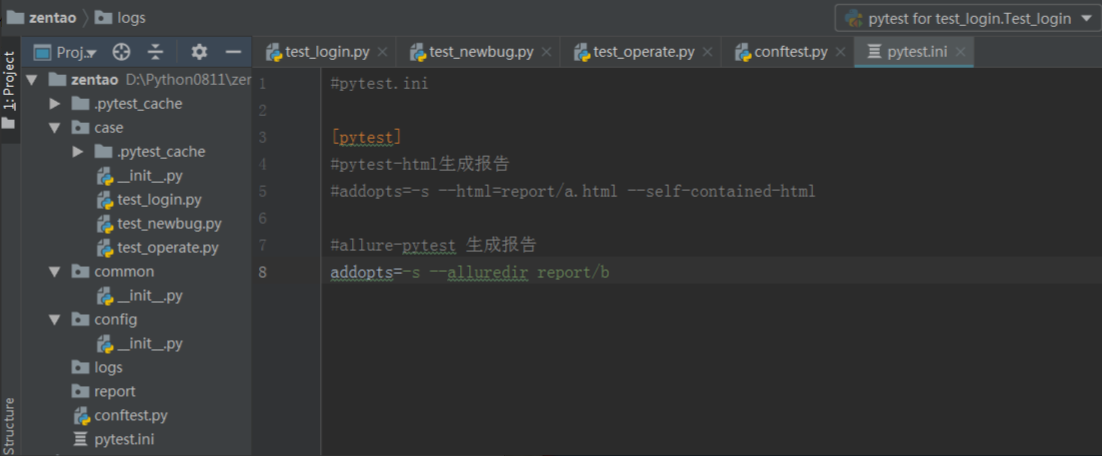
一、Pycharm中创建项目结构
1.新建一个工程,工程名称自己定义,如:zentao
2.在工程的根目录下新建一个conftest.py(测试用例的一些fixture配置)和pytest.ini(改变pytest的运行方式)
3.在工程下创建以下package包:
--case:这个包放test开头的测试用例,也可以放一些非test开头的封装接口方法
--common:这个包放一些公共的方法,如:读取excel文件方法,读取mysql、oracle的脚本
--config:放一些配置文件,如邮箱的一些参数:收件人,发件人,密码等
4.在工程下创建以下文件夹:
--logs:这里存放日志信息
--report:这里存放测试报告
二、开始写脚本
思考:1.登录之后,需要提bug,然后操作bug,如何保持登录了?s=requests.session()可以实现保持会话;
2.假如登录,提bug,操作bug,都写在一个.py文件,可以使用s.get(...),s.post(...)操作所有请求,那若是这些操作在不同的.py文件呢?fixture自定义测试用例前置条件可以实现; 作用范围session(多个文件调用一次,可以跨.py文件调用),conftest.py文件在当前所在目录及以下目录生效;
3.若是请求地址写死,线下线上切换不方便,怎么办?当然fixture可以搞定了
2.1 由此,conftest.py脚本的内容确定了,如下:
#注意这里的ip改为自己服务器的ip哦
#conftest.py

import requests

import pytest

@pytest.fixture(scope="session")

def s():

    ss=requests.session()

    return ss

@pytest.fixture(scope="session")

def host():

    host="http://47.98.66.11:8899"

    return host
2.2 编写登录的脚本
|
1
2
3
4
5
6
7
8
9
10
11
12
13
14
15
16
17
18
19
20
21
22
23
24
25
26
27
28
29
30
31
32
33
34
35
36
37
38
39
40
41
42
43
44
45
46
47
|
# coding:utf-8#test_login.pyimport reimport pytestimport hashlibimport allure@allure.severity("blocker")@allure.epic("禅道登录,增删改查测试")@allure.feature("禅道登录")@allure.issue("http://47.98.66.11:8899/bug-browse-1-0-all.html")class Test_login: @pytest.fixture() def getrand(self,s,host): while True: r = s.get(host+"/user-login.html") # print(r.text) rand = re.findall("id='verifyRand' value='(.+?)'", r.text) #print(rand) if len(rand[0])==10: #break print(rand[0]) return rand[0] @pytest.fixture() def md5(self,getrand): first=hashlib.md5("P@ssw0rd".encode('utf-8')).hexdigest()+getrand print(first) pwd=hashlib.md5(first.encode('utf-8')).hexdigest() print(pwd) return (getrand,pwd) @allure.title("登录用例") def test_login(self,md5,s,host): data={"account":"admin", "password":md5[1], "passwordStrength":1, "referer":"/", "verifyRand":md5[0], "keepLogin":1} r=s.post(host+"/user-login.html",data=data) #print(r.__dict__) # print(dir(r)) # # print(r.text) r1=s.get(host+"/my/") #print(r1.text) assert '退出' in r1.text |
2.3 提交bug
|
1
2
3
4
5
6
7
8
9
10
11
12
13
14
15
16
17
18
19
20
21
22
23
24
25
26
27
28
29
30
31
32
33
34
35
36
37
38
39
40
41
42
43
44
45
46
47
48
49
50
51
52
53
|
# coding:utf-8#test_newbug.pyimport pytestimport reimport randomimport allure@pytest.fixture()def uppic_steps(s,host):#上传图片 f={"localUrl":"D:\\ch.jpg", "imgFile":("ch.jpg",open("D:\\ch.jpg","rb"),"image/jpeg")} r=s.post(host+"/file-ajaxUpload-5f37e08f8d109.html?dir=image",files=f) #print(r.text) print(r.json()) #picurl=re.findall(',"url":"(.+?)"}',r.text)[0].replace("\\","") picurl=r.json()["url"] print("上传图片地址:{}".format(picurl)) return picurl@pytest.fixture()def get_uid(s,host):#获取uid r=s.get(host+"/bug-create-1-0-moduleID=0.html") uid=re.findall("kuid = '(.+?)'",r.text) return uid@allure.severity("critical")@allure.title("提bug")def test_newbug(s,uppic_steps,host,get_uid): data={"product":1, "module":0, "project":1, "openedBuild[]":"trunk", "assignedTo":"admin", "type":"codeerror", "title":"接口自动化bug0815_15_附图片、附件:"+str(random.randint(0,1000)), "severity":3, "pri":3, "steps":"<p>[步骤]<img src={} alt="" /></p><br/><p>[结果]</p><br/><p>[期望]</p><br/>".format(uppic_steps), "oldTaskID":0, "status":"active", "uid":get_uid, "caseVersion":0, "case":0, "result":0, "testtask":0} f={ ("files[]",("中国气候.jpg",open("D:\\中国气候.jpg","rb"),"image/jpeg")), ("labels[]","中国气候.jpg"), ("files[]",("hl.jpeg",open("D:\\hl.jpeg","rb"),"image/jpeg")), ("labels[]","hl.jpeg") } r=s.post(host+"/bug-create-1-0-moduleID=0.html",data=data,files=f) print("提交bug,响应内容:{}".format(r.text)) |
2.4 编辑bug-确认bug-解决bug-关闭bug
|
1
2
3
4
5
6
7
8
9
10
11
12
13
14
15
16
17
18
19
20
21
22
23
24
25
26
27
28
29
30
31
32
33
34
35
36
37
38
39
40
41
42
43
44
45
46
47
48
49
50
51
52
53
54
55
56
57
58
59
60
61
62
63
64
65
66
67
68
69
70
71
72
73
74
75
76
77
78
79
80
81
82
83
84
85
86
87
88
89
90
91
92
93
94
95
96
97
|
# coding:utf-8#test_operate.pyimport pytestfrom lxml import etreeimport reimport timeimport allureimport random@pytest.fixture()def get_id(s,host):#查找未关闭状态的第一条bug的id r=s.get(host+"/bug-browse-1-0-unclosed-0-id_desc.html") er=etree.HTML(r.text) id=er.xpath('//*[@id="bugList"]/tbody/tr[1]/td[1]/a')[0].text #查找第一个的id print("提取第一个id为:{}".format(id)) return iddef get_idstatus(s,get_id,host):#根据id,获取bug的状态 r=s.get(host+"/bug-browse-1-0-all.html") er2=etree.HTML(r.text) idtitle=er2.xpath('//*[@id="bugList"]/tbody/tr[@data-id={}]/td[6]'.format(get_id))[0].get("title") print(get_id,idtitle) return idtitle@allure.title("修改bug")def test_edit(s,get_id,host): r=s.get(host+"/bug-edit-{}.html".format(get_id)) kuid=re.findall("var kuid = '(.+?)'",r.text) lasted=re.findall("id='lastEditedDate' value='(.+?)'",r.text) data = {"product": 1, "module": 0, "project": 1, "openedBuild[]": "trunk", "duplicateBug":0, "assignedTo": "admin", "deadline":"0000-00-00", "type": "codeerror", "title": "0818bug:" + str(random.randint(0, 1000)), "severity": 3, "pri": 3, "steps": "<p>[步骤]</p><br/><p>[结果]</p><br/><p>[期望]</p><br/>", "status": "active", "lastEditedDate":lasted, "uid": kuid, "caseVersion": 0, "comment":"修改bug"} s.post(r.url,data=data) assert get_idstatus(s, get_id, host)=="激活"@allure.title("确认bug")def test_confirm(s,get_id,host): r=s.get(host+"/bug-confirmBug-{}.html?onlybody=yes".format(get_id)) kuid = re.findall("var kuid = '(.+?)'", r.text)[0] data={ "assignedTo":"admin", "type":"codeerror", "pri":3, "status":"active", "comment":"ok,稍后修复", "uid":kuid } r1 = s.post(r.url, data=data) print("确认后,响应内容:{}".format(r1.text)) print(get_id) assert get_idstatus(s, get_id, host) == "激活"@allure.title("解决bug")def test_resolve(s,get_id,host):#解决bug r=s.get(host+"/bug-resolve-{}.html?onlybody=yes".format(get_id)) kuid=re.findall("var kuid = '(.+?)'",r.text)[0] print(type(kuid),kuid,r.url) datas={"resolution":"bydesign", "resolvedBuild":"trunk", "resolvedDate":time.strftime("%Y-%m-%d %H:%M:%S",time.localtime()), "assignedTo":"admin", "status":"resolved", "comment":"不予修复", "uid":kuid } r1 = s.post(r.url, data=datas) print("修改为已解决,响应内容:{}".format(r1.text)) print(get_id) assert get_idstatus(s,get_id,host)=="已解决"@allure.title("关闭bug")def test_close(s,host,get_id):#关闭bug url=host+"/bug-close-{}.html?onlybody=yes".format(get_id) r=s.get(url) kuid=re.findall("kuid = '(.+?)'",r.text) data={ "status":"closed", "comment":"ok", "uid":"kuid" } r1=s.post(url,data=data) print(r1.text) assert get_idstatus(s,get_id,host)=='已关闭' |
2.5 为了展示自己的劳动成果,报告是不可少的
|
1
2
3
4
5
6
7
8
|
#pytest.ini[pytest]#pytest-html生成报告#addopts=-s --html=report/a.html --self-contained-html#allure-pytest 生成报告addopts=-s --alluredir report/b |
2.6 zentao文件下,打开cmd,执行pytest
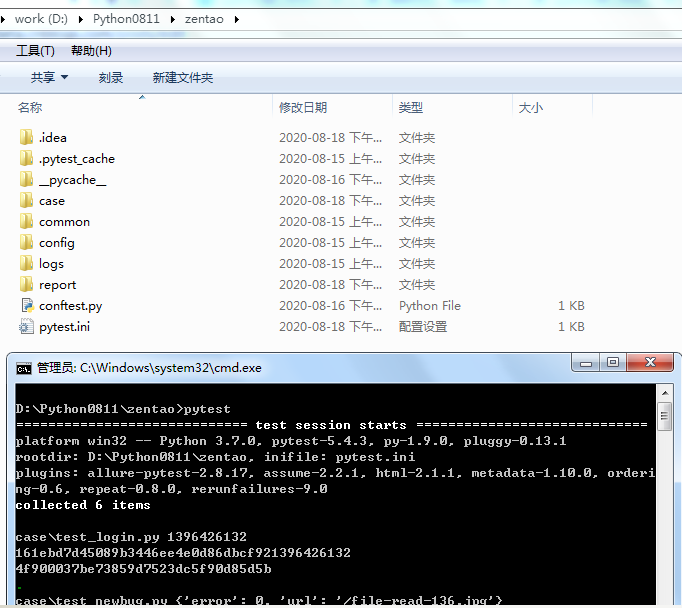
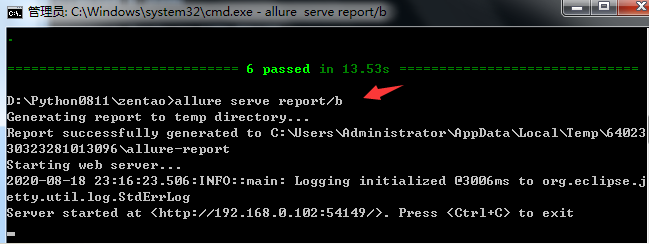
pytest执行完毕,继续输入allure serve report/b 自动展示html格式报告(注意:report/b可以随意命名,但必须与pytest.ini中的内容一致)
注意:pytest可以在zentao目录下执行,也可以在case目录下执行,但这样report/b所在的目录就不同了;根据pytest.ini,执行pytest会在pytest当前所在目录生成report/b目录,若是report/b不存在则直接创建,若是存在则使用已有的;
执行pytest时,一定要删除b目录,不然可能会产生冗余数据;

三、写代码过程中,想要调试某个脚本;如,提交bug;
那么需要执行登录脚本和提交bug脚本;
在case目录下,打开cmd,执行pytest -s test_login.py test_newbug.py
若是想要调试登录,那直接执行pytest -s test_login.py
原文地址https://www.cnblogs.com/canglongdao/p/13526810.html
pytest + 登录禅道 :自动提交bug-编辑bug-确认bug-解决bug-关闭bug的更多相关文章
- 用python实现自动化登录禅道系统 设置定时器自动执行脚本
由于各种原因,我想试下用python实现自动登录禅道系统,并且每天定时执行.(本人第一次接触自动化,在大佬眼中门槛都没摸到的类型) 首先缕清思路: 1.实现自动登录禅道系统,用selenium实现2. ...
- 使用cookies,免密登录禅道(一)
导言:在做自动化的过程中,很多时候都需要绕过登录验证码来进行测试,可使用cookie 绕过验证码进行登录. 以下以自己搭建的禅道环境登录为例(其他网站也可以同样道理): #coding=gbkimpo ...
- jmeter登录禅道案例
下载jmeter,配置环境变量 变量名:JMETER_HOME 变量值:C:\Program Files\apache-jmeter-2.11 变量名:CLASSPATH 变量值:%JMETER_HO ...
- python-自动登录禅道
from bs4 import BeautifulSoup import hashlib import requests import re from tool.request_data_change ...
- post 登录禅道,不成功,无解中
]}s.get("http://localhost/zentaopms116/www/misc-checkUpdate-16dd7448451f46bb496a2099b6a9af8c.ht ...
- form中的button按钮在IE11中自动提交表单问题导致弹出框关闭之后表单被重置
最近几天,测试系统,遇到一个兼容性问题,form中有一个button按钮,没有指定type类型,点击按钮弹出框选择值之后回填给form上的一个单行文本框,在IE6.IE7.IE8.IE9.IE10中测 ...
- wamp服务下部署禅道或其它项目时访问缓慢的解决办法
原因其实很简单: WAMP服务默认是不支持外网访问的,如果公司内外网在一起就会引起缓慢甚至超时的问题,直接修改WAPM的配置文件让它可以访问外网即可解决问题. 解决的方法/步骤 1.解决办法: ...
- 将BUG管理工具(禅道)部署到服务器(测试服务器、云服务器)
禅道是一个开源的项目管理软件,用来记录软件项目的开发过程.bug跟踪以及任务分配,它是基于PHP语言开发的. https://www.zentao.net/download/80111.htm ...
- Linux系统(虚拟机)安装禅道
1.查看linux系统版本 uname -a 2.禅道下载:http://www.zentao.net/download.html,找到要下载的版本,点击进入各平台下载: 3.将下载好的安装包上传到l ...
- linux 安装禅道
1. 查看Linux服务器版本信息 # cat /etc/redhat-release CentOS Linux release 7.4.1708 (Core) 2. 禅道开源版安装包下载 # wge ...
随机推荐
- 直播相关-搭建直播流服务器nodejs
一.安装nodejs环境 去nodejs官方网站下载安装包 https://nodejs.org/en/#download 安装完成之后测试: LUNLI-MC1:~ lunli$ node -v v ...
- ansible搭建
ansible配置步骤 1.创建用户 2.用户提权 3.用户免密 4.cp ansible配置文件 5.配置主机清单 6.修改ansible 用户路径下的配置文件 1.创建用户(都要做) [root@ ...
- INFINI Labs 产品更新 | 修复 Easysearch 跨集群复制索引同步问题,Gateway 内存异常增长等问题
INFINI Labs 产品又更新啦~,本次更新主要对 Easysearch.Gateway.Console.Agent 等产品功能进行优化和相关 Bug 修复,解决了内存异常增长等问题,以下是详细说 ...
- CentOS 7- 配置阿里镜像源
1.备份CentOS 7系统自带yum源配置文件/etc/yum.repos.d/CentOS-Base.repo命令: mv /etc/yum.repos.d/CentOS-Base.repo /e ...
- categraf托管与自升级
categraf支持多种方式进行部署.托管,社区里部署和管理categraf也是五花八门,大家自己使用方便即可. 之前我们觉得大家通过ansible之类的工具批量下发/更新就能很简单地完成任务,最近很 ...
- Prime Solutions
Prime Solutions 以下是一段中学时代的惨痛回忆-每当学到排列组合的单元时,最痛苦的不是分析题目,也不是带错公式或计算错误,而是所谓的「苦工题」,以下这题是个例子:给定正整数N与S,求出方 ...
- Spring之webMvc异常处理
异常处理可以前端处理,也可以后端处理. 从稳妥的角度出发,两边都应该进行处理. 本文专门阐述如何在服务端进行http请求异常处理. 一.常见的异常类型 当我们做http请求的时候,会有各种各样的可能错 ...
- IS-IS总结
IS-IS 管理距离115 ISIS是链路状态协议 封装在数据链路层,所以没有协议号 使用SPF算法计算最短路径 没有骨干区的概念 使用IIH(ISIS ...
- Debezium-Flink-Hudi:实时流式CDC
1. 什么是Debezium Debezium是一个开源的分布式平台,用于捕捉变化数据(change data capture)的场景.它可以捕捉数据库中的事件变化(例如表的增.删.改等),并将其转为 ...
- 高通与At指令:ATFWD解析
背景 本章的内容是适用于AP侧AT指令开发调试的有关人员. 主要是介绍高通实现的ATFWD框架.在这需要说明一下的是,或许你对AT Command很了解了,但是却貌似都不知道ATFWD,这很正常,严格 ...