
ASP.NET Core – Custom Input formatters For Partial Update and Handle Under-posting
前言
之前的文章有谈过关于 ASP.NET Core 处理 under-posting 的方式.
它会使用 class default value. 许多时候这可能不是我们期望的. 比如当我们想要 patch update resource 的时候.
一种解决方法是把 DTO 改成 nullable 来表示 under-posting, 但这也不总是正确的, 毕竟也有可能它是想把 value set to null.
另一个方法是使用 JSON Patch, 但这个方法会让前端比较麻烦. 那为了实现需求只能做一些 Custom 的方案了
Model Binding
参考: Model Binding in ASP.NET Core
在说解决思路之前, 先了解一些基础知识. Model Binding 是 ASP.NET Core 把 Request 的信息投影到 Action parameter 的一个执行过程.
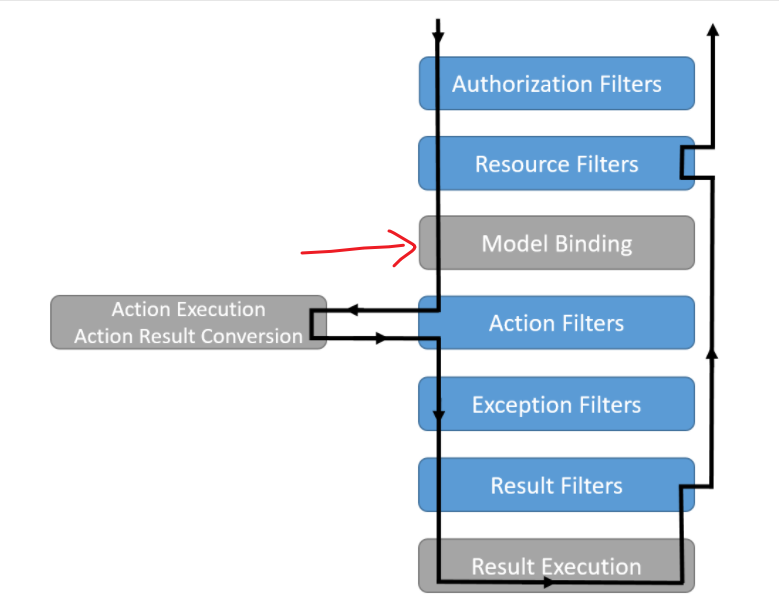
这就是为什么在 Action 阶段获取到的不是 JSON string 而是已经 deserialize 好的 instance. 就是这个 Model Binding 干的事儿.
Input Formatters
而在整个 Model Binding 中, Input Formatters 则是最终负责 deserialize JSON 的.
解决思路
想解决 under-posting 的问题, 就必须在 ASP.NET Core 处理 JSON 之前, 一旦它 deserialize JSON 后, 我们就失去了 under-posting 的信息了.
所以效仿 JsonPatch 的做法就是 Custom Input Formatters.
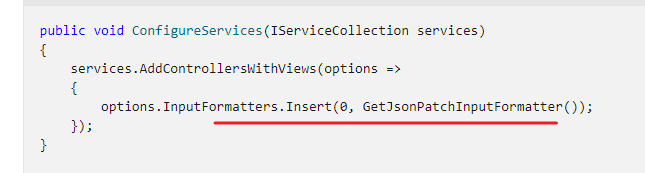
我们可以让 deserialize 的 class implement 特定的 interface, 比如叫 IUnderPosting, 里面则拥有一个 UnderPostingPropertyNames.
拦截 format 以后, 先做一轮原生的 JSON deserialize, 然后在做一个 JsonNode parse, 然后把 under-posting 的 property 记入到对象中.
这个概念和 JSON overflow 类似 Handle overflow JSON.
于是我们就拥有了 under-posting 的信息. 往后, 无论是 validation, mapping 都可以利用这个信息去做事情, 比如 under-posting 的 property 就 ignore validation 同时也不需要 update entity.
预想的结果
按思路走大概是这样的
public interface IUnderPosting

{

    List<string> UnderPostingPropertyNames { get; set; }

}

public class UpdateProductDTO : IUnderPosting

{

    public string Name { get; set; } = "";

    public decimal Amount { get; set; }

    public List<string> UnderPostingPropertyNames { get; set; } = new();

}
在 Controller 可以依据 UnderPostingPropertyNames 去做逻辑处理.
[ApiController]

[Route("api/products")]

public class ProductController : ControllerBase

{

    [HttpPatch]

    public IActionResult UpdateProduct(UpdateProductDTO dto)

    {

        return Ok();

    }

}
探路
看源码
既然我们是想替代 ASP.NET Core build-in 的 JSON formatter, 那就必须先看看它长什么样. 要如何 customize.
SystemTextJsonInputFormatter.cs

TextInputFormatter 好理解, Custom formatters in ASP.NET Core Web API 里也用这个, IInputFormatterExceptionPolicy 就不太清楚了.
最基本需要实现的接口
public class MyInputFormatter2 : TextInputFormatter, IInputFormatterExceptionPolicy

{

    public InputFormatterExceptionPolicy ExceptionPolicy => throw new NotImplementedException();

    public override Task<InputFormatterResult> ReadRequestBodyAsync(InputFormatterContext context, Encoding encoding)

    {

        throw new NotImplementedException();

    }

}
所以整个核心代码就在 ReadRequestBodyAsync 里
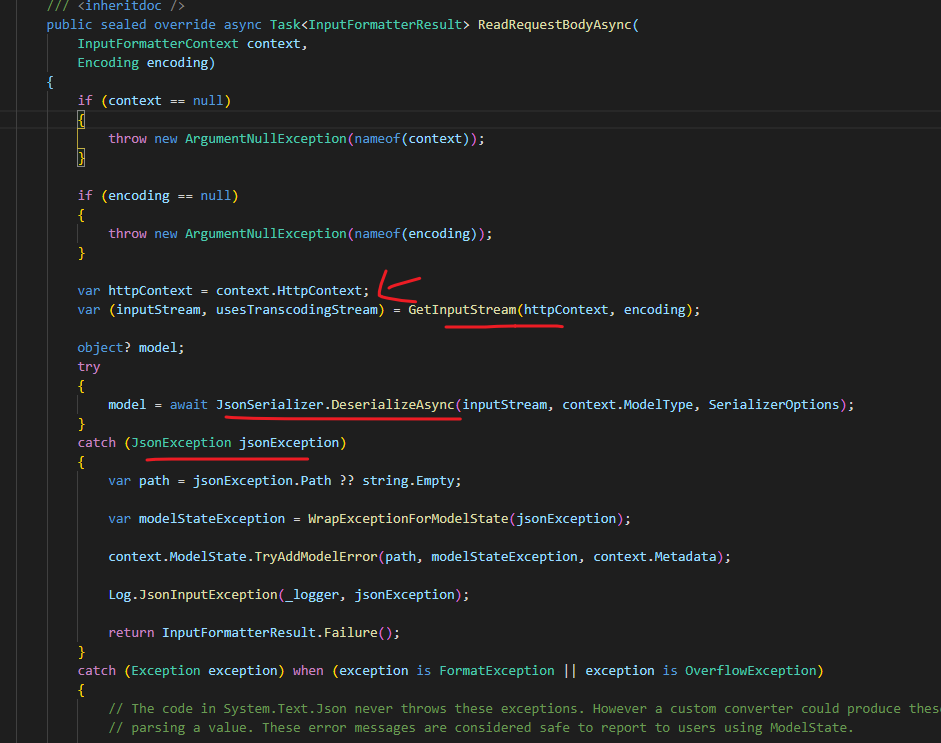
可以大致看出它的实现方式, 从 HttpContext 读取 body stream, 然后 deserialze, ModelType 就是要 binding 到的 class, 如果有 exception 比如 type mismatch, 就写入到 ModelError.
显然它没有允许扩展, 没有办法简单的继承 override 去 customize 它. 另外还有一个难题.
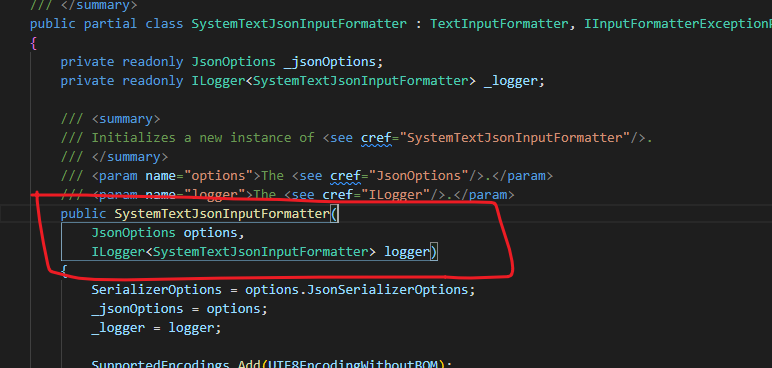
它有 Dependency Injection 的, 但是 formatter 是不允许有 Dependency Injection 的

想要依赖 service 需要靠 context 去拿才正确.
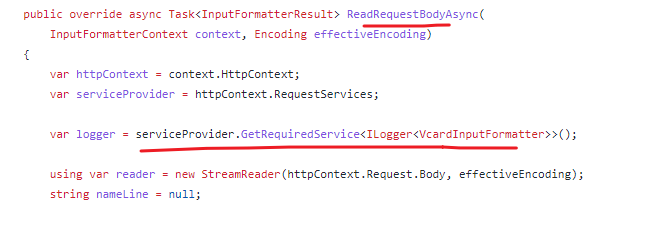
怎么办... wrap 它!
能想到的方法就是 wrap 它来 customize
public class MyInputFormatter : TextInputFormatter, IInputFormatterExceptionPolicy

{

    public MyInputFormatter()

    {

        SupportedEncodings.Add(UTF8EncodingWithoutBOM);

        SupportedEncodings.Add(UTF16EncodingLittleEndian);

        SupportedMediaTypes.Add(MediaTypeHeaderValue.Parse("application/json").CopyAsReadOnly());

        SupportedMediaTypes.Add(MediaTypeHeaderValue.Parse("text/json").CopyAsReadOnly());

        SupportedMediaTypes.Add(MediaTypeHeaderValue.Parse("application/*+json").CopyAsReadOnly());

    }

    InputFormatterExceptionPolicy IInputFormatterExceptionPolicy.ExceptionPolicy => InputFormatterExceptionPolicy.MalformedInputExceptions;

    public override async Task<InputFormatterResult> ReadRequestBodyAsync(InputFormatterContext context, Encoding encoding)

    {

        var serviceProvider = context.HttpContext.RequestServices;

        var logger = serviceProvider.GetRequiredService<ILogger<SystemTextJsonInputFormatter>>();

        var jsonOptionsAccessor = serviceProvider.GetRequiredService<IOptions<JsonOptions>>();

        var defaultFormatter = new SystemTextJsonInputFormatter(jsonOptionsAccessor.Value, logger);

        InputFormatterResult result;

        if (StgUtil.HasImplementInterface(context.ModelType, typeof(IUnderPosting)))

        {

            context.HttpContext.Request.EnableBuffering();

            result = await defaultFormatter.ReadRequestBodyAsync(context, encoding);

            context.HttpContext.Request.Body.Position = 0;

            var model = (IUnderPosting)result.Model!;

            using var document = await JsonDocument.ParseAsync(context.HttpContext.Request.Body);

            context.HttpContext.Request.Body.Position = 0;

            var rootElement = document.RootElement;

            var properties = rootElement.EnumerateObject().Select(p => p.Name).ToList();

            model.UnderPostingPropertyNames = properties;

        }

        else {

            result = await defaultFormatter.ReadRequestBodyAsync(context, encoding);

        }

        return result;

    }

}
这样我们就可以控制最终的 binding 结果了. 这里只是一个大概, 具体实现我懒得写了. 还有一个需要注意的是 body stream 默认只能 read 一次, 如果要多次需要打开设定.
参考:
Re-reading ASP.Net Core request bodies with EnableBuffering()
How to read request body in an asp.net core webapi controller?
ASP.NET Core – Custom Input formatters For Partial Update and Handle Under-posting的更多相关文章
- ASP.NET Core MVC 之局部视图(Partial Views)
1.什么是局部视图 局部视图是在其他视图中呈现的视图.通过执行局部视图生成的HTML输出呈现在调用视图中.与视图一样,局部视图使用 .cshtml 文件扩展名.当希望在不同视图之间共享网页的可重用部分 ...
- ASP.NET Core 中文文档 第四章 MVC(3.7 )局部视图(partial)
原文:Partial Views 作者:Steve Smith 翻译:张海龙(jiechen).刘怡(AlexLEWIS) 校对:许登洋(Seay).何镇汐.魏美娟(初见) ASP.NET Core ...
- [转]Writing Custom Middleware in ASP.NET Core 1.0
本文转自:https://www.exceptionnotfound.net/writing-custom-middleware-in-asp-net-core-1-0/ One of the new ...
- [转]How do you create a custom AuthorizeAttribute in ASP.NET Core?
问: I'm trying to make a custom authorization attribute in ASP.NET Core. In previous versions it was ...
- 在ASP.NET Core使用Middleware模拟Custom Error Page功能
一.使用场景 在传统的ASP.NET MVC中,我们可以使用HandleErrorAttribute特性来具体指定如何处理Action抛出的异常.只要某个Action设置了HandleErrorAtt ...
- 在ASP.NET Core中实现自定义验证特性(Custom Validation Attribute)
这是我们在实际ASP.NET Core项目中用到的,验证用户名中是否包含空格. 开始是这么实现的(继承ValidationAttribute,重写IsValid方法): public class No ...
- [转]Using NLog for ASP.NET Core to write custom information to the database
本文转自:https://github.com/NLog/NLog/issues/1366 In the previous versions of NLog it was easily possibl ...
- [转]Create Custom Exception Filter in ASP.NET Core
本文转自:http://www.binaryintellect.net/articles/5df6e275-1148-45a1-a8b3-0ba2c7c9cea1.aspx In my previou ...
- [转]在ASP.NET Core使用Middleware模拟Custom Error Page功能
本文转自:http://www.cnblogs.com/maxzhang1985/p/5974429.html 阅读目录 一.使用场景 二..NET Core实现 三.源代码 回到目录 一.使用场景 ...
- [译]Writing Custom Middleware in ASP.NET Core 1.0
原文: https://www.exceptionnotfound.net/writing-custom-middleware-in-asp-net-core-1-0/ Middleware是ASP. ...
随机推荐
- UE导入FBX、GLTF模型
楔子 虽然做了很多年的三维可视化,不过都主要还是web端开发为主(webgl,threejs,有兴趣的读者也可以关注下我的相关专栏).最近准备入手一下UE,顺便做一下知识梳理. 所以文章可能都是比较粗 ...
- [oeasy]python0122_日韩字符_日文假名_JIS_Shift_韩国谚文
日文假名和韩国谚文 回忆上次内容 上次回顾了非ascii的拉丁字符编码的进化过程 0-127 是 ascii 的领域 世界各地编码分布 拉丁字符扩展 ascii 共 16 种 由iso组织制定 从 ...
- scanf、cin及其优化、快读性能测试
为了让大家了解C++各种IO方式的性能,于是就有了这篇文章. 本次测试采取的数据均为 \(10^6\) 个不超过 \(10^8\) 随机正整数. 测试代码: #include<bits/stdc ...
- python中pip安装包出现Retrying (Retry(total=4, connect=None, read=None, redirect=None, status=None))…………或无法pip install packname安装依赖包
问题: 安装包出现Retrying (Retry(total=4, connect=None, read=None, redirect=None, status=None)) after connec ...
- midjourney 入门操作
midjourney 入门操作 settings面板 选择模型 当从 V6 切换到 Niji模型时,Current suffix会添加参数 default V6面板功能介绍 RAW Mode功能 -- ...
- 【SpringBoot】15 数据访问P3 整合Mybatis
重新建立一个SpringBoot工程 选择依赖组件 然后删除不需要的Maven&Git文件 还是先查看我们的POM文件 整合Mybatis的组件多了这一个,默认的版本是3.5.4 然后再看看整 ...
- 强化学习:经典测试环境Cart-pole的原始文献
参考文献格式: A. G. Barto, R. S. Sutton, and C. W. Anderson. Neuronlike adaptive elements that can solve d ...
- 光刻机巨头ASML公布了其最新的品牌短片《站在巨人的肩膀上》
光刻机巨头ASML公布了其最新的品牌短片<站在巨人的肩膀上>: 荷兰光刻机:ASML使用AI工具midjourney和runway制作宣传片 这个时长1分50秒短片的特别地方在于,它是完全 ...
- 国产深度学习框架吸引用户的一种免费手段——免费GPU时长
国产的深度学习框架基本成为了一个头部公司的标配了,不论是阿里.百度还是华为都推出了自己的深度学习框架,这几家公司为了吸引用户也都采取了免费使用GPU的活动,但是与阿里.百度的不同,华为是与固定的高校的 ...
- 【转载】 Do's and Don'ts of using t-SNE to Understand Vision Models —— t-SNE 作者写的使用指南(PPT版本)
<Do's and Don'ts of using t-SNE to Understand Vision Models> 作者的PPT视频:https://www.youtube.com/ ...