
CentOS7部署ES(单机)
一、创建路径,解压
## 创建路径

[root@localhost /]# cd /data

[root@localhost data]# mkdir ES

## 解压

[root@localhost data]# cd ES

[root@localhost ES]# ls

elasticsearch-8.11.3-linux-x86_64.tar.gz

[root@localhost ES]# tar -zxvf elasticsearch-8.11.3-linux-x86_64.tar.gz

## 创建数据和日志文件夹

[root@localhost ES]# mkdir /data/ES/elasticsearch-8.11.3/data

[root@localhost ES]# mkdir /data/ES/elasticsearch-8.11.3/log
二、添加用户elsearch
## 新增es用户

[root@localhost ES]# useradd elsearch

## 为es用户设置密码

[root@localhost ES]# passwd elsearch

Changing password for user elsearch.

New password:

BAD PASSWORD: The password contains the user name in some form

Retype new password:

passwd: all authentication tokens updated successfully.

## 如果错了,可以删除再加

## userdel -r elsearch

## 将ES目录更改为elsearch用户权限

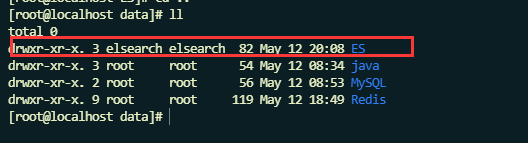
[root@localhost ES]# chown elsearch:elsearch /data/ES/ -R
三、修改\config\elasticsearch.yml文件
[root@localhost data]# cd /data/ES/elasticsearch-8.11.3/config/

[root@localhost config]# ls

elasticsearch-plugins.example.yml  elasticsearch.yml  jvm.options  jvm.options.d  log4j2.properties  role_mapping.yml  roles.yml  users  users_roles

[root@localhost config]# vim elasticsearch.yml
修改内容
# ======================== Elasticsearch Configuration =========================

#放开node.name,集群模式下,放开cluster.name

node.name: node-1

# 数据存储和日志存储路径放开注释

path.data: /data/ES/elasticsearch-8.11.3/data

path.logs: /data/ES/elasticsearch-8.11.3/log

# 设置ip地址,任务网络均可访问

network.host: 0.0.0.0

# 放开http.port:9200

http.port: 9200

# Enable security features

# 启用或禁用X-Pack安全功能

xpack.security.enabled: false

xpack.security.enrollment.enabled: true

# Enable encryption for HTTP API client connections, such as Kibana, Logstash, and Agents

xpack.security.http.ssl.enabled: true

xpack.security.http.ssl.keystore.path: certs/http.p12

# Enable encryption and mutual authentication between cluster nodes

xpack.security.transport.ssl.enabled: true

xpack.security.transport.ssl.verification_mode: certificate

xpack.security.transport.ssl.keystore.path: certs/transport.p12

xpack.security.transport.ssl.truststore.path: certs/transport.p12

cluster.initial_master_nodes: ["node-1"]

## 跨域资源共享设置

http.cors.enabled: true

http.cors.allow-origin: "*"

http.cors.allow-methods: OPTIONS, HEAD, GET, POST, PUT, DELETE

http.cors.allow-headers: "X-Requested-With, Content-Type, Content-Length, X-User"

#----------------------- END SECURITY AUTO CONFIGURATION -------------------------
说明:在Elasticsearch中如果,network.host不是localhost或者127.0.0.1的话,就会认为是生产环境,会对环境的要求比较高,我们的测试环境不一定能够满足,一般情况下需要修改两处配置,如下:
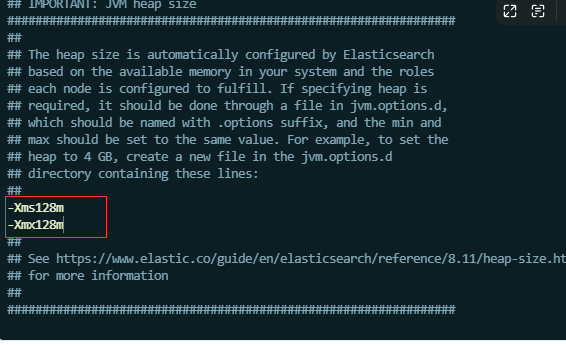
1、修改jvm启动参数jvm.options
[root@kaduoxi config]# vim jvm.options

-Xms128m    #根据自己机器情况修改

-Xmx128m
一个进程在VMAs(虚拟内存区域)创建内存映射量最大数量(/etc/sysctl.conf)
[root@kaduoxi config]# vim /etc/sysctl.conf

vm.max_map_count=655360

#配置生效

[root@kaduoxi config]# sysctl -p
四、启动ES服务
## 切换用户,启动es

[root@localhost config]# su - elsearch

[elsearch@localhost ~]$ cd /data/ES/elasticsearch-8.11.3/bin

[elsearch@localhost bin]$ ./elasticsearch
五、防火墙
#在root用户下关闭防火墙:

#centos6,关闭方式

chkconfig iptables off

#centos7,关闭方式

systemctl stop firewalld.service

## 查看防火墙所有端口

[root@localhost ES]#  firewall-cmd --zone=public --list-ports

## 放开端口6379

[root@localhost ES]#  sudo firewall-cmd --zone=public --add-port=9100/tcp --permanent

success

[root@localhost ES]#  sudo firewall-cmd --zone=public --add-port=9200/tcp --permanent

success

## 刷新防火墙

[root@localhost ES]#  firewall-cmd --reload

success
六、安装elasticsearch-head
[elsearch@kaduoxi bin]$ su - root

Password:

Last login: Mon Jan  8 15:45:04 CST 2024 on pts/0

[root@kaduoxi ~]# docker pull mobz/elasticsearch-head:5

5: Pulling from mobz/elasticsearch-head

75a822cd7888: Pull complete

57de64c72267: Pull complete

4306be1e8943: Pull complete

871436ab7225: Pull complete

0110c26a367a: Pull complete

1f04fe713f1b: Pull complete

723bac39028e: Pull complete

7d8cb47f1c60: Pull complete

7328dcf65c42: Pull complete

b451f2ccfb9a: Pull complete

304d5c28a4cf: Pull complete

4cf804850db1: Pull complete

Digest: sha256:55a3c82dd4ba776e304b09308411edd85de0dc9719f9d97a2f33baa320223f34

Status: Downloaded newer image for mobz/elasticsearch-head:5

docker.io/mobz/elasticsearch-head:5

[root@kaduoxi ~]# docker create --name elasticsearch-head -p 9100:9100 mobz/elasticsearch-head:5

66e6629b1c465d1d14a04d9ff0a19931b9c220dcbff41439b23b244f686cdcf7

[root@kaduoxi ~]# docker start elasticsearch-head

elasticsearch-head

[root@kaduoxi ~]#
问题
问题1:缺少证书
[2024-03-08T03:38:35,255][ERROR][o.e.b.Elasticsearch      ] [node-1] fatal exception while booting Elasticsearch

org.elasticsearch.ElasticsearchSecurityException: failed to load SSL configuration [xpack.security.transport.ssl] - cannot read configured [PKCS12] keystore (as a truststore) [/itcast/es/elasticsearch-8.11.3/config/certs/transport.p12] because the file does not exist
解决:
 cd /data/ES/elasticsearch-8.11.3/bin

 ## 两次回车

[elsearch@localhost bin]$ ./elasticsearch-certutil ca

## 连续回车

[elsearch@localhost bin]$ /data/ES/elasticsearch-8.11.3/bin/elasticsearch-certutil cert --ca /data/ES/elasticsearch-8.11.3/elastic-stack-ca.p12

## 切换root,config下创建certs文件夹

[root@localhost bin]# mv /data/ES/elasticsearch-8.11.3/elastic-certificates.p12 /data/ES/elasticsearch-8.11.3/config/certs/transport.p12

[root@localhost bin]# cp /data/ES/elasticsearch-8.11.3/config/certs/transport.p12 /data/ES/elasticsearch-8.11.3/config/certs/http.p12

[root@localhost bin]# cd ..

[root@localhost elasticsearch-8.11.3]# chmod -R +755 config/certs/
问题2:配置文件设置
[3] bootstrap checks failed. You must address the points described in the following [3] lines before starting Elasticsearch. For more information see [https://www.elastic.co/guide/en/elasticsearch/reference/8.11/bootstrap-checks.html]bootstrap check failure [1] of [3]: max file descriptors [4096] for elasticsearch process is too low, increase to at least [65535]; for more information see [https://www.elastic.co/guide/en/elasticsearch/reference/8.11/_file_descriptor_check.html]

bootstrap check failure [2] of [3]: max number of threads [3766] for user [elsearch] is too low, increase to at least [4096]; for more information see [https://www.elastic.co/guide/en/elasticsearch/reference/8.11/max-number-threads-check.html]

bootstrap check failure [3] of [3]: max virtual memory areas vm.max_map_count [65530] is too low, increase to at least [262144]; for more information see [https://www.elastic.co/guide/en/elasticsearch/reference/8.11/_maximum_map_count_check.html]

[2024-05-12T20:44:23,381][WARN ][o.e.n.Node               ] [node-1] unexpected exception while waiting for http server to closejava.util.concurrent.ExecutionException: java.lang.IllegalStateException: Can't move to stopped state when not started

        at java.base/java.util.concurrent.FutureTask.report(FutureTask.java:122)

        at java.base/java.util.concurrent.FutureTask.get(FutureTask.java:191)

        at org.elasticsearch.server@8.11.3/org.elasticsearch.node.Node.prepareForClose(Node.java:1776)

        at org.elasticsearch.server@8.11.3/org.elasticsearch.bootstrap.Elasticsearch.shutdown(Elasticsearch.java:468)

        at java.base/java.lang.Thread.run(Thread.java:1583)

See logs for more details.
解决:
## max number of threads [3766] for user [elsearch] is too low

参考官网:

https://www.elastic.co/guide/en/elasticsearch/reference/8.11/bootstrap-checks.html

[root@localhost config]# vim /etc/security/limits.conf

# 最大线程数

elsearch       -       nproc       4096

root       -       nproc       4096

[root@localhost config]# sudo systemctl daemon-reload

## 修改max_file_descriptors

[root@localhost config]# vim /etc/security/limits.conf

# 最大文件描述符  配置内容   *表示所有用户生效

* soft nofile 65536

* hard nofile 65536

## 重新登录即可生效

## 可使用命令查看是否生效

[root@localhost ~]# ulimit  -H -n

## 修改max_map_count

[root@kaduoxi config]# vim /etc/sysctl.conf

vm.max_map_count=655360

#配置生效

[root@kaduoxi config]# sysctl -p
CentOS7部署ES(单机)的更多相关文章
- 阿里云ECS部署ES
背景 最近越来越多的公司把业务搬迁到云上,公司也有这个计划,自己抽时间在阿里云和Azure上做了一些小的尝试,现在把阿里云上部署ES和kibana记录下来.为以后做一个参考,也希望对其他人有帮助. 这 ...
- docker 快速部署ES集群 spark集群
1) 拉下来 ES集群 spark集群 两套快速部署环境, 并只用docker跑起来,并保存到私库. 2)弄清楚怎么样打包 linux镜像(或者说制作). 3)试着改一下,让它们跑在集群里面. 4) ...
- 在 CentOS7 部署 ELK8.0.1
在 CentOS7 部署 ELK8.0.1 目录 在 CentOS7 部署 ELK8.0.1 1 下载软件: 2 环境准备: 2.1 关闭防火墙和SELinux 2.2 修改Linux最大打开文件数 ...
- [原]CentOS7部署osm2pgsql
转载请注明原作者(think8848)和出处(http://think8848.cnblogs.com) 部署Postgresql和部署PostGis请参考前两篇文章 本文主要参考GitHub上osm ...
- centos7 部署ssserver
centos7 部署shadowsocks服务端 为什么要选centos7? 以后centos7 肯定是主流,在不重要的环境还是尽量使用新系统吧 centos7 的坑 默认可能会有firewall 或 ...
- centos7 部署 docker compose
=============================================== 2019/4/10_第1次修改 ccb_warlock == ...
- centos7 部署 docker ce
=============================================== 2019/4/9_第1次修改 ccb_warlock === ...
- centos7 部署 open-falcon 0.2.0
=============================================== 2019/4/29_第3次修改 ccb_warlock 更新 ...
- centos7 部署 docker、shipyard
=============================================== 2019/4/9_第3次修改 ccb_warlock 更新说 ...
- centos7 部署 docker swarm
=============================================== 2019/4/9_第3次修改 ccb_warlock 更新说 ...
随机推荐
- #期望dp#洛谷 6835 [Cnoi2020]线形生物
题目 分析 设\(f[i]\)表示由点\(i\)走到点\(i+1\)的期望步数, \(dp[i]\)表示由点1走到点\(i+1\)的期望步数, 那么\(dp\)为\(f\)的前缀和,最后答案为\(dp ...
- #线段树合并#JZOJ 5365 通信
分析 取出一段区间后答案就是虚树边的个数的两倍, 考虑计算\(x\)与父亲的边对答案的贡献, 那么不能够贡献的就是\(x\)的子树下标连续的一段或者是非\(x\)的子树连续的一段, 考虑将\(x\)的 ...
- 使用OHOS SDK构建box2d
参照OHOS IDE和SDK的安装方法配置好开发环境. 从github下载源码,当前最新的提交记录ID为411acc32eb6d4f2e96fc70ddbdf01fe5f9b16230. 执行如下命令 ...
- OpenHarmony 3.1 Release版本关键特性解析——ArkUI框架又有哪些新增能力?
ArkUI 是一套 UI 开发框架,它提供了开发者进行应用 UI 开发时所必须的能力.随着 OpenAtom OpenHarmony(以下简称"OpenHarmony") 3.1 ...
- 【直播回顾】OpenHarmony知识赋能六期第五课—WiFi子系统
8月11日晚上19点,知识赋能第六期第五节直播 <OpenHarmony知识赋能-WiFi子系统> ,在OpenHarmony开发者成长计划社群内成功举行. 第六期直播由从事底层基础工作1 ...
- C#中操作Excel
在GIS数据处理中,经常遇到与Excel的交互,这里进行简单的总结. Excel行列号就像是编辑中的二维数据组,操作Excel相当于操作二维数组.遍历.循环.取值.赋值-- 1.添加引用 添加引用也有 ...
- MySQL基本手册
MySQL配置文件 MySQL软件使用的配置文件名为my.ini,在安装目录下. MySQL常用配置参数: 1.default-character-set:客户端默认字符集. 2.character- ...
- 进阶 stack smashing--canary 报错利用 && environ泄露栈地址
进阶 stack smashing--canary 报错利用 && environ泄露栈地址 这部分是对进阶stack smashing的使用,以及对 environ的认识,我们可以看 ...
- 重新点亮shell————语法[四]
前言 简单介绍一下语法. 正文 数组: 定义数组: IPTS =(10.0.0.1 10.0.0.2 10.0.0.3) 显示所以数组元素: echo ${IPTS[@]} 显示数组元素的个数 ech ...
- jenkins 持续集成和交付——开篇(一)
前言 因为以前就很想看下jenkins了,平时工作中也使用,主要是写脚本,但是jenkins 主要还是说运维部门来搞定的,因为公司安全部门认为程序员不应该去接触运维的东西,但是上次面试问了下,准备把这 ...