
cesiumjs GIS引擎源码编译并运行-2021年3月18日最新版【1.68~1.79.1版本亲测成功】
前言
本篇最初是在2020年的【macOS Big Sur + Cesium 1.76版本】下编译成功,后在【macOS Catalina+cesium 1.79.1版本】编译过程中,出现编译的错误和诸多不畅快,经过多方尝试终于解决了,于2021年3月18日重新整理,将遇到的问题和处理方法贴在本文末尾,供遇到相同问题的小伙伴参考,少走弯路。如果是遇到问题的,直接跳到文章最后部分“故障处理”章节寻求答案,亦可与我联系:QQ:335940945(请注明来意,否则不通过,谢谢合作)
cesium源码编译并运行
真传一句话:务必下载正确的源码包,否则搞死不出来(小神若不是历经九九八十一难被坑,也不用费神写此鸡精,本文开头即是妙意所在,好好体悟)。
注意️:
1.必须是下载源码包,不是官方发布包,发布包已经被阉割,出不来“Development”;
2.不同环境可能导致不同的提示或者报错,如果实在找不出问题所在,请查是否系统和nodejs版本及配套编译、打包工具环境是否存在问题。本文测试实验环境为CentOS 8 + Nodejs最新版本。实在搞不定的可QQ联系博主,免费分享经验:335940945
这里附上正确下载源码包的姿势
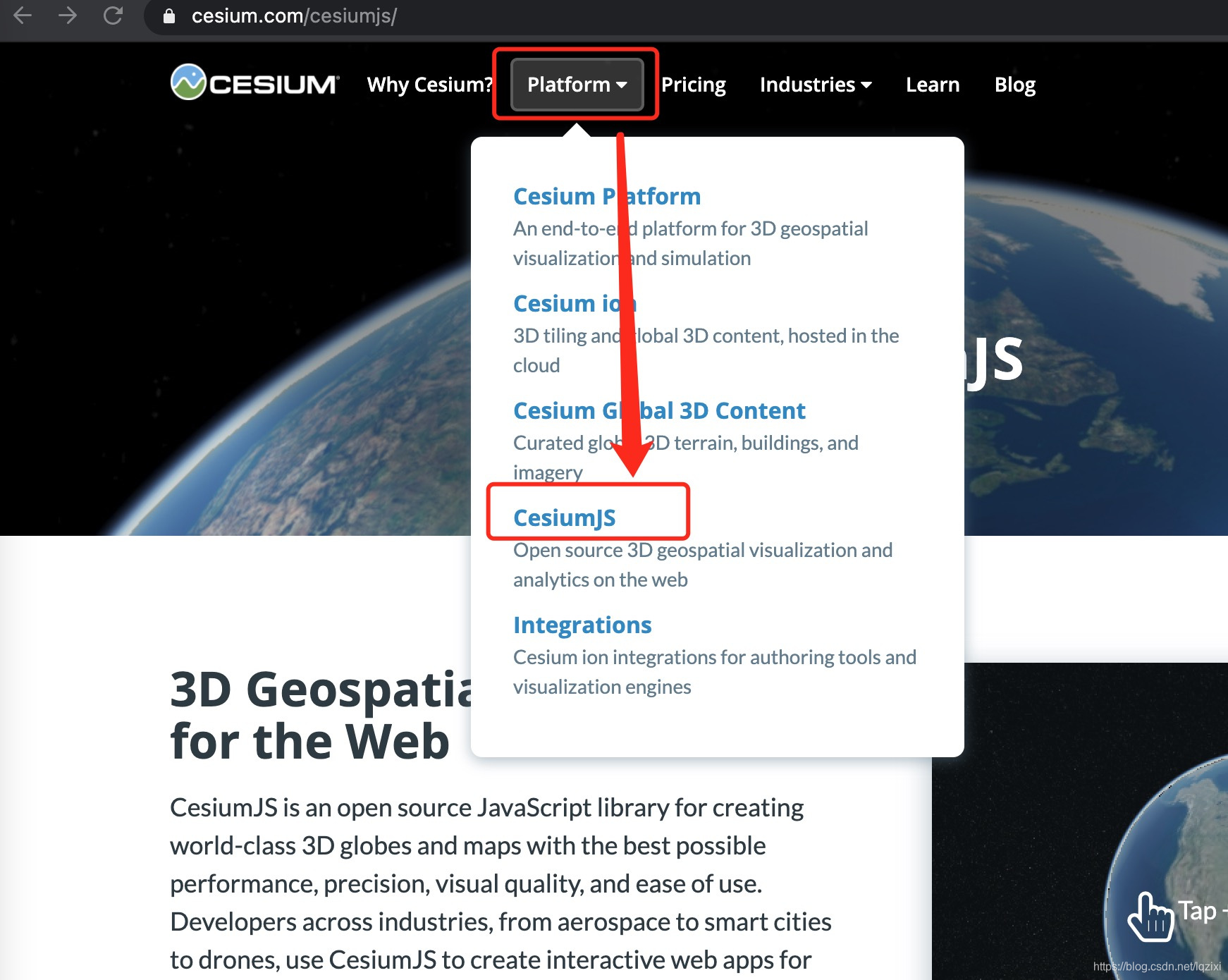
第一步:进入cesium官网https://cesium.com/cesiumjs/,找到“Platform”下的“CesiumJS”;
https://cesium.com/downloads/cesiumjs/
第二步:用你的火眼金睛定位瞄准“source”,不要点绿绿的大图标,不然你就真的被绿了,点开“Previous releases”,里面藏了所有的版本源代码和编译版本,对应版本后面的“source”才是我们心仪的女神小仙女。

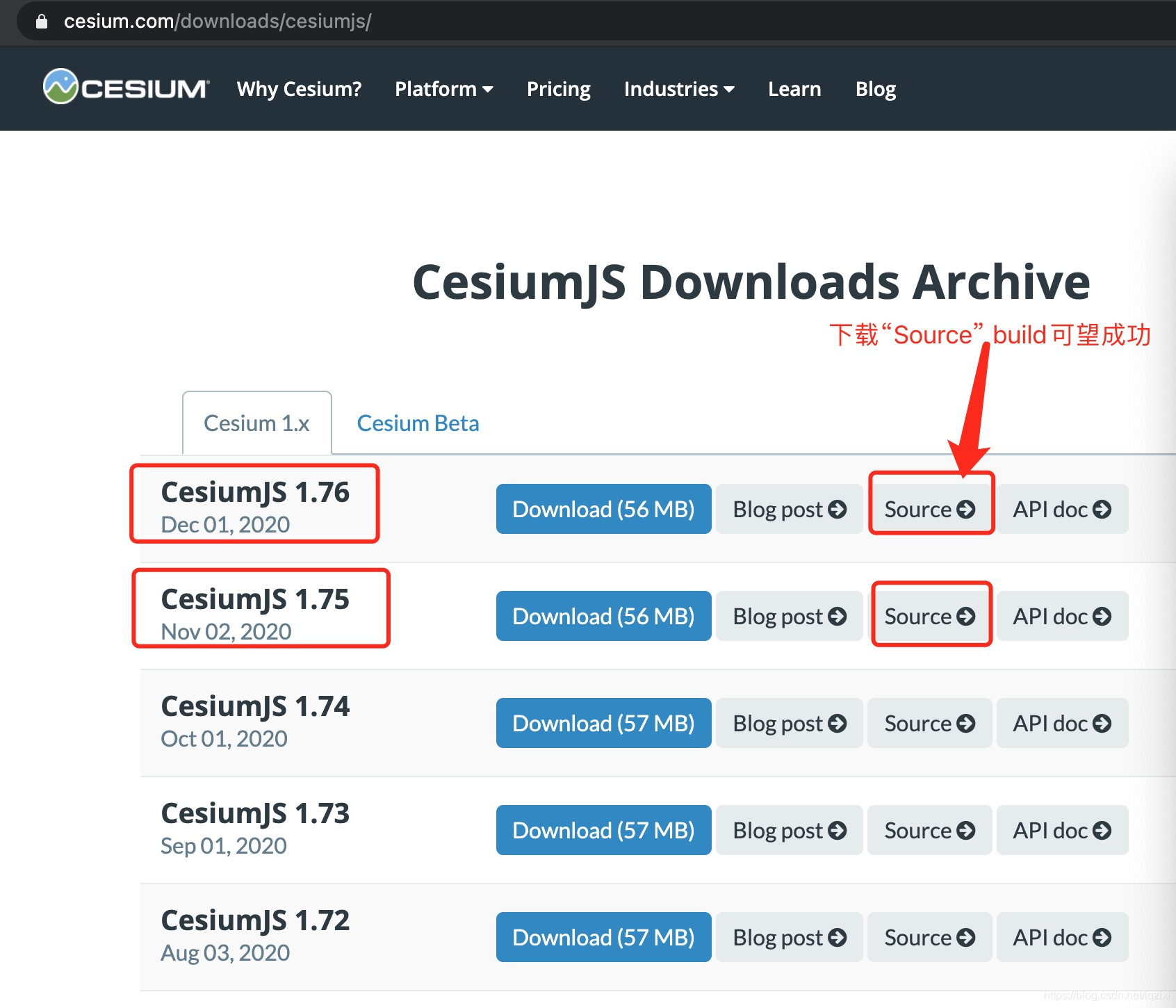
欧了,下载“Sounce”包以后就可以开始按照下面的教程安装编译了,接着开发了。
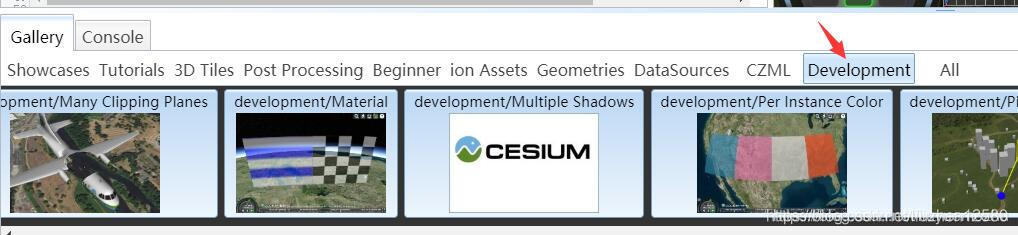
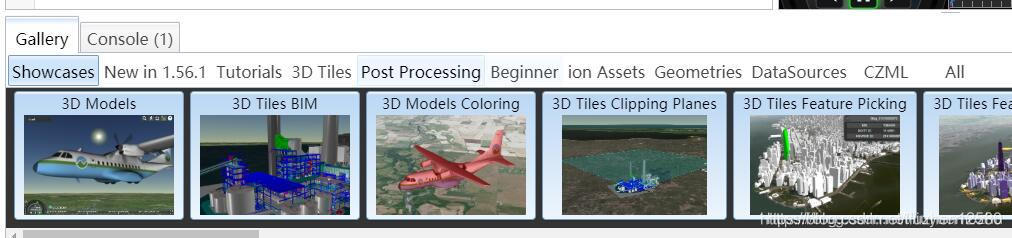
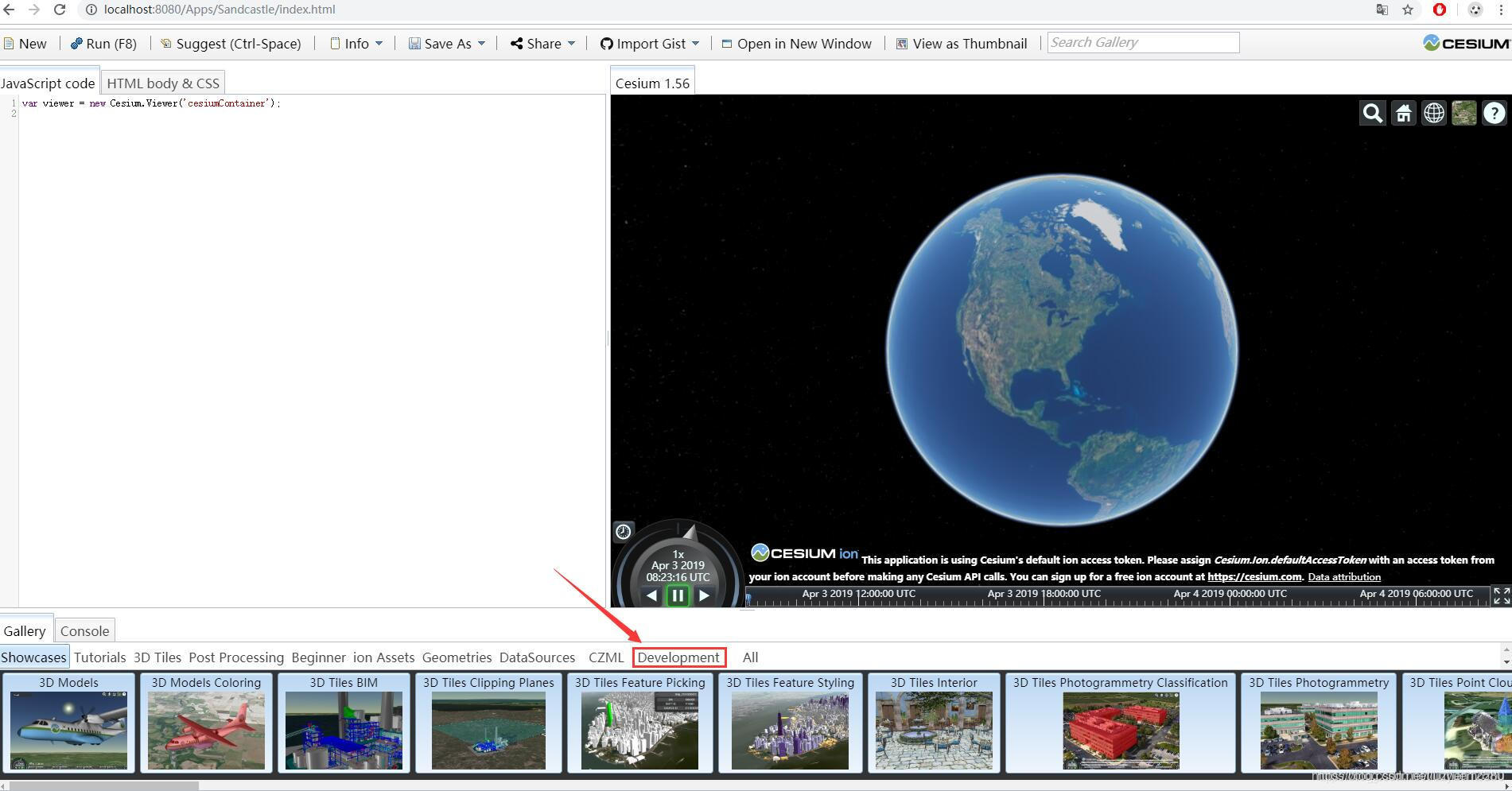
源码经过编译运行后会比发行版多一个Development分组。如图:
编译后版本:
官方版本:
cesium源码编译打包需要gulp,如果电脑上没有安装gulp,那么需要进行安装。
安装gulp:
前提下是电脑上装有node环境和npm环境,此处不再赘述。
解压cesium源码压缩包,在其所在路径,按下shift并鼠标右键选择“在此处打开命令窗口”
1.设置淘宝镜像:
npm install -g cnpm --registry=https://registry.npm.taobao.org
不安装淘宝镜像则需要FQ获取下一步的资源。
2.安装gulp:
npm install gulp -g
全局安装gulp
3.对cesium源码安装npm依赖:
npm install此时cesium根目录中多出node_modules文件夹
4.build打包:
npm run build在Source文件夹下生成了Cesium.js,还在Specs文件夹内生成了SpecList.js和在Build文件夹下生成了minifyShaders.state文件
Source文件夹下的Cesium.js是把Cesium源码中一千两百多个js文件做了一下引用,相当于一个索引。
打包之后cesium根目录下多出了Build文件夹。
5.运行cesium:
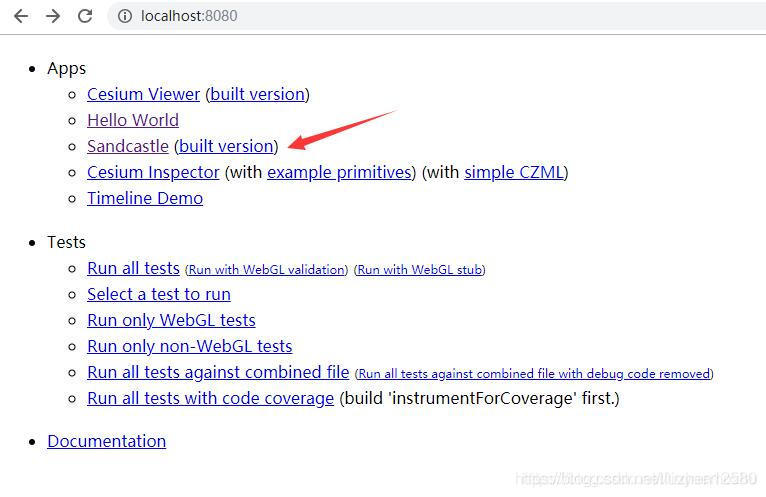
npm startcesium设置的默认端口是8080,用浏览器打开,(此方法只适合于本机访问,至于在局域网中访问,需要使用另外的命令进行端口开放,本博主其他文章将做说明,如需要请关注)
localhost:8080
就可以查看了:
点击Sandcastle打开cesium官方案例:
故障处理
【含新版本1.79.1安装部署步骤解析】
1.新版本遇到的问题
直接贴上本地源码编译遇到的问题和尝试处理过程先,高手直接自己抠出武功秘籍
TonyBruceWudeMacBook-Pro:gaea-1.79.1.2 tony$ npm install gulp -g

npm WARN deprecated chokidar@2.1.8: Chokidar 2 will break on node v14+. Upgrade to chokidar 3 with 15x less dependencies.

npm WARN deprecated urix@0.1.0: Please see https://github.com/lydell/urix#deprecated

npm WARN deprecated resolve-url@0.2.1: https://github.com/lydell/resolve-url#deprecated

npm WARN deprecated fsevents@1.2.13: fsevents 1 will break on node v14+ and could be using insecure binaries. Upgrade to fsevents 2.

npm WARN checkPermissions Missing write access to /usr/local/lib/node_modules

npm ERR! code EACCES

npm ERR! syscall access

npm ERR! path /usr/local/lib/node_modules

npm ERR! errno -13

npm ERR! Error: EACCES: permission denied, access '/usr/local/lib/node_modules'

npm ERR!  [Error: EACCES: permission denied, access '/usr/local/lib/node_modules'] {

npm ERR!   errno: -13,

npm ERR!   code: 'EACCES',

npm ERR!   syscall: 'access',

npm ERR!   path: '/usr/local/lib/node_modules'

npm ERR! }

npm ERR!

npm ERR! The operation was rejected by your operating system.

npm ERR! It is likely you do not have the permissions to access this file as the current user

npm ERR!

npm ERR! If you believe this might be a permissions issue, please double-check the

npm ERR! permissions of the file and its containing directories, or try running

npm ERR! the command again as root/Administrator.

npm ERR! A complete log of this run can be found in:

npm ERR!     /Users/tony/.npm/_logs/2021-03-18T00_50_14_532Z-debug.log

TonyBruceWudeMacBook-Pro:gaea-1.79.1.2 tony$ npm install yarm -g

npm WARN checkPermissions Missing write access to /usr/local/lib/node_modules

npm ERR! code EACCES

npm ERR! syscall access

npm ERR! path /usr/local/lib/node_modules

npm ERR! errno -13

npm ERR! Error: EACCES: permission denied, access '/usr/local/lib/node_modules'

npm ERR!  [Error: EACCES: permission denied, access '/usr/local/lib/node_modules'] {

npm ERR!   errno: -13,

npm ERR!   code: 'EACCES',

npm ERR!   syscall: 'access',

npm ERR!   path: '/usr/local/lib/node_modules'

npm ERR! }

npm ERR!

npm ERR! The operation was rejected by your operating system.

npm ERR! It is likely you do not have the permissions to access this file as the current user

npm ERR!

npm ERR! If you believe this might be a permissions issue, please double-check the

npm ERR! permissions of the file and its containing directories, or try running

npm ERR! the command again as root/Administrator.

npm ERR! A complete log of this run can be found in:

npm ERR!     /Users/tony/.npm/_logs/2021-03-18T00_52_04_209Z-debug.log

TonyBruceWudeMacBook-Pro:gaea-1.79.1.2 tony$ npm install yarm -g

npm WARN checkPermissions Missing write access to /usr/local/lib/node_modules

npm ERR! code EACCES

npm ERR! syscall access

npm ERR! path /usr/local/lib/node_modules

npm ERR! errno -13

npm ERR! Error: EACCES: permission denied, access '/usr/local/lib/node_modules'

npm ERR!  [Error: EACCES: permission denied, access '/usr/local/lib/node_modules'] {

npm ERR!   errno: -13,

npm ERR!   code: 'EACCES',

npm ERR!   syscall: 'access',

npm ERR!   path: '/usr/local/lib/node_modules'

npm ERR! }

npm ERR!

npm ERR! The operation was rejected by your operating system.

npm ERR! It is likely you do not have the permissions to access this file as the current user

npm ERR!

npm ERR! If you believe this might be a permissions issue, please double-check the

npm ERR! permissions of the file and its containing directories, or try running

npm ERR! the command again as root/Administrator.

npm ERR! A complete log of this run can be found in:

npm ERR!     /Users/tony/.npm/_logs/2021-03-18T00_52_22_569Z-debug.log

TonyBruceWudeMacBook-Pro:gaea-1.79.1.2 tony$ yarm install

-bash: yarm: command not found

TonyBruceWudeMacBook-Pro:gaea-1.79.1.2 tony$ yarm install

-bash: yarm: command not found

TonyBruceWudeMacBook-Pro:gaea-1.79.1.2 tony$ npm install yarm -g

npm WARN checkPermissions Missing write access to /usr/local/lib/node_modules

npm ERR! code EACCES

npm ERR! syscall access

npm ERR! path /usr/local/lib/node_modules

npm ERR! errno -13

npm ERR! Error: EACCES: permission denied, access '/usr/local/lib/node_modules'

npm ERR!  [Error: EACCES: permission denied, access '/usr/local/lib/node_modules'] {

npm ERR!   errno: -13,

npm ERR!   code: 'EACCES',

npm ERR!   syscall: 'access',

npm ERR!   path: '/usr/local/lib/node_modules'

npm ERR! }

npm ERR!

npm ERR! The operation was rejected by your operating system.

npm ERR! It is likely you do not have the permissions to access this file as the current user

npm ERR!

npm ERR! If you believe this might be a permissions issue, please double-check the

npm ERR! permissions of the file and its containing directories, or try running

npm ERR! the command again as root/Administrator.

npm ERR! A complete log of this run can be found in:

npm ERR!     /Users/tony/.npm/_logs/2021-03-18T00_52_41_181Z-debug.log

TonyBruceWudeMacBook-Pro:gaea-1.79.1.2 tony$ npm cache clean -f

npm WARN using --force I sure hope you know what you are doing.

TonyBruceWudeMacBook-Pro:gaea-1.79.1.2 tony$ npm install

npm WARN rollup-plugin-uglify@6.0.4 requires a peer of rollup@>=0.66.0 <2 but none is installed. You must install peer dependencies yourself.

audited 948 packages in 4.829s

55 packages are looking for funding

  run `npm fund` for details

found 1 high severity vulnerability

  run `npm audit fix` to fix them, or `npm audit` for details

TonyBruceWudeMacBook-Pro:gaea-1.79.1.2 tony$ npm run build

> cesium@1.79.1 build /Applications/MAMP/htdocs/gaea-1.79.1.2

> gulp build

internal/modules/cjs/loader.js:883

  throw err;

  ^

Error: Cannot find module 'gulp-cli'

Require stack:

- /Applications/MAMP/htdocs/gaea-1.79.1.2/node_modules/.bin/gulp

    at Function.Module._resolveFilename (internal/modules/cjs/loader.js:880:15)

    at Function.Module._load (internal/modules/cjs/loader.js:725:27)

    at Module.require (internal/modules/cjs/loader.js:952:19)

    at require (internal/modules/cjs/helpers.js:88:18)

    at Object.<anonymous> (/Applications/MAMP/htdocs/gaea-1.79.1.2/node_modules/.bin/gulp:3:1)

    at Module._compile (internal/modules/cjs/loader.js:1063:30)

    at Object.Module._extensions..js (internal/modules/cjs/loader.js:1092:10)

    at Module.load (internal/modules/cjs/loader.js:928:32)

    at Function.Module._load (internal/modules/cjs/loader.js:769:14)

    at Function.executeUserEntryPoint [as runMain] (internal/modules/run_main.js:72:12) {

  code: 'MODULE_NOT_FOUND',

  requireStack: [ '/Applications/MAMP/htdocs/gaea-1.79.1.2/node_modules/.bin/gulp' ]

}

npm ERR! code ELIFECYCLE

npm ERR! errno 1

npm ERR! cesium@1.79.1 build: `gulp build`

npm ERR! Exit status 1

npm ERR!

npm ERR! Failed at the cesium@1.79.1 build script.

npm ERR! This is probably not a problem with npm. There is likely additional logging output above.

npm ERR! A complete log of this run can be found in:

npm ERR!     /Users/tony/.npm/_logs/2021-03-18T03_15_38_307Z-debug.log

TonyBruceWudeMacBook-Pro:gaea-1.79.1.2 tony$ yum install gulp -g

-bash: yum: command not found

TonyBruceWudeMacBook-Pro:gaea-1.79.1.2 tony$ brew install gulp -g

Updating Homebrew...

==> Tapping homebrew/core

Cloning into '/usr/local/Homebrew/Library/Taps/homebrew/homebrew-core'...

fatal: unable to access 'https://github.com/Homebrew/homebrew-core/': Failed to connect to github.com port 443: Operation timed out

Error: Failure while executing; `git clone https://github.com/Homebrew/homebrew-core /usr/local/Homebrew/Library/Taps/homebrew/homebrew-core` exited with 128.

Error: Failure while executing; `/usr/local/bin/brew tap homebrew/core` exited with 1.

==> Tapping homebrew/core

Cloning into '/usr/local/Homebrew/Library/Taps/homebrew/homebrew-core'...

fatal: unable to access 'https://github.com/Homebrew/homebrew-core/': Operation timed out after 300018 milliseconds with 0 out of 0 bytes received

Error: Failure while executing; `git clone https://github.com/Homebrew/homebrew-core /usr/local/Homebrew/Library/Taps/homebrew/homebrew-core` exited with 128.

Error: Failure while executing; `/usr/local/bin/brew tap homebrew/core` exited with 1.

TonyBruceWudeMacBook-Pro:gaea-1.79.1.2 tony$ npm install gulp -g

npm WARN deprecated chokidar@2.1.8: Chokidar 2 will break on node v14+. Upgrade to chokidar 3 with 15x less dependencies.

npm WARN deprecated urix@0.1.0: Please see https://github.com/lydell/urix#deprecated

npm WARN deprecated resolve-url@0.2.1: https://github.com/lydell/resolve-url#deprecated

npm WARN deprecated fsevents@1.2.13: fsevents 1 will break on node v14+ and could be using insecure binaries. Upgrade to fsevents 2.

npm WARN checkPermissions Missing write access to /usr/local/lib/node_modules

npm ERR! code EACCES

npm ERR! syscall access

npm ERR! path /usr/local/lib/node_modules

npm ERR! errno -13

npm ERR! Error: EACCES: permission denied, access '/usr/local/lib/node_modules'

npm ERR!  [Error: EACCES: permission denied, access '/usr/local/lib/node_modules'] {

npm ERR!   errno: -13,

npm ERR!   code: 'EACCES',

npm ERR!   syscall: 'access',

npm ERR!   path: '/usr/local/lib/node_modules'

npm ERR! }

npm ERR!

npm ERR! The operation was rejected by your operating system.

npm ERR! It is likely you do not have the permissions to access this file as the current user

npm ERR!

npm ERR! If you believe this might be a permissions issue, please double-check the

npm ERR! permissions of the file and its containing directories, or try running

npm ERR! the command again as root/Administrator.

npm ERR! A complete log of this run can be found in:

npm ERR!     /Users/tony/.npm/_logs/2021-03-18T03_26_13_219Z-debug.log

TonyBruceWudeMacBook-Pro:gaea-1.79.1.2 tony$ npm install -g cnpm --registry=https://registry.npm.taobao.org

-bash: npm install -g cnpm --registry=https://registry.npm.taobao.org: No such file or directory

TonyBruceWudeMacBook-Pro:gaea-1.79.1.2 tony$ npm install gulp -g

npm WARN deprecated chokidar@2.1.8: Chokidar 2 will break on node v14+. Upgrade to chokidar 3 with 15x less dependencies.

npm WARN deprecated urix@0.1.0: Please see https://github.com/lydell/urix#deprecated

npm WARN deprecated resolve-url@0.2.1: https://github.com/lydell/resolve-url#deprecated

npm WARN deprecated fsevents@1.2.13: fsevents 1 will break on node v14+ and could be using insecure binaries. Upgrade to fsevents 2.

npm WARN checkPermissions Missing write access to /usr/local/lib/node_modules

npm ERR! code EACCES

npm ERR! syscall access

npm ERR! path /usr/local/lib/node_modules

npm ERR! errno -13

npm ERR! Error: EACCES: permission denied, access '/usr/local/lib/node_modules'

npm ERR!  [Error: EACCES: permission denied, access '/usr/local/lib/node_modules'] {

npm ERR!   errno: -13,

npm ERR!   code: 'EACCES',

npm ERR!   syscall: 'access',

npm ERR!   path: '/usr/local/lib/node_modules'

npm ERR! }

npm ERR!

npm ERR! The operation was rejected by your operating system.

npm ERR! It is likely you do not have the permissions to access this file as the current user

npm ERR!

npm ERR! If you believe this might be a permissions issue, please double-check the

npm ERR! permissions of the file and its containing directories, or try running

npm ERR! the command again as root/Administrator.

npm ERR! A complete log of this run can be found in:

npm ERR!     /Users/tony/.npm/_logs/2021-03-18T03_28_17_293Z-debug.log

TonyBruceWudeMacBook-Pro:gaea-1.79.1.2 tony$

TonyBruceWudeMacBook-Pro:gaea-1.79.1.2 tony$ su root

Password:

su: Sorry

TonyBruceWudeMacBook-Pro:gaea-1.79.1.2 tony$ su root

Password:

su: Sorry

TonyBruceWudeMacBook-Pro:gaea-1.79.1.2 tony$ su root

Password:

su: Sorry

TonyBruceWudeMacBook-Pro:gaea-1.79.1.2 tony$ su root

Password:

su: Sorry

TonyBruceWudeMacBook-Pro:gaea-1.79.1.2 tony$

TonyBruceWudeMacBook-Pro:gaea-1.79.1.2 tony$

TonyBruceWudeMacBook-Pro:gaea-1.79.1.2 tony$

TonyBruceWudeMacBook-Pro:gaea-1.79.1.2 tony$ npm install vue-cli -g

npm WARN deprecated vue-cli@2.9.6: This package has been deprecated in favour of @vue/cli

npm WARN deprecated request@2.88.2: request has been deprecated, see https://github.com/request/request/issues/3142

npm WARN deprecated coffee-script@1.12.7: CoffeeScript on NPM has moved to "coffeescript" (no hyphen)

npm WARN deprecated har-validator@5.1.5: this library is no longer supported

npm WARN checkPermissions Missing write access to /usr/local/lib/node_modules

npm ERR! code EACCES

npm ERR! syscall access

npm ERR! path /usr/local/lib/node_modules

npm ERR! errno -13

npm ERR! Error: EACCES: permission denied, access '/usr/local/lib/node_modules'

npm ERR!  [Error: EACCES: permission denied, access '/usr/local/lib/node_modules'] {

npm ERR!   errno: -13,

npm ERR!   code: 'EACCES',

npm ERR!   syscall: 'access',

npm ERR!   path: '/usr/local/lib/node_modules'

npm ERR! }

npm ERR!

npm ERR! The operation was rejected by your operating system.

npm ERR! It is likely you do not have the permissions to access this file as the current user

npm ERR!

npm ERR! If you believe this might be a permissions issue, please double-check the

npm ERR! permissions of the file and its containing directories, or try running

npm ERR! the command again as root/Administrator.

npm ERR! A complete log of this run can be found in:

npm ERR!     /Users/tony/.npm/_logs/2021-03-18T03_53_55_529Z-debug.log

TonyBruceWudeMacBook-Pro:gaea-1.79.1.2 tony$

  [恢复于2021年3月18日 下午1:18:24]

Last login: Thu Mar 18 13:18:11 on console

The default interactive shell is now zsh.

To update your account to use zsh, please run `chsh -s /bin/zsh`.

For more details, please visit https://support.apple.com/kb/HT208050.

TonyBruceWudeMacBook-Pro:gaea-1.79.1.2 tony$ npm install gulp-cli -g

npm WARN deprecated resolve-url@0.2.1: https://github.com/lydell/resolve-url#deprecated

npm WARN deprecated urix@0.1.0: Please see https://github.com/lydell/urix#deprecated

npm WARN checkPermissions Missing write access to /usr/local/lib/node_modules

npm ERR! code EACCES

npm ERR! syscall access

npm ERR! path /usr/local/lib/node_modules

npm ERR! errno -13

npm ERR! Error: EACCES: permission denied, access '/usr/local/lib/node_modules'

npm ERR!  [Error: EACCES: permission denied, access '/usr/local/lib/node_modules'] {

npm ERR!   errno: -13,

npm ERR!   code: 'EACCES',

npm ERR!   syscall: 'access',

npm ERR!   path: '/usr/local/lib/node_modules'

npm ERR! }

npm ERR!

npm ERR! The operation was rejected by your operating system.

npm ERR! It is likely you do not have the permissions to access this file as the current user

npm ERR!

npm ERR! If you believe this might be a permissions issue, please double-check the

npm ERR! permissions of the file and its containing directories, or try running

npm ERR! the command again as root/Administrator.

npm ERR! A complete log of this run can be found in:

npm ERR!     /Users/tony/.npm/_logs/2021-03-18T06_33_16_765Z-debug.log

TonyBruceWudeMacBook-Pro:gaea-1.79.1.2 tony$ ls

Apps			README.md		index.cjs

Build			Source			index.html

CHANGES.md		Specs			index.release.html

CODE_OF_CONDUCT.md	ThirdParty		launches

CONTRIBUTING.md		Tools			node_modules

CONTRIBUTORS.md		favicon.ico		package.json

Documentation		greenkeeper.json	server.cjs

LICENSE.md		gulpfile.cjs		web.config

TonyBruceWudeMacBook-Pro:gaea-1.79.1.2 tony$ chmod 777 node_modules/

TonyBruceWudeMacBook-Pro:gaea-1.79.1.2 tony$ npm install gulp-cli -g

npm WARN deprecated urix@0.1.0: Please see https://github.com/lydell/urix#deprecated

npm WARN deprecated resolve-url@0.2.1: https://github.com/lydell/resolve-url#deprecated

npm WARN checkPermissions Missing write access to /usr/local/lib/node_modules

npm ERR! code EACCES

npm ERR! syscall access

npm ERR! path /usr/local/lib/node_modules

npm ERR! errno -13

npm ERR! Error: EACCES: permission denied, access '/usr/local/lib/node_modules'

npm ERR!  [Error: EACCES: permission denied, access '/usr/local/lib/node_modules'] {

npm ERR!   errno: -13,

npm ERR!   code: 'EACCES',

npm ERR!   syscall: 'access',

npm ERR!   path: '/usr/local/lib/node_modules'

npm ERR! }

npm ERR!

npm ERR! The operation was rejected by your operating system.

npm ERR! It is likely you do not have the permissions to access this file as the current user

npm ERR!

npm ERR! If you believe this might be a permissions issue, please double-check the

npm ERR! permissions of the file and its containing directories, or try running

npm ERR! the command again as root/Administrator.

npm ERR! A complete log of this run can be found in:

npm ERR!     /Users/tony/.npm/_logs/2021-03-18T06_34_14_663Z-debug.log

TonyBruceWudeMacBook-Pro:gaea-1.79.1.2 tony$ chmod 777 /usr/local/lib/node_modules

chmod: Unable to change file mode on /usr/local/lib/node_modules: Operation not permitted

TonyBruceWudeMacBook-Pro:gaea-1.79.1.2 tony$ sudo chmod 777 /usr/local/lib/node_modules

Password:

TonyBruceWudeMacBook-Pro:gaea-1.79.1.2 tony$ npm install gulp-cli -g

npm WARN deprecated resolve-url@0.2.1: https://github.com/lydell/resolve-url#deprecated

npm WARN deprecated urix@0.1.0: Please see https://github.com/lydell/urix#deprecated

/usr/local/bin/gulp -> /usr/local/lib/node_modules/gulp-cli/bin/gulp.js

+ gulp-cli@2.3.0

added 246 packages from 165 contributors in 29.501s

TonyBruceWudeMacBook-Pro:gaea-1.79.1.2 tony$ npm install gulp -D

npm WARN deprecated chokidar@2.1.8: Chokidar 2 will break on node v14+. Upgrade to chokidar 3 with 15x less dependencies.

npm WARN deprecated resolve-url@0.2.1: https://github.com/lydell/resolve-url#deprecated

npm WARN deprecated urix@0.1.0: Please see https://github.com/lydell/urix#deprecated

npm WARN deprecated fsevents@1.2.13: fsevents 1 will break on node v14+ and could be using insecure binaries. Upgrade to fsevents 2.

npm WARN rollup-plugin-uglify@6.0.4 requires a peer of rollup@>=0.66.0 <2 but none is installed. You must install peer dependencies yourself.

npm ERR! code EEXIST

npm ERR! path /Applications/MAMP/htdocs/gaea-1.79.1.2/node_modules/.bin/gulp

npm ERR! Refusing to delete /Applications/MAMP/htdocs/gaea-1.79.1.2/node_modules/.bin/gulp: is outside /Applications/MAMP/htdocs/gaea-1.79.1.2/node_modules/gulp and not a link

npm ERR! File exists: /Applications/MAMP/htdocs/gaea-1.79.1.2/node_modules/.bin/gulp

npm ERR! Remove the existing file and try again, or run npm

npm ERR! with --force to overwrite files recklessly.

npm ERR! A complete log of this run can be found in:

npm ERR!     /Users/tony/.npm/_logs/2021-03-18T06_36_30_958Z-debug.log

TonyBruceWudeMacBook-Pro:gaea-1.79.1.2 tony$ chmod 777 /Applications/MAMP/htdocs/gaea-1.79.1.2/node_modules/.bin/

TonyBruceWudeMacBook-Pro:gaea-1.79.1.2 tony$ npm install gulp -D

npm WARN deprecated chokidar@2.1.8: Chokidar 2 will break on node v14+. Upgrade to chokidar 3 with 15x less dependencies.

npm WARN deprecated resolve-url@0.2.1: https://github.com/lydell/resolve-url#deprecated

npm WARN deprecated urix@0.1.0: Please see https://github.com/lydell/urix#deprecated

npm WARN deprecated fsevents@1.2.13: fsevents 1 will break on node v14+ and could be using insecure binaries. Upgrade to fsevents 2.

npm WARN rollup-plugin-uglify@6.0.4 requires a peer of rollup@>=0.66.0 <2 but none is installed. You must install peer dependencies yourself.

npm ERR! code EEXIST

npm ERR! path /Applications/MAMP/htdocs/gaea-1.79.1.2/node_modules/.bin/gulp

npm ERR! Refusing to delete /Applications/MAMP/htdocs/gaea-1.79.1.2/node_modules/.bin/gulp: is outside /Applications/MAMP/htdocs/gaea-1.79.1.2/node_modules/gulp and not a link

npm ERR! File exists: /Applications/MAMP/htdocs/gaea-1.79.1.2/node_modules/.bin/gulp

npm ERR! Remove the existing file and try again, or run npm

npm ERR! with --force to overwrite files recklessly.

npm ERR! A complete log of this run can be found in:

npm ERR!     /Users/tony/.npm/_logs/2021-03-18T06_38_02_518Z-debug.log

TonyBruceWudeMacBook-Pro:gaea-1.79.1.2 tony$ npm install gulp -D

npm WARN deprecated chokidar@2.1.8: Chokidar 2 will break on node v14+. Upgrade to chokidar 3 with 15x less dependencies.

npm WARN deprecated urix@0.1.0: Please see https://github.com/lydell/urix#deprecated

npm WARN deprecated resolve-url@0.2.1: https://github.com/lydell/resolve-url#deprecated

npm WARN deprecated fsevents@1.2.13: fsevents 1 will break on node v14+ and could be using insecure binaries. Upgrade to fsevents 2.

> fsevents@1.2.13 install /Applications/MAMP/htdocs/gaea-1.79.1.2/node_modules/fsevents

> node install.js

gyp WARN install got an error, rolling back install

gyp ERR! configure error

gyp ERR! stack Error: read ECONNRESET

gyp ERR! stack     at TLSWrap.onStreamRead (internal/stream_base_commons.js:209:20)

gyp ERR! System Darwin 19.6.0

gyp ERR! command "/usr/local/bin/node" "/usr/local/lib/node_modules/npm/node_modules/node-gyp/bin/node-gyp.js" "rebuild"

gyp ERR! cwd /Applications/MAMP/htdocs/gaea-1.79.1.2/node_modules/fsevents

gyp ERR! node -v v14.15.1

gyp ERR! node-gyp -v v5.1.0

gyp ERR! not ok

+ gulp@4.0.2

added 326 packages from 227 contributors and audited 326 packages in 49.599s

7 packages are looking for funding

  run `npm fund` for details

found 0 vulnerabilities

TonyBruceWudeMacBook-Pro:gaea-1.79.1.2 tony$

TonyBruceWudeMacBook-Pro:gaea-1.79.1.2 tony$ /usr/local/bin/node" "/usr/local/lib/node_modules/npm/node_modules/node-gyp/bin/node-gyp.js

-bash: /usr/local/bin/node /usr/local/lib/node_modules/npm/node_modules/node-gyp/bin/node-gyp.js: No such file or directory

TonyBruceWudeMacBook-Pro:gaea-1.79.1.2 tony$ /usr/local/bin/node" "/usr/local/lib/node_modules/npm/node_modules/node-gyp/bin/node-gyp.js rebuild

-bash: /usr/local/bin/node /usr/local/lib/node_modules/npm/node_modules/node-gyp/bin/node-gyp.js: No such file or directory

TonyBruceWudeMacBook-Pro:gaea-1.79.1.2 tony$ gulp rebuild /usr/local/bin/node" "/usr/local/lib/node_modules/npm/node_modules/node-gyp/bin/node-gyp.js

Error: Cannot find module 'request'

Require stack:

- /Applications/MAMP/htdocs/gaea-1.79.1.2/gulpfile.cjs

- /usr/local/lib/node_modules/gulp-cli/lib/shared/require-or-import.js

- /usr/local/lib/node_modules/gulp-cli/lib/versioned/^4.0.0/index.js

- /usr/local/lib/node_modules/gulp-cli/index.js

- /usr/local/lib/node_modules/gulp-cli/bin/gulp.js

    at Function.Module._resolveFilename (internal/modules/cjs/loader.js:880:15)

    at Function.Module._load (internal/modules/cjs/loader.js:725:27)

    at Module.require (internal/modules/cjs/loader.js:952:19)

    at require (internal/modules/cjs/helpers.js:88:18)

    at Object.<anonymous> (/Applications/MAMP/htdocs/gaea-1.79.1.2/gulpfile.cjs:11:17)

    at Module._compile (internal/modules/cjs/loader.js:1063:30)

    at Object.Module._extensions..js (internal/modules/cjs/loader.js:1092:10)

    at Module.load (internal/modules/cjs/loader.js:928:32)

    at Function.Module._load (internal/modules/cjs/loader.js:769:14)

    at Module.require (internal/modules/cjs/loader.js:952:19) {

  code: 'MODULE_NOT_FOUND',

  requireStack: [

    '/Applications/MAMP/htdocs/gaea-1.79.1.2/gulpfile.cjs',

    '/usr/local/lib/node_modules/gulp-cli/lib/shared/require-or-import.js',

    '/usr/local/lib/node_modules/gulp-cli/lib/versioned/^4.0.0/index.js',

    '/usr/local/lib/node_modules/gulp-cli/index.js',

    '/usr/local/lib/node_modules/gulp-cli/bin/gulp.js'

  ]

}

TonyBruceWudeMacBook-Pro:gaea-1.79.1.2 tony$ npx -p touch nodetouch gulpfile.js

npx: 3 安装成功,用时 3.489 秒

TonyBruceWudeMacBook-Pro:gaea-1.79.1.2 tony$ npm install gulp-cli -g

npm WARN deprecated resolve-url@0.2.1: https://github.com/lydell/resolve-url#deprecated

npm WARN deprecated urix@0.1.0: Please see https://github.com/lydell/urix#deprecated

/usr/local/bin/gulp -> /usr/local/lib/node_modules/gulp-cli/bin/gulp.js

+ gulp-cli@2.3.0

updated 1 package in 28.055s

TonyBruceWudeMacBook-Pro:gaea-1.79.1.2 tony$ npm install gulp -D

npm WARN deprecated chokidar@2.1.8: Chokidar 2 will break on node v14+. Upgrade to chokidar 3 with 15x less dependencies.

npm WARN deprecated urix@0.1.0: Please see https://github.com/lydell/urix#deprecated

npm WARN deprecated resolve-url@0.2.1: https://github.com/lydell/resolve-url#deprecated

npm WARN deprecated fsevents@1.2.13: fsevents 1 will break on node v14+ and could be using insecure binaries. Upgrade to fsevents 2.

+ gulp@4.0.2

updated 1 package and audited 326 packages in 35.98s

found 0 vulnerabilities

TonyBruceWudeMacBook-Pro:gaea-1.79.1.2 tony$ npx -p touch nodetouch gulpfile.js

npx: 3 安装成功,用时 2.182 秒

TonyBruceWudeMacBook-Pro:gaea-1.79.1.2 tony$ gulp --help

Usage: gulp [options] tasks

选项:

  --help, -h              Show this help.                                 [布尔]

  --version, -v           Print the global and local gulp versions.       [布尔]

  --require               Will require a module before running the gulpfile.

                          This is useful for transpilers but also has other

                          applications.                                 [字符串]

  --gulpfile, -f          Manually set path of gulpfile. Useful if you have

                          multiple gulpfiles. This will set the CWD to the

                          gulpfile directory as well.                   [字符串]

  --cwd                   Manually set the CWD. The search for the gulpfile, as

                          well as the relativity of all requires will be from

                          here.                                         [字符串]

  --verify                Will verify plugins referenced in project's

                          package.json against the plugins blacklist.

  --tasks, -T             Print the task dependency tree for the loaded

                          gulpfile.                                       [布尔]

  --tasks-simple          Print a plaintext list of tasks for the loaded

                          gulpfile.                                       [布尔]

  --tasks-json            Print the task dependency tree, in JSON format, for

                          the loaded gulpfile.

  --tasks-depth, --depth  Specify the depth of the task dependency tree.  [数字]

  --compact-tasks         Reduce the output of task dependency tree by printing

                          only top tasks and their child tasks.           [布尔]

  --sort-tasks            Will sort top tasks of task dependency tree.    [布尔]

  --color                 Will force gulp and gulp plugins to display colors,

                          even when no color support is detected.         [布尔]

  --no-color              Will force gulp and gulp plugins to not display

                          colors, even when color support is detected.    [布尔]

  --silent, -S            Suppress all gulp logging.                      [布尔]

  --continue              Continue execution of tasks upon failure.       [布尔]

  --series                Run tasks given on the CLI in series (the default is

                          parallel).                                      [布尔]

  --log-level, -L         Set the loglevel. -L for least verbose and -LLLL for

                          most verbose. -LLL is default.                  [计数]

TonyBruceWudeMacBook-Pro:gaea-1.79.1.2 tony$ npm install

npm WARN deprecated request@2.88.2: request has been deprecated, see https://github.com/request/request/issues/3142

npm WARN deprecated har-validator@5.1.5: this library is no longer supported

npm WARN deprecated debug@4.1.1: Debug versions >=3.2.0 <3.2.7 || >=4 <4.3.1 have a low-severity ReDos regression when used in a Node.js environment. It is recommended you upgrade to 3.2.7 or 4.3.1. (https://github.com/visionmedia/debug/issues/797)

> husky@4.3.8 install /Applications/MAMP/htdocs/gaea-1.79.1.2/node_modules/husky

> node husky install

husky > Setting up git hooks

git rev-parse command failed. Got fatal: not a git repository (or any of the parent directories): .git

husky > Failed to install

> husky@4.3.8 postinstall /Applications/MAMP/htdocs/gaea-1.79.1.2/node_modules/husky

> opencollective-postinstall || exit 0

Thank you for using husky!

If you rely on this package, please consider supporting our open collective:

> https://opencollective.com/husky/donate

npm WARN rollup-plugin-uglify@6.0.4 requires a peer of rollup@>=0.66.0 <2 but none is installed. You must install peer dependencies yourself.

added 555 packages from 968 contributors and audited 885 packages in 102.272s

56 packages are looking for funding

  run `npm fund` for details

found 1 high severity vulnerability

  run `npm audit fix` to fix them, or `npm audit` for details

TonyBruceWudeMacBook-Pro:gaea-1.79.1.2 tony$ npm run build

> cesium@1.79.1 build /Applications/MAMP/htdocs/gaea-1.79.1.2

> gulp build

[14:50:02] Using gulpfile /Applications/MAMP/htdocs/gaea-1.79.1.2/gulpfile.cjs

[14:50:02] Starting 'build'...

[14:50:07] Finished 'build' after 4.73 s

TonyBruceWudeMacBook-Pro:gaea-1.79.1.2 tony$ npm run generateDocumentation

> cesium@1.79.1 generateDocumentation /Applications/MAMP/htdocs/gaea-1.79.1.2

> gulp generateDocumentation

[14:50:26] Using gulpfile /Applications/MAMP/htdocs/gaea-1.79.1.2/gulpfile.cjs

[14:50:26] Starting 'generateDocumentation'...

[14:50:59] Finished 'generateDocumentation' after 33 s

TonyBruceWudeMacBook-Pro:gaea-1.79.1.2 tony$ npm start

> cesium@1.79.1 start /Applications/MAMP/htdocs/gaea-1.79.1.2

> node server.cjs

Cesium development server running locally.  Connect to http://localhost:8080/
拆分如下:
(1)、问题描述:本意是想按照上文的步骤
1.设置淘宝镜像:
npm install -g cnpm --registry=https://registry.npm.taobao.org不安装淘宝镜像则需要FQ获取下一步的资源。
2.安装gulp:
npm install gulp -g全局安装gulp
3.对cesium源码安装npm依赖:
npm install此时cesium根目录中多出node_modules文件夹
4.build打包:
npm run build在Source文件夹下生成了Cesium.js,还在Specs文件夹内生成了SpecList.js和在Build文件夹下生成了minifyShaders.state文件
Source文件夹下的Cesium.js是把Cesium源码中一千两百多个js文件做了一下引用,相当于一个索引。
打包之后cesium根目录下多出了Build文件夹。
5.运行cesium:
npm start但很明显在第2步骤就出现了问题,安装gulp各种报错,雀神怪鸟
问题研究:仔细研究报错信息,发现有大部分的问题是权限的问题,运行报错中也体现出解决方向。
处理思路:第一步给足权限;第二步到gulp官网下载最新的gulp安装包安装,按照官网提供的正确完整的步骤先把gulp安装完整,测试通过,然后再重复如上步骤。
解决方案:
先瞟了一眼官网gulp的安装步骤
npm install gulp-cli -g

npm install gulp -D

npx -p touch nodetouch gulpfile.js

gulp --help
再次确认了单独搞定gulp必经之路,然后逐步解锁各种高难度姿势。
(1)、给出错提示的文件及目录加上最高的读写权限
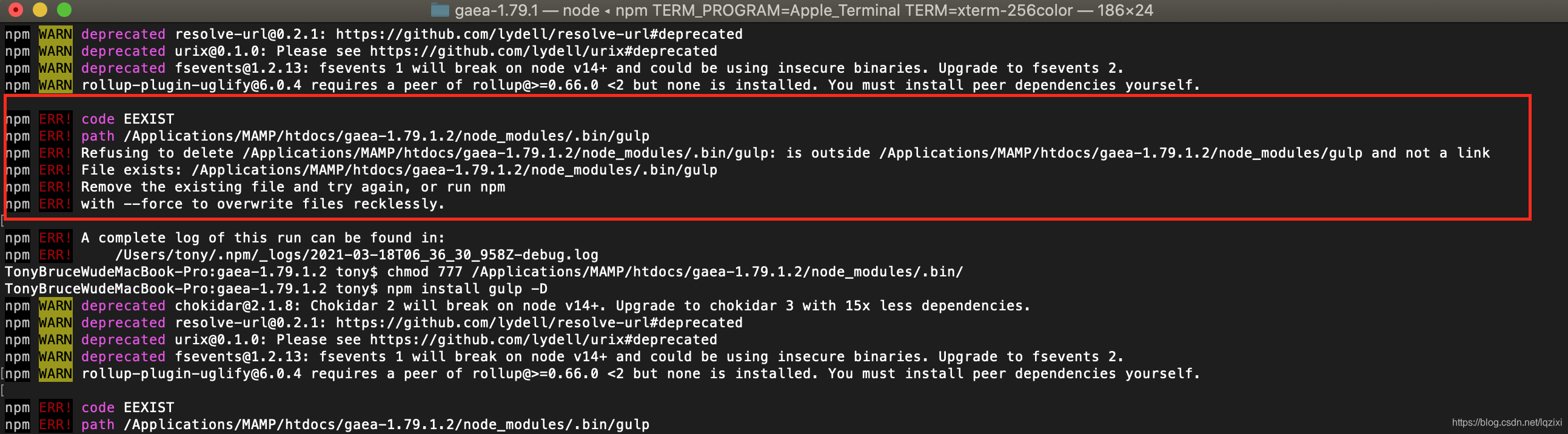
执行命令:
chmod 777 /Applications/MAMP/htdocs/gaea-1.79.1.2/node_modules/.bin/npm install gulp-cli -g紧接着就执行这条命令,又发现了下面的报错,还是被拒绝,原因是文件已存在。
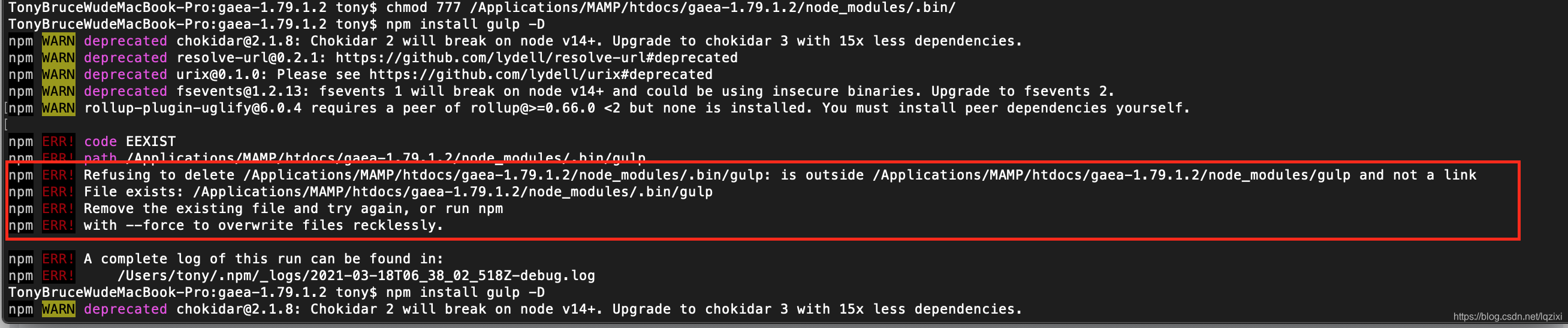
干脆跑到项目根目录
/Applications/MAMP/htdocs/gaea-1.79.1.2/下面把整个"node_modules"彻底删除,因为之前运行“npm install”就有产生了,现在gulp没有权限搞不定她。
命令删除的话:
rm -rf /Applications/MAMP/htdocs/gaea-1.79.1.2/node_modules用"ls"命令在项目目录下确认一下“node_modules”已经彻底被消灭了,没有影子了,然后重新运行命令:
npm install gulp-cli -g现在能正常往下走了,虽然有WARN黄色警告,但已经没有红色的“ERR!”报错了,走完以后出现类似提示说明gulp-cli已经安装成功:

现在接着分别依次运行如下三条命令:
npm install gulp -Dnpx -p touch nodetouch gulpfile.jsgulp --help最后一条是帮助提示,不熟悉的可以多看看。
不报错正常走完就OK了,然后依照上面的步骤依次运行以下5步骤,其中第1、2步骤因为我们已经执行过,也可以跳过,怕出错可以依次运行直到最后:
1.设置淘宝镜像:
npm install -g cnpm --registry=https://registry.npm.taobao.org
不安装淘宝镜像则需要FQ获取下一步的资源。
2.安装gulp:
npm install gulp -g
全局安装gulp
3.对cesium源码安装npm依赖:
npm install此时cesium根目录中多出node_modules文件夹
4.用gulp组织生成文档
npm run generateDocumentation这里实际上是调用gulp来生成Documentation里面的html格式的文档和函数说明等内容,最好一次性走完了,不然
5.build打包:
npm run build在Source文件夹下生成了Cesium.js,还在Specs文件夹内生成了SpecList.js和在Build文件夹下生成了minifyShaders.state文件
Source文件夹下的Cesium.js是把Cesium源码中一千两百多个js文件做了一下引用,相当于一个索引。
打包之后cesium根目录下多出了Build文件夹。
6.运行npm服务器启动cesium:
就可以在浏览器里面用 “localhost:8080”访问到根目录了,我用的MAMP来做本地的服务器环境,根目录默认指向到 " /Applications/MAMP/htdocs/"目录之下,因为有很多个项目,所以在其后面要加上项目的目录:例如: 绝对目录在:“/Applications/MAMP/htdocs/gaea-1.79.1.2”,访问地址就是:http://localhost:8080
这里的gaea相当于你们默认的cesium,cesium 1.79.1版本对应的就是
http://localhost:8080
npm start看到这个久违的界面,希望就续上了
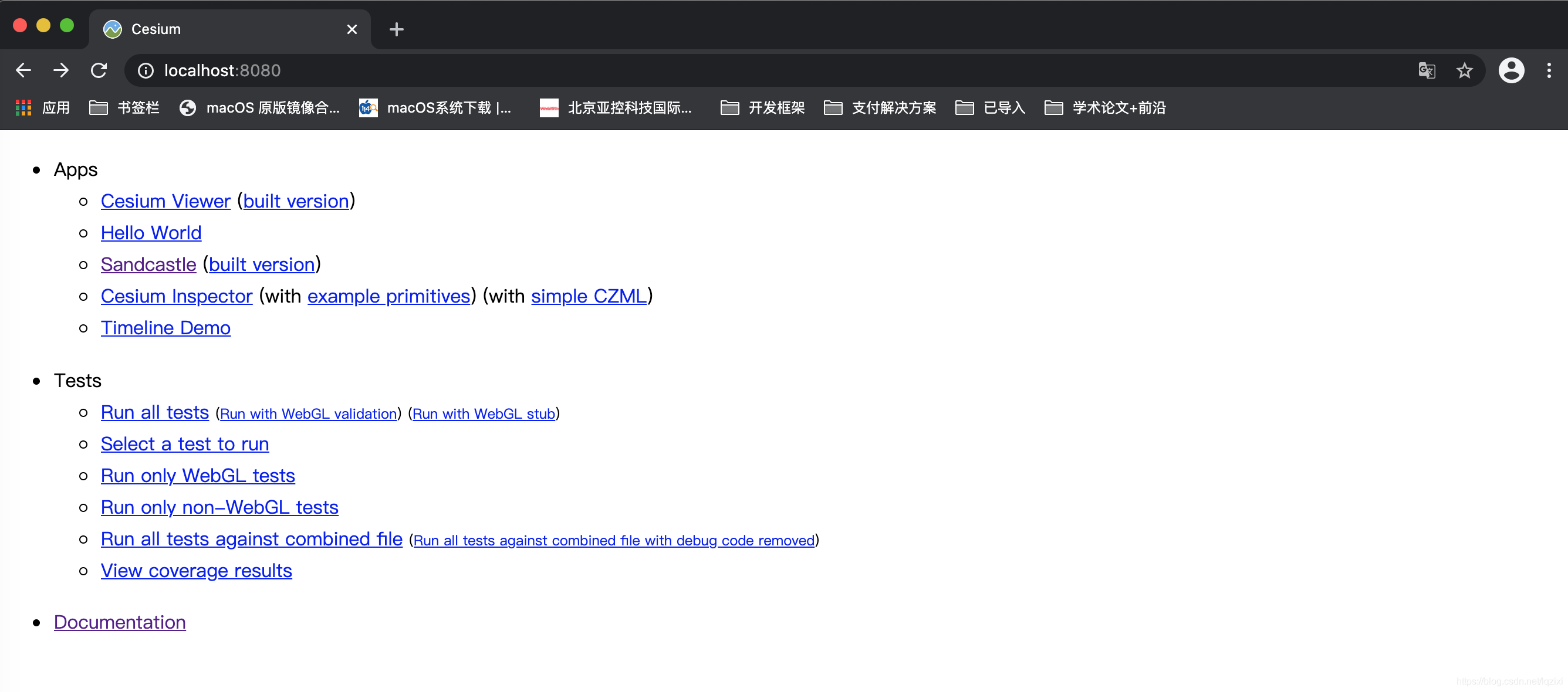
看到正常的样例和"Development"选项卡下的案例都正常,开发前第一步准备工作就做到位了,可以开始发挥了
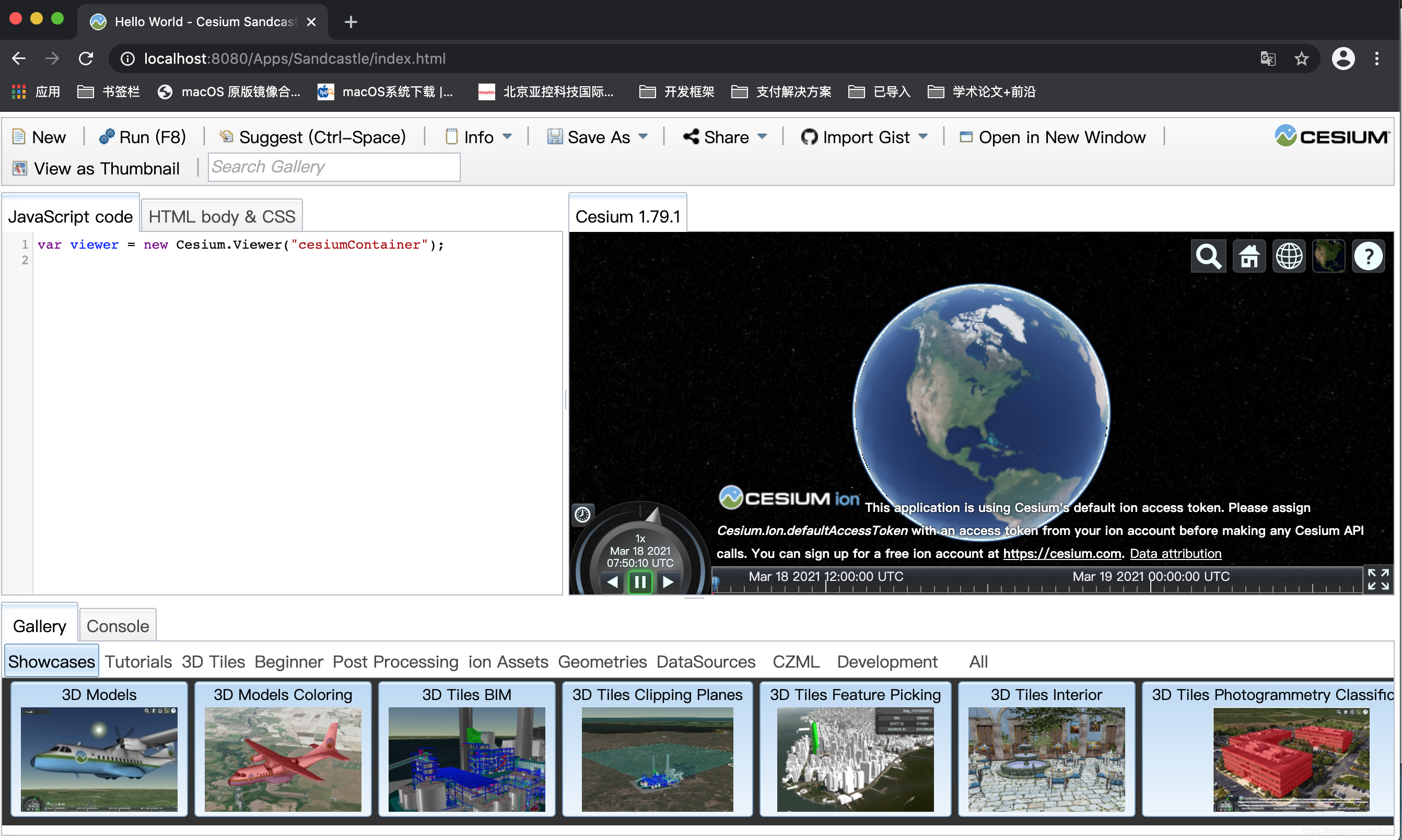
一点小小的说明:1.79.1 版本对Bing地图的支持好像是萎了,自己切换下地图,就能正常显示了。
有好的解决办法和新的发现,欢迎跟帖探讨。
cesiumjs GIS引擎源码编译并运行-2021年3月18日最新版【1.68~1.79.1版本亲测成功】的更多相关文章
- android 源码编译及其运行模拟器相关问题记录
最近一直在看android源码相关的文档,包括编译源码,还有framework层的代码,本人很懒,一直没有写博客,今天想自己在编译一下源码,并且运行在模拟器中. 源码的版本不同,需要的jdk可能也有所 ...
- BDB c++例子,从源码编译到运行
第一步先下载源码,解压后 ./dist/configure --enable-cxx编译,然后make, make install --enable-cxx To build the Berkeley ...
- spark源码编译,运行example遇到:NoClassDefFoundError: org/spark_project/guava/cache/CacheLoader
基本环境: win10+idea Scala2.11.8 maven3.5.3 spark2.1.0 问题: 在window10下编译spark2.1.0源码,在idea下运行example,遇到问题 ...
- C/C++ Capstone 引擎源码编译
Capstone 是一个轻量级的多平台.多架构的反汇编框架.Capstone 旨在成为安全社区中二进制分析和反汇编的终极反汇编引擎.Capstone的编译非常简单只需要一步即可轻松得到对应的Lib库文 ...
- zxing源码编译与运行
编译的jar文件下载地址:http://files.cnblogs.com/rainboy2010/zxing.zip zxing是一个开源的解析条形码/二维码的类库,广泛应用于Android 各大A ...
- 使用源码编译安装PHP7
使用源码编译安装PHP7 2015年6月11日,PHP官网发布消息,正式公开发布PHP7第一版的alpha版本. PHP7特性: PHP 7.0.0 Alpha 1使用新版的ZendEngine引擎, ...
- 《Flink 源码解析》—— 源码编译运行
更新一篇知识星球里面的源码分析文章,去年写的,周末自己录了个视频,大家看下效果好吗?如果好的话,后面补录发在知识星球里面的其他源码解析文章. 前言 之前自己本地 clone 了 Flink 的源码,编 ...
- Flink 源码解析 —— 源码编译运行
更新一篇知识星球里面的源码分析文章,去年写的,周末自己录了个视频,大家看下效果好吗?如果好的话,后面补录发在知识星球里面的其他源码解析文章. 前言 之前自己本地 clone 了 Flink 的源码,编 ...
- 编译 Unity 4.3.1 引擎源码
引言 Unity 官方从 Unity 2017.1 版本开始,开源了引擎和编辑器的C#源码(源码地址:UnityCsReference),但核心的 C/C++ 部分源码并未开源. 编译环境 网上主要的 ...
- 1.EOS源码编译运行
目前网络上都是针对老版EOS2.0源码编译的文章,我在mac上参考这些文章编译,最后发现根本就不对,最新版本只需一条命令(./eosio_build.sh,依赖库会自动安装的)即可.我根据这些文章手动 ...
随机推荐
- C++ 函数指针,指针函数,左值右值
C++ 函数指针,指针函数,左值右值 1.函数指针 是一个指针类型的变量,存放的内容都是函数的指针,用来间接调用函数,格式如下: int add( int a, int b) { return a+b ...
- Nfs 共享存储搭建
Nfs 共享存储搭建 为了实现不同操作系统中的数据共享,我们一般会搭建一些用于文件共享的服务器,nfs服务器就是其中一种,它实现的是linux与linux之间的共享.今天我将把如何在linux系统搭建 ...
- Spring与微服务
Spring与微服务 微服务论文 Melvyn Conway 的意识是,像下图所展示的,设计一个系统时,将人员划分为 UI 团队,中间件团队,DBA 团队,那么相应地,软件系统也就会自然地被划分为 U ...
- 投屏Sink端音频底层解码并用OpenSLES进行播放
一.代码分析 在公司项目中,音频解码及播放是把数据传到Java层进行解码播放的,其实这个步骤没有必要,完全可以在底层进行处理. 通过代码发现其实也做了在底层进行解码,那么为啥不直接使用底层解码播放呢, ...
- Serverless学习笔记
Serverless 闲言碎语 前段时间看了一些Serverless的文章,恰好最近又听了一门Serverless的应用实践课程,就把笔记拿出来和大家分享一下,如表述有误还请各位斧正 大家关心的问题 ...
- 2022亚洲视博会圆满落幕,3DCAT荣获“优秀沉浸式视觉解决方案”奖
2022年8月10-12日,为期3天的2022世界元宇宙生态博览会暨VR/AR/MR/XR.数字创意.数字展陈.数字文旅.数字运动.数字艺术与沉浸式空间场景设计展览会圆满落下帷幕! 此次展会共包含三大 ...
- 三维模型3DTile格式轻量化在数据存储的重要性分析
三维模型3DTile格式轻量化在数据存储的重要性分析 三维模型3DTile格式轻量化在数据存储中占有重要地位.随着科技的不断发展,尤其是空间信息科技的进步,人们对于三维地理空间数据的需求日益增长.然而 ...
- 记录--uni-app adb安卓wifi无线调试
这里给大家分享我在网上总结出来的一些知识,希望对大家有所帮助 方法一 adb connect连接调试 前提条件: 电脑已安装adb工具 手机和电脑连接的同一个WIFI CMD进入到adb工具所在目录, ...
- 阿里二面:谈谈ThreadLocal的内存泄漏问题?问麻了。。。。
引言 ThreadLocal在Java多线程编程中扮演着重要的角色,它提供了一种线程局部存储机制,允许每个线程拥有独立的变量副本,从而有效地避免了线程间的数据共享冲突.ThreadLocal的主要用途 ...
- drools中no-loop和lock-on-active的区别
一.背景 在我们编写drools规则的过程中,可能会发生死循环,那么该怎么解决呢?如果想某一个规则只执行一次,即别的规则导致该规则重新执行,也不需要执行,那么该怎么解决呢? 二.解决方案 针对以上问题 ...